display Hyundai Genesis Coupe 2011 User Guide
[x] Cancel search | Manufacturer: HYUNDAI, Model Year: 2011, Model line: Genesis Coupe, Model: Hyundai Genesis Coupe 2011Pages: 343, PDF Size: 34.28 MB
Page 173 of 343
4105
Features of your vehicle
Using CD Player
1. RANDOM Button
Turns on/off the randomization of the
play list of files in the currently played
DISC. To cancel the mode, press the but-ton once again.
If loaded CD has a file folder, RANDOM
PLAY button operates below.
Press button for less than 0.8 secondto play randomized files in folder.
Press button for 0.8 second or longer to play randomized all files in CD.
2. REPEAT Button
Repeating an MP3 DISC or WMA DISC file
Repeats current song when the button
is pressed for less than 0.8 second.
Repeats all songs in current folder
when the button is pressed for 0.8 sec-
ond or longer.
Repeating an audio DISC file Repeats current song when the button
is pressed for less than 0.8 second.
Repeats the entire DISC when the but-
ton is pressed for 0.8 second or longer. 3. CD Slot
Please face printed side upward and
gently press in. When the ignition switch
is on ACC or ON and power is off, power
is automatically turned on if the CD is
loaded. This CD supports only 12cm CD.
If VCD, Data CD are loaded, "ReadingError" message will appear and CD willbe ejected.
4. CD Eject Button
Press [ ] button to eject the CD during
CD playback. This button is enabled
when ignition switch is off.
5. TRACK Button
Press [TRACK ] button to play the
next song.
Press [TRACK ] button to play from the beginning of current song and
press again to play the previous song.
6. SEEK Button
Press [SEEK ] button to initiate high speed sound search of current song.
Press [SEEK ] button to initiate reverse direction high speed sound search of current song. 7. CD Button
If there is a CD in the CD deck, it switch-
es from the previous mode to CD mode
and plays the song. If there is no CD,
then it displays the message "No Media"
and returns to the previous mode.
8. AST (AUTO STORE) Button
Plays first 10 seconds of each song in
the DISC. Press the button once again to
cancel the mode.
9. Display
Displays the current time, mode, play
track number, play time, RDM, RPT and
AST status.
10. CD Indicator
When car ignition switch is ACC or ON and if the CD is loaded this indicator Icon
is on. If the CD is ejected the Icon is off.
Page 174 of 343
![Hyundai Genesis Coupe 2011 User Guide Features of your vehicle
106
4
11. FOLDER Button
When the loaded CD has file folders,
[FOLDER / ] buttons will operate in
the manner described below.
Press [FOLDER ] button to move
child folder of](/img/35/14696/w960_14696-173.png "Hyundai Genesis Coupe 2011 User Guide Features of your vehicle
106
4
11. FOLDER Button
When the loaded CD has file folders,
[FOLDER / ] buttons will operate in
the manner described below.
Press [FOLDER ] button to move
child folder of")
Features of your vehicle
106
4
11. FOLDER Button
When the loaded CD has file folders,
[FOLDER / ] buttons will operate in
the manner described below.
Press [FOLDER ] button to move
child folder of the current folder and
display the first song in the folder.
Press [ENTER] button to move to the
folder displayed. It will play the first
song in the folder.
Press [FOLDER ] button to move parent folder and display the first song
in the folder. Press [ENTER] button to
move to the folder displayed.
12. TUNE/FILE Button
When loaded CD contains MP3 or WMA
files, [TUNE/FILE / ] buttons will
operate in the manner described below.
Press [TUNE/FILE ] button to select the next song and press [ENTER] but-
ton to play.
Press [TUNE/FILE ] button to select the previous song and press [ENTER]
button to play. 13. INFO Button
Displays the information of the current
CD TRACK in the order of DISC TITLE
➟
DISC ARTIST ß TRACK TITLE ➟
TRACK ARTIST ➟TOTAL TRACK ➟
PLAY SCREEN ➟DISC TITLE... (not dis-
played if the information is not available
on the DISC.)
Page 175 of 343
4107
Features of your vehicle
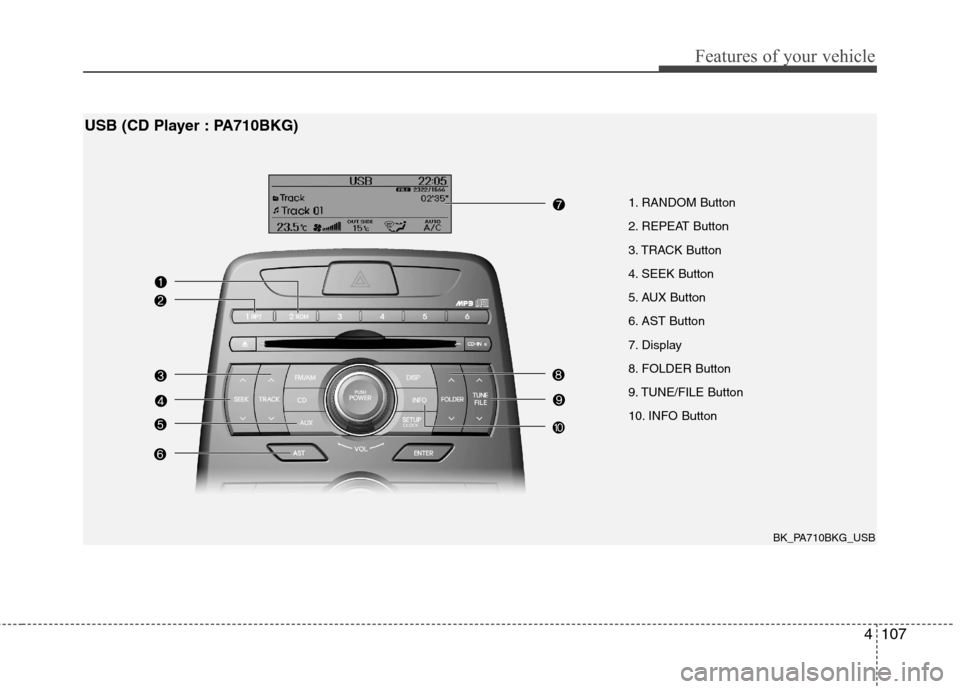
1. RANDOM Button
2. REPEAT Button
3. TRACK Button
4. SEEK Button
5. AUX Button
6. AST Button
7. Display
8. FOLDER Button
9. TUNE/FILE Button
10. INFO Button
USB (CD Player : PA710BKG)
BK_PA710BKG_USB
Page 176 of 343
Features of your vehicle
108
4
Using USB device
1. RANDOM Button
Press the button for less than 0.8 second
to start or stop the random playback of
the songs in the current folder.
Press the button for more than 0.8 sec-
ond to randomly play the entire songs in
the USB device. Press the button again
to cancel the mode.
2. REPEAT Button
Repeats current song when the button is
pressed for less than 0.8 second.
Repeats all songs in current folder when
the button is pressed for 0.8 second or
longer.
3. TRACK Button
Press the [TRACK ] button to play
from the beginning of the song current-
ly played. Press again to move and
play the previous track.
Press the [TRACK ] button to move to the next track. 4. SEEK Button
Press the [SEEK ] button to play the
song in reverse direction in fast speed.
Press the [SEEK ] button to play the song in forward direction in fast speed.
5. AUX Button
If USB or AUX is connected, it switches
to USB or AUX mode to play the song. If
there is no USB or AUX device connect-
ed, then it displays the message "No
Media" and returns to the previous mode.
6. AST (AUTO STORE) Button
Scans each song in the USB device for
10 seconds each. Press the button onceagain to cancel scanning.
7. Display
Displays the current time, mode, play
track number, play time, RDM, RPT and
AST status. 8. FOLDER Button
Press [FOLDER ] button to move
child folder of the current folder and
display the first song in the folder.
Press [ENTER] button to move to the
folder displayed. It will play the first
song in the folder.
Press [FOLDER ] button to move parent folder and display the first song
in the folder. Press [ENTER] button to
move to the folder displayed.
9. TUNE/FILE Button
Press [TUNE/FILE ] button to select the next song and press [ENTER] but-
ton to play.
Press [TUNE/FILE ] button to select the previous song and press [ENTER]
button to play.
10. INFO Button
Displays the information of the file cur-
rently played in the order of FILE NAME➟ TITLE ➟ARTIST ➟ALBUM ➟FOLD-
ER ➟TOTAL FILE ➟NORMAL DISPLAY
➟ FILE NAME... (Displays no information
if the file has no song information.)
Page 179 of 343
4111
Features of your vehicle
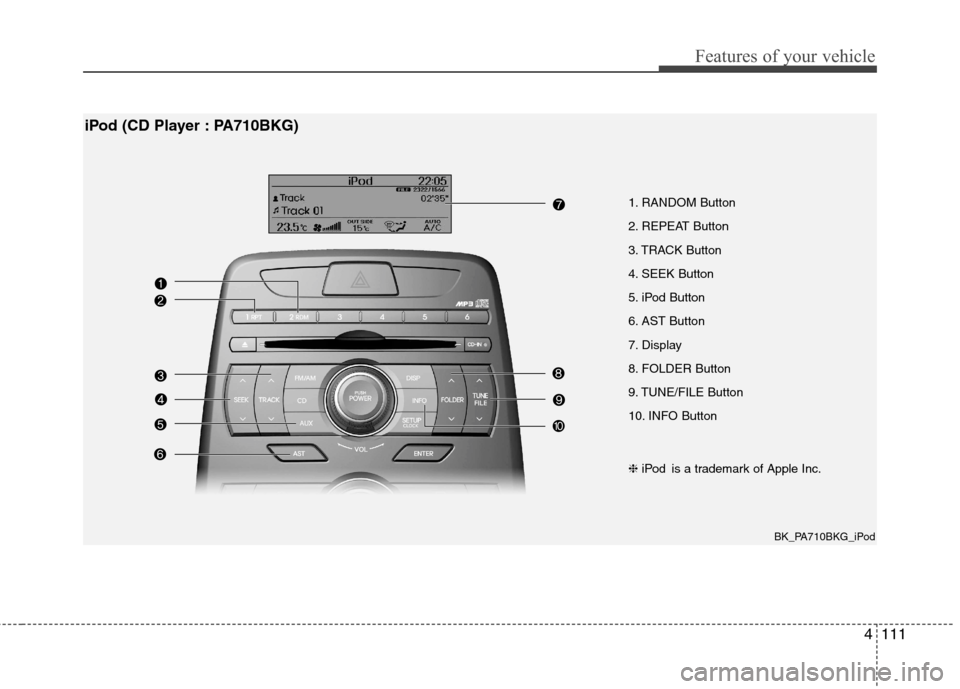
1. RANDOM Button
2. REPEAT Button
3. TRACK Button
4. SEEK Button
5. iPod Button
6. AST Button
7. Display
8. FOLDER Button
9. TUNE/FILE Button
10. INFO Button
iPod (CD Player : PA710BKG)
❈iPod is a trademark of Apple Inc.
BK_PA710BKG_iPod
Page 180 of 343
Features of your vehicle
112
4
Using iPod
Using an iPod when the exclusive cable
is connected to the multiple terminal
inside the console on the right hand side
of the driver's seat.
1. RANDOM Button
Press the button for less than 0.8 second
to to activate or deactivate the random
playback of the songs within the current
category. Press the button for longer than
0.8 second to randomly play all songs in
the entire album of the iPod. Press the
button once again to cancel the mode.
2. REPEAT Button
Press the button to repeat the song cur-
rently played.
3. TRACK Button
Press the [TRACK ] button to play
from the beginning of the song current-
ly played. Press again to move and
play the previous track.
Press the [TRACK ] button to move to the next track. 4. SEEK Button
Press the [SEEK ] button to play the
song in reverse direction in fast speed.
Press the [SEEK ] button to play the song in forward direction in fast speed.
5. iPod Button
If iPod is connected, it switches to the
iPod mode from the previous mode to
play the song files stored in the iPod.
If there is no iPod connected, then it dis-
plays the message "No Media" and
returns to the previous mode.
6. AST (AUTO STORE) Button
Scans each song in the USB device for
10 seconds each. Press the button onceagain to cancel scanning.
7. Display
Displays the current time, mode, play
track number, play time, RDM, RPT and
AST status. 8. FOLDER Button
Press [FOLDER ] button to move
the category and display the first song
in the category. Press [ENTER] button
to move to the category displayed. It
will play the first song in the folder.
Press [FOLDER ] button to move the category and display the first song
in the category. Press [ENTER] button
to move to the category displayed.
(PLAYLISTS ➟ARTISTS ➟ALBUMS
➟ GENRES ➟SONGS ➟COM-
POSERS ➟PLAYLIST...)
9. TUNE/FILE Button
Press [TUNE/FILE ] button to select the next song and press [ENTER] but-
ton to play.
Press [TUNE/FILE ] button to select the previous song and press [ENTER]
button to play.
10. INFO Button
Displays the information of the file cur-
rently played in the order of TITLE ➟
ARTIST ➟ALBUM ➟NORMAL DIS-
PLAY ➟TITLE... (Displays no information
if the file has no song information.)
Page 182 of 343
Features of your vehicle
114
4
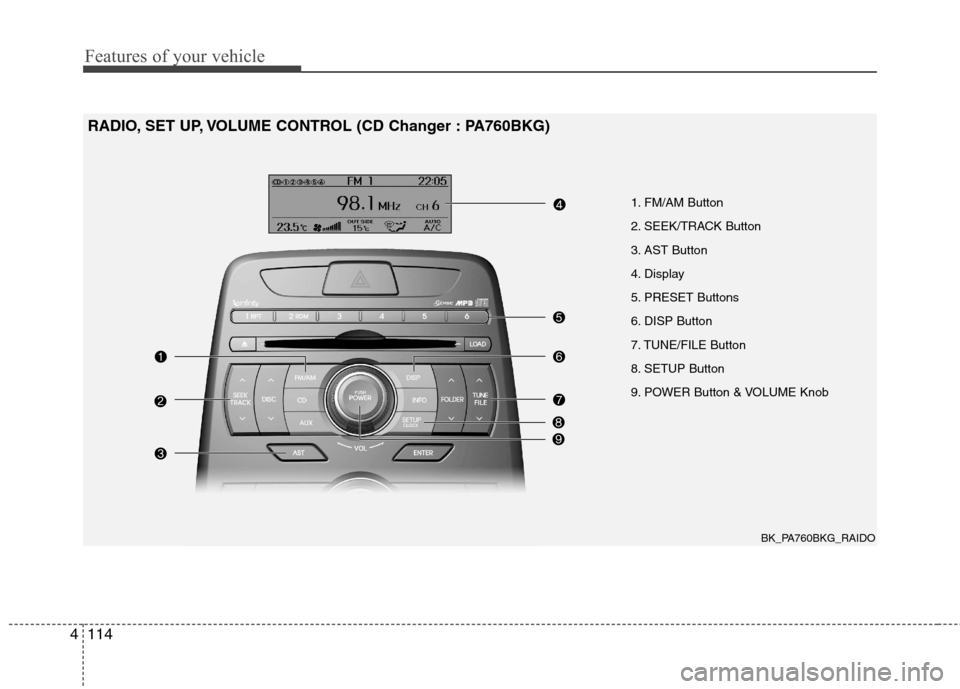
1. FM/AM Button
2. SEEK/TRACK Button
3. AST Button
4. Display
5. PRESET Buttons
6. DISP Button
7. TUNE/FILE Button
8. SETUP Button
9. POWER Button & VOLUME Knob
RADIO, SET UP, VOLUME CONTROL (CD Changer : PA760BKG)
BK_PA760BKG_RAIDO
Page 183 of 343
4115
Features of your vehicle
Using RADIO, SET UP, VOLUME
CONTROL
1. FM/AM Button
Turn to FM or AM mode, and toggles in the order of FM1 ➟FM2 ➟AM ➟FM1...
when the button is pressed each time.
2. SEEK/TRACK Button
When the [SEEK/TRACK / ] button is pressed, it increases/decreases the
band frequency by 200kHz to automati-
cally select channel. Stops at the original
frequency if no channel is found.
3. AST (AUTO STORE) Button When AST is pressed, frequency is
stored on the preset memory [1]~[6] and
automatically plays the channel storedon the Preset [1].
If no channels have been stored because
there was no channel received, will
return to the previous channel. 4. Display
Displays the current time, mode, fre- quency AST status and preset channel.
5. PRESET Buttons
Press [PRESET 1~6] buttons less than
0.8 second to play the channel saved in
each button.
Press [PRESET 1~6] buttons for more
than 0.8 second or longer to save current
station to the respective button with a
beep.
6. DISP (Screen ON/OFF) Button
Turns on/off the displayed data and light
on LCD.
7. TUNE Button
When the [TUNE / ] button is pressed, it increases/decreases the
band frequency by 200kHz from current
frequency.
8. SETUP Button
Press the button to change the SOUND,
(TONE, POSITION), AVC, CLOCK,
TEMP and SCROLL option modes.
9. POWER Button & VOLUME
Knob
Turn on/off the set When the IGNITION
SWITCH is on ACC or ON. If the button
is turned to the right, it increases the vol-
ume and left, decreases the volume.
Page 184 of 343
Features of your vehicle
116
4
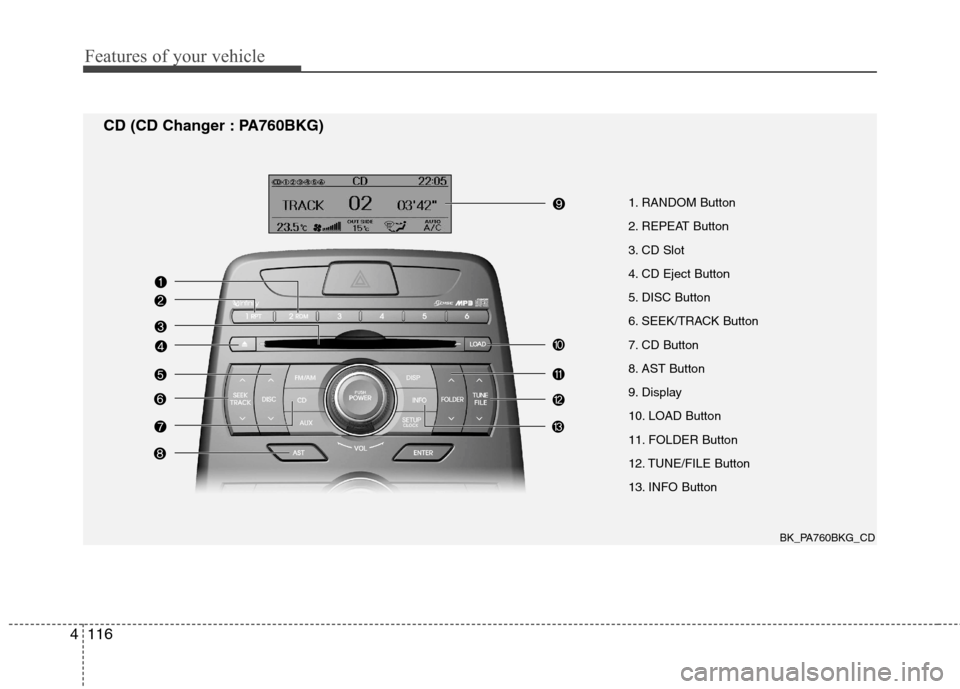
1. RANDOM Button
2. REPEAT Button
3. CD Slot
4. CD Eject Button
5. DISC Button
6. SEEK/TRACK Button
7. CD Button
8. AST Button
9. Display
10. LOAD Button
11. FOLDER Button
12. TUNE/FILE Button
13. INFO Button
CD (CD Changer : PA760BKG)
BK_PA760BKG_CD
Page 185 of 343
4117
Features of your vehicle
Using CD Player
1. RANDOM Button
Turns on/off the randomization of the
play list of files in the currently played
DISC. To cancel the mode, press the but-ton once again.
If loaded CD has a file folder, RANDOM
PLAY button operates below.
Press button for less than 0.8 secondto play randomized files in folder.
Press button for 0.8 second or longer to play randomized all files in CD.
2. REPEAT Button
Repeating an MP3 DISC or WMA DISC file
Repeats current song when the button
is pressed for less than 0.8 second.
Repeats all songs in current folder
when the button is pressed for 0.8 sec-
ond or longer.
Repeating an audio DISC file Repeats current song when the button
is pressed for less than 0.8 second.
Repeats the entire DISC when the but-
ton is pressed for 0.8 second or longer. 3. CD Slot
Please face printed side upward and
gently press in. When the ignition switch
is on ACC or ON and power is off, power
is automatically turned on if the CD is
loaded. This CD supports only 12cm CD.
If VCD, Data CD are loaded, "ReadingError" message will appear and CD willbe ejected.
4. CD Eject Button
Press [ ] button for less than 0.8 sec-
ond to eject the CD during CD play-
back.
Press [ ] button for 0.8 second or longer to eject all the CD in deck.
This button is enabled even when igni- tion switch is off.
5. DISC button
Press [DISC ] button to change disc to the previous disc.
Press [DISC ] button to change disc to the next disc. 6. SEEK/TRACK Button
Press [SEEK/TRACK ] button for
less than 0.8 second too play from the begining of current song and press
again within 1 second to play the previ-ous song.
Press [SEEK/TRACK ] button for 0.8 second or longer to initiate reversedirection high speed sound search ofcurrent song.
Press [SEEK/TRACK ] button for less than 0.8 second to play the nextsong.
Press [SEEK/TRACK ] button for 0.8 second or longer to initiate highspeed sound search of current song.
7. CD Button
If there is a CD in the CD deck, it switch-
es from the previous mode to CD mode
and plays the song. If there is no CD,
then it displays the message "No Media"
and returns to the previous mode.