reset Hyundai Genesis Coupe 2011 User Guide
[x] Cancel search | Manufacturer: HYUNDAI, Model Year: 2011, Model line: Genesis Coupe, Model: Hyundai Genesis Coupe 2011Pages: 343, PDF Size: 34.28 MB
Page 166 of 343
Features of your vehicle
98
4
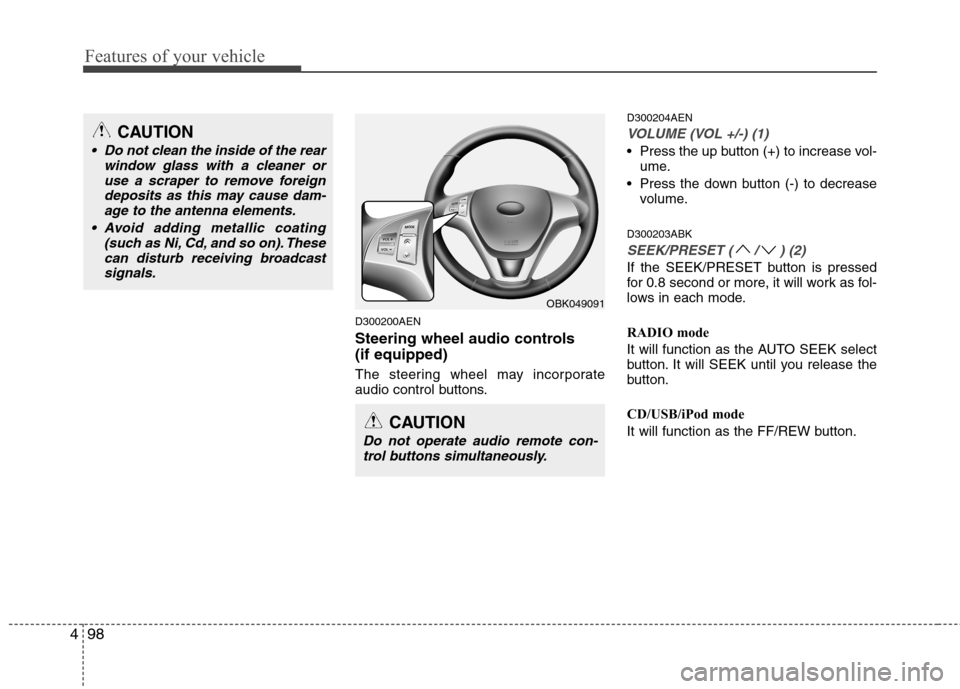
D300200AEN
Steering wheel audio controls (if equipped)
The steering wheel may incorporate
audio control buttons. D300204AEN
VOLUME (VOL +/-) (1)
Press the up button (+) to increase vol-
ume.
Press the down button (-) to decrease volume.
D300203ABK
SEEK/PRESET ( / ) (2)
If the SEEK/PRESET button is pressed
for 0.8 second or more, it will work as fol-
lows in each mode.
RADIO mode
It will function as the AUTO SEEK select
button. It will SEEK until you release the
button.
CD/USB/iPod mode
It will function as the FF/REW button.
OBK049091
CAUTION
Do not operate audio remote con- trol buttons simultaneously.
CAUTION
• Do not clean the inside of the rear window glass with a cleaner or
use a scraper to remove foreigndeposits as this may cause dam-age to the antenna elements.
Avoid adding metallic coating (such as Ni, Cd, and so on). Thesecan disturb receiving broadcastsignals.
Page 167 of 343
499
Features of your vehicle
If the SEEK/PRESET button is pressed
for less than 0.8 second, it will work as
follows in each mode.
RADIO mode
It will function as the PRESET STATION
select buttons.
CD/USB/iPod mode
It will function as the TRACK UP/DOWN
button.
Detailed information for audio control
buttons is included in the following pagesin this section.
MODE (3)
Press the MODE button to select Fadio, CD (Compact Disc).D300800AEN
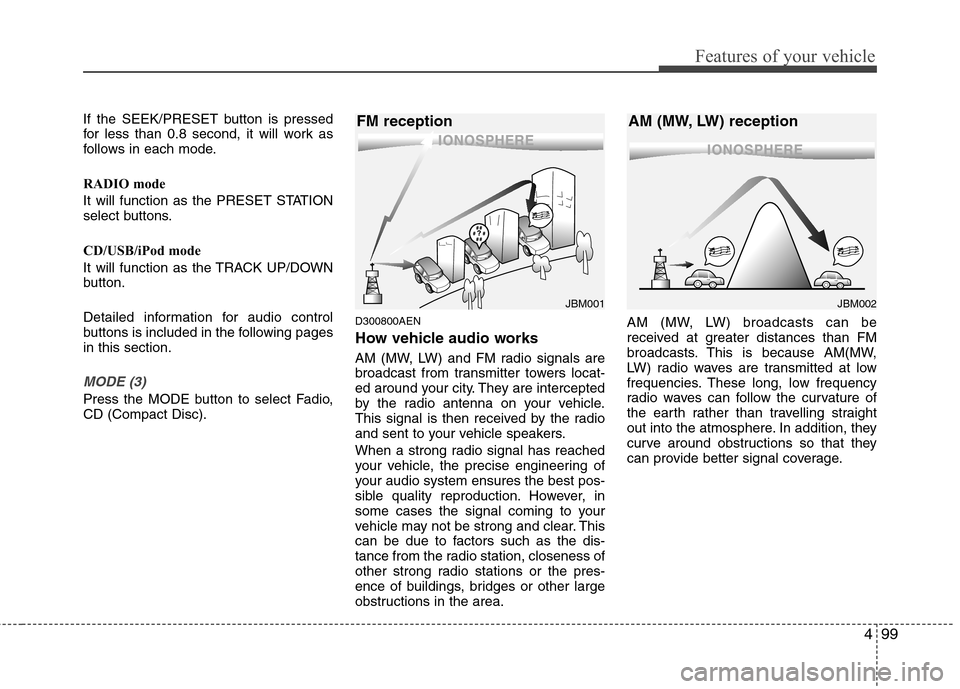
How vehicle audio works
AM (MW, LW) and FM radio signals are
broadcast from transmitter towers locat-
ed around your city. They are intercepted
by the radio antenna on your vehicle.
This signal is then received by the radio
and sent to your vehicle speakers.
When a strong radio signal has reached
your vehicle, the precise engineering of
your audio system ensures the best pos-
sible quality reproduction. However, in
some cases the signal coming to your
vehicle may not be strong and clear. This
can be due to factors such as the dis-
tance from the radio station, closeness of
other strong radio stations or the pres-
ence of buildings, bridges or other large
obstructions in the area.AM (MW, LW) broadcasts can be
received at greater distances than FM
broadcasts. This is because AM(MW,
LW) radio waves are transmitted at low
frequencies. These long, low frequency
radio waves can follow the curvature of
the earth rather than travelling straight
out into the atmosphere. In addition, they
curve around obstructions so that they
can provide better signal coverage.
JBM002
AM (MW, LW) receptionJBM001
FM reception
Page 170 of 343
Features of your vehicle
102
4
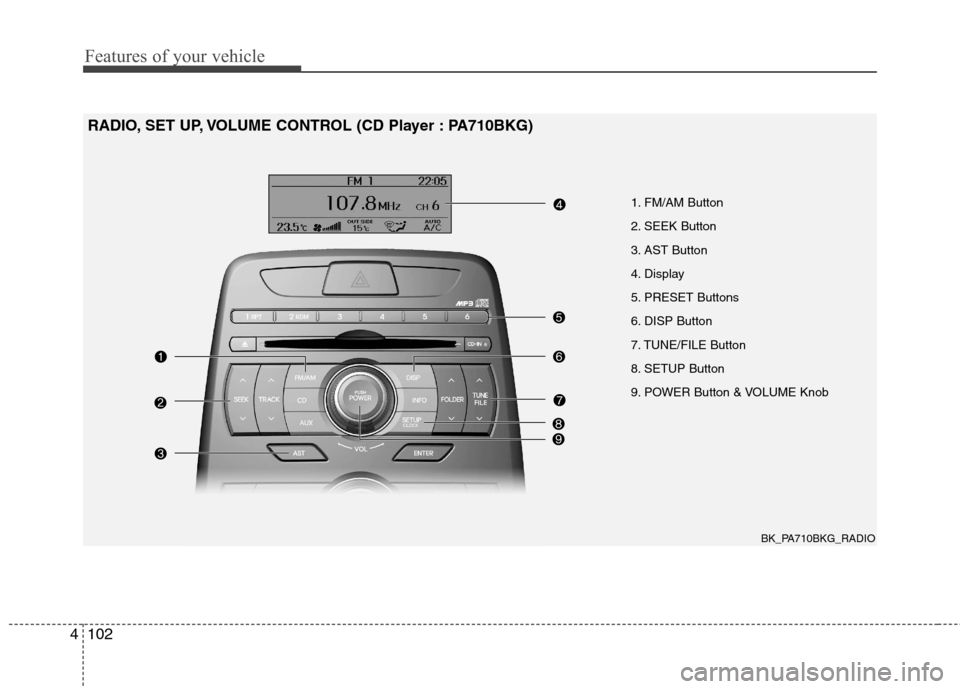
1. FM/AM Button
2. SEEK Button
3. AST Button
4. Display
5. PRESET Buttons
6. DISP Button
7. TUNE/FILE Button
8. SETUP Button
9. POWER Button & VOLUME Knob
RADIO, SET UP, VOLUME CONTROL (CD Player : PA710BKG)
BK_PA710BKG_RADIO
Page 171 of 343
4103
Features of your vehicle
Using RADIO, SET UP, VOLUME
CONTROL
1. FM/AM Button
Turn to FM or AM mode, and toggles in the order of FM1 ➟FM2 ➟AM ➟FM1...
when the button is pressed each time.
2. SEEK Button
When the [SEEK / ] button is pressed, it increases/decreases the
band frequency by 200kHz to automati-
cally select channel. Stops at the original
frequency if no channel is found.
3. AST (AUTO STORE) Button When AST is pressed, frequency is
stored on the preset memory [1]~[6] and
automatically plays the channel storedon the Preset [1].
If no channels have been stored because
there was no channel received, will
return to the previous channel. 4. Display
Displays the current time, mode, fre- quency AST status and preset channel.
5. PRESET Buttons
Press [PRESET 1~6] buttons less than
0.8 second to play the channel saved in
each button.
Press [PRESET 1~6] buttons for 0.8 sec-
ond or longer to save current station to
the respective button with a beep.
6. DISP (Screen ON/OFF) Button
Turns on/off the displayed data and light
on LCD.
7. TUNE/FILE Button
When the [TUNE/FILE / ] button is pressed, it increases / decreases the
band frequency by 200kHz from current
frequency.
8. SETUP Button
Press the button to change the SOUND,
(TONE, POSITION), AVC, CLOCK,
TEMP and SCROLL option modes.
9. POWER Button & VOLUME
Knob
Turn on/off the set When the IGNITION
SWITCH is on ACC or ON. If the button
is turned to the right, it increases the vol-
ume and left, decreases the volume.
Page 181 of 343
4113
Features of your vehicle
✽✽NOTICE FOR USING THE
iPod DEVICE
Some iPod models might not support the communication protocol and the
files will not be played.
Supported iPod models:
- iPod Mini
- iPod 4th(Photo) ~ 6th(Classic) gen-
eration
- iPod Nano 1st~4th generation
- iPod Touch 1st~2nd generation
The order of search or playback of songs in the iPod can be different
from the order searched in the audio
system.
If the iPod disabled due to its own malfunction, reset the iPod. (Reset:
Refer to iPod manual)
An iPod may not operate normally on
low battery.
Some iPod devices, such as the
iPhone, can be connected through the
Bluetooth interface. The device must
have audio Bluetooth capability (such
as for stereo headphone Bluetooth).
The device can play, but it will not be
controlled by the audio system.CAUTION IN USING THE
iPod DEVICE
The HYUNDAI iPod Power Cable
is needed in order to operate iPod
with the audio buttons on theaudio system. The USB cable pro- vided by Apple may cause mal-function and should not be used
for HYUNDAI vehicles.
❋
❋ The HYUNDAI iPod Power
Cable may be purchasedthrough your HYUNDAI
Dealership.
When connecting iPod with the iPod Power Cable, insert the con-nector to the multimedia socket completely. If not inserted com-
pletely, communications betweeniPod and audio may be interrupt- ed.
When adjusting the sound effects of the iPod and the audio system,
the sound effects of both devices will overlap and might reduce ordistort the quality of the sound.
(Continued)
(Continued) Deactivate (turn off) the equalizer function of an iPod when adjust-ing the audio system’s volume,and turn off the equalizer of the
audio system when using theequalizer of an iPod.
When the iPod cable is connect- ed, the system can be switched to
AUX mode even without iPoddevice and may cause noise.Disconnect the iPod cable whenyou are not using the iPod device.
When not using iPod with car audio, detach the iPod cable fromiPod. Otherwise, iPod may remain in accessory mode, and may notwork properly.
Page 182 of 343
Features of your vehicle
114
4
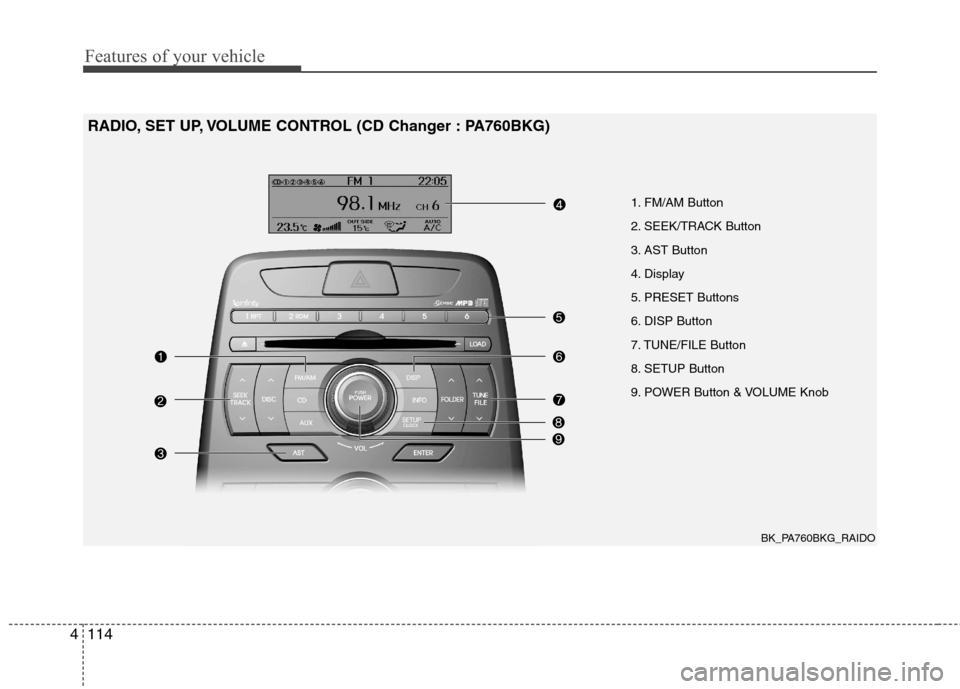
1. FM/AM Button
2. SEEK/TRACK Button
3. AST Button
4. Display
5. PRESET Buttons
6. DISP Button
7. TUNE/FILE Button
8. SETUP Button
9. POWER Button & VOLUME Knob
RADIO, SET UP, VOLUME CONTROL (CD Changer : PA760BKG)
BK_PA760BKG_RAIDO
Page 183 of 343
4115
Features of your vehicle
Using RADIO, SET UP, VOLUME
CONTROL
1. FM/AM Button
Turn to FM or AM mode, and toggles in the order of FM1 ➟FM2 ➟AM ➟FM1...
when the button is pressed each time.
2. SEEK/TRACK Button
When the [SEEK/TRACK / ] button is pressed, it increases/decreases the
band frequency by 200kHz to automati-
cally select channel. Stops at the original
frequency if no channel is found.
3. AST (AUTO STORE) Button When AST is pressed, frequency is
stored on the preset memory [1]~[6] and
automatically plays the channel storedon the Preset [1].
If no channels have been stored because
there was no channel received, will
return to the previous channel. 4. Display
Displays the current time, mode, fre- quency AST status and preset channel.
5. PRESET Buttons
Press [PRESET 1~6] buttons less than
0.8 second to play the channel saved in
each button.
Press [PRESET 1~6] buttons for more
than 0.8 second or longer to save current
station to the respective button with a
beep.
6. DISP (Screen ON/OFF) Button
Turns on/off the displayed data and light
on LCD.
7. TUNE Button
When the [TUNE / ] button is pressed, it increases/decreases the
band frequency by 200kHz from current
frequency.
8. SETUP Button
Press the button to change the SOUND,
(TONE, POSITION), AVC, CLOCK,
TEMP and SCROLL option modes.
9. POWER Button & VOLUME
Knob
Turn on/off the set When the IGNITION
SWITCH is on ACC or ON. If the button
is turned to the right, it increases the vol-
ume and left, decreases the volume.
Page 193 of 343
4125
Features of your vehicle
✽✽NOTICE FOR USING THE
iPod DEVICE
Some iPod models might not support the communication protocol and the
files will not be played.
Supported iPod models:
- iPod Mini
- iPod 4th(Photo) ~ 6th(Classic) gen-
eration
- iPod Nano 1st~4th generation
- iPod Touch 1st~2nd generation
The order of search or playback of songs in the iPod can be different
from the order searched in the audio
system.
If the iPod disabled due to its own malfunction, reset the iPod. (Reset:
Refer to iPod manual)
An iPod may not operate normally on
low battery.
Some iPod devices, such as the
iPhone, can be connected through the
Bluetooth interface. The device must
have audio Bluetooth capability (such
as for stereo headphone Bluetooth).
The device can play, but it will not be
controlled by the audio system.CAUTION IN USING THE
iPod DEVICE
The HYUNDAI iPod Power Cable
is needed in order to operate iPod
with the audio buttons on theaudio system. The USB cable pro- vided by Apple may cause mal-function and should not be used
for HYUNDAI vehicles.
❋
❋ The HYUNDAI iPod Power
Cable may be purchasedthrough your HYUNDAI
Dealership.
When connecting iPod with the iPod Power Cable, insert the con-nector to the multimedia socket completely. If not inserted com-
pletely, communications betweeniPod and audio may be interrupt- ed.
When adjusting the sound effects of the iPod and the audio system,
the sound effects of both devices will overlap and might reduce ordistort the quality of the sound.
(Continued)
(Continued) Deactivate (turn off) the equalizer function of an iPod when adjust-ing the audio system’s volume,and turn off the equalizer of the
audio system when using theequalizer of an iPod.
When the iPod cable is connect- ed, the system can be switched to
AUX mode even without iPoddevice and may cause noise.Disconnect the iPod cable whenyou are not using the iPod device.
When not using iPod with car audio, detach the iPod cable fromiPod. Otherwise, iPod may remain in accessory mode, and may notwork properly.
Page 228 of 343
535
Driving your vehicle
Operate the parking brake. Do notoperate the parking brake while driving
except in an emergency situation.
Each of these actions will cancel cruise
control operation (the SET indicator light
in the instrument cluster will go off), but itwill not turn the system off. If you wish toresume cruise control operation, move
the lever up (to RES+). You will return to your previously preset speed.
E090600ABH
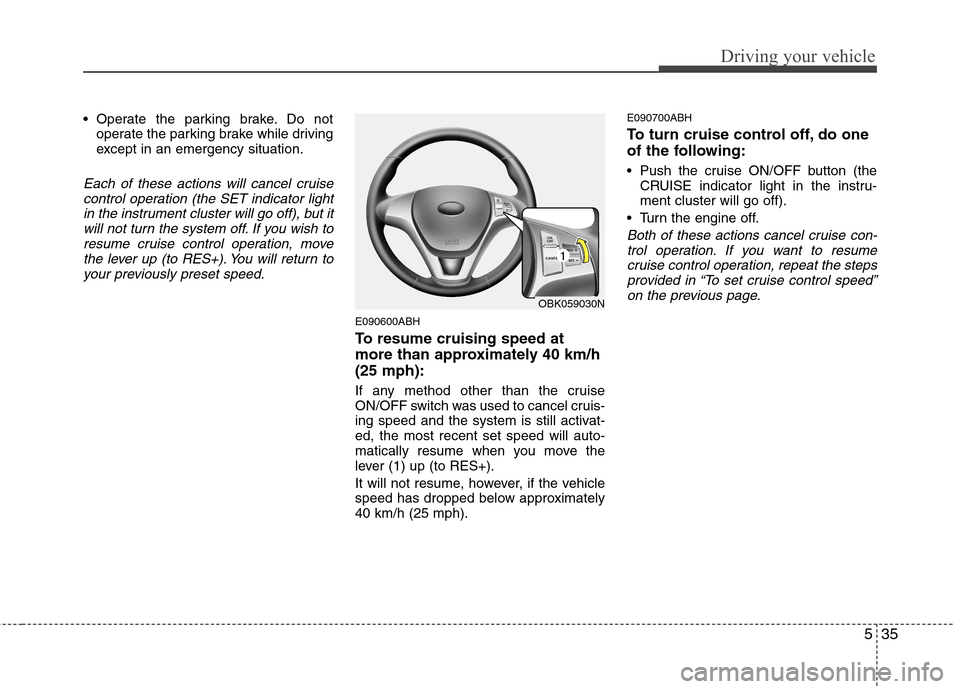
To resume cruising speed at
more than approximately 40 km/h(25 mph):
If any method other than the cruise
ON/OFF switch was used to cancel cruis-
ing speed and the system is still activat-ed, the most recent set speed will auto-
matically resume when you move the
lever (1) up (to RES+).
It will not resume, however, if the vehicle
speed has dropped below approximately40 km/h (25 mph). E090700ABH
To turn cruise control off, do one
of the following:
Push the cruise ON/OFF button (the
CRUISE indicator light in the instru- ment cluster will go off).
Turn the engine off.
Both of these actions cancel cruise con- trol operation. If you want to resume
cruise control operation, repeat the steps provided in “To set cruise control speed”on the previous page.
OBK059030N
1
Page 292 of 343
733
Maintenance
G190300ABK Reset items
Items should be reset after the battery
has been discharged or the battery hasbeen disconnected.
Sunroof (See section 4)
Trip computer (See section 4)
Climate control system (See section 4)
Clock (See section 4)
Audio (See section 4)
WARNING
Before performing maintenance or recharging the battery, turn off all accessories and stop the
engine.
The negative battery cable must be removed first and installed
last when the battery is discon-nected.
Operation related to the battery should be done in an authorized
HYUNDAI dealer.
CAUTION
Keep the battery away from water
or any liquid.
For your safety, use the authentic- ity by approved authorized
HYUNDAI dealer, when youreplace the battery.