engine Hyundai Genesis Coupe 2011 Service Manual
[x] Cancel search | Manufacturer: HYUNDAI, Model Year: 2011, Model line: Genesis Coupe, Model: Hyundai Genesis Coupe 2011Pages: 343, PDF Size: 34.28 MB
Page 125 of 343
457
Features of your vehicle
D190100ABH
Battery saver function
The purpose of this feature is to pre-vent the battery from being dis-
charged. The system automatically
turns off the parking lights when the
driver removes the ignition key (or
turns off the engine) and opens the
driver-side door.
With this feature, the parking lights will be turned off automatically if the driver
parks on the side of road at night.
If necessary, to keep the lights on
when the ignition key is removed, (or
turns off the engine) perform the fol-
lowing:
1) Open the driver-side door.
2) Turn the parking lights OFF and ON again using the light switch on the
steering column. Headlight escort function (if equipped)
If you turn the ignition switch to the ACC or OFF position with the headlights ON,the headlights (and/or tail lights) remain
on for about 20 minutes. However, if the
driver’s door is opened and closed, the
headlights are turned off after 30 sec-
onds.
The headlights can be turned off by
pressing the lock button on the transmit-
ter (or smart key) twice or turning the
light switch to the OFF or Auto position.
However, if you turn the light switch to the
Auto position when it is dark outside, the
headlights will not be turned off.
Headlight welcome function (if equipped)
When the headlight is ON or AUTO posi-
tion and all doors (and trunk) are closed
and locked, if you press the door unlock
button on the transmitter (or the smart
key), the parking light will come on for
about 15 seconds. At this time, if you
press the door lock or unlock button on
the transmitter (or smart key), the park-
ing light will turn off immediately.
LIGHTING
CAUTION
If the driver gets out of the vehicle
through other doors (except dri-ver’s door), the battery saver func-
tion does not operate and the head-light escort function does not turnoff automatically. Therefore, it caus-es the battery to be discharged. In
this case, make sure to turn off the lamp before getting out of the vehi-cle.
Page 127 of 343
459
Features of your vehicle
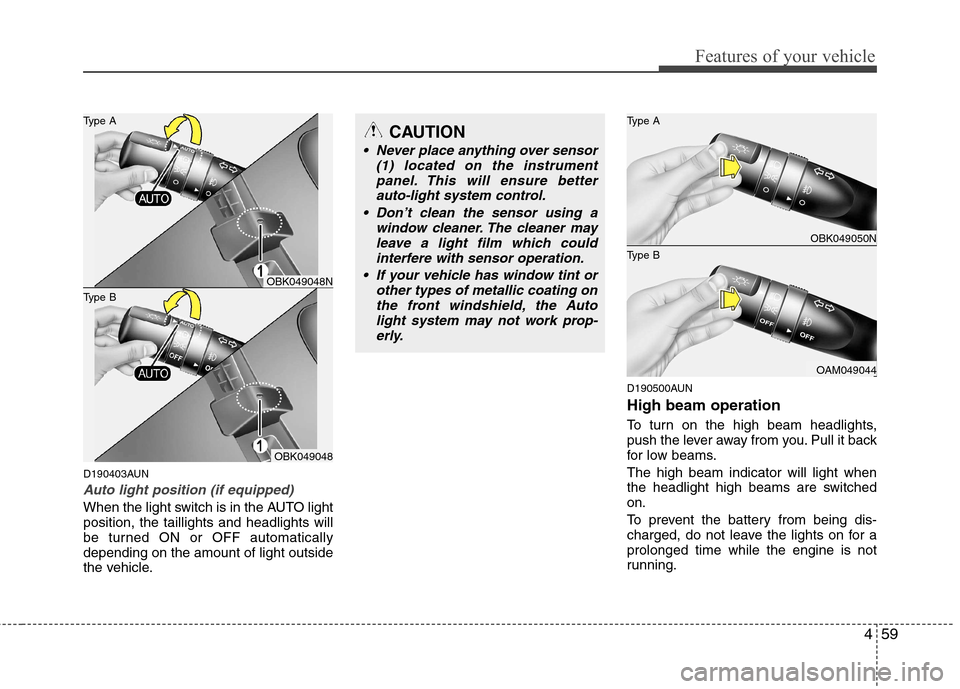
D190403AUN
Auto light position (if equipped)
When the light switch is in the AUTO light position, the taillights and headlights will
be turned ON or OFF automaticallydepending on the amount of light outside
the vehicle.D190500AUN High beam operation
To turn on the high beam headlights,
push the lever away from you. Pull it back
for low beams. The high beam indicator will light when
the headlight high beams are switchedon.
To prevent the battery from being dis-
charged, do not leave the lights on for aprolonged time while the engine is not
running.
CAUTION
Never place anything over sensor
(1) located on the instrument
panel. This will ensure better auto-light system control.
Don’t clean the sensor using a window cleaner. The cleaner may
leave a light film which could interfere with sensor operation.
If your vehicle has window tint or other types of metallic coating onthe front windshield, the Auto
light system may not work prop-erly.
OBK049050N
OAM049044
Type B Type A
OBK049048
Type B Type A
OBK049048N
Page 130 of 343
Features of your vehicle
62
4
D190900AAM
Daytime running light (if equipped)
The Daytime Running Lights (DRL) can
make it easier for others to see the front
of your vehicle during the day. DRL can
be helpful in many different driving condi-
tions, and it is especially helpful after
dawn and before sunset.
The DRL system will make the head-
lights turn OFF when:
1. The parklight switch is ON.
2. The engine is OFF.
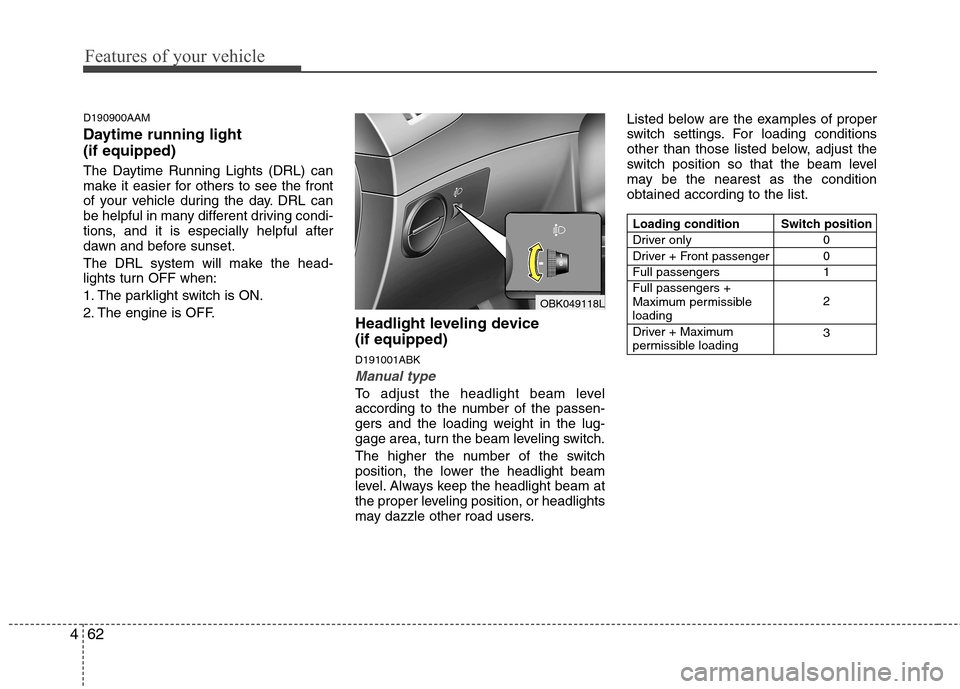
Headlight leveling device (if equipped) D191001ABK
Manual type
To adjust the headlight beam level
according to the number of the passen-
gers and the loading weight in the lug-
gage area, turn the beam leveling switch.
The higher the number of the switch
position, the lower the headlight beam
level. Always keep the headlight beam at
the proper leveling position, or headlights
may dazzle other road users.Listed below are the examples of proper
switch settings. For loading conditions
other than those listed below, adjust the
switch position so that the beam level
may be the nearest as the conditionobtained according to the list.
OBK049118L
Loading condition
Driver only
Driver + Front passengerFull passengersFull passengers +
Maximum permissibleloading
Driver + Maximum
permissible loading
Switch position
0 01 2 3
Page 132 of 343
Features of your vehicle
64
4
D200100CEN
Windshield wipers
Operates as follows when the ignition
switch is turned ON.
(MIST) : For a single wiping cycle, push the lever upward and
release it with the lever in
the 0 (OFF) position. The
wipers will operate contin-
uously if the lever is
pushed upward and held.
0 (OFF) : Wiper is not in operation
--- (INT) : Wiper operates intermittently at the same wiping intervals.
Use this mode in a light rain or
mist. To vary the speed setting,
turn the speed control knob(1).
1 (LO) : Normal wiper speed
2 (HI) : Fast wiper speed
✽✽ NOTICE
If there is heavy accumulation of snow
or ice on the windshield, defrost the
windshield for about 10 minutes, or
until the snow and/or ice is removed
before using the windshield wipers to
ensure proper operation.
D200200ABK
Windshield washers
In the O position, pull the lever gently
toward you to spray washer fluid on the
windshield and to run the wipers 1-3
cycles. Use this function when the wind-
shield is dirty. The spray and wiper oper-
ation will continue until you release the
lever. If the washer does not work, check
the washer fluid level. If the fluid level is
not sufficient, you will need to add appro-
priate non-abrasive windshield washer
fluid to the washer reservoir.
The reservoir filler neck is located in the
front of the engine compartment on the
passenger side.
CAUTION
To prevent possible damage to the washer pump, do not operate the wash-
er when the fluid reservoir is empty.
WARNING
Do not use the washer in freezing
temperatures without first warming
the windshield with the defrosters;
the washer solution could freeze oncontact with the windshield and
obscure your vision.
CAUTION
To prevent possible damage to the wipers or windshield, do not
operate the wipers when thewindshield is dry.
To prevent damage to the wiper blades, do not use gasoline,
kerosene, paint thinner, or othersolvents on or near them.
To prevent damage to the wiper arms and other components, donot attempt to move the wipers
manually.
CAUTION
When starting the vehicle in winter,
set the wiper switch in the O posi-
tion. Otherwise, wipers may operateand ice may damage the windshieldwiper blades. Always remove all snow and ice and defrost the wind-
shield properly prior to operatingthe windshield wipers.
Page 133 of 343
465
Features of your vehicle
D210000AEND210100ABK Map lamp
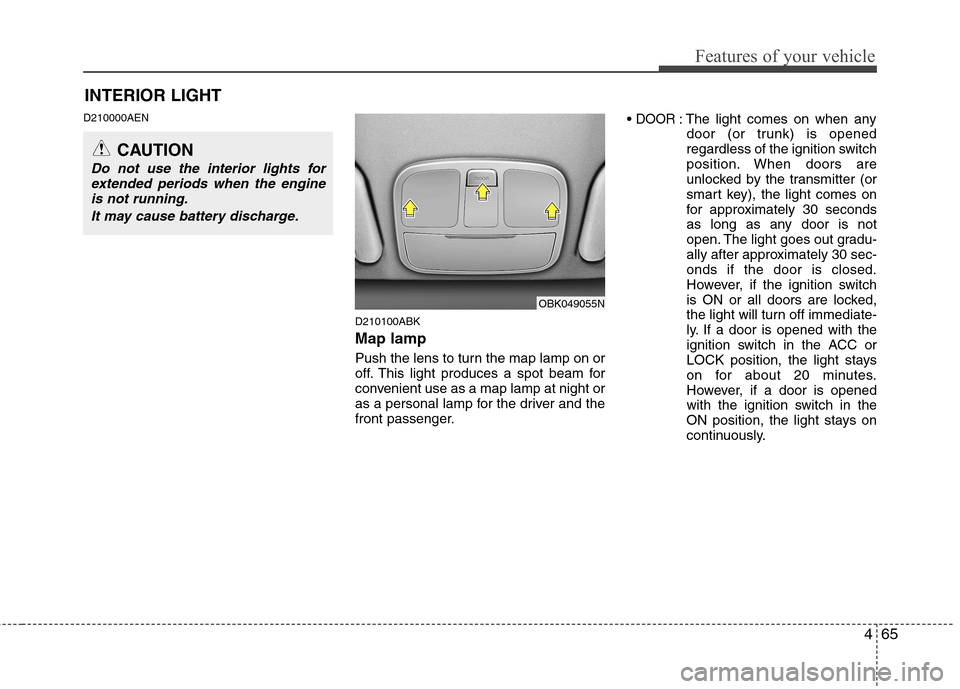
Push the lens to turn the map lamp on or
off. This light produces a spot beam for
convenient use as a map lamp at night or
as a personal lamp for the driver and the
front passenger.DOOR: The light comes on when any
door (or trunk) is opened
regardless of the ignition switch
position. When doors are
unlocked by the transmitter (or
smart key), the light comes on
for approximately 30 seconds
as long as any door is not
open. The light goes out gradu-
ally after approximately 30 sec-onds if the door is closed.
However, if the ignition switch
is ON or all doors are locked,
the light will turn off immediate-
ly. If a door is opened with the
ignition switch in the ACC or
LOCK position, the light stays
on for about 20 minutes.
However, if a door is opened
with the ignition switch in the
ON position, the light stays on
continuously.
INTERIOR LIGHT
CAUTION
Do not use the interior lights for
extended periods when the engineis not running.
It may cause battery discharge.
OBK049055N
Page 135 of 343
467
Features of your vehicle
DEFROSTER
D220000AUN
✽✽ NOTICE
If you want to defrost and defog the
front windshield, refer to “Windshield
defrosting and defogging” in this sec-
tion.
D220100AEN
Rear window defroster
The defroster heats the window to
remove frost, fog and thin ice from the
rear window, while the engine is running.
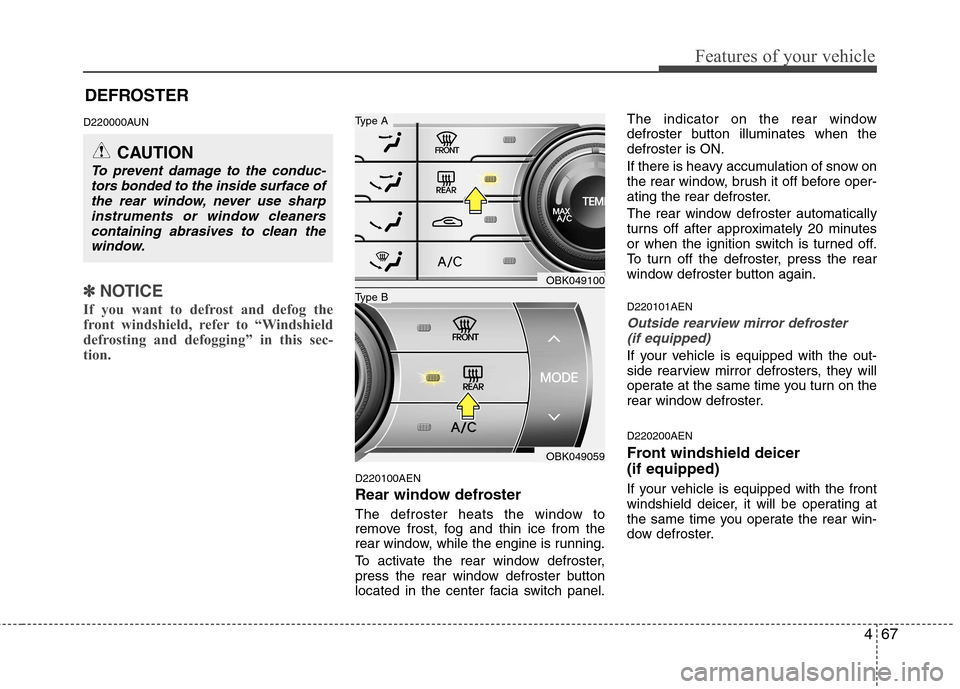
To activate the rear window defroster,
press the rear window defroster button
located in the center facia switch panel. The indicator on the rear window
defroster button illuminates when thedefroster is ON.
If there is heavy accumulation of snow on
the rear window, brush it off before oper-
ating the rear defroster.
The rear window defroster automatically
turns off after approximately 20 minutes
or when the ignition switch is turned off.
To turn off the defroster, press the rear
window defroster button again. D220101AEN
Outside rearview mirror defroster
(if equipped)
If your vehicle is equipped with the out-
side rearview mirror defrosters, they will
operate at the same time you turn on the
rear window defroster. D220200AEN
Front windshield deicer (if equipped)
If your vehicle is equipped with the front
windshield deicer, it will be operating at
the same time you operate the rear win-
dow defroster.
CAUTION
To prevent damage to the conduc- tors bonded to the inside surface ofthe rear window, never use sharp
instruments or window cleanerscontaining abrasives to clean thewindow.
OBK049100
OBK049059
Type B
Type A
Page 137 of 343
469
Features of your vehicle
D230100AEN Heating and air conditioning
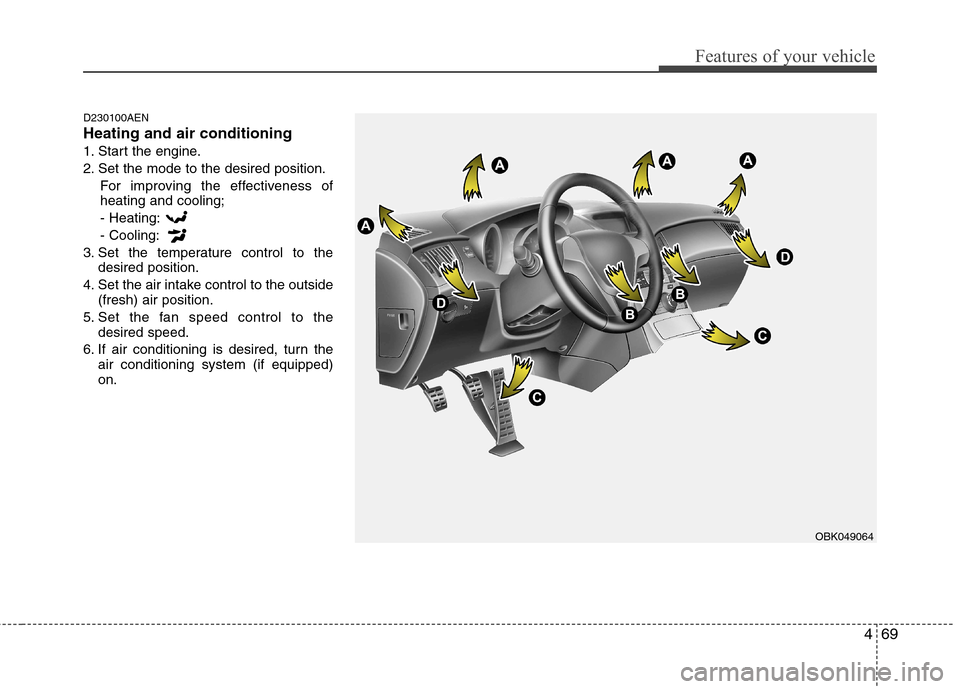
1. Start the engine.
2. Set the mode to the desired position.For improving the effectiveness of heating and cooling;- Heating: - Cooling:
3. Set the temperature control to the desired position.
4. Set the air intake control to the outside (fresh) air position.
5. Set the fan speed control to the desired speed.
6. If air conditioning is desired, turn the air conditioning system (if equipped) on.
OBK049064
Page 142 of 343
Features of your vehicle
74
4
Operation Tips
To keep dust or unpleasant fumes from
entering the car through the ventilation
system, temporarily set the air intakecontrol to the recirculated air position.
Be sure to return the control to the
fresh air position when the irritation
has passed to keep fresh air in the
vehicle. This will help keep the driver
alert and comfortable.
Air for the heating/cooling system is drawn in through the grilles just ahead
of the windshield. Care should be
taken that these are not blocked by
leaves, snow, ice or other obstructions.
To prevent interior fog on the wind- shield, set the air intake control to the
fresh air position and fan speed to the
desired position, turn on the air condi-tioning system, and adjust the temper-
ature control to desired temperature. D230503ABK
Air conditioning (if equipped)
All HYUNDAI Air Conditioning Systems
are filled with environmentally friendly
R-134a refrigerant which does not dam-
age the ozone layer.
1. Start the engine. Push the air condi-
tioning button.
2. Set the mode to the position.
3. Set the air intake control to the outside air or recirculated air position.
4. Adjust the fan speed control and tem- perature control to maintain maximum
comfort.
When maximum cooling is desired, set the temperature control to the extremeleft position (MAX A/C), set the mode
control to the position, then set
the fan speed control to the highestspeed.
✽✽ NOTICE
When using the air conditioning sys- tem, monitor the temperature gauge
closely while driving up hills or in
heavy traffic when outside tempera-
tures are high. Air conditioning sys-
tem operation may cause engine over-
heating. Continue to use the blower
fan but turn the air conditioning sys-
tem off if the temperature gauge indi-
cates engine overheating.
When opening the windows in humid weather air conditioning may create
water droplets inside the vehicle.
Since excessive water droplets may
cause damage to electrical equipment,
air conditioning should only be run
with the windows closed.
Page 143 of 343
475
Features of your vehicle
Air conditioning system operation tips
If the vehicle has been parked in directsunlight during hot weather, open the
windows for a short time to let the hot
air inside the vehicle escape.
To help reduce moisture inside of the windows on rainy or humid days,
decrease the humidity inside the vehi-
cle by operating the air conditioningsystem.
During air conditioning system opera- tion, you may occasionally notice aslight change in engine speed as the
air conditioning compressor cycles.
This is a normal system operation
characteristic.
Use the air conditioning system every month only for a few minutes to ensure
maximum system performance. When using the air conditioning sys-
tem, you may notice clear water drip-
ping (or even puddling) on the ground
under the passenger side of the vehi-
cle. This is a normal system operation
characteristic.
Operating the air conditioning system in the recirculated air position provides
maximum cooling, however, continual
operation in this mode may cause the
air inside the vehicle to become stale.
During cooling operation, you may occasionally notice a misty air flow
because of rapid cooling and humid air
intake. This is a normal system opera-
tion characteristics. D230300BEN
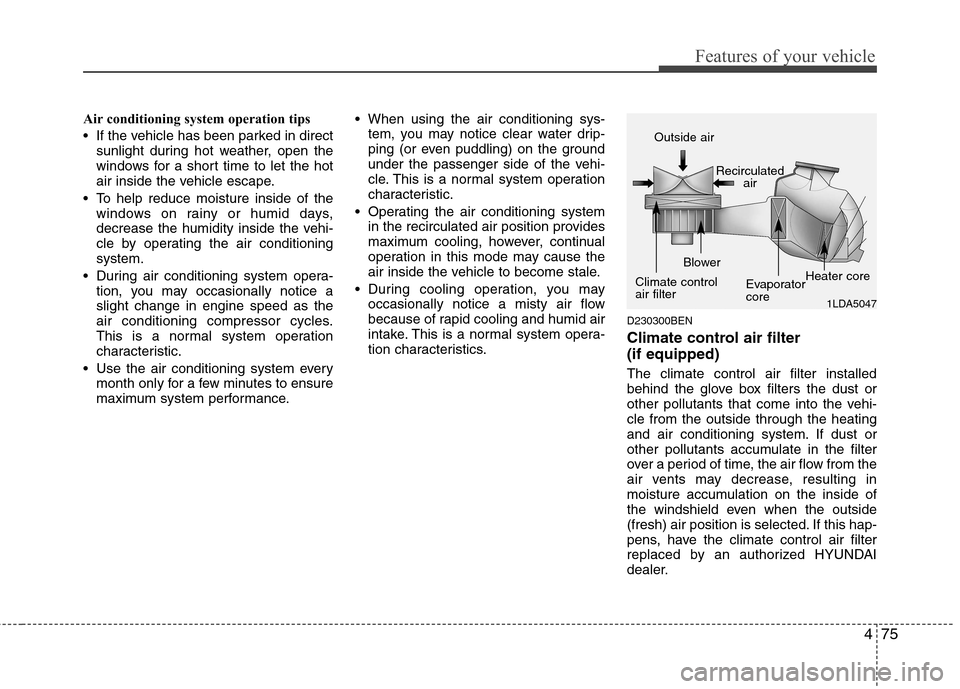
Climate control air filter (if equipped) The climate control air filter installed
behind the glove box filters the dust or
other pollutants that come into the vehi-cle from the outside through the heating
and air conditioning system. If dust or
other pollutants accumulate in the filter
over a period of time, the air flow from the
air vents may decrease, resulting in
moisture accumulation on the inside of
the windshield even when the outside
(fresh) air position is selected. If this hap-
pens, have the climate control air filter
replaced by an authorized HYUNDAI
dealer.
1LDA5047
Outside air
Recirculatedair
Climate control air filter Blower
EvaporatorcoreHeater core
Page 147 of 343
479
Features of your vehicle
D240200ABH
Manual heating and air condition- ing The heating and cooling system can be
controlled manually by pushing buttons
other than the AUTO button. In this case,
the system works sequentially according
to the order of buttons selected.
When pressing any button except the
AUTO button while using automatic oper-ation, the functions not selected will be
controlled automatically.
1. Start the engine.
2. Set the mode to the desired position.For improving the effectiveness of heating and cooling;- Heating: - Cooling:
3. Set the temperature control to the desired position.
4. Set the air intake control to the outside (fresh) air position.
5. Set the fan speed control to the desired speed.
6. If air conditioning is desired, turn the air conditioning system on.
Press the AUTO button in order to con-
vert to full automatic control of the sys-tem. D240201ABH
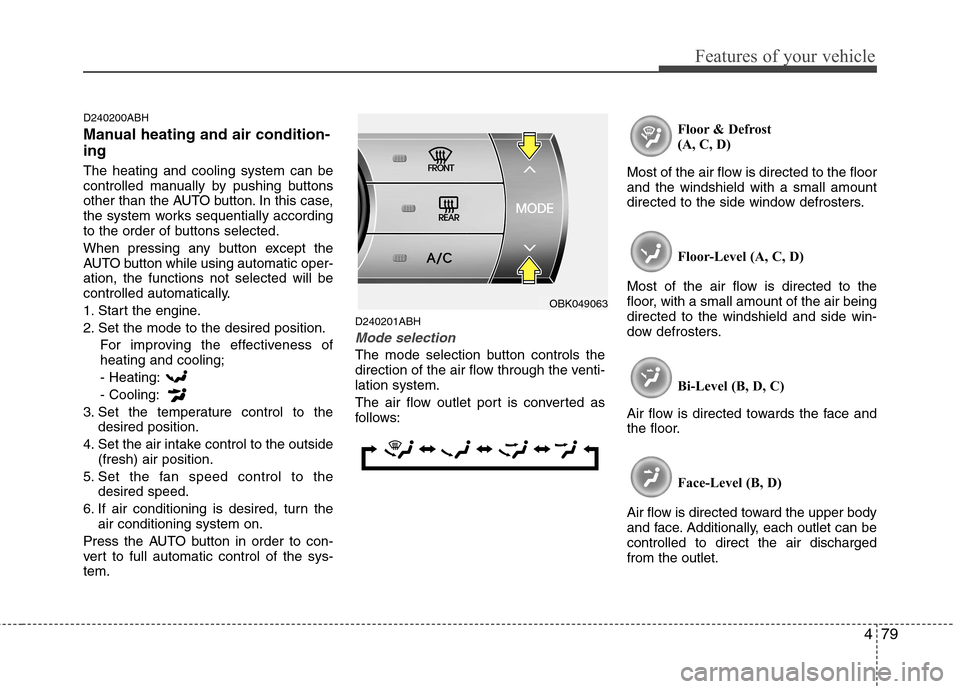
Mode selection
The mode selection button controls the
direction of the air flow through the venti-lation system.
The air flow outlet port is converted as
follows: Floor & Defrost
(A, C, D)
Most of the air flow is directed to the floorand the windshield with a small amount
directed to the side window defrosters.
Floor-Level (A, C, D)
Most of the air flow is directed to the
floor, with a small amount of the air beingdirected to the windshield and side win-
dow defrosters.
Bi-Level (B, D, C)
Air flow is directed towards the face and
the floor.
Face-Level (B, D)
Air flow is directed toward the upper body
and face. Additionally, each outlet can becontrolled to direct the air dischargedfrom the outlet.
OBK049063