fog light Hyundai Genesis Coupe 2013 Owner's Manual
[x] Cancel search | Manufacturer: HYUNDAI, Model Year: 2013, Model line: Genesis Coupe, Model: Hyundai Genesis Coupe 2013Pages: 414, PDF Size: 38.89 MB
Page 6 of 414
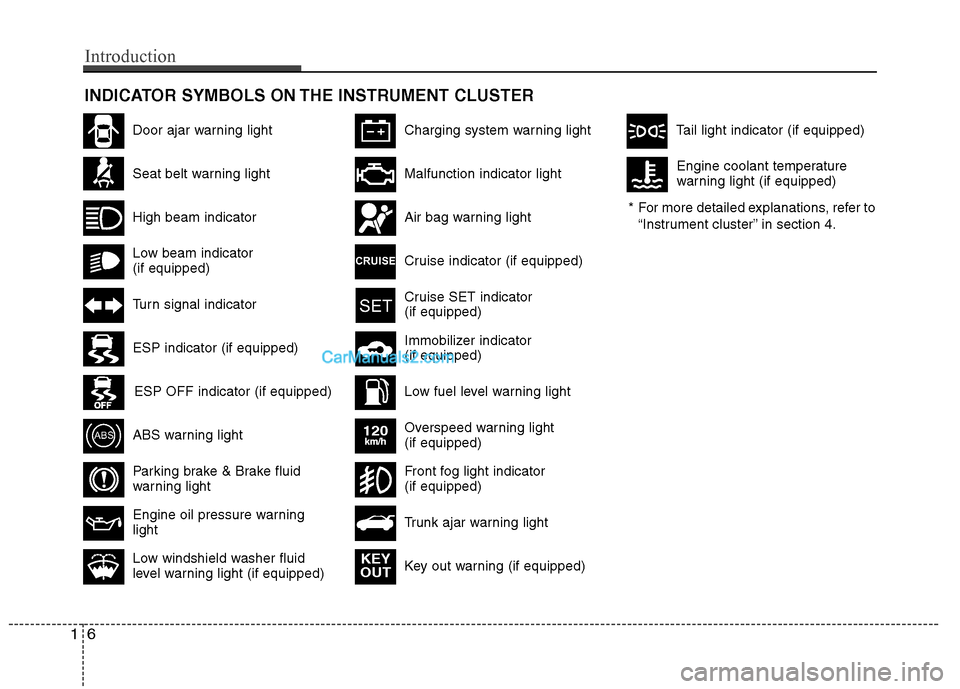
INDICATOR SYMBOLS ON THE INSTRUMENT CLUSTER
Seat belt warning light
High beam indicator
Turn signal indicator
ABS warning light
Parking brake & Brake fluid
warning light
Engine oil pressure warning light
ESP indicator (if equipped)
ESP OFF indicator (if equipped)
Malfunction indicator light
Air bag warning light
Cruise indicator (if equipped)
Cruise SET indicator (if equipped)
Immobilizer indicator (if equipped)
Low fuel level warning light* For more detailed explanations, refer to
“Instrument cluster” in section 4.
Charging system warning light
Low windshield washer fluid
level warning light (if equipped)
Door ajar warning light
Overspeed warning light (if equipped)
120km/h
Key out warning (if equipped) KEY
OUT
Trunk ajar warning light
Front fog light indicator (if equipped)
Tail light indicator (if equipped)
Low beam indicator (if equipped) Engine coolant temperature
warning light (if equipped)
16
Introduction
Page 8 of 414
Your vehicle at a glance
2
2
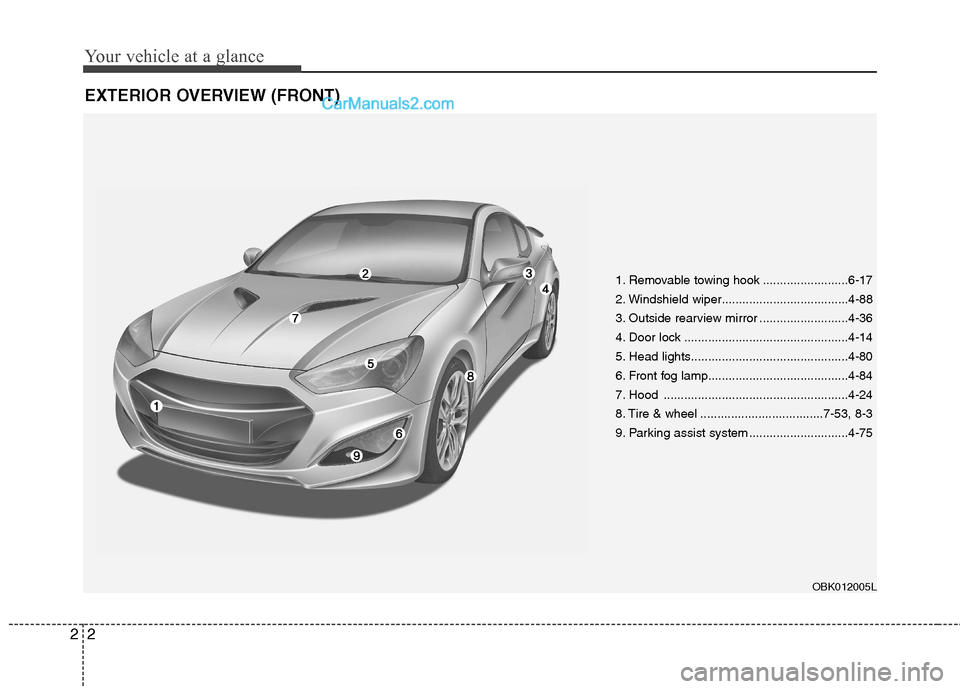
EXTERIOR OVERVIEW (FRONT)
1. Removable towing hook .........................6-17
2. Windshield wiper.....................................4-88
3. Outside rearview mirror ..........................4-36
4. Door lock ................................................4-14
5. Head lights..............................................4-80
6. Front fog lamp.........................................4-84
7. Hood ......................................................4-24
8. Tire & wheel ....................................7-53, 8-3
9. Parking assist system .............................4-75
OBK012005L
Page 10 of 414
Your vehicle at a glance
4
2
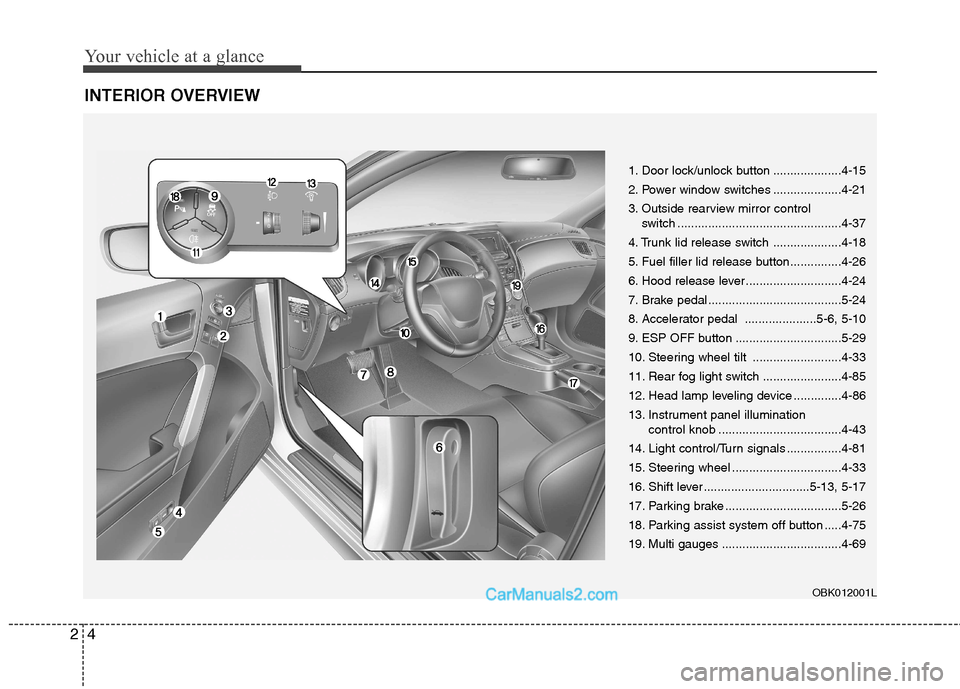
INTERIOR OVERVIEW
1. Door lock/unlock button ....................4-15
2. Power window switches ....................4-21
3. Outside rearview mirror control
switch ................................................4-37
4. Trunk lid release switch ....................4-18
5. Fuel filler lid release button...............4-26
6. Hood release lever ............................4-24
7. Brake pedal .......................................5-24
8. Accelerator pedal .....................5-6, 5-10
9. ESP OFF button ...............................5-29
10. Steering wheel tilt ..........................4-33
11. Rear fog light switch .......................4-85
12. Head lamp leveling device ..............4-86
13. Instrument panel illumination control knob ....................................4-43
14. Light control/Turn signals ................4-81
15. Steering wheel ................................4-33
16. Shift lever ...............................5-13, 5-17
17. Parking brake ..................................5-26
18. Parking assist system off button .....4-75
19. Multi gauges ...................................4-69
OBK012001L
Page 129 of 414
463
Features of your vehicle
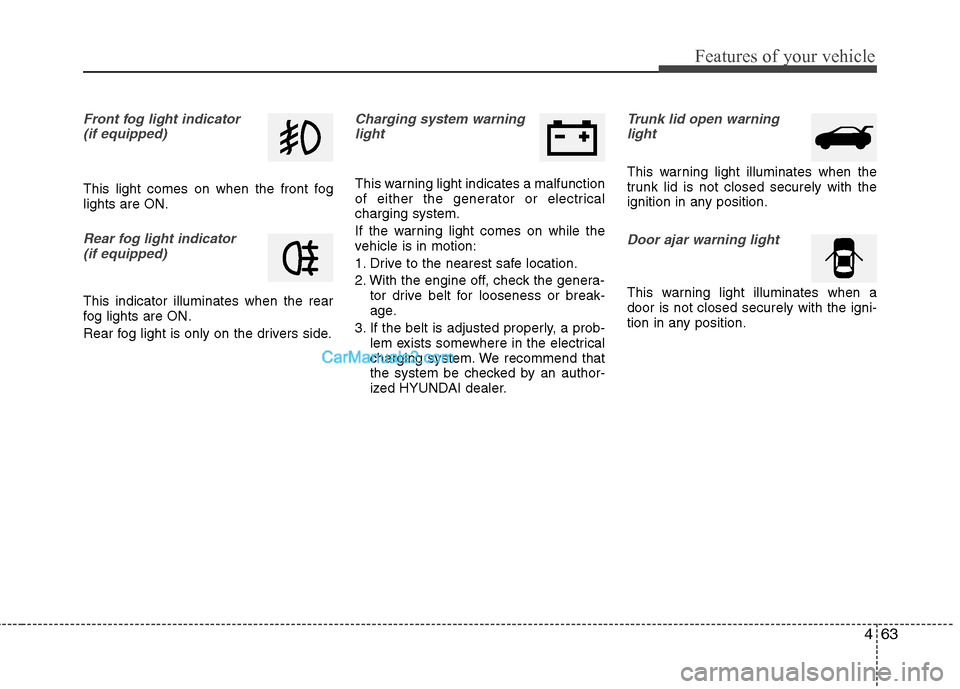
Front fog light indicator (if equipped)
This light comes on when the front fog lights are ON.
Rear fog light indicator (if equipped)
This indicator illuminates when the rear
fog lights are ON.
Rear fog light is only on the drivers side.
Charging system warninglight
This warning light indicates a malfunction
of either the generator or electricalcharging system.
If the warning light comes on while the
vehicle is in motion:
1. Drive to the nearest safe location.
2. With the engine off, check the genera- tor drive belt for looseness or break-
age.
3. If the belt is adjusted properly, a prob- lem exists somewhere in the electrical
charging system. We recommend that
the system be checked by an author-
ized HYUNDAI dealer.
Trunk lid open warning
light
This warning light illuminates when the
trunk lid is not closed securely with the
ignition in any position.
Door ajar warning light
This warning light illuminates when a door is not closed securely with the igni-
tion in any position.
Page 150 of 414
Features of your vehicle
84
4
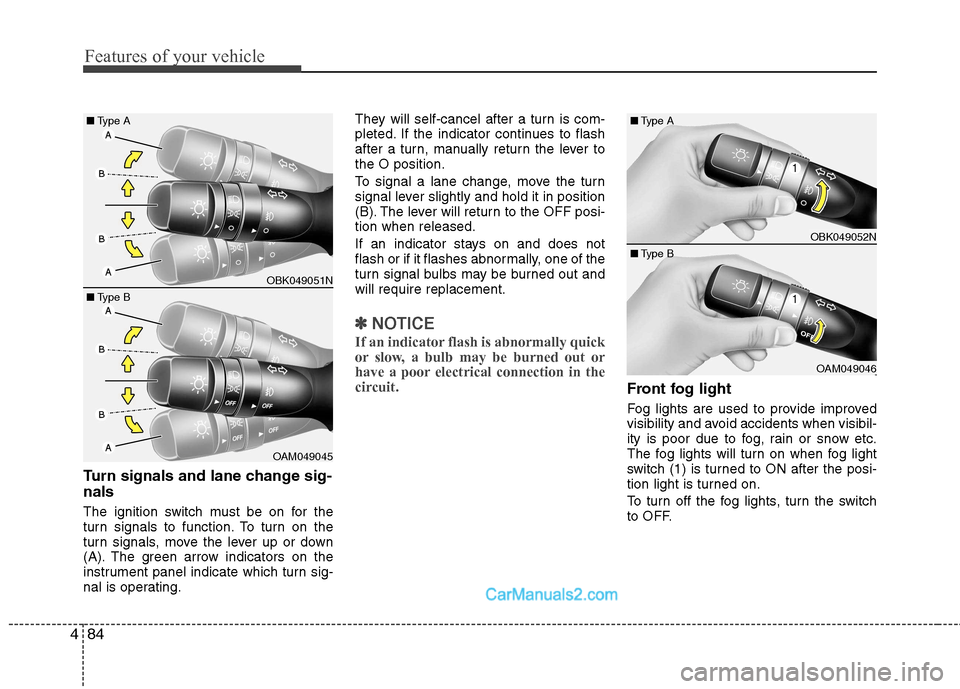
Turn signals and lane change sig- nals
The ignition switch must be on for the
turn signals to function. To turn on the
turn signals, move the lever up or down
(A). The green arrow indicators on the
instrument panel indicate which turn sig-
nal is operating. They will self-cancel after a turn is com-
pleted. If the indicator continues to flash
after a turn, manually return the lever tothe O position.
To signal a lane change, move the turn
signal lever slightly and hold it in position
(B). The lever will return to the OFF posi-tion when released.
If an indicator stays on and does not
flash or if it flashes abnormally, one of the
turn signal bulbs may be burned out andwill require replacement.
✽✽
NOTICE
If an indicator flash is abnormally quick
or slow, a bulb may be burned out or
have a poor electrical connection in the
circuit.
Front fog light
Fog lights are used to provide improved
visibility and avoid accidents when visibil-
ity is poor due to fog, rain or snow etc.
The fog lights will turn on when fog light
switch (1) is turned to ON after the posi-
tion light is turned on.
To turn off the fog lights, turn the switch
to OFF.
OBK049052N
OAM049046
■
Type B
■
Type A
OBK049051N
OAM049045
■
Type B
■
Type A
Page 151 of 414

485
Features of your vehicle
Rear fog light (if equipped)
To turn the rear fog lights on, turn the
headlight switch to the headlight on posi-
tion and press the rear fog light switch
(light on switch will illuminate).
The rear fog lights turn on when the rear
fog switch is pressed after the front fog
switch is turned to the ON position and
the headlight switch to the parklight posi-
tion. (if equipped)
To turn the rear fog lights off, press the
rear fog light switch again or turn the
headlight switch to the OFF position.
✽✽NOTICE
To turn on the rear fog light switch, the ignition switch must be in the ON posi-tion.
✽
✽ NOTICE
Rear fog light is only on the driver’s side.
OBK042119L
CAUTION
When in operation, the fog lights consume large amounts of vehicle
electrical power. Only use the foglights when visibility is poor.
Page 166 of 414
Features of your vehicle
100
4
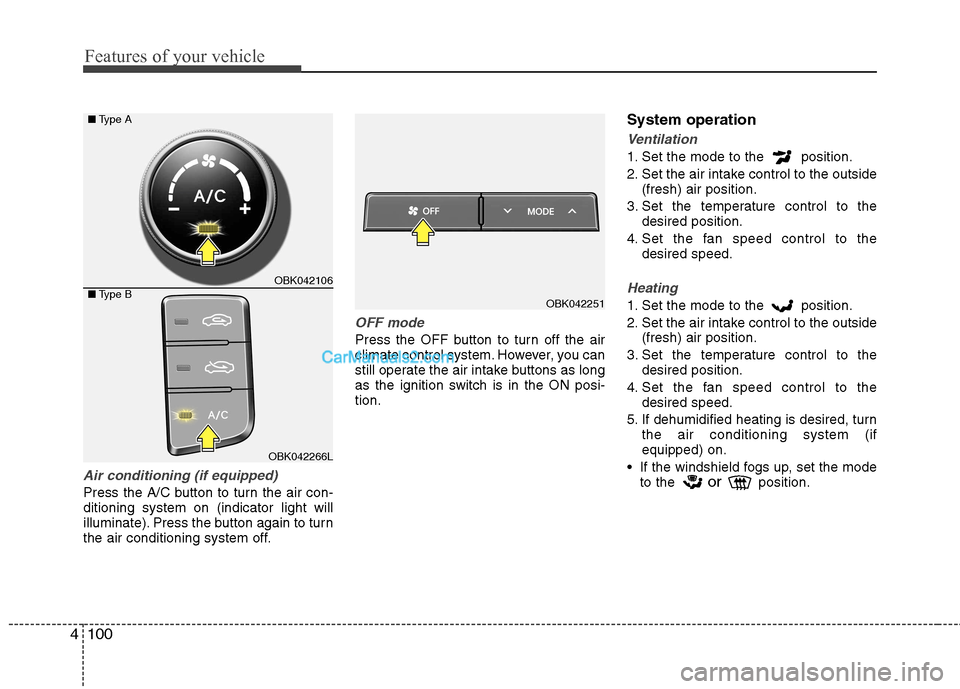
Air conditioning (if equipped)
Press the A/C button to turn the air con- ditioning system on (indicator light will
illuminate). Press the button again to turn
the air conditioning system off.
OFF mode
Press the OFF button to turn off the air
climate control system. However, you can
still operate the air intake buttons as long
as the ignition switch is in the ON posi-tion. System operation
Ventilation
1. Set the mode to the position.
2. Set the air intake control to the outside
(fresh) air position.
3. Set the temperature control to the desired position.
4. Set the fan speed control to the desired speed.
Heating
1. Set the mode to the position.
2. Set the air intake control to the outside(fresh) air position.
3. Set the temperature control to the desired position.
4. Set the fan speed control to the desired speed.
5. If dehumidified heating is desired, turn the air conditioning system (if equipped) on.
If the windshield fogs up, set the mode to the or
position.OBK042251
OBK042106
OBK042266L
■
Type A
■ Type B
Page 185 of 414
4119
Features of your vehicle
The indicator light in the air intake control
button will blink 3 times with 0.5 second
of interval. It indicates that the defogging
logic is canceled or returned to the pro-
grammed status.
If the battery has been discharged or dis-
connected, it resets to the defog logic
status.
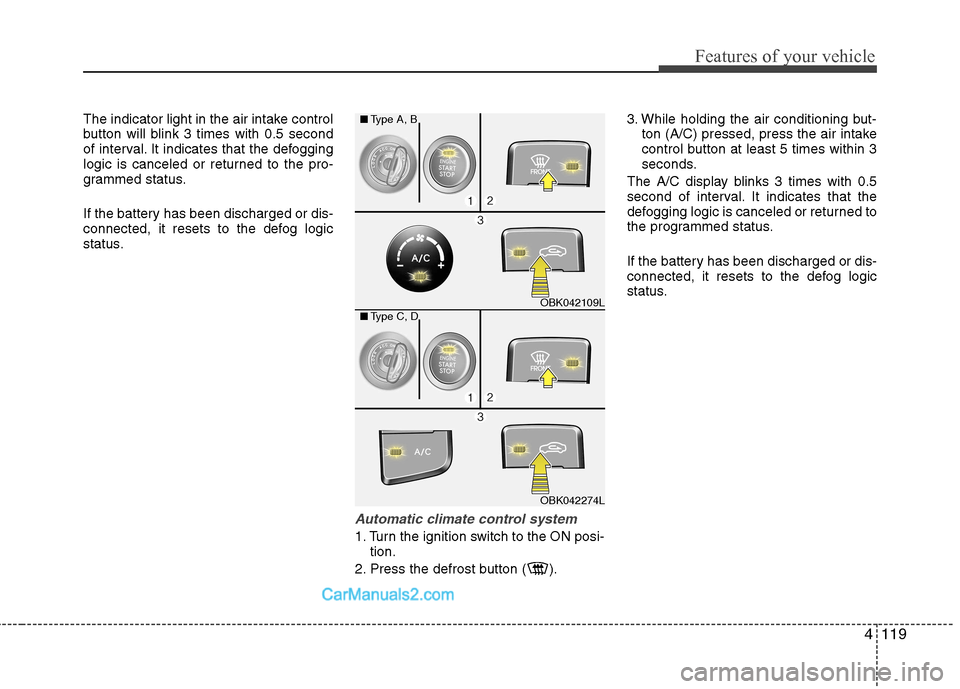
Automatic climate control system
1. Turn the ignition switch to the ON posi-tion.
2. Press the defrost button ( ). 3. While holding the air conditioning but-
ton (A/C) pressed, press the air intake
control button at least 5 times within 3
seconds.
The A/C display blinks 3 times with 0.5
second of interval. It indicates that the
defogging logic is canceled or returned to
the programmed status.
If the battery has been discharged or dis-
connected, it resets to the defog logic
status.
OBK042109L
OBK042274L
■
Type A, B
■ Type C, D
Page 377 of 414
Maintenance
70
7
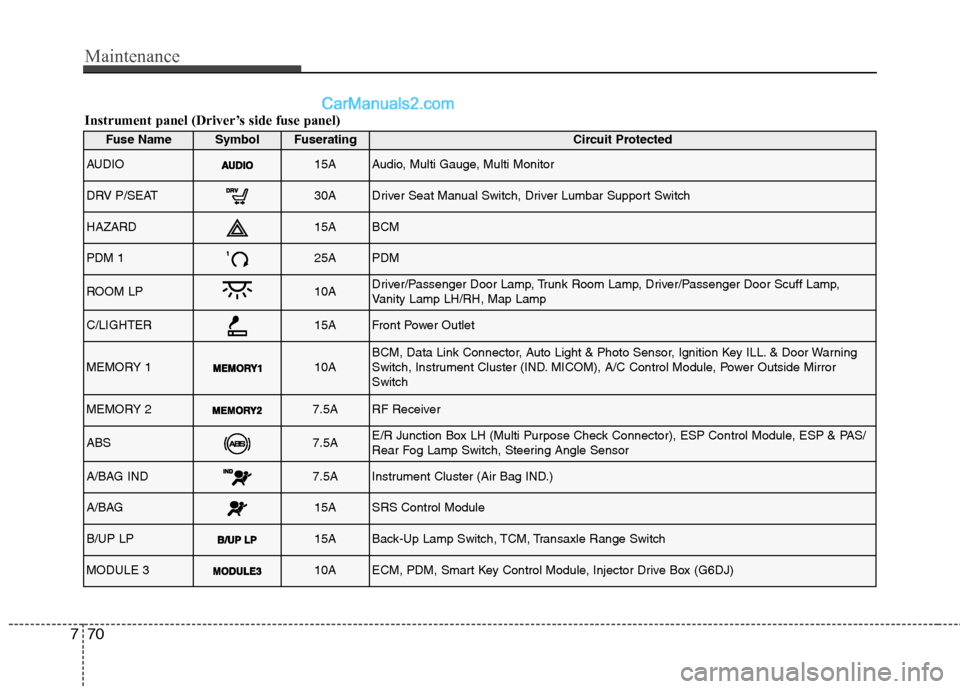
Instrument panel (Driver’s side fuse panel)
Fuse NameSymbolFuseratingCircuit Protected
AUDIO15AAudio, Multi Gauge, Multi Monitor
DRV P/SEAT30ADriver Seat Manual Switch, Driver Lumbar Support Switch
HAZARD15ABCM
PDM 125APDM
ROOM LP10ADriver/Passenger Door Lamp, Trunk Room Lamp, Driver/Passenger Door Scuff Lamp,
Vanity Lamp LH/RH, Map Lamp
C/LIGHTER15AFront Power Outlet
MEMORY 110ABCM, Data Link Connector, Auto Light & Photo Sensor, Ignition Key ILL. & Door Warning
Switch, Instrument Cluster (IND. MICOM), A/C Control Module, Power Outside MirrorSwitch
MEMORY 27.5ARF Receiver
ABS7.5AE/R Junction Box LH (Multi Purpose Check Connector), ESP Control Module, ESP & PAS/
Rear Fog Lamp Switch, Steering Angle Sensor
A/BAG IND7.5AInstrument Cluster (Air Bag IND.)
A/BAG15ASRS Control Module
B/UP LP15ABack-Up Lamp Switch, TCM, Transaxle Range Switch
MODULE 310AECM, PDM, Smart Key Control Module, Injector Drive Box (G6DJ)
Page 383 of 414
Maintenance
76
7
LIGHT BULBS
Use only the bulbs of the specified
wattage.
✽✽ NOTICE
After heavy, driving rain or washing, headlight and taillight lenses could
appear frosty. This condition is caused
by the temperature difference between
the lamp inside and outside. This is sim-
ilar to the condensation on your win-
dows inside your vehicle during the rain
and doesn’t indicate a problem with
your vehicle. If the water leaks into the
lamp bulb circuitry, we recommend thatthe system be checked by an authorized
HYUNDAI dealer.
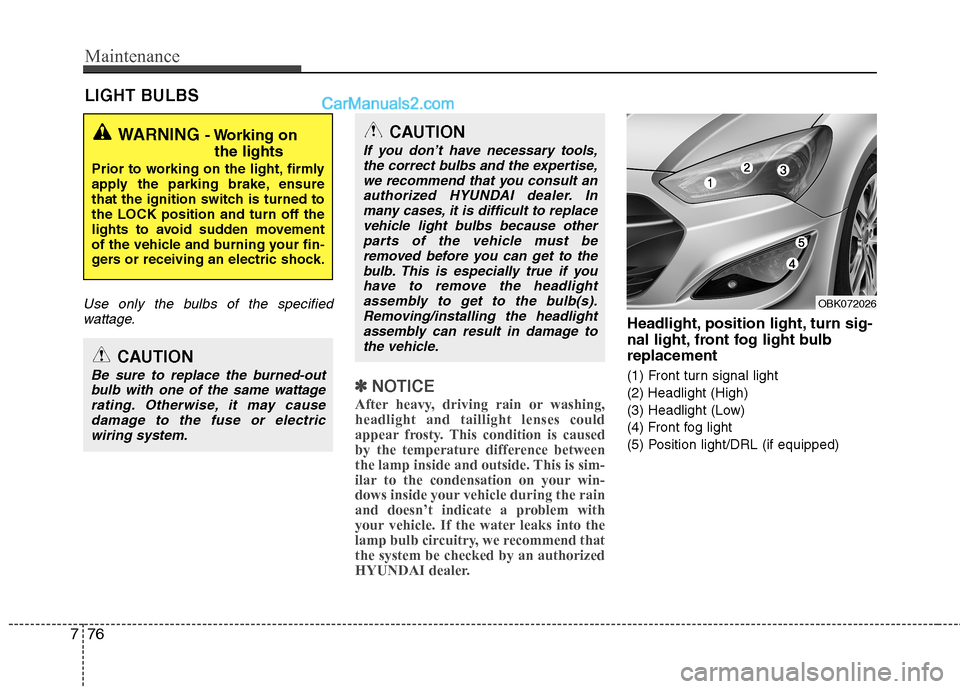
Headlight, position light, turn sig-
nal light, front fog light bulbreplacement
(1) Front turn signal light
(2) Headlight (High)
(3) Headlight (Low)
(4) Front fog light
(5) Position light/DRL (if equipped)
WARNING - Working on
the lights
Prior to working on the light, firmly
apply the parking brake, ensure
that the ignition switch is turned tothe LOCK position and turn off the
lights to avoid sudden movement
of the vehicle and burning your fin-
gers or receiving an electric shock.
CAUTION
Be sure to replace the burned-out bulb with one of the same wattagerating. Otherwise, it may causedamage to the fuse or electric wiring system.
CAUTION
If you don’t have necessary tools,the correct bulbs and the expertise,
we recommend that you consult anauthorized HYUNDAI dealer. Inmany cases, it is difficult to replace vehicle light bulbs because other
parts of the vehicle must beremoved before you can get to thebulb. This is especially true if you
have to remove the headlightassembly to get to the bulb(s).Removing/installing the headlightassembly can result in damage to
the vehicle.
OBK072026