change time HYUNDAI GENESIS COUPE ULTIMATE 2016 User Guide
[x] Cancel search | Manufacturer: HYUNDAI, Model Year: 2016, Model line: GENESIS COUPE ULTIMATE, Model: HYUNDAI GENESIS COUPE ULTIMATE 2016Pages: 475, PDF Size: 14.35 MB
Page 183 of 475
Features of your vehicle
100
4
Air conditioning system operation tips
If the vehicle has been parked in
direct sunlight during hot weather,
open the windows for a short time
to let the hot air inside the vehicle
escape.
To help reduce moisture inside of the windows on rainy or humid
days, decrease the humidity inside
the vehicle by operating the air
conditioning system.
During air conditioning system operation, you may occasionally
notice a slight change in engine
speed as the air conditioning com-
pressor cycles. This is a normal
system operation characteristic.
Use the air conditioning system every month, even if only for a few
minutes, to ensure maximum sys-
tem performance. When using the air conditioning
system, you may notice clear water
dripping (or even puddling) on the
ground under the passenger side
of the vehicle. This is a normal sys-
tem operation characteristic.
Operating the air conditioning sys- tem in the recirculated air position
provides maximum cooling, how-
ever, continual operation in this
mode may cause the air inside the
vehicle to become stale.
During cooling operation, you may occasionally notice a misty air flow
because of rapid cooling and
humid air intake. This is a normal
system operation characteristic.
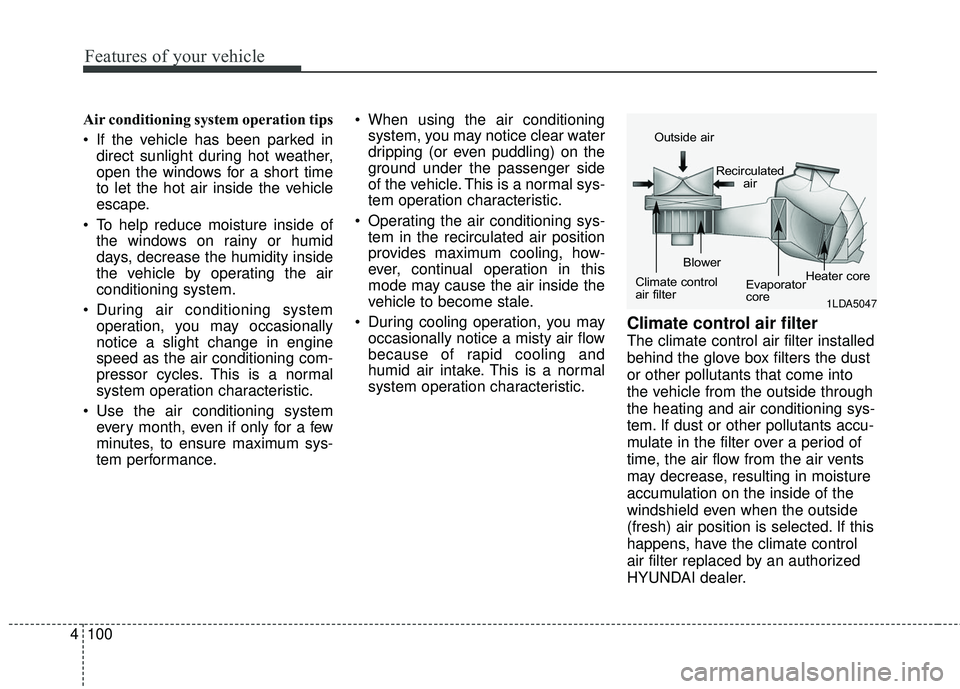
Climate control air filter
The climate control air filter installed
behind the glove box filters the dust
or other pollutants that come into
the vehicle from the outside through
the heating and air conditioning sys-
tem. If dust or other pollutants accu-
mulate in the filter over a period of
time, the air flow from the air vents
may decrease, resulting in moisture
accumulation on the inside of the
windshield even when the outside
(fresh) air position is selected. If this
happens, have the climate control
air filter replaced by an authorized
HYUNDAI dealer.
1LDA5047
Outside air
Recirculatedair
Climate control
air filter Blower
Evaporator
coreHeater core
Page 195 of 475
Features of your vehicle
112
4
Air conditioning system operation tips
If the vehicle has been parked in
direct sunlight during hot weather,
open the windows for a short time
to let the hot air inside the vehicle
escape.
To help reduce moisture inside of the windows on rainy or humid
days, decrease the humidity inside
the vehicle by operating the air
conditioning system.
During air conditioning system operation, you may occasionally
notice a slight change in engine
speed as the air conditioning com-
pressor cycles. This is a normal
system operation characteristic.
Use the air conditioning system every month, even if only for a few
minutes, to ensure maximum sys-
tem performance. When using the air conditioning
system, you may notice clear water
dripping (or even puddling) on the
ground under the passenger side
of the vehicle. This is a normal sys-
tem operation characteristic.
Operating the air conditioning sys- tem in the recirculated air position
provides maximum cooling, how-
ever, continual operation in this
mode may cause the air inside the
vehicle to become stale.
During cooling operation, you may occasionally notice a misty air flow
because of rapid cooling and
humid air intake. This is a normal
system operation characteristics.
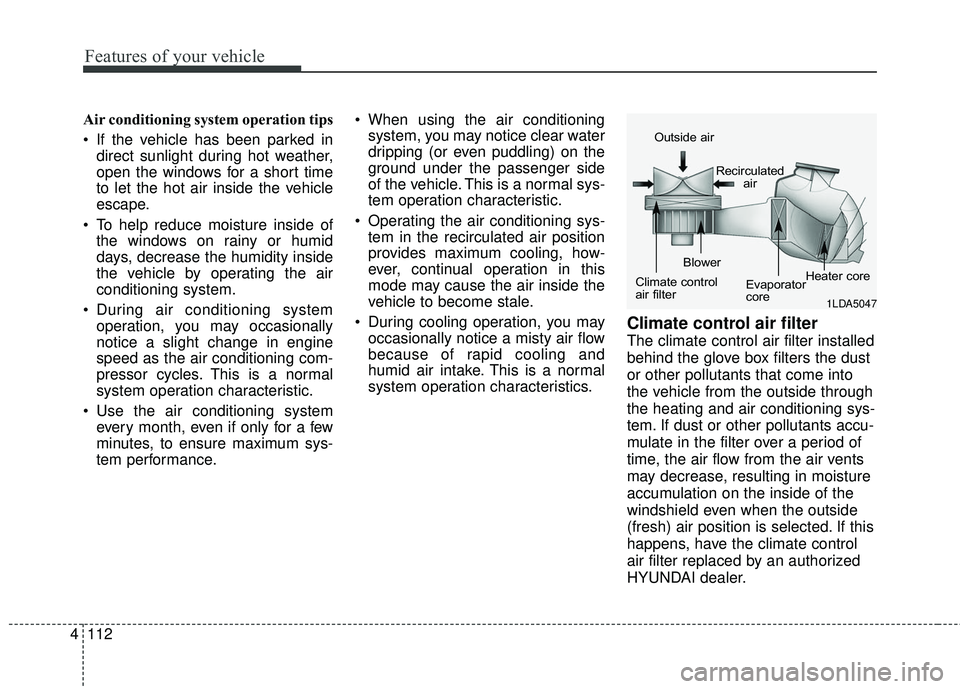
Climate control air filter
The climate control air filter installed
behind the glove box filters the dust
or other pollutants that come into
the vehicle from the outside through
the heating and air conditioning sys-
tem. If dust or other pollutants accu-
mulate in the filter over a period of
time, the air flow from the air vents
may decrease, resulting in moisture
accumulation on the inside of the
windshield even when the outside
(fresh) air position is selected. If this
happens, have the climate control
air filter replaced by an authorized
HYUNDAI dealer.
1LDA5047
Outside air
Recirculatedair
Climate control
air filter Blower
Evaporator
coreHeater core
Page 219 of 475
4136
Features of your vehicle
(Continued) If you want to change the posi- tion of device installation,please inquire with your placeof purchase or service mainte-nance center. Technicalexpertise is required to installor disassemble the device.
Turn on the car ignition before using this device. Do not oper-ate the audio system for longperiods of time with the igni-tion turned off as such opera-tions may lead to battery dis-charge.
Do not subject the device to severe shock or impact. Directpressure onto the front side ofthe monitor may cause dam-age to the LCD or touchscreen.
(Continued)(Continued) When cleaning the device, make sure to turn off thedevice and use a dry andsmooth cloth. Never usetough materials, chemicalcloths, or solvents (alcohol,benzene, thinners, etc.) assuch materials may damagethe device panel or cause col-or/quality deterioration
Do not place beverages close to the audio system. Spillingbeverages may lead to systemmalfunction.
In case of product malfunc- tion, please contact your placeof purchase or After Servicecenter.
Placing the audio system within an electromagneticenvironment may result innoise interference.
Page 229 of 475
4146
Features of your vehicle
SYSTEM CONTROLLERS
AND FUNCTIONS
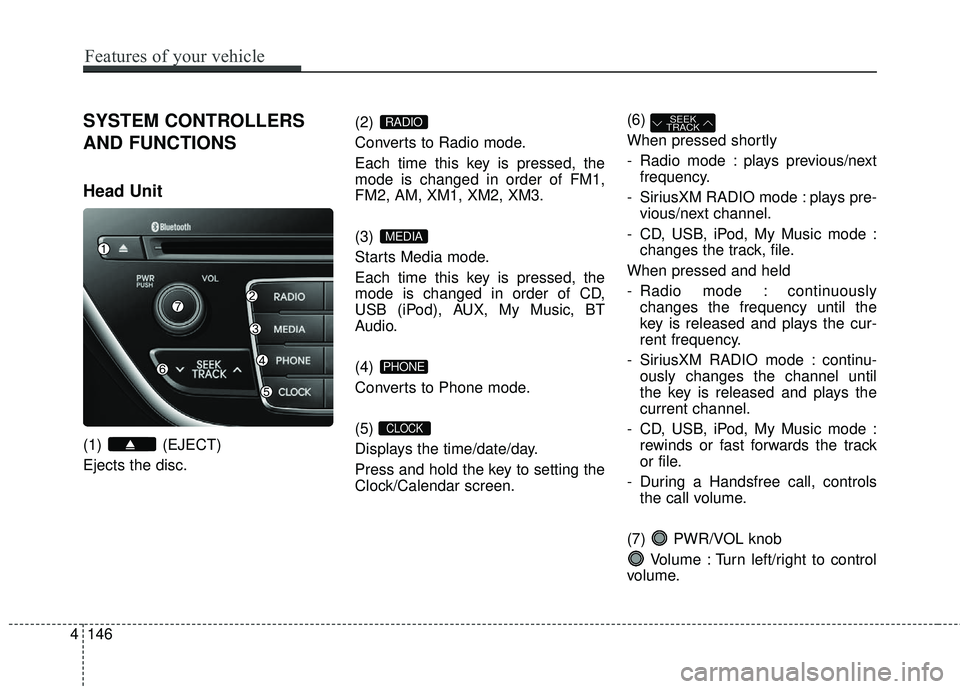
Head Unit
(1) (EJECT)
Ejects the disc.(2)
Converts to Radio mode.
Each time this key is pressed, the
mode is changed in order of FM1,
FM2, AM, XM1, XM2, XM3.
(3)
Starts Media mode.
Each time this key is pressed, the
mode is changed in order of CD,
USB (iPod), AUX, My Music, BT
Audio.
(4)
Converts to Phone mode.
(5)
Displays the time/date/day.
Press and hold the key to setting the
Clock/Calendar screen.(6)
When pressed shortly
- Radio mode : plays previous/next
frequency.
- SiriusXM RADIO mode : plays pre- vious/next channel.
- CD, USB, iPod, My Music mode : changes the track, file.
When pressed and held
- Radio mode : continuously changes the frequency until the
key is released and plays the cur-
rent frequency.
- SiriusXM RADIO mode : continu- ously changes the channel until
the key is released and plays the
current channel.
- CD, USB, iPod, My Music mode : rewinds or fast forwards the track
or file.
- During a Handsfree call, controls the call volume.
(7) PWR/VOL knob Volume : Turn left/right to control
volume.
SEEK
TRACK
CLOCK
PHONE
MEDIA
RADIO
Page 231 of 475
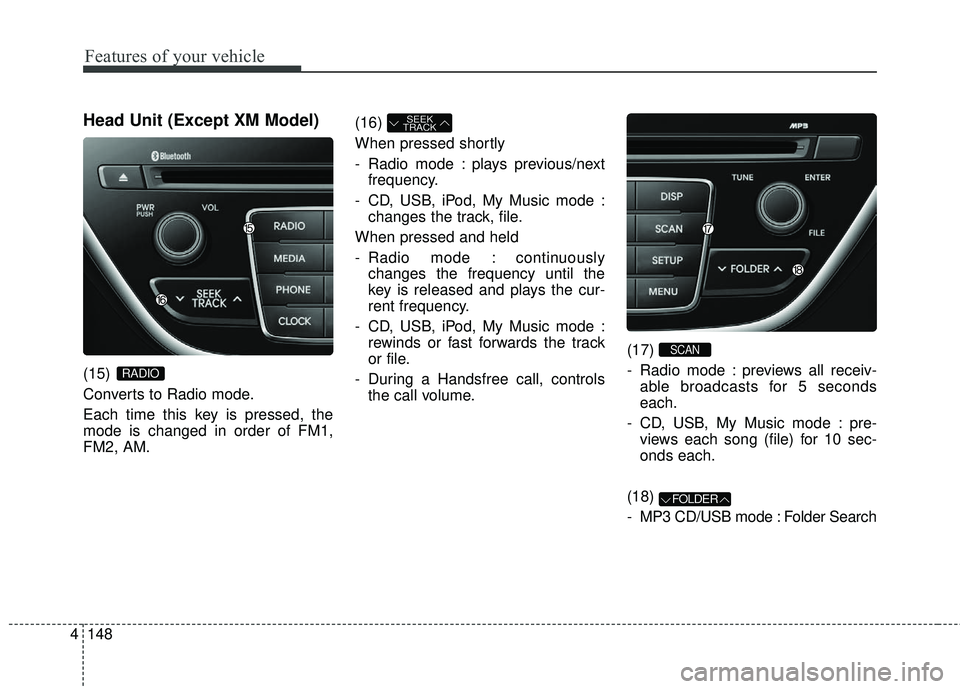
Head Unit (Except XM Model)
(15)
Converts to Radio mode.
Each time this key is pressed, the
mode is changed in order of FM1,
FM2, AM.(16)
When pressed shortly
- Radio mode : plays previous/next
frequency.
- CD, USB, iPod, My Music mode : changes the track, file.
When pressed and held
- Radio mode : continuously changes the frequency until the
key is released and plays the cur-
rent frequency.
- CD, USB, iPod, My Music mode : rewinds or fast forwards the track
or file.
- During a Handsfree call, controls the call volume. (17)
- Radio mode : previews all receiv-
able broadcasts for 5 seconds
each.
- CD, USB, My Music mode : pre- views each song (file) for 10 sec-
onds each.
(18)
- MP3 CD/USB mode : Folder Search
FOLDER
SCAN
SEEK
TRACK
RADIO
Features of your vehicle
148
4
Page 247 of 475
Features of your vehicle
164
4
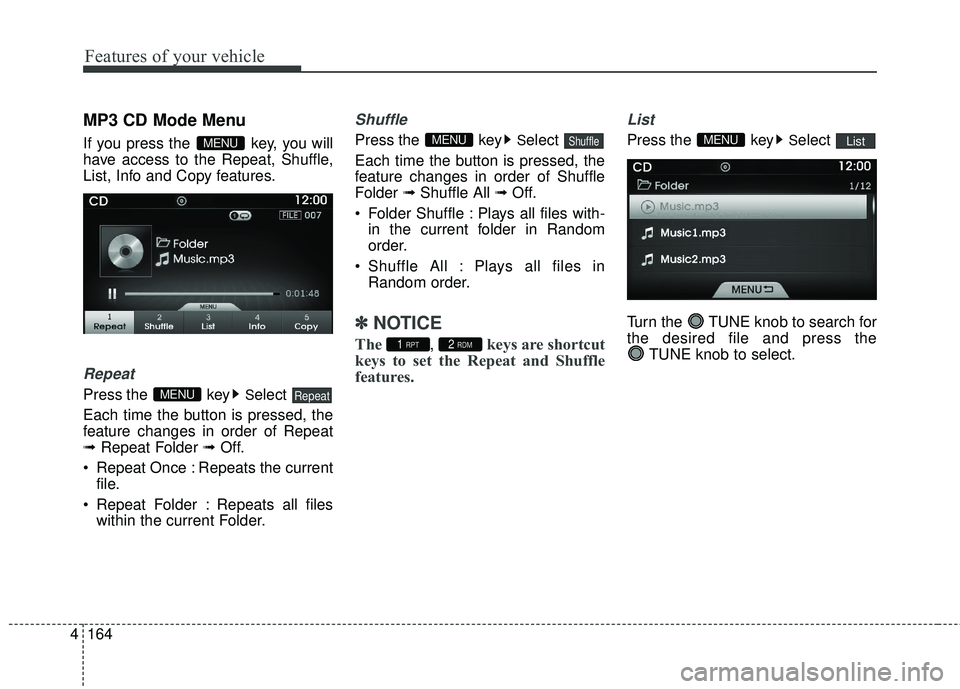
MP3 CD Mode Menu
If you press the key, you will
have access to the Repeat, Shuffle,
List, Info and Copy features.
Repeat
Press the keySelect
Each time the button is pressed, the
feature changes in order of Repeat
➟ Repeat Folder ➟ Off.
Repeat Once : Repeats the current file.
Repeat Folder : Repeats all files within the current Folder.
Shuffle
Press the keySelect
Each time the button is pressed, the
feature changes in order of Shuffle
Folder ➟Shuffle All ➟ Off.
Folder Shuffle : Plays all files with- in the current folder in Random
order.
Shuffle All : Plays all files in Random order.
✽ ✽ NOTICE
The, keys are shortcut
keys to set the Repeat and Shuffle
features.
List
Press the keySelect
Turn the TUNE knob to search for
the desired file and press the TUNE knob to select.ListMENU
2 RDM1 RPT
ShuffleMENU
RepeatMENU
MENU
Page 251 of 475
Features of your vehicle
168
4
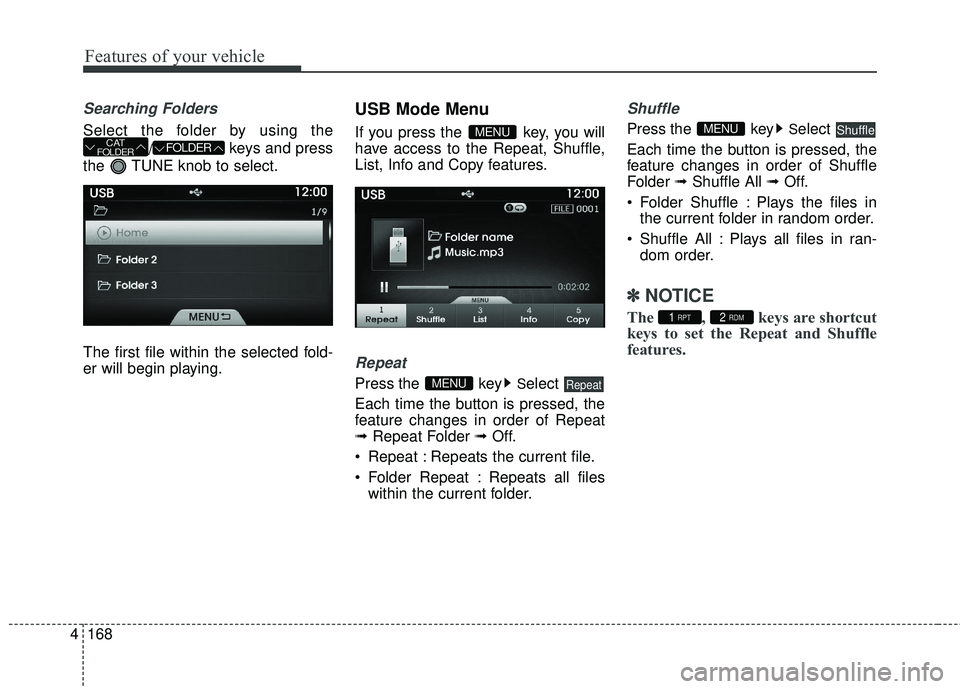
Searching Folders
Select the folder by using the
/ keys and press
the TUNE knob to select.
The first file within the selected fold-
er will begin playing.
USB Mode Menu
If you press the key, you will
have access to the Repeat, Shuffle,
List, Info and Copy features.
Repeat
Press the keySelect
Each time the button is pressed, the
feature changes in order of Repeat
➟ Repeat Folder ➟ Off.
Repeat : Repeats the current file.
Folder Repeat : Repeats all files within the current folder.
Shuffle
Press the keySelect
Each time the button is pressed, the
feature changes in order of Shuffle
Folder ➟Shuffle All ➟ Off.
Folder Shuffle : Plays the files in the current folder in random order.
Shuffle All : Plays all files in ran- dom order.
✽ ✽ NOTICE
The , keys are shortcut
keys to set the Repeat and Shuffle
features.2 RDM1 RPT
ShuffleMENU
RepeatMENU
MENUFOLDERCAT
FOLDER
Page 282 of 475
![HYUNDAI GENESIS COUPE ULTIMATE 2016 User Guide 4199
Features of your vehicle
Clock/Calendar Setting
Clock Setting
Press the key Select [Clock/
Calendar] Select [Clock Settings]
Use the TUNE knob to select the
Hour, Minutes and AM/PM setting
and](/img/35/56127/w960_56127-281.png "HYUNDAI GENESIS COUPE ULTIMATE 2016 User Guide 4199
Features of your vehicle
Clock/Calendar Setting
Clock Setting
Press the key Select [Clock/
Calendar] Select [Clock Settings]
Use the TUNE knob to select the
Hour, Minutes and AM/PM setting
and")
4199
Features of your vehicle
Clock/Calendar Setting
Clock Setting
Press the key Select [Clock/
Calendar] Select [Clock Settings]
Use the TUNE knob to select the
Hour, Minutes and AM/PM setting
and use TUNE knob to change
settings.
Calendar Setting
Press the key Select [Clock/
Calendar] Select [Calendar Settings]
Use the TUNE knob to select the
Month, Day, and Year and use TUNE knob to change settings.
Time Format
Press the key Select [Clock/
Calendar] Select [Time Format]
This feature is used to change the
clock format between 12hr or 24hr.
Clock Display
Press the key Select [Clock/
Calendar] Select [Clock Display
(Power off)]
This feature is used to display a clock
on the screen when the audio sys-
tem is turned off.SETUP
SETUP SETUP
SETUP
Page 289 of 475
Driving your vehicle
25
WARNING- ENGINE EXHAUST CAN BE DANGEROUS!
Engine exhaust fumes can be extremely dangerous. If, at any time, you smell exhaust fumes inside the vehicle,
open the windows immediately.
• Do not inhale exhaust fumes. Exhaust fumes contain carbon monoxide, a colorless, odorless gas that can cause unconsciousness and death
by asphyxiation.
The exhaust system should be checked whenever the vehicle is raised to change the oil or for any other purpose.
If you hear a change in the sound of the exhaust or if you drive over something that strikes the underneath side
of the car, have the exhaust system checked as soon as possible by an authorized HYUNDAI dealer.
Letting the engine idle in your garage, even with the garage door open, is a hazardous practice. Never run the
engine in your garage any longer than it takes to start the engine and back the car out.
If it is necessary to idle the engine for a prolonged period with people inside the car, be sure to do so only in an
open area with the air intake set at "Fresh" and fan operating at one of the higher speeds so fresh air is drawn
into the interior.
If you must drive with the trunk lid open because you are carrying objects that make this necessary:
1. Close all windows.
2. Open side vents.
3. Set the air intake control at "Fresh", the air flow control at " " or " " and the fan at one of the higher speeds.
To assure proper operation of the ventilation system, be sure the ventilation air intakes located just in front of the
windshield are kept clear of snow, ice, leaves or other obstructions.
Page 296 of 475
59
Driving your vehicle
ACC(Accessory)
• with manual transmission
Press the engine start/stop button
when the button is in the OFF posi-
tion without depressing the clutch
pedal.
• with automatic transmission
Press the engine start/stop button
when the button is in the OFF posi-
tion without depressing the brake
pedal.
The steering wheel is unlocked and
electrical accessories are operative
(if equipped with steering lock).
If you leave the engine start/stop but-
ton in the ACC position for more than
1 hour, the engine is off automatical-
ly to prevent the battery from dis-
charging.
ON
• with manual transmission
Press the engine start/stop button
when the button is in the ACC posi-
tion without depressing the clutch
pedal.
• with automatic transmission
Press the engine start/stop button
when the button is in the ACC posi-
tion without depressing the brake
pedal.
The warning lights can be checked
before the engine is started. Do not
leave the button in the ON position if
the engine is not running to prevent
the battery from discharging.
START
• with manual transmission
To start the engine, depress the
clutch pedal and brake pedal, then
press the engine start/stop button
with the shift lever in the N(Neutral)
position.
• with automatic transmission
To start the engine, depress the brake
pedal and press the engine start/stop
button with the shift lever in the
P(Park) or the N (Neutral) position.
✽ ✽NOTICE
• If you press the engine start/stop
button without depressing the
clutch pedal on manual transmis-
sion vehicles or without depressing
the brake pedal on automatic
transmission vehicles, the engine
will not start and the engine
start/stop button changes as fol-
lows:
OFF → →
ACC →
→
ON →
→
OFF
• If you leave the engine start/stop button in the ACC or the ON posi-
tion for a long time, the battery
may be discharged.