lamp HYUNDAI GENESIS G80 2016 User Guide
[x] Cancel search | Manufacturer: HYUNDAI, Model Year: 2016, Model line: GENESIS G80, Model: HYUNDAI GENESIS G80 2016Pages: 516, PDF Size: 81.01 MB
Page 196 of 516
3-108
Convenient features of your vehicle
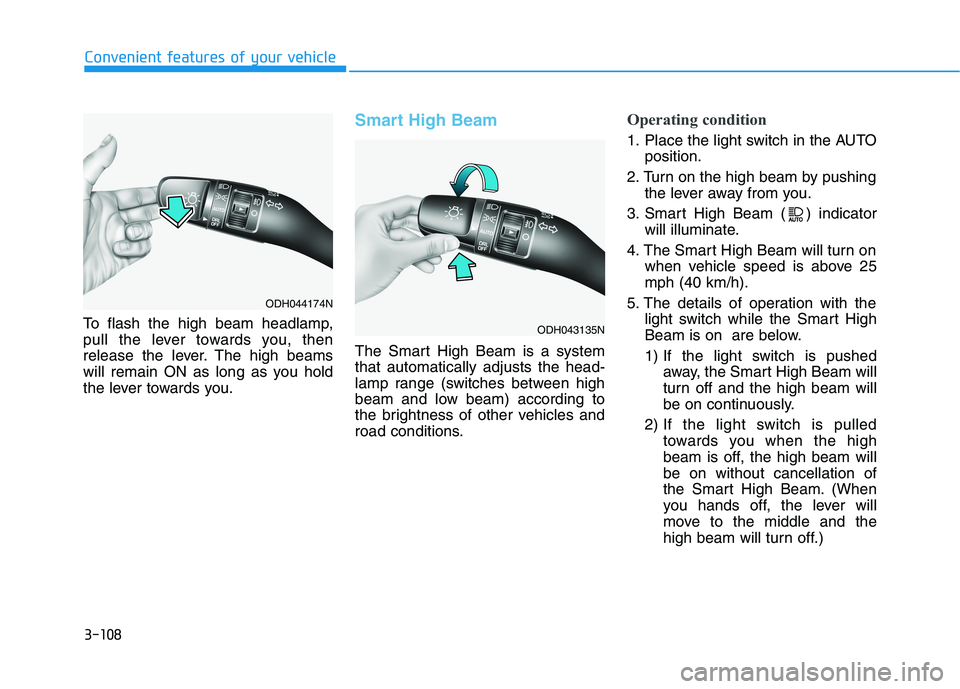
To flash the high beam headlamp,
pull the lever towards you, then
release the lever. The high beams
will remain ON as long as you hold
the lever towards you.
Smart High Beam
The Smart High Beam is a system
that automatically adjusts the head-
lamp range (switches between high
beam and low beam) according to
the brightness of other vehicles and
road conditions.
Operating condition
1. Place the light switch in the AUTO
position.
2. Turn on the high beam by pushing
the lever away from you.
3. Smart High Beam ( ) indicator
will illuminate.
4. The Smart High Beam will turn on
when vehicle speed is above 25
mph (40 km/h).
5. The details of operation with the
light switch while the Smart High
Beam is on are below.
1) If the light switch is pushed
away, the Smart High Beam will
turn off and the high beam will
be on continuously.
2) If the light switch is pulled
towards you when the high
beam is off, the high beam will
be on without cancellation of
the Smart High Beam. (When
you hands off, the lever will
move to the middle and the
high beam will turn off.)
ODH044174N
ODH043135N
Page 197 of 516
3-109
Convenient features of your vehicle
3
3) If the light switch is pulled
towards you when the high
beam is on by the Smart High
Beam, the low beam will be on
and the Smart High Beam will
turn off.
4) If the light switch is turned to
the headlamp position ( )
from AUTO position, the Smart
High Beam will turn off and the
low beam will be on continu-
ously.When the Smart High Beam is oper-
ating, the high beam switches to low
beam in the below conditions.
- When the headlamp is detected
from the on-coming vehicle.
- When the tail lamp is detected
from the front vehicle.
- When headlamp/tail lamp of bicy-
cle/motorcycle is detected.
- When the surrounding is so bright
that high beams are not needed.
- When streetlights or other lights
are detected.
- When the light switch is not in the
AUTO position.
- When the Smart High Beam is off.
- When vehicle speed is below 22
mph (35 km/h).Warning light and message
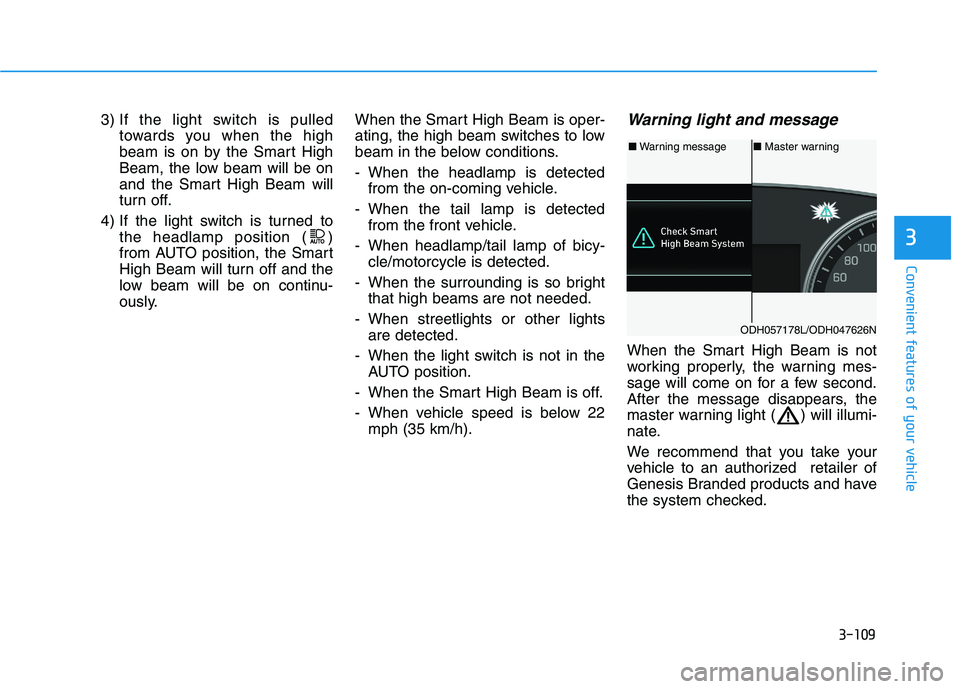
When the Smart High Beam is not
working properly, the warning mes-
sage will come on for a few second.
After the message disappears, the
master warning light ( ) will illumi-
nate.
We recommend that you take your
vehicle to an authorized retailer of
Genesis Branded products and have
the system checked.
■Warning message■Master warning
ODH057178L/ODH047626N
Page 198 of 516
3-110
Convenient features of your vehicle
(Continued)
When headlamp aiming is not
properly adjusted.
When driving on a narrow
curved road or rough road.
When driving downhill or uphill.
When only part of the vehicle
in front is visible on a cross-
road or curved road.
When there is a traffic light,
reflecting sign, flashing sign
or mirror.
When the road conditions are
bad such as being wet or cov-
ered with snow.
When the front vehicle's head-
lamps are off but the fog lamps
on.
When a vehicle suddenly
appears from a curve.
When the vehicle is tilted from
a flat tire or being towed.
When the LKAS (Lane keep-
ing Assist System) warning
light illuminates. (if equipped)
(Continued)
(Continued)
When you replace or reinstall
the windshield glass/LKAS
camera (if equipped), take
your vehicle to an authorized
retailer of Genesis Branded
products and have the system
checked.The system may not operate nor-
mally in the below conditions.
When the light from the on-
coming or front vehicle is not
detected because of lamp dam-
age, hidden from sight, etc.
When the lamp of the on-com-
ing or front vehicle is covered
with dust, snow or water.
When the light from the on-
coming or front vehicle is not
detected because of exhaust
fume, smoke, fog, snow, etc.
When the front window is cov-
ered with foreign matters such
as ice, dust, fog, or is damaged.
When there is a similar shape
lamp with the front vehicle’s
lamps.
When it is hard to see because
of fog, heavy rain or snow.
When the headlamp is not
repaired or replaced at an
authorized retailer.
(Continued)
CAUTION
Page 200 of 516
3-112
Convenient features of your vehicle
Front fog lamp (if equipped)
Use the switch next to the headlamp
switch to turn the Fog Lights ON and
OFF. The fog lamps will turn on when
the fog lamp switch (1) is turned to
the ON position after the headlamps
are turned on.
To turn off the fog lamps, turn the
switch to the OFF position.
You can use the fog lamps only when
the headlamps are on low beam.
When the light switch is in the AUTO
position, you can also use the fog
lamps when the headlamps turn on
automatically. The fog lamps will go
OFF when the headlamps turn OFF.
✽ ✽
NOTICE
When in operation, the fog lamps
consume large amounts of vehicle
electrical power. Only use the fog
lamps when visibility is poor.
Battery saver function
The purpose of this feature is to pre-
vent the battery from being dis-
charged. The system automatically
turns off the parking lamp when the
driver turns the engine off and opens
the driver-side door.
With this feature, the parking lamps
will turn off automatically if the driver
parks on the side of road at night.
If necessary, to keep the lamps on
when the engine is turned off, perform
the following:
1) Open the driver-side door.
2) Turn the parking lamps OFF and
ON again using the light switch on
the steering column.
Headlamp delay function
(if equipped)
If you place the Engine Start/Stop
button in to the ACC or OFF position
with the headlamps ON, the head-
lamps (and/or parking lamps) remain
on for about 5 minutes. However,
with the engine off if the driver’s door
is opened and closed, the head-
lamps (and/or parking lamps) are
turned off after 15 seconds.
The headlamps (and/or parking
lamps) can be turned off by pressing
the lock button on the smart key
twice or turning the light switch to the
OFF or AUTO position. However, if
you turn the light switch to the AUTO
position when it is dark outside, the
headlamps will not be turned off.
You can activate or deactivate the
Headlamp Delay function from the
User Settings Mode (Light) on the
LCD display.
For more details, refer to "LCD
Display" in this chapter.
Page 201 of 516
3-113
Convenient features of your vehicle
3
✽ ✽
NOTICE
If the driver gets out of the vehicle
through other doors (except driver's
door), the battery saver function
does not operate and the headlamp
delay function does not turn off
automatically. Therefore, It causes
the battery to be discharged. In this
case, make sure to turn off the lamp
before getting out of the vehicle.
AFLS (Adaptive Front Lighting
System) a.k.a. DBL (Dynamic
Bending Light)
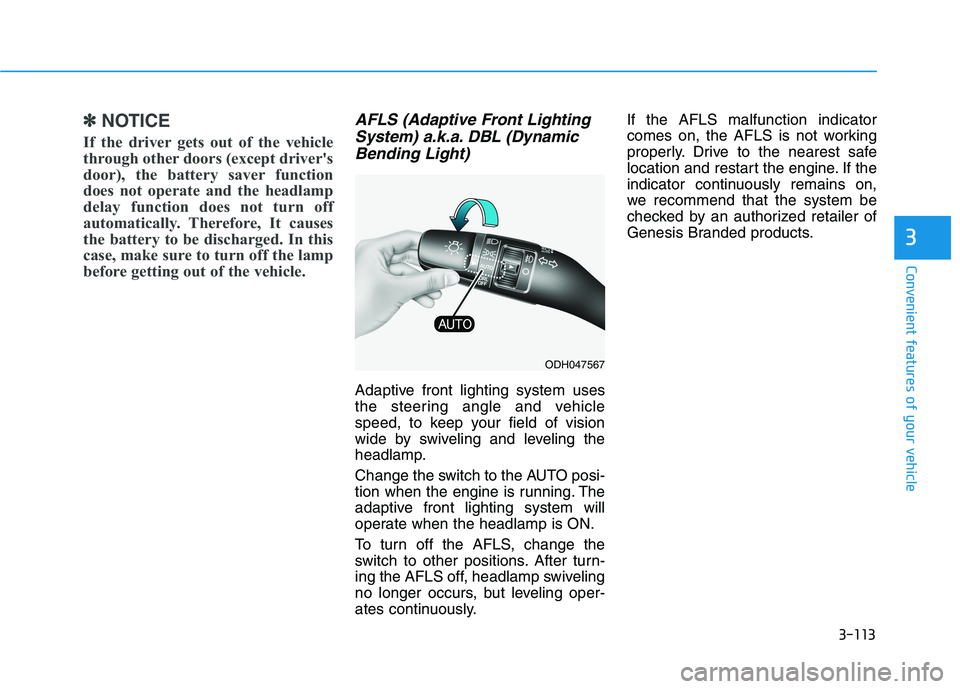
Adaptive front lighting system uses
the steering angle and vehicle
speed, to keep your field of vision
wide by swiveling and leveling the
headlamp.
Change the switch to the AUTO posi-
tion when the engine is running. The
adaptive front lighting system will
operate when the headlamp is ON.
To turn off the AFLS, change the
switch to other positions. After turn-
ing the AFLS off, headlamp swiveling
no longer occurs, but leveling oper-
ates continuously.If the AFLS malfunction indicator
comes on, the AFLS is not working
properly. Drive to the nearest safe
location and restart the engine. If the
indicator continuously remains on,
we recommend that the system be
checked by an authorized retailer of
Genesis Branded products.
ODH047567
Page 202 of 516
3-114
Convenient features of your vehicle
Daytime running light (DRL)
The Daytime Running Lights (DRL)
can make it easier for others to see
the front of your vehicle during the
day, especially after dawn and before
sunset.
for U.S.A
The DRL will turn off when:
1. The light switch is not in the AUTO
position.
2. The parking brake is applied.
3. The engine is turned off.
4. The hazard warning flasher is on.
5. You turn the turn signal light on.
- If you turn on the turn signal
light, only the corresponding
daytime running lights will turn
off.
6. The Smart High Beam is turned
on with pass function for warning.
for Canada
The DRL will turn off when:
1. The light switch is in the headlamp
position, including the operation
that the headlamp is turned on
automatically in the AUTO light
position.
2. The parking brake is applied.
3. The engine is turned off.
4. The hazard warning flasher is on.
5. You turn the turn signal light on.
- If you turn on the turn signal
light, only the corresponding
daytime running lights will turn
off.
- If you turn on turn signal light
with the position light turned on,
the daytime running lights will
turn off but the position light
remains on.
6. The Smart High Beam is turned
on with pass function for warning.
Headlamp leveling device
(if equipped)
Automatically adjusts the headlamp
beam level according to the number
of passengers and loading weight in
the luggage area.
If the Headlight Leveling Device is
not working properly have your vehi-
cle inspected by an authorized retail-
er of Genesis Branded products.
✽ ✽
NOTICE
• Check the headlamp washers peri-
odically to confirm that the wash-
er fluid is being sprayed properly
onto the headlamp lenses.
• The headlamp washer can be
operated 15 minutes after the last
operation.
Page 203 of 516
3-115
Convenient features of your vehicle
3
Welcome system (if equipped)
Welcome light (if equipped)
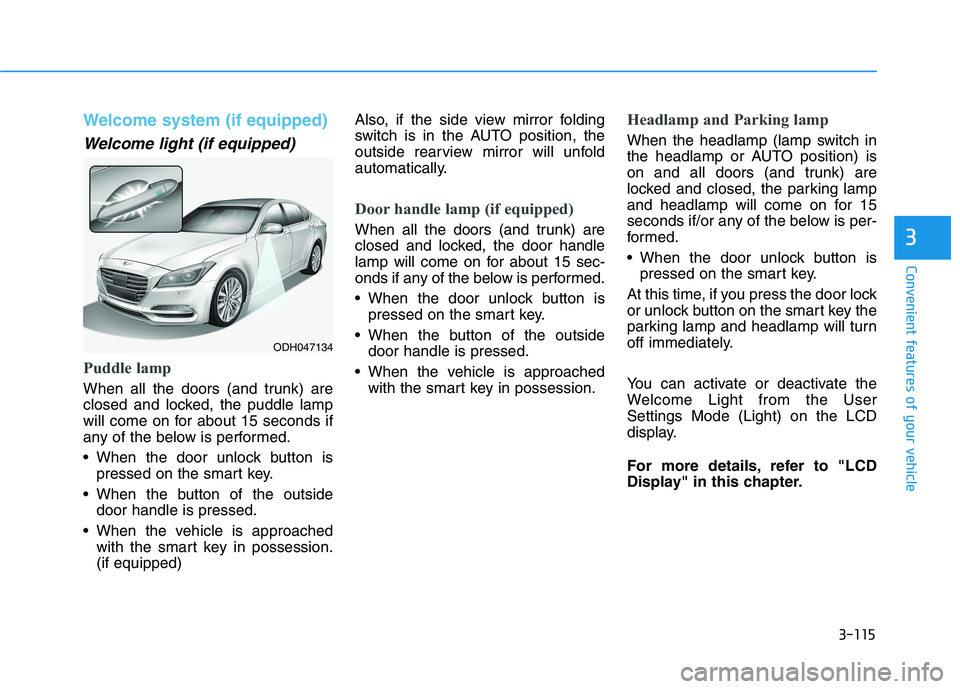
Puddle lamp
When all the doors (and trunk) are
closed and locked, the puddle lamp
will come on for about 15 seconds if
any of the below is performed.
When the door unlock button is
pressed on the smart key.
When the button of the outside
door handle is pressed.
When the vehicle is approached
with the smart key in possession.
(if equipped)Also, if the side view mirror folding
switch is in the AUTO position, the
outside rearview mirror will unfold
automatically.
Door handle lamp (if equipped)
When all the doors (and trunk) are
closed and locked, the door handle
lamp will come on for about 15 sec-
onds if any of the below is performed.
When the door unlock button is
pressed on the smart key.
When the button of the outside
door handle is pressed.
When the vehicle is approached
with the smart key in possession.
Headlamp and Parking lamp
When the headlamp (lamp switch in
the headlamp or AUTO position) is
on and all doors (and trunk) are
locked and closed, the parking lamp
and headlamp will come on for 15
seconds if/or any of the below is per-
formed.
When the door unlock button is
pressed on the smart key.
At this time, if you press the door lock
or unlock button on the smart key the
parking lamp and headlamp will turn
off immediately.
You can activate or deactivate the
Welcome Light from the User
Settings Mode (Light) on the LCD
display.
For more details, refer to "LCD
Display" in this chapter.
ODH047134
Page 204 of 516
3-116
Convenient features of your vehicle
Interior lamp
When the interior lamp switch is in
the DOOR position and all doors (and
trunk) are closed and locked, the
room lamp will come on for 30 sec-
onds if any of the below is performed.
When the door unlock button is
pressed on the smart key.
When the button of the outside
door handle is pressed.
At this time, if you press the door lock
or unlock button on the smart key the
room lamp will turn off immediately.
Interior lights
Interior lamp AUTO cut
The interior lamps will automatically
go off approximately 20 minutes after
the engine is turned off and the
doors closed. If a door is opened, the
lamp will go off 40 minutes after the
engine is turned off. If the doors are
locked by the smart key and the vehi-
cle enters the armed stage of the
theft alarm system, the lamps will go
off five seconds later.
Front lamps
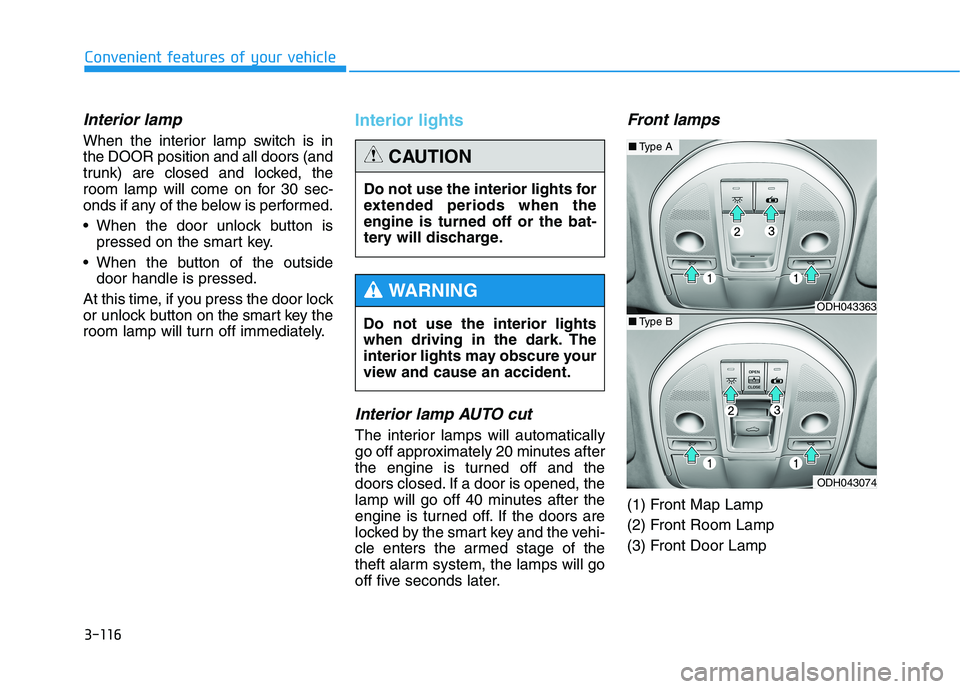
(1) Front Map Lamp
(2) Front Room Lamp
(3) Front Door Lamp Do not use the interior lights
when driving in the dark. The
interior lights may obscure your
view and cause an accident.
WARNING
Do not use the interior lights for
extended periods when the
engine is turned off or the bat-
tery will discharge.
CAUTION
ODH043363
ODH043074
■Type A
■Type B
Page 205 of 516
3-117
Convenient features of your vehicle
3
Front Map Lamp ( ):
Press either of these buttons to turn
the map lamp on or off. This light pro-
duces a spot beam for convenient
use as a map lamp at night or as a
personal lamp for the driver and the
front passenger.
Front Room Lamp ( ):
Press this button to turn the front and
rear room lamps on and off.
Front Door Lamp ( ):
The front or rear room lamps come
on when the front or rear doors are
opened if the engine is running or
not. When doors are unlocked by the
Smart Key, the front and rear lamps
come on for approximately 30 sec-
onds as long as any door is not
opened. The front and rear room
lamps go out gradually after approxi-
mately 30 seconds if the door is
closed. However, if the Engine Start/
Stop button is in the ON position or
all doors are locked, the front and
rear lamps will turn off.
If a door is opened with the Engine
Start/Stop button in the ACC position
or the OFF position, the front and
rear lamps stay on for about 20 min-
utes.
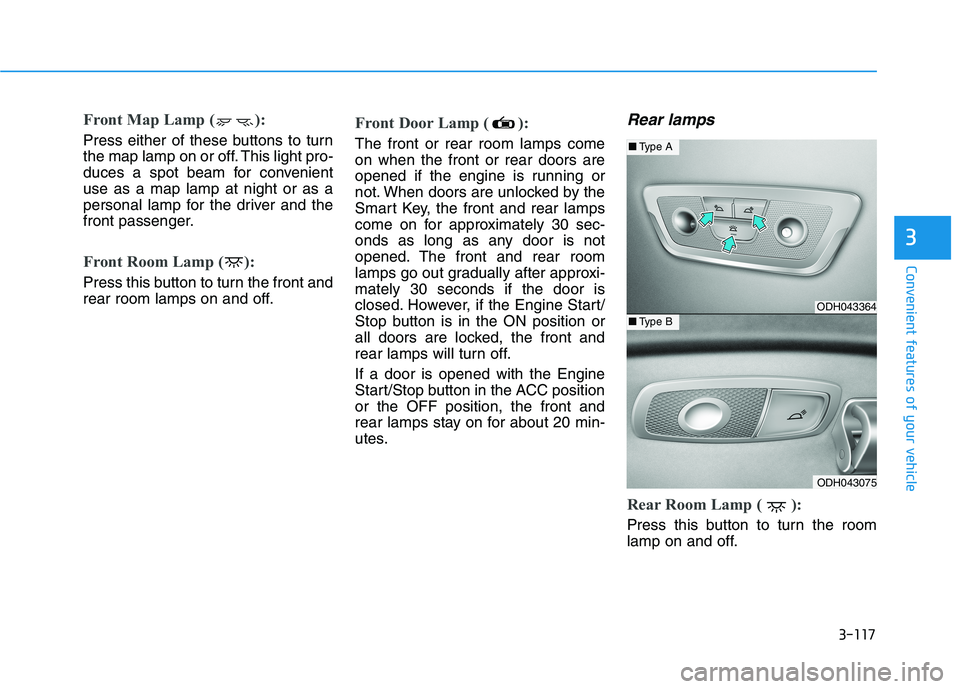
Rear lamps
Rear Room Lamp ( ):
Press this button to turn the room
lamp on and off.
ODH043364
ODH043075
■Type A
■Type B
Page 206 of 516
3-118
Convenient features of your vehicle
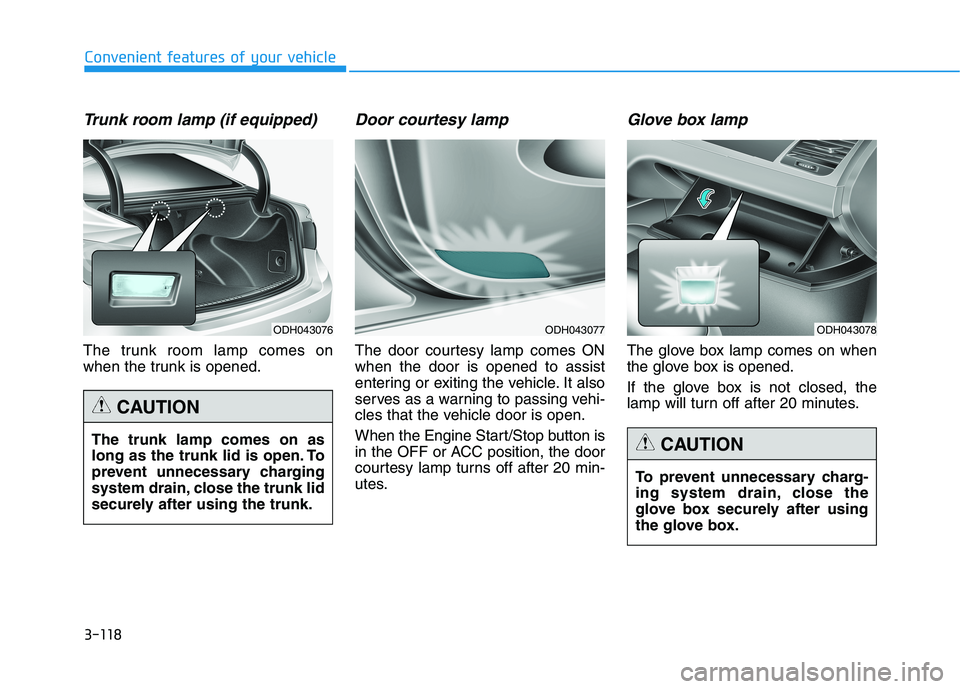
Trunk room lamp (if equipped)
The trunk room lamp comes on
when the trunk is opened.
Door courtesy lamp
The door courtesy lamp comes ON
when the door is opened to assist
entering or exiting the vehicle. It also
serves as a warning to passing vehi-
cles that the vehicle door is open.
When the Engine Start/Stop button is
in the OFF or ACC position, the door
courtesy lamp turns off after 20 min-
utes.
Glove box lamp
The glove box lamp comes on when
the glove box is opened.
If the glove box is not closed, the
lamp will turn off after 20 minutes.
To prevent unnecessary charg-
ing system drain, close the
glove box securely after using
the glove box.
CAUTION
ODH043078ODH043077ODH043076
The trunk lamp comes on as
long as the trunk lid is open. To
prevent unnecessary charging
system drain, close the trunk lid
securely after using the trunk.
CAUTION