lamp HYUNDAI GENESIS G80 2016 Owners Manual
[x] Cancel search | Manufacturer: HYUNDAI, Model Year: 2016, Model line: GENESIS G80, Model: HYUNDAI GENESIS G80 2016Pages: 516, PDF Size: 81.01 MB
Page 8 of 516
F8
Introduction
Other fuels
Using fuels such as;
- Silicone (Si) contained fuel,
- Ferrocene (Fe) contained fuel,
and
- Other metallic additives con-
tained fuels,
may cause vehicle and engine dam-
age or cause plugging, misfiring,
poor acceleration, engine stalling,
catalyst melting, abnormal corrosion,
life cycle reduction, etc.
Also, the Malfunction Indicator Lamp
(MIL) may illuminate.
✽ ✽
NOTICE
Damage to the fuel system or per-
formance problem caused by the use
of these fuels may not be covered by
your New Vehicle Limited
Warranty.
Gasoline containing MMT
Some gasoline contains harmful
manganese-based fuel additives
such as
MMT (Methylcyclopentadienyl
Manganese Tricarbonyl
).
Genesis Branded Vehicle does not
recommend the use of gasoline con-
taining MMT.
This type of fuel can reduce vehicle
performance and affect your emis-
sion control system.
The malfunction indicator lamp on
the cluster may come on.
Do not use methanol
Fuels containing methanol (wood
alcohol) should not be used in your
vehicle.
This type of fuel can reduce vehicle
performance and damage compo-
nents of the fuel system, engine con-
trol system and emission control sys-
tem.
Fuel Additives
Genesis Branded Vehicle recom-
mends that you use good quality
gasolines treated with detergent
additives such as TOP TIER
Detergent Gasoline, which help pre-
vent deposit formation in the engine.Your New Vehicle Limited
Warranty may not cover dam-
age to the fuel system and any
performance problems that are
caused by the use of fuels con-
taining methanol.
CAUTION
Page 13 of 516
1-2
E EX
XT
TE
ER
RI
IO
OR
R
O
OV
VE
ER
RV
VI
IE
EW
W
(
(I
I)
)
Your vehicle at a glance
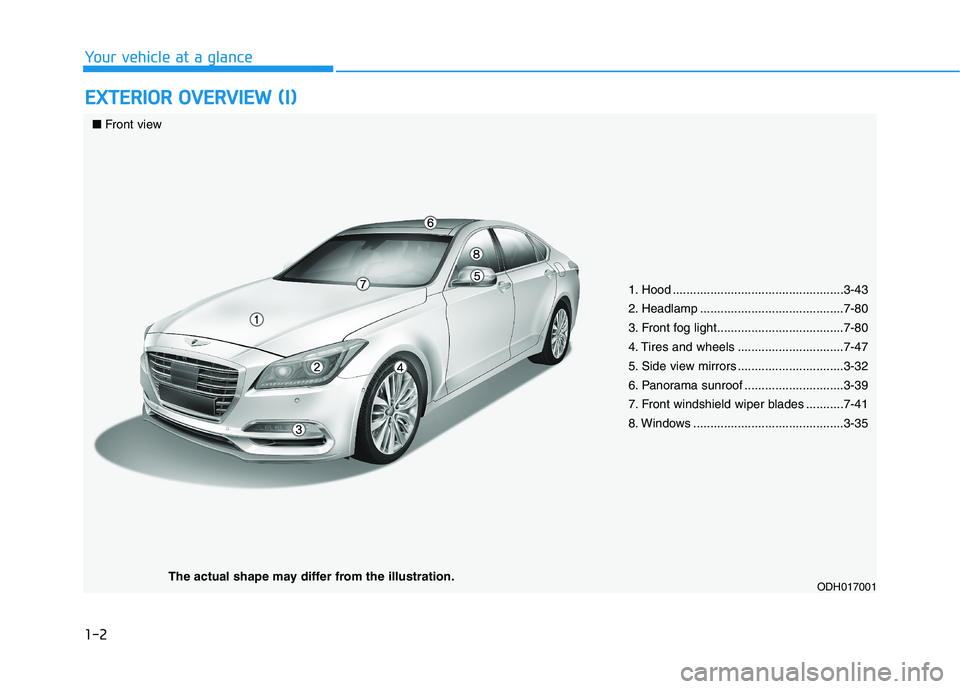
1. Hood ..................................................3-43
2. Headlamp ..........................................7-80
3. Front fog light.....................................7-80
4. Tires and wheels ...............................7-47
5. Side view mirrors ...............................3-32
6. Panorama sunroof .............................3-39
7. Front windshield wiper blades ...........7-41
8. Windows ............................................3-35
ODH017001
■Front view
The actual shape may differ from the illustration.
Page 14 of 516
1-3
Your vehicle at a glance
E EX
XT
TE
ER
RI
IO
OR
R
O
OV
VE
ER
RV
VI
IE
EW
W
(
(I
II
I)
)
1
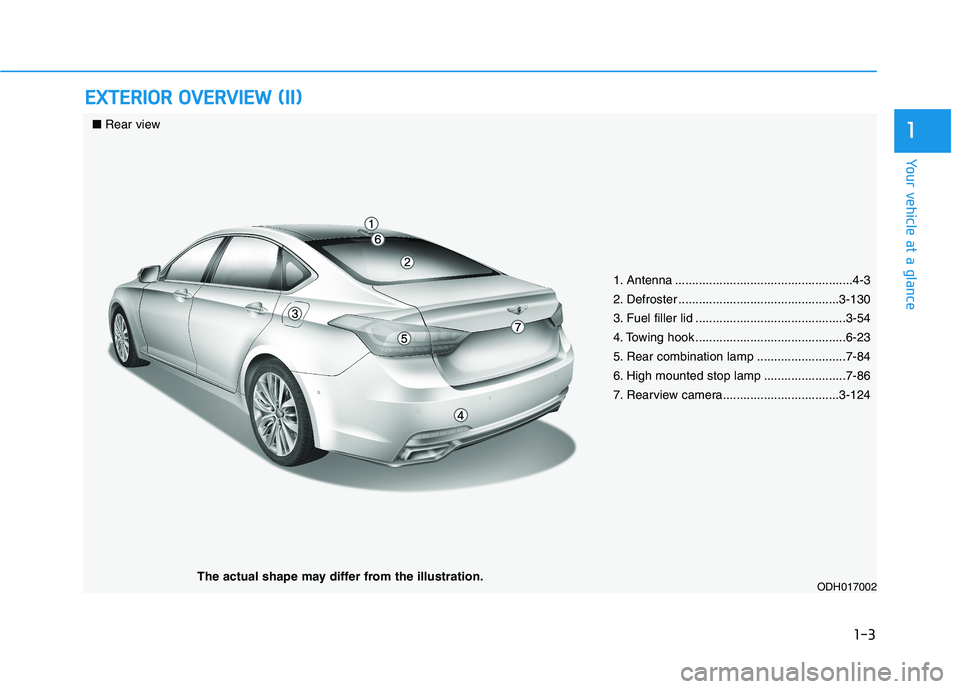
1. Antenna ....................................................4-3
2. Defroster ...............................................3-130
3. Fuel filler lid ............................................3-54
4. Towing hook ............................................6-23
5. Rear combination lamp ..........................7-84
6. High mounted stop lamp ........................7-86
7. Rearview camera..................................3-124
ODH017002
■Rear view
The actual shape may differ from the illustration.
Page 152 of 516
3-64
Convenient features of your vehicle
LCD Modes
L LC
CD
D
D
DI
IS
SP
PL
LA
AY
Y
The information provided differs according to the items applied to your vehicle.
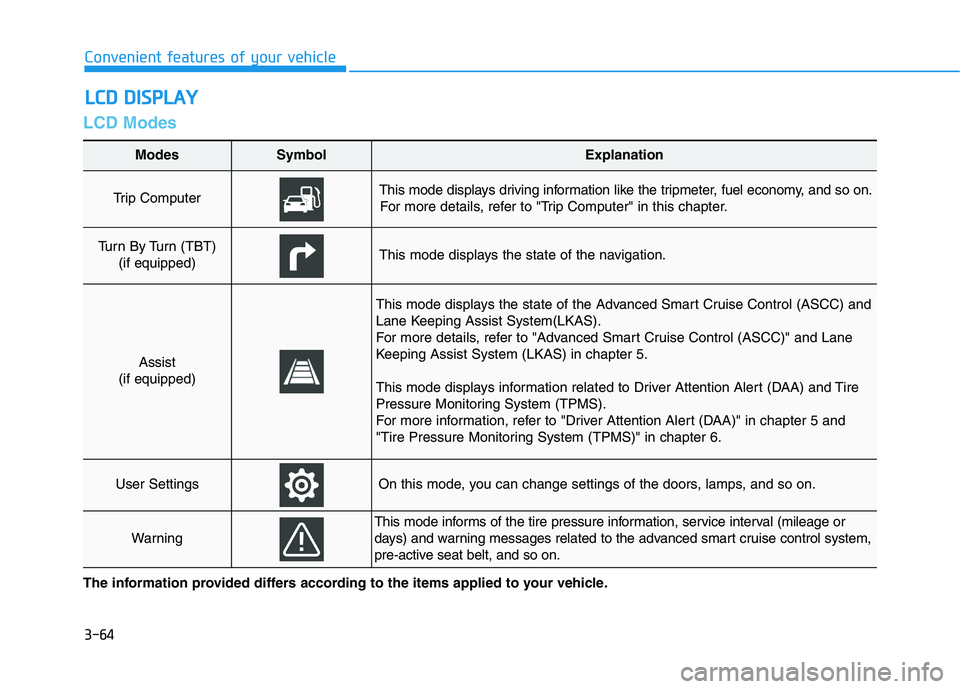
Modes SymbolExplanation
Trip Computer This mode displays driving information like the tripmeter, fuel economy, and so on.
For more details, refer to "Trip Computer" in this chapter.
Turn By Turn (TBT)
(if equipped)This mode displays the state of the navigation.
Assist
(if equipped)
This mode displays the state of the Advanced Smart Cruise Control (ASCC) and
Lane Keeping Assist System(LKAS).
For more details, refer to "Advanced Smart Cruise Control (ASCC)" and Lane
Keeping Assist System (LKAS) in chapter 5.
This mode displays information related to Driver Attention Alert (DAA) and Tire
Pressure Monitoring System (TPMS).
For more information, refer to "Driver Attention Alert (DAA)" in chapter 5 and
"Tire Pressure Monitoring System (TPMS)" in chapter 6.
User SettingsOn this mode, you can change settings of the doors, lamps, and so on.
Warning
This mode informs of the tire pressure information, service interval (mileage or
days) and warning messages related to the advanced smart cruise control system,
pre-active seat belt, and so on.
Page 156 of 516
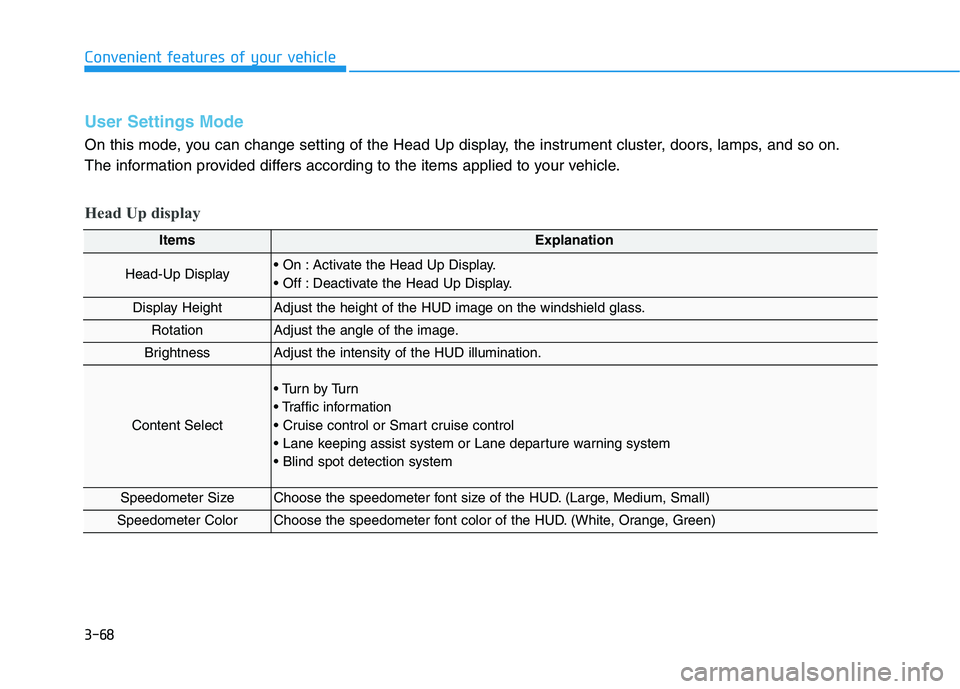
3-68
Convenient features of your vehicle
ItemsExplanation
Head-Up Display Activate the Head Up Display.
Deactivate the Head Up Display.
Display HeightAdjust the height of the HUD image on the windshield glass.
RotationAdjust the angle of the image.
BrightnessAdjust the intensity of the HUD illumination.
Content Select
Tu r n b y Tu r n
Speedometer SizeChoose the speedometer font size of the HUD. (Large, Medium, Small)
Speedometer ColorChoose the speedometer font color of the HUD. (White, Orange, Green)
User Settings Mode
On this mode, you can change setting of the Head Up display, the instrument cluster, doors, lamps, and so on.
The information provided differs according to the items applied to your vehicle.
Head Up display
Page 159 of 516
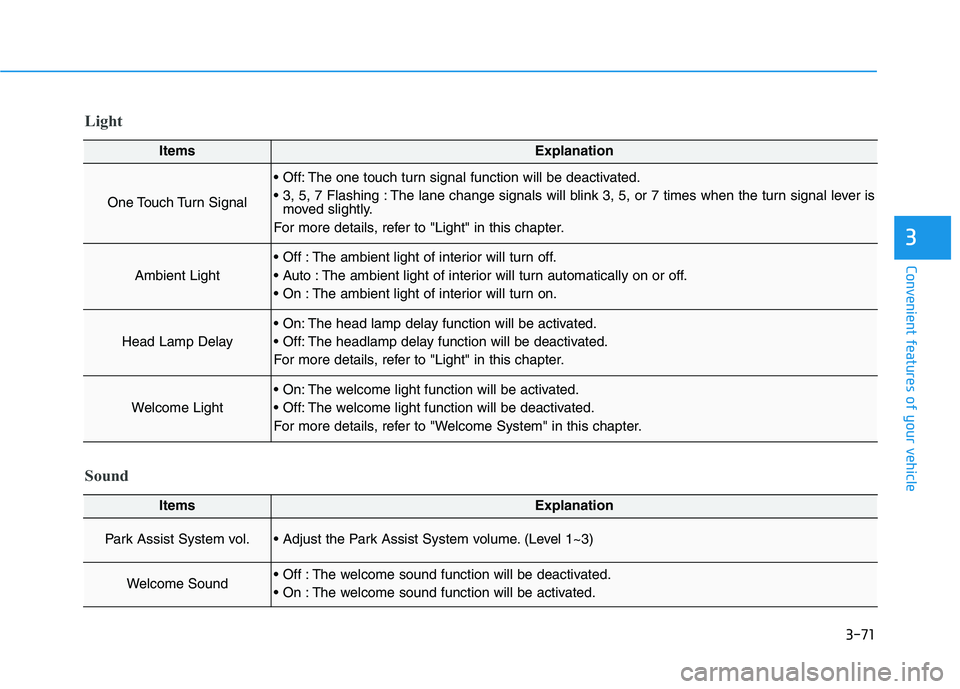
3-71
Convenient features of your vehicle
3
ItemsExplanation
One Touch Turn Signal
The one touch turn signal function will be deactivated.
The lane change signals will blink 3, 5, or 7 times when the turn signal lever is
moved slightly.
For more details, refer to "Light" in this chapter.
Ambient Light
The ambient light of interior will turn off.
The ambient light of interior will turn automatically on or off.
The ambient light of interior will turn on.
Head Lamp Delay
The head lamp delay function will be activated.
The headlamp delay function will be deactivated.
For more details, refer to "Light" in this chapter.
Welcome Light
The welcome light function will be activated.
The welcome light function will be deactivated.
For more details, refer to "Welcome System" in this chapter.
Light
ItemsExplanation
Park Assist System vol. (Level 1~3)
Welcome Sound The welcome sound function will be deactivated.
The welcome sound function will be activated.
Sound
Page 170 of 516
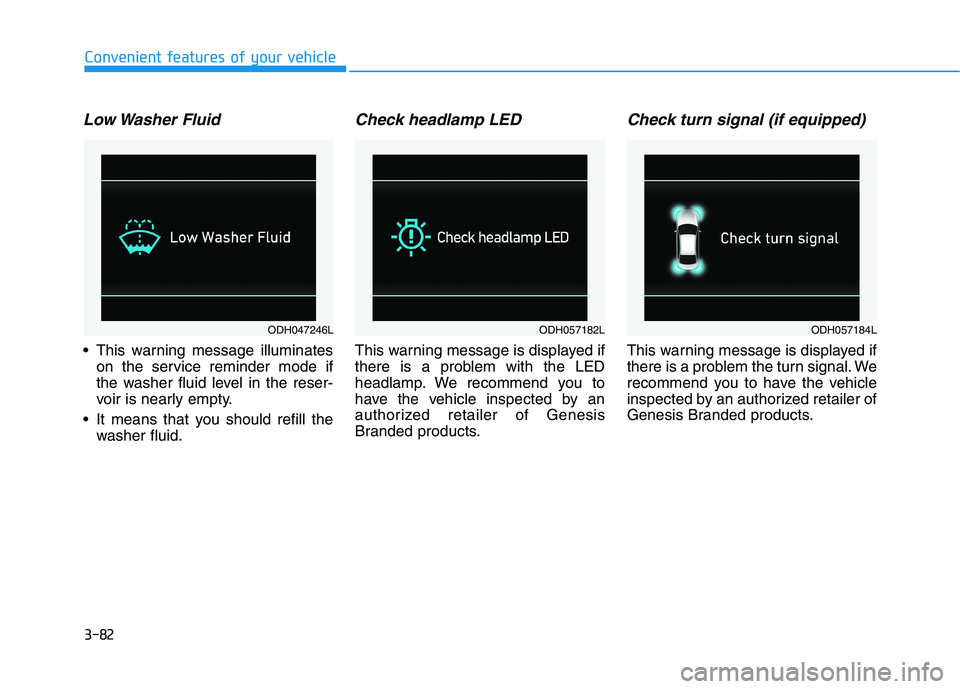
3-82
Convenient features of your vehicle
Low Washer Fluid
This warning message illuminates
on the service reminder mode if
the washer fluid level in the reser-
voir is nearly empty.
It means that you should refill the
washer fluid.
Check headlamp LED
This warning message is displayed if
there is a problem with the LED
headlamp. We recommend you to
have the vehicle inspected by an
authorized retailer of Genesis
Branded products.
Check turn signal (if equipped)
This warning message is displayed if
there is a problem the turn signal. We
recommend you to have the vehicle
inspected by an authorized retailer of
Genesis Branded products.
ODH047246LODH057182LODH057184L
Page 182 of 516
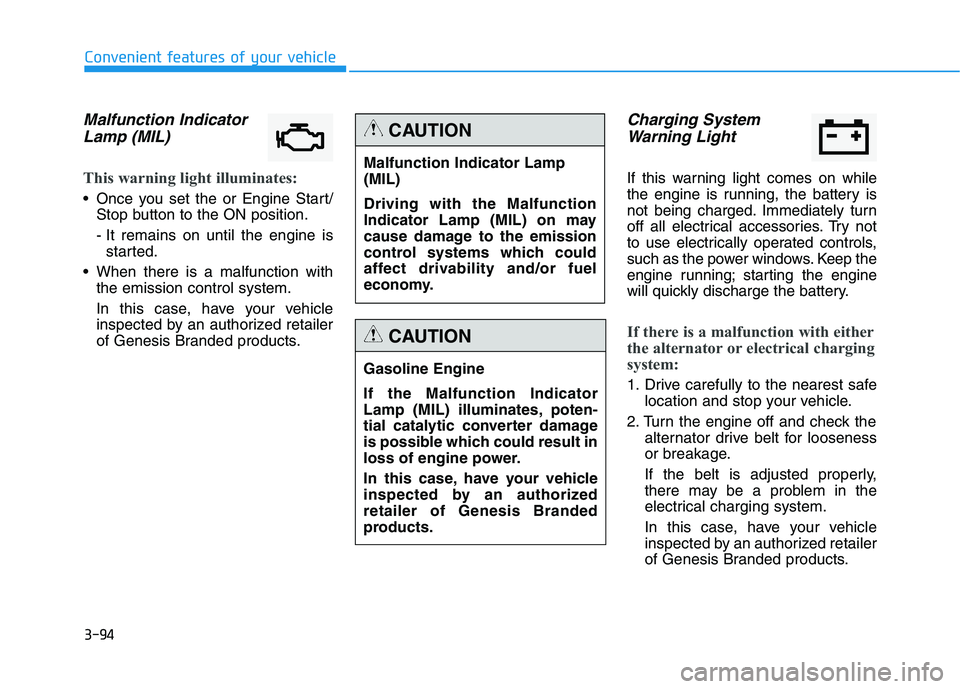
3-94
Convenient features of your vehicle
Malfunction Indicator
Lamp (MIL)
This warning light illuminates:
Once you set the or Engine Start/
Stop button to the ON position.
- It remains on until the engine is
started.
When there is a malfunction with
the emission control system.
In this case, have your vehicle
inspected by an authorized retailer
of Genesis Branded products.
Charging System
Warning Light
If this warning light comes on while
the engine is running, the battery is
not being charged. Immediately turn
off all electrical accessories. Try not
to use electrically operated controls,
such as the power windows. Keep the
engine running; starting the engine
will quickly discharge the battery.
If there is a malfunction with either
the alternator or electrical charging
system:
1. Drive carefully to the nearest safe
location and stop your vehicle.
2. Turn the engine off and check the
alternator drive belt for looseness
or breakage.
If the belt is adjusted properly,
there may be a problem in the
electrical charging system.
In this case, have your vehicle
inspected by an authorized retailer
of Genesis Branded products.
Malfunction Indicator Lamp
(MIL)
Driving with the Malfunction
Indicator Lamp (MIL) on may
cause damage to the emission
control systems which could
affect drivability and/or fuel
economy.
CAUTION
Gasoline Engine
If the Malfunction Indicator
Lamp (MIL) illuminates, poten-
tial catalytic converter damage
is possible which could result in
loss of engine power.
In this case, have your vehicle
inspected by an authorized
retailer of Genesis Branded
products.
CAUTION
Page 194 of 516
3-106
Convenient features of your vehicle
Exterior lights
Lighting control
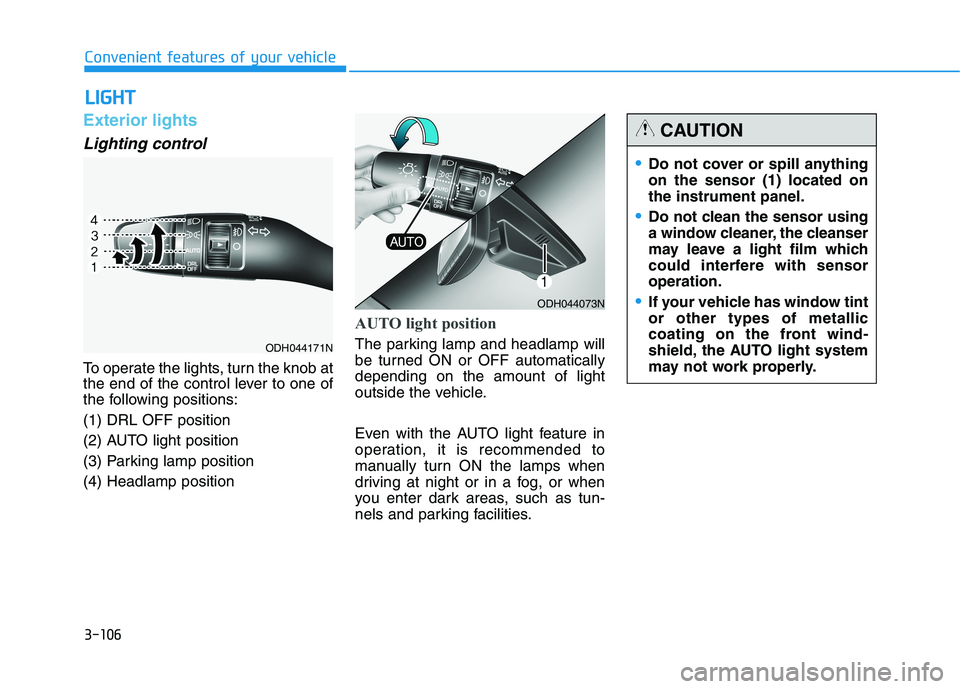
To operate the lights, turn the knob at
the end of the control lever to one of
the following positions:
(1) DRL OFF position
(2) AUTO light position
(3) Parking lamp position
(4) Headlamp position
AUTO light position
The parking lamp and headlamp will
be turned ON or OFF automatically
depending on the amount of light
outside the vehicle.
Even with the AUTO light feature in
operation, it is recommended to
manually turn ON the lamps when
driving at night or in a fog, or when
you enter dark areas, such as tun-
nels and parking facilities.
L LI
IG
GH
HT
T
ODH044073N
Do not cover or spill anything
on the sensor (1) located on
the instrument panel.
Do not clean the sensor using
a window cleaner, the cleanser
may leave a light film which
could interfere with sensor
operation.
If your vehicle has window tint
or other types of metallic
coating on the front wind-
shield, the AUTO light system
may not work properly.
CAUTION
ODH044171N
Page 195 of 516
3-107
Convenient features of your vehicle
3
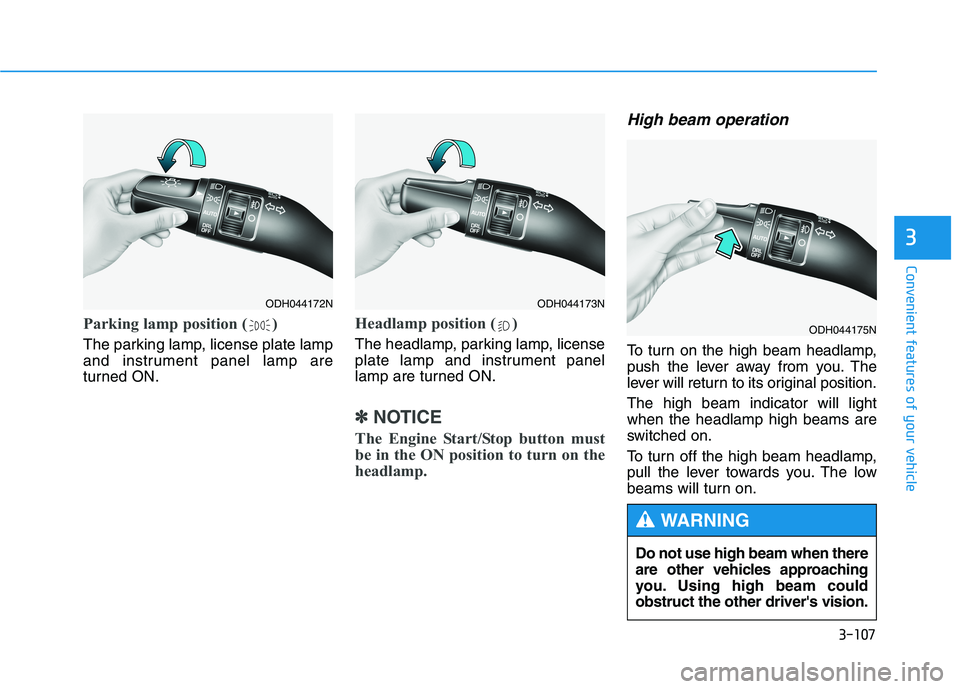
Parking lamp position ( )
The parking lamp, license plate lamp
and instrument panel lamp are
turned ON.
Headlamp position ( )
The headlamp, parking lamp, license
plate lamp and instrument panel
lamp are turned ON.
✽ ✽
NOTICE
The Engine Start/Stop button must
be in the ON position to turn on the
headlamp.
High beam operation
To turn on the high beam headlamp,
push the lever away from you. The
lever will return to its original position.
The high beam indicator will light
when the headlamp high beams are
switched on.
To turn off the high beam headlamp,
pull the lever towards you. The low
beams will turn on.
ODH044172NODH044173N
ODH044175N
Do not use high beam when there
are other vehicles approaching
you. Using high beam could
obstruct the other driver's vision.
WARNING