driver HYUNDAI GENESIS GV70 2022 Owners Manual
[x] Cancel search | Manufacturer: HYUNDAI, Model Year: 2022, Model line: GENESIS GV70, Model: HYUNDAI GENESIS GV70 2022Pages: 647, PDF Size: 49.91 MB
Page 295 of 647
06
6-21
High Performance Brake
For vehicles equipped with the High
Performance Brake (large diameter
monoblock brakes with enhanced
braking performance), noise such as a
squeal, squeak or groan is generated
while braking. This is normal and the
friction may create circle patterns on
the disc surface. This is also a normal
condition which does not affect braking
performance.
WARNING
Frequent braking may deform
components and worn the disc brake
causing vibration when braking.
Observe the speed limit to prevent
brake damage from excessive braking.
Brake wear, noise, vibration from
excessive braking or deformation of the
brakes caused by repeatedly braking in
high speed, racing on tracks, etc. may
not be covered under warranty.
Electronic Parking Brake (EPB)
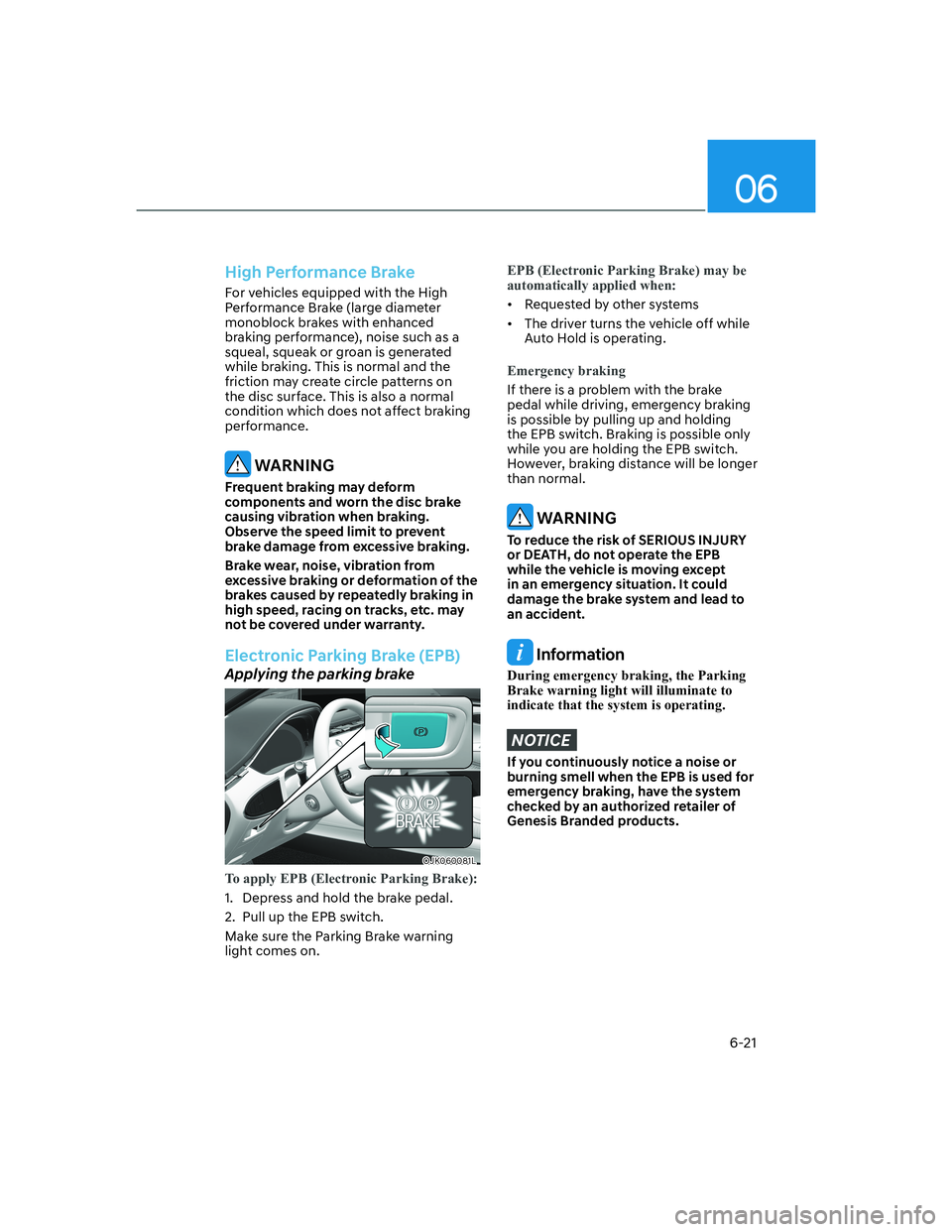
Applying the parking brake
OJK060081LOJK060081L
To apply EPB (Electronic Parking Brake):
1. Depress and hold the brake pedal.
2. Pull up the EPB switch.
Make sure the Parking Brake warning
light comes on.
EPB (Electronic Parking Brake) may be
automatically applied when:
• Requested by other systems
• The driver turns the vehicle off while
Auto Hold is operating.
Emergency braking
If there is a problem with the brake
pedal while driving, emergency braking
is possible by pulling up and holding
the EPB switch. Braking is possible only
while you are holding the EPB switch.
However, braking distance will be longer
than normal.
WARNING
To reduce the risk of SERIOUS INJURY
or DEATH, do not operate the EPB
while the vehicle is moving except
in an emergency situation. It could
damage the brake system and lead to
an accident.
Information
During emergency braking, the Parking
Brake warning light will illuminate to
indicate that the system is operating.
NOTICE
If you continuously notice a noise or
burning smell when the EPB is used for
emergency braking, have the system
checked by an authorized retailer of
Genesis Branded products.
Page 297 of 647
06
6-23
Warning messages
OJK061066NOJK061066N
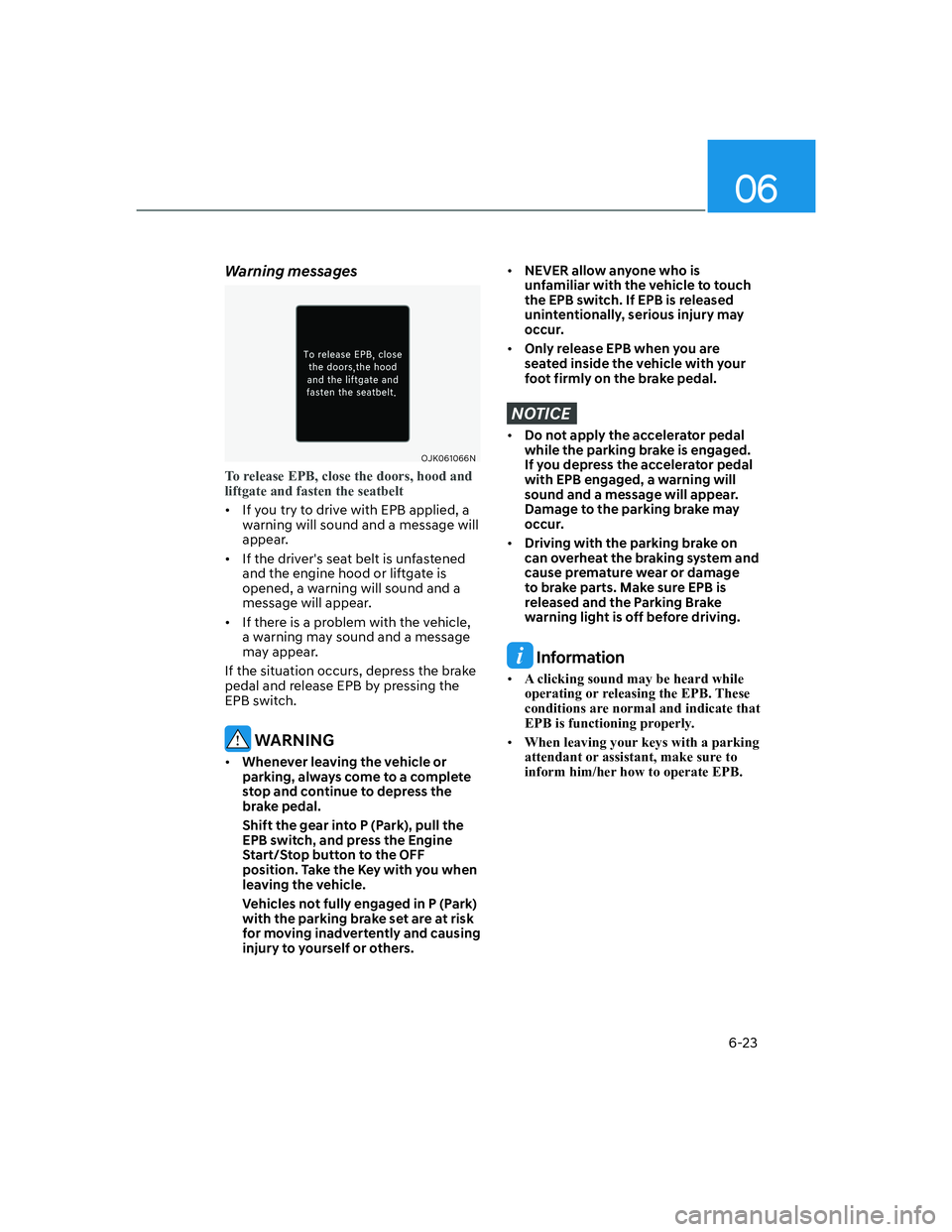
To release EPB, close the doors, hood and
liftgate and fasten the seatbelt
• If you try to drive with EPB applied, a
warning will sound and a message will
appear.
• If the driver's seat belt is unfastened
and the engine hood or liftgate is
opened, a warning will sound and a
message will appear.
• If there is a problem with the vehicle,
a warning may sound and a message
may appear.
If the situation occurs, depress the brake
pedal and release EPB by pressing the
EPB switch.
WARNING
• Whenever leaving the vehicle or
parking, always come to a complete
stop and continue to depress the
brake pedal.
Shift the gear into P (Park), pull the
EPB switch, and press the Engine
Start/Stop button to the OFF
position. Take the Key with you when
leaving the vehicle.
Vehicles not fully engaged in P (Park)
with the parking brake set are at risk
for moving inadvertently and causing
injury to yourself or others.
• NEVER allow anyone who is
unfamiliar with the vehicle to touch
the EPB switch. If EPB is released
unintentionally, serious injury may
occur.
• Only release EPB when you are
seated inside the vehicle with your
foot firmly on the brake pedal.
NOTICE
• Do not apply the accelerator pedal
while the parking brake is engaged.
If you depress the accelerator pedal
with EPB engaged, a warning will
sound and a message will appear.
Damage to the parking brake may
occur.
• Driving with the parking brake on
can overheat the braking system and
cause premature wear or damage
to brake parts. Make sure EPB is
released and the Parking Brake
warning light is off before driving.
Information
• A clicking sound may be heard while
operating or releasing the EPB. These
conditions are normal and indicate that
EPB is functioning properly.
• When leaving your keys with a parking
attendant or assistant, make sure to
inform him/her how to operate EPB.
Page 299 of 647

06
6-25
NOTICE
• If the EPB warning light is still
on, have the system checked by
an authorized retailer of Genesis
Branded products.
• If the Parking Brake warning light
does not illuminate or blinks even
though the EPB switch was pulled
up, EPB may not be applied.
• If the Parking Brake warning light
blinks when the EPB warning light is
on, press the switch, and then pull it
up. Repeat this one more time. If the
EPB warning does not go off, have
the system checked by an authorized
retailer of Genesis Branded products.
Parking brake warning light
Check the Parking Brake
warning light by pressing the
Engine Stop/Start button to the
ON position.
This light will be illuminated when the
parking brake is applied with the Engine
Stop/Start button in the START or ON
position.
Before driving, be sure the parking
brake is released and the Parking Brake
warning light is OFF.
If the Parking Brake warning light
remains on after the parking brake is
released while the engine is running,
there may be a malfunction in the
brake system. Immediate attention is
necessary.
If at all possible, cease driving the vehicle
immediately. If that is not possible,
use extreme caution while operating
the vehicle and only continue to drive
the vehicle until you can reach a safe
location.
When the EPB (Electronic Parking
Brake) does not release
If the EPB does not release normally,
contact an authorized retailer of Genesis
Branded products by loading the vehicle
on a flatbed tow truck and have the
system checked.
Auto Hold
Auto Hold helps maintain the vehicle in a
standstill even though the brake pedal is
not depressed after the driver brings the
vehicle to a complete stop by depressing
the brake pedal.
To apply:
OJK060010OJK060010
1. With the driver's door and engine
hood closed, depress the brake
pedal and then press the AUTO
HOLD switch. The white AUTO HOLD
indicator will come on and the system
will be in the standby position.
Page 301 of 647

06
6-27
Information
• The Auto Hold does not operate when:
-The driver's door is opened
-The engine hood is opened
-The gear is in P (Park)
-EPB is applied
• For your safety, the Auto Hold
automatically switches to EPB when:
-The driver's door is opened
-The engine hood is opened
-The vehicle is in a standstill for more
than 10 minutes
-The vehicle is standing on a steep
slope
-The vehicle moved several times
In these cases, the Parking Brake
warning light comes on, the AUTO
HOLD indicator changes from green
to white, and a warning sound and a
message will appear to inform you that
EPB has been automatically engaged.
Before driving off again, depress the
brake pedal, check the surrounding
area near your vehicle and release the
parking brake manually with the EPB
switch.
• While operating Auto Hold, you may
hear mechanical noise. However, it is
normal operating noise.
NOTICE
If the AUTO HOLD indicator changes
to yellow, Auto Hold is not working
properly. Contact an authorized retailer
of Genesis Branded products.
WARNING
• Depress the accelerator pedal slowly
when you start the vehicle.
• For your safety, cancel Auto Hold
when you drive downhill, back up the
vehicle or park the vehicle.
NOTICE
If there is a malfunction with the
driver's door or engine hood open
detection system, Auto Hold may not
work properly.
Contact an authorized retailer of
Genesis Branded products.
Warning messages
OIK060069LOIK060069L
Parking brake automatically engaged
When EPB is applied while Auto Hold
is activated, a warning will sound and a
message will appear.
Page 302 of 647
Driving Your Vehicle
6-28
OIK060067LOIK060067L
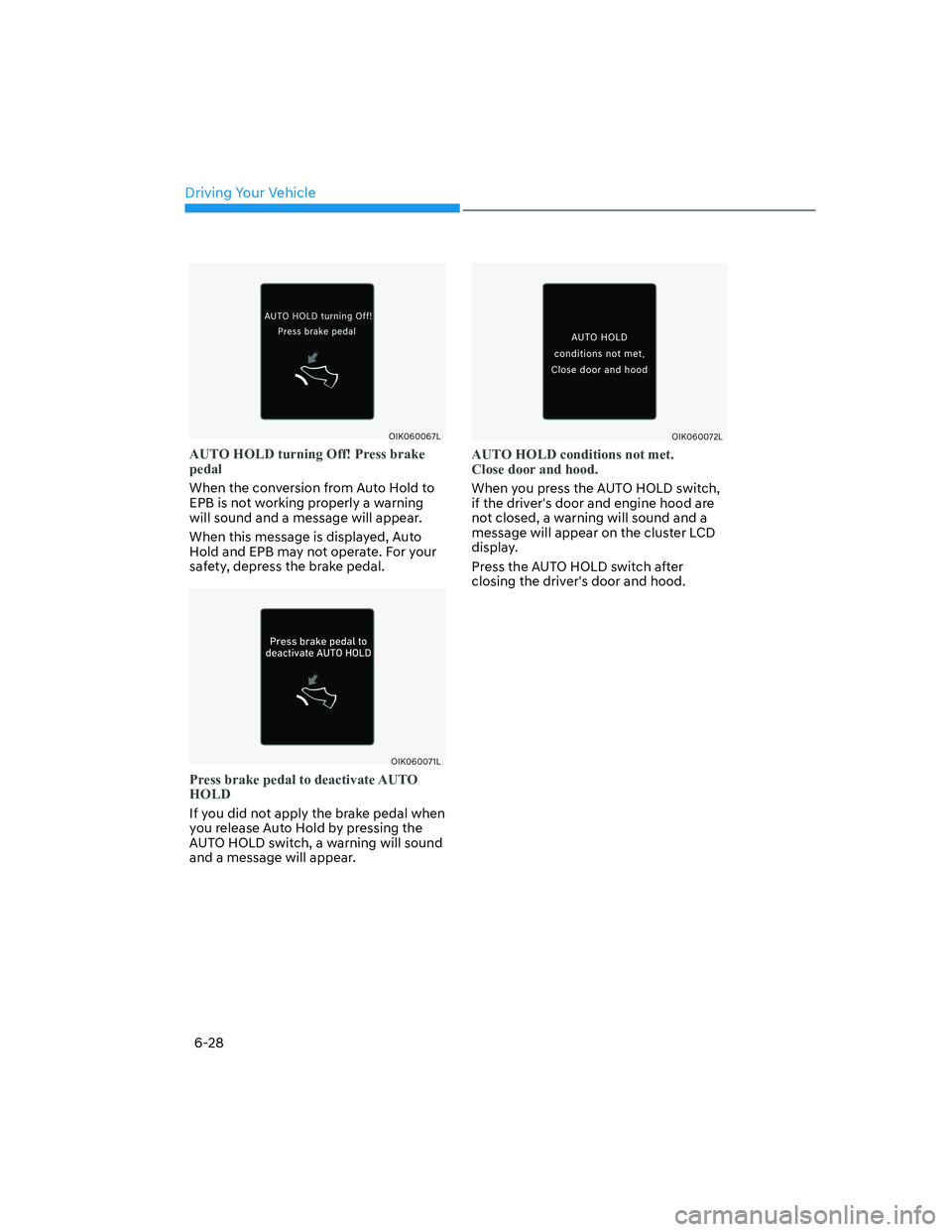
AUTO HOLD turning Off! Press brake
pedal
When the conversion from Auto Hold to
EPB is not working properly a warning
will sound and a message will appear.
When this message is displayed, Auto
Hold and EPB may not operate. For your
safety, depress the brake pedal.
OIK060071LOIK060071L
Press brake pedal to deactivate AUTO
HOLD
If you did not apply the brake pedal when
you release Auto Hold by pressing the
AUTO HOLD switch, a warning will sound
and a message will appear.
OIK060072LOIK060072L
AUTO HOLD conditions not met.
Close door and hood.
When you press the AUTO HOLD switch,
if the driver's door and engine hood are
not closed, a warning will sound and a
message will appear on the cluster LCD
display.
Press the AUTO HOLD switch after
closing the driver's door and hood.
Page 303 of 647
06
6-29
Anti-Lock Brake System (ABS)
WARNING
Anti-Lock Braking System (ABS) or
Electronic Stability Control (ESC)
system will not prevent accidents
due to improper or dangerous driving
maneuvers. Even though vehicle
control is improved during emergency
braking, always maintain a safe
distance between you and objects
ahead of you. Vehicle speeds should
always be reduced during extreme
road conditions. The braking distance
for vehicles equipped with ABS or ESC
may be longer than for those without
these systems in the following road
conditions.
Drive your vehicle at reduced speeds
during the following conditions:
• Rough, gravel or snow-covered
roads.
• On roads where the road surface is
pitted or has different surface height.
• Tire chains are installed on your
vehicle.
The safety features of ABS or ESC
equipped vehicle should not be tested
by high speed driving or cornering. This
could endanger the safety of yourself or
others.
ABS is an electronic braking system that
helps prevent a braking skid. ABS allows
the driver to steer and brake at the same
time.
Using ABS
To obtain the maximum benefit from
your ABS in an emergency situation,
do not attempt to modulate your brake
pressure and do not try to pump your
brakes. Depress your brake pedal as hard
as possible.
When you apply your brakes under
conditions which may lock the wheels,
you may hear sounds from the brakes,
or feel a corresponding sensation in the
brake pedal. This is normal and it means
your ABS is active.
ABS does not reduce the time or distance
it takes to stop the vehicle.
Always maintain a safe distance from the
vehicle in front of you.
ABS will not prevent a skid that results
from sudden changes in direction, such
as trying to take a corner too fast or
making a sudden lane change. Always
drive at a safe speed for the road and
weather conditions.
ABS cannot prevent a loss of stability.
Always steer moderately when braking
hard. Severe or sharp steering wheel
movement can still cause your vehicle to
veer into oncoming traffic or off the road.
On loose or uneven road surfaces,
operation of the anti-lock brake system
may result in a longer stopping distance
than for vehicles equipped with a
conventional brake system.
The ABS (
) warning light will stay
on for several seconds after the Engine
Start/Stop button is in the ON position.
Page 304 of 647

Driving Your Vehicle
6-30
During that time, ABS will go through
self-diagnosis and the light will go off if
everything is normal. If the light stays on,
you may have a problem with your ABS.
Contact an authorized retailer of Genesis
Branded products as soon as possible.
WARNING
If the ABS () warning light is on and
stays on, you may have a problem with
the ABS. Your power brakes will work
normally. To reduce the risk of serious
injury or death, contact your authorized
retailer of Genesis Branded products as
soon as possible.
NOTICE
When you drive on a road having poor
traction, such as an icy road, and apply
your brakes continuously, ABS will be
active continuously and the ABS (
)
warning light may illuminate. Pull your
vehicle over to a safe place and turn the
vehicle off.
Restart the vehicle. If the ABS warning
light is off, then your ABS system is
normal.
Otherwise, you may have a problem
with your ABS system. Contact an
authorized retailer of Genesis Branded
products as soon as possible.
Information
When you jump start your vehicle because
of a drained battery, the ABS ()
warning light may turn on at the same
time. This happens because of the low
battery voltage. It does not mean your
ABS is malfunctioning. Have the battery
recharged before driving the vehicle.
Electronic Stability Control (ESC)
OJK060038LOJK060038L
Electronic Stability Control helps to
stabilize the vehicle during cornering
maneuvers.
ESC checks where you are steering and
where the vehicle is actually going. ESC
applies braking pressure to any one of
the vehicle's brakes and intervenes in the
engine management system to assist the
driver with keeping the vehicle on the
intended path. It is not a substitute for
safe driving practices. Always adjust your
speed and driving to the road conditions.
Page 308 of 647
Driving Your Vehicle
6-34
Hill-Start Assist Control (HAC)
Hill-Start Assist Control helps prevent
the vehicle from rolling backwards
when starting a vehicle from a stop
on a hill. The system operates the
brakes automatically for approximately
2 seconds (maximum of 5 seconds
when the accelerator pedal is slightly
depressed during HAC operation) and
releases the brake after 2 seconds or
when the accelerator pedal is depressed.
WARNING
Always be ready to depress the
accelerator pedal when starting off
an incline. Hill-Start Assist Control
activates only for approximately 2
seconds (maximum of 5 seconds
when the accelerator pedal is slightly
depressed during HAC operation).
Information
• Hill-Start Assist Control does not
operate when the gear is shifted to P
(Park) or N (Neutral).
• Hill-Start Assist Control activates even
when the ESC (Electronic Stability
Control) is off. However, it does not
activate, when ESC does not operate
normally.
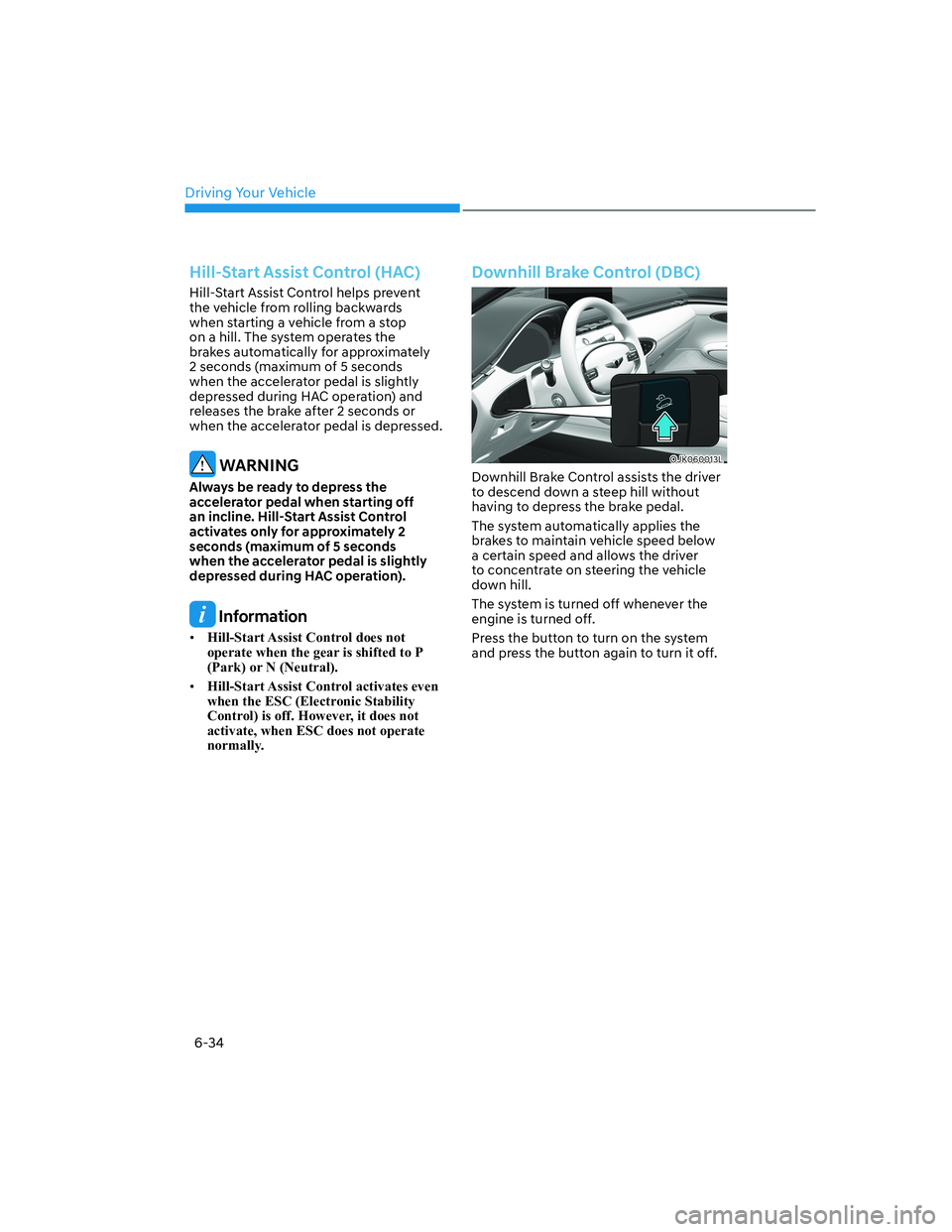
Downhill Brake Control (DBC)
OJK060013LOJK060013L
Downhill Brake Control assists the driver
to descend down a steep hill without
having to depress the brake pedal.
The system automatically applies the
brakes to maintain vehicle speed below
a certain speed and allows the driver
to concentrate on steering the vehicle
down hill.
The system is turned off whenever the
engine is turned off.
Press the button to turn on the system
and press the button again to turn it off.
Page 309 of 647
06
6-35
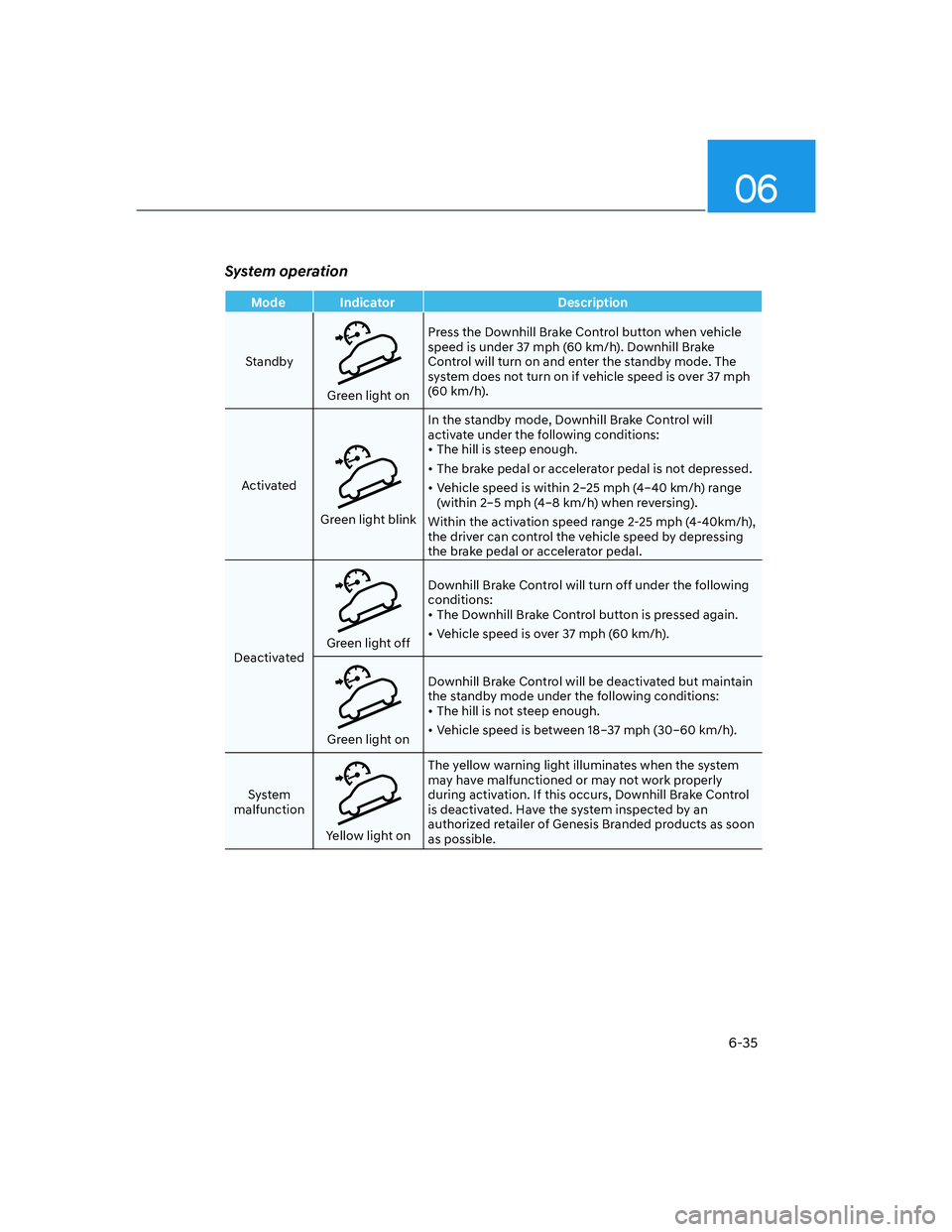
System operation
Mode Indicator Description
Standby
Green light onPress the Downhill Brake Control button when vehicle
speed is under 37 mph (60 km/h). Downhill Brake
Control will turn on and enter the standby mode. The
system does not turn on if vehicle speed is over 37 mph
(60 km/h).
Activated
Green light blinkIn the standby mode, Downhill Brake Control will
activate under the following conditions:
• The hill is steep enough.
• The brake pedal or accelerator pedal is not depressed.
• Vehicle speed is within 2–25 mph (4–40 km/h) range
(within 2–5 mph (4–8 km/h) when reversing).
Within the activation speed range 2-25 mph (4-40km/h),
the driver can control the vehicle speed by depressing
the brake pedal or accelerator pedal.
Deactivated
Green light offDownhill Brake Control will turn off under the following
conditions:
• The Downhill Brake Control button is pressed again.
• Vehicle speed is over 37 mph (60 km/h).
Green light onDownhill Brake Control will be deactivated but maintain
the standby mode under the following conditions:
• The hill is not steep enough.
• Vehicle speed is between 18–37 mph (30–60 km/h).
System
malfunction
Yellow light onThe yellow warning light illuminates when the system
may have malfunctioned or may not work properly
during activation. If this occurs, Downhill Brake Control
is deactivated. Have the system inspected by an
authorized retailer of Genesis Branded products as soon
as possible.
Page 311 of 647
06
6-37
Good Braking Practices
WARNING
Whenever leaving the vehicle or
parking, always come to a complete
stop and continue to depress the brake
pedal. Shift the gear to the P (Park)
position, then apply the parking brake,
and press the Engine Start/Stop button
to the OFF position.
Vehicles parked with the parking brake
not applied or not fully engaged may
roll inadvertently and may cause injury
to the driver and others. ALWAYS apply
the parking brake before exiting the
vehicle.Wet brakes can be dangerous! The
brakes may get wet if the vehicle is
driven through standing water or if it
is washed. Your vehicle will not stop as
quickly if the brakes are wet. Wet brakes
may cause the vehicle to pull to one side.
To dry the brakes, apply the brakes
lightly until the braking action returns to
normal. If the braking action does not
return to normal, stop as soon as it is safe
to do so and call an authorized retailer of
Genesis Branded products for assistance.
DO NOT drive with your foot resting on
the brake pedal. Even light, but constant
pedal pressure can result in the brakes
overheating, brake wear, and possibly
even brake failure.
If a tire goes flat while you are driving,
apply the brakes gently and keep the
vehicle pointed straight ahead while you
slow down. When you are moving slowly
enough for it to be safe to do so, pull off
the road and stop in a safe location.
Keep your foot firmly on the brake pedal
when the vehicle is stopped to prevent
the vehicle from rolling forward.