automatic Hyundai Getz 2003 User Guide
[x] Cancel search | Manufacturer: HYUNDAI, Model Year: 2003, Model line: Getz, Model: Hyundai Getz 2003Pages: 444, PDF Size: 13.82 MB
Page 71 of 444
1- 56 FEATURES OF YOUR HYUNDAI
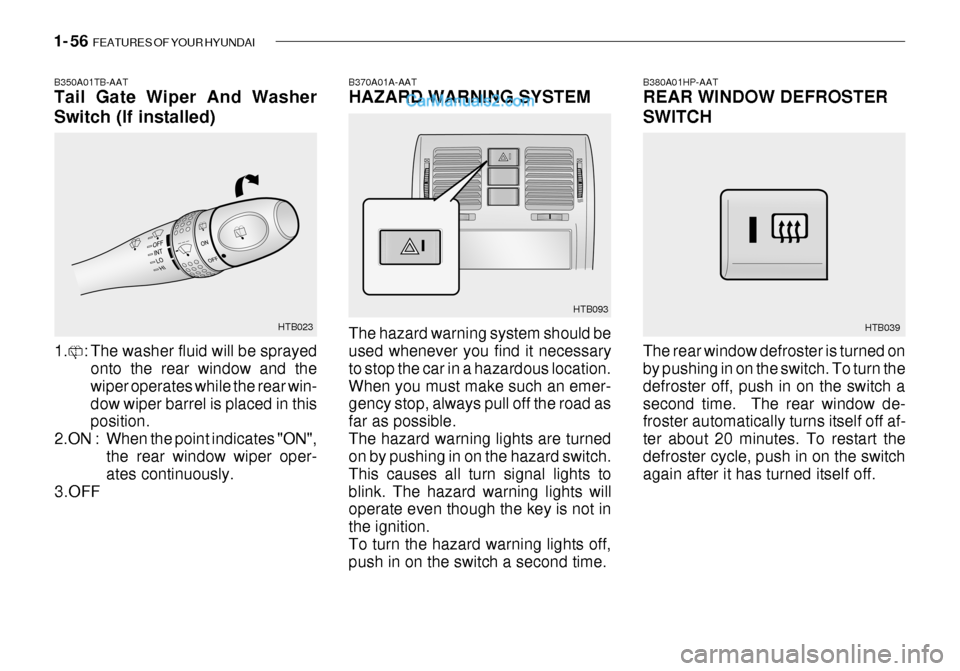
B370A01A-AAT HAZARD WARNING SYSTEM The hazard warning system should be used whenever you find it necessary to stop the car in a hazardous location.When you must make such an emer- gency stop, always pull off the road as far as possible.The hazard warning lights are turned on by pushing in on the hazard switch. This causes all turn signal lights toblink. The hazard warning lights will operate even though the key is not in the ignition.To turn the hazard warning lights off, push in on the switch a second time. HTB093
B380A01HP-AAT REAR WINDOW DEFROSTER SWITCH The rear window defroster is turned on by pushing in on the switch. To turn the defroster off, push in on the switch asecond time. The rear window de- froster automatically turns itself off af- ter about 20 minutes. To restart thedefroster cycle, push in on the switch again after it has turned itself off.
HTB039B350A01TB-AAT Tail Gate Wiper And Washer Switch (If installed)
HTB023
1. : The washer fluid will be sprayed onto the rear window and the wiper operates while the rear win-dow wiper barrel is placed in this position.
2.ON : When the point indicates "ON", the rear window wiper oper-ates continuously.
3.OFF
Page 77 of 444
1- 62 FEATURES OF YOUR HYUNDAI
2. Insert the hexagonal head wrench
provided with the vehicle into the socket. This wrench can be found in the vehicle’s trunk or glove box.
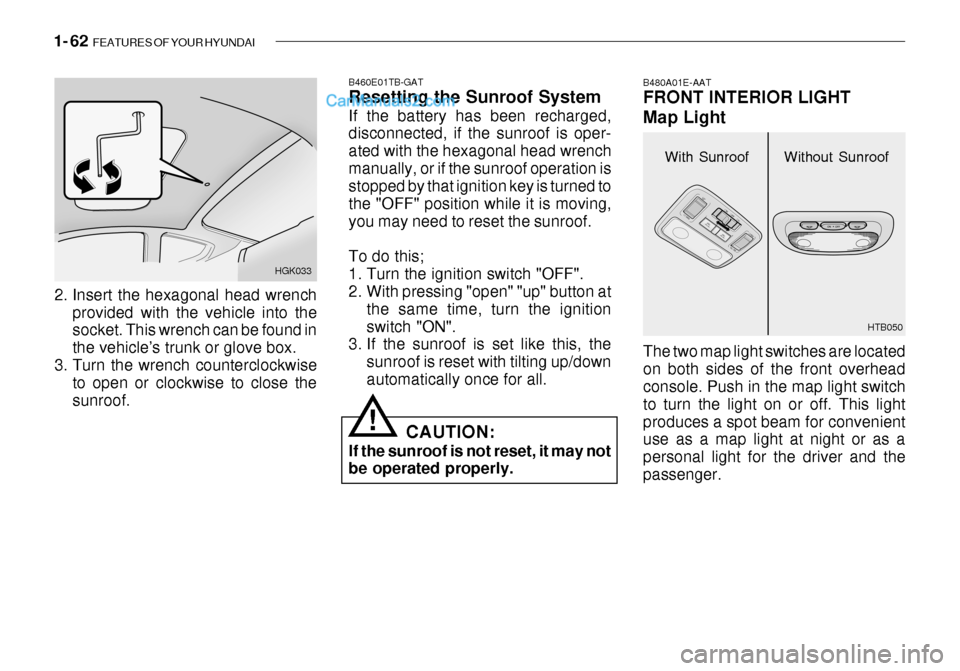
3. Turn the wrench counterclockwise to open or clockwise to close thesunroof. HGK033
With Sunroof
B480A01E-AAT FRONT INTERIOR LIGHT Map Light The two map light switches are located on both sides of the front overhead console. Push in the map light switch to turn the light on or off. This lightproduces a spot beam for convenient use as a map light at night or as a personal light for the driver and thepassenger.
B460E01TB-GAT Resetting the Sunroof System If the battery has been recharged, disconnected, if the sunroof is oper- ated with the hexagonal head wrenchmanually, or if the sunroof operation is stopped by that ignition key is turned to the "OFF" position while it is moving,you may need to reset the sunroof. To do this;
1. Turn the ignition switch "OFF".
2. With pressing "open" "up" button at
the same time, turn the ignition switch "ON".
3. If the sunroof is set like this, the
sunroof is reset with tilting up/downautomatically once for all.Without Sunroof
HTB050
!CAUTION:
If the sunroof is not reset, it may not be operated properly.
Page 112 of 444

FEATURES OF YOUR HYUNDAI 1- 97
H290B03E-GAT
1. POWER ON-OFF Control Knob The radio unit may be operated when the ignition key is in the "ACC" or "ON"position. Press the button to switch the power on. The display shows the radio frequency in the radio mode, the tapedirection indicator in the tape mode or CD track in either the CD mode or CD AUTO CHANGER mode. To switchthe power off, press the button again. VOLUME Control Rotate the knob clockwise to increase the volume and turn the knob counter- clockwise to reduce the volume.
2. BASS/BALANCE
Control Knob BASS Control Knob
Press to pop the knob out. To increase the bass, rotate the knob clockwise, while to decrease the bass, rotate theknob counterclockwise. BALANCE Control knob Pull the Bass control knob out further. Rotate the knob clockwise to empha-size right speaker sound. (Left speaker sound will be attenuated) When the control knob is turned counterclock-wise, left speaker sound will be em- phasized (Right speaker sound will be attenuated).
3. TREBLE/FAD Knob
TREBLE Control Knob
Press to pop the knob out and turn to the left or right for the desired trebletone. FAD (Fader Control) Knob Pull the Bass control knob out further. Turn the control knob counterclock- wise to emphasize front speaker sound. (Rear speaker sound will be attenu-ated) When the control knob is turned clockwise, rear speaker sound will be emphasized. (Front speaker sound willbe attenuated) 4. TUNE (Manual) Select Button Press the ( ) side or ( ) side to increase or to decrease the frequency.Press either button and hold down to continuously scroll, Release button once the desired station is reached. SEEK Operation (Automatic Channel Selection) Press the TUNE select button for 0.5 sec or more. Releasing it will automati- cally tune to the next available stationwith a beep sound. When the ( ) side is pressed longer than 0.5 second, releasing will auto-matically tune to the next higher fre- quency and when the ( ) side is pressed longer than 0.5 second andreleasing will automatically tune to the next lower frequency.
5. PRESET STATION Select
Buttons
Six (6) stations for AM, FM and FM2 respectively can be preset in the elec- tronic memory circuit.
Page 119 of 444
1- 104 FEATURES OF YOUR HYUNDAI
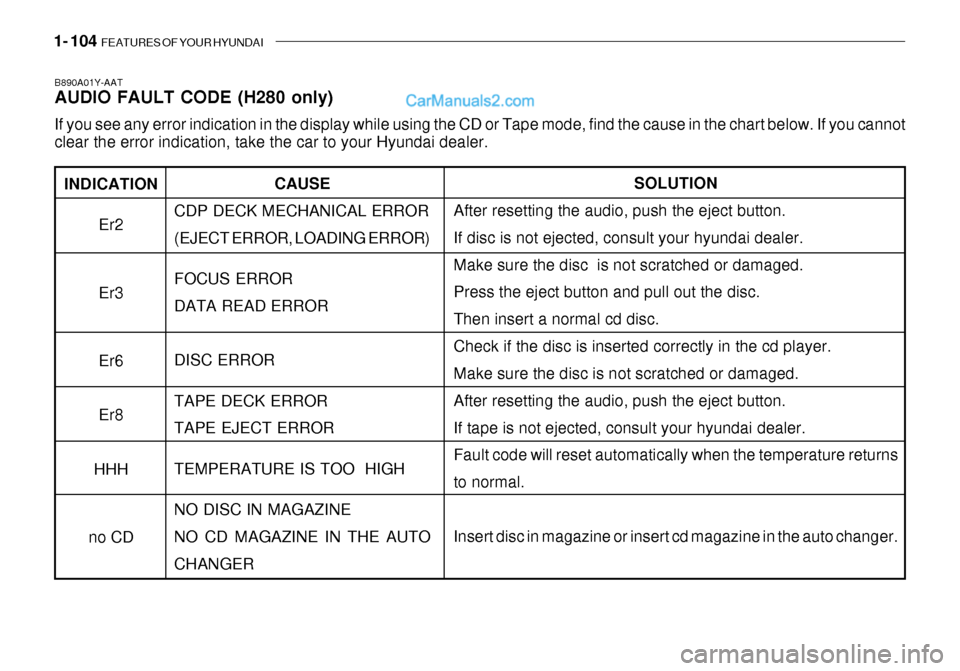
INDICATION
Er2 Er3 Er6 Er8
HHH
no CD
B890A01Y-AAT AUDIO FAULT CODE (H280 only) If you see any error indication in the display while using the CD or Tape mode, find the cause in the chart below. If you canno t
clear the error indication, take the car to your Hyundai dealer.
SOLUTION
After resetting the audio, push the eject button. If disc is not ejected, consult your hyundai dealer.Make sure the disc is not scratched or damaged. Press the eject button and pull out the disc. Then insert a normal cd disc.Check if the disc is inserted correctly in the cd player. Make sure the disc is not scratched or damaged. After resetting the audio, push the eject button.If tape is not ejected, consult your hyundai dealer. Fault code will reset automatically when the temperature returns to normal. Insert disc in magazine or insert cd magazine in the auto changer.
CAUSE
CDP DECK MECHANICAL ERROR (EJECT ERROR, LOADING ERROR) FOCUS ERROR DATA READ ERROR DISC ERROR TAPE DECK ERROR TAPE EJECT ERROR TEMPERATURE IS TOO HIGH NO DISC IN MAGAZINE NO CD MAGAZINE IN THE AUTOCHANGER
Page 121 of 444
1- 106 FEATURES OF YOUR HYUNDAI
!
HMP280B01TB-GAT
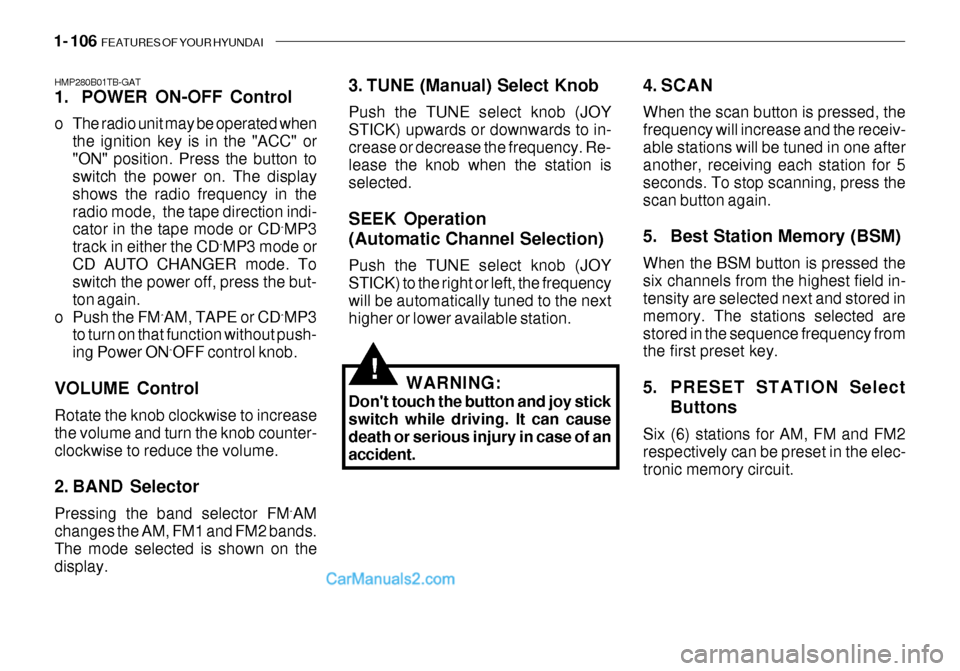
1. POWER ON-OFF Control
o The radio unit may be operated when
the ignition key is in the "ACC" or "ON" position. Press the button to switch the power on. The display shows the radio frequency in theradio mode, the tape direction indi- cator in the tape mode or CD ˆ
MP3
track in either the CD ˆ
MP3 mode or
CD AUTO CHANGER mode. Toswitch the power off, press the but- ton again.
o Push the FM ˆ
AM, TAPE or CD ˆ
MP3
to turn on that function without push-ing Power ON ˆ
OFF control knob.
VOLUME Control Rotate the knob clockwise to increase the volume and turn the knob counter-clockwise to reduce the volume.
2. BAND Selector Pressing the band selector FM ˆ
AM
changes the AM, FM1 and FM2 bands. The mode selected is shown on thedisplay. 3. TUNE (Manual) Select Knob Push the TUNE select knob (JOY STICK) upwards or downwards to in-crease or decrease the frequency. Re- lease the knob when the station is selected. SEEK Operation (Automatic Channel Selection) Push the TUNE select knob (JOY STICK) to the right or left, the frequencywill be automatically tuned to the next higher or lower available station.
4. SCAN When the scan button is pressed, the frequency will increase and the receiv-able stations will be tuned in one after another, receiving each station for 5 seconds. To stop scanning, press thescan button again.
5. Best Station Memory (BSM) When the BSM button is pressed the six channels from the highest field in- tensity are selected next and stored in memory. The stations selected arestored in the sequence frequency from the first preset key.
5. PRESET STATION Select
Buttons
Six (6) stations for AM, FM and FM2 respectively can be preset in the elec- tronic memory circuit.
WARNING:
Don't touch the button and joy stickswitch while driving. It can causedeath or serious injury in case of an accident.
Page 132 of 444
FEATURES OF YOUR HYUNDAI 1- 117
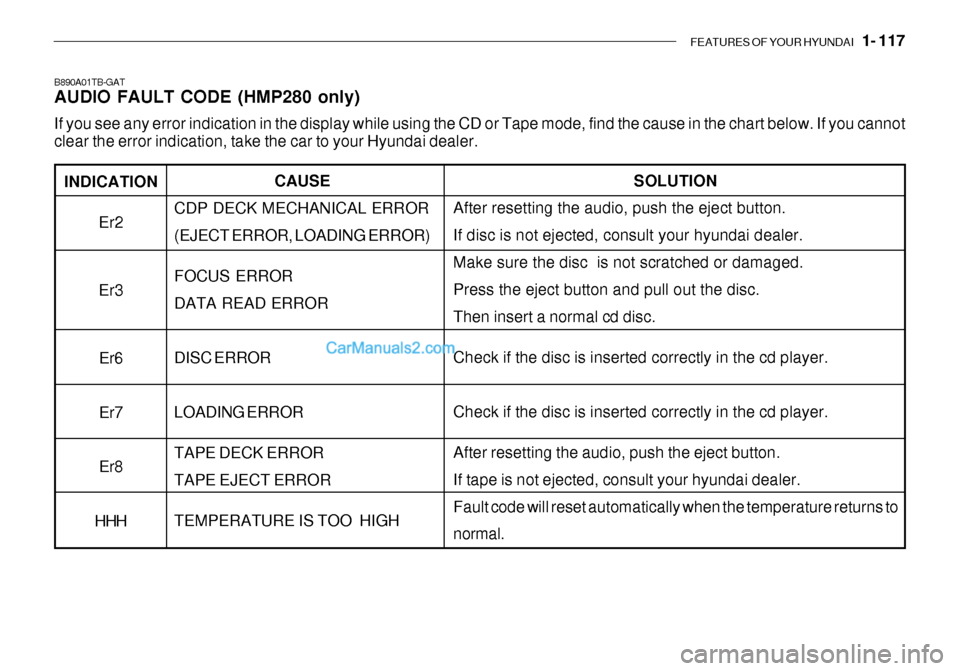
INDICATION
Er2 Er3
Er6 Er7Er8
HHH
B890A01TB-GAT AUDIO FAULT CODE (HMP280 only) If you see any error indication in the display while using the CD or Tape mode, find the cause in the chart below. If you canno t
clear the error indication, take the car to your Hyundai dealer.
SOLUTION
After resetting the audio, push the eject button. If disc is not ejected, consult your hyundai dealer.Make sure the disc is not scratched or damaged. Press the eject button and pull out the disc. Then insert a normal cd disc. Check if the disc is inserted correctly in the cd player. Check if the disc is inserted correctly in the cd player. After resetting the audio, push the eject button. If tape is not ejected, consult your hyundai dealer.Fault code will reset automatically when the temperature returns to normal.
CAUSE
CDP DECK MECHANICAL ERROR (EJECT ERROR, LOADING ERROR) FOCUS ERROR DATA READ ERROR DISC ERROR LOADING ERROR TAPE DECK ERROR TAPE EJECT ERROR TEMPERATURE IS TOO HIGH
Page 137 of 444
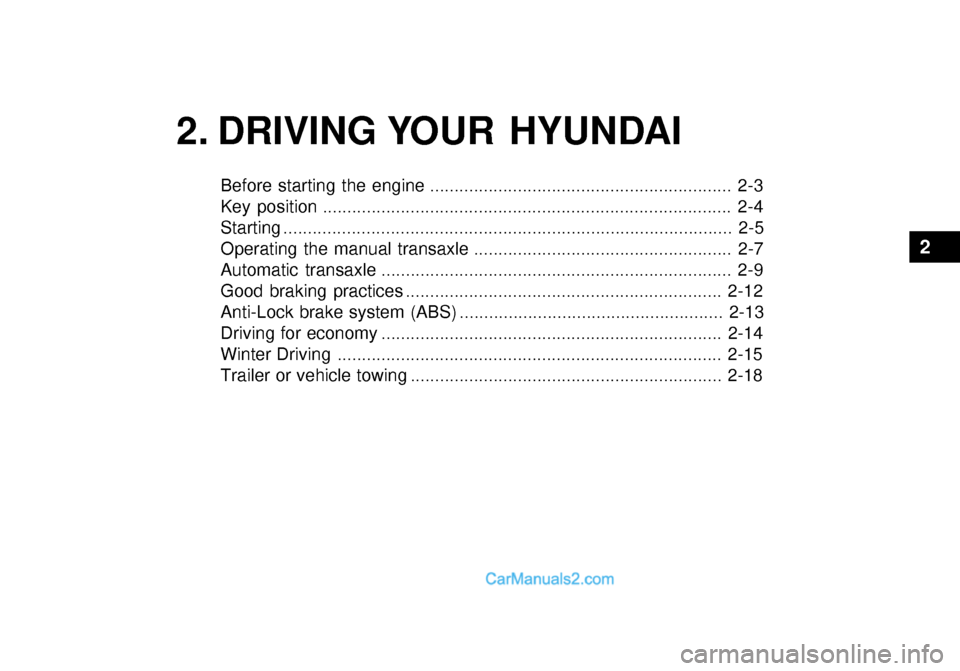
2. DRIVING YOUR HYUNDAI
2
Before starting the engine .............................................................. 2-3
Key position .................................................................................... 2-4
Starting ............................................................................................ 2-5
Operating the manual transaxle ..................................................... 2-7
Automatic transaxle ........................................................................ 2-9
Good braking practices ................................................................. 2-12
Anti-Lock brake system (ABS) ...................................................... 2-13
Driving for economy ...................................................................... 2-14
Winter Driving ............................................................................... 2-15
Trailer or vehicle towing ................................................................ 2-18
Page 139 of 444

DRIVING YOUR HYUNDAI 2- 3
C020A01O-GAT BEFORE STARTING THE EN- GINE Before you start the engine, you should always:
1. Look around the vehicle to be sure
there are no flat tires, puddles of oil, water or other indications of pos-sible trouble.
2. After entering the car, check to be
sure the parking brake is engaged.
3. Check that all windows, and lights are clean.
4. Check that the interior and exterior mirrors are clean and in position.
5. Check your seat, seatback and
headrest to be sure they are in theirproper positions.
6. Lock all the doors.
7. Fasten your seat belt and be sure
that all other occupants have fas- tened theirs.
8. Turn off all lights and accessories
that are not needed.
9. When you turn the ignition switch to
"ON", check that all appropriate warning lights are operating and that you have sufficient fuel. 10.Check the operation of warning
lights and all bulbs when key is in the "ON" position.
!WARNING: (DIESEL ENGINE)
To ensure that sufficient vacuum exists within the brake system dur-ing cold weather start-up condi- tions, it is necessary to run the engine at idle for several secondsafter starting the engine. C030A01A-GAT COMBINATION IGNITION SWITCHTo Start the Engine
o If your Hyundai is equipped with a
manual transaxle, place the shift lever in neutral and depress theclutch pedal fully.
o If your Hyundai has an automatic
transaxle, place the shift lever in "P"(park).
o To start the engine, insert the igni-
tion key and turn it to the "START"position. Release it as soon as the engine starts. Do not hold the key in the "START" position for more than15 seconds.
NOTE: For safety, the engine will not start if the shift lever is not in "P" or "N"Position (Automatic transaxle).
Page 141 of 444
DRIVING YOUR HYUNDAI 2- 5
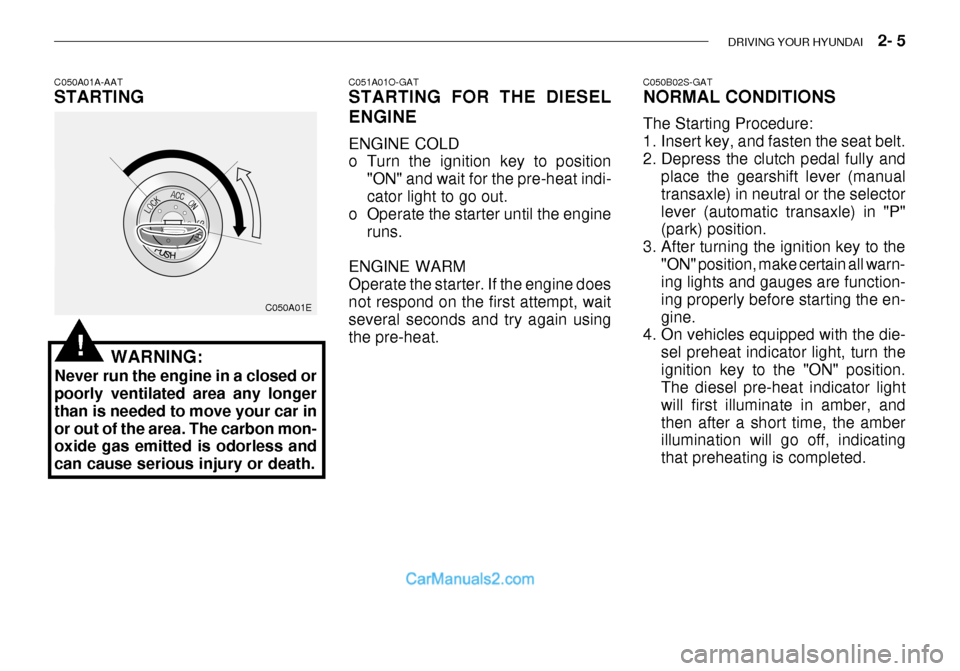
C050A01A-AAT STARTING
C050A01E
WARNING:
Never run the engine in a closed or poorly ventilated area any longer than is needed to move your car inor out of the area. The carbon mon- oxide gas emitted is odorless and can cause serious injury or death.
!
C051A01O-GAT STARTING FOR THE DIESEL ENGINE ENGINE COLD
o Turn the ignition key to position "ON" and wait for the pre-heat indi- cator light to go out.
o Operate the starter until the engine
runs.
ENGINE WARMOperate the starter. If the engine doesnot respond on the first attempt, wait several seconds and try again using the pre-heat. C050B02S-GAT NORMAL CONDITIONS The Starting Procedure:
1. Insert key, and fasten the seat belt.
2. Depress the clutch pedal fully and
place the gearshift lever (manualtransaxle) in neutral or the selectorlever (automatic transaxle) in "P" (park) position.
3. After turning the ignition key to the "ON" position, make certain all warn-ing lights and gauges are function- ing properly before starting the en-gine.
4. On vehicles equipped with the die-
sel preheat indicator light, turn theignition key to the "ON" position. The diesel pre-heat indicator light will first illuminate in amber, andthen after a short time, the amber illumination will go off, indicating that preheating is completed.
Page 145 of 444
DRIVING YOUR HYUNDAI 2- 9
HTB185
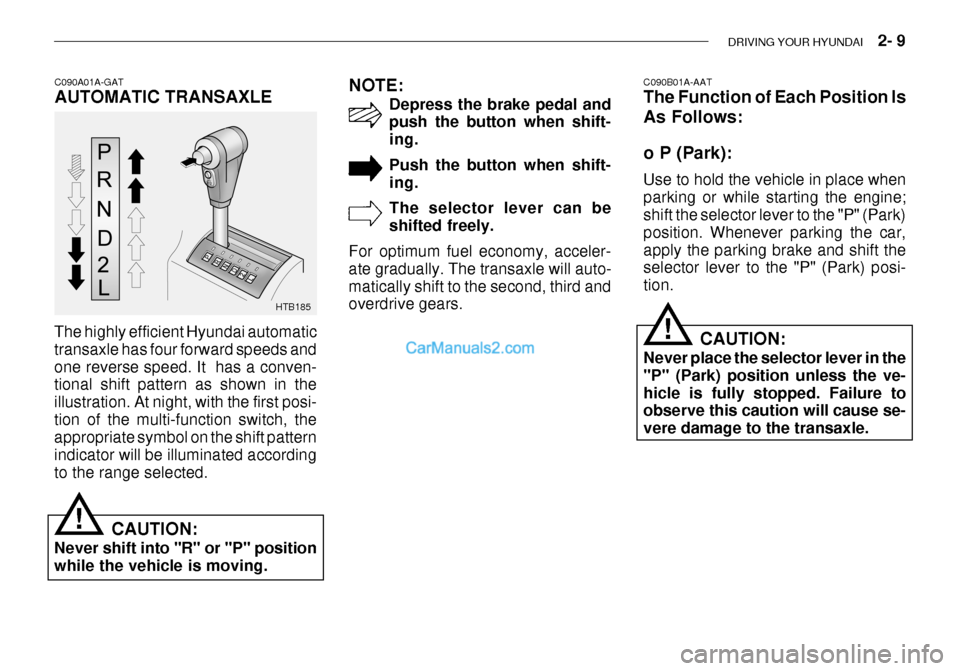
C090A01A-GAT AUTOMATIC TRANSAXLE
The highly efficient Hyundai automatic transaxle has four forward speeds andone reverse speed. It has a conven- tional shift pattern as shown in the illustration. At night, with the first posi-tion of the multi-function switch, the appropriate symbol on the shift pattern indicator will be illuminated accordingto the range selected. CAUTION:
Never shift into "R" or "P" positionwhile the vehicle is moving. NOTE:
Depress the brake pedal and push the button when shift- ing. Push the button when shift- ing. The selector lever can be shifted freely.
For optimum fuel economy, acceler-ate gradually. The transaxle will auto-matically shift to the second, third and overdrive gears. C090B01A-AAT The Function of Each Position Is As Follows: o P (Park): Use to hold the vehicle in place when parking or while starting the engine; shift the selector lever to the "P" (Park) position. Whenever parking the car,apply the parking brake and shift the selector lever to the "P" (Park) posi- tion.
CAUTION:
Never place the selector lever in the"P" (Park) position unless the ve-hicle is fully stopped. Failure to observe this caution will cause se- vere damage to the transaxle.
!
!