Sound system Hyundai Getz 2003 Owner's Manual
[x] Cancel search | Manufacturer: HYUNDAI, Model Year: 2003, Model line: Getz, Model: Hyundai Getz 2003Pages: 444, PDF Size: 13.82 MB
Page 16 of 444
1. FEATURES OF YOUR HYUNDAI
Fuel Recommendations ................................................................... 1-2
Breaking in Your New Hyundai ........................................................ 1-3
Key (Immobilizer system) ................................................................ 1-4
Door locks (Theft-alarm system) ..................................................... 1-7
Power windows .............................................................................. 1-12
Seat ................................................................................................ 1-13
Seat Belt ......................................................................................... 1-20
Child restraint system .................................................................... 1-26
Supplemental restraint (AIRBAG) system ..................................... 1-34
Instrument cluster and indicator lights ............................................ 1-41
Warning Light and Indicator ............................................................ 1-44
Trip computer ................................................................................. 1-51
Multi-Function Light Switch ............................................................ 1-53
Windshield wiper/Washer Switch ................................................... 1-54
Sunroof ........................................................................................... 1-60
Mirror .............................................................................................. 1-64
Hood Release ................................................................................ 1-67
How to use luggage Room ............................................................. 1-70
Heating and cooling control ............................................................ 1-75
Stereo sound system ..................................................................... 1-84
Audio system ................................................................................. 1-86
Antenna ........................................................................................ 1-120
1
Page 25 of 444
1- 10 FEATURES OF YOUR HYUNDAI
HTB202
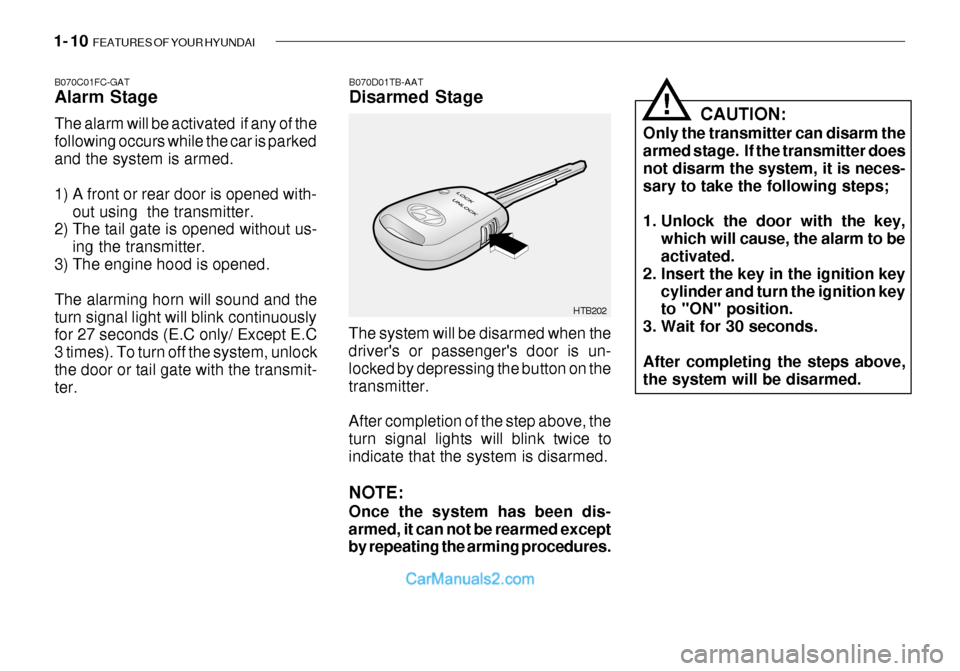
B070D01TB-AAT Disarmed Stage
B070C01FC-GATAlarm Stage The alarm will be activated if any of the following occurs while the car is parkedand the system is armed.
1) A front or rear door is opened with-
out using the transmitter.
2) The tail gate is opened without us-
ing the transmitter.
3) The engine hood is opened.The alarming horn will sound and the turn signal light will blink continuously for 27 seconds (E.C only/ Except E.C 3 times). To turn off the system, unlockthe door or tail gate with the transmit- ter. The system will be disarmed when thedriver's or passenger's door is un- locked by depressing the button on thetransmitter. After completion of the step above, the turn signal lights will blink twice to indicate that the system is disarmed. NOTE: Once the system has been dis- armed, it can not be rearmed except by repeating the arming procedures. CAUTION:
Only the transmitter can disarm thearmed stage. If the transmitter does not disarm the system, it is neces-sary to take the following steps;
1. Unlock the door with the key, which will cause, the alarm to be activated.
2. Insert the key in the ignition key cylinder and turn the ignition keyto "ON" position.
3. Wait for 30 seconds. After completing the steps above, the system will be disarmed.
!
Page 45 of 444
1- 30 FEATURES OF YOUR HYUNDAI
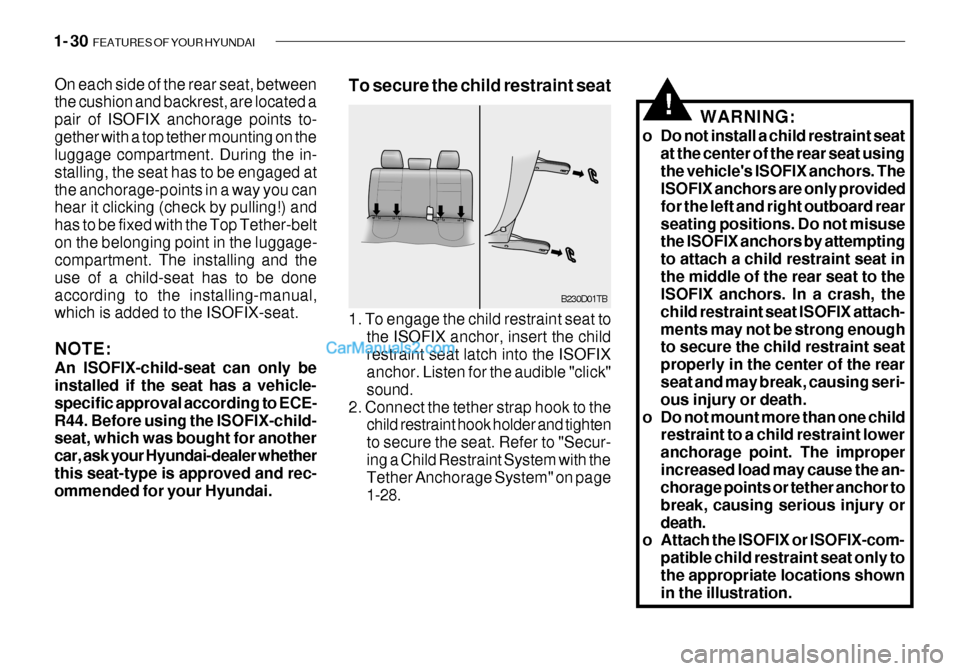
On each side of the rear seat, between the cushion and backrest, are located a pair of ISOFIX anchorage points to-gether with a top tether mounting on the luggage compartment. During the in- stalling, the seat has to be engaged atthe anchorage-points in a way you can hear it clicking (check by pulling!) and has to be fixed with the Top Tether-belton the belonging point in the luggage- compartment. The installing and the use of a child-seat has to be doneaccording to the installing-manual, which is added to the ISOFIX-seat. NOTE: An ISOFIX-child-seat can only be installed if the seat has a vehicle- specific approval according to ECE-R44. Before using the ISOFIX-child- seat, which was bought for another car, ask your Hyundai-dealer whetherthis seat-type is approved and rec- ommended for your Hyundai. B230D01TB
1. To engage the child restraint seat to the ISOFIX anchor, insert the child restraint seat latch into the ISOFIX anchor. Listen for the audible "click" sound.
2. Connect the tether strap hook to the child restraint hook holder and tightento secure the seat. Refer to "Secur-ing a Child Restraint System with the Tether Anchorage System" on page 1-28.
To secure the child restraint seat
WARNING:
o Do not install a child restraint seat at the center of the rear seat usingthe vehicle's ISOFIX anchors. The ISOFIX anchors are only provided for the left and right outboard rearseating positions. Do not misuse the ISOFIX anchors by attempting to attach a child restraint seat inthe middle of the rear seat to the ISOFIX anchors. In a crash, the child restraint seat ISOFIX attach-ments may not be strong enough to secure the child restraint seat properly in the center of the rear seat and may break, causing seri- ous injury or death.
o Do not mount more than one child restraint to a child restraint loweranchorage point. The improperincreased load may cause the an- chorage points or tether anchor to break, causing serious injury ordeath.
o Attach the ISOFIX or ISOFIX-com-
patible child restraint seat only tothe appropriate locations shown in the illustration.
!
Page 99 of 444
1- 84 FEATURES OF YOUR HYUNDAI
Ionosphere
B750A02L
AM reception
Mountains
Buildings Unobstructed
area
FM radio station
B750A03L
Ionosphere
FM reception
B750A01L Obstructed area
Iron bridges
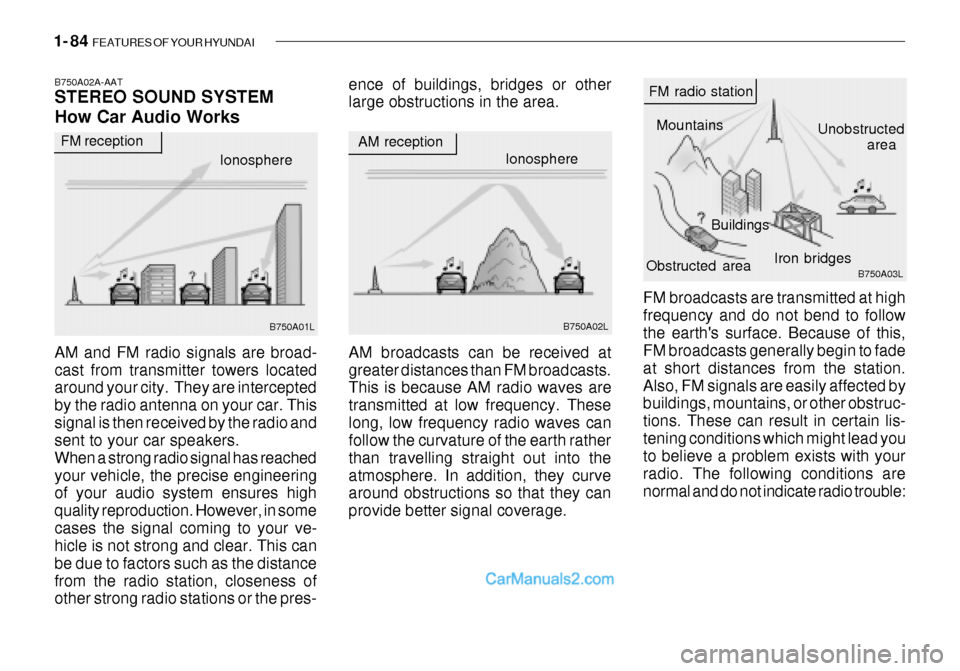
FM broadcasts are transmitted at high frequency and do not bend to followthe earth's surface. Because of this, FM broadcasts generally begin to fade at short distances from the station.Also, FM signals are easily affected by buildings, mountains, or other obstruc- tions. These can result in certain lis-tening conditions which might lead you to believe a problem exists with your radio. The following conditions arenormal and do not indicate radio trouble:
AM broadcasts can be received atgreater distances than FM broadcasts. This is because AM radio waves are transmitted at low frequency. Theselong, low frequency radio waves can follow the curvature of the earth rather than travelling straight out into theatmosphere. In addition, they curve around obstructions so that they can provide better signal coverage.
B750A02A-AAT STEREO SOUND SYSTEM How Car Audio Works
AM and FM radio signals are broad- cast from transmitter towers located around your city. They are intercepted by the radio antenna on your car. Thissignal is then received by the radio and sent to your car speakers. When a strong radio signal has reachedyour vehicle, the precise engineering of your audio system ensures high quality reproduction. However, in somecases the signal coming to your ve- hicle is not strong and clear. This can be due to factors such as the distancefrom the radio station, closeness of other strong radio stations or the pres- ence of buildings, bridges or otherlarge obstructions in the area.
Page 100 of 444
FEATURES OF YOUR HYUNDAI 1- 85
B750A04L
B750A05L
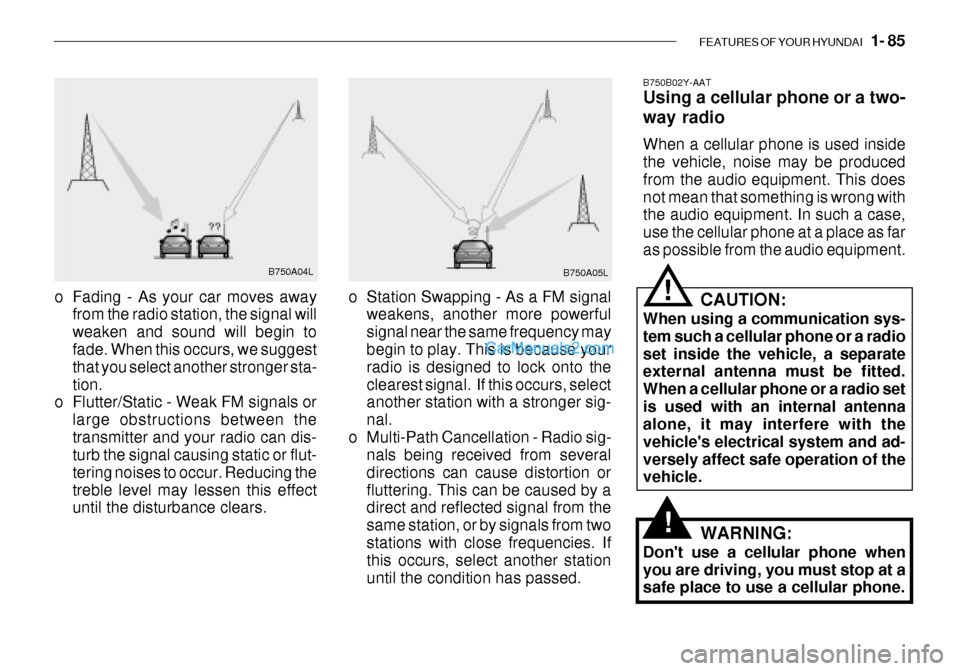
o Station Swapping - As a FM signal weakens, another more powerful signal near the same frequency may begin to play. This is because your radio is designed to lock onto theclearest signal. If this occurs, select another station with a stronger sig- nal.
o Multi-Path Cancellation - Radio sig- nals being received from severaldirections can cause distortion orfluttering. This can be caused by a direct and reflected signal from the same station, or by signals from twostations with close frequencies. If this occurs, select another station until the condition has passed.
o Fading - As your car moves away
from the radio station, the signal willweaken and sound will begin to fade. When this occurs, we suggest that you select another stronger sta-tion.
o Flutter/Static - Weak FM signals or
large obstructions between thetransmitter and your radio can dis- turb the signal causing static or flut- tering noises to occur. Reducing thetreble level may lessen this effect until the disturbance clears. B750B02Y-AAT Using a cellular phone or a two- way radio When a cellular phone is used inside the vehicle, noise may be produced from the audio equipment. This doesnot mean that something is wrong with the audio equipment. In such a case, use the cellular phone at a place as faras possible from the audio equipment.
!
!
CAUTION:
When using a communication sys- tem such a cellular phone or a radio set inside the vehicle, a separate external antenna must be fitted. When a cellular phone or a radio setis used with an internal antenna alone, it may interfere with the vehicle's electrical system and ad-versely affect safe operation of the vehicle.
WARNING:
Don't use a cellular phone when you are driving, you must stop at a safe place to use a cellular phone.
Page 102 of 444

FEATURES OF YOUR HYUNDAI 1- 87
5. TUNE Press the button not more than 1 second then frequency is increased.Likewise press the button not more than 1 second to decrease the fre- quency.
o SEEK Press the button for over 1 second, then it will tune to the next receivablehigher frequency station. Likewise, press the button for over 1 second then it will tune to the next receivablelower frequency station.If the selected station is in the preset memory, memo- rized channel will be on the display too. 6. FM/AM Button FM/AM band button, which is used to change the band repeatedly in follow- ing manner. FM1 FM2 AM FM1
(FM1 FM2 M L FM1 : Europe)
K210B01TB-GAT 1. POWER ON/OFF, VOLUME Rotate the Power switch clockwise to turn on the audio when the ignitionswitch is at ACC or ON position. Once the system is on, you can increase or decrease the volume by rotating theknob clockwise or counter-clockwise.
o BALANCE Further pull the volume button and rotate clockwise to emphasize right sound speaker. Or rotate counter-clockwise to empha-size left sound speaker.
o SCAN Button When this button is pressed, the fre- quency will be increased to be tuned to the next receivable station one afteranother, receiving each station for 5 seconds. if the desirable station is tuned, press this button (scan) againto cancel scan function.
2. BASS/TREBLE-pull Press this button to pop up. Rotate the knob clockwise to increase the Bassand rotate to counter-clockwise to de- crease the Bass. Further pull the button and rotate clock-wise to increase the Treble. Or rotate counter-clockwise to de- crease the Treble. After adjustmentpress the button. 3. PRESET ( 1 ~ 6 ) Press any of these buttons not more than 2 seconds to listen to the station in memory. Press the preset button for 2 seconds or more, then the currentstation will be stored into the memory of the preset button. 4. LCD LCD shows the following information; band of FM1/FM2/AM/(L)/(M) fre-quency, preset channel number, ST in case of FM Stereo.
Page 107 of 444

1- 92 FEATURES OF YOUR HYUNDAI
K240B01TB-GAT 1. POWER ON/OFF, VOLUME Press this button to turn on/off the audio when the ignition switch is atACC or ON position. Once the system is on, you can increase or decrease the volume by rotating the knob clock-wise or counter-clockwise. Press this button again to turn it off. 2. TUNE Press the button not more than 0.5 second then frequency is increased. Likewise press the button not morethan 0.5 second to decrease the fre- quency. With the button held down for 0.5 secor more, the beep sound will be heard and frequency will increase or decrease rapidly. if you release the button afterthe beep sound, seek function is in operation. o SEEK Press the button for over 0.5 second and release the button after beep sound,then it will tune to the next receivable higher frequency station. Likewise, press the button for over 0.5 secondand release the button after the beep sound, then it will tune to the next receivable lower frequency station. ifthe selected station is in the preset memory, memorized channel will be on the display too. 3. PRESET Press any of these buttons not more than 2 seconds to listen to the stationin memory. Press the preset button for 2 seconds or more, then the current station will be stored into the memoryof the preset button with the sound.
4. SCAN Button When this button is pressed, the fre- quency will be increased to be tuned tothe next receivable station one after another, receiving each station for 5 seconds. if the desirable station istuned, press this button (scan) again to cancel scan function. 5. BASS/BAL- pull Press to pop the knob out, To increase the bass, rotate the knob clockwise, while to decrease the Bass, rotate theknob counterclockwise. Further pull the popped-ed knob for the balance control. Rotate the knob clockwise toemphasize right speaker sound. (Left speaker sound will be attenuated) When the control knob is turnedcounter-clockwise, left speaker sound will be emphasized. (Right speaker will be attenuated)
Page 118 of 444
FEATURES OF YOUR HYUNDAI 1- 103
o This equipment is designed to
be used only in a 12 volt DC battery system with negativeground.
o This unit is made of precision
parts. Do not attempt to disas-semble or adjust any parts.
o When driving your vehicle, be
sure to keep the volume of theunit set low enough to allow you to hear sounds coming from the outside.
o Do not expose this equipment (including the speakers and tape)to water or excessive moisture.
Page 125 of 444
1- 110 FEATURES OF YOUR HYUNDAI
o Do not add any oil to the rotating
parts. Keep magnets, screwdriv- ers and other metallic objects awayfrom the tape mechanism and head.
o This equipment is designed to be
used only in a 12 volt DC batterysystem with negative ground.
o This unit is made of precision
parts. Do not attempt to disas-semble or adjust any parts.
o When driving your vehicle, be sure
to keep the volume of the unit setlow enough to allow you to hear sounds coming from the outside.
o Do not expose this equipment (in- cluding the speakers and tape) towater or excessive moisture.
Page 128 of 444
FEATURES OF YOUR HYUNDAI 1- 113
7. CD EJECT When the button is pressed with a CD loaded, the CD will eject.
8. SCAN
o Press the SCAN button to playback
the first 10 seconds of each track.
o To playback the first 10 seconds of each track in the selected folder, press the SCAN button for 2 sec-onds or longer. (MP3 CD only)
o Press the SCAN button again within
10 sec. When you have reached thedesired track.
9. BOOKMARK (MARK) When the CD player unit is operating, the desired track on the disc can be bookmarked by using the MARK but-ton.
o Press the MARK button to bookmark the desired track for more than 2 seconds. This will display the " " symbol on
the LCD with beep sound. To play the bookmarked tracks, press the MARK button within a sec-ond. o Press the MARK button to erase the
bookmarked tracks for more than 2seconds.This will erase the bookmark and " "
symbol on the LCD with beep sound.
10. JOY STICK (ENT)
o You can skip the track by pushing the JOY STICK to the left or right. After selecting the desired track, press the JOY STICK to playback the track.If you do not press the JOY STICK within 5 seconds, the previous track will playback again.
o You can move through the folder by pushing the JOYSTICK to up anddown.After moving the desired folder, press the JOYSTICK to playback the se- lected track.If you do not press the JOYSTICK within 5 seconds, the previous track will playback again. (MP3 CD only) NOTE:
o To assure proper operation of the
unit, keep the vehicle interior tem- perature within a normal range byusing the vehicle's air condition- ing or heating system.
o When replacing the fuse, replace
it with a fuse having the correctcapacity.
o The bookmarks are all erased when the car battery is disconnected orpower off. Therefore, all data will have to be set again if this shouldoccur.
o This equipment is designed to be
used only in a 12 volt DC batterysystem with negative ground.
o This unit is made of precision
parts. Do not attempt to disas-semble or adjust any parts.
o When driving your vehicle, be sure
to keep the volume of the unit setlow enough to allow you to hear sounds coming from the outside.
o Do not expose this equipment (in-
cluding the speakers and tape) towater or excessive moisture.