reset Hyundai Getz 2005 User Guide
[x] Cancel search | Manufacturer: HYUNDAI, Model Year: 2005, Model line: Getz, Model: Hyundai Getz 2005Pages: 437, PDF Size: 11.19 MB
Page 254 of 437
1- 42 FEATURES OF YOUR HYUNDAI
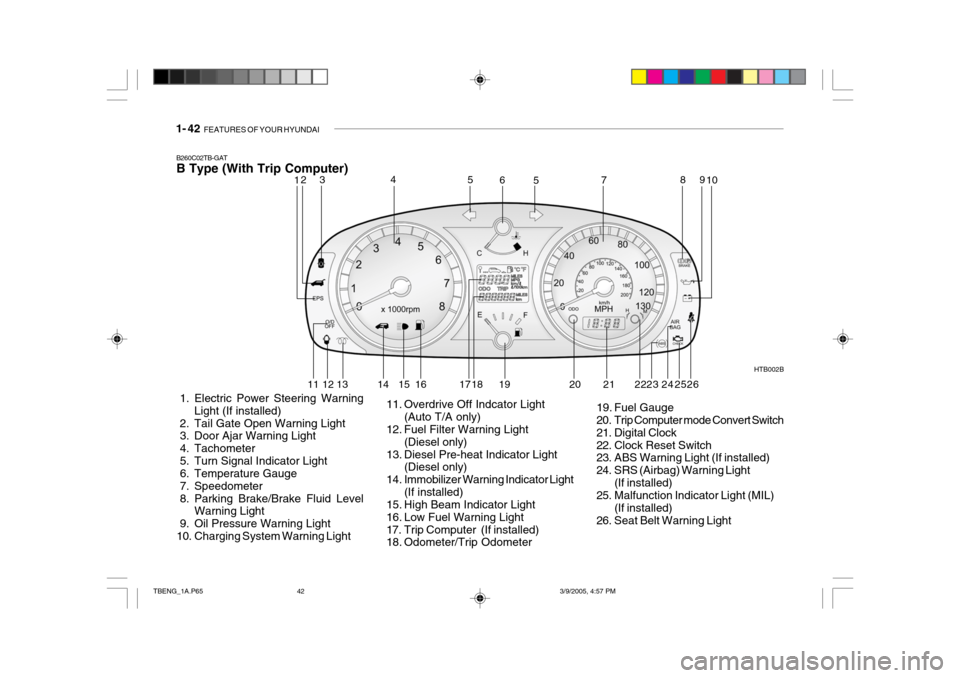
B260C02TB-GAT B Type (With Trip Computer)
1. Electric Power Steering Warning Light (If installed)
2. Tail Gate Open Warning Light
3. Door Ajar Warning Light
4. Tachometer
5. Turn Signal Indicator Light
6. Temperature Gauge
7. Speedometer
8. Parking Brake/Brake Fluid Level Warning Light
9. Oil Pressure Warning Light
10. Charging System Warning Light HTB002B
11. Overdrive Off Indcator Light (Auto T/A only)
12. Fuel Filter Warning Light
(Diesel only)
13. Diesel Pre-heat Indicator Light (Diesel only)
14. Immobilizer Warning Indicator Light (If installed)
15. High Beam Indicator Light
16. Low Fuel Warning Light
17. Trip Computer (If installed)
18. Odometer/Trip Odometer 19. Fuel Gauge
20. Trip Computer mode Convert Switch
21. Digital Clock
22. Clock Reset Switch
23. ABS Warning Light (If installed)
24. SRS (Airbag) Warning Light
(If installed)
25. Malfunction Indicator Light (MIL)
(If installed)
26. Seat Belt Warning Light
12 3 4
5
5
67 8
910
11 12 13 14 15 16 17 18 19 20 23 24
252221 26
TBENG_1A.P65 3/9/2005, 4:57 PM
42
Page 261 of 437

FEATURES OF YOUR HYUNDAI 1- 49
B310B01TB-GAT ODOMETER/TRIP ODOMETER A TYPE (WITH TRIP COMPUTER)1. Odometer The odometer records the total driving distance in kilometers or miles, and is useful for keeping a record for mainte- nance intervals. NOTE: Any alteration of the odometer may void your warranty coverage. HTB008A
A Type
B Type 2. Trip odometer
o This mode indicates the drive dis-
tance travelled since the last drive time reset.
o Pressing the reset switch built in left
side of speedmeter for more than 1second, when the drive distance is being displayed, clears the drive distance to zero.
o Refer to the explanation of the trip computer (see page 1-52, Drive Dis-tance).
B TYPE (WITHOUT TRIP COMPUTER) Function of digital odometer/trip odometer
Pushing in the reset switch when the ignition switch is turned "ON" will dis-play the following sequence: 1. Odometer
HTB010
1 2 3
The odometer records the total driving distance in kilometers or miles, and is useful for keeping a record for mainte-nance intervals. NOTE: Any alteration of the odometer may void your warranty coverage. 2,3 Trip odometer Records the distance of 2 trips in kilo- meters or miles.
TBENG_1A.P65 3/9/2005, 4:57 PM
49
Page 262 of 437

1- 50 FEATURES OF YOUR HYUNDAI
HTB009A The trip computer is the microcom- puter-controlled driver information gauge that displays information re-lated to driving, such as outside tem- perature distance to empty, drive dis- tance and average consumption onthe LCD. Reset switch
o The reset switch is used to zero the
multi-functional display mode.
o Pushing in the reset switch built in
left side of speedmeter changes the display as follows;
B400B02TB-GAT TRIP COMPUTER (If Installed)
HTB012A
1. Outside temperature
OUTSIDE TEMPERATURE DISTANCE TO EMPTY DRIVE DISTANCE
AVERAGE CONSUMPTION
This mode indicates the outside tem- perature between -40 C (-40 F) and
75 C (167 F) .
2. Distance to empty HTB011A
TRIP A:
First distance you have trav-
eled from your origination point to a first destination.TRIP B: Second distance from the first
destination to the final destination. To shift from TRIP A to TRIP B, press the reset switch. When pressed for 1 second, it will reset to 0.
TBENG_1A.P65 3/9/2005, 4:57 PM
50
Page 263 of 437

FEATURES OF YOUR HYUNDAI 1- 51
Total Fuel Consumption(L) x 100 Total Cruise Distance (km)
3. Drive Distance
HTB013A HTB014A
MPG =
L/100km = Total Cruise Distance(Miles) Total Fuel Consumption (G)o This mode indicates the estimated
distance to empty from the current fuel in the fuel tank and distance toempty symbol.
o When refueling with more than 6
liters, the trip computer will recog-nize refueling.
o When the battery has been rein-
stalled after being discharged ordisconnected, drive more than 32km for an accurate distance to empty.
NOTE:
o When the distance to empty is less than 50 km, the symbol will al- ways come on and the distance toempty digits will indicate "---" with flash until more fuel is added.
o The distance to empty can differ
from the actual tripmeter accord-ing to driving conditions.
o The distance to empty can vary
according to the driving condi-tions, driving pattern or vehicle speed. o This mode indicates the drive dis-
tance travelled since the last drivetime reset.
o Pressing the reset switch built in left
side of speedmeter for more than 1second, when the drive distance is being displayed, clears the drive distance to zero. 4. Average Consumption
o This mode indicates the average
consumption since the data reset.
o It displays per 10 seconds after you
drive over 50m and 10 seconds.
o Calculation Method
TBENG_1A.P65 3/9/2005, 4:57 PM
51
Page 269 of 437

FEATURES OF YOUR HYUNDAI 1- 57
B420A02A-AAT CIGARETTE LIGHTER For the cigarette lighter to work, the key must be in the "ACC" position orthe "ON" position. To use the cigarette lighter, push it all the way into its socket. When the ele-ment has heated, the lighter will pop out to the "ready" position. Do not hold the cigarette lighter pressedin. This can damage the heating ele- ment and create a fire hazard. B430A01TB-GAT FRONT ASHTRAY
If it is necessary to replace the ciga- rette lighter, use only a genuine Hyundai replacement or its approved equiva-lent.
HTB097-1!
HTB100
B400A01TB-AAT DIGITAL CLOCK
HTB095-1
There is a digital clock control button built-in right side of the speedometer. Its functions are: o Reset : Push the button for more than
1 second.
o Min/Hour Adjustment: Turn to "H"
for 0.5 second to advance the hour indicated. Turn to "M" for 0.5 sec-ond to advance the minute indi- cated.
o Auto mode: Turn to the right or left
side for more than 1 second to ad-vance fastly. CAUTION:
Don't turn the switch excessively to prevent switch damage.
!
CAUTION:
Do not use electric accessories or equipment other than the Hyundai genuine parts in the socket.
TBENG_1A.P65 3/9/2005, 4:58 PM
57
Page 273 of 437
FEATURES OF YOUR HYUNDAI 1- 61
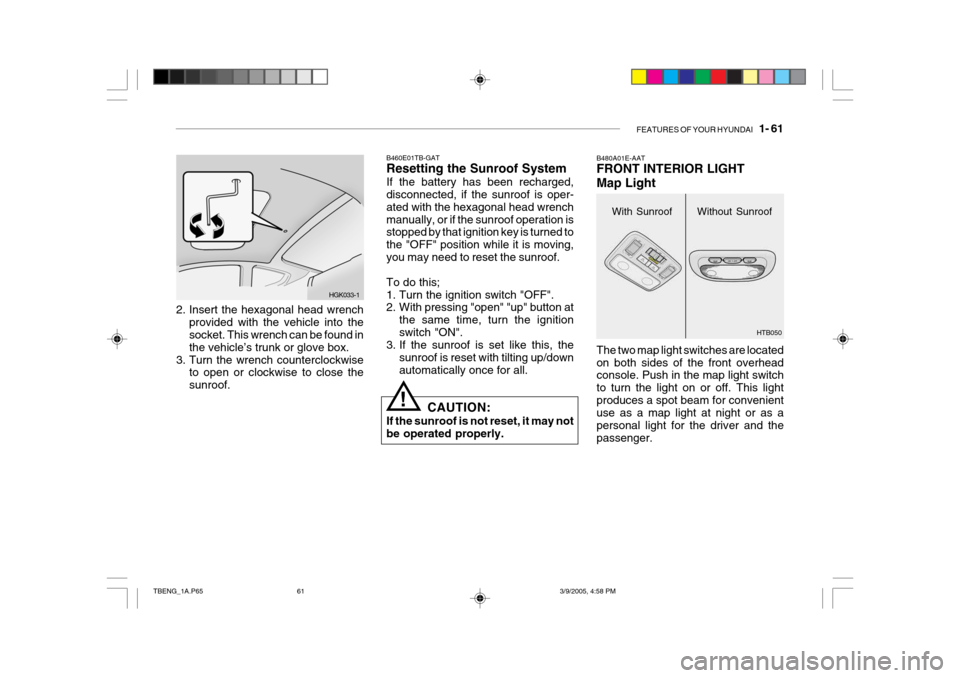
2. Insert the hexagonal head wrench
provided with the vehicle into the socket. This wrench can be found in the vehicle’s trunk or glove box.
3. Turn the wrench counterclockwise to open or clockwise to close thesunroof. HGK033-1
With Sunroof
B480A01E-AAT FRONT INTERIOR LIGHT Map Light The two map light switches are located on both sides of the front overhead console. Push in the map light switch to turn the light on or off. This lightproduces a spot beam for convenient use as a map light at night or as a personal light for the driver and thepassenger.
B460E01TB-GAT Resetting the Sunroof System If the battery has been recharged, disconnected, if the sunroof is oper- ated with the hexagonal head wrenchmanually, or if the sunroof operation is stopped by that ignition key is turned to the "OFF" position while it is moving,you may need to reset the sunroof. To do this;
1. Turn the ignition switch "OFF".
2. With pressing "open" "up" button at
the same time, turn the ignition switch "ON".
3. If the sunroof is set like this, the
sunroof is reset with tilting up/downautomatically once for all.Without Sunroof
HTB050
!CAUTION:
If the sunroof is not reset, it may not be operated properly.
TBENG_1A.P65 3/9/2005, 4:58 PM
61
Page 284 of 437

1- 72 FEATURES OF YOUR HYUNDAI
B560B01O-GAT AUTO FUEL CUT SWITCH (Gasoline Engine) (If installed) The auto fuel cut switch is located on the driver's side of the engine compart- ment.In the event of a collision or sudden impact, the auto fuel cut device cuts off the fuel supply. If this device is acti-vated, it must be reset by pressing in on the top of the switch before the engine can be restarted. HTB304
!WARNING:
Before resetting the auto fuel cut switch, the fuel line should bechecked for fuel leaks.
HTB098
B580A01TB-GAT SUN VISOR
HTB148-1
A Type
B Type
o To use the luggage board with
unfolding, fix it in the luggage board supporter. There will be an audible "Click" when the luggage board fixes in the supporter.
o The luggage board can be thrown out in the event of a sudden stopor an accident. Unfold the lug-gage board stablely to prevent cargo damage.
HTB302
TBENG_1A.P65 3/9/2005, 4:58 PM
72
Page 297 of 437

FEATURES OF YOUR HYUNDAI 1- 85
K210A01TB-GAT STEREO RADIO OPERATION (K220) (If installed)
K220A01TB
1. Power ON/OFF, VOLUME, BALANCE, SCAN Button
2. BASS/TREBLE-pull Button
3. Preset Buttons 4. LCD
5. TUNE/SEEK Button
6. FM/AM Button
7. FADER Button
12 3 456
7
Tbeng_1b.p65 3/9/2005, 4:59 PM
85
Page 298 of 437

1- 86 FEATURES OF YOUR HYUNDAI
5. TUNE Press the button not more than 1 second then frequency is increased.Likewise press the button not more than 1 second to decrease the fre- quency.
o SEEK Press the button for over 1 second, then it will tune to the next receivablehigher frequency station. Likewise, press the button for over 1 second then it will tune to the next receivablelower frequency station.If the selected station is in the preset memory, memo- rized channel will be on the display too. 6. FM/AM Button FM/AM band button, which is used to change the band repeatedly in follow- ing manner. FM1 FM2 AM FM1
(FM1 FM2 M L FM1 : Europe)
K210B01TB-GAT 1. POWER ON/OFF, VOLUME Rotate the Power switch clockwise to turn on the audio when the ignitionswitch is at ACC or ON position. Once the system is on, you can increase or decrease the volume by rotating theknob clockwise or counter-clockwise.
o BALANCE Further pull the volume button and rotate clockwise to emphasize right sound speaker. Or rotate counter-clockwise to empha-size left sound speaker.
o SCAN Button When this button is pressed, the fre- quency will be increased to be tuned to the next receivable station one afteranother, receiving each station for 5 seconds. if the desirable station is tuned, press this button (scan) againto cancel scan function.
2. BASS/TREBLE-pull Press this button to pop up. Rotate the knob clockwise to increase the Bassand rotate to counter-clockwise to de- crease the Bass. Further pull the button and rotate clock-wise to increase the Treble. Or rotate counter-clockwise to de- crease the Treble. After adjustmentpress the button. 3. PRESET ( 1 ~ 6 ) Press any of these buttons not more than 2 seconds to listen to the station in memory. Press the preset button for 2 seconds or more, then the currentstation will be stored into the memory of the preset button. 4. LCD LCD shows the following information; band of FM1/FM2/AM/(L)/(M) fre-quency, preset channel number, ST in case of FM Stereo.
Tbeng_1b.p65
3/9/2005, 4:59 PM
86
Page 302 of 437

1- 90 FEATURES OF YOUR HYUNDAI
K240A01TB
123 456
7
8
K240A01TB-GAT STEREO RADIO OPERATION (K240) (If installed)
1. Power ON/OFF, VOLUME
2. TUNE/SEEK Button
3. PRESET Buttons
4. SCAN Button
5. BASS/BAL pull Button
6. TREB/pull FAD Button
7. FM/AM Button
8. LCD
Tbeng_1b.p65
3/9/2005, 4:59 PM
90