buttons Hyundai Grand Santa Fe 2013 User Guide
[x] Cancel search | Manufacturer: HYUNDAI, Model Year: 2013, Model line: Grand Santa Fe, Model: Hyundai Grand Santa Fe 2013Pages: 718, PDF Size: 13.5 MB
Page 365 of 718
Features of your vehicle
268 4
RADIO MODE
- AM900DMMG, AM910DMMG,
AM911DMMG, AM901DMGG,
AM910DMEE, AM912DMEE,
AM911DMEE, AM910DMGL,
AM900DMMN, AM910DMMN
Basic Mode Screen
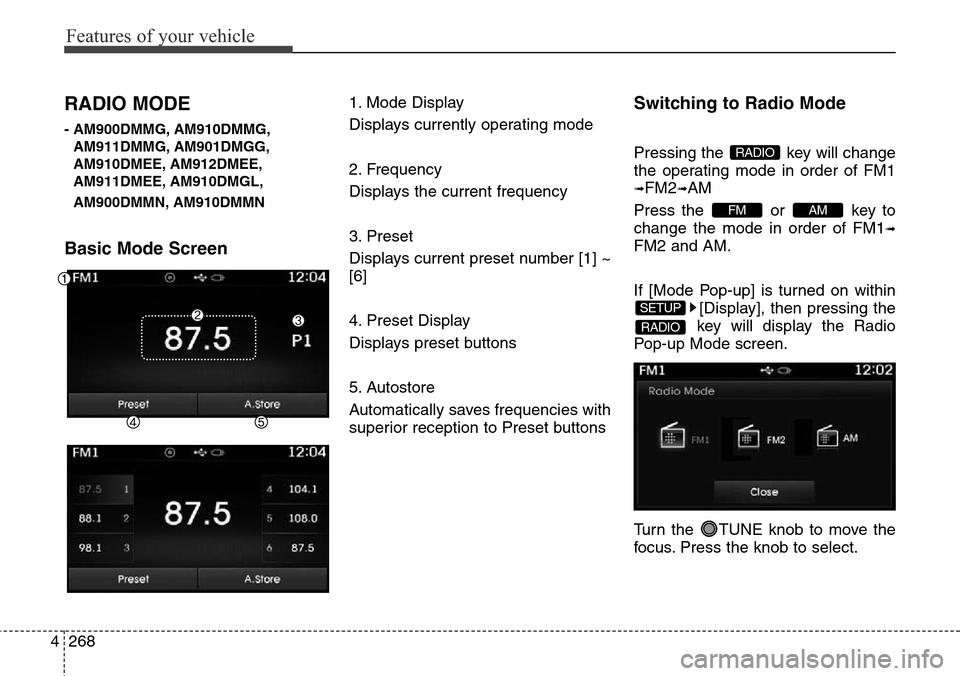
1. Mode Display
Displays currently operating mode
2. Frequency
Displays the current frequency
3. Preset
Displays current preset number [1] ~
[6]
4. Preset Display
Displays preset buttons
5. Autostore
Automatically saves frequencies with
superior reception to Preset buttonsSwitching to Radio Mode
Pressing the key will change
the operating mode in order of FM1
➟FM2➟AM
Press the or key to
change the mode in order of FM1
➟
FM2 and AM.
If [Mode Pop-up] is turned on within
[Display], then pressing the
key will display the Radio
Pop-up Mode screen.
Turn the TUNE knob to move the
focus. Press the knob to select.
RADIO
SETUP
AMFM
RADIO
Page 366 of 718
4269
Features of your vehicle
Searching Radio Frequencies
Using Seek
Press the key to play the
previous/next frequency.
Using TUNE
Turn the TUNE knob to select the
desired frequency.
• FM : Increases/decreased by 100kHz
• AM : Increases/decreased by 9kHz
Using Radio Mode
Selecting /Saving Presets
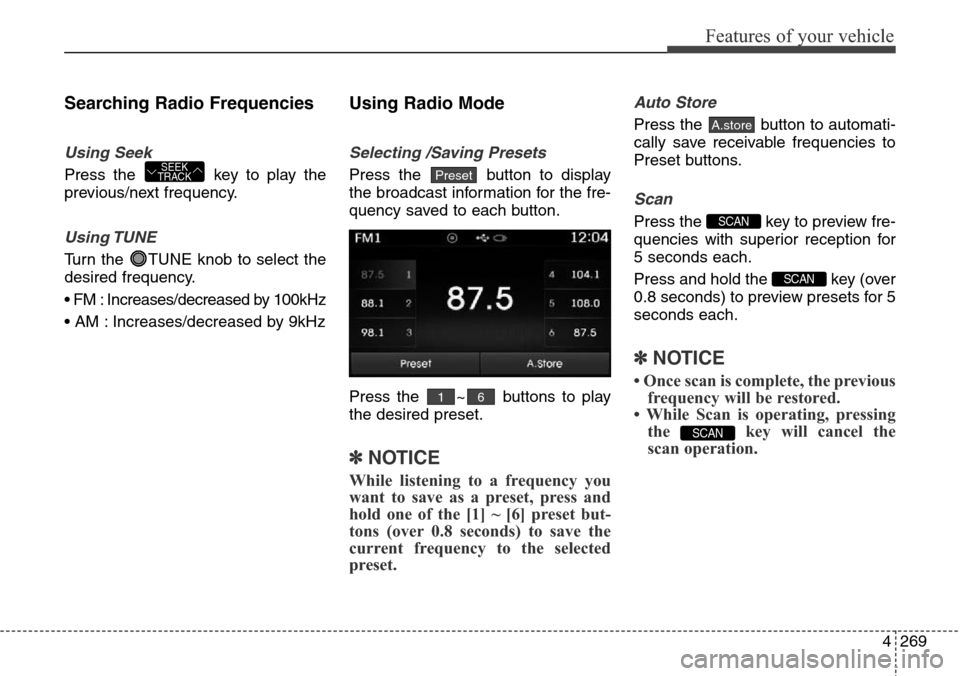
Press the button to display
the broadcast information for the fre-
quency saved to each button.
Press the ~ buttons to play
the desired preset.
✽NOTICE
While listening to a frequency you
want to save as a preset, press and
hold one of the [1] ~ [6] preset but-
tons (over 0.8 seconds) to save the
current frequency to the selected
preset.
Auto Store
Press the button to automati-
cally save receivable frequencies to
Preset buttons.
Scan
Press the key to preview fre-
quencies with superior reception for
5 seconds each.
Press and hold the key (over
0.8 seconds) to preview presets for 5
seconds each.
✽NOTICE
• Once scan is complete, the previous
frequency will be restored.
• While Scan is operating, pressing
the key will cancel the
scan operation.
SCAN
SCAN
SCAN
A.store
61
PresetSEEK
TRACK
Page 397 of 718
Features of your vehicle
300 4
Press the ( )button or
individually select the files you want
to delete. Once files are selected, the
( )button and
( )buttons will be enabled.
1) : Moves to the previous
screen
2) Select All: Selects all files
3) Unselet All: Deselects all selected
files
4) Delete: Deletes selected files
After selecting the files you want to
delete, press the ( )but-
ton to delete the selected files.
✽NOTICE
• If there is memory available, up to
6,000 files can be saved.
• Identical files cannot be copied
more than 1,000 times.
• To check memory information, go
to [System] [Memory
Information]
✽NOTICE - USING THE
Bluetooth®Wireless
Technology Audio Mode
•Bluetooth®Wireless Technology
Audio Mode can be used only
when a Bluetooth
®Wireless
Technology phone has been con-
nected.
•Bluetooth
®Wireless Technology
Audio Mode will not be available
when connecting mobile phones
that do not support this feature.
• While Bluetooth
®Wireless
Technology Audio is playing, if the
Bluetooth
®Wireless Technology
phone is connected, then the music
will also stop.
• Moving the Track up/down while
playing Bluetooth
®Wireless
Technology audio mode may
result in pop noises in some mobile
phones.
•Bluetooth
®Wireless Technology
streaming audio may not be sup-
ported in some mobile phones.
(Continued)(Continued)
• When returning to Bluetooth
®
Wireless Technology Audio mode
after ending a call, the mode may
not automatically restart in some
mobile phones.
• Receiving an incoming call or
making an outgoing call while
playing Bluetooth
®Wireless
Technology Audio may result in
audio interference.
SETUP
Delete
Delete
Unselect All
Select All
Page 427 of 718
Features of your vehicle
330 4
SETUP
(for RDS,
Bluetooth®Wireless
Technologyequipped model)
- AM904DMEE, AM914DMEE
Starting Mode
Press the key to display the
Setup screen.
You can select and control options
related to [Display], [Sound],
[Clock/Day], [Phone] and [System].
Display Settings
Adjusting the Brightness
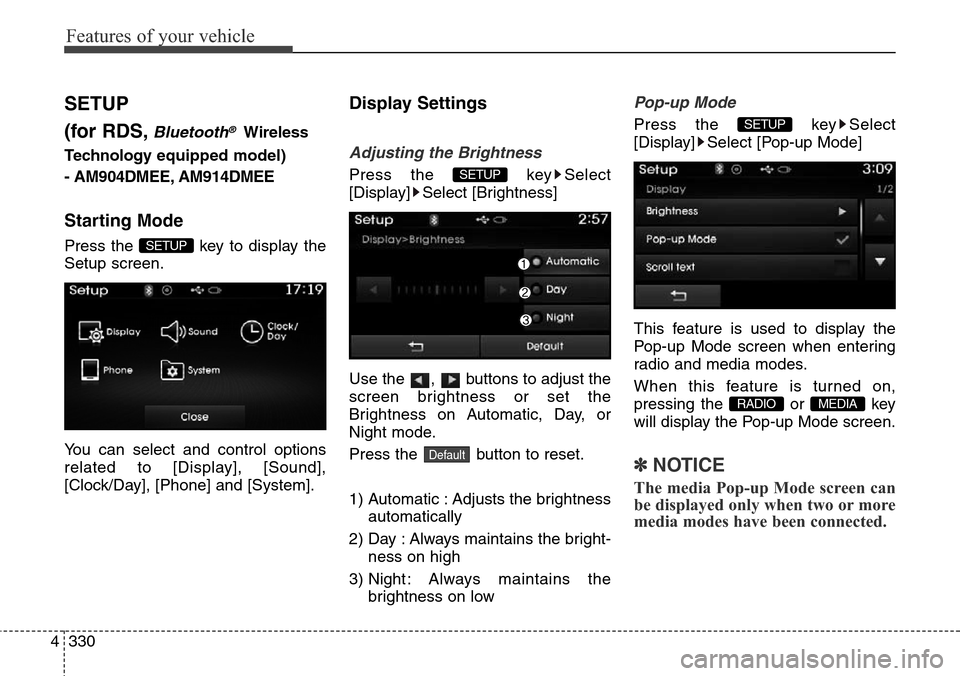
Press the key Select
[Display] Select [Brightness]
Use the , buttons to adjust the
screen brightness or set the
Brightness on Automatic, Day, or
Night mode.
Press the button to reset.
1) Automatic : Adjusts the brightness
automatically
2) Day : Always maintains the bright-
ness on high
3) Night : Always maintains the
brightness on low
Pop-up Mode
Press the key Select
[Display] Select [Pop-up Mode]
This feature is used to display the
Pop-up Mode screen when entering
radio and media modes.
When this feature is turned on,
pressing the or key
will display the Pop-up Mode screen.
✽NOTICE
The media Pop-up Mode screen can
be displayed only when two or more
media modes have been connected.
MEDIA RADIO
SETUP
Default
SETUP
SETUP
Page 429 of 718
![Hyundai Grand Santa Fe 2013 User Guide Features of your vehicle
332 4
Sound Settings
Sound Settings
Press the key Select
[Sound] Select [Audio Setting]Use the , , , buttons to
adjust the Fader/Balance settings.
Use the , buttons to adj](/img/35/14776/w960_14776-428.png "Hyundai Grand Santa Fe 2013 User Guide Features of your vehicle
332 4
Sound Settings
Sound Settings
Press the key Select
[Sound] Select [Audio Setting]Use the , , , buttons to
adjust the Fader/Balance settings.
Use the , buttons to adj")
Features of your vehicle
332 4
Sound Settings
Sound Settings
Press the key Select
[Sound] Select [Audio Setting]Use the , , , buttons to
adjust the Fader/Balance settings.
Use the , buttons to adjust the
Bass/Middle/Treble settings.
Press the button to reset.
Virtual Sound
Press the key Select
[Sound] Select [Virtual Sound]
This feature is used to set the Power
Bass, Power Treble and Surround
sound options.SETUP
DefaultSETUP
Page 430 of 718
![Hyundai Grand Santa Fe 2013 User Guide 4333
Features of your vehicle
SDVC (Speed Dependent Volume
Control)
Press the key Select
[Sound] Select [Speed Dependent
Vol.]
The volume level is controlled auto-
matically according to the vehicle](/img/35/14776/w960_14776-429.png "Hyundai Grand Santa Fe 2013 User Guide 4333
Features of your vehicle
SDVC (Speed Dependent Volume
Control)
Press the key Select
[Sound] Select [Speed Dependent
Vol.]
The volume level is controlled auto-
matically according to the vehicle")
4333
Features of your vehicle
SDVC (Speed Dependent Volume
Control)
Press the key Select
[Sound] Select [Speed Dependent
Vol.]
The volume level is controlled auto-
matically according to the vehicle
speed. SDVC can be set by selecting
from Off/Low/Mid/High.
Voice Recognition Setting
Press the key Select
[Sound] Select [Volume Dialogue]
Use the , buttons to adjust
the Volume Dialog.
Touch Screen Beep
Press the key Select
[Sound] Select [Touch Screen
Beep]
This feature is used to turn the touch
screen beep on/off.SETUP SETUP
SETUP
Page 431 of 718
![Hyundai Grand Santa Fe 2013 User Guide Features of your vehicle
334 4
Clock/Day Setting
Clock Setting
Press the key Select
[Clock/Day] Select [Clock Settings]
Use the , buttons to set the
Hour, Minutes and AM/PM setting.
✽NOTICE
Pres](/img/35/14776/w960_14776-430.png "Hyundai Grand Santa Fe 2013 User Guide Features of your vehicle
334 4
Clock/Day Setting
Clock Setting
Press the key Select
[Clock/Day] Select [Clock Settings]
Use the , buttons to set the
Hour, Minutes and AM/PM setting.
✽NOTICE
Pres")
Features of your vehicle
334 4
Clock/Day Setting
Clock Setting
Press the key Select
[Clock/Day] Select [Clock Settings]
Use the , buttons to set the
Hour, Minutes and AM/PM setting.
✽NOTICE
Press and hold the key (over
0.8 seconds) to display the Clock/
Day screen.
Calendar Setting
Press the key Select
[Clock/Day] Select [Day Settings]
Use the , buttons to set the
Day, Month and Year setting.
Time Format
Press the key Select
[Clock/Day] Select [Time Format]
This feature is used to change the
clock format between 12hr or 24hr.SETUP SETUP
CLOCK
SETUP
Page 435 of 718
![Hyundai Grand Santa Fe 2013 User Guide Features of your vehicle
338 4
Audio Streaming
Press the key Select
[Phone] Select [Audio Streaming]
When Audio Streaming is turned on,
you can play music files saved in
your
Bluetooth®Wireless
Tec](/img/35/14776/w960_14776-434.png "Hyundai Grand Santa Fe 2013 User Guide Features of your vehicle
338 4
Audio Streaming
Press the key Select
[Phone] Select [Audio Streaming]
When Audio Streaming is turned on,
you can play music files saved in
your
Bluetooth®Wireless
Tec")
Features of your vehicle
338 4
Audio Streaming
Press the key Select
[Phone] Select [Audio Streaming]
When Audio Streaming is turned on,
you can play music files saved in
your
Bluetooth®Wireless
Technology device through the audio
system.
Outgoing Volume
Press the key Select
[Phone] Select [Outgoing Volume]
Use the , buttons to adjust
the outgoing volume level.
Turning Bluetooth System Off
Press the key Select
[Phone] Select [Bluetooth System
Off]
Once
Bluetooth®Wireless
Technology is turned off,
Bluetooth®
Wireless Technology related features
will not be supported within the audio
system.
✽NOTICE
To t u r n Bluetooth®Wireless
Technology back on, go to
[Phone] and press “Yes”.SETUP
SETUP
SETUP SETUP
CAUTION
Bluetooth®Wireless Technology
audio streaming may not be sup-
ported in some Bluetooth
®
Wireless Technology phones.
Page 437 of 718
Features of your vehicle
340 4
SETUP
(for
Bluetooth®Wireless
Technologyequipped model)
-AM900DMMG, AM910DMMG,
AM911DMMG, AM901DMGG,
AM910DMEE, AM912DMEE,
AM911DMEE, AM910DMGL,
AM900DMMN, AM910DMMN
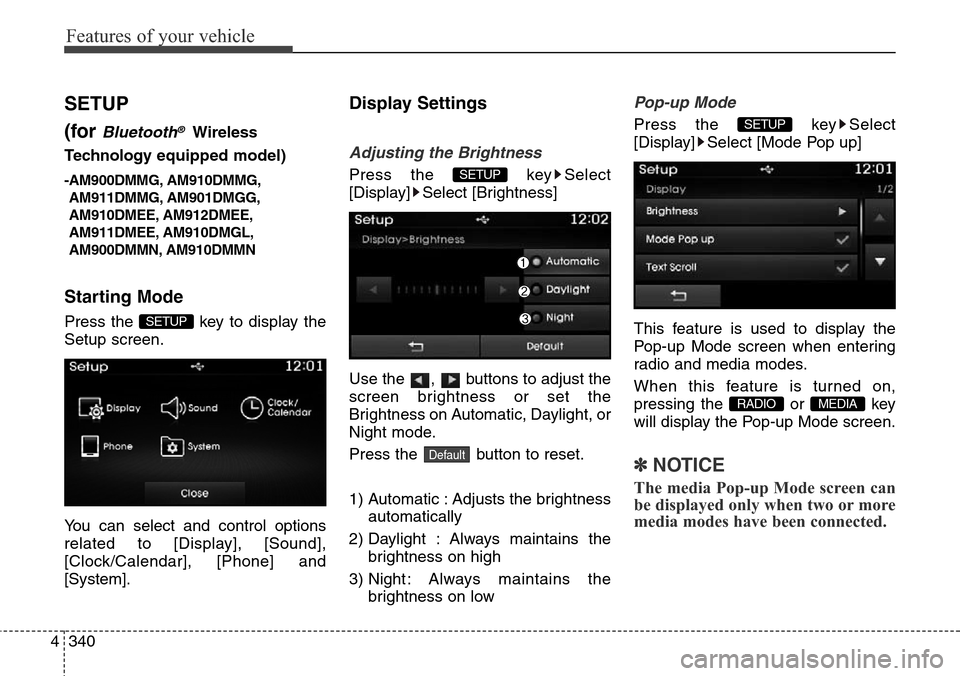
Starting Mode
Press the key to display the
Setup screen.
You can select and control options
related to [Display], [Sound],
[Clock/Calendar], [Phone] and
[System].
Display Settings
Adjusting the Brightness
Press the key Select
[Display] Select [Brightness]
Use the , buttons to adjust the
screen brightness or set the
Brightness on Automatic, Daylight, or
Night mode.
Press the button to reset.
1) Automatic : Adjusts the brightness
automatically
2) Daylight : Always maintains the
brightness on high
3) Night : Always maintains the
brightness on low
Pop-up Mode
Press the key Select
[Display] Select [Mode Pop up]
This feature is used to display the
Pop-up Mode screen when entering
radio and media modes.
When this feature is turned on,
pressing the or key
will display the Pop-up Mode screen.
✽NOTICE
The media Pop-up Mode screen can
be displayed only when two or more
media modes have been connected.
MEDIA RADIO
SETUP
Default
SETUP
SETUP
Page 438 of 718
![Hyundai Grand Santa Fe 2013 User Guide 4341
Features of your vehicle
Text Scroll
Press the key Select
[Display] Select [Text Scroll]
This feature is used to scroll text dis-
played on the screen when it is too
long to be displayed at once](/img/35/14776/w960_14776-437.png "Hyundai Grand Santa Fe 2013 User Guide 4341
Features of your vehicle
Text Scroll
Press the key Select
[Display] Select [Text Scroll]
This feature is used to scroll text dis-
played on the screen when it is too
long to be displayed at once")
4341
Features of your vehicle
Text Scroll
Press the key Select
[Display] Select [Text Scroll]
This feature is used to scroll text dis-
played on the screen when it is too
long to be displayed at once.
When turned on, the text is repeat-
edly scrolled. When turned off, the
text is scrolled just once.
MP3 Information Display
Press the key Select
[Display] Select [Media Display]
This feature is used to change the
information displayed within USB
and MP3 CD modes.
1) Folder File : Displays file name
and folder name
2) Album Artist Song : Displays
album name/artist name/song
Sound Settings
Sound Settings
Press the key Select
[Sound] Select [Sound Setting]
Use the , , , buttons to
adjust the Fader/Balance settings.
Use the , buttons to adjust the
Bass/Middle/Treble settings.
Press the button to reset.
Default
SETUP
SETUP SETUP