key Hyundai Grand Santa Fe 2013 Manual PDF
[x] Cancel search | Manufacturer: HYUNDAI, Model Year: 2013, Model line: Grand Santa Fe, Model: Hyundai Grand Santa Fe 2013Pages: 718, PDF Size: 13.5 MB
Page 335 of 718
Features of your vehicle
238 4
MENU : My Music Mode
(if equipped)
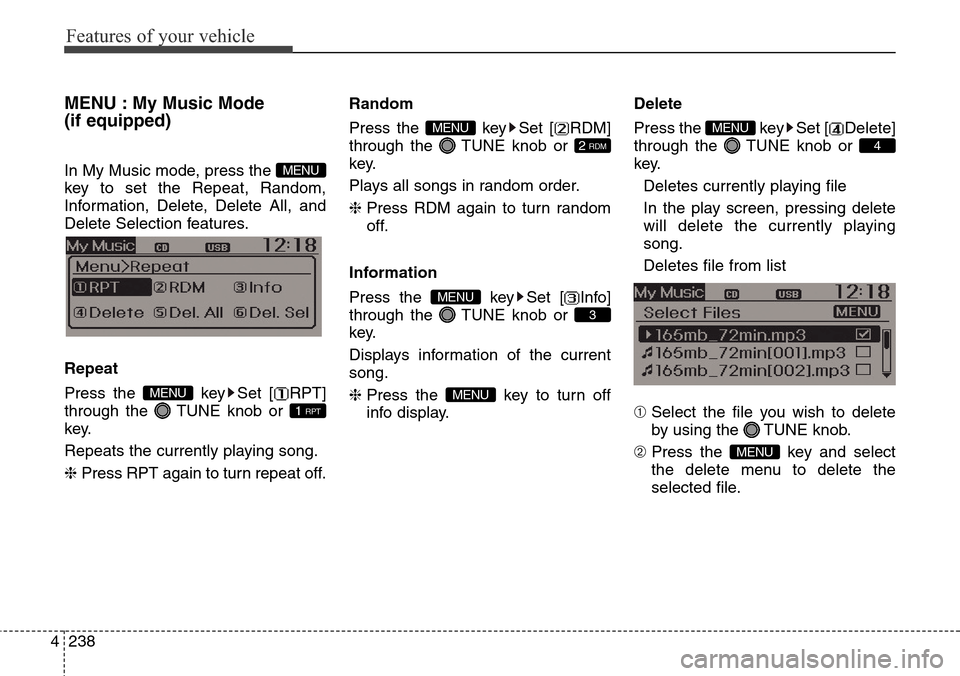
In My Music mode, press the
key to set the Repeat, Random,
Information, Delete, Delete All, and
Delete Selection features.
Repeat
Press the key Set [ RPT]
through the TUNE knob or
key.
Repeats the currently playing song.
❈ Press RPT again to turn repeat off.Random
Press the key Set [ RDM]
through the TUNE knob or
key.
Plays all songs in random order.
❈ Press RDM again to turn random
off.
Information
Press the key Set [ Info]
through the TUNE knob or
key.
Displays information of the current
song.
❈ Press the key to turn off
info display.Delete
Press the key Set [ Delete]
through the TUNE knob or
key.
Deletes currently playing file
In the play screen, pressing delete
will delete the currently playing
song.
Deletes file from list
➀ Select the file you wish to delete
by using the TUNE knob.
➁ Press the key and select
the delete menu to delete the
selected file.
MENU
4
MENU
MENU
3
MENU
2 RDM
MENU
1 RPT
MENU
MENU
Page 336 of 718
![Hyundai Grand Santa Fe 2013 Manual PDF 4239
Features of your vehicle
Delete All
Press the key Set [ Del.All]
through the TUNE knob or
key.
Deletes all songs of My Music.
Delete Selection
Press the key Set [
Del.Sel] through the TUNE k](/img/35/14776/w960_14776-335.png "Hyundai Grand Santa Fe 2013 Manual PDF 4239
Features of your vehicle
Delete All
Press the key Set [ Del.All]
through the TUNE knob or
key.
Deletes all songs of My Music.
Delete Selection
Press the key Set [
Del.Sel] through the TUNE k")
4239
Features of your vehicle
Delete All
Press the key Set [ Del.All]
through the TUNE knob or
key.
Deletes all songs of My Music.
Delete Selection
Press the key Set [
Del.Sel] through the TUNE knob
or key.
Songs within My Music are selected
and deleted.
➀ Select the songs you wish to
delete from the list.➁ After selecting, press the
key and select the delete menu.
✽NOTICE- Using the My Music
• Even if memory is available, a
maximum of 6,000 songs can be
stored.
• The same song can be copied up to
1,000 times.
• Memory info can be checked in
the System menu of Setup.
AUX
AUX is used to play external MEDIA
currently connected with the AUX
terminal.
AUX mode will automatically start
when an external device is connect-
ed with the AUX terminal.
If an external device is connected,
you can also press the key to
change to AUX mode.
❈ AUX mode cannot be started
unless there is an external device
connected to the AUX terminal.
✽NOTICE - USING THE AUX
Fully insert the AUX cable into the
AUX terminal for use.
MEDIA
MENU
6
MENU
5
MENU
Page 337 of 718
Features of your vehicle
240 4
Bluetooth®Wireless
Technology AUDIO
(if equipped)
What is Bluetooth®Wireless
Technology?
Bluetooth®Wireless Technology
allows devices to be connected in a
short distance, including hands-free
devices, stereo headsets, wireless
remote controllers, etc. For more
information, visit the
Bluetooth®
Wireless Technology website at
www.Bluetooth.com
Before using Bluetooth®Wireless
Technology audio features
•
Bluetooth®Wireless Technology
audio may not be supported
depending on the compatibility of
your
Bluetooth®Wireless Technology
mobile phone.
• In order to use
Bluetooth®Wireless
Technology audio, you must first
pair and connect the
Bluetooth®
Wireless Technology mobile phone.• The
Bluetooth®word mark and
logos are registered trademarks
owned by
Bluetooth®SIG, Inc. and
any use of such marks is under
license. Other trademarks and trade
names are those of their respective
owners. A
Bluetooth®enabled cell
phone is required to use
Bluetooth®
Wireless Technology
•
Bluetooth®Wireless Technology
audio can be used only when the
[Audio Streaming] of Phone is
turned On.
❈ Setting
Bluetooth®Wireless
Technology Audio Streaming :
Press the key Select
[Phone] through the tune knob
Select [Audio Streaming] through
the TUNE knob Set /
Starting Bluetooth®Wireless
Technology Audio
• Press the key to change the
mode in order of CD ➟ USB ➟ AUX
➟ My Music ➟ BT Audio.
• If BT Audio is selected,
Bluetooth®
Wireless Technology audio will start
playing.
❈ Audio may not automatically start
playing in some mobile phones.
Using the
Bluetooth®Wireless
Technologyaudio features
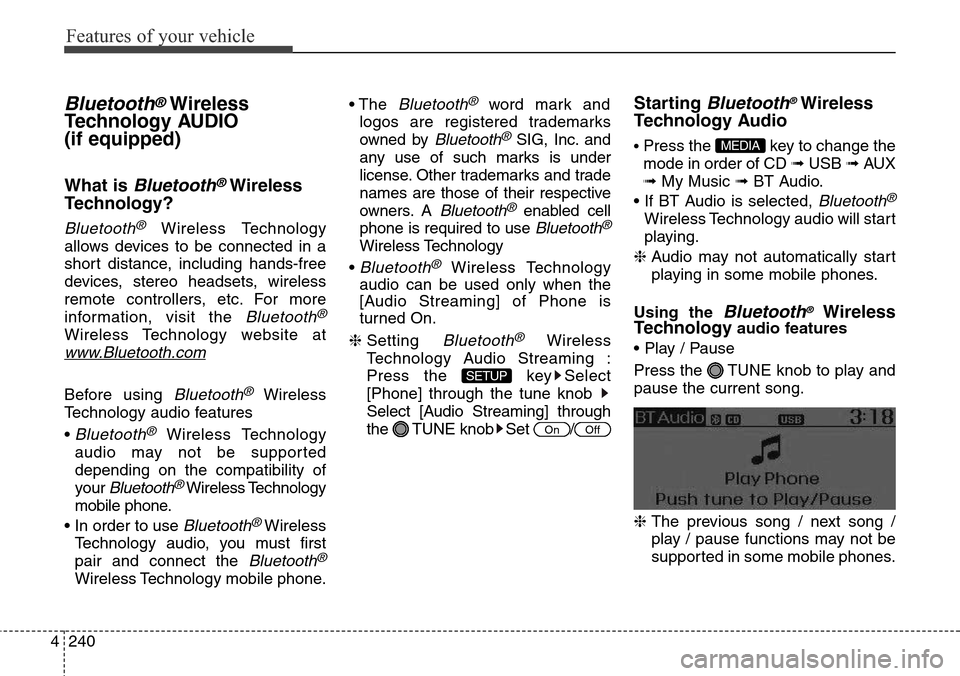
• Play / Pause
Press the TUNE knob to play and
pause the current song.
❈ The previous song / next song /
play / pause functions may not be
supported in some mobile phones.
MEDIA
OffOn
SETUP
Page 338 of 718
4241
Features of your vehicle
PHONE (if equipped)
Before using the Bluetooth®Wireless
Technology
phone features
• In order to use
Bluetooth®Wireless
Technology
phone, you must first
pair and connect the
Bluetooth®
Wireless Technologymobile phone.
• If the mobile phone is not paired or
connected, it is not possible to
enter Phone mode. Once a phone
is paired or connected, the guid-
ance screen will be displayed.
• If Priority is set upon vehicle igni-
tion (IGN/ACC ON), the
Bluetooth®
Wireless Technologyphone will be
automatically connected. Even if
you are outside, the
Bluetooth®
Wireless Technologyphone will be
automatically connected once you
are in the vicinity of the vehicle. If you
do not want automatic
Bluetooth®
Wireless Technologyphone connec-
tion, set the
Bluetooth®Wireless
Technology
power to OFF.
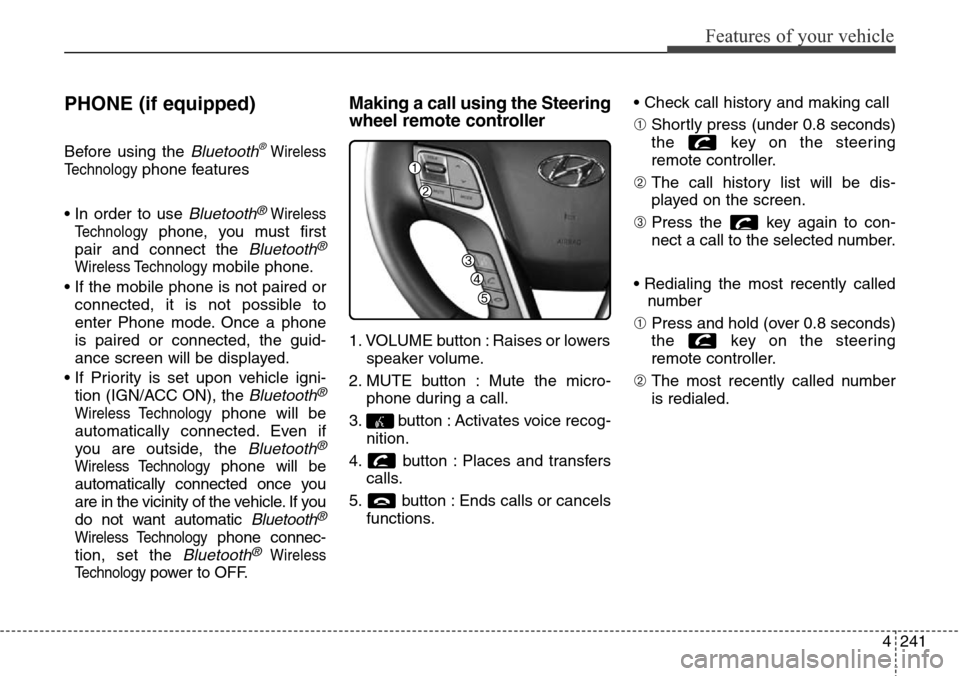
Making a call using the Steering
wheel remote controller
1. VOLUME button : Raises or lowers
speaker volume.
2. MUTE button : Mute the micro-
phone during a call.
3. button : Activates voice recog-
nition.
4. button : Places and transfers
calls.
5. button : Ends calls or cancels
functions.• Check call history and making call
➀ Shortly press (under 0.8 seconds)
the key on the steering
remote controller.
➁ The call history list will be dis-
played on the screen.
➂ Press the key again to con-
nect a call to the selected number.
• Redialing the most recently called
number
➀ Press and hold (over 0.8 seconds)
the key on the steering
remote controller.
➁ The most recently called number
is redialed.
Page 339 of 718
![Hyundai Grand Santa Fe 2013 Manual PDF Features of your vehicle
242 4
Phone MENU (for RDS model)
Press the key to display three
menus (Call History, Phone Book,
Phone Setup).
Call history
Press the key Set [
History] through the TUNE kn](/img/35/14776/w960_14776-338.png "Hyundai Grand Santa Fe 2013 Manual PDF Features of your vehicle
242 4
Phone MENU (for RDS model)
Press the key to display three
menus (Call History, Phone Book,
Phone Setup).
Call history
Press the key Set [
History] through the TUNE kn")
Features of your vehicle
242 4
Phone MENU (for RDS model)
Press the key to display three
menus (Call History, Phone Book,
Phone Setup).
Call history
Press the key Set [
History] through the TUNE knob
or key.
The call history is displayed and can
be used to select a number and
make a call.
If call history does not exist, a screen
asking whether to download call his-
tory is displayed. (The download fea-
ture may not be supported in some
mobile phones)Phone Book
Press the key Set [ P.
Book] through the TUNE knob or
key.
The phone book is displayed and
can be used to select a number and
make a call.
❈ If more than one number is saved
to one contact, then a screen
showing the mobile phone num-
ber, Home and office number is
displayed. Select the desired num-
ber to make the call.
❈ If phone book do not exist, a screen
asking whether to download phone
book is displayed. (The download
feature may not be supported in
some mobile phones)Phone Setup
Press the key Set [ Setup]
through the TUNE knob or
key.
The
Bluetooth®Wireless Technology
mobile phone setup screen is dis-
played. For more information, refer to
“Phone Setup”.
3
PHONE
2 RDM
PHONE
1 RPT
PHONE
PHONE
Page 340 of 718
![Hyundai Grand Santa Fe 2013 Manual PDF 4243
Features of your vehicle
Phone MENU
Press the key to display three
menus (Call History, Contacts, Phone
Setup).
Call history
Press the key Set [ History]
through the TUNE knob or
key.
The cal](/img/35/14776/w960_14776-339.png "Hyundai Grand Santa Fe 2013 Manual PDF 4243
Features of your vehicle
Phone MENU
Press the key to display three
menus (Call History, Contacts, Phone
Setup).
Call history
Press the key Set [ History]
through the TUNE knob or
key.
The cal")
4243
Features of your vehicle
Phone MENU
Press the key to display three
menus (Call History, Contacts, Phone
Setup).
Call history
Press the key Set [ History]
through the TUNE knob or
key.
The call history is displayed and can
be used to select a number and
make a call.
If call history does not exist, a screen
asking whether to download call his-
tory is displayed. (The download fea-
ture may not be supported in some
mobile phones)Contacts
Press the key Set [Contacts] through the TUNE knob
or key.
The Contacts are displayed and can
be used to select a number and
make a call.
❈If more than one number is saved
to one contact, then a screen
showing the mobile phone num-
ber, Home and office number is
displayed. Select the desired num-
ber to make the call.❈If Contacts do not exist, a screen
asking whether to download
Contacts is displayed. (The down-
load feature may not be supported
in some mobile phones)
Phone Setup
Press the key Set [
Setup] through the TUNE knob or
key.
The
Bluetooth®Wireless Technology
mobile phone setup screen is dis-
played. For more information, refer to
“Phone Setup”.
3
PHONE
2 RDM
PHONE
1 RPT
PHONE
PHONE
Page 344 of 718
4247
Features of your vehicle
VOICE COMMAND
(if equipped)
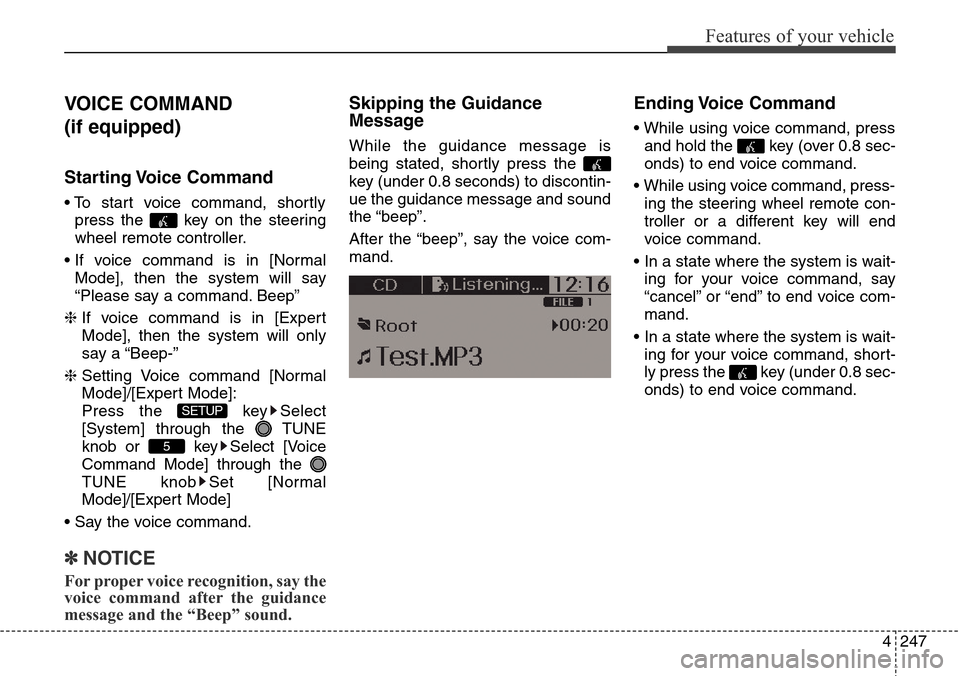
Starting Voice Command
• To start voice command, shortly
press the key on the steering
wheel remote controller.
• If voice command is in [Normal
Mode], then the system will say
“Please say a command. Beep”
❈ If voice command is in [Expert
Mode], then the system will only
say a “Beep-”
❈ Setting Voice command [Normal
Mode]/[Expert Mode]:
Press the key Select
[System] through the TUNE
knob or key Select [Voice
Command Mode] through the
TUNE knob Set [Normal
Mode]/[Expert Mode]
• Say the voice command.
✽NOTICE
For proper voice recognition, say the
voice command after the guidance
message and the “Beep” sound.
Skipping the Guidance
Message
While the guidance message is
being stated, shortly press the
key (under 0.8 seconds) to discontin-
ue the guidance message and sound
the “beep”.
After the “beep”, say the voice com-
mand.
Ending Voice Command
• While using voice command, press
and hold the key (over 0.8 sec-
onds) to end voice command.
• While using voice command, press-
ing the steering wheel remote con-
troller or a different key will end
voice command.
• In a state where the system is wait-
ing for your voice command, say
“cancel” or “end” to end voice com-
mand.
• In a state where the system is wait-
ing for your voice command, short-
ly press the key (under 0.8 sec-
onds) to end voice command.
5
SETUP
Page 345 of 718
Features of your vehicle
248 4
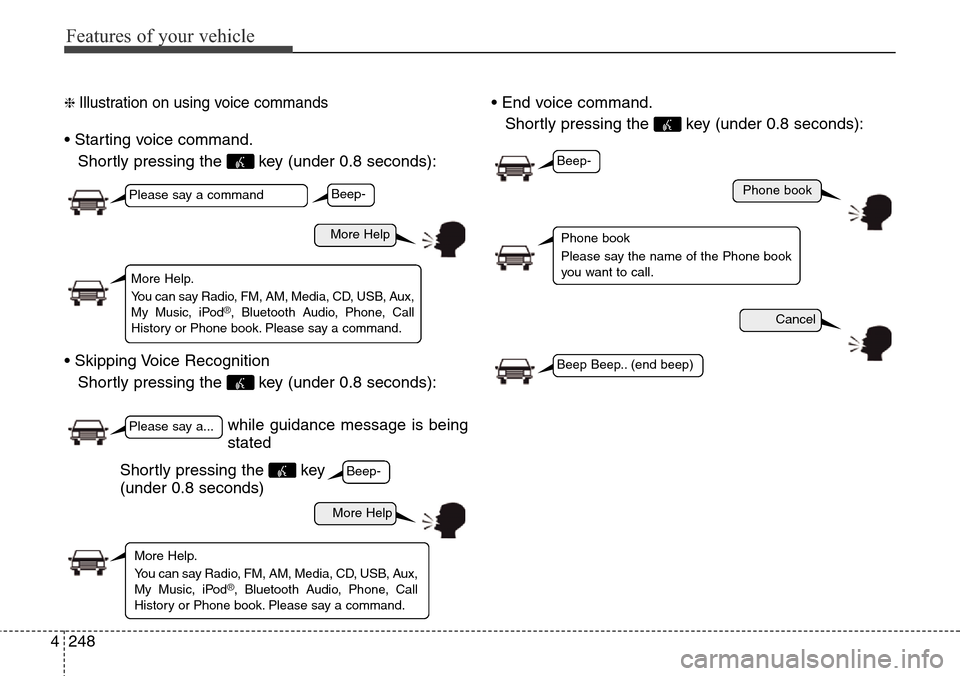
❈ Illustration on using voice commands
• Starting voice command.
Shortly pressing the key (under 0.8 seconds):
• Skipping Voice Recognition
Shortly pressing the key (under 0.8 seconds):• End voice command.
Shortly pressing the key (under 0.8 seconds):
while guidance message is being
stated
More Help
Phone book
Cancel
More Help
Please say a command
Please say a...
More Help.
You can say Radio, FM, AM, Media, CD, USB, Aux,
My Music, iPod
®, Bluetooth Audio, Phone, Call
History or Phone book. Please say a command.
Phone book
Please say the name of the Phone book
you want to call.
More Help.
You can say Radio, FM, AM, Media, CD, USB, Aux,
My Music, iPod
®, Bluetooth Audio, Phone, Call
History or Phone book. Please say a command.
Beep-
Beep-
Beep-
Beep Beep.. (end beep)
Shortly pressing the key
(under 0.8 seconds)
Page 353 of 718
Features of your vehicle
256 4
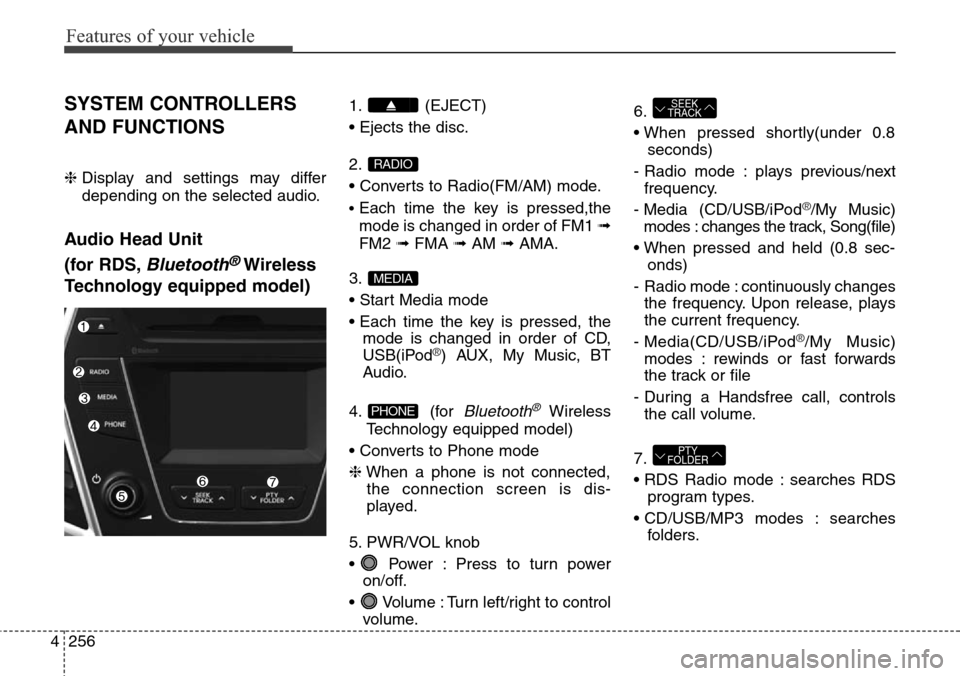
SYSTEM CONTROLLERS
AND FUNCTIONS
❈ Display and settings may differ
depending on the selected audio.
Audio Head Unit
(for RDS,
Bluetooth®Wireless
Technology equipped model)
1. (EJECT)
• Ejects the disc.
2.
• Converts to Radio(FM/AM) mode.
•Each time the key is pressed,the
mode is changed in order of FM1 ➟
FM2 ➟FMA ➟AM ➟AMA.
3.
• Start Media mode
• Each time the key is pressed, the
mode is changed in order of CD,
USB(iPod
®) AUX, My Music, BT
Audio.
4. (for
Bluetooth®Wireless
Technology equipped model)
• Converts to Phone mode
❈When a phone is not connected,
the connection screen is dis-
played.
5. PWR/VOL knob
• Power : Press to turn power
on/off.
• Volume : Turn left/right to control
volume.6.
• When pressed shortly(under 0.8
seconds)
- Radio mode : plays previous/next
frequency.
- Media (CD/USB/iPod
®/My Music)
modes : changes the track, Song(file)
• When pressed and held (0.8 sec-
onds)
- Radio mode : continuously changes
the frequency. Upon release, plays
the current frequency.
- Media(CD/USB/iPod
®/My Music)
modes : rewinds or fast forwards
the track or file
- During a Handsfree call, controls
the call volume.
7.
• RDS Radio mode : searches RDS
program types.
• CD/USB/MP3 modes : searches
folders.
PTY
FOLDER
SEEK
TRACK
PHONE
MEDIA
RADIO
Page 354 of 718
4257
Features of your vehicle
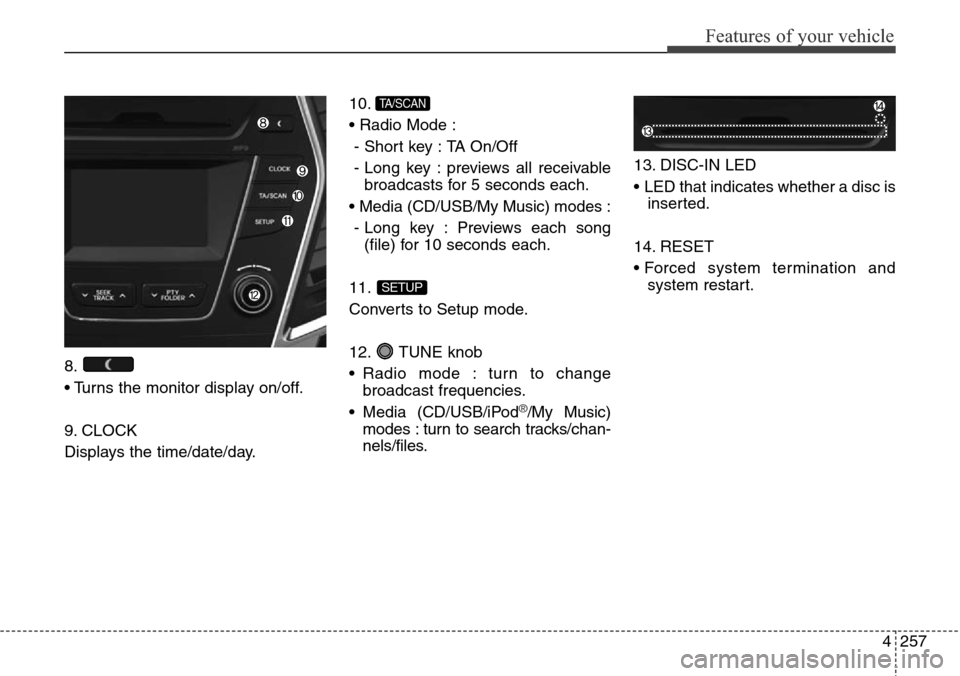
8.
• Turns the monitor display on/off.
9. CLOCK
Displays the time/date/day.10.
• Radio Mode :
- Short key : TA On/Off
- Long key : previews all receivable
broadcasts for 5 seconds each.
• Media (CD/USB/My Music) modes :
- Long key : Previews each song
(file) for 10 seconds each.
11.
Converts to Setup mode.
12. TUNE knob
• Radio mode : turn to change
broadcast frequencies.
• Media (CD/USB/iPod
®/My Music)
modes : turn to search tracks/chan-
nels/files.13. DISC-IN LED
• LED that indicates whether a disc is
inserted.
14. RESET
• Forced system termination and
system restart.
SETUP
TA/SCAN