key Hyundai Grand Santa Fe 2013 Service Manual
[x] Cancel search | Manufacturer: HYUNDAI, Model Year: 2013, Model line: Grand Santa Fe, Model: Hyundai Grand Santa Fe 2013Pages: 718, PDF Size: 13.5 MB
Page 238 of 718
4141
Features of your vehicle
Headlamp welcome
When the headlight(light switch in
the headlight or AUTO position) is on
and all doors (and tailgate) are
locked and closed, the headlight,
position light and tail light will come
on for 15 seconds if any of the below
is performed.
• Without smart key system
- When the door unlock button is
pressed on the transmitter.
• With the smart key system
- When the door unlock button is
pressed on the smart key.
At this time, if you press the door lock
button (on the transmitter or smart
key), the lights will turn off immedi-
ately.
Interior light
When the interior light switch is in the
DOOR position and all doors (and
tailgate) are locked and closed, the
room lamp will come on for 30 sec-
onds if any of the below is performed.
• Without smart key system
- When the door unlock button is
pressed on the transmitter.
• With the smart key system
- When the door unlock button is
pressed on the smart key.
- When the button of the outside
door handle is pressed.
At this time, if you press the door lock
button, the lamps will turn off imme-
diately.
Puddle lamp and pocket lamp
(if equipped)
When all doors are locked and
closed, the puddle lamp and pocket
lamp will come on for 15 seconds if
any of the below is performed.
• Without smart key system
- When the door unlock button is
pressed on the transmitter.
• With the smart key system
- When the door unlock button is
pressed on the smart key.
- When the button of the outside
door handle is pressed.
- When the vehicle is approached
with the smart key in possession.
At this time, if you press the door lock
button, the lamps will turn off imme-
diately.
✽NOTICE
The puddle lamp and pocket lamp
do not operate when the outside
rearview mirror folding switch is in
the fold position.
WELCOME SYSTEM (IF EQUIPPED)
Page 270 of 718
4173
Features of your vehicle
STORAGE COMPARTMENT
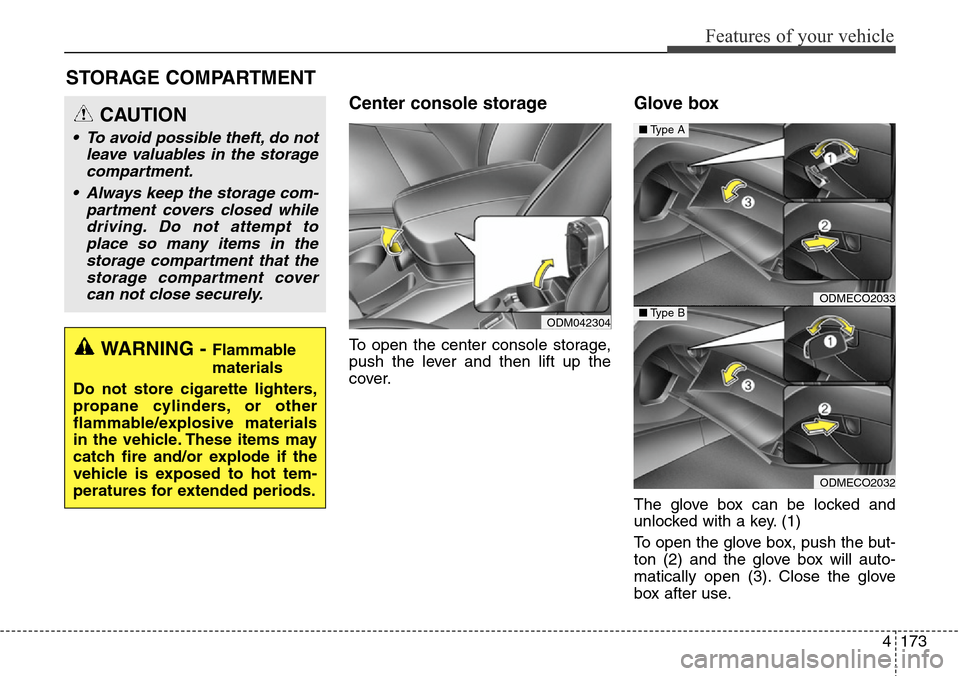
Center console storage
To open the center console storage,
push the lever and then lift up the
cover.
Glove box
The glove box can be locked and
unlocked with a key. (1)
To open the glove box, push the but-
ton (2) and the glove box will auto-
matically open (3). Close the glove
box after use.
ODMECO2033
ODMECO2032
■Type A
■Type B
WARNING - Flammable
materials
Do not store cigarette lighters,
propane cylinders, or other
flammable/explosive materials
in the vehicle. These items may
catch fire and/or explode if the
vehicle is exposed to hot tem-
peratures for extended periods.
CAUTION
• To avoid possible theft, do not
leave valuables in the storage
compartment.
• Always keep the storage com-
partment covers closed while
driving. Do not attempt to
place so many items in the
storage compartment that the
storage compartment cover
can not close securely.
ODM042304
Page 296 of 718
4199
Features of your vehicle
(Continued)
• If you use devices such as a USB
hub purchased separately, the
vehicle’s audio system may not
recognize the USB device. In that
case, connect the USB device
directly to the multimedia termi-
nal of the vehicle.
• If the USB device is divided by log-
ical drives, only the music files on
the highest-priority drive are rec-
ognized by car audio.
• Devices such as MP3 Player/
Cellular phone/Digital camera can
be unrecognizable by standard
USB I/F can be unrecognizable.
• Charging through the USB may
not be supported in some mobile
devices.
• USB HDD or USB types liable to
connection failures due to vehicle
vibrations are not supported. (i-
stick type)
• Some non-standard USB devices
(METAL COVER TYPE USB)
can be unrecognizable.
(Continued)(Continued)
• Some USB flash memory readers
(such as CF, SD, micro SD, etc.) or
external-HDD type devices can be
unrecognizable.
• Music files protected by DRM
(DIGITAL RIGHTS MANAGE-
MENT) are not recognizable.
• The data in the USB memory may
be lost while using this audio.
Always back up important data on
a personal storage device.
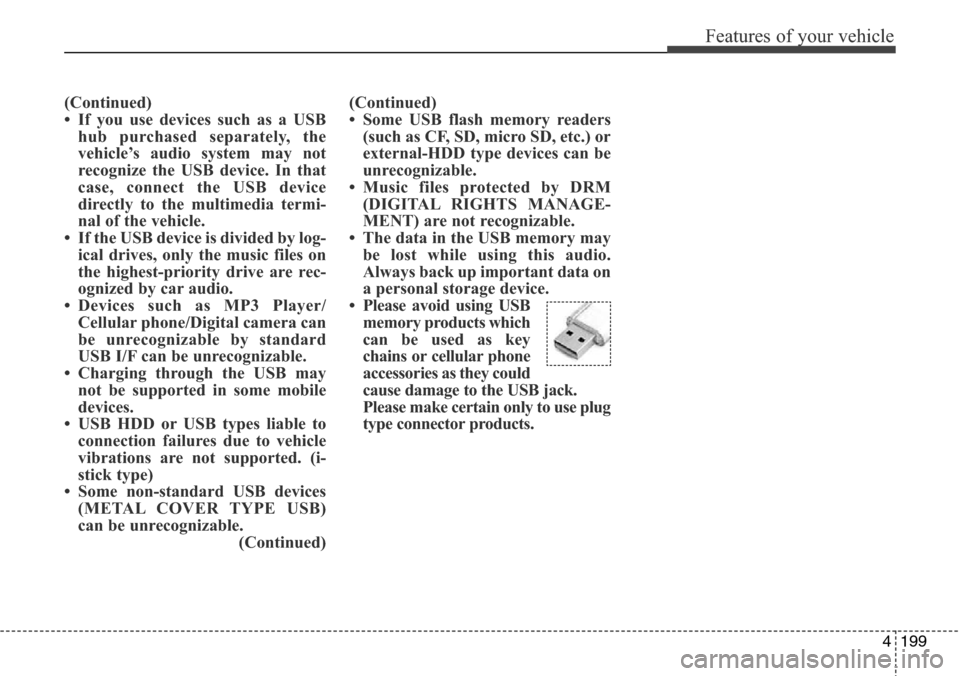
• Please avoid using USB
memory products which
can be used as key
chains or cellular phone
accessories as they could
cause damage to the USB jack.
Please make certain only to use plug
type connector products.
Page 300 of 718
4203
Features of your vehicle
SYSTEM CONTROLLERS
AND FUNCTIONS
❈Display and settings may differ
depending on the selected audio.
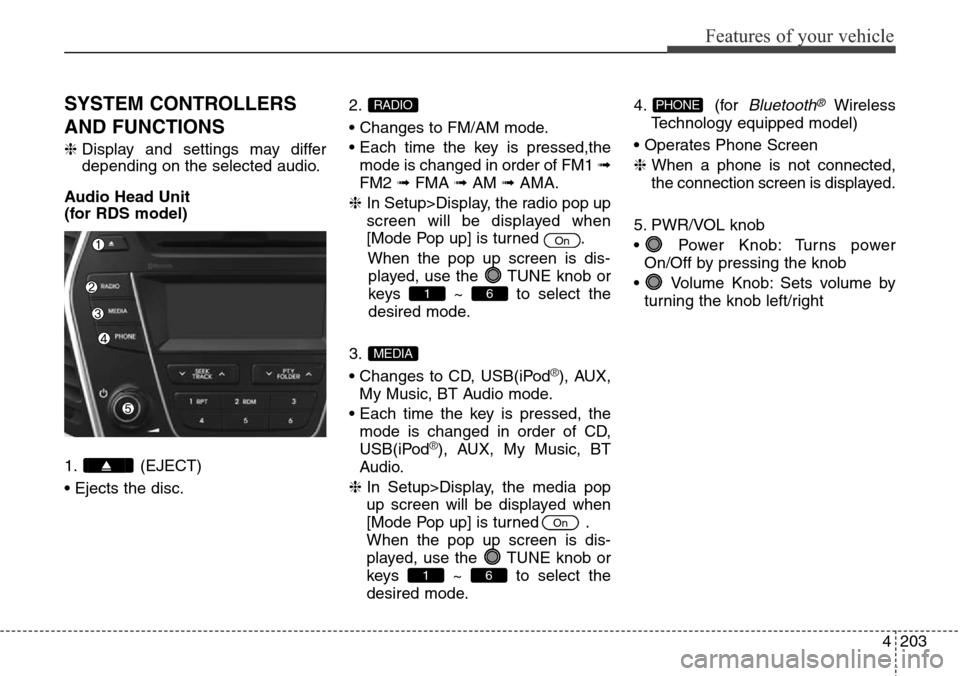
Audio Head Unit
(for RDS model)
1. (EJECT)
• Ejects the disc.2.
• Changes to FM/AM mode.
• Each time the key is pressed,the
mode is changed in order of FM1 ➟
FM2 ➟FMA ➟AM ➟AMA.
❈ In Setup>Display, the radio pop up
screen will be displayed when
[Mode Pop up] is turned .
When the pop up screen is dis-
played, use the TUNE knob or
keys ~ to select the
desired mode.
3.
• Changes to CD, USB(iPod
®), AUX,
My Music, BT Audio mode.
• Each time the key is pressed, the
mode is changed in order of CD,
USB(iPod
®), AUX, My Music, BT
Audio.
❈ In Setup>Display, the media pop
up screen will be displayed when
[Mode Pop up] is turned .
When the pop up screen is dis-
played, use the TUNE knob or
keys ~ to select the
desired mode.4. (for
Bluetooth®Wireless
Technology equipped model)
• Operates Phone Screen
❈ When a phone is not connected,
the connection screen is displayed.
5. PWR/VOL knob
• Power Knob: Turns power
On/Off by pressing the knob
• Volume Knob: Sets volume by
turning the knob left/rightPHONE
61
On
MEDIA
61
On
RADIO
Page 301 of 718
Features of your vehicle
204 4
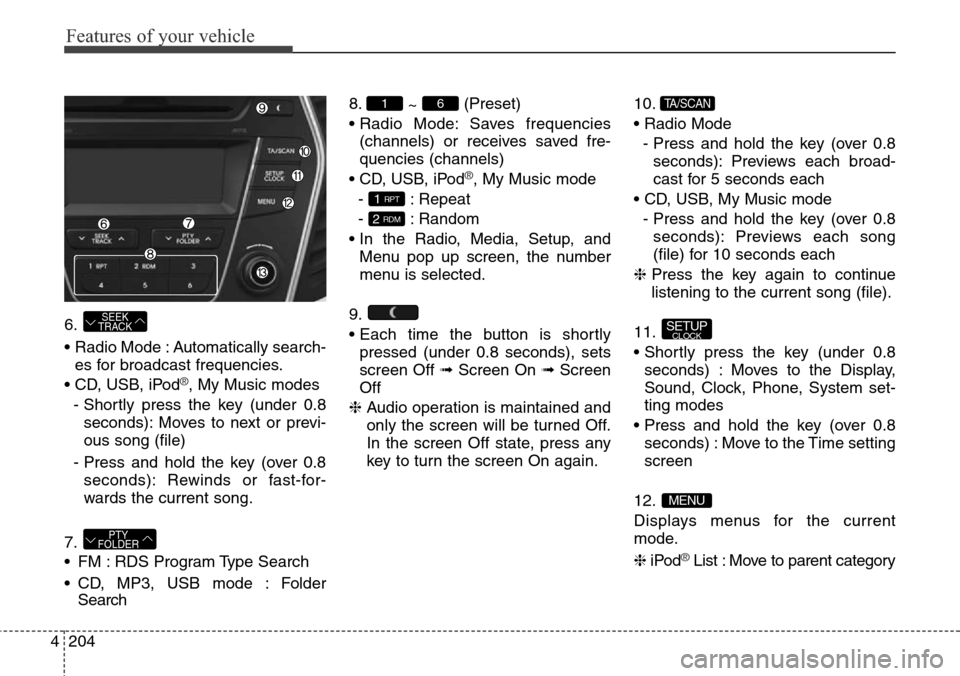
6.
• Radio Mode : Automatically search-
es for broadcast frequencies.
• CD, USB, iPod
®, My Music modes
- Shortly press the key (under 0.8
seconds): Moves to next or previ-
ous song (file)
- Press and hold the key (over 0.8
seconds): Rewinds or fast-for-
wards the current song.
7.
• FM : RDS Program Type Search
• CD, MP3, USB mode : Folder
Search8.
~ (Preset)
• Radio Mode: Saves frequencies
(channels) or receives saved fre-
quencies (channels)
• CD, USB, iPod
®, My Music mode
- : Repeat
- : Random
• In the Radio, Media, Setup, and
Menu pop up screen, the number
menu is selected.
9.
• Each time the button is shortly
pressed (under 0.8 seconds), sets
screen Off ➟Screen On ➟Screen
Off
❈ Audio operation is maintained and
only the screen will be turned Off.
In the screen Off state, press any
key to turn the screen On again.10.
• Radio Mode
- Press and hold the key (over 0.8
seconds): Previews each broad-
cast for 5 seconds each
• CD, USB, My Music mode
- Press and hold the key (over 0.8
seconds): Previews each song
(file) for 10 seconds each
❈ Press the key again to continue
listening to the current song (file).
11.
• Shortly press the key (under 0.8
seconds) : Moves to the Display,
Sound, Clock, Phone, System set-
ting modes
• Press and hold the key (over 0.8
seconds) : Move to the Time setting
screen
12.
Displays menus for the current
mode.
❈iPod
®List : Move to parent category
MENU
SETUPCLOCK
TA/SCAN
2 RDM
1 RPT
61
PTY
FOLDER
SEEK
TRACK
Page 302 of 718
4205
Features of your vehicle
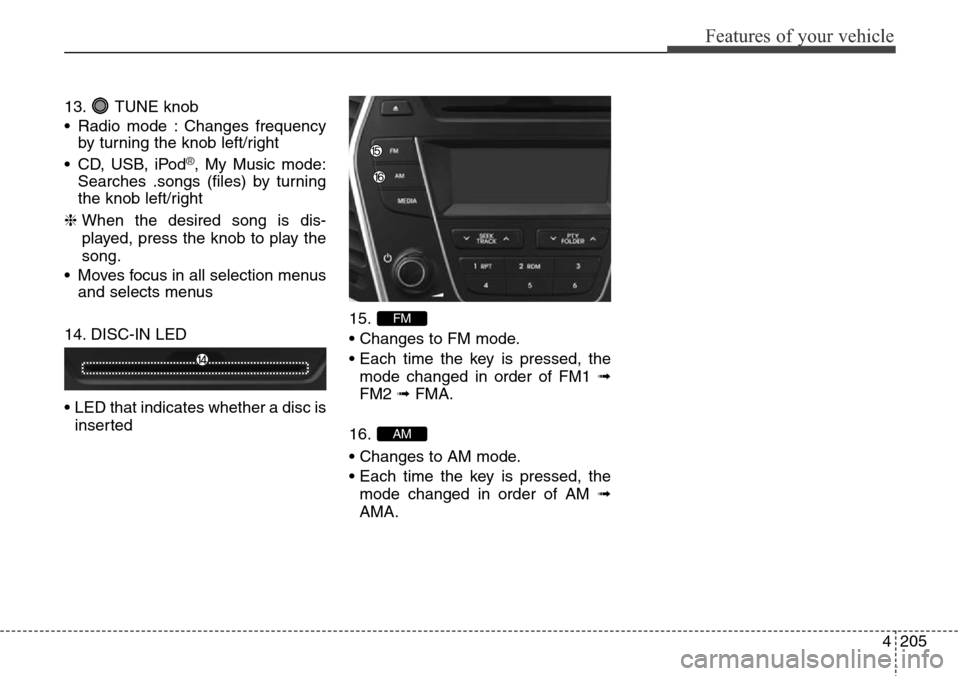
13. TUNE knob
• Radio mode : Changes frequency
by turning the knob left/right
• CD, USB, iPod
®, My Music mode:
Searches .songs (files) by turning
the knob left/right
❈ When the desired song is dis-
played, press the knob to play the
song.
• Moves focus in all selection menus
and selects menus
14. DISC-IN LED
• LED that indicates whether a disc is
inserted15.
• Changes to FM mode.
• Each time the key is pressed, the
mode changed in order of FM1 ➟
FM2 ➟ FMA.
16.
• Changes to AM mode.
• Each time the key is pressed, the
mode changed in order of AM ➟
AMA.
AM
FM
Page 303 of 718
Features of your vehicle
206 4
Audio Head Unit
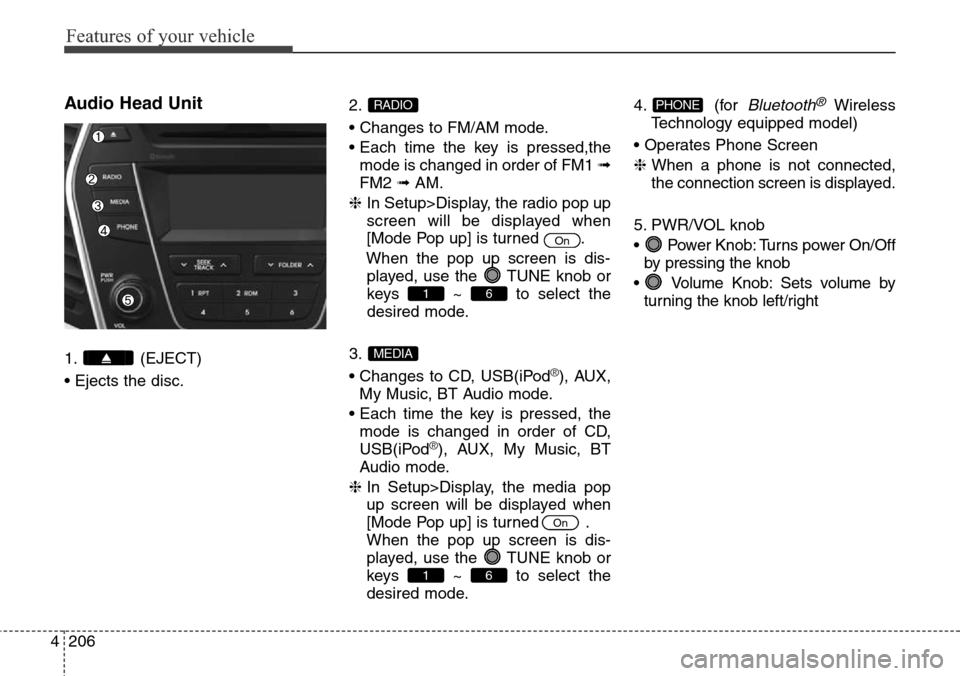
1. (EJECT)
• Ejects the disc.2.
• Changes to FM/AM mode.
• Each time the key is pressed,the
mode is changed in order of FM1 ➟
FM2 ➟AM.
❈ In Setup>Display, the radio pop up
screen will be displayed when
[Mode Pop up] is turned .
When the pop up screen is dis-
played, use the TUNE knob or
keys ~ to select the
desired mode.
3.
• Changes to CD, USB(iPod®), AUX,
My Music, BT Audio mode.
• Each time the key is pressed, the
mode is changed in order of CD,
USB(iPod
®), AUX, My Music, BT
Audio mode.
❈ In Setup>Display, the media pop
up screen will be displayed when
[Mode Pop up] is turned .
When the pop up screen is dis-
played, use the TUNE knob or
keys ~ to select the
desired mode.4. (for
Bluetooth®Wireless
Technology equipped model)
• Operates Phone Screen
❈ When a phone is not connected,
the connection screen is displayed.
5. PWR/VOL knob
• Power Knob: Turns power On/Off
by pressing the knob
• Volume Knob: Sets volume by
turning the knob left/rightPHONE
61
On
MEDIA
61
On
RADIO
Page 304 of 718
4207
Features of your vehicle
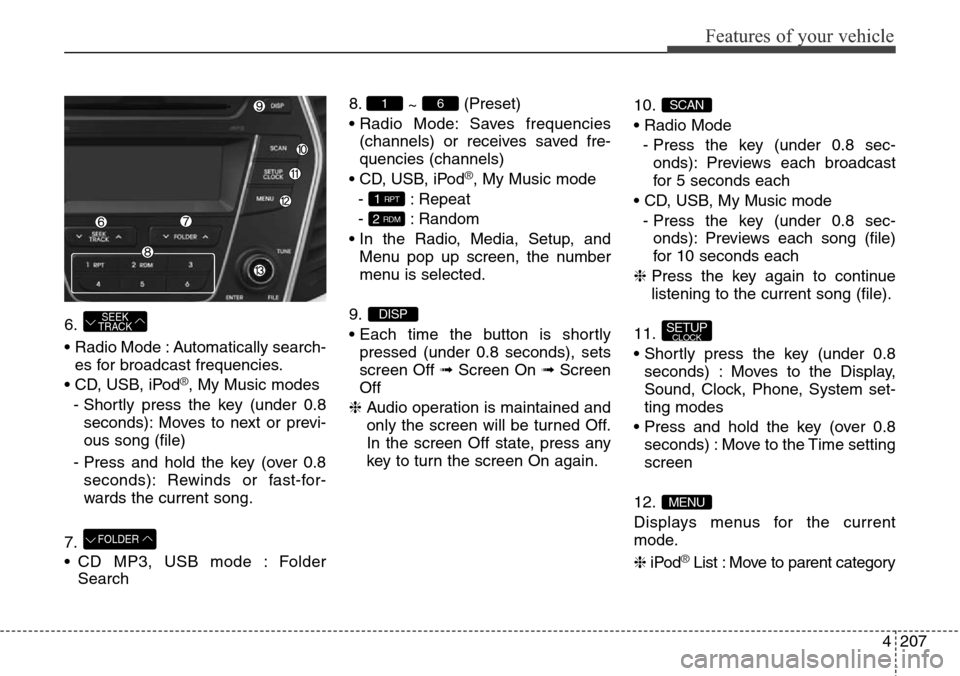
6.
• Radio Mode : Automatically search-
es for broadcast frequencies.
• CD, USB, iPod
®, My Music modes
- Shortly press the key (under 0.8
seconds): Moves to next or previ-
ous song (file)
- Press and hold the key (over 0.8
seconds): Rewinds or fast-for-
wards the current song.
7.
• CD MP3, USB mode : Folder
Search8.
~ (Preset)
• Radio Mode: Saves frequencies
(channels) or receives saved fre-
quencies (channels)
• CD, USB, iPod
®, My Music mode
- : Repeat
- : Random
• In the Radio, Media, Setup, and
Menu pop up screen, the number
menu is selected.
9.
• Each time the button is shortly
pressed (under 0.8 seconds), sets
screen Off ➟Screen On ➟Screen
Off
❈ Audio operation is maintained and
only the screen will be turned Off.
In the screen Off state, press any
key to turn the screen On again.10.
• Radio Mode
- Press the key (under 0.8 sec-
onds): Previews each broadcast
for 5 seconds each
• CD, USB, My Music mode
- Press the key (under 0.8 sec-
onds): Previews each song (file)
for 10 seconds each
❈ Press the key again to continue
listening to the current song (file).
11.
• Shortly press the key (under 0.8
seconds) : Moves to the Display,
Sound, Clock, Phone, System set-
ting modes
• Press and hold the key (over 0.8
seconds) : Move to the Time setting
screen
12.
Displays menus for the current
mode.
❈iPod
®List : Move to parent category
MENU
SETUPCLOCK
SCAN
DISP
2 RDM
1 RPT
61
FOLDER
SEEK
TRACK
Page 305 of 718
Features of your vehicle
208 4
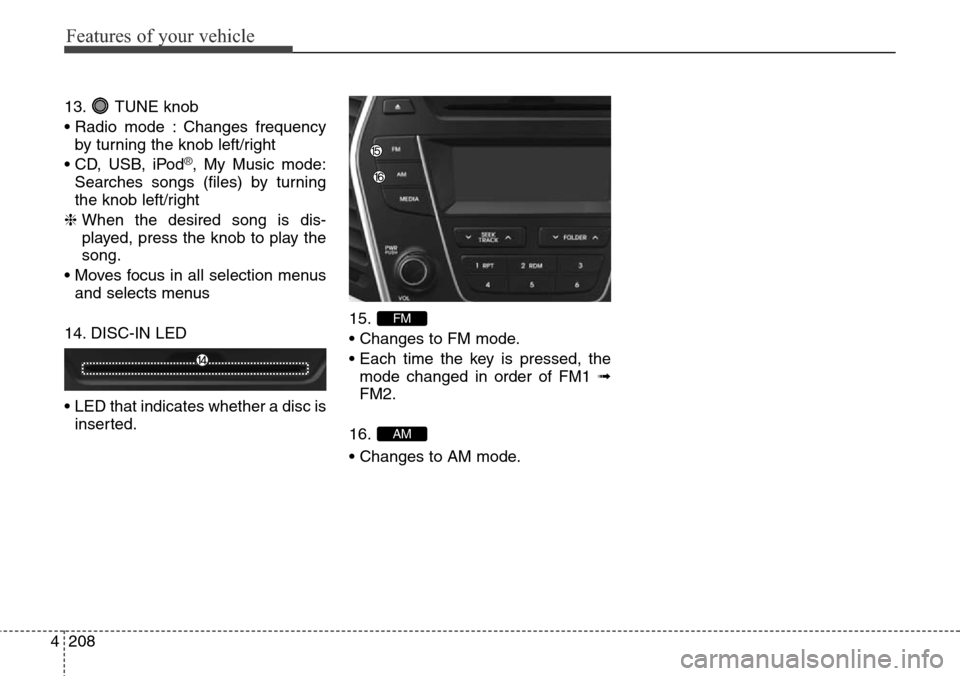
13. TUNE knob
• Radio mode : Changes frequency
by turning the knob left/right
• CD, USB, iPod
®, My Music mode:
Searches songs (files) by turning
the knob left/right
❈ When the desired song is dis-
played, press the knob to play the
song.
• Moves focus in all selection menus
and selects menus
14. DISC-IN LED
• LED that indicates whether a disc is
inserted.15.
• Changes to FM mode.
• Each time the key is pressed, the
mode changed in order of FM1 ➟
FM2.
16.
• Changes to AM mode.
AM
FM
Page 306 of 718
![Hyundai Grand Santa Fe 2013 Service Manual 4209
Features of your vehicle
SETUP (for RDS model)
-
AM104DMEE, AM114DMEE
Display Settings
Press the key Select
[Display] through TUNE knob or
key Select menu through
TUNE knobMode Pop up
[Mode Pop](/img/35/14776/w960_14776-305.png "Hyundai Grand Santa Fe 2013 Service Manual 4209
Features of your vehicle
SETUP (for RDS model)
-
AM104DMEE, AM114DMEE
Display Settings
Press the key Select
[Display] through TUNE knob or
key Select menu through
TUNE knobMode Pop up
[Mode Pop")
4209
Features of your vehicle
SETUP (for RDS model)
-
AM104DMEE, AM114DMEE
Display Settings
Press the key Select
[Display] through TUNE knob or
key Select menu through
TUNE knobMode Pop up
[Mode Pop up] Changes .
selection mode
• During On state, press the
or key to display the mode
change pop up screen.
Scroll text
[Scroll text] Set /
• : Maintains scroll
• : Scrolls only one (1) time.
Song Info
When playing an MP3 file, select the
desired display info from ‘Folder/File’
or ‘Album/Artist/Song’.
Sound Settings
Press the key Select
[Sound] through TUNE knob or
key Select menu through
TUNE knob
2 RDM
SETUP
Off
On
OffOn
MEDIA
RADIO
On
1 RPT
SETUP