ignition Hyundai H-1 (Grand Starex) 2009 - RHD (UK, Australia) Owner's Guide
[x] Cancel search | Manufacturer: HYUNDAI, Model Year: 2009, Model line: H-1 (Grand Starex), Model: Hyundai H-1 (Grand Starex) 2009Pages: 303, PDF Size: 31.48 MB
Page 108 of 303
447
Features of your vehicle
D190100AUN
Battery saver function
The purpose of this feature is to pre-vent the battery from being dis-
charged. The system automatically
turns off the exterior lights when the
driver removes the ignition key and
opens the driver-side door.
With this feature, the parking lights will be turned off automatically if the driver
parks on the side of road at night.
If necessary, to keep the lights on
when the ignition key is removed, per-
form the following:
1) Open the driver-side door.
2) Turn the parking lights OFF and ON again using the light switch on the
steering column. D190400ATQ
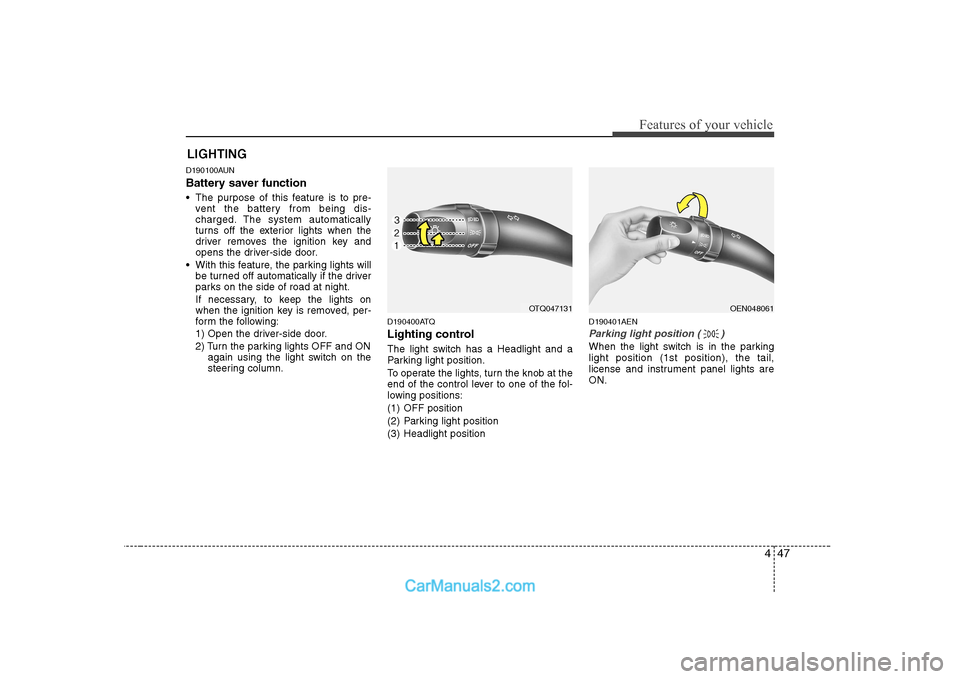
Lighting control
The light switch has a Headlight and a
Parking light position.
To operate the lights, turn the knob at the
end of the control lever to one of the fol-
lowing positions:
(1) OFF position
(2) Parking light position
(3) Headlight position D190401AEN
Parking light position ( )
When the light switch is in the parking light position (1st position), the tail,
license and instrument panel lights areON.
LIGHTING
OTQ047131OEN048061
Page 109 of 303
Features of your vehicle
48
4
D190402AEN
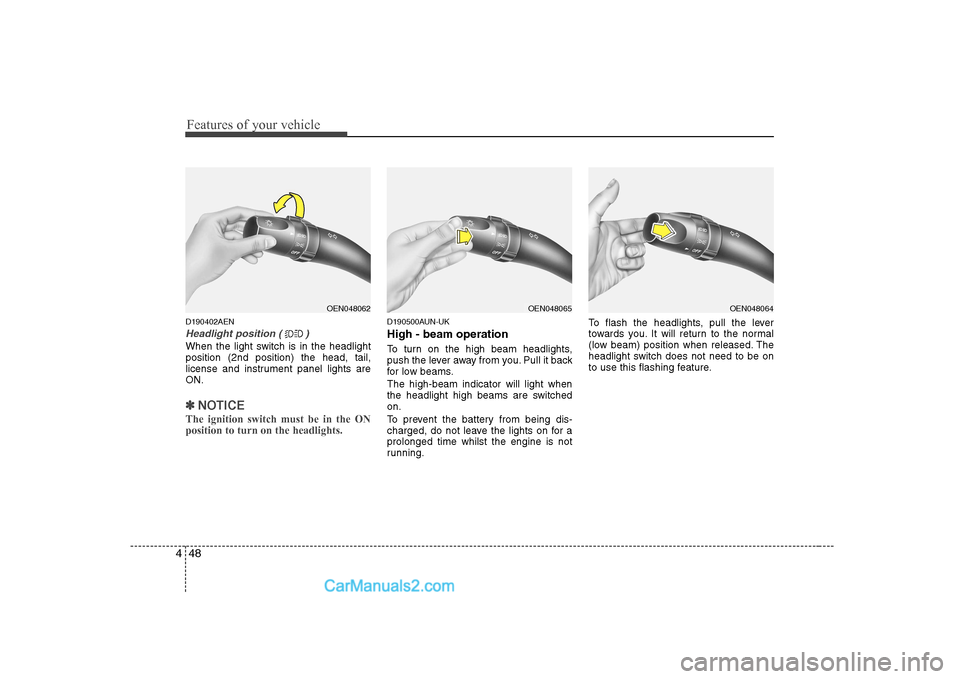
Headlight position ( )
When the light switch is in the headlight position (2nd position) the head, tail,
license and instrument panel lights areON.
✽✽
NOTICE
The ignition switch must be in the ON position to turn on the headlights.
D190500AUN-UK High - beam operation
To turn on the high beam headlights,
push the lever away from you. Pull it back
for low beams. The high-beam indicator will light when
the headlight high beams are switchedon.
To prevent the battery from being dis-
charged, do not leave the lights on for aprolonged time whilst the engine is not
running. To flash the headlights, pull the lever
towards you. It will return to the normal
(low beam) position when released. The
headlight switch does not need to be on
to use this flashing feature.
OEN048062OEN048065OEN048064
Page 110 of 303
449
Features of your vehicle
D190600AUN
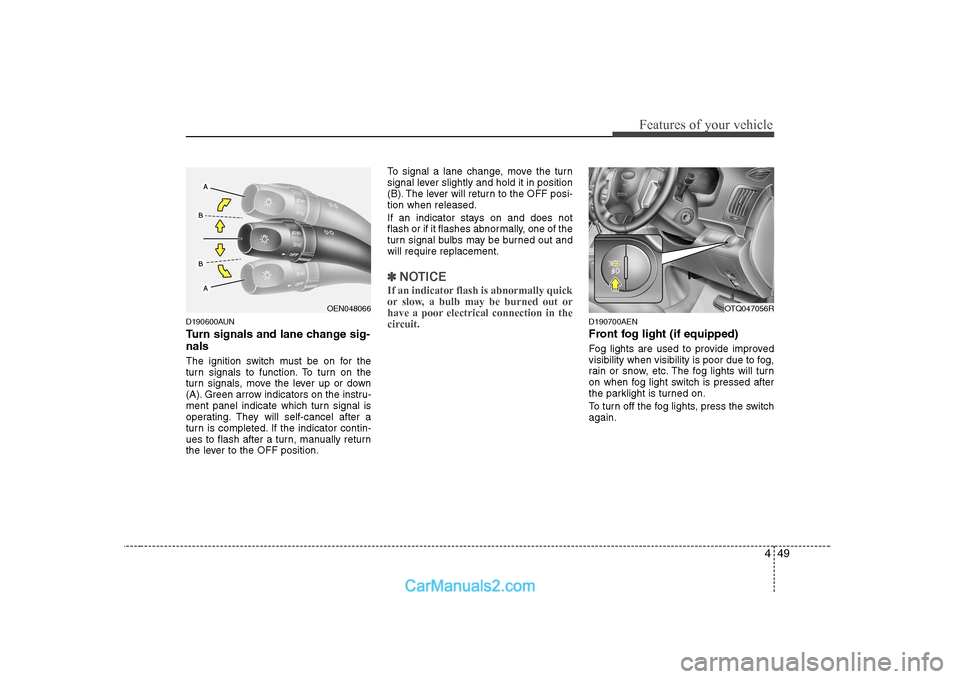
Turn signals and lane change sig- nals
The ignition switch must be on for the
turn signals to function. To turn on the
turn signals, move the lever up or down
(A). Green arrow indicators on the instru-
ment panel indicate which turn signal is
operating. They will self-cancel after a
turn is completed. If the indicator contin-
ues to flash after a turn, manually return
the lever to the OFF position.To signal a lane change, move the turn
signal lever slightly and hold it in position
(B). The lever will return to the OFF posi-tion when released.
If an indicator stays on and does not
flash or if it flashes abnormally, one of the
turn signal bulbs may be burned out andwill require replacement.
✽✽
NOTICE
If an indicator flash is abnormally quick
or slow, a bulb may be burned out or
have a poor electrical connection in the
circuit.
D190700AEN
Front fog light (if equipped)
Fog lights are used to provide improved
visibility when visibility is poor due to fog,
rain or snow, etc. The fog lights will turn
on when fog light switch is pressed after
the parklight is turned on.
To turn off the fog lights, press the switch again.
OEN048066OTQ047056R
Page 113 of 303
Features of your vehicle
52
4
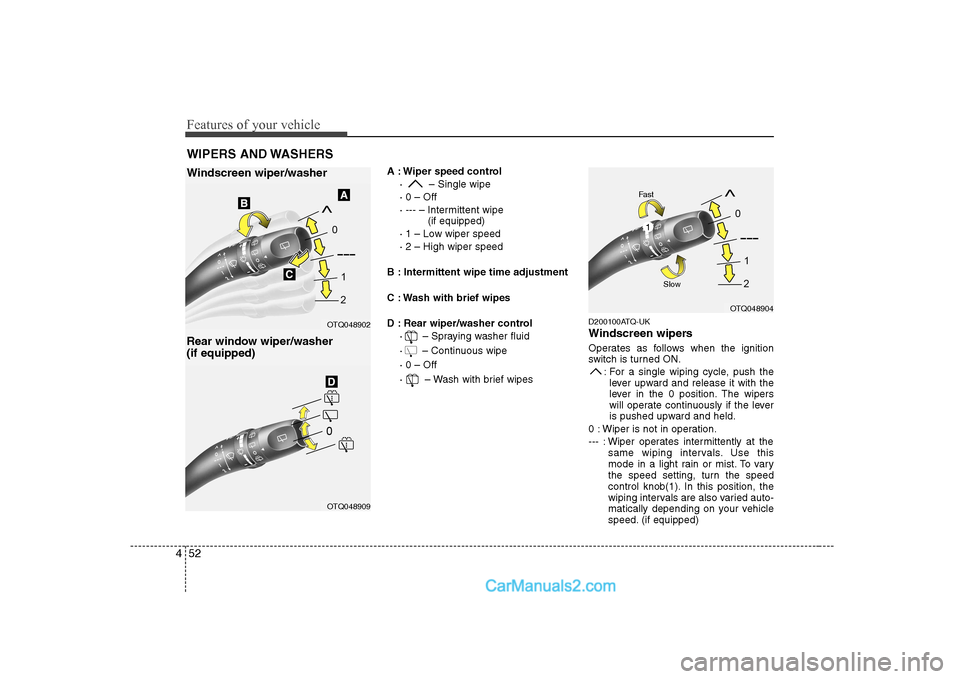
A : Wiper speed control
· – Single wipe · 0 – Off
· --- – Intermittent wipe (if equipped)
· 1 – Low wiper speed· 2 – High wiper speed
B : Intermittent wipe time adjustment
C : Wash with brief wipes
D : Rear wiper/washer control · – Spraying washer fluid
· – Continuous wipe· 0 – Off
· – Wash with brief wipes D200100ATQ-UK
Windscreen wipers
Operates as follows when the ignition
switch is turned ON.
: For a single wiping cycle, push thelever upward and release it with the
lever in the 0 position. The wipers
will operate continuously if the lever
is pushed upward and held.
0 : Wiper is not in operation.
--- : Wiper operates intermittently at the same wiping intervals. Use this
mode in a light rain or mist. To vary
the speed setting, turn the speed
control knob(1). In this position, the
wiping intervals are also varied auto-
matically depending on your vehicle
speed. (if equipped)
WIPERS AND WASHERS
Windscreen wiper/washer
Rear window wiper/washer (if equipped)
OTQ048902
OTQ048904
OTQ048909
1
Fast
Slow
Page 116 of 303
455
Features of your vehicle
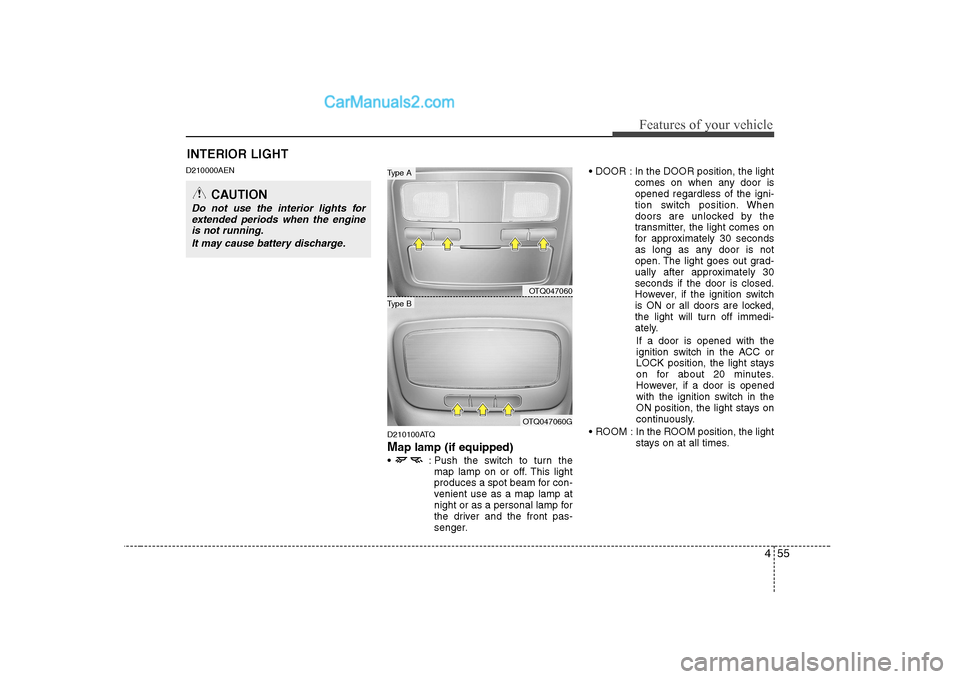
D210000AEND210100ATQ Map lamp (if equipped)
: Push the switch to turn the map lamp on or off. This light
produces a spot beam for con-
venient use as a map lamp at
night or as a personal lamp for
the driver and the front pas-
senger. In the DOOR position, the light
comes on when any door isopened regardless of the igni-
tion switch position. When
doors are unlocked by the
transmitter, the light comes on
for approximately 30 seconds
as long as any door is not
open. The light goes out grad-
ually after approximately 30seconds if the door is closed.
However, if the ignition switch
is ON or all doors are locked,
the light will turn off immedi-
ately.
If a door is opened with the
ignition switch in the ACC or
LOCK position, the light stays
on for about 20 minutes.
However, if a door is opened
with the ignition switch in the
ON position, the light stays on
continuously.
ROOM : In the ROOM position, the light stays on at all times.
INTERIOR LIGHT
CAUTION
Do not use the interior lights for
extended periods when the engine is not running.
It may cause battery discharge.
OTQ047060
OTQ047060G
Type B
Type A
Page 117 of 303
Features of your vehicle
56
4
D210200ATQ-UK
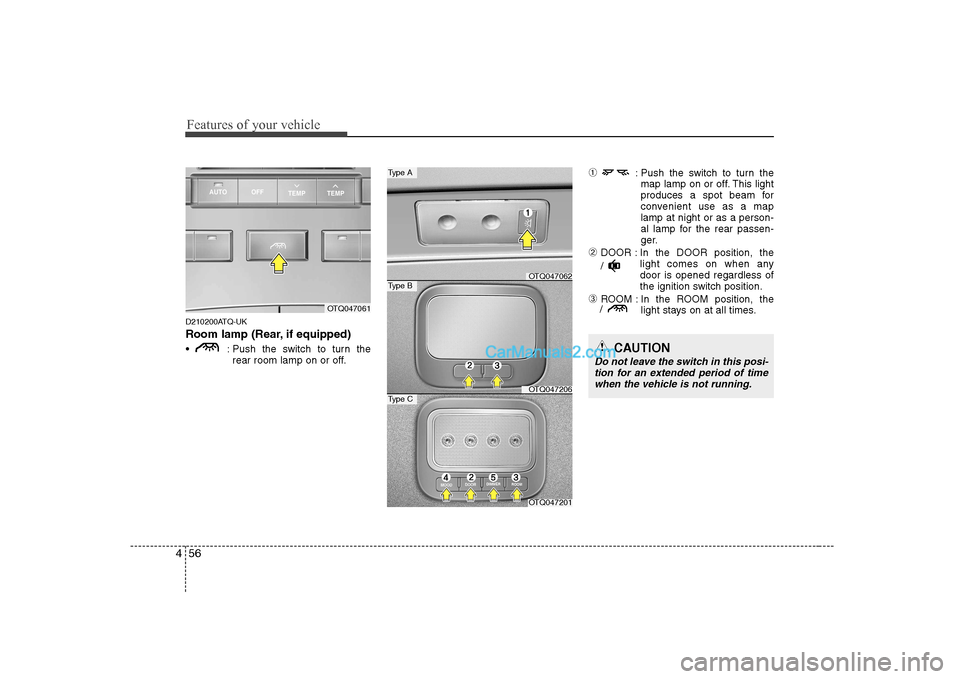
Room lamp (Rear, if equipped)
: Push the switch to turn the
rear room lamp on or off. ➀
: Push the switch to turn the
map lamp on or off. This light
produces a spot beam for
convenient use as a maplamp at night or as a person-
al lamp for the rear passen-
ger.
➁ DOOR : In the DOOR position, the
light comes on when anydoor is opened regardless of
the ignition switch position.
➂ ROOM : In the ROOM position, the
light stays on at all times.
OTQ047061
OTQ047201
Type C
OTQ047062
Type A
Type B
OTQ047206
/
/
CAUTION
Do not leave the switch in this posi-
tion for an extended period of time
when the vehicle is not running.
Page 119 of 303
Features of your vehicle
58
4
D220000AUN-UK
✽✽
NOTICE
If you want to defrost and defog on the
front windscreen, refer to “Windscreen
Defrosting and Defogging” in this sec-tion.
D220100AUN-UK
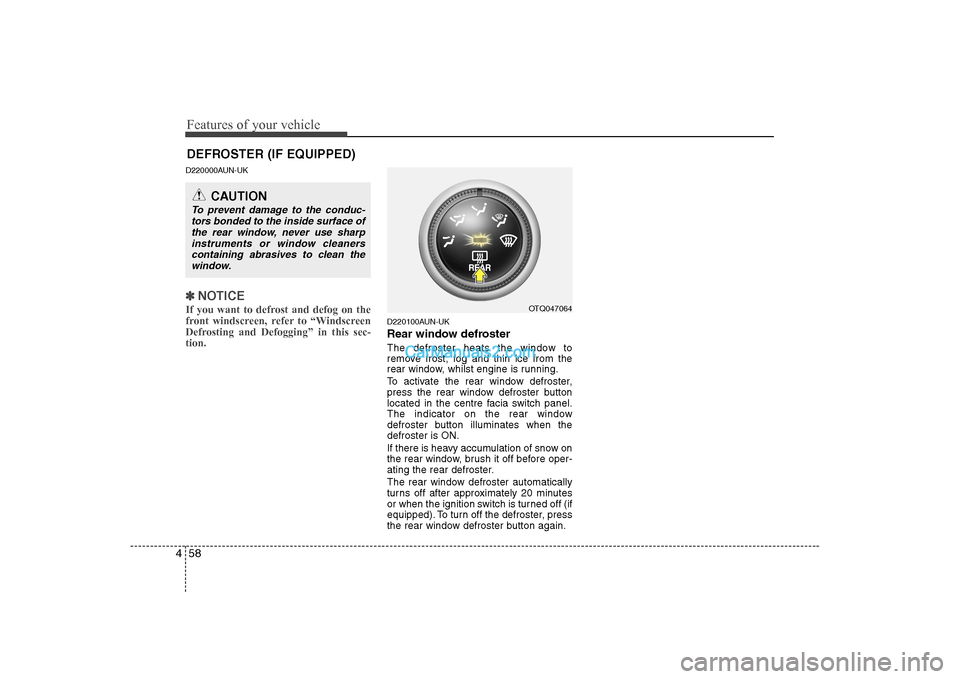
Rear window defroster
The defroster heats the window to
remove frost, fog and thin ice from the
rear window, whilst engine is running.
To activate the rear window defroster,
press the rear window defroster button
located in the centre facia switch panel.
The indicator on the rear window
defroster button illuminates when thedefroster is ON.
If there is heavy accumulation of snow on
the rear window, brush it off before oper-
ating the rear defroster.
The rear window defroster automatically
turns off after approximately 20 minutes
or when the ignition switch is turned off (if
equipped). To turn off the defroster, press
the rear window defroster button again.
DEFROSTER (IF EQUIPPED)
OTQ047064
CAUTION
To prevent damage to the conduc- tors bonded to the inside surface of
the rear window, never use sharp instruments or window cleanerscontaining abrasives to clean the
window.
Page 124 of 303
463
Features of your vehicle
Recirculated air position The indicator light on the
button illuminates when therecirculated air position isselected.
With the recirculated air position selected, air from
the passenger compart-
ment will be drawn throughthe heating system andheated or cooled accordingto the function selected.
Outside (fresh) air position The indicator light on the
button will not illuminatewhen the outside (fresh) airposition is selected.
With the outside (fresh) airposition selected, air enters
the vehicle from outside andis heated or cooled accord-ing to the function selected.✽✽ NOTICE
Prolonged operation of the heater in the
recirculated air position (without airconditioning selected) may cause fog-
ging of the windscreen and side windows
and the air within the passenger com-partment may become stale.
In addition, prolonged use of the air con-
ditioning with the recirculated air posi-
tion selected will result in excessively dry
air in the passenger compartment.
D230104AUN
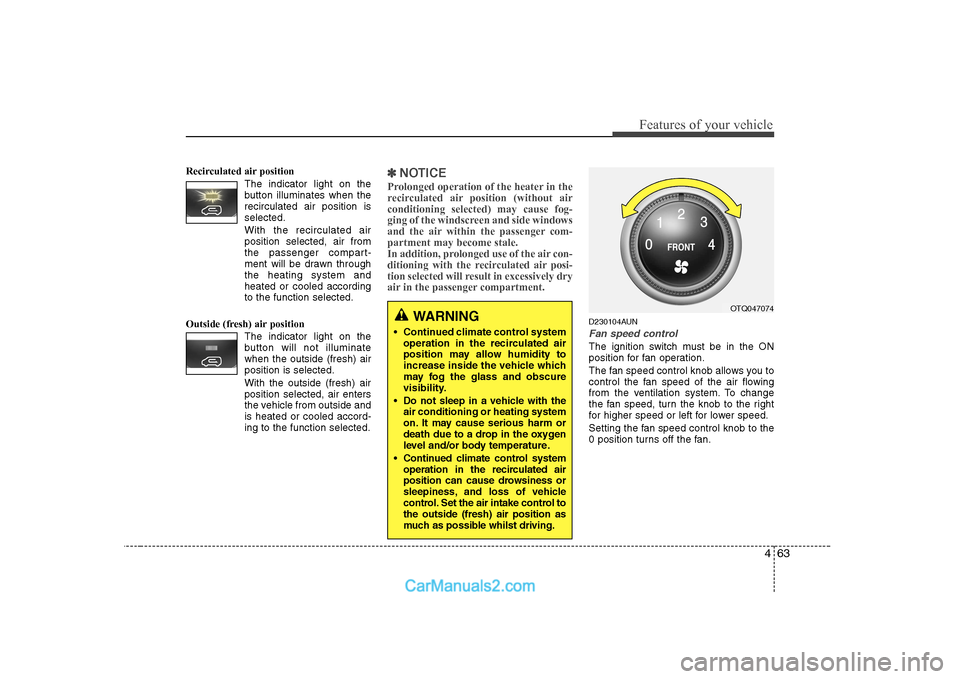
Fan speed control
The ignition switch must be in the ON
position for fan operation.
The fan speed control knob allows you to
control the fan speed of the air flowing
from the ventilation system. To change
the fan speed, turn the knob to the right
for higher speed or left for lower speed.
Setting the fan speed control knob to the
0 position turns off the fan.
WARNING
• Continued climate control system operation in the recirculated air
position may allow humidity to
increase inside the vehicle which
may fog the glass and obscure
visibility.
Do not sleep in a vehicle with the air conditioning or heating system
on. It may cause serious harm or
death due to a drop in the oxygen
level and/or body temperature.
Continued climate control system operation in the recirculated air
position can cause drowsiness or
sleepiness, and loss of vehicle
control. Set the air intake control tothe outside (fresh) air position as
much as possible whilst driving.OTQ047074
Page 132 of 303
471
Features of your vehicle
D250102AFD-UK
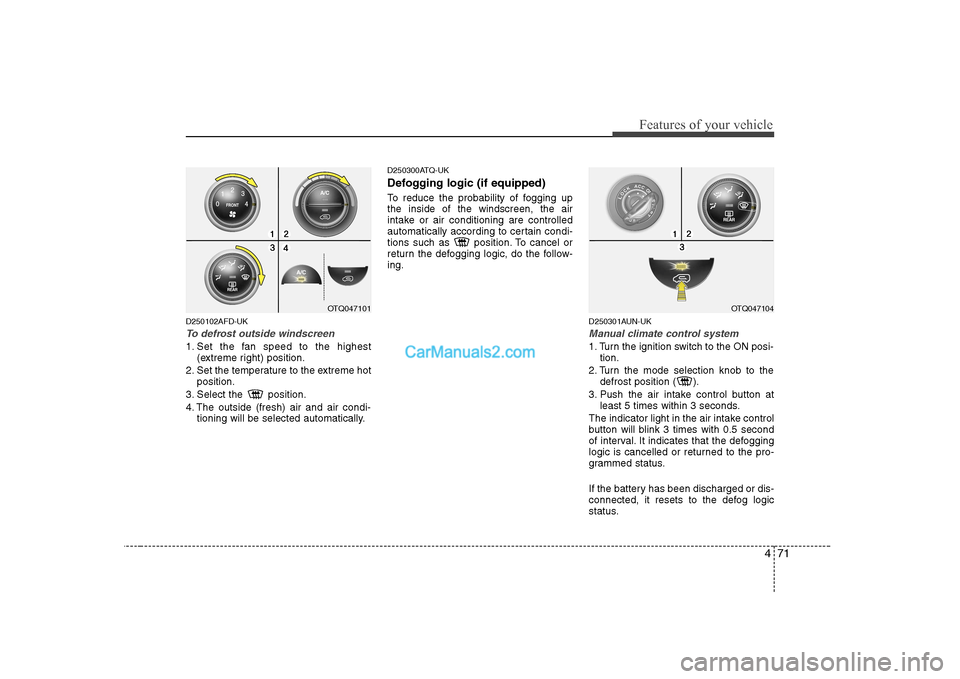
To defrost outside windscreen
1. Set the fan speed to the highest(extreme right) position.
2. Set the temperature to the extreme hot position.
3. Select the position.
4. The outside (fresh) air and air condi- tioning will be selected automatically. D250300ATQ-UK
Defogging logic (if equipped)
To reduce the probability of fogging up the inside of the windscreen, the air
intake or air conditioning are controlled
automatically according to certain condi-
tions such as position. To cancel or
return the defogging logic, do the follow-ing.
D250301AUN-UK
Manual climate control system
1. Turn the ignition switch to the ON posi-tion.
2. Turn the mode selection knob to the defrost position ( ).
3. Push the air intake control button at least 5 times within 3 seconds.
The indicator light in the air intake control
button will blink 3 times with 0.5 second
of interval. It indicates that the defogging
logic is cancelled or returned to the pro-
grammed status.
If the battery has been discharged or dis-
connected, it resets to the defog logic
status.
OTQ047101OTQ047104
Page 138 of 303
477
Features of your vehicle
D280600AEN-UK
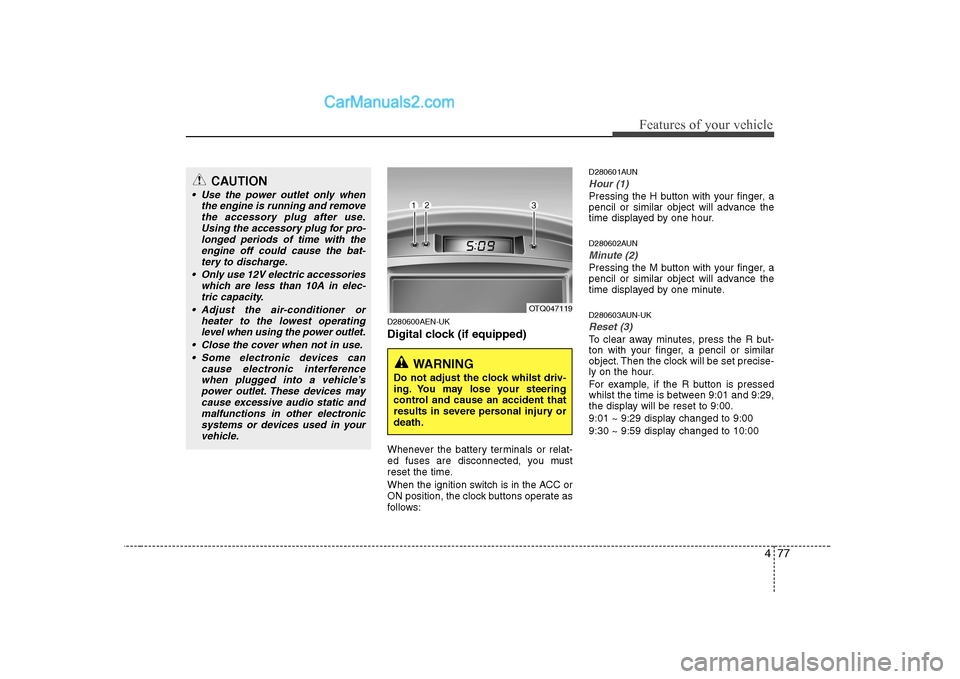
Digital clock (if equipped)
Whenever the battery terminals or relat-
ed fuses are disconnected, you must
reset the time.
When the ignition switch is in the ACC or
ON position, the clock buttons operate as
follows:D280601AUN
Hour (1)
Pressing the H button with your finger, a
pencil or similar object will advance the
time displayed by one hour.
D280602AUN
Minute (2)
Pressing the M button with your finger, a
pencil or similar object will advance the
time displayed by one minute.
D280603AUN-UK
Reset (3)
To clear away minutes, press the R but-
ton with your finger, a pencil or similar
object. Then the clock will be set precise-
ly on the hour.
For example, if the R button is pressed
whilst the time is between 9:01 and 9:29,
the display will be reset to 9:00.
9:01 ~ 9:29 display changed to 9:00
9:30 ~ 9:59 display changed to 10:00
OTQ047119
WARNING
Do not adjust the clock whilst driv-
ing. You may lose your steering
control and cause an accident that
results in severe personal injury ordeath.
CAUTION
Use the power outlet only when the engine is running and removethe accessory plug after use.Using the accessory plug for pro-
longed periods of time with theengine off could cause the bat- tery to discharge.
Only use 12V electric accessories which are less than 10A in elec-
tric capacity.
Adjust the air-conditioner or heater to the lowest operatinglevel when using the power outlet.
Close the cover when not in use. Some electronic devices can cause electronic interferencewhen plugged into a vehicle’s power outlet. These devices maycause excessive audio static and
malfunctions in other electronicsystems or devices used in your vehicle.