lock Hyundai H350 2015 Repair Manual
[x] Cancel search | Manufacturer: HYUNDAI, Model Year: 2015, Model line: H350, Model: Hyundai H350 2015Pages: 473, PDF Size: 26.4 MB
Page 240 of 473
4-48
Multimedia System
RRAA DDIIOO ,, SS EE TT UU PP,, VV OO LLUU MM EE
C
C OO NNTTRR OO LL
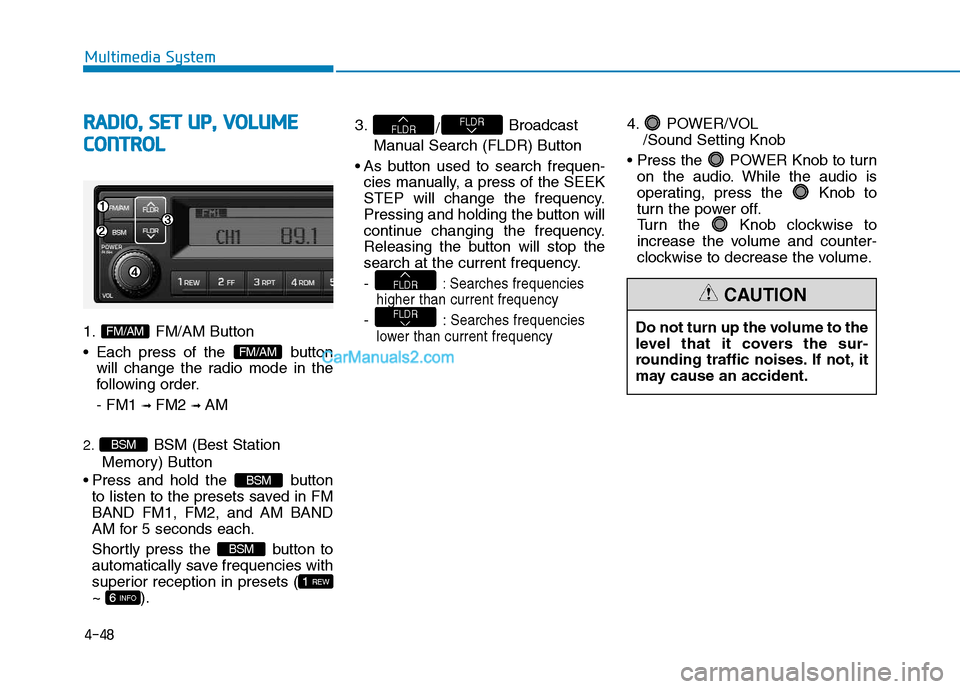
1. FM/AM Button
Each press of the button
will change the radio mode in the
following order. - FM1 ➟
FM2 ➟ AM
2. BSM (Best Station
Memory) Button
Press and hold the button to listen to the presets saved in FM BAND FM1, FM2, and AM BAND
AM for 5 seconds each.
Shortly press the button to
automatically save frequencies with
superior reception in presets (~ ). 3.
/Broadcast
Manual Search (FLDR) Button
As button used to search frequen- cies manually, a press of the SEEK
STEP will change the frequency.
Pressing and holding the button will
continue changing the frequency.
Releasing the button will stop the
search at the current frequency. -
: Searches frequencies
higher than current frequency
- :Searches frequencies
lower than current frequency
4. POWER/VOL /Sound Setting Knob
POWER Knob to turn on the audio. While the audio is
operating, press the Knob to
turn the power off.
Turn the Knob clockwise to
increase the volume and counter-
clockwise to decrease the volume.
FLDR
FLDR
FLDRFLDR
6 INFO
1 REW
BSM
BSM
BSM
FM/AM
FM/AMDo not turn up the volume to the
level that it covers the sur-
rounding traffic noises. If not, it
may cause an accident.
CAUTION
Page 241 of 473
4-49
Multimedia System
4
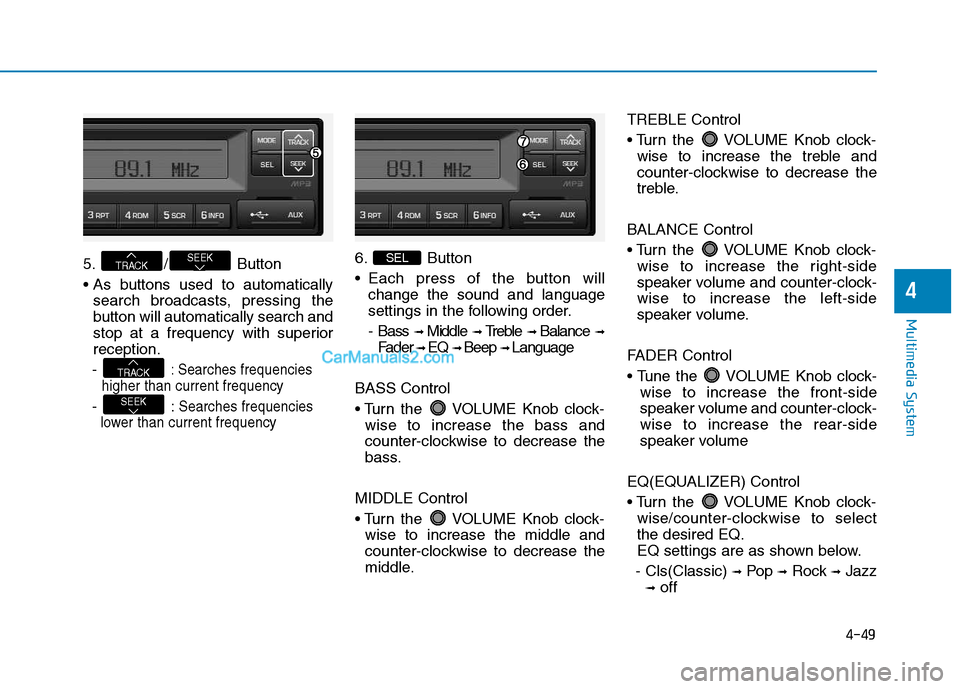
5. / Button
search broadcasts, pressing the
button will automatically search and
stop at a frequency with superiorreception.
-
: Searches frequencies
higher than current frequency
- :Searches frequencies
lower than current frequency
6. Button
Each press of the button will change the sound and language
settings in the following order.
- Bass ➟
Middle ➟ Treble ➟ Balance ➟
Fader ➟ EQ ➟ Beep ➟ Language
BASS Control
VOLUME Knob clock- wise to increase the bass and
counter-clockwise to decrease the
bass.
MIDDLE Control
VOLUME Knob clock- wise to increase the middle and
counter-clockwise to decrease the
middle. TREBLE Control
VOLUME Knob clock-
wise to increase the treble and
counter-clockwise to decrease the
treble.
BALANCE Control
VOLUME Knob clock- wise to increase the right-side
speaker volume and counter-clock-wise to increase the left-side
speaker volume.
FADER Control
VOLUME Knob clock- wise to increase the front-side
speaker volume and counter-clock-wise to increase the rear-side
speaker volume
EQ(EQUALIZER) Control
VOLUME Knob clock- wise/counter-clockwise to select the desired EQ.
EQ settings are as shown below.
- Cls(Classic) ➟
Pop ➟Rock ➟Jazz
➟ off SEL
SEEK
TRACK
SEEKTRACK
Page 242 of 473
4-50
Multimedia System
BEEP Control
VOLUME Knob clock-wise/counter-clockwise to the
BEEP sound ON/OFF.
LANGUAGE (Only AM210MDEE)
VOLUME Knob clock- wise/counter-clockwise to the select the desired Language
Language setting are as shown
below - English ➟➟
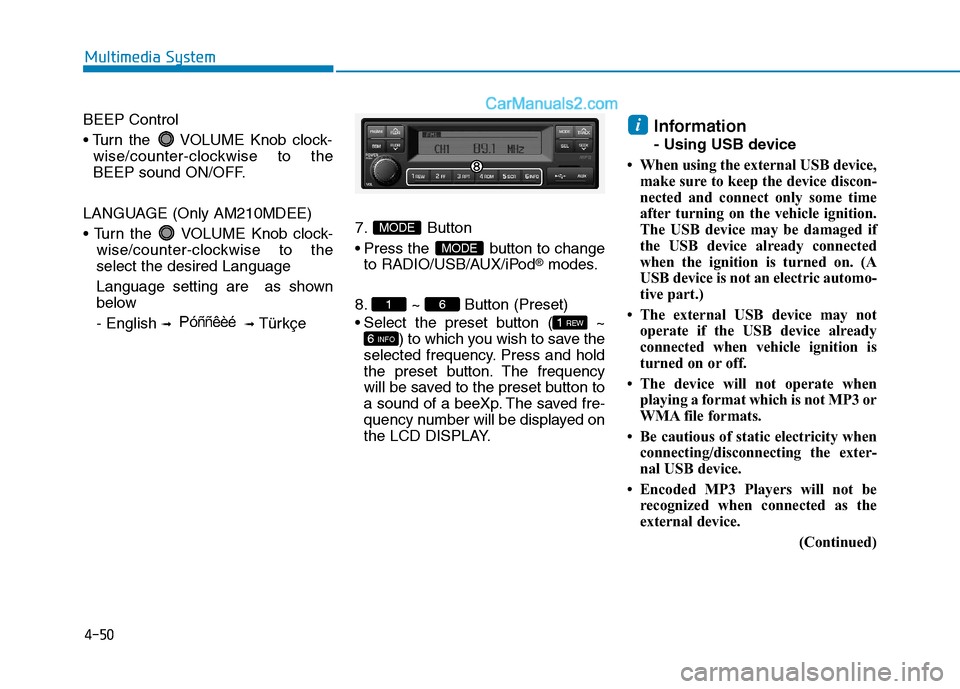
Türkçe7. Button
Press the button to change
to RADIO/USB/AUX/iPod
®modes.
8. ~ Button (Preset)
Select the preset button ( ~ ) to which you wish to save the
selected frequency. Press and hold
the preset button. The frequency
will be saved to the preset button to
a sound of a beeXp. The saved fre-
quency number will be displayed on
the LCD DISPLAY. Information
- Using USB device
When using the external USB device, make sure to keep the device discon-
nected and connect only some time
after turning on the vehicle ignition.
The USB device may be damaged if
the USB device already connected
when the ignition is turned on. (A
USB device is not an electric automo-
tive part.)
The external USB device may not operate if the USB device already
connected when vehicle ignition is
turned on or off.
The device will not operate when playing a format which is not MP3 or
WMA file formats.
Be cautious of static electricity when connecting/disconnecting the exter-
nal USB device.
Encoded MP3 Players will not be recognized when connected as the
external device.
(Continued)
i
6 INFO
1 REW
61
MODE
MODE
P óññêèé
Page 244 of 473
4-52
Multimedia System
(Continued)
The device may not support normaloperation if MP3 Players, cellular
phones, digital cameras, or other
electronic devices (USB devices not
recognized as portable disk drives)
are connected to the device.
This product does guarantees proper operation of only standard (METAL
COVER TYPE) USB MEMORY.
The device may not support normal operation when using formats such
as HDD Type, CF, or SD Memory.
The device will not support files locked by DRM (Digital Rights
Management).
This product does not recognize SD Type USB MEMORY STICK, CF
Type USB MEMORY STICK and
other USB MEMORY STICKS con-
nected to a different Adaptor.
(Continued)(Continued)
This product does not guarantee
proper operation of USB HDD or
USB MEMORY with defective con-
nection caused by vehicle vibrations.
UBS memory products used as key
chains and mobile phone accessories
(i-stick type) may cause damage to
the USB Jack. Refrain from using
such products.
USB CONNECTOR PIN wear and tear can lead to inferior USB signal
delivery with the SET.UUSSIINN GG UU SSBB //AA UU XX
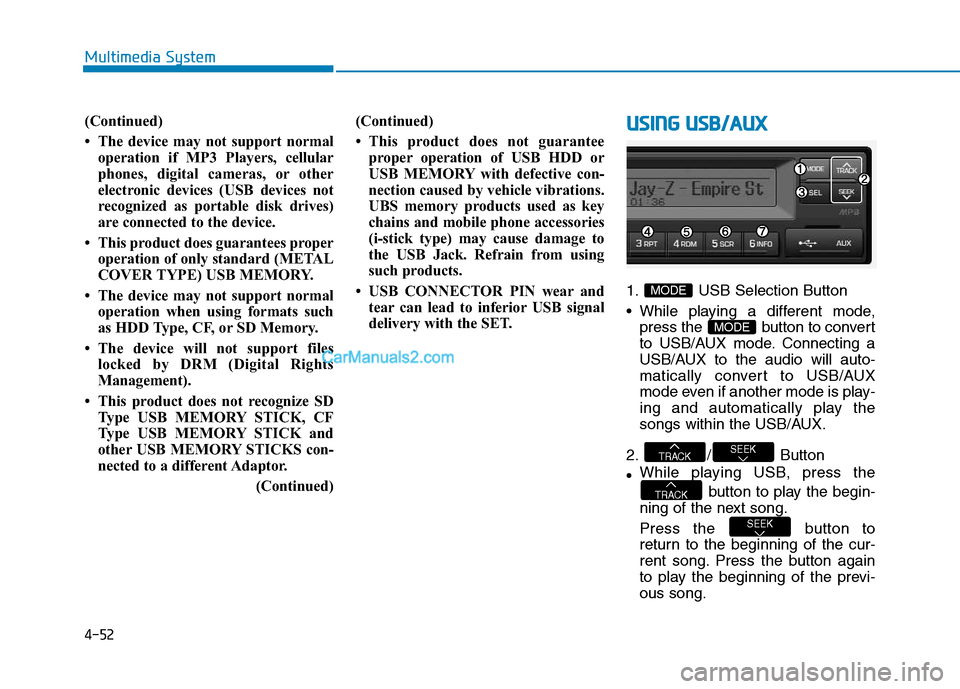
1. USB Selection Button
While playing a different mode,
press the button to convert
to USB/AUX mode. Connecting a
USB/AUX to the audio will auto-
matically convert to USB/AUX
mode even if another mode is play-
ing and automatically play the
songs within the USB/AUX.
2. / Button While playing USB, press the
button to play the begin-
ning of the next song.
Press the button to
return to the beginning of the cur-
rent song. Press the button again
to play the beginning of the previ-ous song.
SEEK
TRACK
SEEKTRACK
MODE
MODE
Page 254 of 473
![Hyundai H350 2015 Repair Manual 4-62
Multimedia System
Phone Setup (if equipped)
Press the key Select [Phone]
(for RDS model)
Pair Phone
Information
To pair a Bluetooth®
Wireless
Technology enabled mobile phone,
authenticatio](/img/35/14886/w960_14886-253.png "Hyundai H350 2015 Repair Manual 4-62
Multimedia System
Phone Setup (if equipped)
Press the key Select [Phone]
(for RDS model)
Pair Phone
Information
To pair a Bluetooth®
Wireless
Technology enabled mobile phone,
authenticatio")
4-62
Multimedia System
Phone Setup (if equipped)
Press the key Select [Phone]
(for RDS model)
Pair Phone
Information
To pair a Bluetooth®
Wireless
Technology enabled mobile phone,
authentication and connection
processes are first required. As a
result, you cannot pair your mobile
phone while driving the vehicle. First
park your vehicle before use.
Select [Pair Phone] Set through
TUNE knob
➀ Search for device names as dis-
played on your mobile phone andconnect.
➁ Input the passkey displayed on the
screen. (Passkey : 0000)
❈ The device name and passkey will
be displayed on the screen for up
to 3 minutes. If pairing is not com-
pleted within the 3 minutes, the
mobile phone pairing process willautomatically be canceled. ➂
Pairing completion is displayed.
❈ In some mobile phones, pairing
will automatically be followed byconnection.
❈ It is possible to pair up to five
Bluetooth ®Wireless Technology
enabled mobile phones.
iSETUP
CLOCK
Page 257 of 473
![Hyundai H350 2015 Repair Manual 4-65
Multimedia System
4
Audio Streaming
Songs (files) saved in your
Bluetooth®Wireless Technology
enabled mobile phone can be played through the audio system.
Select [Audio Streaming] Set / throug](/img/35/14886/w960_14886-256.png "Hyundai H350 2015 Repair Manual 4-65
Multimedia System
4
Audio Streaming
Songs (files) saved in your
Bluetooth®Wireless Technology
enabled mobile phone can be played through the audio system.
Select [Audio Streaming] Set / throug")
4-65
Multimedia System
4
Audio Streaming
Songs (files) saved in your
Bluetooth®Wireless Technology
enabled mobile phone can be played through the audio system.
Select [Audio Streaming] Set / through TUNE knob
Information
The Bluetooth ®
Wireless Technology
audio streaming feature may not be
supported in some mobile phones.
Outgoing Volume
This is used to set the volume of your
voice as heard by the other partywhile on a
Bluetooth ®Wireless
Technology enabled handsfree call.
Select [Outgoing Volume] Set vol-
ume through TUNE knob ❈ While on a call, the volume can be
changed by using the key.
Bluetooth®Wireless
Technology System Off
This feature is used when you do not wish to use the
Bluetooth ®Wireless
Technology system.
Select [Bluetooth System Off] Set
through TUNE knob ❈ If a phone is already connected, disconnect the currently connect-
ed phone and turn the
Bluetooth ®
Wireless Technology system off.
Using the Bluetooth®Wireless
Technology System
To use Bluetooth ®Wireless
Technology when the system is cur-
rently off, follow these next steps.
Turning On
Bluetooth ®Wireless
Technology through the
Key
Press the key ScreenGuidance ❈ Moves to the screen where
Bluetooth ®Wireless Technology
functions can be used and dis-
plays guidance. Turning On
Bluetooth
®Wireless
Technology through the
Key
Press the key Select[Phone] ➀ A screen asking whether to turn on
Bluetooth ®Wireless Technology will
be displayed.
➁ On the screen, select to turn on
Bluetooth ®Wireless Technology
and display guidance.
❈ If the
Bluetooth ®Wireless
Technology system is turned on,
the system will automatically try toconnect the most recently con-nected
Bluetooth ®Wireless
Technology mobile phone. YES
SETUP
CLOCK
SETUP
CLOCK
PHONE
PHONE
SEEK
TRACK
i
Off
On
Page 272 of 473
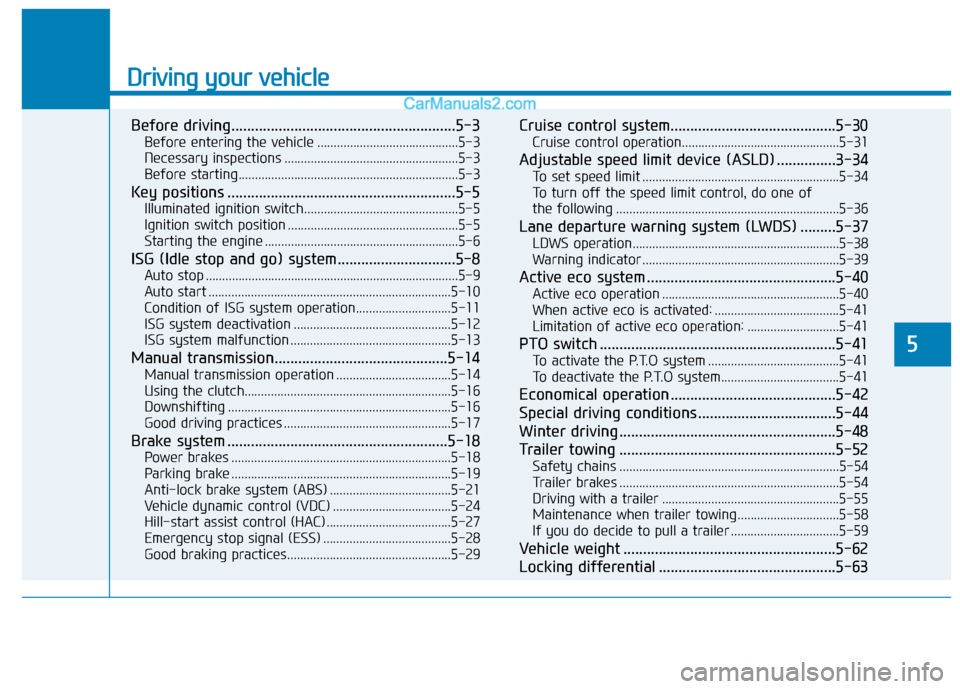
Driving your vehicle
Before driving.........................................................5-3Before entering the vehicle ...........................................5-3
Necessary inspections .....................................................5-3
Before starting...................................................................5-3
Key positions ..........................................................5-5 Illuminated ignition switch...............................................5-5
Ignition switch position ....................................................5-5
Starting the engine ...........................................................5-6
ISG (Idle stop and go) system..............................5-8 Auto stop .............................................................................5-9
Auto start ..........................................................................5-10
Condition of ISG system operation.............................5-11
ISG system deactivation ................................................5-12
ISG system malfunction .................................................5-13
Manual transmission............................................5-14 Manual transmission operation ...................................5-14
Using the clutch...............................................................5-16
Downshifting ....................................................................5-16
Good driving practices ...................................................5-17
Brake system ........................................................5-18 Power brakes ...................................................................5-18
Parking brake ...................................................................5-19
Anti-lock brake system (ABS) .....................................5-21
Vehicle dynamic control (VDC) ....................................5-24
Hill-start assist control (HAC) ......................................5-27
Emergency stop signal (ESS) .......................................5-28
Good braking practices..................................................5-29 Cruise control system..........................................5-30
Cruise control operation................................................5-31
Adjustable speed limit device (ASLD) ...............3-34 To set speed limit ............................................................5-34
To turn off the speed limit control, do one of
the following ....................................................................5-36
Lane departure warning system (LWDS) .........5-37 LDWS operation...............................................................5-38
Warning indicator ............................................................5-39
Active eco system ................................................5-40 Active eco operation ......................................................5-40
When active eco is activated: ......................................5-41
Limitation of active eco operation: ............................5-41
PTO switch ............................................................5-41 To activate the P.T.O system ........................................5-41
To deactivate the P.T.O system....................................5-41
Economical operation ..........................................5-42
Special driving conditions ...................................5-44
Winter driving .......................................................5-48
Trailer towing .......................................................5-52 Safety chains ...................................................................5-54
Trailer brakes ...................................................................5-54
Driving with a trailer ......................................................5-55
Maintenance when trailer towing ...............................5-58
If you do decide to pull a trailer .................................5-59
Vehicle weight ......................................................5-62
Locking differential .............................................5-63
5
Page 274 of 473
5-3
Driving your vehicle
BBEEFFOO RREE DD RRIIVV IINN GG
5
Before entering the vehicle
• Be sure that all windows, outside
mirror(s), and outside lights are clean.
Check the condition of the tires.
Check under the vehicle for any sign of leaks.
Be sure there are no obstacles behind you if you intend to back up.
Necessary inspections
Fluid levels, such as engine oil,
engine coolant, power steering fluid,
brake fluid, and washer fluid should
be checked on a regular basis, with
the exact interval depending on the
fluid. Further details are provided in
Section 7, “Maintenance”.
Before starting
Close and lock all doors.
Position the seat so that all con-trols are easily reached.
Adjust the inside and outside rearview mirrors.
Be sure that all lights work.
Check all gauges.
Check the operation of warning lights when the ignition switch is
turned to the ON position.
Release the parking brake and make sure the brake warning lightgoes out.
For safe operation, be sure you are
familiar with your vehicle and itsequipment.
Driving while distracted can
result in a loss of vehicle con-
trol, that may lead to an acci-
dent, severe personal injury,
and death. The driver’s primary
responsibility is in the safe and
legal operation of a vehicle, and
use of any handheld devices,
other equipment, or vehicle sys-
tems which take the driver’s
eyes, attention and focus away
from the safe operation of a
vehicle or which are not permis-
sible by law should never beused during operation of the
vehicle.
WARNING
Page 276 of 473
5-5
Driving your vehicle
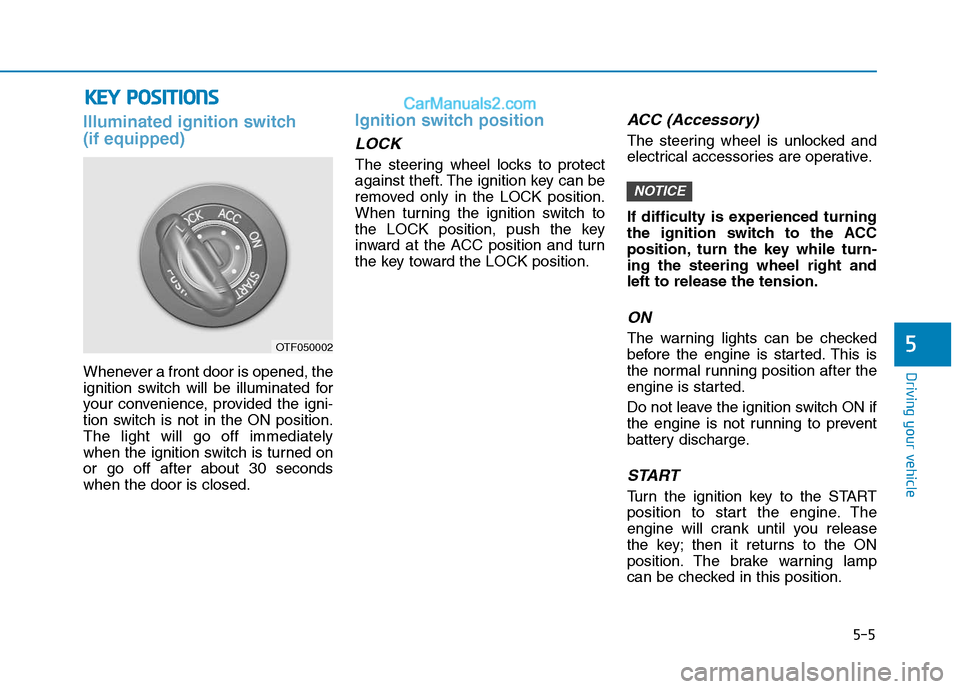
Illuminated ignition switch (if equipped)
Whenever a front door is opened, the
ignition switch will be illuminated for
your convenience, provided the igni-
tion switch is not in the ON position.The light will go off immediately
when the ignition switch is turned onor go off after about 30 secondswhen the door is closed.
Ignition switch position
LOCK
The steering wheel locks to protect
against theft. The ignition key can be
removed only in the LOCK position.
When turning the ignition switch to
the LOCK position, push the key
inward at the ACC position and turn
the key toward the LOCK position.
ACC (Accessory)
The steering wheel is unlocked and
electrical accessories are operative.
If difficulty is experienced turning
the ignition switch to the ACC
position, turn the key while turn-ing the steering wheel right andleft to release the tension.
ON
The warning lights can be checked
before the engine is started. This is
the normal running position after the
engine is started.
Do not leave the ignition switch ON if
the engine is not running to prevent
battery discharge.
START
Turn the ignition key to the START
position to start the engine. The
engine will crank until you release
the key; then it returns to the ON
position. The brake warning lamp
can be checked in this position.
NOTICE
5
KKEEYY PP OO SSIITT IIOO NNSS
OTF050002
Page 277 of 473
5-6
Starting the engine
Driving your vehicle
Ignition key
Never turn the ignition switch
to LOCK or ACC while the vehi-
cle is moving. This would result
in loss of directional control
and braking function, whichcould cause an accident.
The anti-theft steering column
lock is not a substitute for the
parking brake. Before leaving
the driver’s seat, always make
sure the shift lever is engaged
in 1st gear for the manual
transmission, set the parking
brake fully and shut the
engine off. Unexpected and
sudden vehicle movement
may occur if these precau-tions are not taken.(Continued)
WARNING (Continued)
Never reach for the ignition
switch, or any other controls
through the steering wheel
while the vehicle is in motion.
The presence of your hand orarm in this area could cause a
loss of vehicle control, an
accident and serious bodily
injury or death.
Do not place any movable
objects around the driver’s
seat as they may move while
driving, interfere with the driv-er and lead to an accident.
Always wear appropriate
shoes when operating your
vehicle. Unsuitable shoes
(high heels, ski boots,etc.)
may interfere with your abilityto use the brake and accelera-
tor pedal, and the clutch.
Do not start the vehicle with the accelerator pedal
depressed. The vehicle can
move and lead to an accident.
Wait until the engine rpm is
normal. The vehicle may sud-
denly move if the brake padelis released when the rpm ishigh.
WARNING