key Hyundai H350 2016 Owner's Guide
[x] Cancel search | Manufacturer: HYUNDAI, Model Year: 2016, Model line: H350, Model: Hyundai H350 2016Pages: 473, PDF Size: 26.4 MB
Page 142 of 473
3-80
Convenient features of your vehicle
Warning sound
Overspeed warning (if equipped)
Overspeed warning light
If you drive with the speed of
120km/h or more, the overspeed
warning light will blink. This is to pre-
vent from driving your vehicle with
overspeed.
Overspeed warning chime
If you drive with the speed of
120km/h or more, the overspeed
warning chime will sound for about 5
seconds. This is to prevent you from
driving your vehicle with overspeed.
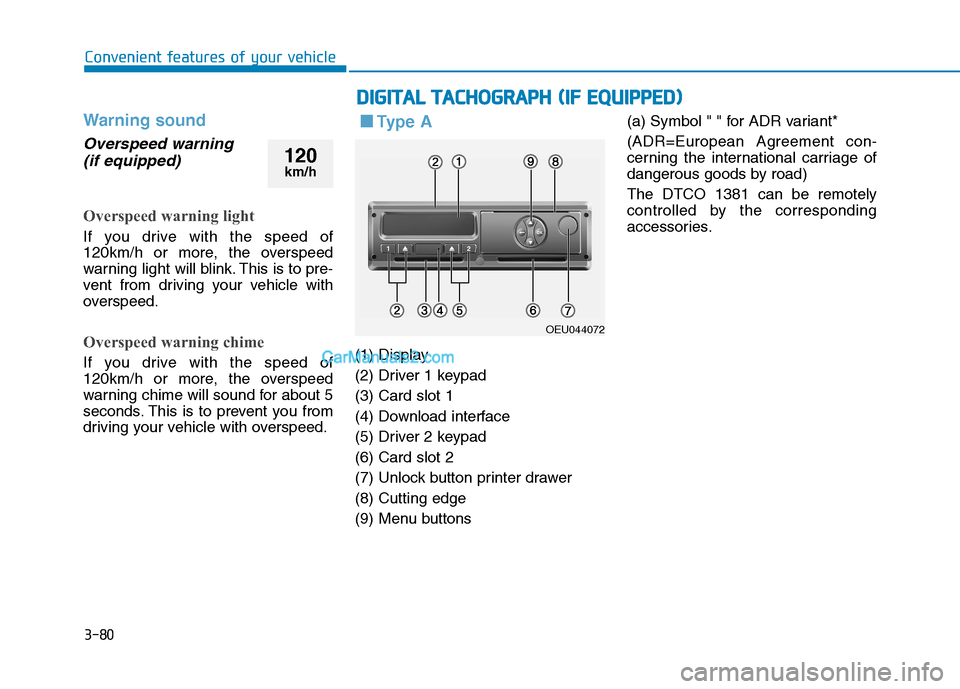
■■ Ty p e A
(1) Display
(2) Driver 1 keypad(3) Card slot 1
(4) Download interface
(5) Driver 2 keypad(6) Card slot 2
(7) Unlock button printer drawer(8) Cutting edge
(9) Menu buttons (a) Symbol " " for ADR variant*
(ADR=European Agreement con-
cerning the international carriage of
dangerous goods by road) The DTCO 1381 can be remotely
controlled by the corresponding
accessories.
DD
IIGG IITT AA LL TT AA CCHH OO GGRRAA PPHH (( IIFF EE QQ UUIIPP PP EEDD ))
OEU044072
120
km/h
Page 143 of 473
3-81
Convenient features of your vehicle
3
Description
Display (1)
Depending on the vehicle's opera-
tional condition, different displays will
appear or data can be displayed.
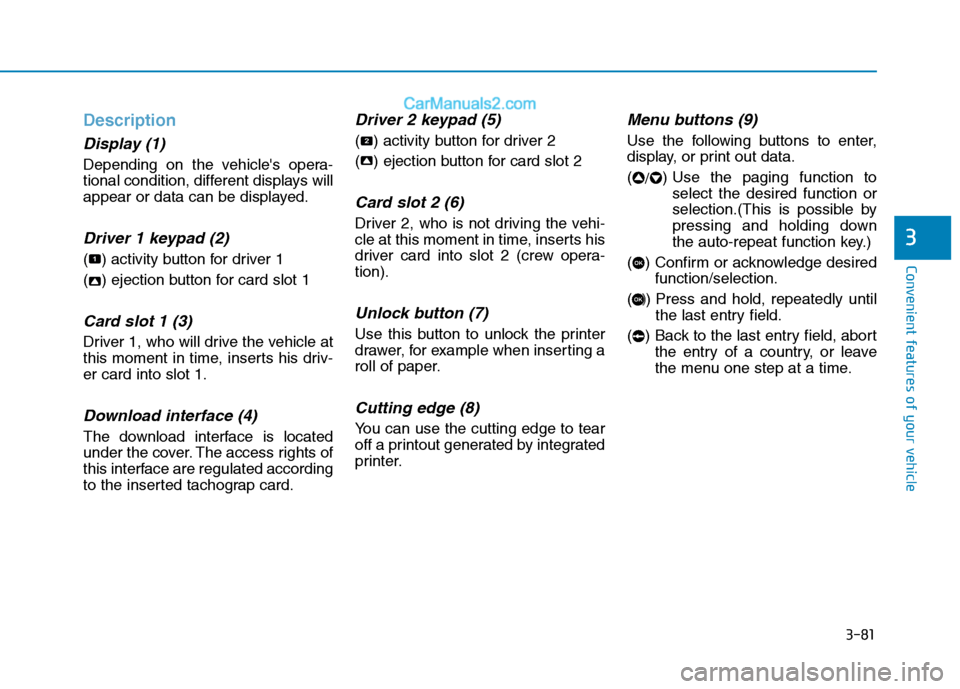
Driver 1 keypad (2)
( ) activity button for driver 1
( ) ejection button for card slot 1
Card slot 1 (3)
Driver 1, who will drive the vehicle at
this moment in time, inserts his driv-er card into slot 1.
Download interface (4)
The download interface is located
under the cover. The access rights of
this interface are regulated according
to the inserted tachograp card.
Driver 2 keypad (5)
( ) activity button for driver 2
( ) ejection button for card slot 2
Card slot 2 (6)
Driver 2, who is not driving the vehi-
cle at this moment in time, inserts his
driver card into slot 2 (crew opera-tion).
Unlock button (7)
Use this button to unlock the printer
drawer, for example when inserting a
roll of paper.
Cutting edge (8)
You can use the cutting edge to tear
off a printout generated by integrated
printer.
Menu buttons (9)
Use the following buttons to enter,
display, or print out data. (/) Use the paging function to
select the desired function or
selection.(This is possible by
pressing and holding down
the auto-repeat function key.)
( ) Confirm or acknowledge desired function/selection.
( ) Press and hold, repeatedly until the last entry field.
( ) Back to the last entry field, abort the entry of a country, or leave
the menu one step at a time.
OK
OK
22
2
1
Page 144 of 473
3-82
Convenient features of your vehicle
ADR variant*(a)
- Some functions, such as insertionor removal of the tachograph
cards, printing or display of data
are possible only while the ignition
is switched on.
- The download interface dap on the DTCO 1381 must be closed duringloading and unloading of haz-
ardous materials. ❈ For more detail information,
refer to operating instructions
(book or CD) from the manufac-
turing company.
■■
Type B
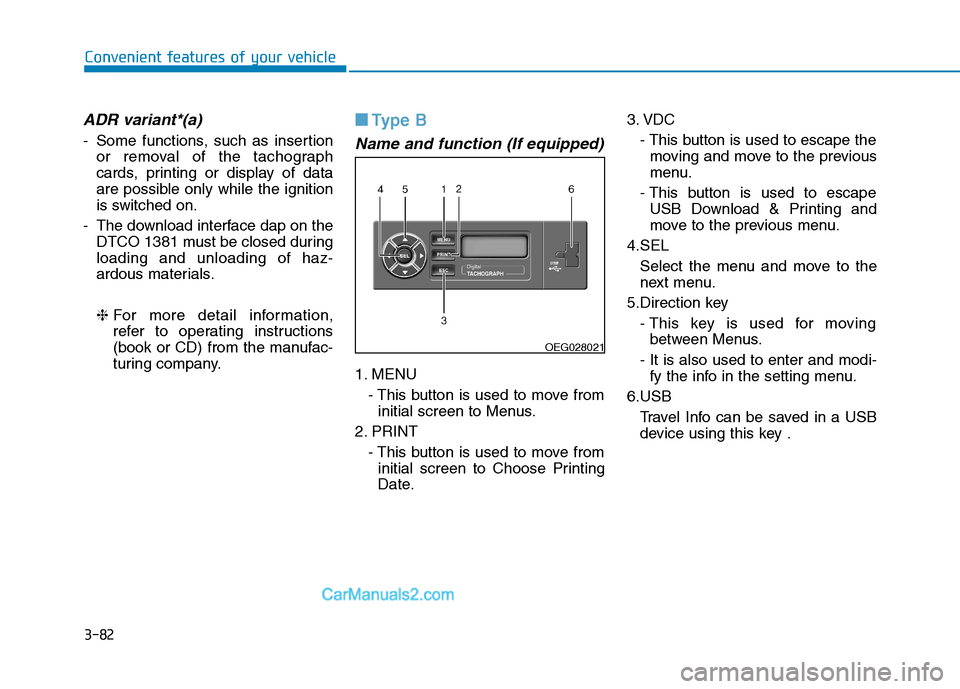
Name and function (If equipped)
1. MENU
- This button is used to move frominitial screen to Menus.
2. PRINT - This button is used to move frominitial screen to Choose Printing
Date. 3. VDC
- This button is used to escape themoving and move to the previous
menu.
- This button is used to escape USB Download & Printing and
move to the previous menu.
4.SEL Select the menu and move to the
next menu.
5.Direction key - This key is used for movingbetween Menus.
- It is also used to enter and modi- fy the info in the setting menu.
6.USB Travel Info can be saved in a USBdevice using this key .
OEG028021
Page 145 of 473
3-83
Convenient features of your vehicle
3
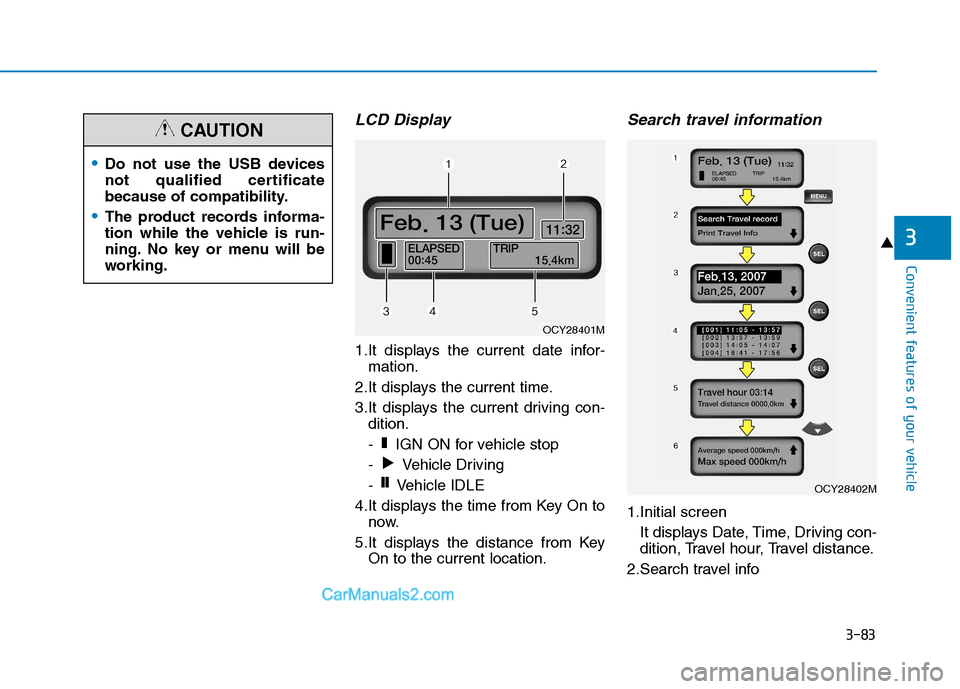
LCD Display
1.It displays the current date infor-mation.
2.It displays the current time.
3.It displays the current driving con- dition.
- IGN ON for vehicle stop
- Vehicle Driving
- Vehicle IDLE
4.It displays the time from Key On to now.
5.It displays the distance from Key On to the current location.
Search travel information
1.Initial screen
It displays Date, Time, Driving con-
dition, Travel hour, Travel distance.
2.Search travel info
❙❙
❚
OCY28401M
OCY28402M
Do not use the USB devices
not qualified certificate
because of compatibility.
The product records informa-
tion while the vehicle is run-
ning. No key or menu will be
working.
CAUTION
Page 146 of 473
3-84
Convenient features of your vehicle
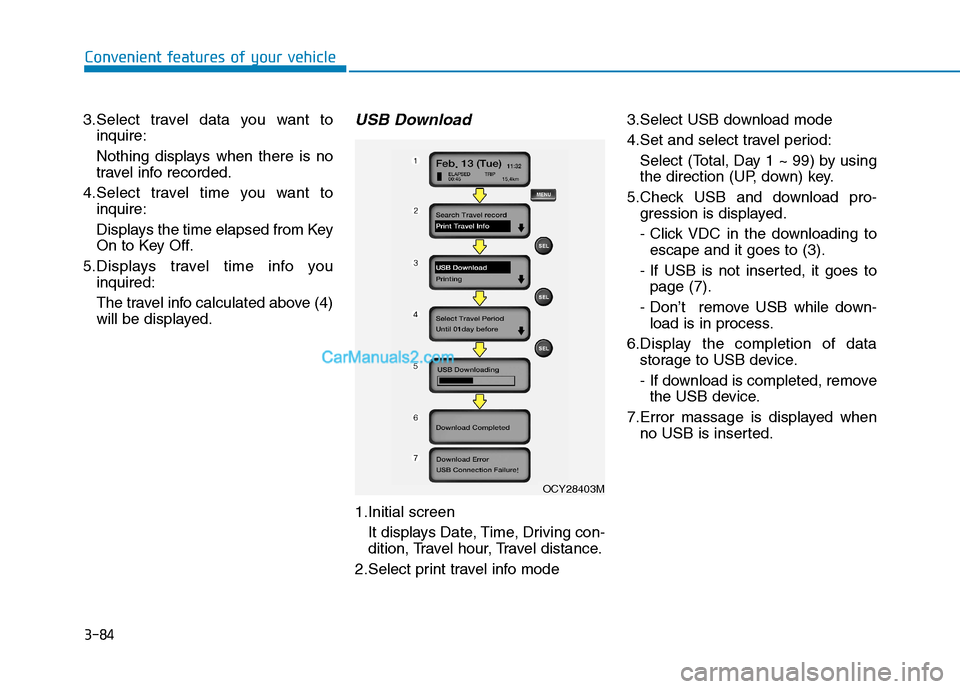
3.Select travel data you want toinquire:
Nothing displays when there is no
travel info recorded.
4.Select travel time you want to inquire:
Displays the time elapsed from Key
On to Key Off.
5.Displays travel time info you inquired:
The travel info calculated above (4)
will be displayed.USB Download
1.Initial screen
It displays Date, Time, Driving con-
dition, Travel hour, Travel distance.
2.Select print travel info mode 3.Select USB download mode
4.Set and select travel period:
Select (Total, Day 1 ~ 99) by using
the direction (UP, down) key.
5.Check USB and download pro- gression is displayed.
- Click VDC in the downloading toescape and it goes to (3).
- If USB is not inserted, it goes to page (7).
- Don’t remove USB while down- load is in process.
6.Display the completion of data storage to USB device.
- If download is completed, removethe USB device.
7.Error massage is displayed when no USB is inserted.
OCY28403M
Page 147 of 473
3-85
Convenient features of your vehicle
3
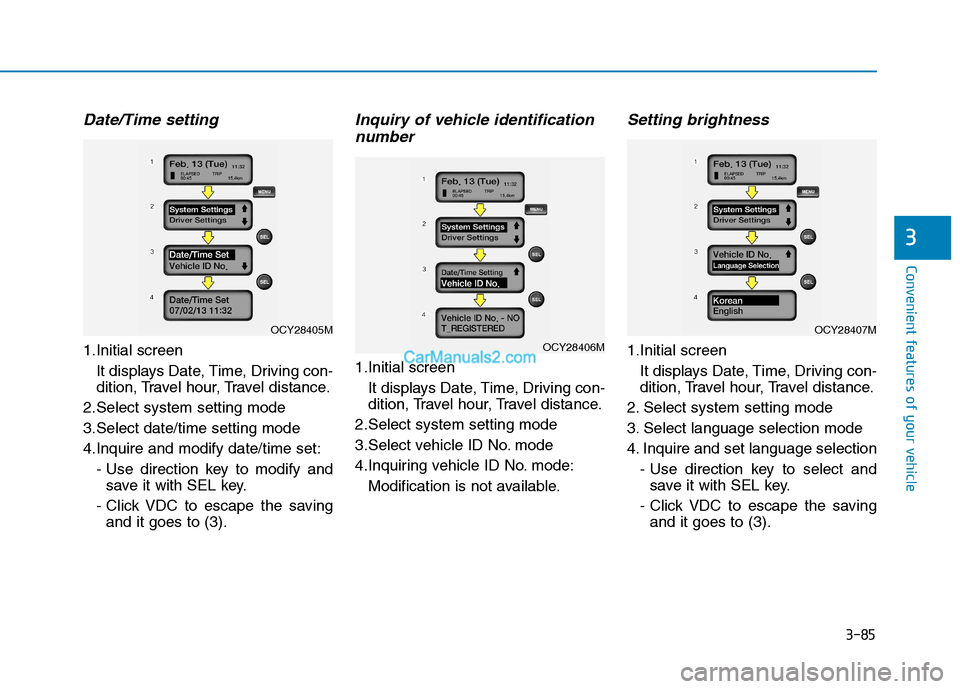
Date/Time setting
1.Initial screenIt displays Date, Time, Driving con-
dition, Travel hour, Travel distance.
2.Select system setting mode
3.Select date/time setting mode
4.Inquire and modify date/time set: - Use direction key to modify andsave it with SEL key.
- Click VDC to escape the saving and it goes to (3).
Inquiry of vehicle identification
number
1.Initial screen
It displays Date, Time, Driving con-
dition, Travel hour, Travel distance.
2.Select system setting mode
3.Select vehicle ID No. mode
4.Inquiring vehicle ID No. mode: Modification is not available.
Setting brightness
1.Initial screenIt displays Date, Time, Driving con-
dition, Travel hour, Travel distance.
2. Select system setting mode
3. Select language selection mode
4. Inquire and set language selection - Use direction key to select andsave it with SEL key.
- Click VDC to escape the saving and it goes to (3).OCY28406M
OCY28407MOCY28405M
Page 148 of 473
3-86
Convenient features of your vehicle
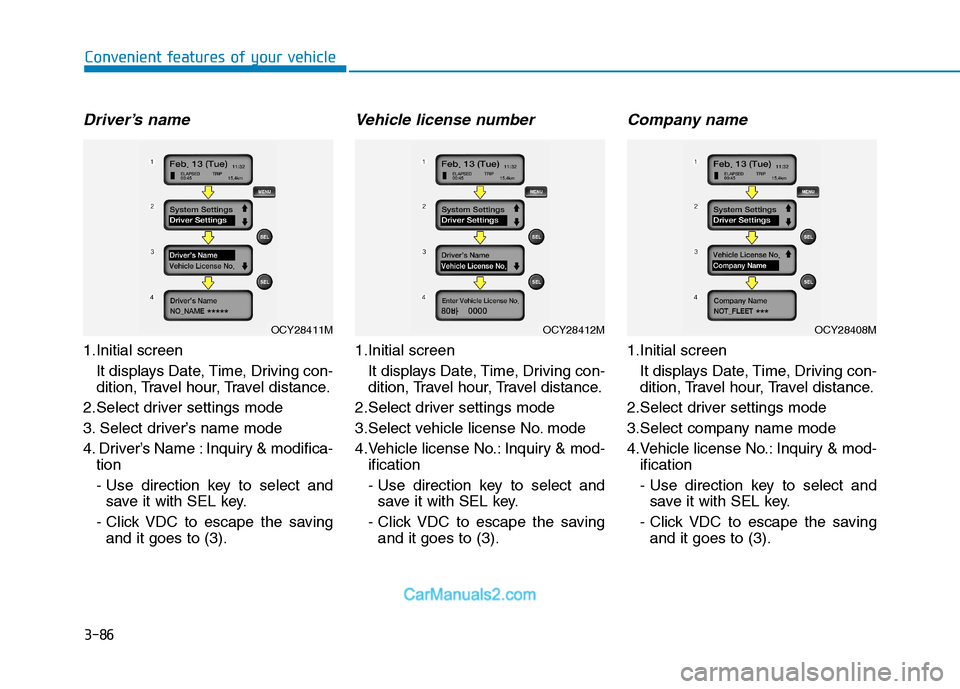
Driver’s name
1.Initial screen It displays Date, Time, Driving con-
dition, Travel hour, Travel distance.
2.Select driver settings mode
3. Select driver’s name mode
4. Driver’s Name : Inquiry & modifica- tion
- Use direction key to select andsave it with SEL key.
- Click VDC to escape the saving and it goes to (3).
Vehicle license number
1.Initial screen
It displays Date, Time, Driving con-
dition, Travel hour, Travel distance.
2.Select driver settings mode
3.Select vehicle license No. mode
4.Vehicle license No.: Inquiry & mod- ification
- Use direction key to select andsave it with SEL key.
- Click VDC to escape the saving and it goes to (3).
Company name
1.Initial screen
It displays Date, Time, Driving con-
dition, Travel hour, Travel distance.
2.Select driver settings mode
3.Select company name mode
4.Vehicle license No.: Inquiry & mod- ification
- Use direction key to select andsave it with SEL key.
- Click VDC to escape the saving and it goes to (3).
OCY28412MOCY28408MOCY28411M
Page 149 of 473
3-87
Convenient features of your vehicle
3
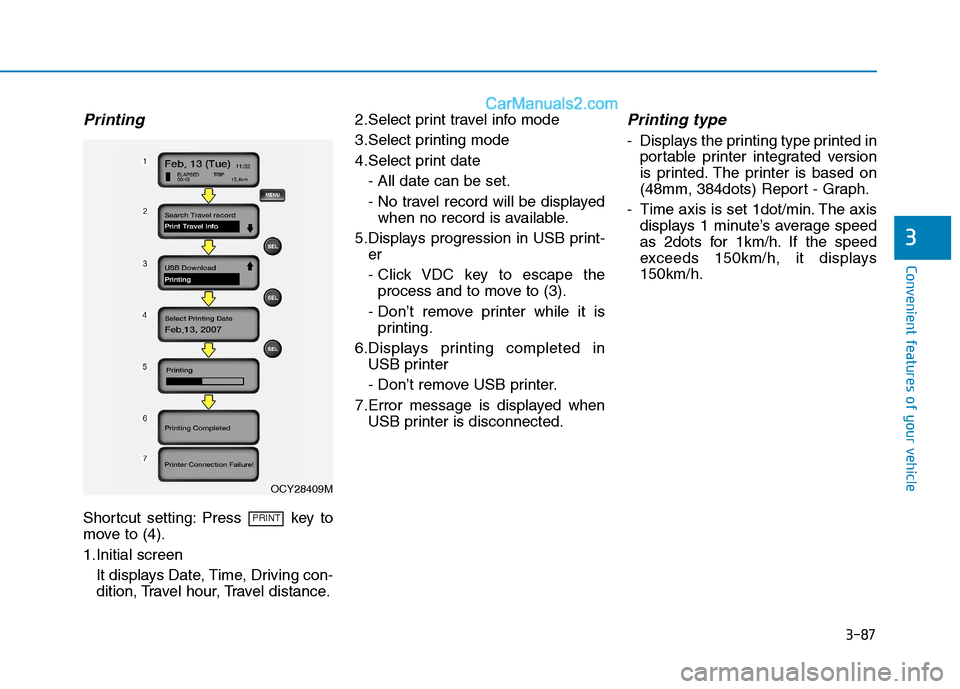
Printing
Shortcut setting: Press key to
move to (4).
1.Initial screenIt displays Date, Time, Driving con-
dition, Travel hour, Travel distance. 2.Select print travel info mode
3.Select printing mode
4.Select print date
- All date can be set.
- No travel record will be displayedwhen no record is available.
5.Displays progression in USB print- er
- Click VDC key to escape theprocess and to move to (3).
- Don’t remove printer while it is printing.
6.Displays printing completed in USB printer
- Don’t remove USB printer.
7.Error message is displayed when USB printer is disconnected.
Printing type
- Displays the printing type printed inportable printer integrated version
is printed. The printer is based on
(48mm, 384dots) Report - Graph.
- Time axis is set 1dot/min. The axis displays 1 minute’s average speed
as 2dots for 1km/h. If the speed
exceeds 150km/h, it displays150km/h.
PRINT
OCY28409M
Page 157 of 473
3-95
Convenient features of your vehicle
3
This system is a supplemental sys-
tem that shows behind the vehicle
through the rearview display mirror
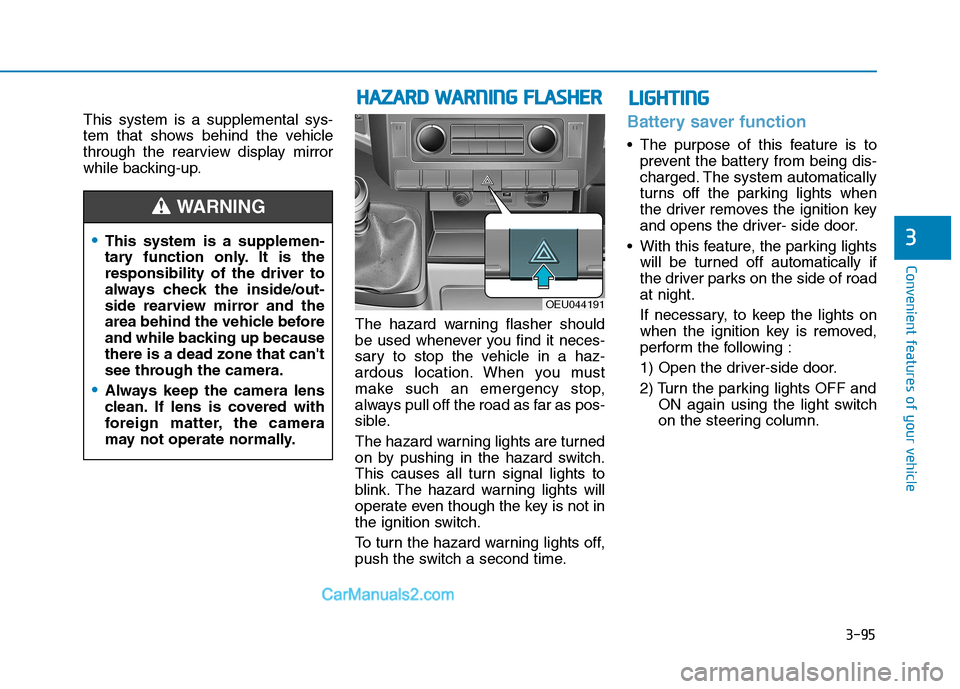
while backing-up.The hazard warning flasher should
be used whenever you find it neces-
sary to stop the vehicle in a haz-
ardous location. When you must
make such an emergency stop,
always pull off the road as far as pos-
sible.
The hazard warning lights are turned
on by pushing in the hazard switch.
This causes all turn signal lights to
blink. The hazard warning lights will
operate even though the key is not in
the ignition switch.
To turn the hazard warning lights off,
push the switch a second time.Battery saver function
The purpose of this feature is toprevent the battery from being dis-
charged. The system automatically
turns off the parking lights when
the driver removes the ignition key
and opens the driver- side door.
With this feature, the parking lights will be turned off automatically if
the driver parks on the side of roadat night.
If necessary, to keep the lights on
when the ignition key is removed,
perform the following :
1) Open the driver-side door.
2) Turn the parking lights OFF and ON again using the light switch
on the steering column.
This system is a supplemen-
tary function only. It is theresponsibility of the driver to
always check the inside/out-
side rearview mirror and the
area behind the vehicle before
and while backing up becausethere is a dead zone that can't
see through the camera.
Always keep the camera lens
clean. If lens is covered with
foreign matter, the camera
may not operate normally.
WARNING
HHAAZZAA RRDD WW AARRNN IINN GG FF LLAA SSHH EERR
OEU044191
LLIIGG HH TTIINN GG
Page 158 of 473
3-96
Convenient features of your vehicle
Headlight escort function (if equipped)
The headlights (and/or taillights)
remain on for approximately 5 min-
utes after the ignition key is removed
or turned to the ACC or LOCK posi-
tion. However, if the driver’s door isopened and closed, the headlights
are turned off after 30 seconds.
The headlights can be turned off by
pressing the lock button on the trans-
mitter twice or turning off the light
switch from the headlight or Autolight position.
Headlight welcome function (if equipped)
When the headlight switch is in the
ON or AUTO position and all doors
(and tailgate) are closed and locked,
if you press the door unlock button
on the transmitter the headlights will
come on for about 15 seconds.
If the headlight switch is in the AUTO position, the function can only oper-ate at night.
At this time, if you press the door
unlock button again or door lock but-
ton on the transmitter, the headlights
will turn off immediately.
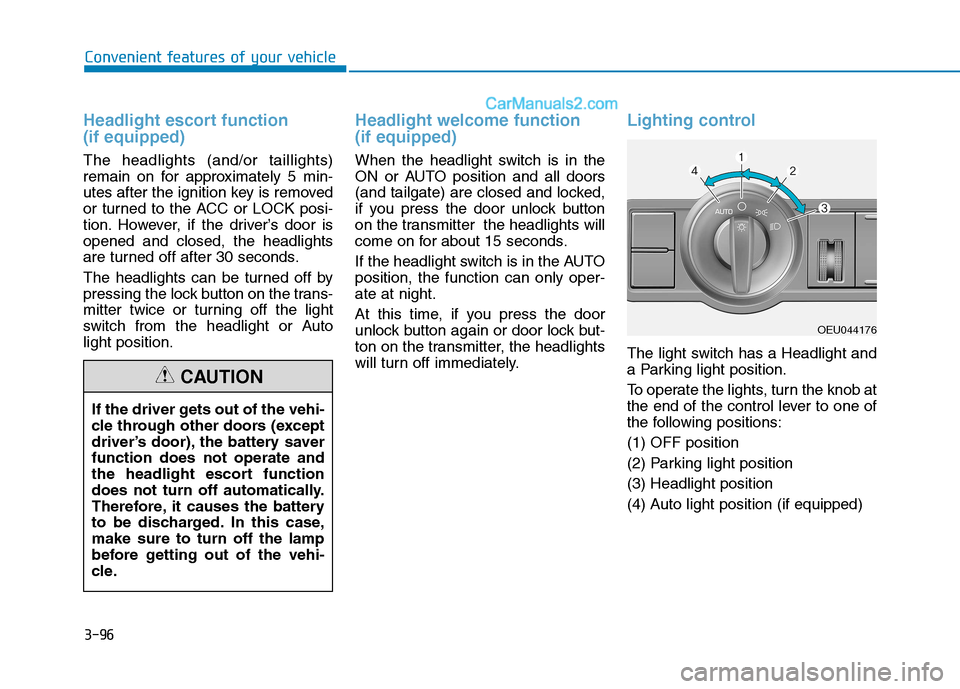
Lighting control
The light switch has a Headlight and
a Parking light position.
To operate the lights, turn the knob at
the end of the control lever to one of
the following positions: (1) OFF position
(2) Parking light position(3) Headlight position
(4) Auto light position (if equipped)
If the driver gets out of the vehi-
cle through other doors (except
driver’s door), the battery saverfunction does not operate and
the headlight escort function
does not turn off automatically.
Therefore, it causes the battery
to be discharged. In this case,make sure to turn off the lamp
before getting out of the vehi-
cle.
CAUTION
OEU044176