keys Hyundai H350 2016 Owner's Manual
[x] Cancel search | Manufacturer: HYUNDAI, Model Year: 2016, Model line: H350, Model: Hyundai H350 2016Pages: 473, PDF Size: 26.4 MB
Page 63 of 473
Convenient features of your vehicle
Keys .........................................................................3-4Record your key number ................................................3-4
Key operations ...................................................................3-4
Immobilizer system............................................................3-5
Remote keyless entry ...........................................3-6 Remote keyless entry system operations...................3-6
Transmitter precautions...................................................3-7
Battery replacement .........................................................3-8
Theft-alarm system...............................................3-9 Armed stage .....................................................................3-10
Theft-alarm stage...........................................................3-10
Disarmed stage ................................................................3-11
Door locks .............................................................3-11 Operating door locks from outside the vehicle ......3-11
Operating door locks from inside the vehicle .........3-12
Deadlocks ..........................................................................3-14
Speed sensing door lock system ................................3-14
Mid sliding door ...................................................3-15 Opening/closing from the outside..............................3-15
Opening/closing from the inside.................................3-16
Child-protector mid sliding door lock ........................3-16
Electrical step .......................................................3-17 Operation and obstacle detection ..............................3-19
Electrical step warning alarm ......................................3-19
Regular cleaning ..............................................................3-21 Rear door ..............................................................3-22
Opening/closing from the outside..............................3-23
Opening/closing from the inside.................................3-23
Opening the left-hand rear door ...............................3-24
Opening the rear doors to an angle of
180° or 270° ......................................................................3-24 Closing the rear doors from the outside ..................3-25
Child-protector rear door lock ....................................3-25
Windows ................................................................3-26 Power windows ................................................................3-27
Rear seat windows .........................................................3-29
Hood.......................................................................3-30 Opening the hood ...........................................................3-30
Closing the hood .............................................................3-31
Fuel filler lid .........................................................3-32 Closing the fuel filler lid ................................................3-32
Urea solution filler lid .........................................3-34
Steering wheel......................................................3-37 Power steering.................................................................3-37
Tilt & telescopic steering ..............................................3-37
Horn ....................................................................................3-38
Mirrors ...................................................................3-39 Inside rearview mirror....................................................3-39
Outside rearview mirror ................................................3-41
3
Page 66 of 473
3-4
Convenient features of your vehicle
Record your key number
The key code number is stamped on the
key code tag
attached to the keyset.
Should you lose your keys, we rec-
ommend that you contact an author-
ized HYUNDAI dealer. Remove the
key code tag and store it in a safe
place. Also, record the code number
and keep it in a safe and handy
place, but not in the vehicle.
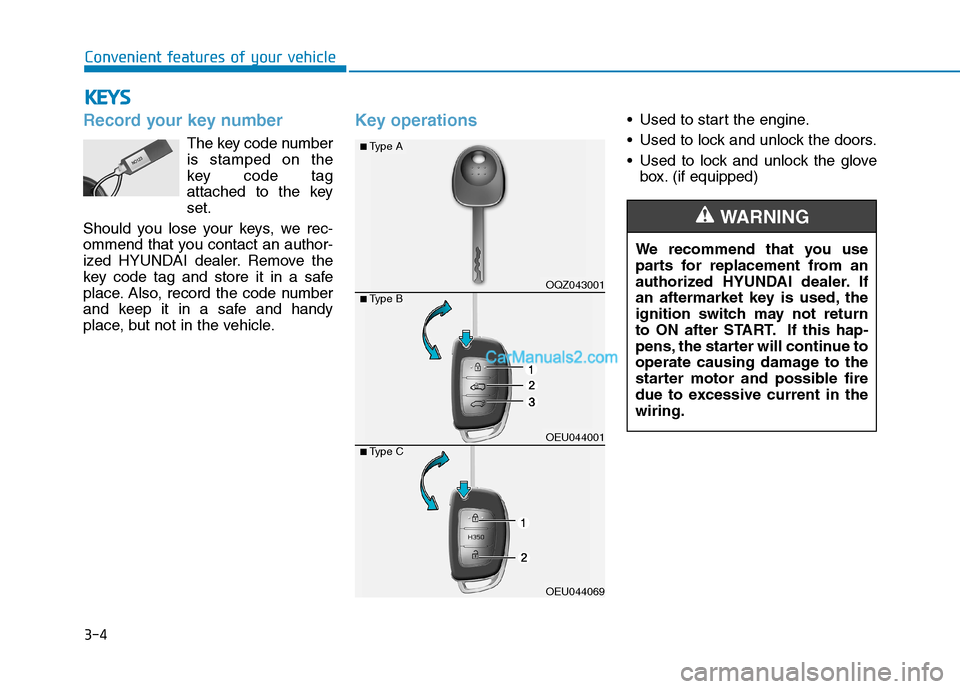
Key operations• Used to start the engine.
Used to lock and unlock the doors.
Used to lock and unlock the glove box. (if equipped)
KKEEYY SS
We recommend that you use
parts for replacement from an
authorized HYUNDAI dealer. If
an aftermarket key is used, the
ignition switch may not return
to ON after START. If this hap-
pens, the starter will continue to
operate causing damage to the
starter motor and possible fire
due to excessive current in thewiring.
WARNING
OQZ043001
OEU044001
OEU044069
■Type A
■Type B
■Type C
Page 67 of 473
3-5
Convenient features of your vehicle
Immobilizer system
Your vehicle may be equipped with
an electronic engine immobilizer sys-
tem to reduce the risk of unautho-
rized vehicle use.
Your immobilizer system is com-
prised of a small transponder in the
ignition key and electronic devices
inside the vehicle.
With the immobilizer system, when-
ever you insert your ignition key into
the ignition switch and turn it to ON,
it checks and determines and verifies
if the ignition key is valid or not.
If the key is determined to be valid,
the engine will start.
If the key is determined to be invalid,
the engine will not start.
To deactivate the immobilizersystem:
Insert the ignition key into the key
cylinder and turn it to the OFF posi-tion.
To activate the immobilizer sys-tem:
Turn the ignition key to the ON posi-tion.
The immobilizer system activates
automatically. Without a valid ignition
key for your vehicle, the engine will
not start.
3
Ignition key
Leaving children unattended in
a vehicle with the ignition key is
dangerous even if the key is not
in the ignition or start is ACC orON position.
Children copy adults and they
could place the key in the igni-tion.
The ignition key would enable
children to operate power win-
dows or other controls, or even
make the vehicle move, which
could result in serious bodily
injury or even death.
Never leave the keys in your
vehicle with unsupervised chil-
dren, when the engine is run-ning.
WARNING
In order to prevent theft of your
vehicle, do not leave spare keys
anywhere in your vehicle. Your
immobilizer password is a cus-
tomer unique password and
should be kept confidential. Do
not leave this number anywhere
in your vehicle.
WARNING
Page 68 of 473
3-6Information
When starting the engine, do not use
the key with other immobilizer keys
around. Otherwise the engine may not
start or may stop soon after it starts.
Keep each key separately not to have
any malfunction after you receive
your new vehicle.
Information
If you need additional keys or lose
your keys, we recommend that you
consult an authorized HYUNDAI
dealer. The transponder in your ignition
key is an important part of the
immobilizer system. It is designed
to give years of trouble-free serv-
ice, however you should avoid
exposure to moisture, static elec-
tricity and rough handling.
Immobilizer system malfunction
could occur.
Remote keyless entry system operations
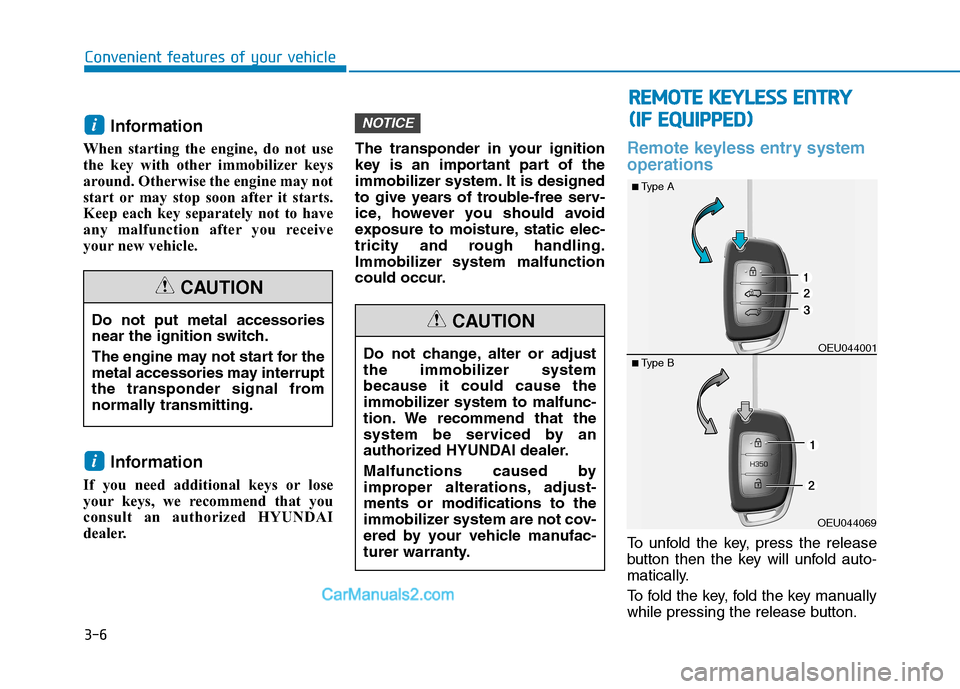
To unfold the key, press the release
button then the key will unfold auto-
matically.
To fold the key, fold the key manually
while pressing the release button.
NOTICE
i
i
Convenient features of your vehicle
Do not put metal accessories
near the ignition switch.
The engine may not start for the
metal accessories may interrupt
the transponder signal from
normally transmitting.
CAUTION
Do not change, alter or adjust
the immobilizer systembecause it could cause the
immobilizer system to malfunc-
tion. We recommend that the
system be serviced by an
authorized HYUNDAI dealer.
Malfunctions caused by
improper alterations, adjust-ments or modifications to the
immobilizer system are not cov-
ered by your vehicle manufac-
turer warranty.
CAUTION
RR
EEMM OOTTEE KK EEYY LLEE SSSS EE NN TTRR YY
(
( IIFF EE QQ UUIIPP PPEEDD ))
OEU044069OEU044001
■
Type A
■ Type B
Page 73 of 473
3-11
Convenient features of your vehicle
3
Disarmed stage
The system will be disarmed when:
Transmitter
- The door unlock button is pressed.
- The engine is started.
- The ignition switch is in the "ON"position. (Armed stage status)
- The ignition switch is in the "ACC" position for 27 seconds or more.
(Theft-alarm stage status)
After the doors are unlocked, the
hazard warning lights will blink twiceto indicate that the system is dis-
armed.
After pressing the unlock button, if
any door (or rear door) is not opened
within 30 seconds, the system will be
rearmed. Information
Burglar alarm system
If the system is not disarmed with the transmitter, insert the key into
the ignition switch and start the
engine. Then the system will be dis-
armed.
If you lose your keys, we recom- mend that you consult an author-
ized HYUNDAI dealer.
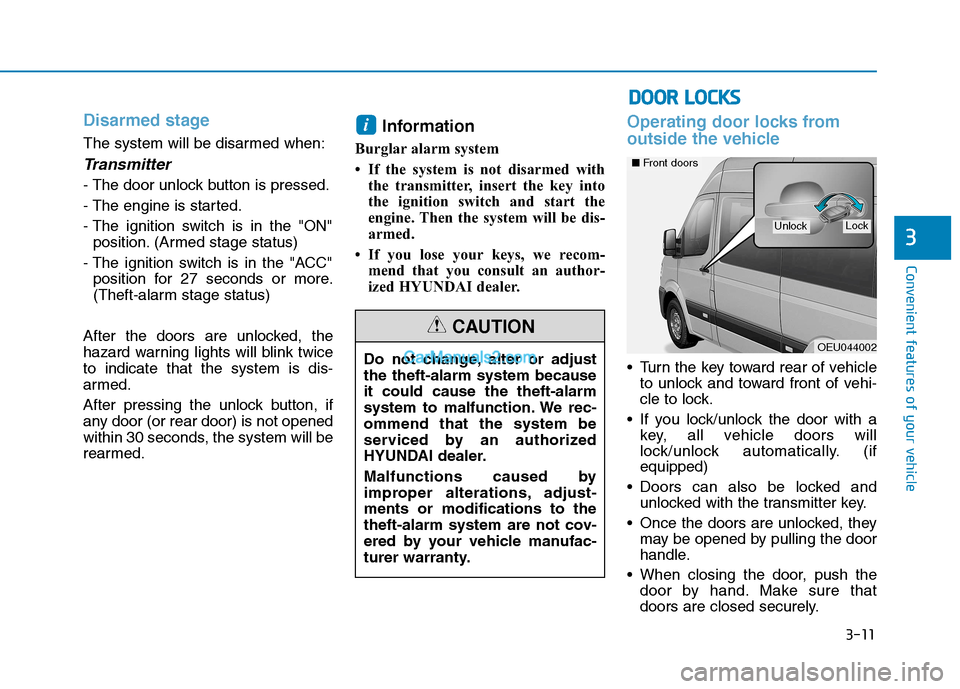
Operating door locks from
outside the vehicle
Turn the key toward rear of vehicleto unlock and toward front of vehi-
cle to lock.
If you lock/unlock the door with a key, all vehicle doors will
lock/unlock automatically. (ifequipped)
Doors can also be locked and unlocked with the transmitter key.
Once the doors are unlocked, they may be opened by pulling the door
handle.
When closing the door, push the door by hand. Make sure that
doors are closed securely.
i
Do not change, alter or adjust the theft-alarm system becauseit could cause the theft-alarm
system to malfunction. We rec-ommend that the system be
serviced by an authorized
HYUNDAI dealer.
Malfunctions caused by
improper alterations, adjust-ments or modifications to the
theft-alarm system are not cov-
ered by your vehicle manufac-
turer warranty.
CAUTION
DDOO OORR LL OO CCKK SS
OEU044002
LockUnlock
■Front doors
Page 211 of 473
![Hyundai H350 2016 Owners Manual 4-19
Multimedia System
4
SSEE TT UU PP (( FF OO RR RR DD SS MM OODDEELL))
- AC210MDEE
Display Settings
Press the key Select
[Display] through TUNE knob or
key Select menu through
Mode Pop up
[M](/img/35/14880/w960_14880-210.png "Hyundai H350 2016 Owners Manual 4-19
Multimedia System
4
SSEE TT UU PP (( FF OO RR RR DD SS MM OODDEELL))
- AC210MDEE
Display Settings
Press the key Select
[Display] through TUNE knob or
key Select menu through
Mode Pop up
[M")
4-19
Multimedia System
4
SSEE TT UU PP (( FF OO RR RR DD SS MM OODDEELL))
- AC210MDEE
Display Settings
Press the key Select
[Display] through TUNE knob or
key Select menu through
Mode Pop up
[Mode Pop up] Changes . selection mode
During On state, press the or key to display the mode change pop up screen.
When the pop up screen is dis- played, use the TUNE knob or
keys ~ to select the
desired mode.
Scroll text
[Scroll text] Set /
Maintains scroll
: Scrolls only one (1) time.
Song Info
When playing an MP3 file, select the
desired display info from ‘Folder/File’
or ‘Album/Artist/Song’.
Off
On
OffOn
61
MEDIA
RADIO
On
1 RPT
SETUP
Page 214 of 473
![Hyundai H350 2016 Owners Manual 4-22
Multimedia System
S
S EE TT UU PP
-AC110MDGG, AC110MDGN, AC110MDGL
Display Settings
Press the key Select
[Display] through TUNE knob or
key Select menu through
TUNE knob
Mode Pop up
[Mode Po](/img/35/14880/w960_14880-213.png "Hyundai H350 2016 Owners Manual 4-22
Multimedia System
S
S EE TT UU PP
-AC110MDGG, AC110MDGN, AC110MDGL
Display Settings
Press the key Select
[Display] through TUNE knob or
key Select menu through
TUNE knob
Mode Pop up
[Mode Po")
4-22
Multimedia System
S
S EE TT UU PP
-AC110MDGG, AC110MDGN, AC110MDGL
Display Settings
Press the key Select
[Display] through TUNE knob or
key Select menu through
TUNE knob
Mode Pop up
[Mode Pop up] Changes . selection mode
During On state, press the or key to display the mode change pop up screen.
When the pop up screen is dis- played, use the TUNE knob or
keys ~ to select the
desired mode.
Text Scroll
[Text Scroll] Set /
Maintains scroll
: Scrolls only one (1) time.
Media Display
When playing an MP3 file, select the
desired display info from ‘Folder/File’
or ‘Album/Artist/Song’.
Sound Settings
Press the key Select
[Sound] through TUNE knob or key Select menu through
TUNE knob
Sound Settings
Press the key Select
[Sound] through TUNE knob or key
2
SETUP
2 RDM
SETUP
Off
On
OffOn
61
MEDIA
RADIO
On
1 RPT
SETUP
Page 251 of 473
![Hyundai H350 2016 Owners Manual 4-59
Multimedia System
4
SSEE TT UU PP (( ff oo rr RR DD SS mm ooddeell))
- AC210MDEE
Display Settings
Press the key Select
[Display] through TUNE knob or
key Select menu through
Mode Pop up
[M](/img/35/14880/w960_14880-250.png "Hyundai H350 2016 Owners Manual 4-59
Multimedia System
4
SSEE TT UU PP (( ff oo rr RR DD SS mm ooddeell))
- AC210MDEE
Display Settings
Press the key Select
[Display] through TUNE knob or
key Select menu through
Mode Pop up
[M")
4-59
Multimedia System
4
SSEE TT UU PP (( ff oo rr RR DD SS mm ooddeell))
- AC210MDEE
Display Settings
Press the key Select
[Display] through TUNE knob or
key Select menu through
Mode Pop up
[Mode Pop up] Changes . selection mode
During On state, press the or key to display the mode change pop up screen.
When the pop up screen is dis- played, use the TUNE knob or
keys ~ to select the
desired mode.
Scroll text
[Scroll text] Set /
Maintains scroll
: Scrolls only one (1) time.
Song Info
When playing an MP3 file, select the
desired display info from ‘Folder/File’
or ‘Album/Artist/Song’.
Off
On
OffOn
61
MEDIA
RADIO
On
1 RPT
SETUP
Page 470 of 473
I-5
Key positions ..................................................................5-5
Ignition switch position ...............................................5-5
Illuminated ignition switch ..........................................5-5
Starting the engine .......................................................5-6
Keys ................................................................................3-4 Immobilizer system .....................................................3-5
Key operations .............................................................3-4
Record your key number .............................................3-4
Lane departure warning system (LWDS) .....................5-37
Light bulbs ....................................................................7-67 Headlight and front fog light aiming (for Europe) ....7-70
Headlight, position light, turn signal light, front fog light bulb replacement ..............................7-68
High mounted stop light bulb replacement ...............7-78
Interior light bulb replacement ..................................7-78
License plate light bulb replacement .........................7-78
Rear combination light bulbs replacement ................7-75
Side marker lamp .......................................................7-75
Lighting.........................................................................3-95
Battery saver function ................................................3-95
Daytime running light..............................................3-101
Front fog light ..........................................................3-100
Headlight escort function...........................................3-96
Headlight leveling device ........................................3-101 Headlight welcome function ......................................3-96
High - beam operation ...............................................3-98
Lighting control .........................................................3-96
Rear fog light ...........................................................3-100
Turn signals and lane change signals ........................3-99
Load and speed capacity tires.........................................8-5
Locking differential ......................................................5-63
Maintenance services......................................................7-5 Engine compartment precautions (Diesel engine).......7-7
Owner's responsibility .................................................7-5
Owner maintenance precautions ..................................7-5
Manual transmission and rearaxle oil...........................7-31 Change the gear oil ....................................................7-31
Check and adding oil .................................................7-31
Manual transmission .....................................................5-14
Downshifting .............................................................5-16
Good driving practices...............................................5-17
Manual transmission operation..................................5-14
Using the clutch .........................................................5-16
Mid sliding door ...........................................................3-15 Child-protector mid sliding door lock .......................3-16
Opening/closing from the inside ...............................3-16
Opening/closing from the outside .............................3-15
Mirrors ..........................................................................3-39
Inside rearview mirror ...............................................3-39
Outside rearview mirror.............................................3-41
I
Index
K
L
M