radio power HYUNDAI I10 2008 Owners Manual
[x] Cancel search | Manufacturer: HYUNDAI, Model Year: 2008, Model line: I10, Model: HYUNDAI I10 2008Pages: 354, PDF Size: 37.04 MB
Page 159 of 354
Features of your vehicle
80
4
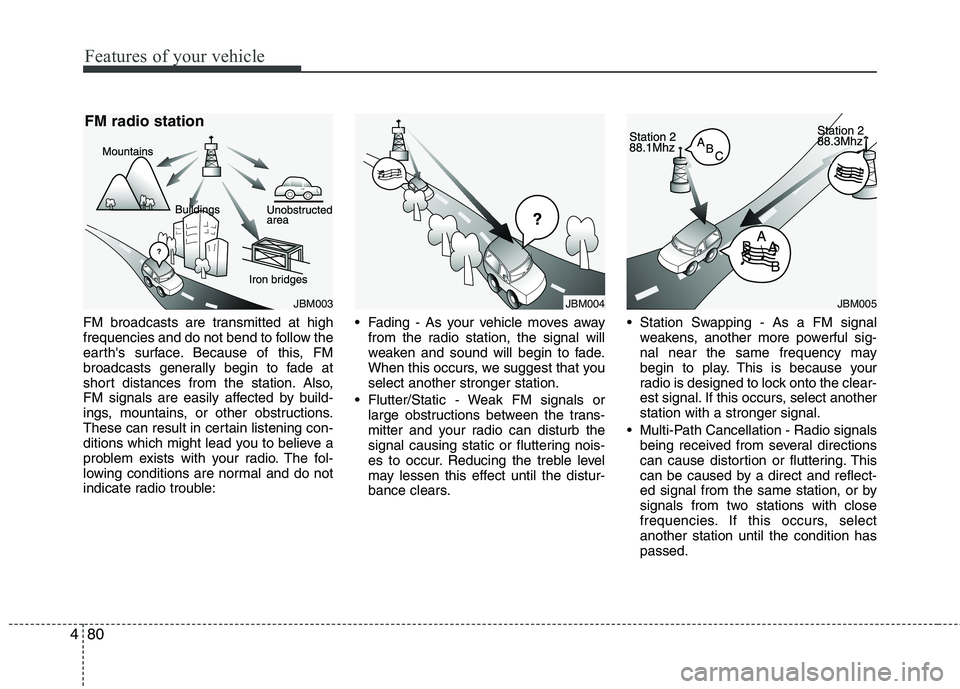
FM broadcasts are transmitted at high
frequencies and do not bend to follow the
earth's surface. Because of this, FM
broadcasts generally begin to fade at
short distances from the station. Also,
FM signals are easily affected by build-
ings, mountains, or other obstructions.
These can result in certain listening con-
ditions which might lead you to believe a
problem exists with your radio. The fol-
lowing conditions are normal and do not
indicate radio trouble: Fading - As your vehicle moves away
from the radio station, the signal will
weaken and sound will begin to fade.
When this occurs, we suggest that youselect another stronger station.
Flutter/Static - Weak FM signals or large obstructions between the trans-
mitter and your radio can disturb the
signal causing static or fluttering nois-
es to occur. Reducing the treble level
may lessen this effect until the distur-
bance clears. Station Swapping - As a FM signal
weakens, another more powerful sig-
nal near the same frequency may
begin to play. This is because your
radio is designed to lock onto the clear-
est signal. If this occurs, select anotherstation with a stronger signal.
Multi-Path Cancellation - Radio signals being received from several directions
can cause distortion or fluttering. This
can be caused by a direct and reflect-
ed signal from the same station, or by
signals from two stations with close
frequencies. If this occurs, selectanother station until the condition haspassed.
JBM003
FM radio stationJBM005JBM004
Page 162 of 354
483
Features of your vehicle
Using RADIO, SETUP, VOLUME
and AUDIO CONTROL
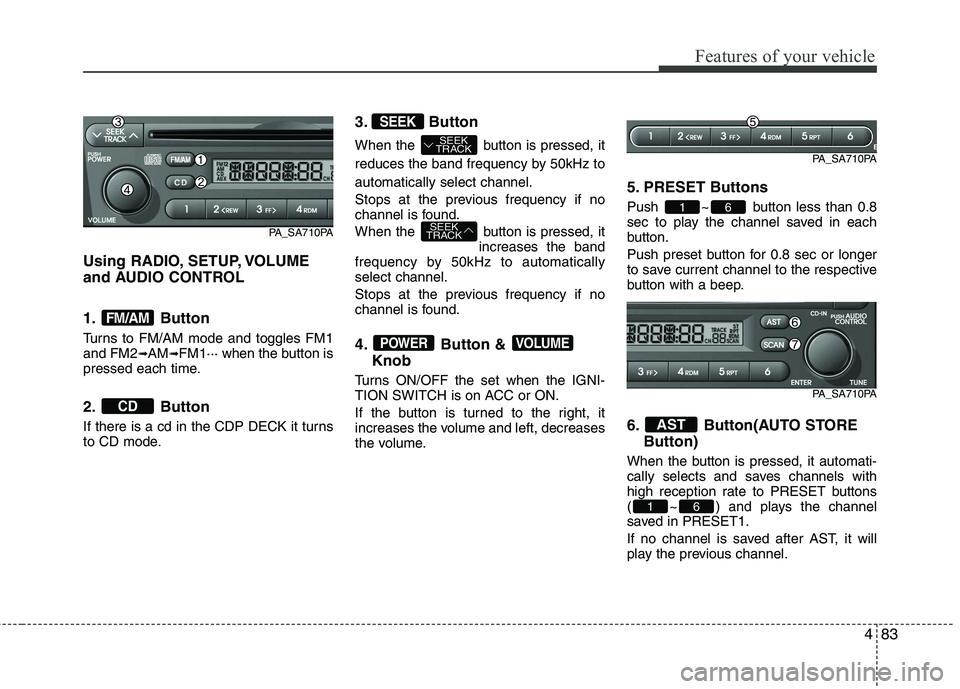
1. Button
Turns to FM/AM mode and toggles FM1 and FM2➟AM ➟FM1··· when the button is
pressed each time.
2. Button
If there is a cd in the CDP DECK it turns
to CD mode. 3. Button
When the button is pressed, it
reduces the band frequency by 50kHz toautomatically select channel.
Stops at the previous frequency if no
channel is found.
When the button is pressed, it
increases the band
frequency by 50kHz to automatically select channel.
Stops at the previous frequency if no
channel is found.
4. Button &
Knob
Turns ON/OFF the set when the IGNI-
TION SWITCH is on ACC or ON.
If the button is turned to the right, it
increases the volume and left, decreases
the volume. 5. PRESET Buttons
Push ~ button less than 0.8
sec to play the channel saved in each
button.
Push preset button for 0.8 sec or longer
to save current channel to the respective
button with a beep.
6. Button(AUTO STORE
Button)
When the button is pressed, it automati-
cally selects and saves channels with
high reception rate to PRESET buttons
( ~ ) and plays the channel
saved in PRESET1.
If no channel is saved after AST, it will
play the previous channel.
61
AST
61
VOLUMEPOWER
SEEK
TRACK
SEEK
TRACK
SEEK
CD
FM/AM
PA_SA710PA
PA_SA710PA
PA_SA710PA
Page 169 of 354
Features of your vehicle
90
4
- REGION (REGION MENU indication is
possible with RDS MENU)
Selects whether REGION code is used
(ON) or not (OFF) once the radio deter-
mines the AF jump condition. If AUTO isselected, AF jump condition is deter-mined automatically via PI reception sta-
tus.
- TA VOL (TA VOL MENU indication is possible with RDS MENU)
Adjusts the TA (Traffic Announcement)
volume level according to normal audio
volume level. - Time
Select this item to enter “Automatic Time
setting” mode (Auto, manual). ❋ Auto is Automatic RDS Time.
Select this item to enter Clock setup
mode. (12/24Hr., Auto, Time)
- 12/24 Hr.
Select “12/24 Hr.” button to enter Time
Format menu. - Time
Select “Time” button to enter Time set- ting. Adjust the hour and press the
button to set. Adjust the minute and
press the button to complete
and exit from clock adjustment mode.
Pressing the button while in
power off, screen will allow the user to
make immediately adjustments to the
clock.
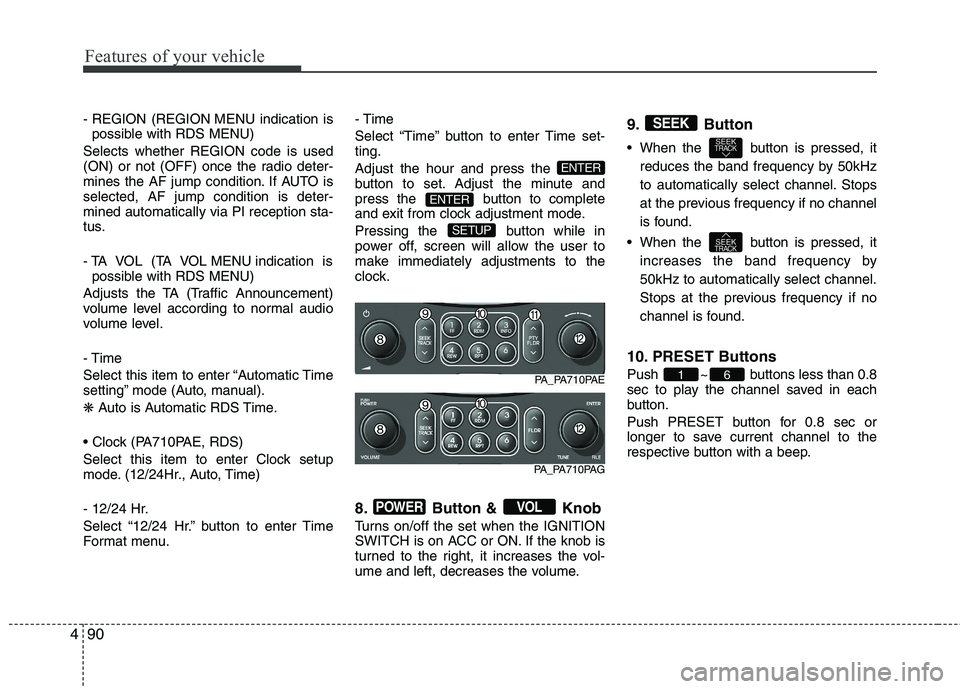
8. Button & Knob
Turns on/off the set when the IGNITION
SWITCH is on ACC or ON. If the knob is
turned to the right, it increases the vol-
ume and left, decreases the volume.9. Button
When the button is pressed, it
reduces the band frequency by 50kHz
to automatically select channel. Stops
at the previous frequency if no channel
is found.
When the button is pressed, it increases the band frequency by50kHz to automatically select channel.
Stops at the previous frequency if no
channel is found.
10. PRESET Buttons
Push ~ buttons less than 0.8
sec to play the channel saved in each
button.
Push PRESET button for 0.8 sec or
longer to save current channel to the
respective button with a beep.
61
SEEKTRACK
SEEKTRACK
SEEK
VOLPOWER
SETUP
ENTER
ENTER
PA_PA710PAE
PA_PA710PAG