air condition HYUNDAI I10 2014 User Guide
[x] Cancel search | Manufacturer: HYUNDAI, Model Year: 2014, Model line: I10, Model: HYUNDAI I10 2014Pages: 343, PDF Size: 9.14 MB
Page 137 of 343
Features of your vehicle
76 4
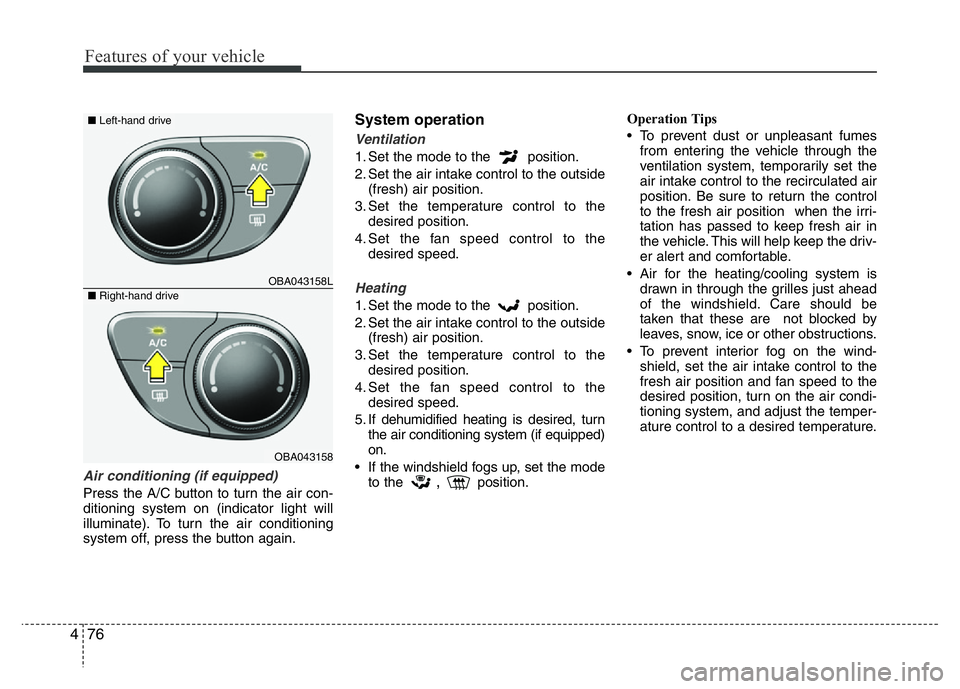
Air conditioning (if equipped)
Press the A/C button to turn the air con-
ditioning system on (indicator light will
illuminate). To turn the air conditioning
system off, press the button again.
System operation
Ventilation
1. Set the mode to the position.
2. Set the air intake control to the outside
(fresh) air position.
3. Set the temperature control to the
desired position.
4. Set the fan speed control to the
desired speed.
Heating
1. Set the mode to the position.
2. Set the air intake control to the outside
(fresh) air position.
3. Set the temperature control to the
desired position.
4. Set the fan speed control to the
desired speed.
5. If dehumidified heating is desired, turn
the air conditioning system (if equipped)
on.
• If the windshield fogs up, set the mode
to the
,position.Operation Tips
• To prevent dust or unpleasant fumes
from entering the vehicle through the
ventilation system, temporarily set the
air intake control to the recirculated air
position. Be sure to return the control
to the fresh air position when the irri-
tation has passed to keep fresh air in
the vehicle. This will help keep the driv-
er alert and comfortable.
• Air for the heating/cooling system is
drawn in through the grilles just ahead
of the windshield. Care should be
taken that these are not blocked by
leaves, snow, ice or other obstructions.
• To prevent interior fog on the wind-
shield, set the air intake control to the
fresh air position and fan speed to the
desired position, turn on the air condi-
tioning system, and adjust the temper-
ature control to a desired temperature.
OBA043158L
OBA043158
■Left-hand drive
■Right-hand drive
Page 138 of 343
477
Features of your vehicle
Air conditioning (if equipped)
All HYUNDAI Air Conditioning Systems
are filled with environmentally friendly
R-134a refrigerant.
1. Start the engine. Push the air condi-
tioning button.
2. Set the mode to the position.
3. Set the air intake control to the recircu-
lated air position. However, prolonged
operation of the recirculated air posi-
tion will excessively dry the air. In this
case, change the air position.
4. Adjust the fan speed control and tem-
perature control to maintain maximum
comfort.
When maximum cooling is desired, set
the temperature control to the extreme
left, set the air intake control to the
recirculated air position, then set the
fan speed control to the highest speed.✽NOTICE
• While using the air conditioning sys-
tem, monitor the temperature gauge
closely while driving up hills or in
heavy traffic when outside tempera-
tures are high. Air conditioning sys-
tem operation may cause engine over-
heating. Continue to use the blower
fan but turn the air conditioning sys-
tem off if the temperature gauge indi-
cates engine overheating.
• While opening the windows in humid
weather air conditioning may create
water droplets inside the vehicle.
Since excessive water droplets may
cause damage to electrical equipment,
air conditioning should only be used
with the windows closed.
Air conditioning system operation tips
• If the vehicle has been parked in direct
sunlight during hot weather, open the
windows for a short time to let the hot
air inside the vehicle escape.
• To help reduce moisture inside of the
windows on rainy or humid days,
decrease the humidity inside the vehicle
by operating the air conditioning system.
• During air conditioning system opera-
tion, you may occasionally notice a slight
change in engine speed as the air con-
ditioning compressor cycles. This is a
normal system operation characteristic.
• Use the air conditioning system every
month only for a few minutes to ensure
maximum system performance.
• When using the air conditioning system,
you may notice clear water dripping (or
even puddling) on the ground under the
passenger side of the vehicle. This is a
normal system operation characteristic.
• Operating the air conditioning system
in the recirculated air position provides
maximum cooling, however, continual
operation in this mode may cause the
air inside the vehicle to become stale.
• During cooling operation, you may
occasionally notice a misty air flow
because of rapid cooling and humid air
intake. This is a normal system opera-
tion characteristics.
Page 139 of 343
Features of your vehicle
78 4
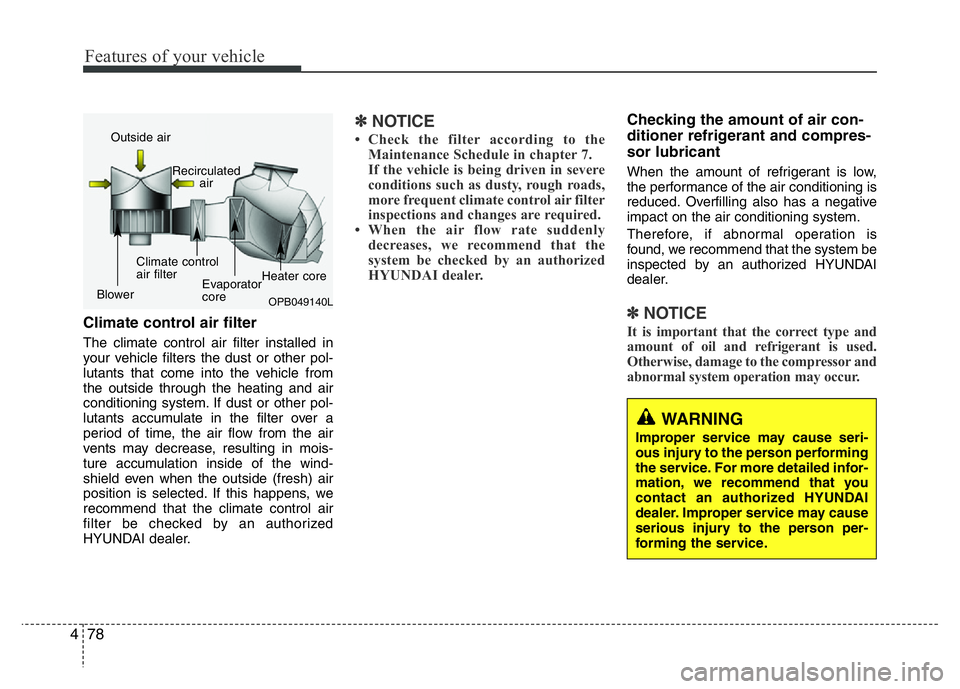
Climate control air filter
The climate control air filter installed in
your vehicle filters the dust or other pol-
lutants that come into the vehicle from
the outside through the heating and air
conditioning system. If dust or other pol-
lutants accumulate in the filter over a
period of time, the air flow from the air
vents may decrease, resulting in mois-
ture accumulation inside of the wind-
shield even when the outside (fresh) air
position is selected. If this happens, we
recommend that the climate control air
filter be checked by an authorized
HYUNDAI dealer.
✽NOTICE
• Check the filter according to the
Maintenance Schedule in chapter 7.
If the vehicle is being driven in severe
conditions such as dusty, rough roads,
more frequent climate control air filter
inspections and changes are required.
• When the air flow rate suddenly
decreases, we recommend that the
system be checked by an authorized
HYUNDAI dealer.
Checking the amount of air con-
ditioner refrigerant and compres-
sor lubricant
When the amount of refrigerant is low,
the performance of the air conditioning is
reduced. Overfilling also has a negative
impact on the air conditioning system.
Therefore, if abnormal operation is
found, we recommend that the system be
inspected by an authorized HYUNDAI
dealer.
✽NOTICE
It is important that the correct type and
amount of oil and refrigerant is used.
Otherwise, damage to the compressor and
abnormal system operation may occur.
OPB049140L
Outside air
Recirculated
air
Climate control
air filter
BlowerEvaporator
coreHeater core
WARNING
Improper service may cause seri-
ous injury to the person performing
the service. For more detailed infor-
mation, we recommend that you
contact an authorized HYUNDAI
dealer. Improper service may cause
serious injury to the person per-
forming the service.
Page 141 of 343
Features of your vehicle
80 4
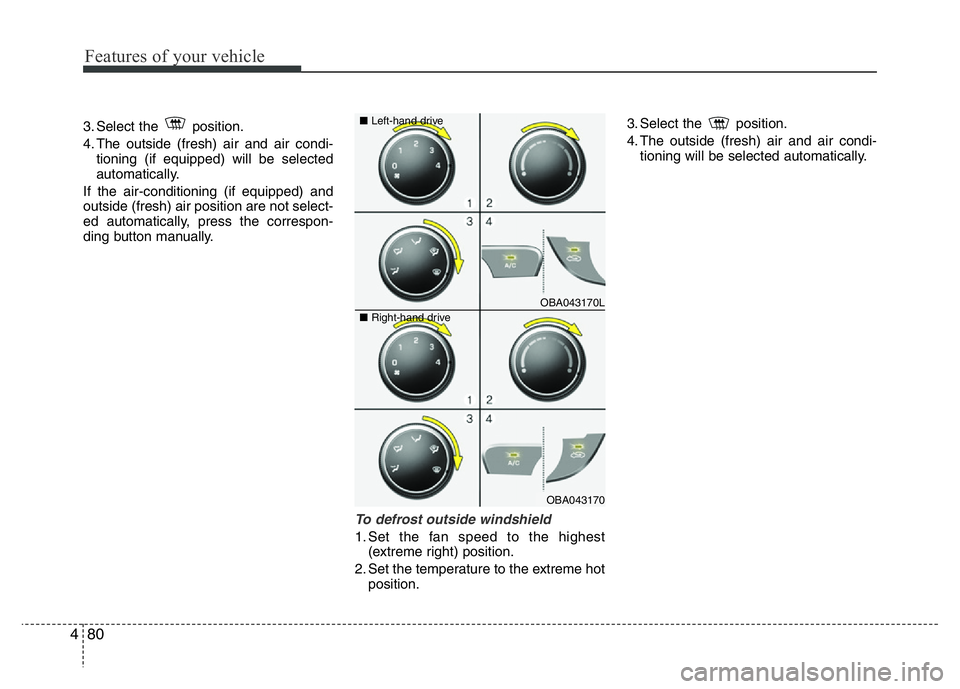
3. Select the position.
4. The outside (fresh) air and air condi-
tioning (if equipped) will be selected
automatically.
If the air-conditioning (if equipped) and
outside (fresh) air position are not select-
ed automatically, press the correspon-
ding button manually.
To defrost outside windshield
1. Set the fan speed to the highest
(extreme right) position.
2. Set the temperature to the extreme hot
position.3. Select the position.
4. The outside (fresh) air and air condi-
tioning will be selected automatically.
OBA043170L
OBA043170 ■Left-hand drive
■Right-hand drive
Page 143 of 343
Features of your vehicle
82 4
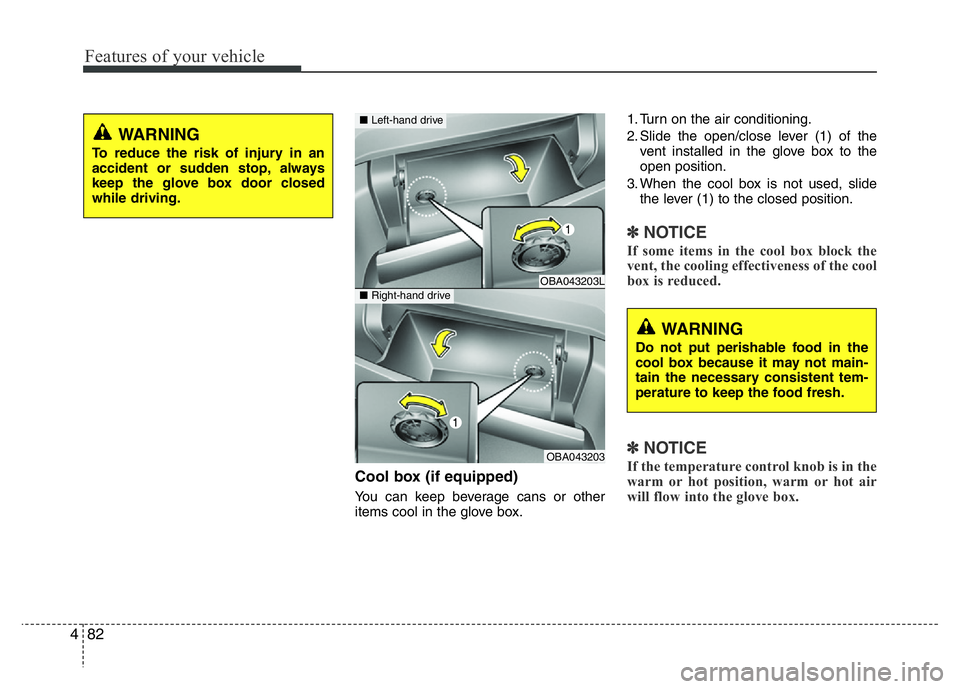
Cool box (if equipped)
You can keep beverage cans or other
items cool in the glove box.1. Turn on the air conditioning.
2. Slide the open/close lever (1) of the
vent installed in the glove box to the
open position.
3. When the cool box is not used, slide
the lever (1) to the closed position.
✽NOTICE
If some items in the cool box block the
vent, the cooling effectiveness of the cool
box is reduced.
✽NOTICE
If the temperature control knob is in the
warm or hot position, warm or hot air
will flow into the glove box.
WARNING
To reduce the risk of injury in an
accident or sudden stop, always
keep the glove box door closed
while driving.
OBA043203L
OBA043203
■Left-hand drive
■Right-hand drive
WARNING
Do not put perishable food in the
cool box because it may not main-
tain the necessary consistent tem-
perature to keep the food fresh.
Page 147 of 343
Features of your vehicle
86 4
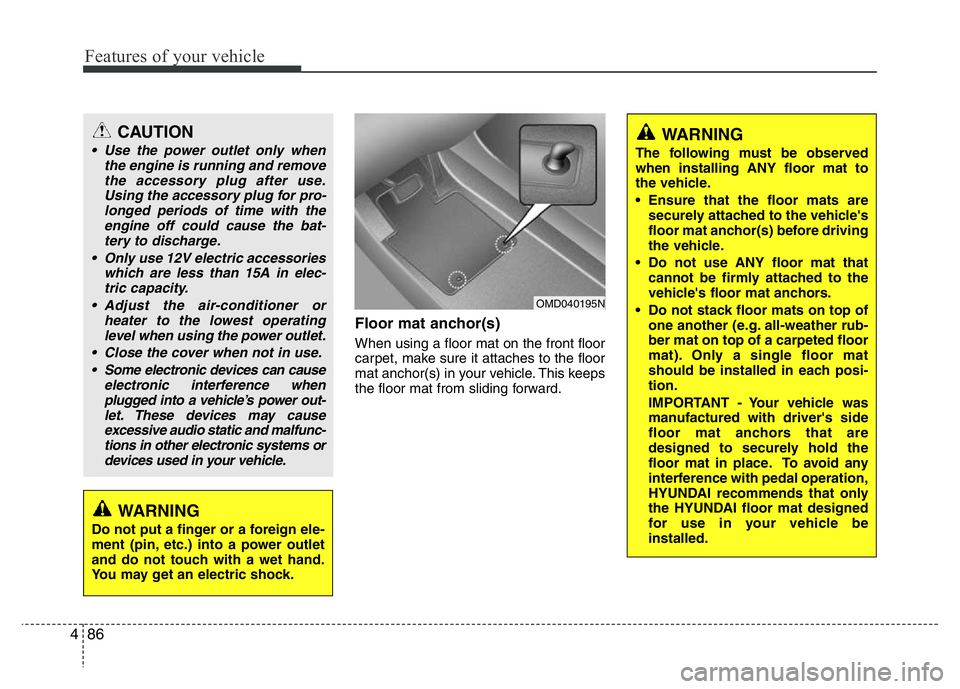
Floor mat anchor(s)
When using a floor mat on the front floor
carpet, make sure it attaches to the floor
mat anchor(s) in your vehicle. This keeps
the floor mat from sliding forward.
OMD040195N
CAUTION
• Use the power outlet only when
the engine is running and remove
the accessory plug after use.
Using the accessory plug for pro-
longed periods of time with the
engine off could cause the bat-
tery to discharge.
• Only use 12V electric accessories
which are less than 15A in elec-
tric capacity.
• Adjust the air-conditioner or
heater to the lowest operating
level when using the power outlet.
• Close the cover when not in use.
• Some electronic devices can cause
electronic interference when
plugged into a vehicle’s power out-
let. These devices may cause
excessive audio static and malfunc-
tions in other electronic systems or
devices used in your vehicle.
WARNING
Do not put a finger or a foreign ele-
ment (pin, etc.) into a power outlet
and do not touch with a wet hand.
You may get an electric shock.
WARNING
The following must be observed
when installing ANY floor mat to
the vehicle.
• Ensure that the floor mats are
securely attached to the vehicle's
floor mat anchor(s) before driving
the vehicle.
• Do not use ANY floor mat that
cannot be firmly attached to the
vehicle's floor mat anchors.
• Do not stack floor mats on top of
one another (e.g. all-weather rub-
ber mat on top of a carpeted floor
mat). Only a single floor mat
should be installed in each posi-
tion.
IMPORTANT - Your vehicle was
manufactured with driver's side
floor mat anchors that are
designed to securely hold the
floor mat in place. To avoid any
interference with pedal operation,
HYUNDAI recommends that only
the HYUNDAI floor mat designed
for use in your vehicle be
installed.
Page 192 of 343
✽NOTICE - USING THE
Bluetooth®Wireless Technology
CELLULAR PHONE
• Do not use a cellular phone or perform
Bluetooth®Wireless Technology set-
tings (e.g. pairing a phone) while driv-
ing.
• Some Bluetooth
®Wireless Technology -
enabled phones may not be recognized
by the system or fully compatible with
the system.
• Before using Bluetooth
®Wireless
Technology related features of the
audio system, refer your phone’s User’s
Manual for phone-side Bluetooth
®
Wireless Technology operations.
• The phone must be paired to the audio
system to use Bluetooth
®Wireless
Technology related features.
• You will not be able to use the hands-
free feature when your phone (in the
car) is outside of the cellular service
area (e.g. in a tunnel, in a underground,
in a mountainous area, etc.).
(Continued)(Continued)
• If the cellular phone signal is poor or
the vehicles interior noise is too loud, it
may be difficult to hear the other per-
son’s voice during a call.
• Do not place the phone near or inside
metallic objects, otherwise communica-
tions with Bluetooth
®Wireless
Technology system or cellular service
stations can be disturbed.
• While a phone is connected through
Bluetooth
®Wireless Technology your
phone may discharge quicker than
usual for additional Bluetooth
®
Wireless Technology-related opera-
tions.
• Some cellular phones or other devices
may cause interference noise or mal-
function to audio system. In this case,
store the device in a different location
may resolve the condition.
• Phone contact names should be saved
in English or they may not be displayed
correctly.
(Continued)(Continued)
• If Priority is set upon vehicle
ignition(IGN/ACC ON), the Bluetooth
®
Wireless Technology phone will be
automatically connected.
Even if you are outside, the Bluetooth
®
Wireless Technology phone will be
automatically connected once you are
in the vicinity of the vehicle.
If you do not want automatic
Bluetooth
®Wireless Technology con-
nection, turn the Bluetooth®Wireless
Technology feature off.
• The hands-free call volume and quality
may differ depending on the mobile
phone type.
•Bluetooth
®Wireless Technology fea-
tures can be used only when the mobile
phone has been paired and connected
with the device. For more information
on pairing and connecting Bluetooth
®
Wireless Technology enabled mobile
phones, refer to the “Phone Setup” sec-
tion.
(Continued)
Features of your vehicle
131 4
Page 226 of 343
533
Driving your vehicle
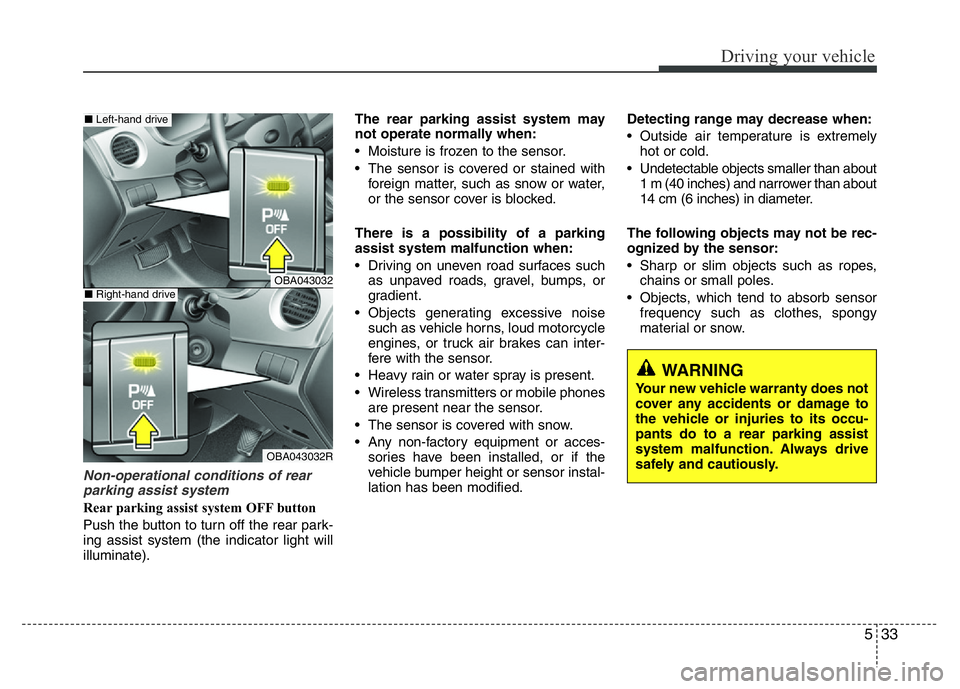
Non-operational conditions of rear
parking assist system
Rear parking assist system OFF button
Push the button to turn off the rear park-
ing assist system (the indicator light will
illuminate).The rear parking assist system may
not operate normally when:
• Moisture is frozen to the sensor.
• The sensor is covered or stained with
foreign matter, such as snow or water,
or the sensor cover is blocked.
There is a possibility of a parking
assist system malfunction when:
• Driving on uneven road surfaces such
as unpaved roads, gravel, bumps, or
gradient.
• Objects generating excessive noise
such as vehicle horns, loud motorcycle
engines, or truck air brakes can inter-
fere with the sensor.
• Heavy rain or water spray is present.
• Wireless transmitters or mobile phones
are present near the sensor.
• The sensor is covered with snow.
• Any non-factory equipment or acces-
sories have been installed, or if the
vehicle bumper height or sensor instal-
lation has been modified.Detecting range may decrease when:
• Outside air temperature is extremely
hot or cold.
• Undetectable objects smaller than about
1 m (40 inches) and narrower than about
14 cm (6 inches) in diameter.
The following objects may not be rec-
ognized by the sensor:
• Sharp or slim objects such as ropes,
chains or small poles.
• Objects, which tend to absorb sensor
frequency such as clothes, spongy
material or snow.
WARNING
Your new vehicle warranty does not
cover any accidents or damage to
the vehicle or injuries to its occu-
pants do to a rear parking assist
system malfunction. Always drive
safely and cautiously.
OBA043032
OBA043032R
■Left-hand drive
■Right-hand drive
Page 238 of 343
65
What to do in an emergency
✽ NOTICE
An inappropriately disposed
battery can be harmful to the
environment and human health.
Dispose the battery according
to your local law(s) or regula-
tion.
Jump starting procedure
1. Position the vehicles close enough that
the jumper cables will reach, but do not
allow the vehicles to touch.
2. Avoid fans or any moving parts in the
engine compartment at all times, even
when the vehicles are turned off.
3. Turn off all electrical devices such as
radios, lights, air conditioning, etc. Put
the vehicles in P (Park, for automatic
transaxle vehicle) or neutral (for manu-
al transaxle vehicle), and set the park-
ing brakes. Turn both vehicles OFF.
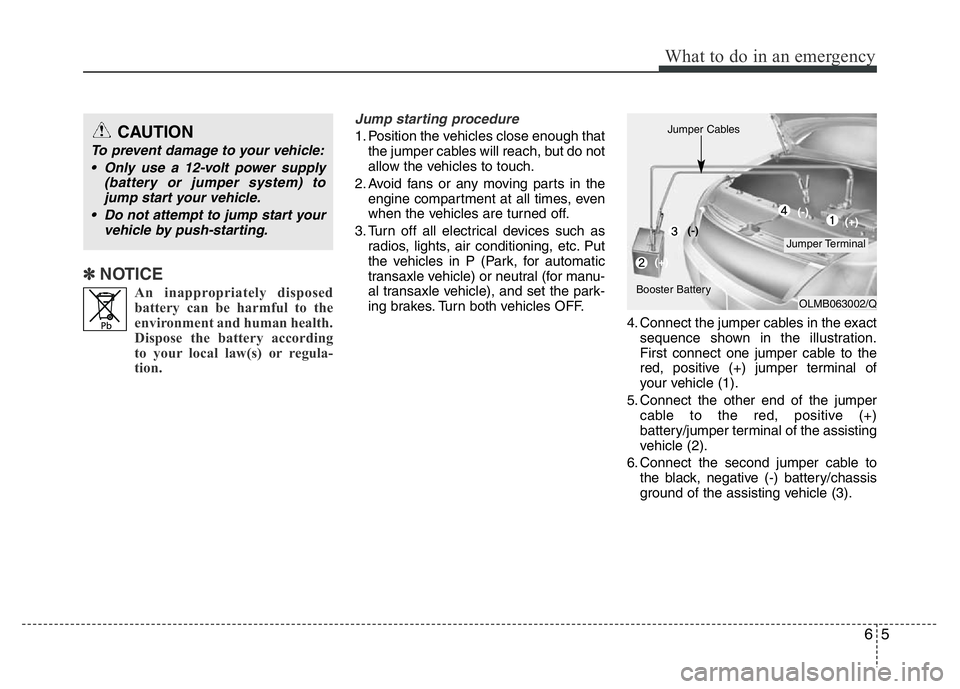
4. Connect the jumper cables in the exact
sequence shown in the illustration.
First connect one jumper cable to the
red, positive (+) jumper terminal of
your vehicle (1).
5. Connect the other end of the jumper
cable to the red, positive (+)
battery/jumper terminal of the assisting
vehicle (2).
6. Connect the second jumper cable to
the black, negative (-) battery/chassis
ground of the assisting vehicle (3).CAUTION
To prevent damage to your vehicle:
• Only use a 12-volt power supply
(battery or jumper system) to
jump start your vehicle.
• Do not attempt to jump start your
vehicle by push-starting.
OLMB063002/Q
Jumper Terminal Jumper Cables
Booster Battery(-)
(+)(+) (-)
Page 240 of 343
67
What to do in an emergency
IF THE ENGINE OVERHEATS
If your temperature gauge indicates over-
heating, you will experience a loss of
power, or hear loud pinging or knocking
sound, the engine will probably be too
hot. If this happens, you should:
1. Pull the vehicle off the road and stop
as soon as it is safe to do so.
2. Place the shift lever in P (automatic
transaxle) or Neutral (manual
transaxle) and set the parking brake. If
the air conditioning is on, turn it off.
3. If engine coolant is running out under
the vehicle or steam is coming out
from the hood, stop the engine. Do not
open the hood until the coolant has
stopped running or the steaming has
stopped. If there is no visible loss of
engine coolant and no steam, leave
the engine running and check to be
sure the engine cooling fan is operat-
ing. If the fan is not running, turn the
engine off.
4. Check to see if the water pump drive
belt is missing. If it is not missing,
check to see that it is tight. If the drive
belt seems to be satisfactory, check
for coolant leakage from the radiator,
hoses or under the vehicle. (If the air
conditioning had been in use, it is nor-
mal for cold water to be draining from it
when you stop).5. If the water pump drive belt is broken
or engine coolant is leaking out, stop
the engine immediately and we recom-
mend that you call an authorized
HYUNDAI dealer.6. If you cannot find the cause of the
overheating, wait until the engine tem-
perature has returned to normal. Then,
if coolant has been lost, carefully add
coolant to the reservoir to bring the
fluid level in the reservoir up to the
halfway mark.
7. Proceed with caution, keeping alert for
further signs of overheating. If over-
heating happens again, we recom-
mend that you call an authorized
HYUNDAI dealer.
CAUTION
Serious loss of coolant indicates
there is a leak in the cooling system
and we recommend that the system
be checked by an authorized
HYUNDAI dealer.
WARNING
While the engine is running, keep
hair, hands and clothing away from
moving parts such as the fan and
drive belts to prevent injury.
WARNING
Do not remove the radiator cap
when the engine is hot. This can
allow coolant to be blown out of the
opening and cause serious burns.