air con HYUNDAI I10 2014 Service Manual
[x] Cancel search | Manufacturer: HYUNDAI, Model Year: 2014, Model line: I10, Model: HYUNDAI I10 2014Pages: 343, PDF Size: 9.14 MB
Page 143 of 343
Features of your vehicle
82 4
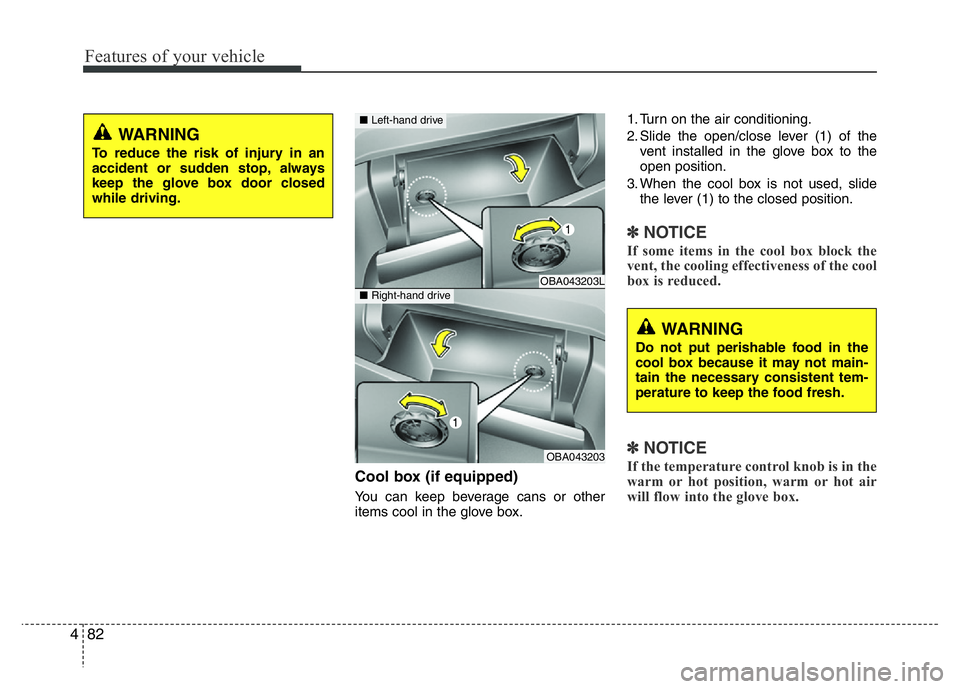
Cool box (if equipped)
You can keep beverage cans or other
items cool in the glove box.1. Turn on the air conditioning.
2. Slide the open/close lever (1) of the
vent installed in the glove box to the
open position.
3. When the cool box is not used, slide
the lever (1) to the closed position.
✽NOTICE
If some items in the cool box block the
vent, the cooling effectiveness of the cool
box is reduced.
✽NOTICE
If the temperature control knob is in the
warm or hot position, warm or hot air
will flow into the glove box.
WARNING
To reduce the risk of injury in an
accident or sudden stop, always
keep the glove box door closed
while driving.
OBA043203L
OBA043203
■Left-hand drive
■Right-hand drive
WARNING
Do not put perishable food in the
cool box because it may not main-
tain the necessary consistent tem-
perature to keep the food fresh.
Page 147 of 343
Features of your vehicle
86 4
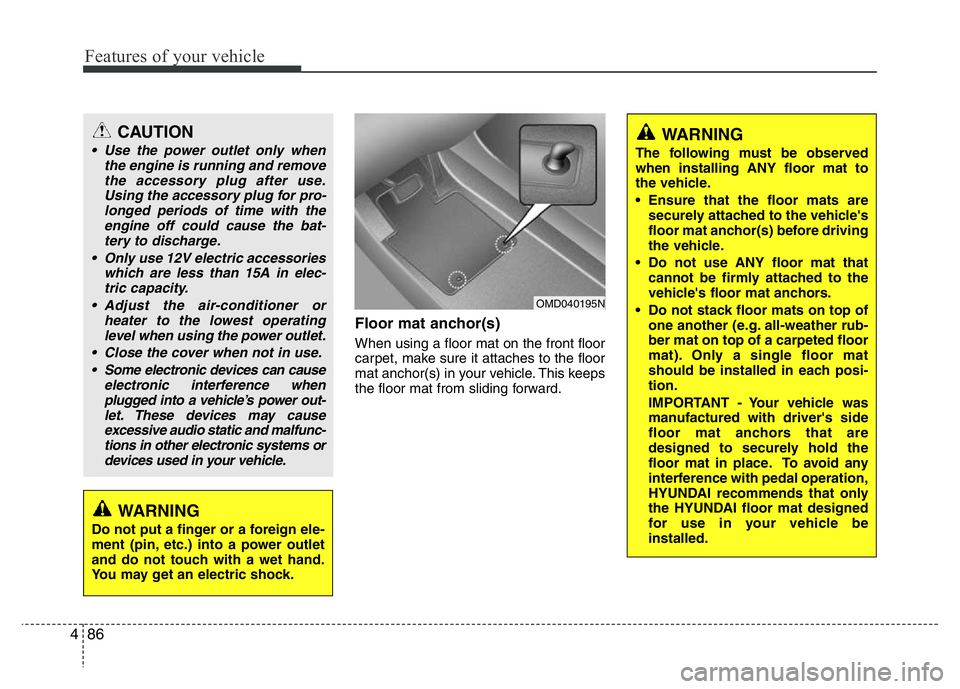
Floor mat anchor(s)
When using a floor mat on the front floor
carpet, make sure it attaches to the floor
mat anchor(s) in your vehicle. This keeps
the floor mat from sliding forward.
OMD040195N
CAUTION
• Use the power outlet only when
the engine is running and remove
the accessory plug after use.
Using the accessory plug for pro-
longed periods of time with the
engine off could cause the bat-
tery to discharge.
• Only use 12V electric accessories
which are less than 15A in elec-
tric capacity.
• Adjust the air-conditioner or
heater to the lowest operating
level when using the power outlet.
• Close the cover when not in use.
• Some electronic devices can cause
electronic interference when
plugged into a vehicle’s power out-
let. These devices may cause
excessive audio static and malfunc-
tions in other electronic systems or
devices used in your vehicle.
WARNING
Do not put a finger or a foreign ele-
ment (pin, etc.) into a power outlet
and do not touch with a wet hand.
You may get an electric shock.
WARNING
The following must be observed
when installing ANY floor mat to
the vehicle.
• Ensure that the floor mats are
securely attached to the vehicle's
floor mat anchor(s) before driving
the vehicle.
• Do not use ANY floor mat that
cannot be firmly attached to the
vehicle's floor mat anchors.
• Do not stack floor mats on top of
one another (e.g. all-weather rub-
ber mat on top of a carpeted floor
mat). Only a single floor mat
should be installed in each posi-
tion.
IMPORTANT - Your vehicle was
manufactured with driver's side
floor mat anchors that are
designed to securely hold the
floor mat in place. To avoid any
interference with pedal operation,
HYUNDAI recommends that only
the HYUNDAI floor mat designed
for use in your vehicle be
installed.
Page 149 of 343
Features of your vehicle
88 4
✽NOTICE
• If you install an aftermarket HID
head lamp, your vehicle’s audio and
electronic device may malfunction.
• Prevent chemicals such as perfume,
cosmetic oil, sun cream, hand cleaner
and air freshener from contacting the
interior parts because they may cause
damage or discoloration.
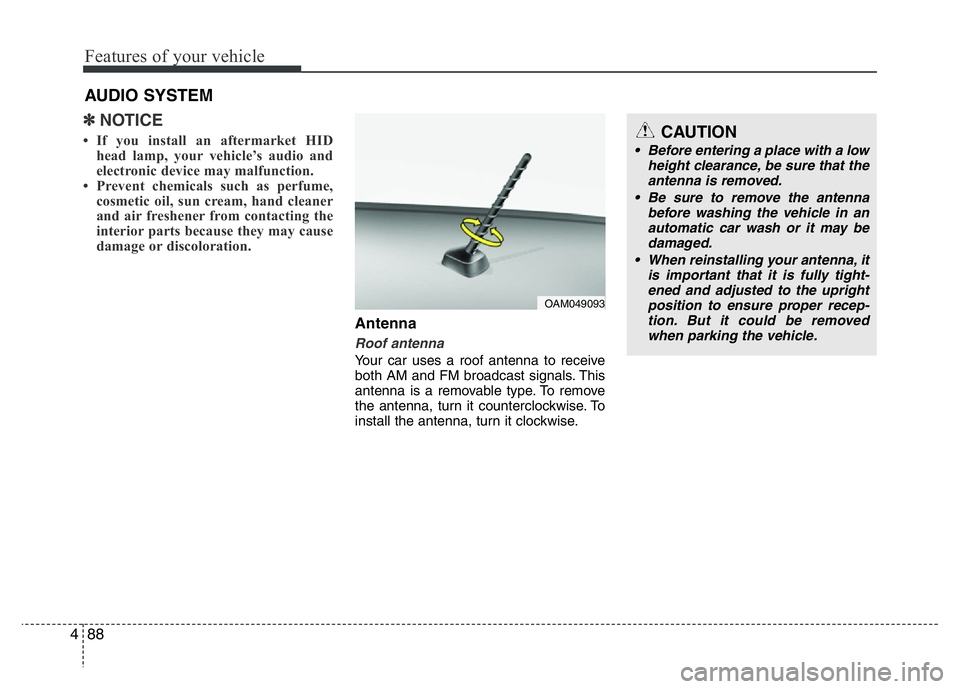
Antenna
Roof antenna
Your car uses a roof antenna to receive
both AM and FM broadcast signals. This
antenna is a removable type. To remove
the antenna, turn it counterclockwise. To
install the antenna, turn it clockwise.
AUDIO SYSTEM
CAUTION
• Before entering a place with a low
height clearance, be sure that the
antenna is removed.
• Be sure to remove the antenna
before washing the vehicle in an
automatic car wash or it may be
damaged.
• When reinstalling your antenna, it
is important that it is fully tight-
ened and adjusted to the upright
position to ensure proper recep-
tion. But it could be removed
when parking the vehicle.
OAM049093
Page 157 of 343
Features of your vehicle
96 4
(Continued)
• Turn on the car ignition before
using this device. Do not operate
the audio system for long periods
of time with the ignition turned off
as such operations may lead to
battery discharge.
• Do not subject the device to
severe shock or impact. Direct
pressure onto the front side of
the monitor may cause damage to
the LCD or touch screen.
• When cleaning the device, make
sure to turn off the device and
use a dry and smooth cloth.
Never use tough materials, chem-
ical cloths, or solvents (alcohol,
benzene, thinners, etc.) as such
materials may damage the device
panel or cause color/quality dete-
rioration
(Continued)(Continued)
• Do not place beverages close to
the audio system. Spilling bever-
ages may lead to system mal-
function.
• In case of product malfunction,
please contact your place of pur-
chase or After Service center.
• Placing the audio system within
an electromagnetic environment
may result in noise interference.
• Prevent caustic solutions such as
perfume and cosmetic oil from
contacting the dashboard
because they may cause damage
or discoloration.CAUTION
• Operating the device while driv-
ing could lead to accidents due to
a lack of attention to external sur-
roundings. First park the vehicle
before operating the device.
• Adjust the volume to levels that
allow the driver to hear sounds
from outside of the vehicle.
Driving in a state where external
sounds cannot be heard may lead
to accidents.
• Pay attention to the volume set-
ting when turning the device on.
A sudden output of extreme vol-
ume upon turning the device on
could lead to hearing impairment.
(Adjust the volume to a suitable
levels before turning off the
device.)
(Continued)
Page 172 of 343
![HYUNDAI I10 2014 Service Manual 4111
Features of your vehicle
Phone Setup (if equipped)
Press the key Select [Phone]
Pair Phone
Select [Pair Phone] Set through
TUNE knob
➀Search for device names as displayed
on your mobile phone](/img/35/56233/w960_56233-171.png "HYUNDAI I10 2014 Service Manual 4111
Features of your vehicle
Phone Setup (if equipped)
Press the key Select [Phone]
Pair Phone
Select [Pair Phone] Set through
TUNE knob
➀Search for device names as displayed
on your mobile phone")
4111
Features of your vehicle
Phone Setup (if equipped)
Press the key Select [Phone]
Pair Phone
Select [Pair Phone] Set through
TUNE knob
➀Search for device names as displayed
on your mobile phone and connect.
➁Input the passkey displayed on the
screen. (Passkey : 0000)
❈The device name and passkey will be
displayed on the screen for up to 3
minutes. If pairing is not completed
within the 3 minutes, the mobile phone
pairing process will automatically be
canceled.➂Pairing completion is displayed.
❈In some mobile phones, pairing will
automatically be followed by connec-
tion.
❈It is possible to pair up to five
Bluetooth®Wireless Technology
enabled mobile phones.
SETUP
CLOCKCAUTION
To pair a Bluetooth®Wireless
Technology enabled mobile phone,
authentication and connection
processes are first required. As a
result, you cannot pair your mobile
phone while driving the vehicle.
First park your vehicle before use.
Page 173 of 343
![HYUNDAI I10 2014 Service Manual Features of your vehicle
112 4
Phone List
The names of up to 5 paired phones
will be displayed.
A [ ] is displayed in front of the cur-
rently connected phone.
Select the desired name to setup the
sel](/img/35/56233/w960_56233-172.png "HYUNDAI I10 2014 Service Manual Features of your vehicle
112 4
Phone List
The names of up to 5 paired phones
will be displayed.
A [ ] is displayed in front of the cur-
rently connected phone.
Select the desired name to setup the
sel")
Features of your vehicle
112 4
Phone List
The names of up to 5 paired phones
will be displayed.
A [ ] is displayed in front of the cur-
rently connected phone.
Select the desired name to setup the
selected phone.• Connecting a phone
Select [Phone List] Select mobile
phone through TUNE knob
Select [Connect Phone]
➀Select a mobile phone that is not
currently connected.
➁Connect the selected mobile
phone.
➂Connection completion is dis-
played.
❈If a phone is already connected,
disconnect the currently connect-
ed phone and select a new phone
to connect.• Disconnecting a connected phone
Select [Phone List] Select mobile
phone through TUNE knob
Select [Disconnect Phone]
➀Select the currently connected
mobile phone.
➁Disconnect the selected mobile
phone.
➂Disconnection completion is dis-
played.
Page 174 of 343
![HYUNDAI I10 2014 Service Manual 4113
Features of your vehicle
• Changing connection sequence
(Priority)
This is used to change the order (pri-
ority) of automatic connection for the
paired mobile phones.
Select [Phone List] Select](/img/35/56233/w960_56233-173.png "HYUNDAI I10 2014 Service Manual 4113
Features of your vehicle
• Changing connection sequence
(Priority)
This is used to change the order (pri-
ority) of automatic connection for the
paired mobile phones.
Select [Phone List] Select")
4113
Features of your vehicle
• Changing connection sequence
(Priority)
This is used to change the order (pri-
ority) of automatic connection for the
paired mobile phones.
Select [Phone List] Select [Priority]
through TUNE knob Select No. 1
Priority mobile phone
➀Select [Priority].
➁From the paired phones, select
the phone desired for No.1 priority.
➂The changed priority sequence is
displayed.
❈Once the connection sequence
(priority) is changed, the new no. 1
priority mobile phone will be con-
nected.
- when the no. 1 priority cannot be
connected: Automatically
attempts to connect the most
recently connected phone.
- Cases when the most recently
connected phone cannot be con-
nected: Attempts to connect in
the order in which paired phones
are listed.- The connected phone will auto-
matically be changed to No. 1
priority.
• Delete
Select [Phone List] Select mobile
phone through TUNE knob
Select [Delete]
➀ Select the desired mobile phone.
➁ Delete the selected mobile phone.
➂ Deletion completion is displayed.
❈When attempting to delete a cur-
rently connected phone, the
phone is first disconnected.Contacts Download
This feature is used to download
contacts and call histories into the
audio system.
Select [Contacts Download] Select
through TUNE knob
CAUTION
• When you delete a mobile
phone, the mobile phone con-
tacts will also be erased.
• For stable Bluetooth
®Wireless
Technology communication,
delete the mobile phone from
the audio and also delete the
audio from your mobile phone.
CAUTION
• The download feature may not
be supported in some mobile
phones.
• If a different operation is per-
formed while Contacts are
being downloaded, download-
ing will be discontinued.
Contacts already downloaded
will be saved.
• When downloading new
Contacts, delete all previously
saved Contacts before start-
ing download.
Page 176 of 343
![HYUNDAI I10 2014 Service Manual 4115
Features of your vehicle
System Settings
Press the key Select [System]
Memory Information
(if equipped)
Displays currently used memory and
total system memory.
Select [Memory Information] OK
T](/img/35/56233/w960_56233-175.png "HYUNDAI I10 2014 Service Manual 4115
Features of your vehicle
System Settings
Press the key Select [System]
Memory Information
(if equipped)
Displays currently used memory and
total system memory.
Select [Memory Information] OK
T")
4115
Features of your vehicle
System Settings
Press the key Select [System]
Memory Information
(if equipped)
Displays currently used memory and
total system memory.
Select [Memory Information] OK
The currently used memory is displayed
on the left side while the total system
memory is displayed on the right side.
SETUP
CLOCK
CAUTION
Bluetooth®Wireless Technology
connection may become intermit-
tently disconnected in some mobile
phones. Follow these next steps to
try again.
1) Turn the Bluetooth
®Wireless
Technology function within the
mobile phone ON/OFF and try to
connect again.
2) Turn the mobile phone power
ON/OFF and try to connect again.
3) Completely remove the mobile
phone battery, reboot, and then
try to connect again.
4) Reboot the audio system and try
to connect again
5) Delete all paired devices in your
mobile phone and the audio sys-
tem and pair again for use.
Page 189 of 343
Bluetooth®Wireless
Technology AUDIO
(if equipped)
What is Bluetooth®Wireless
Technology?
Bluetooth®Wireless Technology allows
devices to be connected in a short dis-
tance, including hands-free devices,
stereo headsets, wireless remote con-
trollers, etc. For more information, visit
the
Bluetooth®Wireless Technology
website at www.Bluetooth.com
Before using Bluetooth®Wireless
Technology audio features
•
Bluetooth®Wireless Technology audio
may not be supported depending on
the compatibility of your
Bluetooth®
Wireless Technology mobile phone.
• In order to use
Bluetooth®Wireless
Technology audio, you must first pair
and connect the
Bluetooth®Wireless
Technology mobile phone.• The
Bluetooth®word mark and logos
are registered trademarks owned by
Bluetooth®SIG, Inc. and any use of
such marks is under license. Other
trademarks and trade names are those
of their respective owners. A
Bluetooth®
enabled cell phone is required to useBluetooth®Wireless Technology
•
Bluetooth®Wireless Technology audio
can be used only when the [Audio
Streaming] of Phone is turned On.
❈Setting
Bluetooth®Wireless Technology
Audio Streaming : Press the
key Select [Phone] through the tune
knob Select [Audio Streaming] through
the TUNE knob Set /
Starting Bluetooth®Wireless
Technology Audio
• Press the key to change the
mode in order of CD ➟ USB ➟ AUX ➟
My Music ➟ BT Audio.
• If BT Audio is selected,
Bluetooth®
Wireless Technology audio will start
playing.
❈Audio may not automatically start play-
ing in some mobile phones.
Using the Bluetooth®Wireless
Technologyaudio features
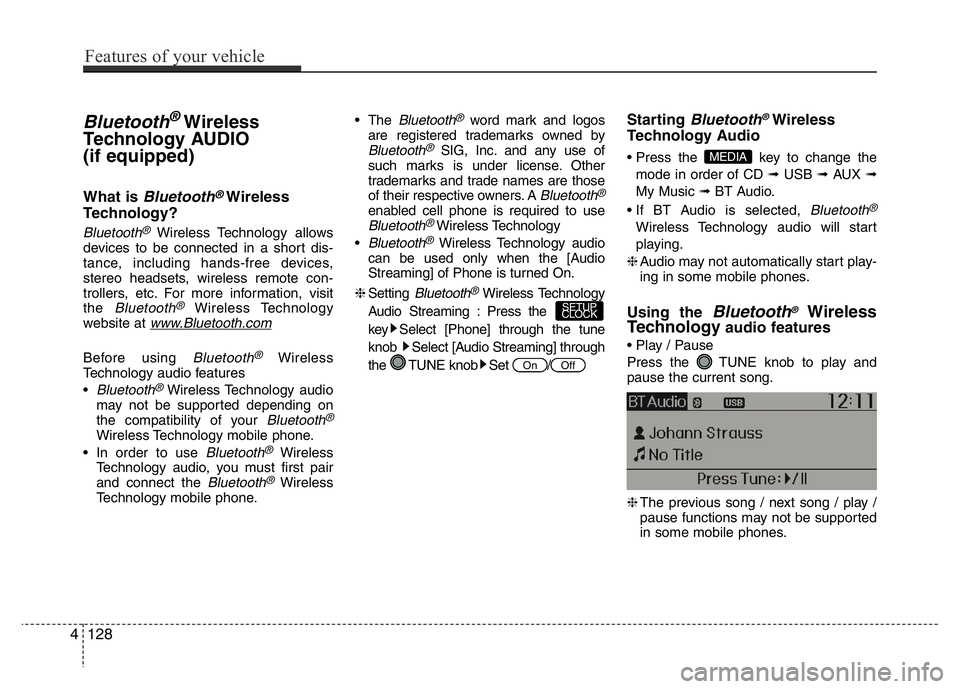
• Play / Pause
Press the TUNE knob to play and
pause the current song.
❈The previous song / next song / play /
pause functions may not be supported
in some mobile phones.
MEDIA
OffOn
SETUP
CLOCK
4128
Features of your vehicle
Page 190 of 343
PHONE (if equipped)
Before using the Bluetooth®Wireless
Technologyphone features
• In order to use
Bluetooth®Wireless
Technology
phone, you must first pair
and connect the
Bluetooth®Wireless
Technology
mobile phone.
• If the mobile phone is not paired or con-
nected, it is not possible to enter Phone
mode. Once a phone is paired or con-
nected, the guidance screen will be dis-
played.
• If Priority is set upon vehicle ignition
(IGN/ACC ON), the
Bluetooth®Wireless
Technology
phone will be automatically
connected. Even if you are outside, the
Bluetooth®Wireless Technologyphone will
be automatically connected once you are
in the vicinity of the vehicle. If you do not
want automatic
Bluetooth®Wireless
Technology
phone connection, set the
Bluetooth®Wireless Technologypower to
OFF.
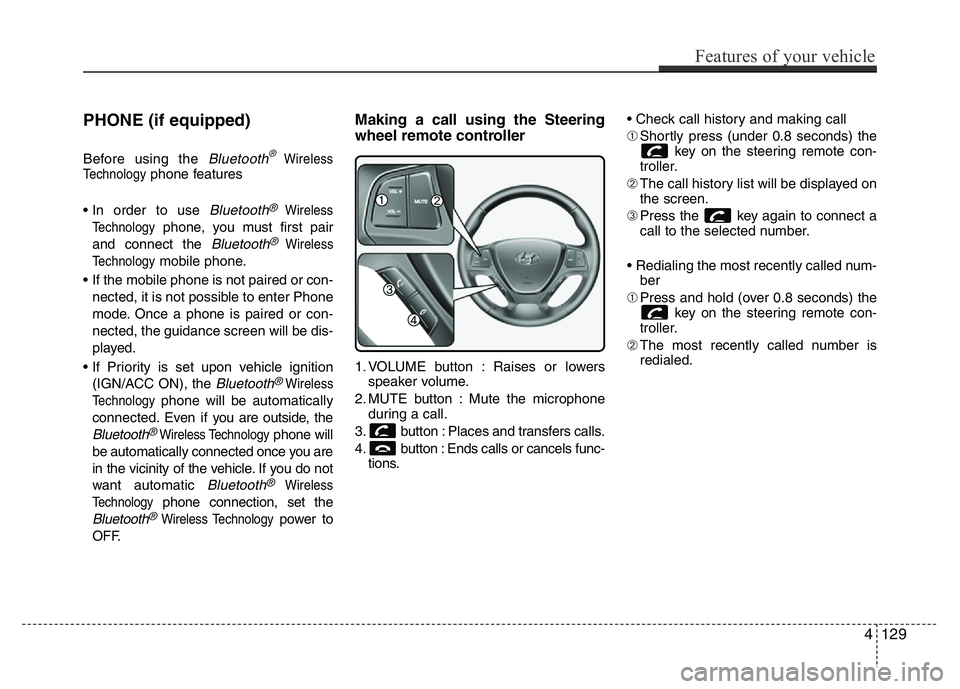
Making a call using the Steering
wheel remote controller
1. VOLUME button : Raises or lowers
speaker volume.
2. MUTE button : Mute the microphone
during a call.
3. button : Places and transfers calls.
4. button : Ends calls or cancels func-
tions.• Check call history and making call
➀Shortly press (under 0.8 seconds) the
key on the steering remote con-
troller.
➁The call history list will be displayed on
the screen.
➂Press the key again to connect a
call to the selected number.
• Redialing the most recently called num-
ber
➀Press and hold (over 0.8 seconds) the
key on the steering remote con-
troller.
➁The most recently called number is
redialed.
Features of your vehicle
129 4