clock HYUNDAI I10 2017 User Guide
[x] Cancel search | Manufacturer: HYUNDAI, Model Year: 2017, Model line: I10, Model: HYUNDAI I10 2017Pages: 343, PDF Size: 9.14 MB
Page 175 of 343
![HYUNDAI I10 2017 User Guide Features of your vehicle
114 4
Auto Download
When connecting a mobile phone, it is
possible to automatically download new
Contacts and Call Histories.
Select [Auto Download] Set /
through TUNE knob
A](/img/35/56220/w960_56220-174.png "HYUNDAI I10 2017 User Guide Features of your vehicle
114 4
Auto Download
When connecting a mobile phone, it is
possible to automatically download new
Contacts and Call Histories.
Select [Auto Download] Set /
through TUNE knob
A")
Features of your vehicle
114 4
Auto Download
When connecting a mobile phone, it is
possible to automatically download new
Contacts and Call Histories.
Select [Auto Download] Set /
through TUNE knob
Audio Streaming
Songs (files) saved in your Bluetooth®
Wireless Technology enabled mobile
phone can be played through the audio
system.
Select [Audio Streaming] Set /
through TUNE knob
Outgoing Volume
This is used to set the volume of your
voice as heard by the other party while
on a
Bluetooth®Wireless Technology
enabled handsfree call.
Select [Outgoing Volume] Set volume
through TUNE knob
❈While on a call, the volume can be
changed by using the key.
Bluetooth®Wireless Technology
System Off
This feature is used when you do not
wish to use the Bluetooth®Wireless
Technology system.
Select [Bluetooth System Off] Set
through TUNE knob
❈If a phone is already connected, dis-
connect the currently connected phone
and turn the
Bluetooth®Wireless
Technology system off.
Using the Bluetooth®Wireless
Technology System
To use Bluetooth®Wireless Technology
when the system is currently off, follow
these next steps.
• Turning On
Bluetooth®Wireless
Technology through the Key.
Press the key Screen Guidance
❈Moves to the screen where
Bluetooth®
Wireless Technology functions can be
used and displays guidance.
• Turning On
Bluetooth®Wireless
Technology through the Key.
Press the key Select [Phone]
➀A screen asking whether to turn on
Bluetooth®Wireless Technology will be
displayed.
➁On the screen, select to turn on
Bluetooth®Wireless Technology and
display guidance.
❈If the
Bluetooth®Wireless Technology
system is turned on, the system will
automatically try to connect the most
recently connected
Bluetooth®Wireless
Technology mobile phone.
YES
SETUP
CLOCK
SETUP
CLOCK
PHONE
PHONE
SEEK
TRACK
OffOn
OffOn
CAUTION
The Bluetooth®Wireless Technology
audio streaming feature may not be
supported in some mobile phones.
Page 176 of 343
![HYUNDAI I10 2017 User Guide 4115
Features of your vehicle
System Settings
Press the key Select [System]
Memory Information
(if equipped)
Displays currently used memory and
total system memory.
Select [Memory Information] OK
T](/img/35/56220/w960_56220-175.png "HYUNDAI I10 2017 User Guide 4115
Features of your vehicle
System Settings
Press the key Select [System]
Memory Information
(if equipped)
Displays currently used memory and
total system memory.
Select [Memory Information] OK
T")
4115
Features of your vehicle
System Settings
Press the key Select [System]
Memory Information
(if equipped)
Displays currently used memory and
total system memory.
Select [Memory Information] OK
The currently used memory is displayed
on the left side while the total system
memory is displayed on the right side.
SETUP
CLOCK
CAUTION
Bluetooth®Wireless Technology
connection may become intermit-
tently disconnected in some mobile
phones. Follow these next steps to
try again.
1) Turn the Bluetooth
®Wireless
Technology function within the
mobile phone ON/OFF and try to
connect again.
2) Turn the mobile phone power
ON/OFF and try to connect again.
3) Completely remove the mobile
phone battery, reboot, and then
try to connect again.
4) Reboot the audio system and try
to connect again
5) Delete all paired devices in your
mobile phone and the audio sys-
tem and pair again for use.
Page 189 of 343
Bluetooth®Wireless
Technology AUDIO
(if equipped)
What is Bluetooth®Wireless
Technology?
Bluetooth®Wireless Technology allows
devices to be connected in a short dis-
tance, including hands-free devices,
stereo headsets, wireless remote con-
trollers, etc. For more information, visit
the
Bluetooth®Wireless Technology
website at www.Bluetooth.com
Before using Bluetooth®Wireless
Technology audio features
•
Bluetooth®Wireless Technology audio
may not be supported depending on
the compatibility of your
Bluetooth®
Wireless Technology mobile phone.
• In order to use
Bluetooth®Wireless
Technology audio, you must first pair
and connect the
Bluetooth®Wireless
Technology mobile phone.• The
Bluetooth®word mark and logos
are registered trademarks owned by
Bluetooth®SIG, Inc. and any use of
such marks is under license. Other
trademarks and trade names are those
of their respective owners. A
Bluetooth®
enabled cell phone is required to useBluetooth®Wireless Technology
•
Bluetooth®Wireless Technology audio
can be used only when the [Audio
Streaming] of Phone is turned On.
❈Setting
Bluetooth®Wireless Technology
Audio Streaming : Press the
key Select [Phone] through the tune
knob Select [Audio Streaming] through
the TUNE knob Set /
Starting Bluetooth®Wireless
Technology Audio
• Press the key to change the
mode in order of CD ➟ USB ➟ AUX ➟
My Music ➟ BT Audio.
• If BT Audio is selected,
Bluetooth®
Wireless Technology audio will start
playing.
❈Audio may not automatically start play-
ing in some mobile phones.
Using the Bluetooth®Wireless
Technologyaudio features
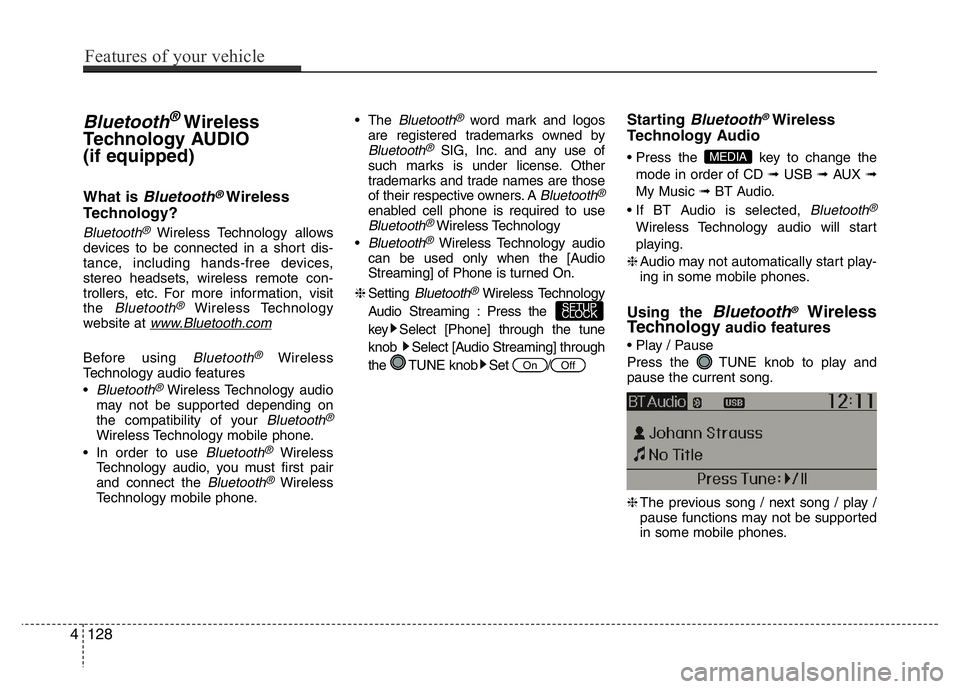
• Play / Pause
Press the TUNE knob to play and
pause the current song.
❈The previous song / next song / play /
pause functions may not be supported
in some mobile phones.
MEDIA
OffOn
SETUP
CLOCK
4128
Features of your vehicle
Page 242 of 343
69
What to do in an emergency
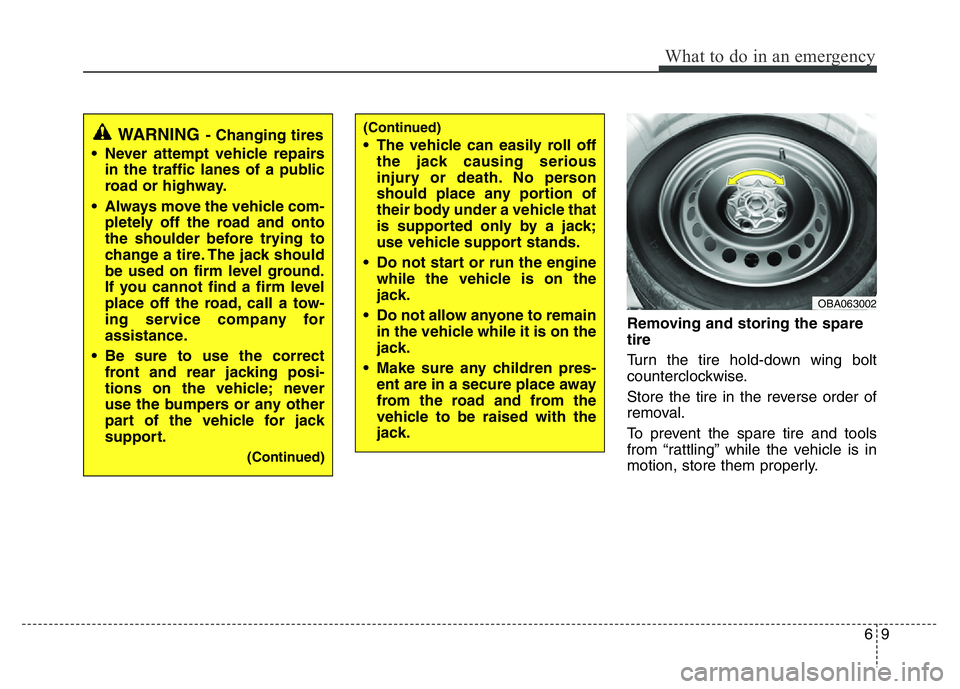
Removing and storing the spare
tire
Turn the tire hold-down wing bolt
counterclockwise.
Store the tire in the reverse order of
removal.
To prevent the spare tire and tools
from “rattling” while the vehicle is in
motion, store them properly.
OBA063002
(Continued)
• The vehicle can easily roll off
the jack causing serious
injury or death. No person
should place any portion of
their body under a vehicle that
is supported only by a jack;
use vehicle support stands.
• Do not start or run the engine
while the vehicle is on the
jack.
• Do not allow anyone to remain
in the vehicle while it is on the
jack.
• Make sure any children pres-
ent are in a secure place away
from the road and from the
vehicle to be raised with the
jack.WARNING- Changing tires
• Never attempt vehicle repairs
in the traffic lanes of a public
road or highway.
• Always move the vehicle com-
pletely off the road and onto
the shoulder before trying to
change a tire. The jack should
be used on firm level ground.
If you cannot find a firm level
place off the road, call a tow-
ing service company for
assistance.
• Be sure to use the correct
front and rear jacking posi-
tions on the vehicle; never
use the bumpers or any other
part of the vehicle for jack
support.
(Continued)
Page 244 of 343
611
What to do in an emergency
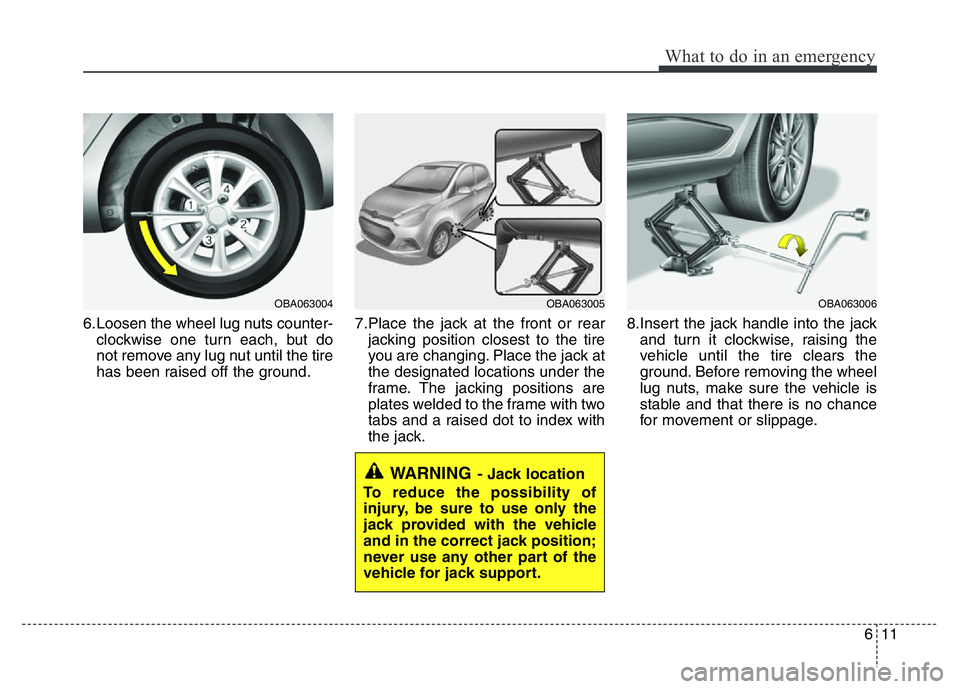
6.Loosen the wheel lug nuts counter-
clockwise one turn each, but do
not remove any lug nut until the tire
has been raised off the ground.7.Place the jack at the front or rear
jacking position closest to the tire
you are changing. Place the jack at
the designated locations under the
frame. The jacking positions are
plates welded to the frame with two
tabs and a raised dot to index with
the jack.8.Insert the jack handle into the jack
and turn it clockwise, raising the
vehicle until the tire clears the
ground. Before removing the wheel
lug nuts, make sure the vehicle is
stable and that there is no chance
for movement or slippage.
WARNING- Jack location
To reduce the possibility of
injury, be sure to use only the
jack provided with the vehicle
and in the correct jack position;
never use any other part of the
vehicle for jack support.
OBA063005OBA063006OBA063004
Page 245 of 343
What to do in an emergency
12 6
9.Loosen the wheel lug nuts and
remove them with your fingers.
Slide the wheel off the studs and
lay it flat so it cannot roll away. To
put the wheel on the hub, pick up
the spare tire, line up the holes
with the studs and slide the wheel
onto them. If this is difficult, tip the
wheel slightly and get the top hole
in the wheel lined up with the top
stud. Then jiggle the wheel back
and forth until the wheel can be slid
over the other studs.10. To install the wheel, hold it on the
studs, put the wheel nuts on the
studs and tighten them finger
tight. Jiggle the tire to be sure it is
completely seated, then tighten
the nuts as much as possible
with your fingers again.
11. Lower the vehicle to the ground
by turning the wheel nut wrench
counterclockwise.
WARNING
• Wheels and wheel covers may
have sharp edges. Handle
them carefully to avoid possi-
ble severe injury.
• Before putting the wheel into
place, be sure that there is
nothing on the hub or wheel
(such as mud, tar, gravel, etc.)
that interferes with the wheel
from fitting solidly against the
hub. If there is, remove it. If
the contact of the mounting
surface between the wheel
and hub is not good, the
wheel nuts could come loose
and cause the loss of a wheel.
Loss of a wheel may result in
loss of control of the vehicle.
This may cause serious injury
or death.
Page 249 of 343
What to do in an emergency
16 6
When towing your vehicle in an emer-
gency without wheel dollies:
1. Set the ignition switch in the ACC posi-
tion.
2. Place the transaxle shift lever in N
(Neutral).
3. Release the parking brake.
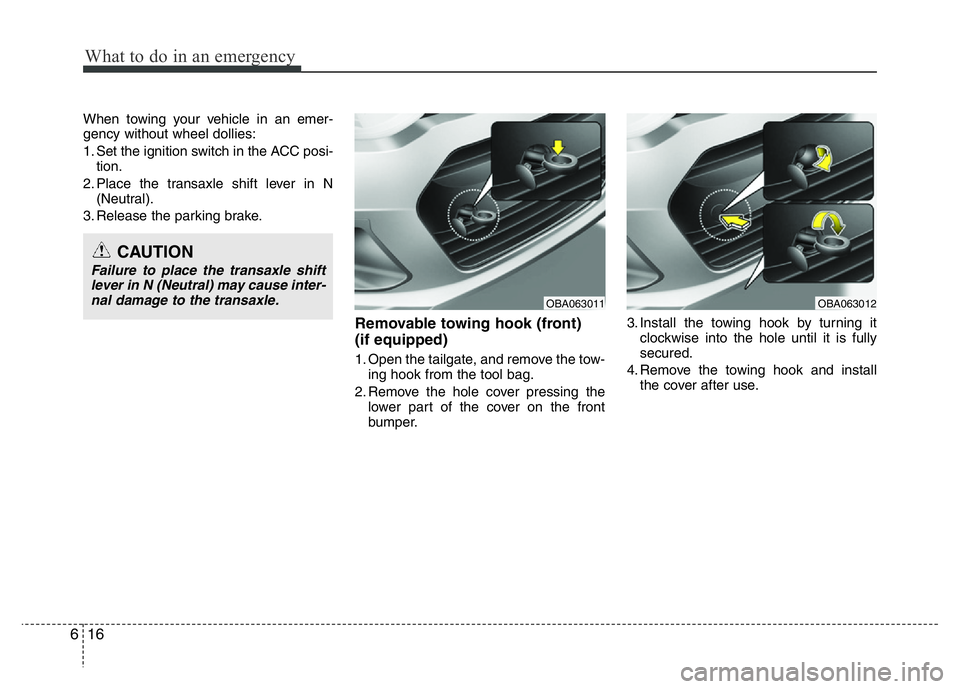
Removable towing hook (front)
(if equipped)
1. Open the tailgate, and remove the tow-
ing hook from the tool bag.
2. Remove the hole cover pressing the
lower part of the cover on the front
bumper.3. Install the towing hook by turning it
clockwise into the hole until it is fully
secured.
4. Remove the towing hook and install
the cover after use.
CAUTION
Failure to place the transaxle shift
lever in N (Neutral) may cause inter-
nal damage to the transaxle.
OBA063011OBA063012
Page 275 of 343
723
Maintenance
ENGINE COOLANT
Changing the engine oil and filter
We recommend that the engine oil and
filter be replaced by an authorized
HYUNDAI dealer.The high-pressure cooling system has a
reservoir filled with year round antifreeze
coolant. The reservoir is filled at the fac-
tory.
Check the antifreeze protection and
coolant level at least once a year, at the
beginning of the winter season, and
before traveling to a colder climate.
Checking the coolant level
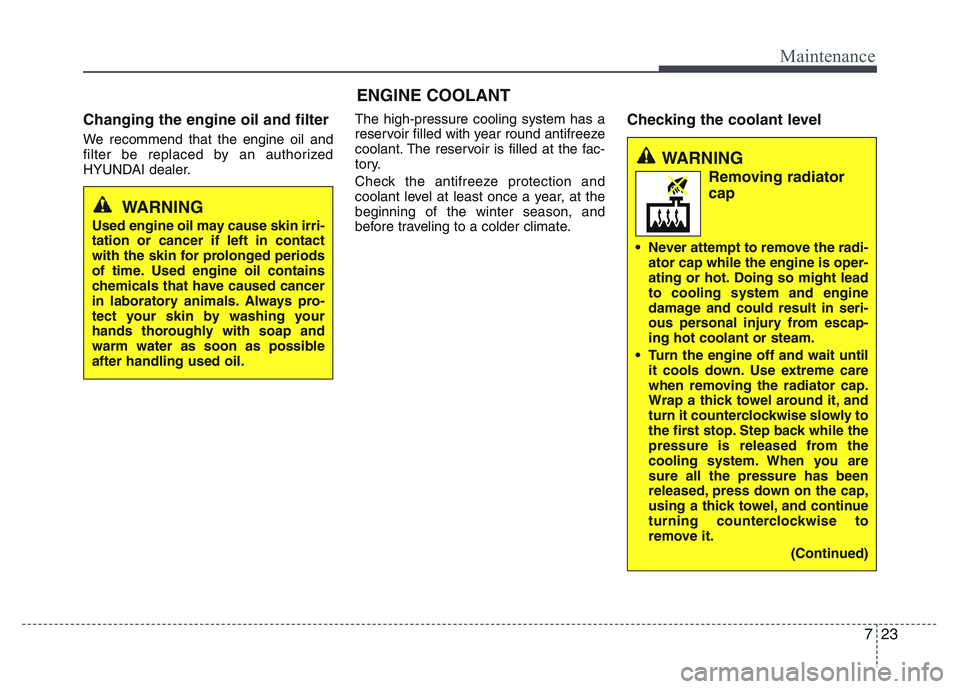
WARNING
Used engine oil may cause skin irri-
tation or cancer if left in contact
with the skin for prolonged periods
of time. Used engine oil contains
chemicals that have caused cancer
in laboratory animals. Always pro-
tect your skin by washing your
hands thoroughly with soap and
warm water as soon as possible
after handling used oil.
WARNING
Removing radiator
cap
• Never attempt to remove the radi-
ator cap while the engine is oper-
ating or hot. Doing so might lead
to cooling system and engine
damage and could result in seri-
ous personal injury from escap-
ing hot coolant or steam.
• Turn the engine off and wait until
it cools down. Use extreme care
when removing the radiator cap.
Wrap a thick towel around it, and
turn it counterclockwise slowly to
the first stop. Step back while the
pressure is released from the
cooling system. When you are
sure all the pressure has been
released, press down on the cap,
using a thick towel, and continue
turning counterclockwise to
remove it.
(Continued)
Page 307 of 343
755
Maintenance
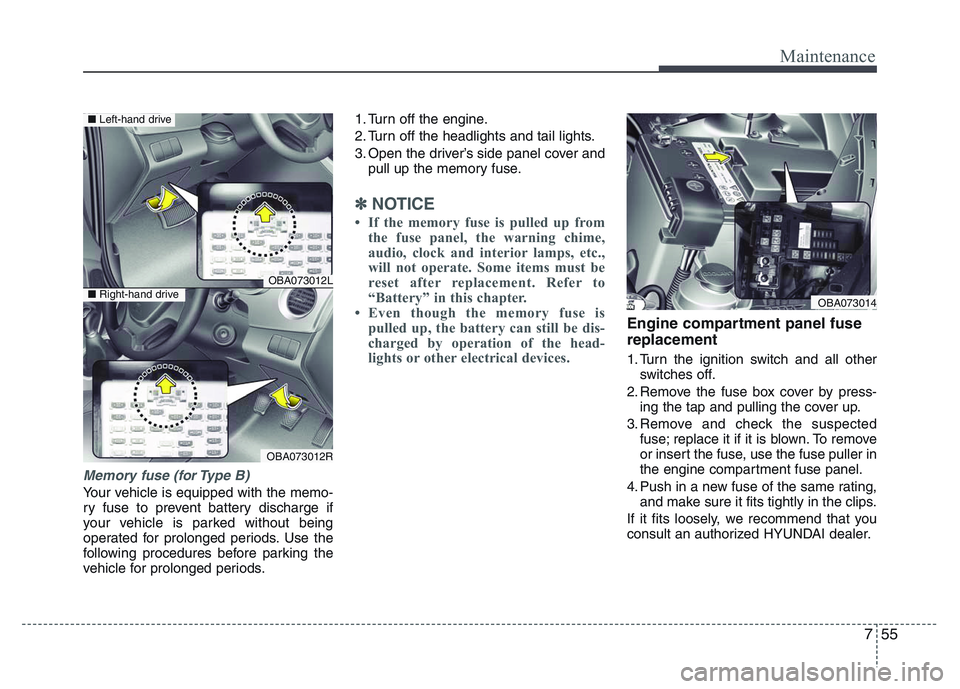
Memory fuse (for Type B)
Your vehicle is equipped with the memo-
ry fuse to prevent battery discharge if
your vehicle is parked without being
operated for prolonged periods. Use the
following procedures before parking the
vehicle for prolonged periods.1. Turn off the engine.
2. Turn off the headlights and tail lights.
3. Open the driver’s side panel cover and
pull up the memory fuse.
✽NOTICE
• If the memory fuse is pulled up from
the fuse panel, the warning chime,
audio, clock and interior lamps, etc.,
will not operate. Some items must be
reset after replacement. Refer to
“Battery” in this chapter.
• Even though the memory fuse is
pulled up, the battery can still be dis-
charged by operation of the head-
lights or other electrical devices.
Engine compartment panel fuse
replacement
1. Turn the ignition switch and all other
switches off.
2. Remove the fuse box cover by press-
ing the tap and pulling the cover up.
3. Remove and check the suspected
fuse; replace it if it is blown. To remove
or insert the fuse, use the fuse puller in
the engine compartment fuse panel.
4. Push in a new fuse of the same rating,
and make sure it fits tightly in the clips.
If it fits loosely, we recommend that you
consult an authorized HYUNDAI dealer.
OBA073012L
OBA073012R
■Left-hand drive
■Right-hand driveOBA073014
Page 311 of 343
759
Maintenance
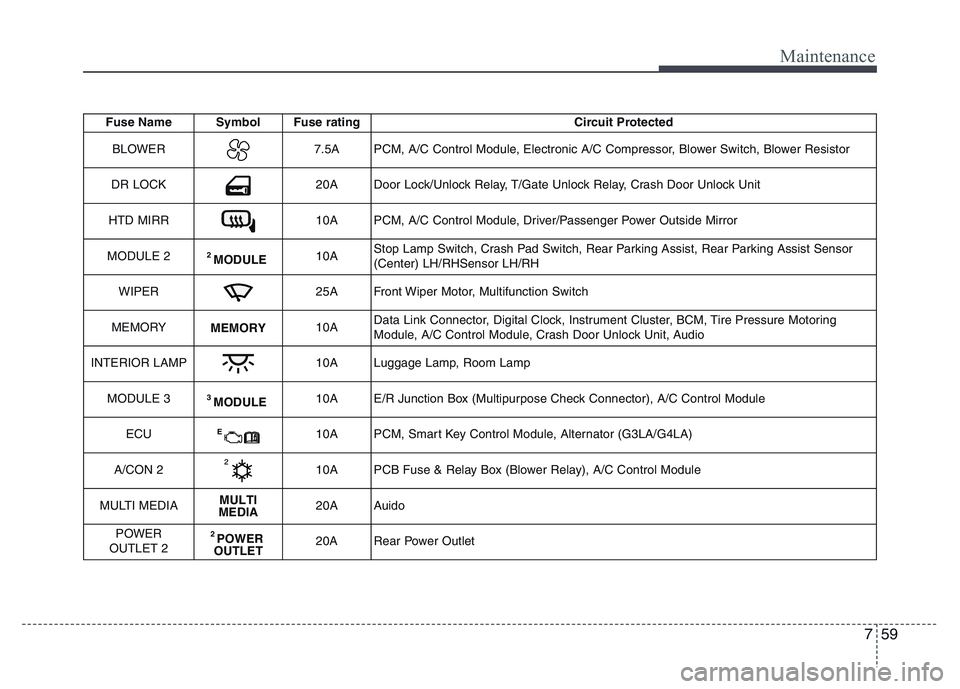
Fuse Name Symbol Fuse rating Circuit Protected
BLOWER
7.5A PCM, A/C Control Module, Electronic A/C Compressor, Blower Switch, Blower Resistor
DR LOCK
20A Door Lock/Unlock Relay, T/Gate Unlock Relay, Crash Door Unlock Unit
HTD MIRR
10A PCM, A/C Control Module, Driver/Passenger Power Outside Mirror
MODULE 2
2 MODULE10AStop Lamp Switch, Crash Pad Switch, Rear Parking Assist, Rear Parking Assist Sensor
(Center) LH/RHSensor LH/RH
WIPER
25A Front Wiper Motor, Multifunction Switch
MEMORY
MEMORY10AData Link Connector, Digital Clock, Instrument Cluster, BCM, Tire Pressure Motoring
Module, A/C Control Module, Crash Door Unlock Unit, Audio
INTERIOR LAMP
10A Luggage Lamp, Room Lamp
MODULE 3
3 MODULE10A E/R Junction Box (Multipurpose Check Connector), A/C Control Module
ECU
E10A PCM, Smart Key Control Module, Alternator (G3LA/G4LA)
A/CON 2
10A PCB Fuse & Relay Box (Blower Relay), A/C Control Module
MULTI MEDIA
MULTI
MEDIA20A Auido
POWER
OUTLET 2
2 POWER
OUTLET20A Rear Power Outlet