audio HYUNDAI I10 2017 Owner's Guide
[x] Cancel search | Manufacturer: HYUNDAI, Model Year: 2017, Model line: I10, Model: HYUNDAI I10 2017Pages: 343, PDF Size: 9.14 MB
Page 193 of 343
(Continued)
• When a Bluetooth®Wireless
Technology mobile phone is connected,
a ( ) icon will appear at the top of the
screen. If a ( ) icon is not displayed,
this indicates that a Bluetooth
®
Wireless Technology enabled device has
not been connected. You must connect
the device before use. For more infor-
mation on Bluetooth
®Wireless
Technology mobile phones, refer to the
“Phone Setup” section.
• Pairing and connecting a Bluetooth
®
Wireless Technology enabled mobile
phone will work only when the
Bluetooth
®Wireless Technology option
within your mobile phone has been
turned on. (Methods of turning on the
Bluetooth
®Wireless Technology
enabled feature may differ depending
on the mobile phone.)
(Continued)(Continued)
• In some mobile phones, starting the
ignition while talking through
Bluetooth
®Wireless Technology
enabled handsfree call will result in the
call becoming disconnected. (Switch the
call back to your mobile phone when
starting the ignition.)
• Some features may not be supported in
some Bluetooth
®Wireless Technology
mobile phone and devices.
•Bluetooth
®Wireless Technology
enabled operation may be unstable
depending on the communication state.
• Placing the audio system within an elec-
tromagnetic environment may result in
noise interference.
4132
Features of your vehicle
Page 292 of 343
Maintenance
40 7
Reset items
Items should be reset after the battery
has been discharged or the battery has
been disconnected.
• Auto up/down window (See chapter 4)
• Climate control system
(See chapter 4)
• Audio (See chapter 4)(Continued)
• Before performing maintenance
or recharging the battery, turn off
all accessories and stop the
engine.
• The negative battery cable must
be removed first and installed
last when the battery is discon-
nected.WARNING- Recharging
battery
When recharging the battery,
observe the following precautions:
• The battery must be removed
from the vehicle and placed in an
area with good ventilation.
• Do not allow cigarettes, sparks,
or flame near the battery.
• Watch the battery during charging,
and stop or reduce the charging
rate if the battery cells begin
gassing (boiling) violently or if the
temperature of the electrolyte of
any cell exceeds 49°C (120°F).
• Wear eye protection when check-
ing the battery during charging.
• Disconnect the battery charger in
the following order.
1. Turn off the battery charger main
switch.
2. Unhook the negative clamp from
the negative battery terminal.
3. Unhook the positive clamp from
the positive battery terminal.
(Continued)
Page 307 of 343
755
Maintenance
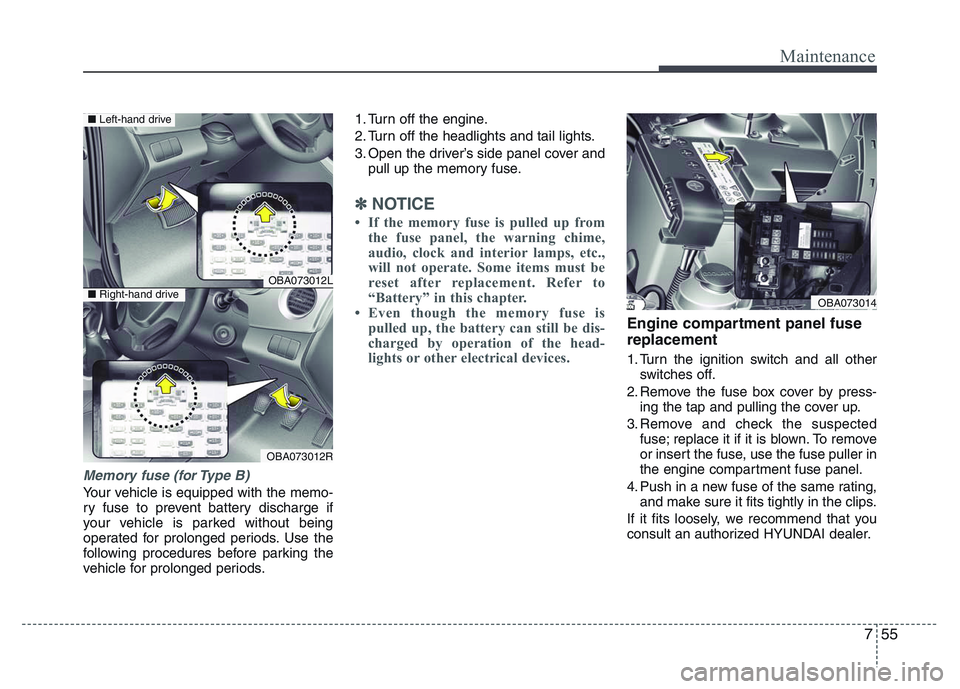
Memory fuse (for Type B)
Your vehicle is equipped with the memo-
ry fuse to prevent battery discharge if
your vehicle is parked without being
operated for prolonged periods. Use the
following procedures before parking the
vehicle for prolonged periods.1. Turn off the engine.
2. Turn off the headlights and tail lights.
3. Open the driver’s side panel cover and
pull up the memory fuse.
✽NOTICE
• If the memory fuse is pulled up from
the fuse panel, the warning chime,
audio, clock and interior lamps, etc.,
will not operate. Some items must be
reset after replacement. Refer to
“Battery” in this chapter.
• Even though the memory fuse is
pulled up, the battery can still be dis-
charged by operation of the head-
lights or other electrical devices.
Engine compartment panel fuse
replacement
1. Turn the ignition switch and all other
switches off.
2. Remove the fuse box cover by press-
ing the tap and pulling the cover up.
3. Remove and check the suspected
fuse; replace it if it is blown. To remove
or insert the fuse, use the fuse puller in
the engine compartment fuse panel.
4. Push in a new fuse of the same rating,
and make sure it fits tightly in the clips.
If it fits loosely, we recommend that you
consult an authorized HYUNDAI dealer.
OBA073012L
OBA073012R
■Left-hand drive
■Right-hand driveOBA073014
Page 311 of 343
759
Maintenance
Fuse Name Symbol Fuse rating Circuit Protected
BLOWER
7.5A PCM, A/C Control Module, Electronic A/C Compressor, Blower Switch, Blower Resistor
DR LOCK
20A Door Lock/Unlock Relay, T/Gate Unlock Relay, Crash Door Unlock Unit
HTD MIRR
10A PCM, A/C Control Module, Driver/Passenger Power Outside Mirror
MODULE 2
2 MODULE10AStop Lamp Switch, Crash Pad Switch, Rear Parking Assist, Rear Parking Assist Sensor
(Center) LH/RHSensor LH/RH
WIPER
25A Front Wiper Motor, Multifunction Switch
MEMORY
MEMORY10AData Link Connector, Digital Clock, Instrument Cluster, BCM, Tire Pressure Motoring
Module, A/C Control Module, Crash Door Unlock Unit, Audio
INTERIOR LAMP
10A Luggage Lamp, Room Lamp
MODULE 3
3 MODULE10A E/R Junction Box (Multipurpose Check Connector), A/C Control Module
ECU
E10A PCM, Smart Key Control Module, Alternator (G3LA/G4LA)
A/CON 2
10A PCB Fuse & Relay Box (Blower Relay), A/C Control Module
MULTI MEDIA
MULTI
MEDIA20A Auido
POWER
OUTLET 2
2 POWER
OUTLET20A Rear Power Outlet
Page 314 of 343
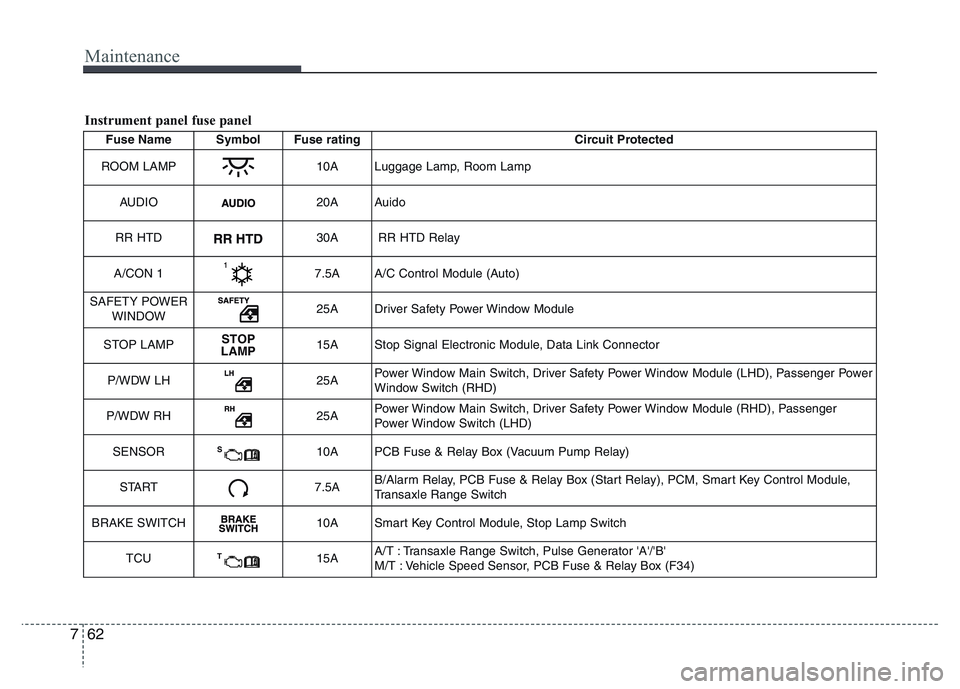
Maintenance
62 7
Fuse Name Symbol Fuse rating Circuit Protected
ROOM LAMP
10A Luggage Lamp, Room Lamp
AUDIO
20A Auido
RR HTD
30A RR HTD Relay
A/CON 1
7.5A A/C Control Module (Auto)
SAFETY POWER
WINDOW
25A Driver Safety Power Window Module
STOP LAMP
STOP
LAMP15A Stop Signal Electronic Module, Data Link Connector
P/WDW LH
25APower Window Main Switch, Driver Safety Power Window Module (LHD), Passenger Power
Window Switch (RHD)
P/WDW RH
25APower Window Main Switch, Driver Safety Power Window Module (RHD), Passenger
Power Window Switch (LHD)
SENSOR
S10A PCB Fuse & Relay Box (Vacuum Pump Relay)
START
7.5AB/Alarm Relay, PCB Fuse & Relay Box (Start Relay), PCM, Smart Key Control Module,
Transaxle Range Switch
BRAKE SWITCH
10A Smart Key Control Module, Stop Lamp Switch
TCU
T15AA/T : Transaxle Range Switch, Pulse Generator 'A'/'B'
M/T : Vehicle Speed Sensor, PCB Fuse & Relay Box (F34)
Instrument panel fuse panel