light 60 w HYUNDAI I20 2020 Workshop Manual
[x] Cancel search | Manufacturer: HYUNDAI, Model Year: 2020, Model line: I20, Model: HYUNDAI I20 2020Pages: 444, PDF Size: 8.93 MB
Page 155 of 444
6-27
06
The ignition switch must be in the
ON position to be able to raise or
lower the windows. Each door has a
Power Window switch to control that
door’s window. The driver has a Power
Window Lock switch which can block
the operation of passenger windows.
The power windows will operate for
approximately 3 minutes after the
ignition switch is placed in the ACC or
OFF position. However, if the front doors
are opened, the Power Windows cannot
be operated even within the 3 minutes
period.
WARNING
To avoid serious injury or death, do not
extend your head, arms or body outside
the windows while driving.
i Information
• In cold and wet climates, power
windows may not work properly due to
freezing conditions.
• While driving with the rear windows
down or with the sunroof (if equipped)
opened (or partially opened), your
vehicle may demonstrate a wind
buffeting or pulsation noise. This
noise is normal and can be reduced
or eliminated by taking the following
actions. If the noise occurs with one
or both of the rear windows down,
partially lower both front windows
approximately 2.5 cm (one inch).
If you experience the noise with the
sunroof open, slightly close the sunroof.
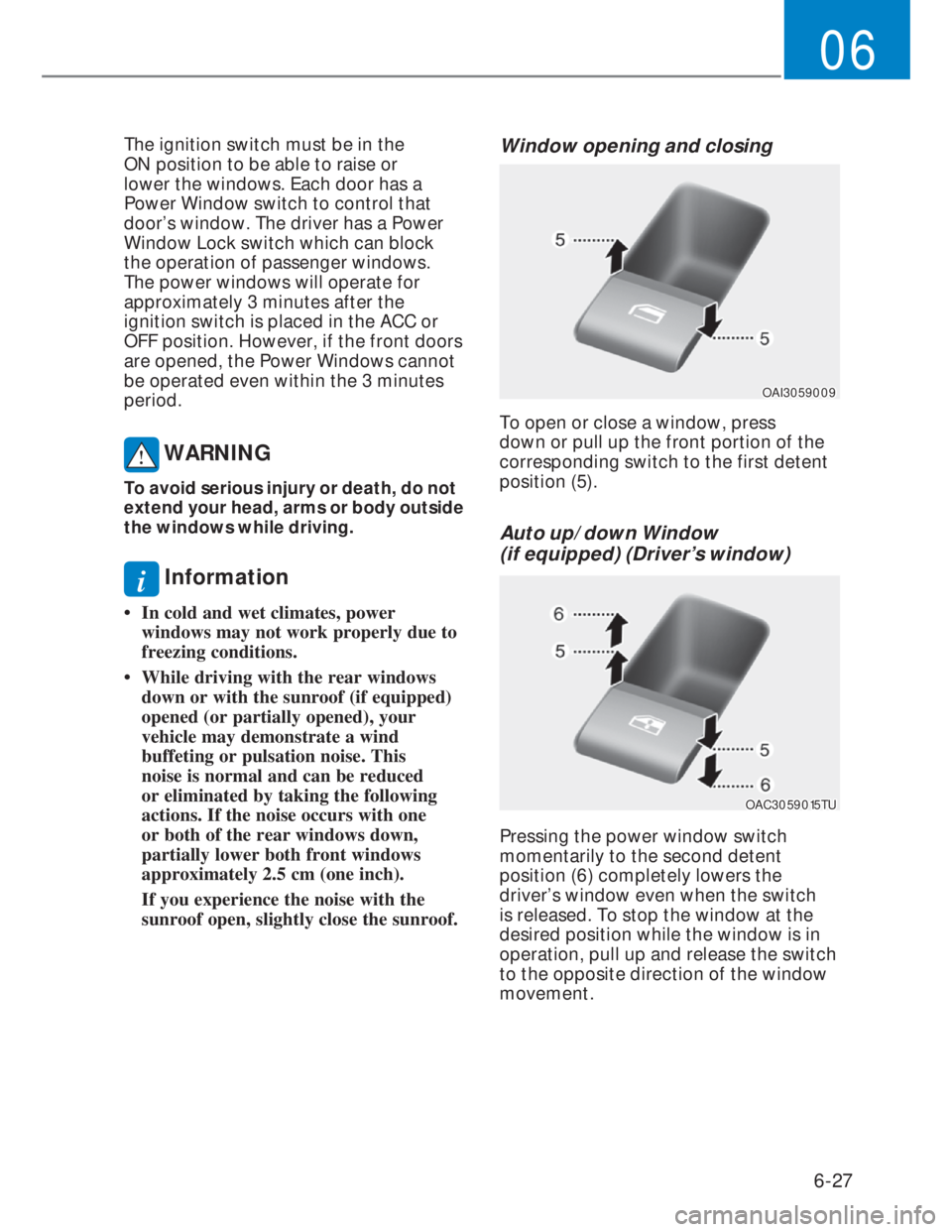
Window opening and closing
OAI3059009OAI3059009
To open or close a window, press
down or pull up the front portion of the
corresponding switch to the first detent
position (5).
Auto up/down Window
(if equipped) (Driver’s window)
OAC3059015TUOAC3059015TU
Pressing the power window switch
momentarily to the second detent
position (6) completely lowers the
driver’s window even when the switch
is released. To stop the window at the
desired position while the window is in
operation, pull up and release the switch
to the opposite direction of the window
movement.
Page 163 of 444
6-35
06
Hood
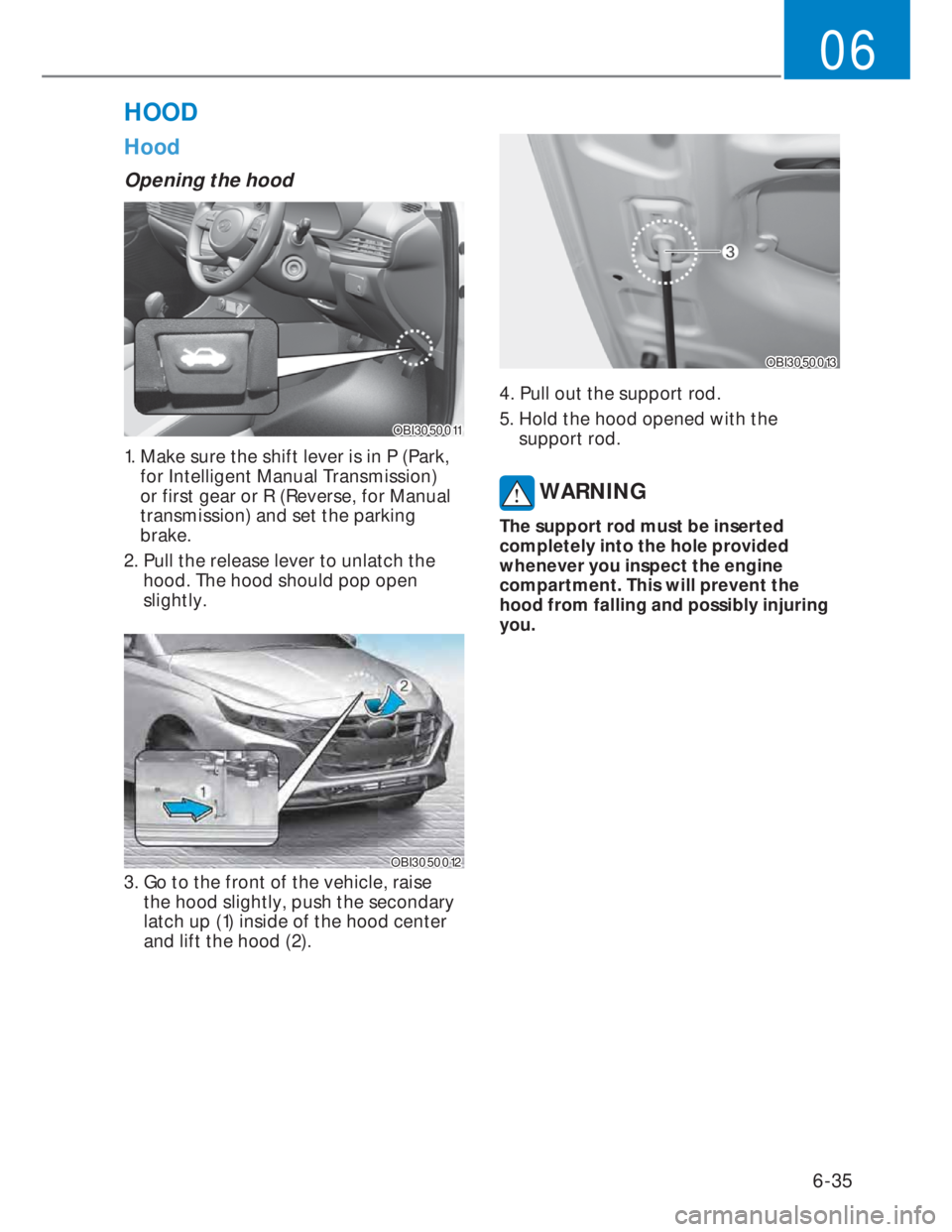
Opening the hood
OBI3050011OBI3050011
1. Make sure the shift lever is in P (Park,
for Intelligent Manual Transmission)
or first gear or R (Reverse, for Manual
transmission) and set the parking
brake.
2. Pull the release lever to unlatch the
hood. The hood should pop open
slightly.
OBI3050012OBI3050012
3. Go to the front of the vehicle, raise
the hood slightly, push the secondary
latch up (1) inside of the hood center
and lift the hood (2).
OBI3050013OBI3050013
4. Pull out the support rod.
5. Hold the hood opened with the
support rod.
WARNING
The support rod must be inserted
completely into the hole provided
whenever you inspect the engine
compartment. This will prevent the
hood from falling and possibly injuring
you.
HOOD
Page 164 of 444
6-36
Convenient features
Closing the hood
1. Before closing the hood, check the
following:
• All filler caps in engine compartment
must be correctly installed.
• Gloves, rags or any other
combustible material must
be removed from the engine
compartment.
2. Return the support rod to its clip to
prevent it from rattling.
3. Lower the hood halfway (lifted
approximately 30 cm from the closed
position) and push down to securely
lock in place. Then double check to be
sure the hood is secure.
WARNING
Always double check to be sure that the
hood is firmly latched before driving
away. Check there is no hood open
warning light or message displayed on
the instrument cluster. Driving with the
hood opened may cause a total loss
of visibility, which might result in an
accident.
WARNING
• Before closing the hood, ensure that
all obstructions are removed from
the hood opening. Closing the hood
with an obstruction present in the
hood opening may result in property
damage or severe personal injury.
• Do not leave gloves, rags or any other
combustible material in the engine
compartment. Doing so may cause a
heat-induced fire.
• Do not move the vehicle with
the hood raised. The view will be
blocked and the hood could fall or be
damaged.
Tailgate
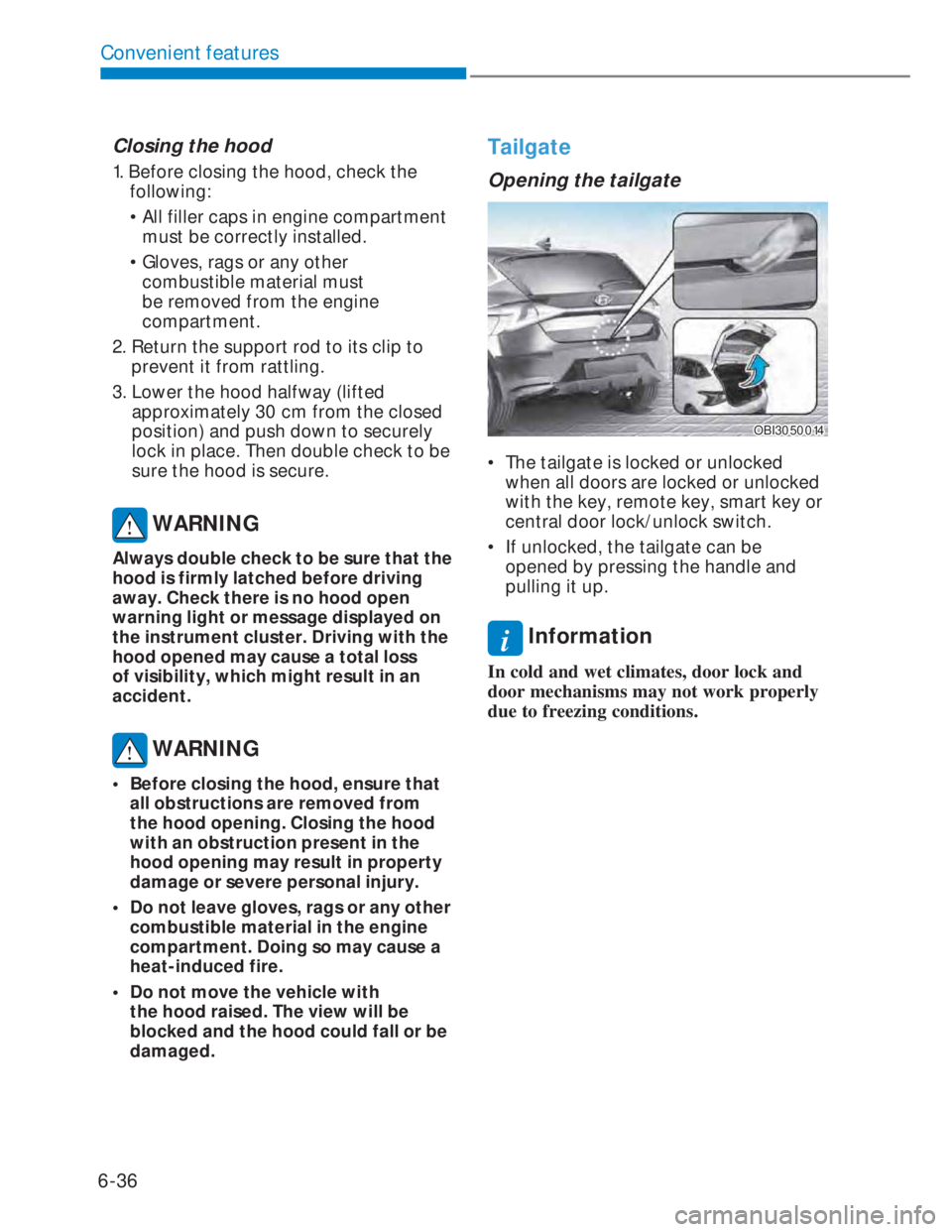
Opening the tailgate
OBI3050014OBI3050014
• The tailgate is locked or unlocked
when all doors are locked or unlocked
with the key, remote key, smart key or
central door lock/unlock switch.
• If unlocked, the tailgate can be
opened by pressing the handle and
pulling it up.
i Information
In cold and wet climates, door lock and
door mechanisms may not work properly
due to freezing conditions.
Page 167 of 444
6-39
06
Fuel filler door
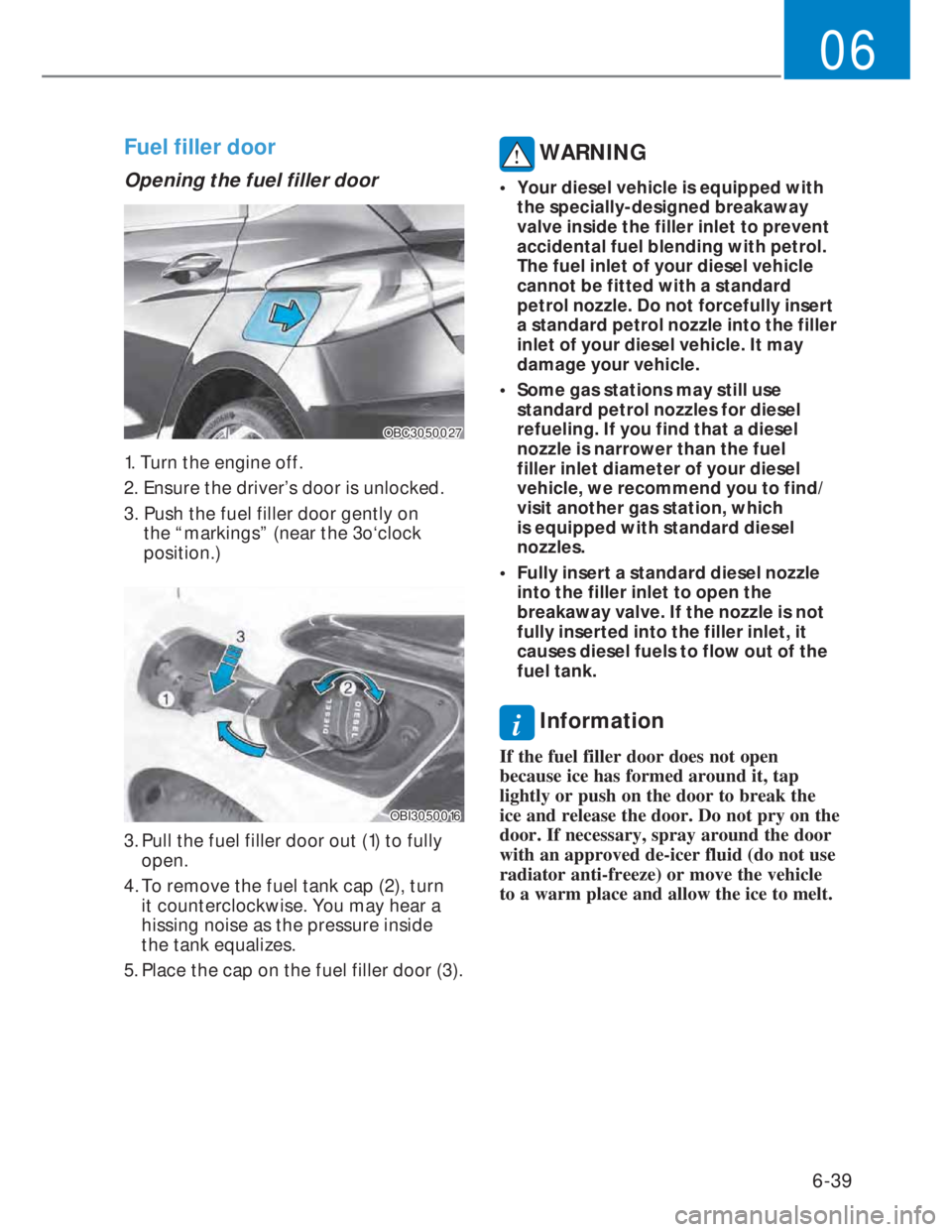
Opening the fuel filler door
OBC3050027OBC3050027
1. Turn the engine off.
2. Ensure the driver’s door is unlocked.
3. Push the fuel filler door gently on
the “markings” (near the 3o‘clock
position.)
OBI3050016OBI3050016
3. Pull the fuel filler door out (1) to fully
open.
4. To remove the fuel tank cap (2), turn
it counterclockwise. You may hear a
hissing noise as the pressure inside
the tank equalizes.
5. Place the cap on the fuel filler door (3).
WARNING
• Your diesel vehicle is equipped with
the specially-designed breakaway
valve inside the filler inlet to prevent
accidental fuel blending with petrol.
The fuel inlet of your diesel vehicle
cannot be fitted with a standard
petrol nozzle. Do not forcefully insert
a standard petrol nozzle into the filler
inlet of your diesel vehicle. It may
damage your vehicle.
• Some gas stations may still use
standard petrol nozzles for diesel
refueling. If you find that a diesel
nozzle is narrower than the fuel
filler inlet diameter of your diesel
vehicle, we recommend you to find/
visit another gas station, which
is equipped with standard diesel
nozzles.
• Fully insert a standard diesel nozzle
into the filler inlet to open the
breakaway valve. If the nozzle is not
fully inserted into the filler inlet, it
causes diesel fuels to flow out of the
fuel tank.
i Information
If the fuel filler door does not open
because ice has formed around it, tap
lightly or push on the door to break the
ice and release the door. Do not pry on the
door. If necessary, spray around the door
with an approved de-icer fluid (do not use
radiator anti-freeze) or move the vehicle
to a warm place and allow the ice to melt.
Page 168 of 444
6-40
Convenient features
Closing the fuel filler door
1. To install the fuel tank cap (2), turn it
clockwise until it “clicks” once. This
indicates that the cap is securely
tightened.
2. Close the fuel filler door (1) and push it
lightly and make sure that it is securely
closed.
WARNING
Petrol is highly flammable and
explosive. Failure to follow these
guidelines may result in SERIOUS
INJURY or DEATH:
• Read and follow all warnings posted
at the gas station.
• Before refueling, note the location
of the Emergency Petrol Shut-Off,if
available, at the gas station.
• Before touching the fuel nozzle, you
should eliminate the potential build-
up of static electricity by touching
a metal part of the vehicle, a safe
distance away from the fuel filler
neck, nozzle, or other gas source,
with your bare hand.
• Do not use cellular phones while
refueling. Electric current and/or
electronic interference from cellular
phones can potentially ignite fuel
vapors and cause a fire. • Do not get back into a vehicle
once you have begun refueling.
You can generate a buildup of
static electricity by touching,
rubbing or sliding against any item
or fabric capable of producing
static electricity. Static electricity
discharge can ignite fuel vapors
causing a fire. If you must re-enter
the vehicle, you should once again
eliminate potentially dangerous
static electricity discharge by
touching a metal part of the vehicle,
away from the fuel filler neck, nozzle
or other petrol source, with your bare
hand.
• When using an approved portable
fuel container, be sure to place the
container on the ground prior to
refueling. Static electricity discharge
from the container can ignite fuel
vapors causing a fire. Once refueling
has begun, contact between your
bare hand and the vehicle should
be maintained until the filling is
complete.
• Use only approved portable plastic
fuel containers designed to carry and
store petrol.
Page 169 of 444
6-41
06
• When refueling, always move the
shift lever to the P (Park) position (for
Intelligent Manual Transmission) or
first gear or R (Reverse, for manual
transmission), set the parking brake,
and place the ignition switch to the
LOCK/OFF position. Sparks produced
by electrical components related
to the engine can ignite fuel vapors
causing a fire.
• Do not use matches or a lighter and
do not smoke or leave a lit cigarette
in your vehicle while at a gas station,
especially during refueling.
• Do not over-fill or top-off your
vehicle tank, which can cause petrol
spillage.
• If a fire breaks out during refueling,
leave the vicinity of the vehicle, and
immediately contact the manager
of the gas station and then contact
the local fire department. Follow any
safety instructions they provide.
• If pressurized fuel sprays out, it can
cover your clothes or skin and thus
subject you to the risk of fire and
burns. Always remove the fuel cap
carefully and slowly. If the cap is
venting fuel or if you hear a hissing
sound, wait until the condition stops
before completely removing the cap.
• Always check that the fuel cap is
installed securely to prevent fuel
spillage in the event of an accident.i Information
• Make sure to refuel your vehicle
according to the “Fuel Requirements”
suggested in the 1 chapter.
• Do not spill fuel on the exterior surfaces
of the vehicle. Any type of fuel spilled
on painted surfaces may damage the
paint.
NOTICE
If the fuel filler cap requires
replacement, use only a genuine
HYUNDAI cap or the equivalent
specified for your vehicle. An incorrect
fuel filler cap can result in a serious
malfunction of the fuel system or
emission control system.
Page 170 of 444
6-42
Convenient features
Exterior lights
Lighting control
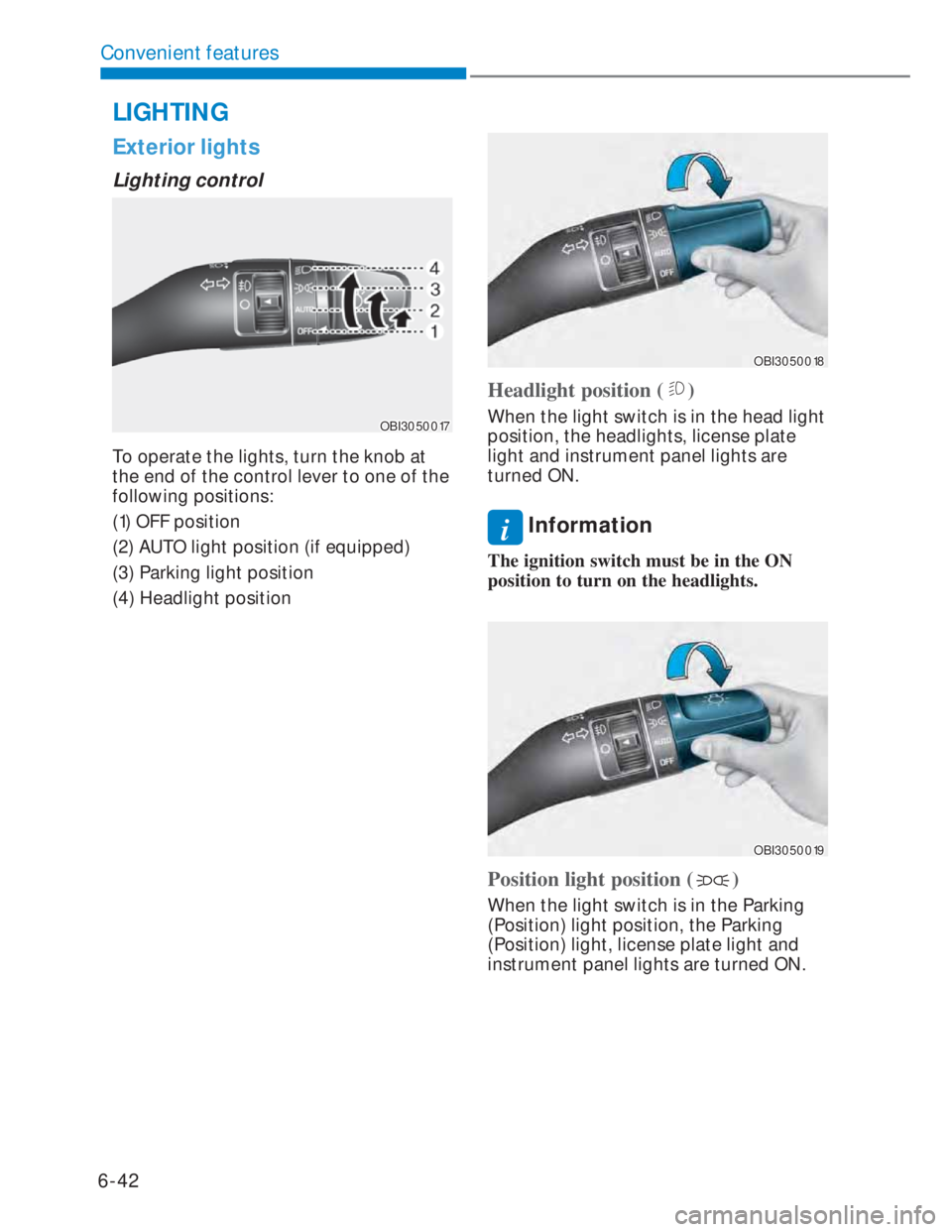
OBI3050017OBI3050017
To operate the lights, turn the knob at
the end of the control lever to one of the
following positions:
(1) OFF position
(2) AUTO light position (if equipped)
(3) Parking light position
(4) Headlight position
OBI3050018OBI3050018
Headlight position ()
When the light switch is in the head light
position, the headlights, license plate
light and instrument panel lights are
turned ON.
i Information
The ignition switch must be in the ON
position to turn on the headlights.
OBI3050019OBI3050019
Position light position ()
When the light switch is in the Parking
(Position) light position, the Parking
(Position) light, license plate light and
instrument panel lights are turned ON.
LIGHTING
Page 171 of 444
6-43
06
OBI3050020OBI3050020
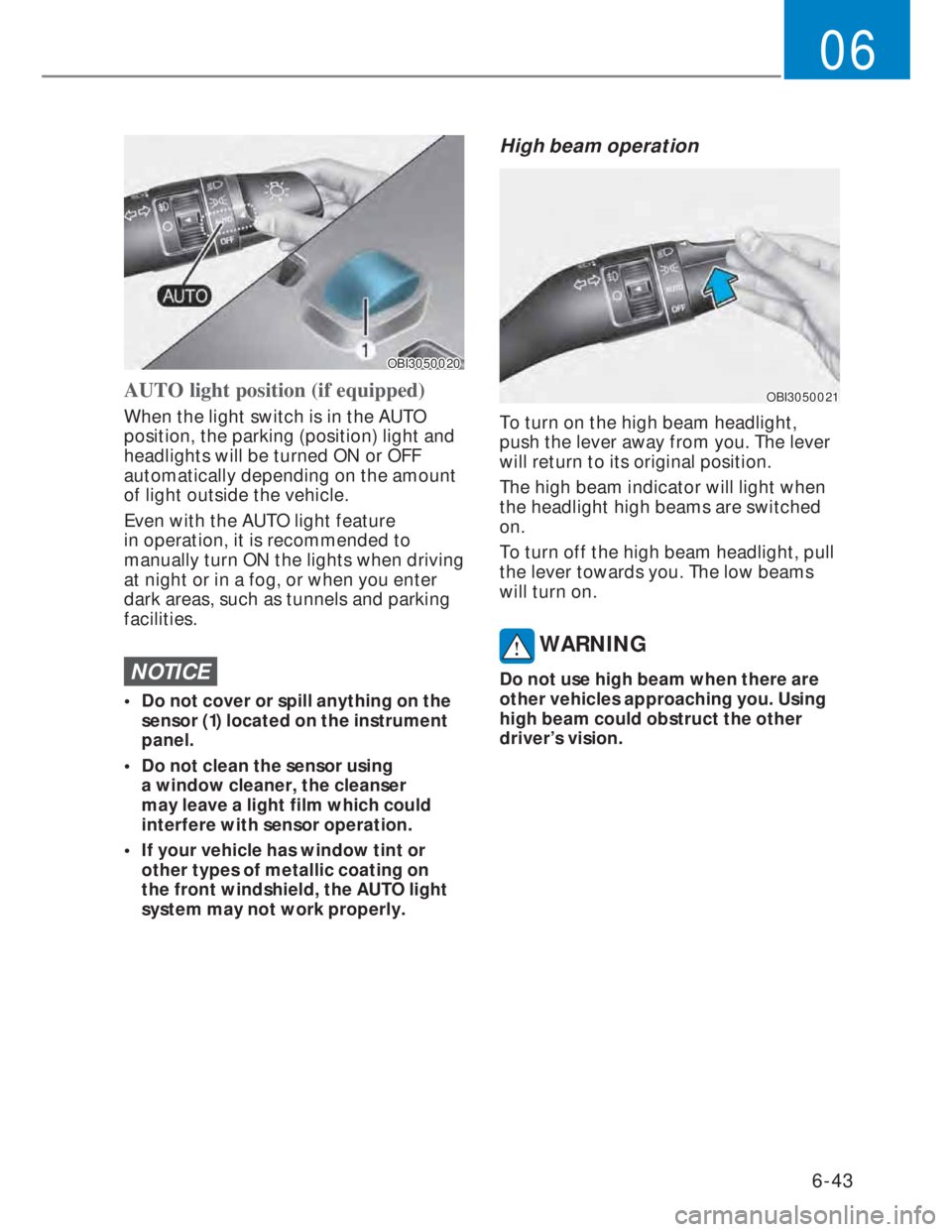
AUTO light position (if equipped)
When the light switch is in the AUTO
position, the parking (position) light and
headlights will be turned ON or OFF
automatically depending on the amount
of light outside the vehicle.
Even with the AUTO light feature
in operation, it is recommended to
manually turn ON the lights when driving
at night or in a fog, or when you enter
dark areas, such as tunnels and parking
facilities.
NOTICE
• Do not cover or spill anything on the
sensor (1) located on the instrument
panel.
• Do not clean the sensor using
a window cleaner, the cleanser
may leave a light film which could
interfere with sensor operation.
• If your vehicle has window tint or
other types of metallic coating on
the front windshield, the AUTO light
system may not work properly.
High beam operation
OBI3050021OBI3050021
To turn on the high beam headlight,
push the lever away from you. The lever
will return to its original position.
The high beam indicator will light when
the headlight high beams are switched
on.
To turn off the high beam headlight, pull
the lever towards you. The low beams
will turn on.
WARNING
Do not use high beam when there are
other vehicles approaching you. Using
high beam could obstruct the other
driver’s vision.
Page 172 of 444
6-44
Convenient features
OBI3050022OBI3050022
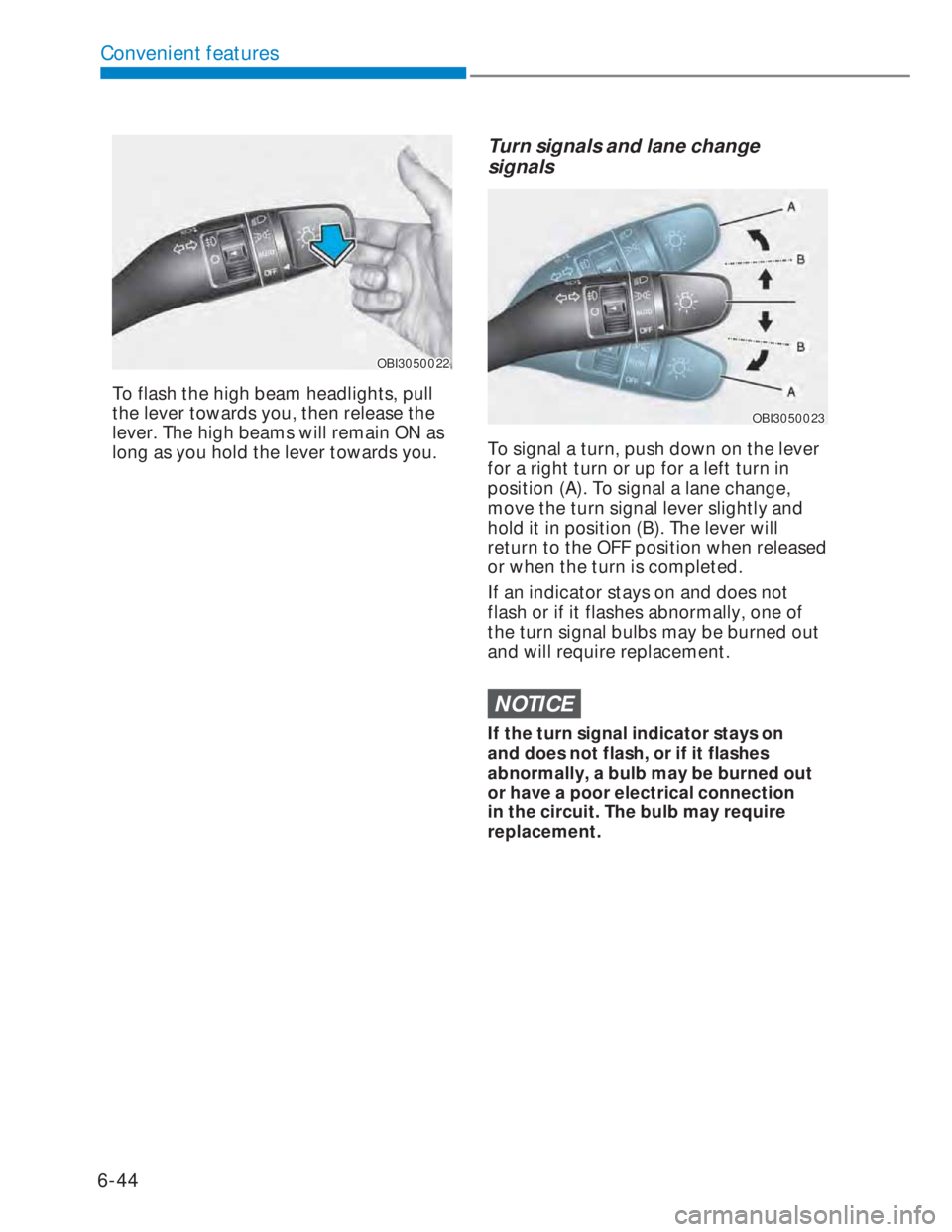
To flash the high beam headlights, pull
the lever towards you, then release the
lever. The high beams will remain ON as
long as you hold the lever towards you.
Turn signals and lane change
signals
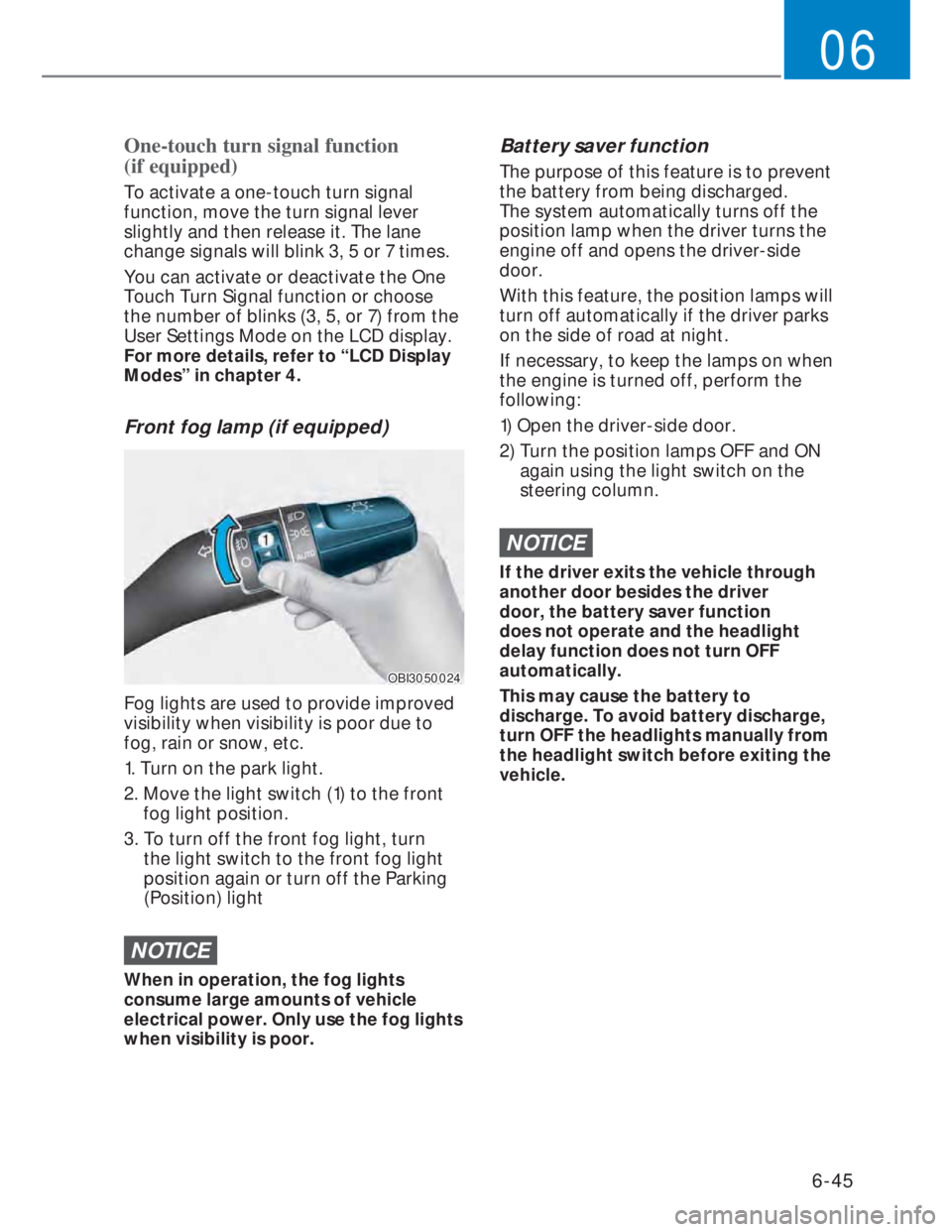
OBI3050023OBI3050023
To signal a turn, push down on the lever
for a right turn or up for a left turn in
position (A). To signal a lane change,
move the turn signal lever slightly and
hold it in position (B). The lever will
return to the OFF position when released
or when the turn is completed.
If an indicator stays on and does not
flash or if it flashes abnormally, one of
the turn signal bulbs may be burned out
and will require replacement.
NOTICE
If the turn signal indicator stays on
and does not flash, or if it flashes
abnormally, a bulb may be burned out
or have a poor electrical connection
in the circuit. The bulb may require
replacement.
Page 173 of 444
6-45
06
One-touch turn signal function
(if equipped)
To activate a one-touch turn signal
function, move the turn signal lever
slightly and then release it. The lane
change signals will blink 3, 5 or 7 times.
You can activate or deactivate the One
Touch Turn Signal function or choose
the number of blinks (3, 5, or 7) from the
User Settings Mode on the LCD display.
For more details, refer to “LCD Display
Modes” in chapter 4.
Front fog lamp (if equipped)
OBI3050024OBI3050024
Fog lights are used to provide improved
visibility when visibility is poor due to
fog, rain or snow, etc.
1. Turn on the park light.
2. Move the light switch (1) to the front
fog light position.
3. To turn off the front fog light, turn
the light switch to the front fog light
position again or turn off the Parking
(Position) light
NOTICE
When in operation, the fog lights
consume large amounts of vehicle
electrical power. Only use the fog lights
when visibility is poor.
Battery saver function
The purpose of this feature is to prevent
the battery from being discharged.
The system automatically turns off the
position lamp when the driver turns the
engine off and opens the driver-side
door.
With this feature, the position lamps will
turn off automatically if the driver parks
on the side of road at night.
If necessary, to keep the lamps on when
the engine is turned off, perform the
following:
1) Open the driver-side door.
2) Turn the position lamps OFF and ON
again using the light switch on the
steering column.
NOTICE
If the driver exits the vehicle through
another door besides the driver
door, the battery saver function
does not operate and the headlight
delay function does not turn OFF
automatically.
This may cause the battery to
discharge. To avoid battery discharge,
turn OFF the headlights manually from
the headlight switch before exiting the
vehicle.