warning HYUNDAI I20 2022 Owners Manual
[x] Cancel search | Manufacturer: HYUNDAI, Model Year: 2022, Model line: I20, Model: HYUNDAI I20 2022Pages: 444, PDF Size: 8.93 MB
Page 299 of 444
7-52
Driving your vehicle
WARNING
The use of tire chains may adversely
affect vehicle handling:
• Drive less than 30 km/h (20 mph)
or the chain manufacturer’s
recommended speed limit,
whichever is lower.
• Drive carefully and avoid bumps,
holes, sharp turns, and other road
hazards, which may cause the vehicle
to bounce.
• Avoid sharp turns or locked wheel
braking.
i Information
• Install tire chains on the front tires.
It should be noted that installing
tire chains on the tires will provide
a greater driving force, but will not
prevent side skids.
• Do not install tire chains without
first checking local and municipal
regulations for possible restrictions
against their use.
Chain Installation
When installing tire chains, follow the
manufacturer’s instructions and mount
them as tightly possible. Drive slowly
(less than 30 km/h (20 mph)) with
chains installed. If you hear the chains
contacting the body or chassis, stop and
tighten them. If they still make contact,
slow down until the noise stops. Remove
the tire chains as soon as you begin
driving on cleared roads.
When mounting snow chains, park
the vehicle on level ground away from
traffic. Turn on the vehicle Hazard
Warning Flasher and place a triangular
emergency warning device behind the
vehicle (if available). Always place the
vehicle in N (Neutral), apply the parking
brake and turn off the engine before
installing snow chains.
NOTICE
When using tire chains:
• Wrong size chains or improperly
installed chains can damage your
vehicle’s brake lines, suspension,
body and wheels.
• Use SAE “S” class or wire chains.
• If you hear noise caused by chains
contacting the body, retighten the
chain to prevent contact with the
vehicle body.
• To prevent body damage, retighten
the chains after driving 0.5~1.0 km
(0.3~0.6 miles).
• Do not use tire chains on vehicles
equipped with aluminum wheels. If
unavoidable, use a wire type chain.
• Use wire chains less than 15 mm (0.59
in) wide to prevent damage to the
chain’s connection.
Page 302 of 444
7-55
07
Two labels on your driver’s door sill show
how much weight your vehicle was
designed to carry: the Tire and Loading
Information Label and the Certification
Label.
Before loading your vehicle, familiarize
yourself with the following terms for
determining your vehicle’s weight
ratings, from the vehicle’s specifications
and the Certification Label:
Base Curb Weight
This is the weight of the vehicle
including a full tank of fuel and all
standard equipment. It does not
include passengers, cargo, or optional
equipment.
Vehicle Curb Weight
This is the weight of your new vehicle
when you picked it up from your dealer
plus any aftermarket equipment.
Cargo Weight
This figure includes all weight added to
the Base Curb Weight, including cargo
and optional equipment.
GAW (Gross Axle Weight)
This is the total weight placed on each
axle (front and rear) - including vehicle
curb weight and all payload.
GAWR (Gross Axle Weight Rating)
This is the maximum allowable weight
that can be carried by a single axle (front
or rear). These numbers are shown on
the Certification Label. The total load on
each axle must never exceed its GAWR.GVW (Gross Vehicle Weight)
This is the Base Curb Weight plus actual
Cargo Weight plus passengers.
GVWR (Gross Vehicle Weight Rating)
This is the maximum allowable weight
of the fully loaded vehicle (including
all options, equipment, passengers
and cargo). The GVWR is shown on
the Certification Label located on the
driver’s door sill.
Overloading
WARNING
The Gross Axle Weight Rating (GAWR)
and the Gross Vehicle Weight Rating
(GVWR) for your vehicle are on the
Certification Label attached to the
driver’s (or front passenger’s) door.
Exceeding these ratings can cause an
accident or vehicle damage. You can
calculate the weight of your load by
weighing the items (and people) before
putting them in the vehicle. Be careful
not to overload your vehicle.
VEHICLE WEIGHT
Page 303 of 444
8
Cruise Control (CC) ......................................................................................... 8-2
System operation ...................................................................................................... 8-2
Rear View Monitor (RVM) ...............................................................................8-6
System settings ..........................................................................................................8-7
System malfunction and limitations ........................................................................ 8-9
Reverse Parking Distance Warning (PDW) .................................................. 8-10
System settings ........................................................................................................8-10
System operation
.....................................................................................................8-10
System malfunction and precautions ......................................................................8-11
8. Driver assistance system
Page 307 of 444
08
8-5
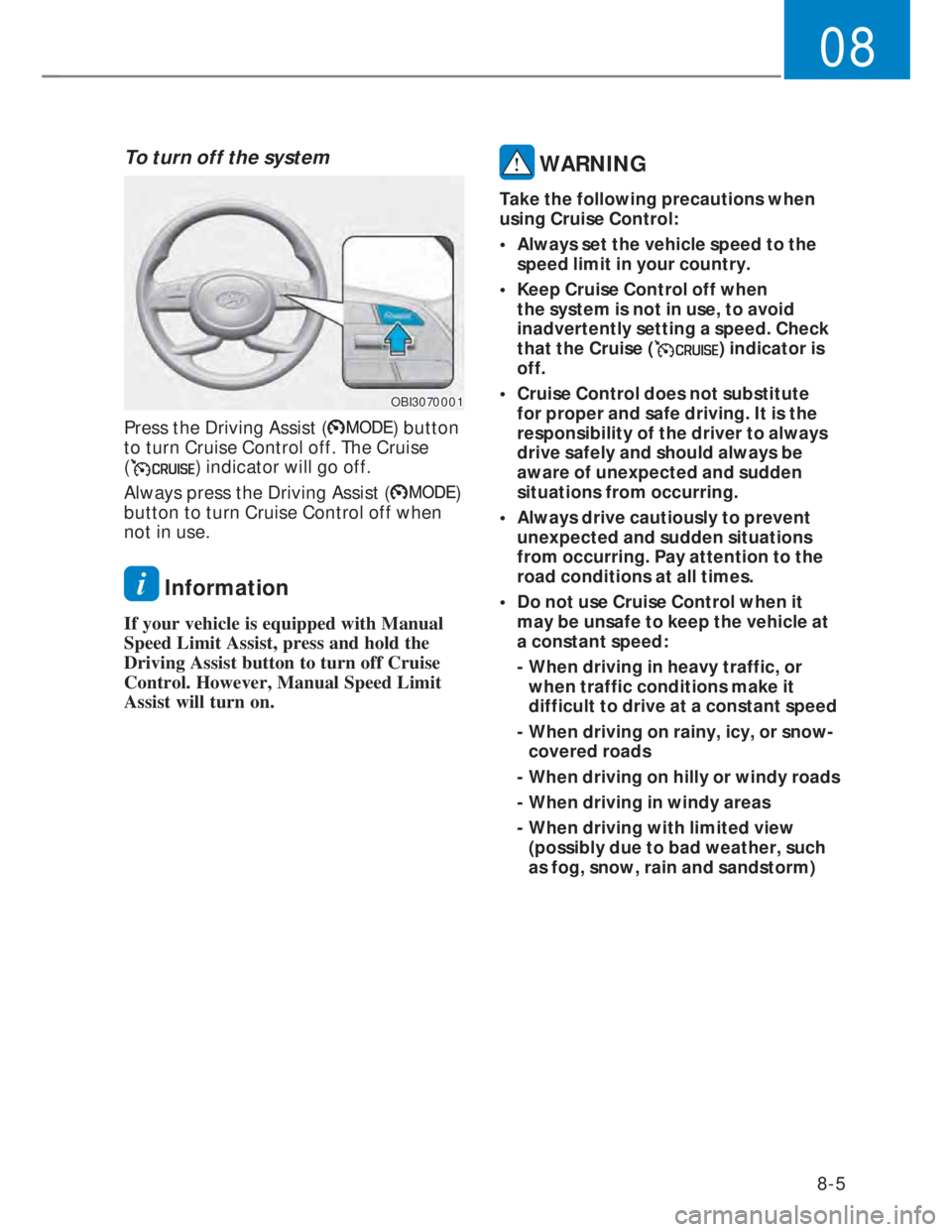
To turn off the system
OBI3070001OBI3070001
Press the Driving Assist () button
to turn Cruise Control off. The Cruise
(
) indicator will go off.
Always press the Driving Assist (
)
button to turn Cruise Control off when
not in use.
Information
If your vehicle is equipped with Manual
Speed Limit Assist, press and hold the
Driving Assist button to turn off Cruise
Control. However, Manual Speed Limit
Assist will turn on.
WARNING
Take the following precautions when
using Cruise Control:
• Always set the vehicle speed to the
speed limit in your country.
• Keep Cruise Control off when
the system is not in use, to avoid
inadvertently setting a speed. Check
that the Cruise (
) indicator is
off.
• Cruise Control does not substitute
for proper and safe driving. It is the
responsibility of the driver to always
drive safely and should always be
aware of unexpected and sudden
situations from occurring.
• Always drive cautiously to prevent
unexpected and sudden situations
from occurring. Pay attention to the
road conditions at all times.
• Do not use Cruise Control when it
may be unsafe to keep the vehicle at
a constant speed:
- When driving in heavy traffic, or
when traffic conditions make it
difficult to drive at a constant speed
- When driving on rainy, icy, or snow-
covered roads
- When driving on hilly or windy roads
- When driving in windy areas
- When driving with limited view
(possibly due to bad weather, such
as fog, snow, rain and sandstorm)
Page 311 of 444
08
8-9
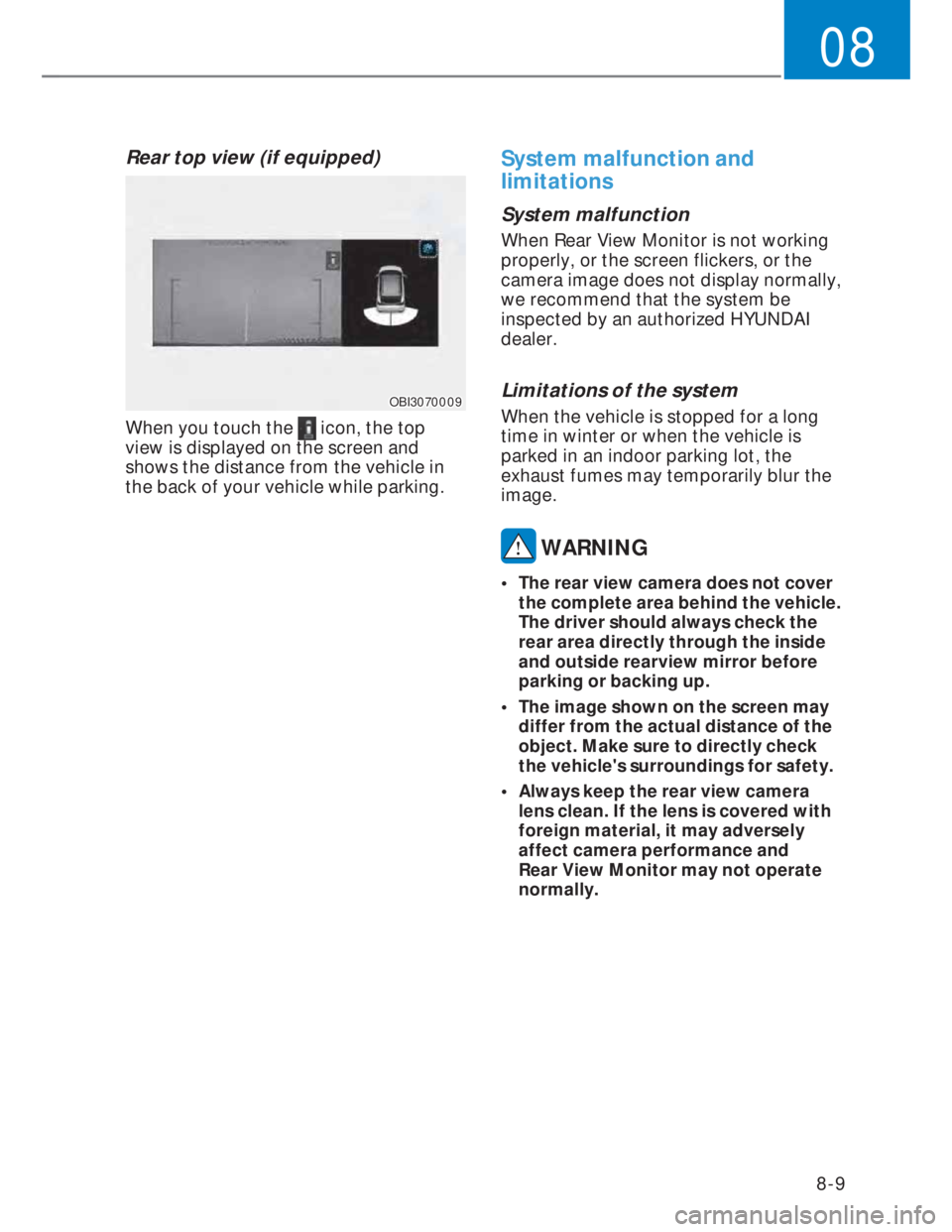
Rear top view (if equipped)
OBI3070009OBI3070009
When you touch the icon, the top
view is displayed on the screen and
shows the distance from the vehicle in
the back of your vehicle while parking.
System malfunction and
limitations
System malfunction
When Rear View Monitor is not working
properly, or the screen flickers, or the
camera image does not display normally,
we recommend that the system be
inspected by an authorized HYUNDAI
dealer.
Limitations of the system
When the vehicle is stopped for a long
time in winter or when the vehicle is
parked in an indoor parking lot, the
exhaust fumes may temporarily blur the
image.
WARNING
• The rear view camera does not cover
the complete area behind the vehicle.
The driver should always check the
rear area directly through the inside
and outside rearview mirror before
parking or backing up.
• The image shown on the screen may
differ from the actual distance of the
object. Make sure to directly check
the vehicle's surroundings for safety.
• Always keep the rear view camera
lens clean. If the lens is covered with
foreign material, it may adversely
affect camera performance and
Rear View Monitor may not operate
normally.
Page 313 of 444
08
8-11
System malfunction and
precautions
System malfunction
After starting the engine, a beep will
sound when the gear is shifted to R
(Reverse) to indicate the system is
operating normally.
However, if one or more of the following
occurs, first check whether the
ultrasonic sensor is damaged or blocked
with foreign material. If it still does not
work properly, we recommend that the
system be inspected by an authorized
HYUNDAI dealer.
• The audible warning does not sound.
• The buzzer sounds intermittently.
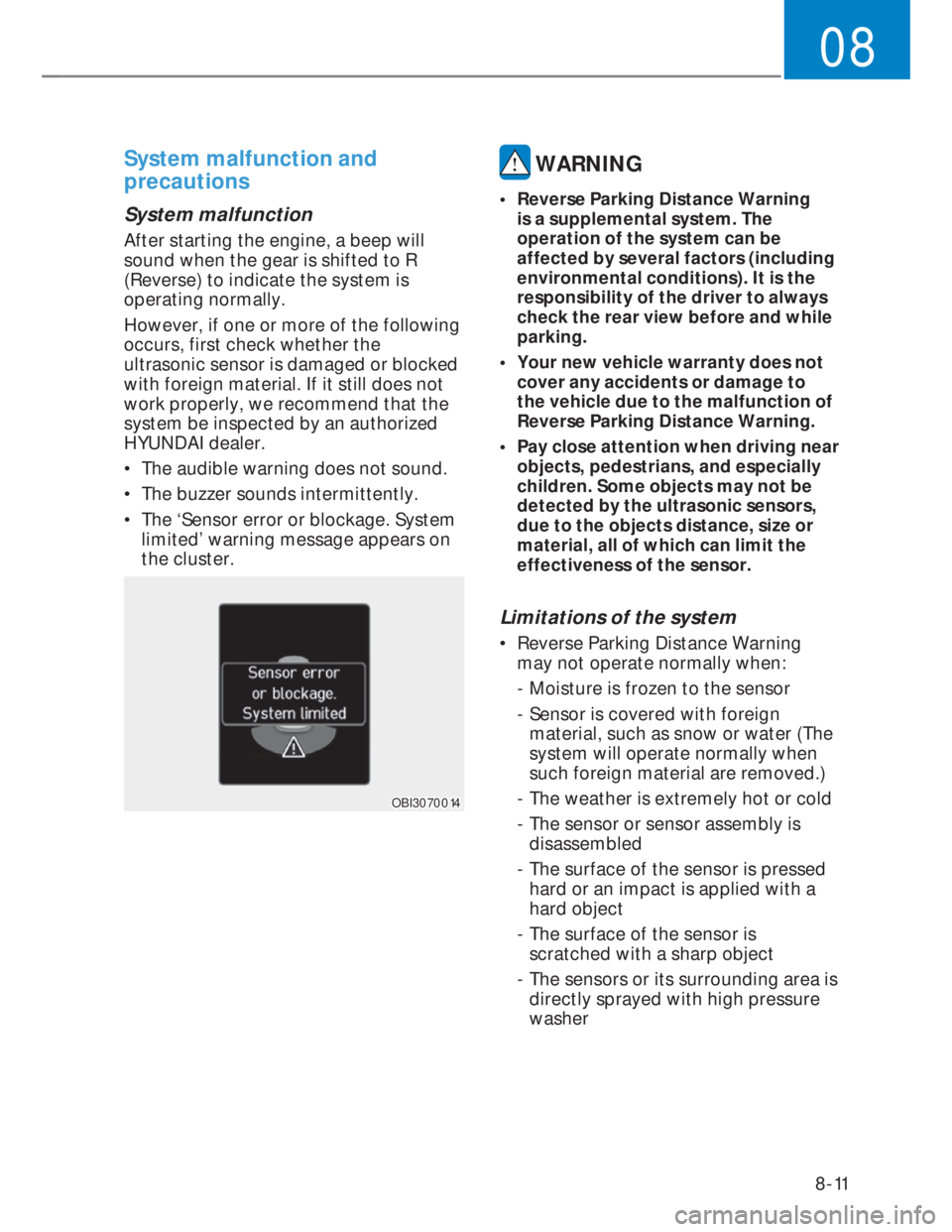
• The ‘Sensor error or blockage. System
limited’ warning message appears on
the cluster.
OBI3070014OBI3070014
WARNING
• Reverse Parking Distance Warning
is a supplemental system. The
operation of the system can be
affected by several factors (including
environmental conditions). It is the
responsibility of the driver to always
check the rear view before and while
parking.
• Your new vehicle warranty does not
cover any accidents or damage to
the vehicle due to the malfunction of
Reverse Parking Distance Warning.
• Pay close attention when driving near
objects, pedestrians, and especially
children. Some objects may not be
detected by the ultrasonic sensors,
due to the objects distance, size or
material, all of which can limit the
effectiveness of the sensor.
Limitations of the system
• Reverse Parking Distance Warning
may not operate normally when:
- Moisture is frozen to the sensor
- Sensor is covered with foreign
material, such as snow or water (The
system will operate normally when
such foreign material are removed.)
- The weather is extremely hot or cold
- The sensor or sensor assembly is
disassembled
- The surface of the sensor is pressed
hard or an impact is applied with a
hard object
- The surface of the sensor is
scratched with a sharp object
- The sensors or its surrounding area is
directly sprayed with high pressure
washer
Page 314 of 444
Driver assistance system
8-12
• Reverse Parking Distance Warning
may malfunction when:
- Heavy rain or water spray is present
- Water flows on the surface of the
sensor
- Affected by another vehicle’s sensors
- The sensor is covered with snow
- Driving on uneven road, gravel roads
or bushes
- Objects that generates ultrasonic
waves are near the sensor
- Installing the license plate differently
from the original location
- The vehicle bumper height or
ultrasonic sensor installation has
been modified
- Attaching equipments or accessories
around the ultrasonic sensors
• The following objects may not be
detected:
- Sharp or slim objects, such as ropes,
chains or small poles.
- Objects, which tend to absorb sensor
frequency, such as clothes, spongy
material or snow.
- Objects smaller than 100 cm (40 in.)
in length and narrower than 14 cm (6
in.) in diameter.
- Pedestrians, animals or objects
that are very close to the ultrasonic
sensors
• Parking Distance Warning Indicators
may be displayed differently from
the actual detected location when
the obstacle is located between the
sensors.
• Parking Distance Warning indicator
may not occur sequentially depending
on vehicle speed or obstacle shape.
• If Reverse Parking Distance Warning
needs repair, we recommend that the
system be inspected by an authorized
HYUNDAI dealer.
Page 315 of 444
Hazard warning flasher................................................................................... 9-2
In case of an emergency while driving
.......................................................... 9-2
If the engine stalls while driving .............................................................................. 9-2
If the engine stalls at a crossroad or crossing ......................................................... 9-2
If you have a flat tire while driving
.......................................................................... 9-3
If the engine will not start .............................................................................. 9-3
If the engine doesn’t turn over or turns over slowly ............................................... 9-3
If the engine turns over normally but doesn’t start ................................................ 9-3
Jump starting .................................................................................................. 9-4
If the engine overheats
................................................................................... 9-7
Tire pressure monitoring system (TPMS)
......................................................9-9
Check tire pressure ................................................................................................... 9-9
Tire pressure monitoring system .............................................................................9-10
Low tire pressure telltale..........................................................................................9-11
Low tire pressure position telltale and tire pressure telltale
..................................9-11
TPMS (Tire Pressure Monitoring System) malfunction indicator
.......................... 9-12
Changing a tire with TPMS ...................................................................................... 9-12
If you have a flat tire ......................................................................................9-14
Jack and tools........................................................................................................... 9-14
Removing and storing the spare tire....................................................................... 9-14
Changing tires
.......................................................................................................... 9-15
Jack label .................................................................................................................. 9-19
EC Declaration of conformity for Jack................................................................... 9-20
Towing ............................................................................................................ 9-21
Towing service .......................................................................................................... 9-21
Removable towing hook ......................................................................................... 9-22
Emergency towing .................................................................................................. 9-23
Emergency commodity ................................................................................ 9-25
First aid kit ............................................................................................................... 9-25
Triangle reflector ..................................................................................................... 9-25
9. Emergency situations
9
Page 316 of 444
9-2
Emergency situations
OAI3079001OAI3079001
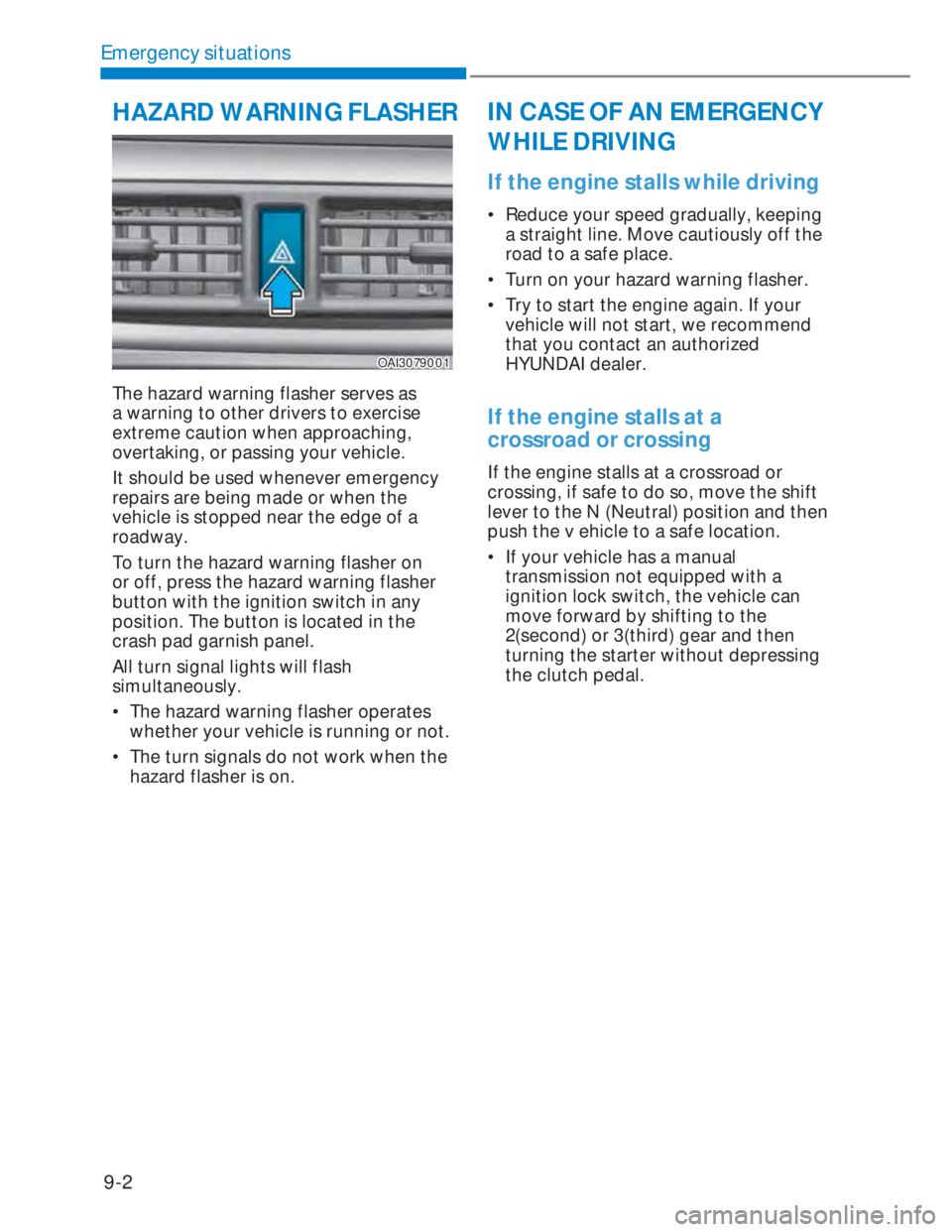
The hazard warning flasher serves as
a warning to other drivers to exercise
extreme caution when approaching,
overtaking, or passing your vehicle.
It should be used whenever emergency
repairs are being made or when the
vehicle is stopped near the edge of a
roadway.
To turn the hazard warning flasher on
or off, press the hazard warning flasher
button with the ignition switch in any
position. The button is located in the
crash pad garnish panel.
All turn signal lights will flash
simultaneously.
• The hazard warning flasher operates
whether your vehicle is running or not.
• The turn signals do not work when the
hazard flasher is on.
HAZARD WARNING FLASHER IN CASE OF AN EMERGENCY
WHILE DRIVING
If the engine stalls while driving
• Reduce your speed gradually, keeping
a straight line. Move cautiously off the
road to a safe place.
• Turn on your hazard warning flasher.
• Try to start the engine again. If your
vehicle will not start, we recommend
that you contact an authorized
HYUNDAI dealer.
If the engine stalls at a
crossroad or crossing
If the engine stalls at a crossroad or
crossing, if safe to do so, move the shift
lever to the N (Neutral) position and then
push the v ehicle to a safe location.
• If your vehicle has a manual
transmission not equipped with a
ignition lock switch, the vehicle can
move forward by shifting to the
2(second) or 3(third) gear and then
turning the starter without depressing
the clutch pedal.
Page 317 of 444
9-3
09
If you have a flat tire while
driving
If a tire goes flat while you are driving:
• Take your foot off the accelerator
pedal and let the vehicle slow down
while driving straight ahead. Do not
apply the brakes immediately or
attempt to pull off the road as this
may cause loss of vehicle control
resulting in an accident. When the
vehicle has slowed to such a speed
that it is safe to do so, brake carefully
and pull off the road. Drive off the
road as far as possible and park on
firm, level ground. If you are on a
divided highway, do not park in the
median area between the two traffic
lanes.
• When the vehicle is stopped, press
the hazard warning flasher button,
move the shift lever into N (Neutral,
for Automated manual transmission)
or neutral (for manual transmission
vehicle), apply the parking brake, and
place the ignition switch in the LOCK/
OFF position.
• Have all passengers get out of the
vehicle. Be sure they all get out on the
side of the vehicle that is away from
traffic.
• When changing a flat tire, follow the
instructions provided later in this
chapter.
IF THE ENGINE WILL NOT
START
If the engine doesn’t turn over
or turns over slowly
• Be sure the for Automated manual
transmission or N (Neutral) if it is a
vehicle. The engine starts only when
the shift lever is in N (Neutral).
• Check the battery connections to be
sure they are clean and tight.
• Turn on the interior light. If the light
dims or goes out when you operate
the starter, the battery is drained.
Do not push or pull the vehicle to start
it. This could cause damage to your
vehicle.
See instructions for “Jump Starting”
provided in this chapter.
WARNING
Push or pull starting the vehicle may
cause the catalytic converter to
overload which can lead to damage to
the emission control system.
If the engine turns over normally
but doesn’t start
• Check the fuel level and add fuel if
necessary.
If the engine still does not start, we
recommend that you call an authorized
HYUNDAI dealer for assistance.