temperature HYUNDAI I30 2011 Owner's Manual
[x] Cancel search | Manufacturer: HYUNDAI, Model Year: 2011, Model line: I30, Model: HYUNDAI I30 2011Pages: 635, PDF Size: 40.66 MB
Page 164 of 635
Features of your vehicle
86
4
Temperature conversion
If the battery has been discharged or dis-
connected, the temperature mode dis-
play will reset to Centigrade.
This is normal condition. You can switch
the temperature mode between
Centigrade to Fahrenheit as follows;
While depressing the AUTO button,
depress the OFF button for 3 seconds or
more. The display will change from
Centigrade to Fahrenheit, or from
Fahrenheit to Centigrade.
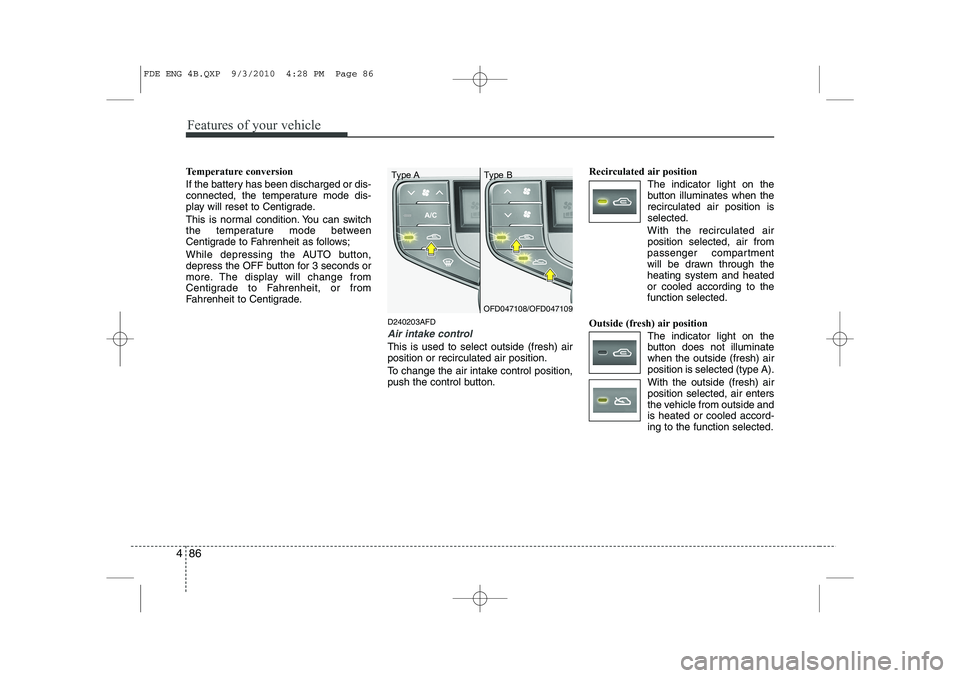
D240203AFD
Air intake control
This is used to select outside (fresh) air position or recirculated air position.
To change the air intake control position,
push the control button.Recirculated air position
The indicator light on the
button illuminates when therecirculated air position isselected.
With the recirculated air position selected, air from
passenger compartment
will be drawn through theheating system and heatedor cooled according to thefunction selected.
Outside (fresh) air position The indicator light on the
button does not illuminatewhen the outside (fresh) airposition is selected (type A). With the outside (fresh) air position selected, air enters
the vehicle from outside andis heated or cooled accord-ing to the function selected.
OFD047108/OFD047109
Type A Type B
FDE ENG 4B.QXP 9/3/2010 4:28 PM Page 86
Page 165 of 635
487
Features of your vehicle
✽✽NOTICE
It should be noted that prolonged oper-
ation of the heating in recirculated airposition will cause fogging of the wind-shield and side windows and the air
within the passenger compartment willbecome stale.
In addition, prolonged use of the air
conditioning with the recirculated air
position selected, will result in excessive-
ly dry air in the passenger compart-ment.
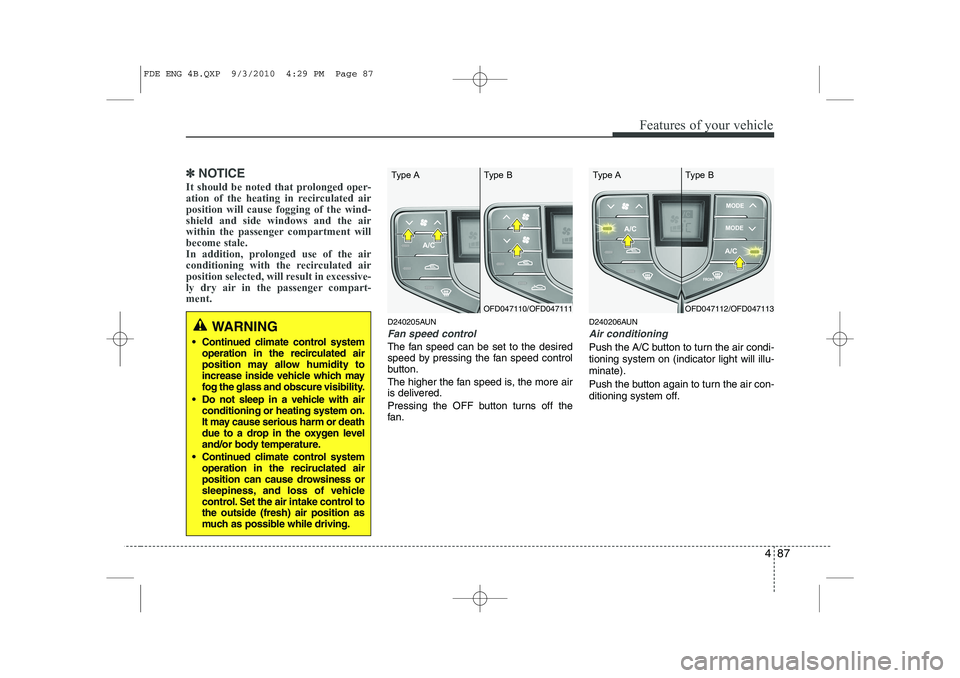
D240205AUN
Fan speed control
The fan speed can be set to the desired
speed by pressing the fan speed control
button.
The higher the fan speed is, the more air
is delivered.
Pressing the OFF button turns off the
fan. D240206AUN
Air conditioning
Push the A/C button to turn the air condi- tioning system on (indicator light will illu-minate).
Push the button again to turn the air con-
ditioning system off.
WARNING
Continued climate control system operation in the recirculated air
position may allow humidity to
increase inside vehicle which may
fog the glass and obscure visibility.
Do not sleep in a vehicle with air conditioning or heating system on.
It may cause serious harm or death
due to a drop in the oxygen level
and/or body temperature.
Continued climate control system operation in the reciruclated air
position can cause drowsiness or
sleepiness, and loss of vehicle
control. Set the air intake control tothe outside (fresh) air position as
much as possible while driving.
OFD047110/OFD047111
Type A Type BOFD047112/OFD047113
Type A Type B
FDE ENG 4B.QXP 9/3/2010 4:29 PM Page 87
Page 166 of 635
Features of your vehicle
88
4
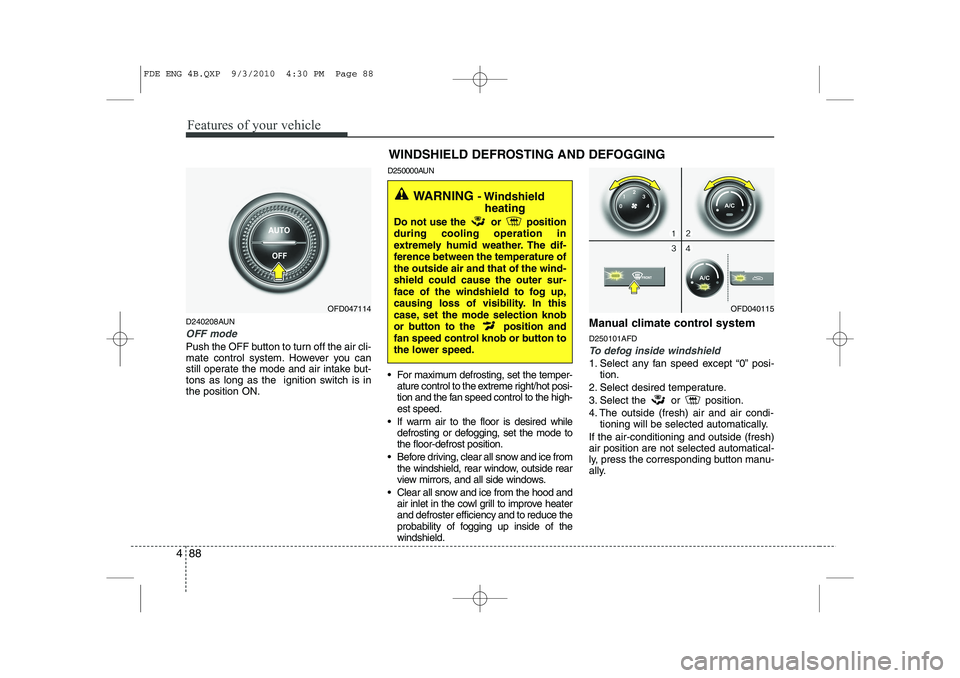
D240208AUN
OFF mode
Push the OFF button to turn off the air cli-
mate control system. However you can
still operate the mode and air intake but-
tons as long as the ignition switch is inthe position ON. D250000AUN
For maximum defrosting, set the temper-
ature control to the extreme right/hot posi-
tion and the fan speed control to the high-est speed.
If warm air to the floor is desired while defrosting or defogging, set the mode tothe floor-defrost position.
Before driving, clear all snow and ice from the windshield, rear window, outside rear
view mirrors, and all side windows.
Clear all snow and ice from the hood and air inlet in the cowl grill to improve heaterand defroster efficiency and to reduce the
probability of fogging up inside of thewindshield. Manual climate control system D250101AFDTo defog inside windshield
1. Select any fan speed except “0” posi-
tion.
2. Select desired temperature.
3. Select the or position.
4. The outside (fresh) air and air condi- tioning will be selected automatically.
If the air-conditioning and outside (fresh) air position are not selected automatical-
ly, press the corresponding button manu-
ally.
OFD047114 WINDSHIELD DEFROSTING AND DEFOGGINGOFD040115
WARNING
- Windshield
heating
Do not use the or position during cooling operation in
extremely humid weather. The dif-
ference between the temperature ofthe outside air and that of the wind-shield could cause the outer sur-
face of the windshield to fog up,
causing loss of visibility. In this
case, set the mode selection knob
or button to the position and
fan speed control knob or button to
the lower speed.
FDE ENG 4B.QXP 9/3/2010 4:30 PM Page 88
Page 167 of 635
489
Features of your vehicle
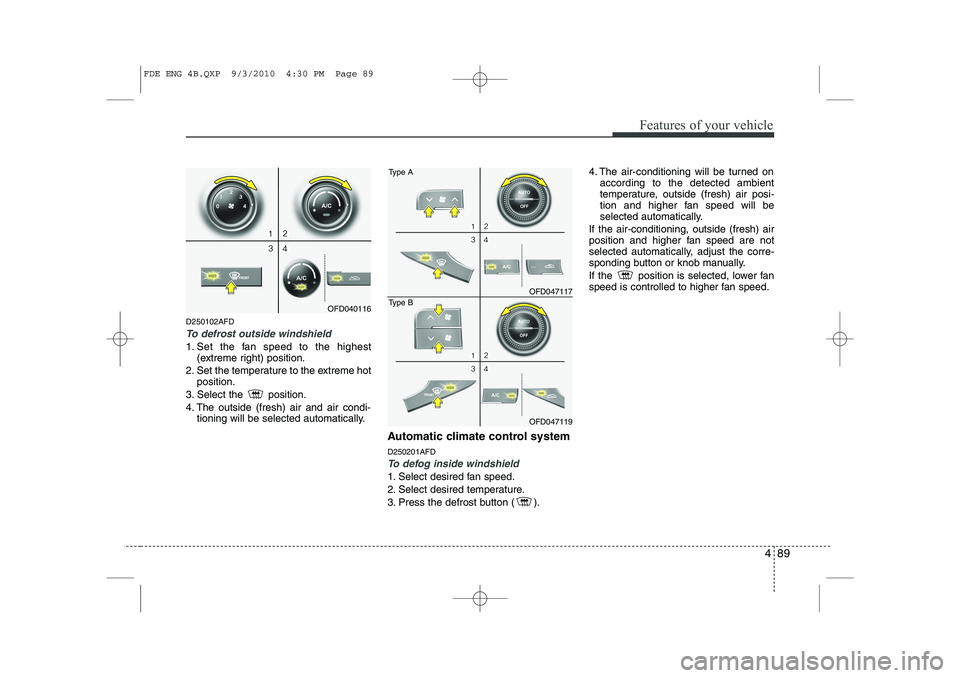
D250102AFD
To defrost outside windshield
1. Set the fan speed to the highest(extreme right) position.
2. Set the temperature to the extreme hot position.
3. Select the position.
4. The outside (fresh) air and air condi- tioning will be selected automatically.
Automatic climate control system D250201AFD
To defog inside windshield
1. Select desired fan speed.
2. Select desired temperature.
3. Press the defrost button ( ). 4. The air-conditioning will be turned on
according to the detected ambient
temperature, outside (fresh) air posi-
tion and higher fan speed will be
selected automatically.
If the air-conditioning, outside (fresh) air
position and higher fan speed are not
selected automatically, adjust the corre-
sponding button or knob manually.
If the position is selected, lower fan
speed is controlled to higher fan speed.
OFD040116
OFD047117
Type A
OFD047119
Type B
FDE ENG 4B.QXP 9/3/2010 4:30 PM Page 89
Page 168 of 635
Features of your vehicle
90
4
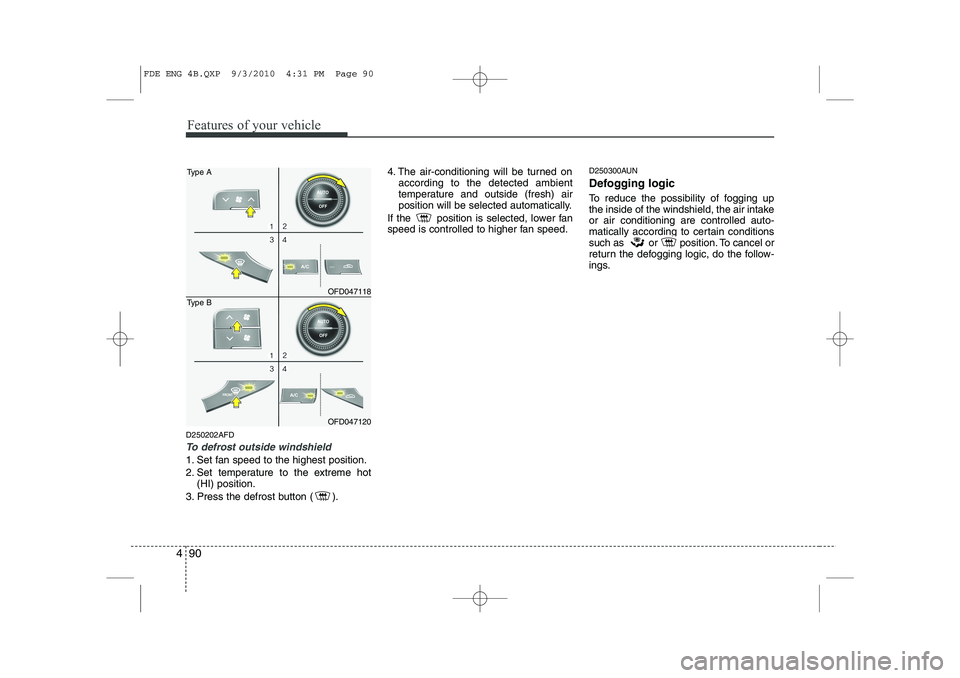
D250202AFD
To defrost outside windshield
1. Set fan speed to the highest position.
2. Set temperature to the extreme hot
(HI) position.
3. Press the defrost button ( ). 4. The air-conditioning will be turned on
according to the detected ambient
temperature and outside (fresh) air
position will be selected automatically.
If the position is selected, lower fan
speed is controlled to higher fan speed. D250300AUN
Defogging logic
To reduce the possibility of fogging up
the inside of the windshield, the air intakeor air conditioning are controlled auto-
matically according to certain conditions
such as or position. To cancel or
return the defogging logic, do the follow-
ings.
OFD047118
Type A
OFD047120
Type B
FDE ENG 4B.QXP 9/3/2010 4:31 PM Page 90
Page 170 of 635
Features of your vehicle
92
4
D270000AUN
These compartments can be used to
store small items required by the driver
or passengers.
D270100AFD
Center console storage (if equipped)
These compartments can be used to
store small items required by the driver
or front passenger.
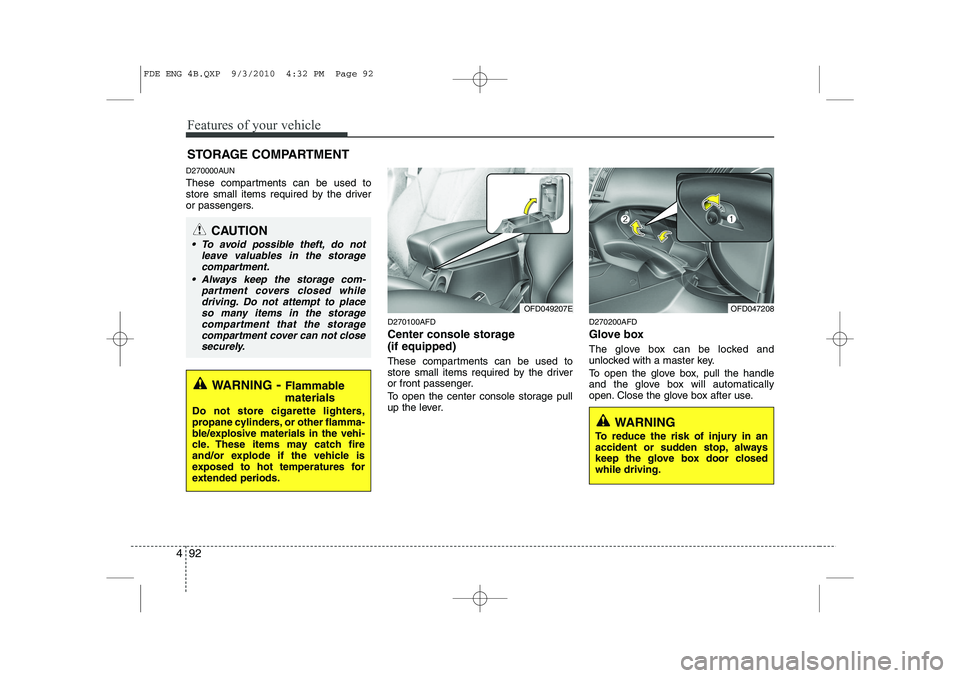
To open the center console storage pull
up the lever.D270200AFD
Glove box
The glove box can be locked and
unlocked with a master key.
To open the glove box, pull the handle
and the glove box will automatically
open. Close the glove box after use.
STORAGE COMPARTMENT
WARNING
- Flammable
materials
Do not store cigarette lighters,
propane cylinders, or other flamma-
ble/explosive materials in the vehi-
cle. These items may catch fire
and/or explode if the vehicle is
exposed to hot temperatures for
extended periods.
CAUTION
To avoid possible theft, do not leave valuables in the storage
compartment.
Always keep the storage com- partment covers closed whiledriving. Do not attempt to place
so many items in the storagecompartment that the storage compartment cover can not close securely.
OFD049207EOFD047208
WARNING
To reduce the risk of injury in an
accident or sudden stop, always
keep the glove box door closedwhile driving.
FDE ENG 4B.QXP 9/3/2010 4:32 PM Page 92
Page 171 of 635
493
Features of your vehicle
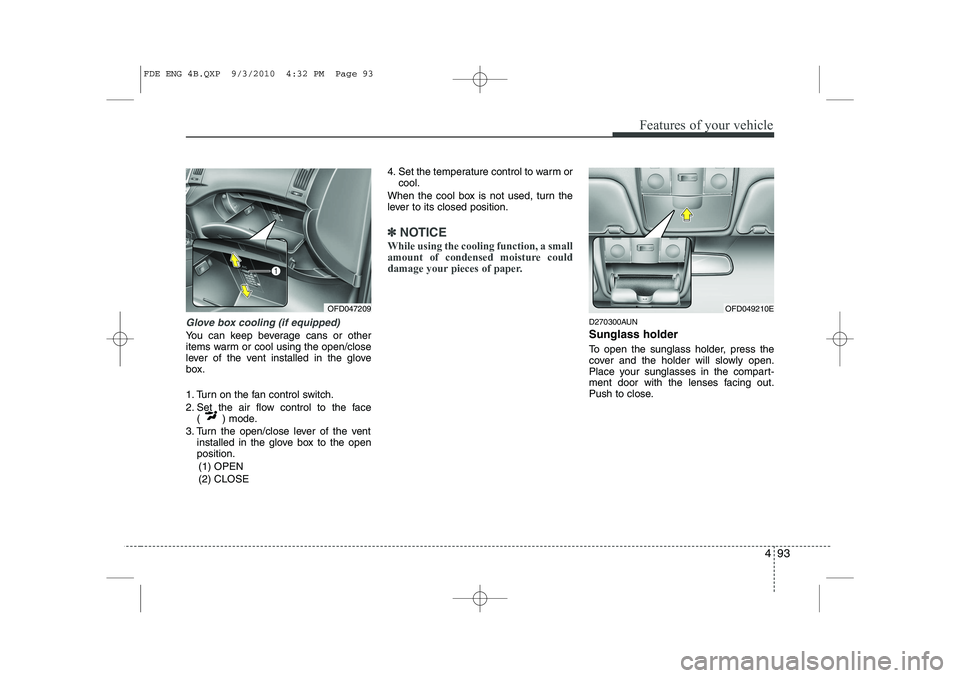
Glove box cooling (if equipped)
You can keep beverage cans or other
items warm or cool using the open/close
lever of the vent installed in the glove
box.
1. Turn on the fan control switch.
2. Set the air flow control to the face( ) mode.
3. Turn the open/close lever of the vent installed in the glove box to the open position.
(1) OPEN (2) CLOSE 4. Set the temperature control to warm or
cool.
When the cool box is not used, turn the
lever to its closed position.
✽✽ NOTICE
While using the cooling function, a small
amount of condensed moisture could
damage your pieces of paper.
D270300AUN Sunglass holder
To open the sunglass holder, press the
cover and the holder will slowly open.
Place your sunglasses in the compart-
ment door with the lenses facing out.
Push to close.
OFD047209OFD049210E
FDE ENG 4B.QXP 9/3/2010 4:32 PM Page 93
Page 189 of 635
4 111
Features of your vehicle
Care of disc (if equipped)
If the temperature inside the car is toohigh, open the car windows for ventilation
before using your car audio.
It is illegal to copy and use MP3/WMA/AAC/WAVE files without
permission. Use CDs that are created
only by lawful means.
Do not apply volatile agents such as benzene and thinner, normal cleaners
and magnetic sprays made for ana-
logue disc onto CDs.
To prevent the disc surface from get- ting damaged. Hold and carry CDs bythe edges or the edges of the center
hole only.
Clean the disc surface with a piece of soft cloth before playback (wipe it fromthe center to the outside edge).
Do not damage the disc surface or attach pieces of sticky tape or paperonto it.
Make sure on undesirable matter other than CDs are inserted into the CD
player (Do not insert more than oneCD at a time).
Keep CDs in their cases after use to protect them from scratches or dirt. Depending on the type of CD-R/CD-
RW CDs, certain CDs may not operate
normally according to manufacturingcompanies or making and recording
methods. In such circumstances, if you
still continue to use those CDs, they
may cause the malfunction of your caraudio system.
✽✽ NOTICE - Playing an
Incompatible Copy-Protected
Audio CD
Some copy protected CDs, which do not comply with the international audio CDstandards (Red Book), may not play on
your car audio. Please note that if you
try to play copy protected CDs and the
CD player does not perform correctlythe CDs maybe defective, not the CD
player.
FDE ENG 4C (AUDIO).QXP 9/3/2010 4:48 PM Page 111
Page 196 of 635
Features of your vehicle
118
4
10. SET UP Button
Press this button to turn to the SOUND,
RDS option, clock setting, time display,
SCROLL, SDVC, temperature display
and adjustment mode.
If no action is taken for 5 seconds after
pressing the button, it will return to the
play mode.(After entering SET UP mode,
move between items using the left, right
and PUSH functions of the TUNE but-ton.)
The set up item changes from AUDIO ➟
RDS ➟ CLOCK ➟ TIME ➟ SCROLL ➟
SDVC ➟ TEMP ➟ P.BASS ➟ AUDIO...
The manual setting is a default for radio
time but if customer wants, the time
received from RDS station can be set for
radio time. In this case, the RDS time,
which is effected by the situation of RDS
station, can be different with actual time. ❈
TO SETUP TIME UPDATE
1. Press SETUP button.
2. Select RDS menu by rotating/pressing TUNE knob.
3. Select TIME menu by rotating/pressing TUNE knob.
4. Select Auto or Manual by rotating/ pressing TUNE knob.
5. Press SETUP button to exit SETUP mode.
11. TUNE/ENTER Button
Turn this button clockwise by one notch
to increase frequency by 0.05Mhz from
current frequency.
Turn this button counterclockwise by one
notch to decrease frequency by 0.05Mhz
from current frequency.
Press this button while holding SET UP
button to activate / inactivate the item to.
Select SET UP item using left and right
function of the Tune button. 12. PTY(FLDR) button
Moves [PTY ] Button when search-
ing PTY in RDS Broadcasting Program
Type selection.
Moves [PTY ] button when search- ing PTY in RDS Broadcasting Program
Type selection.
13. Preset Button
Push [1]~[6] buttons less than 0.8 second
to play the channel saved in each button.
Push preset button for 0.8 second or
longer to save current channel to the
respective button with a beep.
FDE ENG 4C (AUDIO).QXP 9/3/2010 4:49 PM Page 118
Page 208 of 635
Features of your vehicle
130
4
10. SET UP Button
Press this button to turn to the SOUND,
RDS option, clock setting, time display,
SCROLL, SDVC, temperature display
and adjustment mode.
If no action is taken for 5 seconds after
pressing the button, it will return to the
play mode.(After entering SET UP mode,
move between items using the left, right
and PUSH functions of the TUNE but-ton.)
The set up item changes from AUDIO ➟
RDS ➟ CLOCK ➟ TIME ➟ SCROLL ➟
SDVC ➟ TEMP ➟AUDIO...
The manual setting is a default for radio
time but if customer wants, the time
received from RDS station can be set for
radio time. In this case, the RDS time,
which is effected by the situation of RDS
station, can be different with actual time. ❈
TO SETUP TIME UPDATE
1. Press SETUP button.
2. Select RDS menu by rotating/pressing TUNE knob.
3. Select TIME menu by rotating/pressing TUNE knob.
4. Select Auto or Manual by rotating/ pressing TUNE knob.
5. Press SETUP button to exit SETUP mode.
11. TUNE/ENTER Button
Turn this button clockwise by one notch
to increase frequency by 0.05Mhz from
current frequency.
Turn this button counterclockwise by one
notch to decrease frequency by 0.05Mhz
from current frequency.
Press this button while holding SET UP
button to activate / inactivate the item to.
Select SET UP item using left and right
function of the Tune button. 12. PTY(FLDR) Button
Moves [PTY ] button when search-
ing PTY in RDS Broadcasting Program
Type selection.
Moves [PTY ] button when search- ing PTY in RDS Broadcasting Program
Type selection.
13. Preset Button
Push [1]~[6] buttons less than 0.8 second
to play the channel saved in each button.
Push preset button for 0.8 second or
longer to save current channel to the
respective button with a beep.
FDE ENG 4C (AUDIO).QXP 9/3/2010 4:49 PM Page 130