reset HYUNDAI I30 2012 User Guide
[x] Cancel search | Manufacturer: HYUNDAI, Model Year: 2012, Model line: I30, Model: HYUNDAI I30 2012Pages: 635, PDF Size: 40.66 MB
Page 190 of 635
Features of your vehicle
112
4
A-100FD
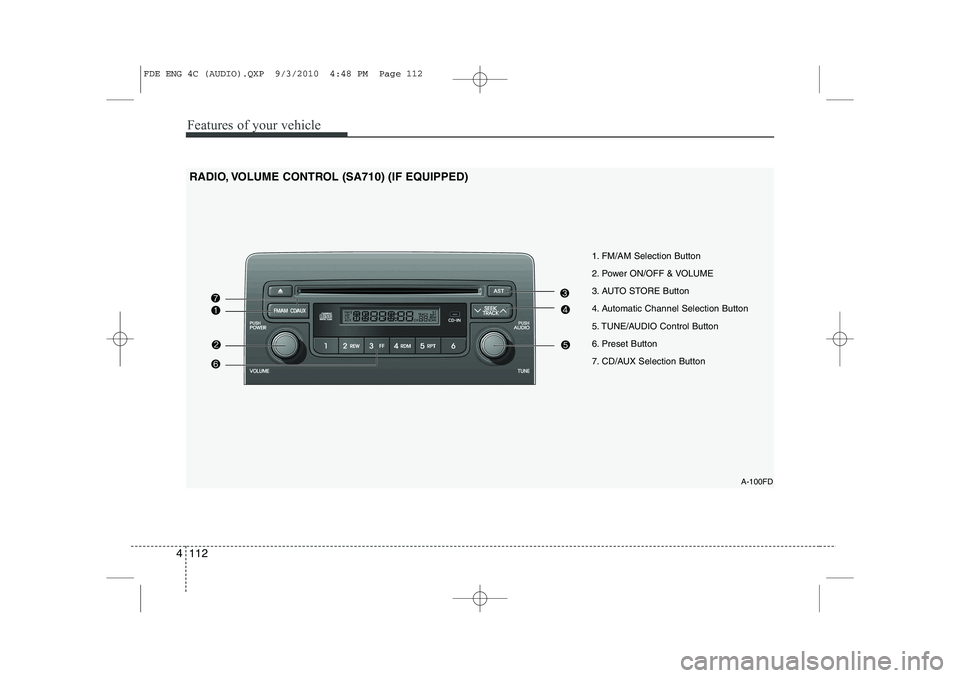
1. FM/AM Selection Button
2. Power ON/OFF & VOLUME
3. AUTO STORE Button
4. Automatic Channel Selection Button
5. TUNE/AUDIO Control Button
6. Preset Button
7. CD/AUX Selection Button
RADIO, VOLUME CONTROL (SA710) (IF EQUIPPED)
FDE ENG 4C (AUDIO).QXP 9/3/2010 4:48 PM Page 112
Page 191 of 635
4 113
Features of your vehicle
1. FM/AM Selection Button
Turns to FM/AM mode and toggles FM1 and FM2➟AM ➟FM1··· when the button is
pressed each time.
2. Power ON/OFF & Volume
Control Button
Turns the ON/OFF set when the IGNI-
TION SWITCH is on ACC or ON.
If the button is turned to the right, it
increases the volume and left, decreases
the volume.
3. AUTO STORE Button
When the button is pressed, it automati-
cally selects and saves channels with
high reception rate to PRESET but-
tons(1~6) and plays the channel saved inPRESET1.
If no channel is saved after AST, it will
play the previous channel. 4. Automatic Channel Selection
Button
When the [SEEK ] button is pressed, it reduces the band frequency
by 5kHz to automatically select chan-
nel. Stops at the previous frequency if
no channel is found.
When the [SEEK ] button is pressed, it increases the band fre-
quency by 5kHz to automatically select
channel. Stops at the previous fre-
quency if no channel is found.
5. TUNE/AUDIO Control Button
Turn this button clockwise by one notch
to increase frequency by 0.05MHz from
current frequency.
Turn this button counterclockwise by one
notch to decrease frequency by 0.05MHz
from current frequency.
Turns to AUDIO CONTROL mode, and toggles in the order of BASS ➟
MIDDLE
➟ TREBLE ➟ FADER ➟ BALANCE ➟
AVC ON ➟ P.BASS ➟ BASS··· when the
button is pressed each time. 6. Preset Button
Push [1]~[6]button less than 0.8 second
to play the channel saved in each button.
Push preset button for 0.8 second or
longer to save current channel to the
respective button with a beep.
7. CD/AUX Selection Button
If there is a cd in the CDP DECK it turns
to CD mode, and if a device is connected
to AUX then it toggles. CD
➟AUX ➟CD··· when the button is
pressed each time.(It will not turn to AUX
if the auxiliary device is not connected.)
FDE ENG 4C (AUDIO).QXP 9/3/2010 4:48 PM Page 113
Page 194 of 635
Features of your vehicle
116
4
A-200FDE
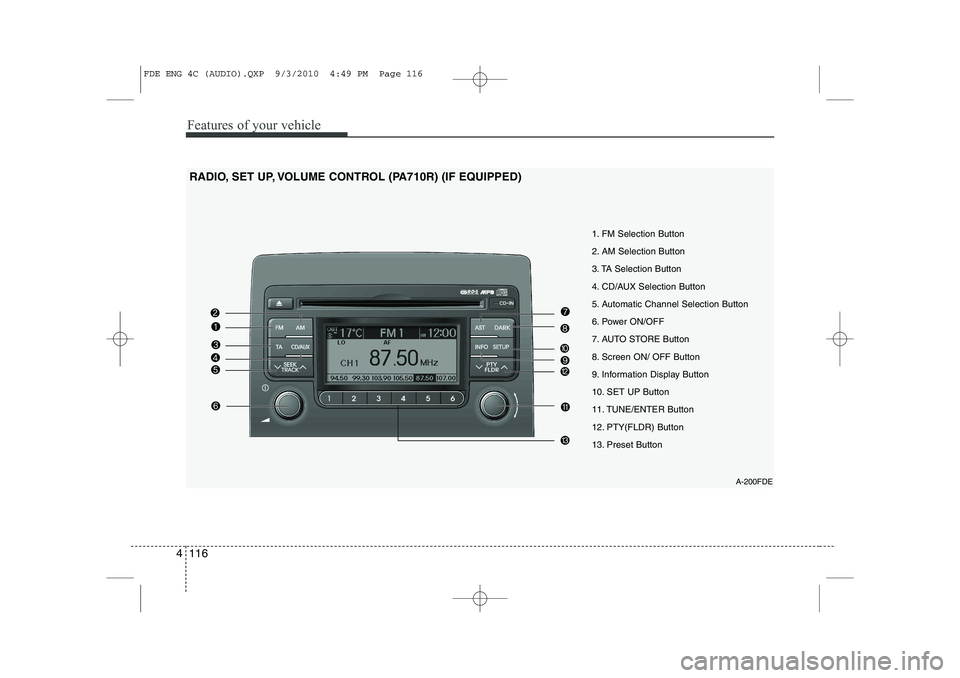
1. FM Selection Button
2. AM Selection Button
3. TA Selection Button
4. CD/AUX Selection Button
5. Automatic Channel Selection Button
6. Power ON/OFF
7. AUTO STORE Button
8. Screen ON/ OFF Button
9. Information Display Button
10. SET UP Button
11. TUNE/ENTER Button
12. PTY(FLDR) Button
13. Preset Button
RADIO, SET UP, VOLUME CONTROL (PA710R) (IF EQUIPPED)
FDE ENG 4C (AUDIO).QXP 9/3/2010 4:49 PM Page 116
Page 195 of 635
4 117
Features of your vehicle
1. FM Selection Button
Turns to FM mode and toggles in the order of FM1➟FM2 ➟FMA ➟FM1··· when
the button is pressed each time.
2. AM Selection Button
Turns to AM mode, and toggles AM and
AMA when the button is pressed each
time.
3. TA Selection Button
In FM, CD, AUX mode, turns on/off the
reception of TA channels of RDS.
4. CD/AUX Selection Button
If there is a cd in the CDP DECK it turns
to CD mode, and if a device is connected
to AUX then it toggles. CD ➟
AUX ➟CD··· when the button is
pressed each time.(It will not turn to AUX
if the auxiliary device is not connected.) 5. Automatic Channel Selection
Button
When the [SEEK ]button is pressed, it reduces the band frequency by 50khz to automatically select channel.
Stops at the previous frequency if no
channel is found.
When the [SEEK ]button is pressed, it increases the band frequency by50khz to automatically select channel.
Stops at the previous frequency if no
channel is found.
6. Power ON/OFF & Volume Control Button
Turns on/off the set when the IGNI- TION SWITCH is on ACC or ON. If the
button is turned to the right, it increas-
es the volume and left, decreases the
volume.
In AUX mode, the volume and tone (BASS, MID, TRE) are adjusted in a
separate way.
If you pull out AUX from a jack and
insert it again, then only volume goes
back to 10-step. 7. AUTO STORE Button
When you press the [AST] button, the
mode changes to ‘Auto store Band’ and
it saves the result. (FM1 or FM2 changes to FMA, AM changes to AMA.)
When the button is pressed, it auto- matically selects and saves channels
with high reception rate to PRESET
buttons (1~6) and plays the channel
saved in PRESET1.
If no channel is saved after AST, it will
play the previous channel.
8. Screen ON/ OFF Button
Turns off/on the displayed data and light
on LCD.
The screen and light will be turned on by
pressing any button except DARK button
when the screen is turned off.
9. Information Display Button
Displays the information of the channel
currently played by RDS.
FDE ENG 4C (AUDIO).QXP 9/3/2010 4:49 PM Page 117
Page 196 of 635
Features of your vehicle
118
4
10. SET UP Button
Press this button to turn to the SOUND,
RDS option, clock setting, time display,
SCROLL, SDVC, temperature display
and adjustment mode.
If no action is taken for 5 seconds after
pressing the button, it will return to the
play mode.(After entering SET UP mode,
move between items using the left, right
and PUSH functions of the TUNE but-ton.)
The set up item changes from AUDIO ➟
RDS ➟ CLOCK ➟ TIME ➟ SCROLL ➟
SDVC ➟ TEMP ➟ P.BASS ➟ AUDIO...
The manual setting is a default for radio
time but if customer wants, the time
received from RDS station can be set for
radio time. In this case, the RDS time,
which is effected by the situation of RDS
station, can be different with actual time. ❈
TO SETUP TIME UPDATE
1. Press SETUP button.
2. Select RDS menu by rotating/pressing TUNE knob.
3. Select TIME menu by rotating/pressing TUNE knob.
4. Select Auto or Manual by rotating/ pressing TUNE knob.
5. Press SETUP button to exit SETUP mode.
11. TUNE/ENTER Button
Turn this button clockwise by one notch
to increase frequency by 0.05Mhz from
current frequency.
Turn this button counterclockwise by one
notch to decrease frequency by 0.05Mhz
from current frequency.
Press this button while holding SET UP
button to activate / inactivate the item to.
Select SET UP item using left and right
function of the Tune button. 12. PTY(FLDR) button
Moves [PTY ] Button when search-
ing PTY in RDS Broadcasting Program
Type selection.
Moves [PTY ] button when search- ing PTY in RDS Broadcasting Program
Type selection.
13. Preset Button
Push [1]~[6] buttons less than 0.8 second
to play the channel saved in each button.
Push preset button for 0.8 second or
longer to save current channel to the
respective button with a beep.
FDE ENG 4C (AUDIO).QXP 9/3/2010 4:49 PM Page 118
Page 206 of 635
Features of your vehicle
128
4
A-300FDE
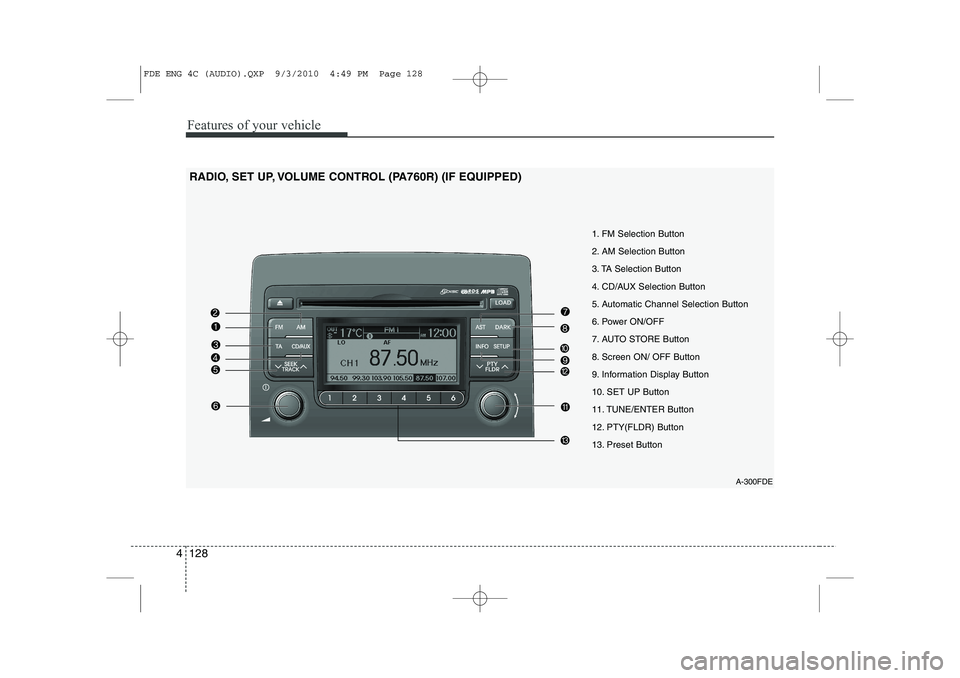
1. FM Selection Button
2. AM Selection Button
3. TA Selection Button
4. CD/AUX Selection Button
5. Automatic Channel Selection Button
6. Power ON/OFF
7. AUTO STORE Button
8. Screen ON/ OFF Button
9. Information Display Button
10. SET UP Button
11. TUNE/ENTER Button
12. PTY(FLDR) Button
13. Preset Button
RADIO, SET UP, VOLUME CONTROL (PA760R) (IF EQUIPPED)
FDE ENG 4C (AUDIO).QXP 9/3/2010 4:49 PM Page 128
Page 207 of 635
4 129
Features of your vehicle
1. FM Selection Button
Turns to FM mode and toggles in the order of FM1➟FM2 ➟FMA ➟FM1··· when
the button is pressed each time.
2. AM Selection Button
Turns to AM mode, and toggles AM and
AMA when the button is pressed each
time.
3. TA Selection Button
In FM, CD, AUX mode, turns on/off the
reception of TA channels of RDS.
4. CD/AUX Selection Button
If there is a cd in the CDP DECK it turns
to CD mode, and if a device is connected
to AUX then it toggles. CD ➟
AUX ➟CD··· when the button is
pressed each time.(It will not turn to AUX
if the auxiliary device is not connected.) 5. Automatic Channel Selection
Button
When the [SEEK ]button is pressed, it reduces the band frequency by 50khz to automatically select channel.
Stops at the previous frequency if no
channel is found.
When the [SEEK ]button is pressed, it increases the band frequency by50khz to automatically select channel.
Stops at the previous frequency if no
channel is found.
6. Power ON/OFF & Volume Control Button
Turns on/off the set when the IGNI- TION SWITCH is on ACC or ON. If the
button is turned to the right, it increas-
es the volume and left, decreases the
volume.
In AUX mode, the volume and tone (BASS, MID, TRE) are adjusted in a
separate way.
If you pull out AUX from a jack and
insert it again, then only volume goes
back to 10-step. 7. AUTO STORE Button
When you press the [AST] button, the
mode changes to ‘Auto store Band’ and
it saves the result. (FM1 or FM2 changes to FMA, AM changes to AMA.)
When the button is pressed, it auto- matically selects and saves channels
with high reception rate to PRESET
buttons (1~6) and plays the channel
saved in PRESET1.
If no channel is saved after AST, it will
play the previous channel.
8. Screen ON/ OFF Button
Turns off/on the displayed data and light
on LCD.
The screen and light will be turned on by
pressing any button except DARK button
when the screen is turned off.
9. Information Display Button
Displays the information of the channel
currently played by RDS.
FDE ENG 4C (AUDIO).QXP 9/3/2010 4:49 PM Page 129
Page 208 of 635
Features of your vehicle
130
4
10. SET UP Button
Press this button to turn to the SOUND,
RDS option, clock setting, time display,
SCROLL, SDVC, temperature display
and adjustment mode.
If no action is taken for 5 seconds after
pressing the button, it will return to the
play mode.(After entering SET UP mode,
move between items using the left, right
and PUSH functions of the TUNE but-ton.)
The set up item changes from AUDIO ➟
RDS ➟ CLOCK ➟ TIME ➟ SCROLL ➟
SDVC ➟ TEMP ➟AUDIO...
The manual setting is a default for radio
time but if customer wants, the time
received from RDS station can be set for
radio time. In this case, the RDS time,
which is effected by the situation of RDS
station, can be different with actual time. ❈
TO SETUP TIME UPDATE
1. Press SETUP button.
2. Select RDS menu by rotating/pressing TUNE knob.
3. Select TIME menu by rotating/pressing TUNE knob.
4. Select Auto or Manual by rotating/ pressing TUNE knob.
5. Press SETUP button to exit SETUP mode.
11. TUNE/ENTER Button
Turn this button clockwise by one notch
to increase frequency by 0.05Mhz from
current frequency.
Turn this button counterclockwise by one
notch to decrease frequency by 0.05Mhz
from current frequency.
Press this button while holding SET UP
button to activate / inactivate the item to.
Select SET UP item using left and right
function of the Tune button. 12. PTY(FLDR) Button
Moves [PTY ] button when search-
ing PTY in RDS Broadcasting Program
Type selection.
Moves [PTY ] button when search- ing PTY in RDS Broadcasting Program
Type selection.
13. Preset Button
Push [1]~[6] buttons less than 0.8 second
to play the channel saved in each button.
Push preset button for 0.8 second or
longer to save current channel to the
respective button with a beep.
FDE ENG 4C (AUDIO).QXP 9/3/2010 4:49 PM Page 130
Page 219 of 635
4 141
Features of your vehicle
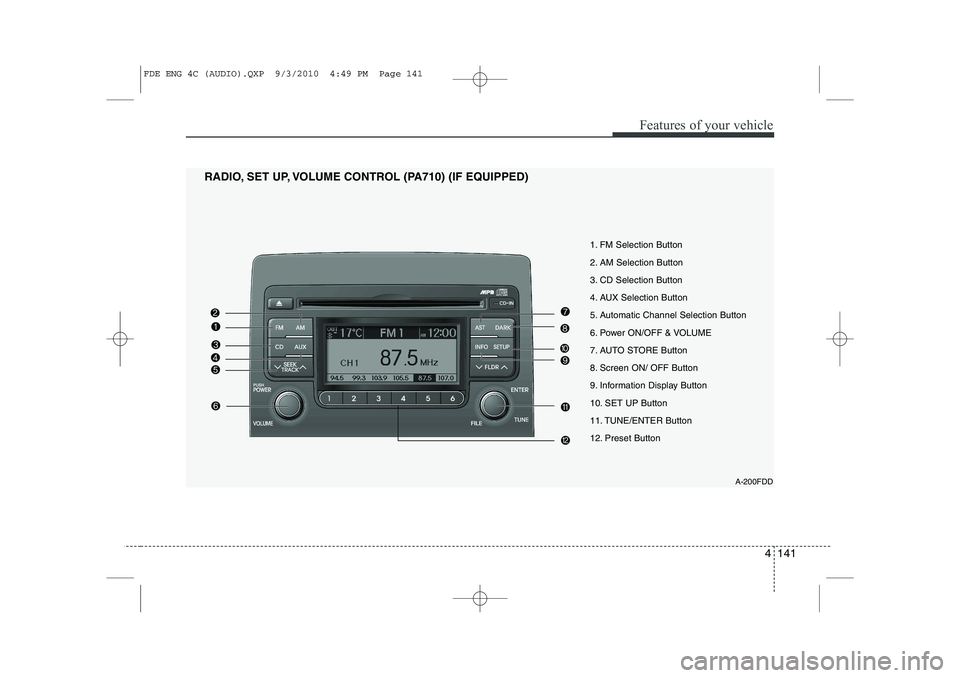
1. FM Selection Button
2. AM Selection Button
3. CD Selection Button
4. AUX Selection Button
5. Automatic Channel Selection Button
6. Power ON/OFF & VOLUME
7. AUTO STORE Button
8. Screen ON/ OFF Button
9. Information Display Button
10. SET UP Button
11. TUNE/ENTER Button
12. Preset Button
RADIO, SET UP, VOLUME CONTROL (PA710) (IF EQUIPPED)
A-200FDD
FDE ENG 4C (AUDIO).QXP 9/3/2010 4:49 PM Page 141
Page 220 of 635
Features of your vehicle
142
4
1. FM Selection Button
Turns to FM mode and toggles FM1 and
FM2 when the button is pressed each
time.
2. AM Selection Button
Turns to AM mode, and toggles in the order of AM1 ➟AM2 ➟AM1··· when the
button is pressed each time.
3. CD Selection Button
If there is a cd in the CDP DECK it plays
the CD.
Press CD button to automatically insert CD when the disc is ejected from the
deck by pressing CD EJECT.
4. AUX Selection Button
If the auxiliary device is connected, it
turns to AUX MODE to play the sound
from the auxiliary player.
If no Disc and auxiliary device is connected,
it displays “NO Media” for 5 seconds and
returns to the previous mode. 5. Automatic Channel Selection
Button
When the [SEEK ]button is pressed, it reduces the band frequency by 100khz to automatically select chan-
nel. Stops at the previous frequency if
no channel is found.
When the [SEEK ]button is pressed, it increases the band frequency by100khz to automatically select channel.
Stops at the previous frequency if no
channel is found.
6. Power ON/OFF & Volume Control Button
Turns on/off the set when the IGNI- TION SWITCH is on ACC or ON. If the
button is turned to the right, it increas-
es the volume and left, decreases the
volume.
In AUX mode, the volume and tone (BASS, MID, TRE) are adjusted in a
separate way.
If you pull out AUX from a jack and
insert it again, then only volume goes
back to 10-step. 7. AUTO STORE Button
When the button is pressed, it automati-
cally selects and saves channels with
high reception rate to PRESET buttons
(1~6) and plays the channel saved inPRESET1.
If no channel is saved after AST, it will
play the previous channel.
8. Screen ON/ OFF Button
Turns off/on the displayed data and light
on LCD.
The screen and light will be turned on by
pressing any button except DARK button
when the screen is turned off.
9. Information Display Button
Displays the information of the channel
currently played.
FDE ENG 4C (AUDIO).QXP 9/3/2010 4:49 PM Page 142