Front HYUNDAI I30 2018 Workshop Manual
[x] Cancel search | Manufacturer: HYUNDAI, Model Year: 2018, Model line: I30, Model: HYUNDAI I30 2018Pages: 659, PDF Size: 17.14 MB
Page 88 of 659
3-86
The high beam switches to low beam
in the below conditions.
- When the Smart High Beam is off.
- When the light switch is not in theAUTO position.
- When the headlamp is detected from the on-coming vehicle.
- When the tail lamp is detected from the front vehicle.
- When the surrounding is bright enough high beams are not needed.
- When streetlights or other lights are detected.
- When vehicle speed is below 35km/h (15mph).Warning light and message
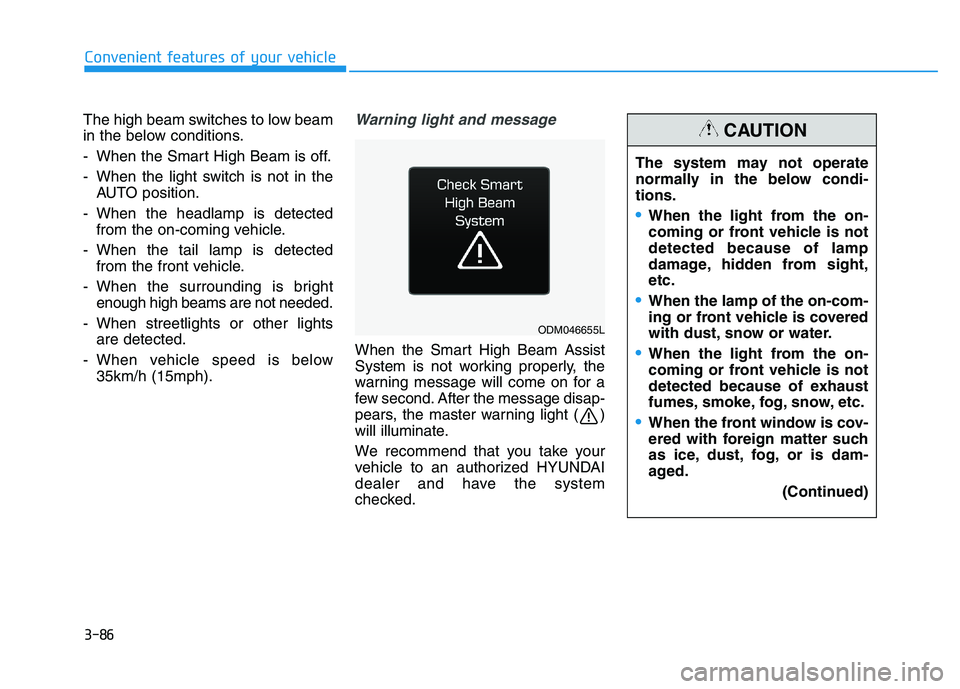
When the Smart High Beam Assist
System is not working properly, the
warning message will come on for a
few second. After the message disap-
pears, the master warning light ( )
will illuminate.
We recommend that you take your
vehicle to an authorized HYUNDAI
dealer and have the system
checked.
Convenient features of your vehicle
ODM046655L
The system may not operate
normally in the below condi-
tions.
When the light from the on-
coming or front vehicle is not
detected because of lamp
damage, hidden from sight,
etc.
When the lamp of the on-com-
ing or front vehicle is covered
with dust, snow or water.
When the light from the on-
coming or front vehicle is not
detected because of exhaust
fumes, smoke, fog, snow, etc.
When the front window is cov-
ered with foreign matter such
as ice, dust, fog, or is dam-
aged.
(Continued)
CAUTION
Page 89 of 659
3-87
Convenient features of your vehicle
3
(Continued)
When there is a similar
shaped lamp with the front
vehicle’s lamps.
When it is hard to see
because of fog, heavy rain or
snow.
When the headlamp is not
repaired or replaced at an
authorized dealer.
When headlamp aiming is not
properly adjusted.
When driving on a narrow
winding road or rough road.
When driving downhill or
uphill.
When only part of the vehicle
in front is visible on a cross-
road or on a corner.
When there is a traffic light,
reflecting sign, flashing sign
or mirror.
When the road conditions are
bad such as being wet or cov-
ered with snow.(Continued)
(Continued)
When the front vehicle’s head-
lamps are off but the fog
lamps on.
When a vehicle suddenly
appears from a around a cor-
ner.
When the vehicle is tilted from
a flat tyre or being towed.
When the LDWS (Lane Departure
Warning System) or LKAS (Lane
Keeping Assist System) warning
light illuminates. (if equipped)
Do not place any accessories,
stickers or tint the windshield.
Have the windshield glass
replaced by an authorised
dealer.
Do not remove or impact relat-
ed parts of the Smart High
Beam system.
Be careful that water doesn’t
get into the Smart High Beam
unit.
Do not place objects on the
instrument panel that reflect
light such as mirrors, white
paper, etc. The system may
malfunction if sunlight is
reflected.
At times, the Smart High
Beam system may not work
properly, always check the
road conditions for your safe-
ty. When the system does not
operate normally, manually
change between the high
beam and low beam.
WARNING
Page 90 of 659
3-88
Convenient features of your vehicle
Turn signals and lane changesignals
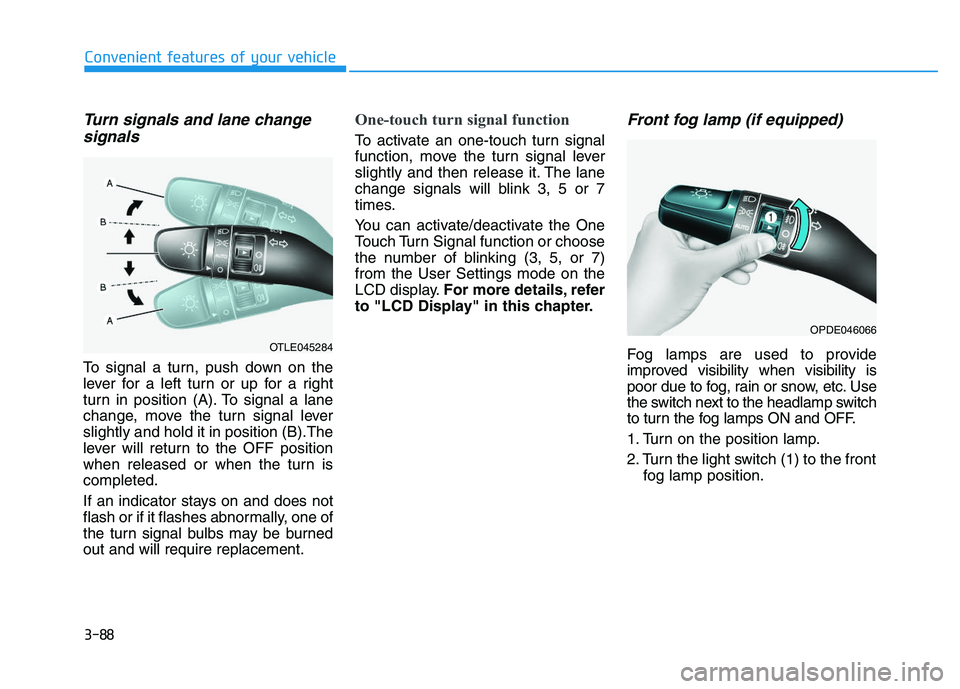
To signal a turn, push down on the
lever for a left turn or up for a right
turn in position (A). To signal a lane
change, move the turn signal lever
slightly and hold it in position (B).The
lever will return to the OFF position
when released or when the turn is
completed.
If an indicator stays on and does not
flash or if it flashes abnormally, one of
the turn signal bulbs may be burned
out and will require replacement.
One-touch turn signal function
To activate an one-touch turn signal
function, move the turn signal lever
slightly and then release it. The lane
change signals will blink 3, 5 or 7
times.
You can activate/deactivate the One
Touch Turn Signal function or choose
the number of blinking (3, 5, or 7)
from the User Settings mode on the
LCD display. For more details, refer
to "LCD Display" in this chapter.
Front fog lamp (if equipped)
Fog lamps are used to provide
improved visibility when visibility is
poor due to fog, rain or snow, etc. Use
the switch next to the headlamp switch
to turn the fog lamps ON and OFF.
1. Turn on the position lamp.
2. Turn the light switch (1) to the front fog lamp position.
OPDE046066
OTLE045284
Page 91 of 659
3-89
Convenient features of your vehicle
3
3. To turn off the front fog lamp, turnthe light switch to the front fog
lamp position again or turn off the
position lamp.
When in operation, the fog lamps
consume large amounts of vehicle
electrical power. Only use the fog
lamps when visibility is poor.Rear fog lamp
Vehicle with front fog lamp
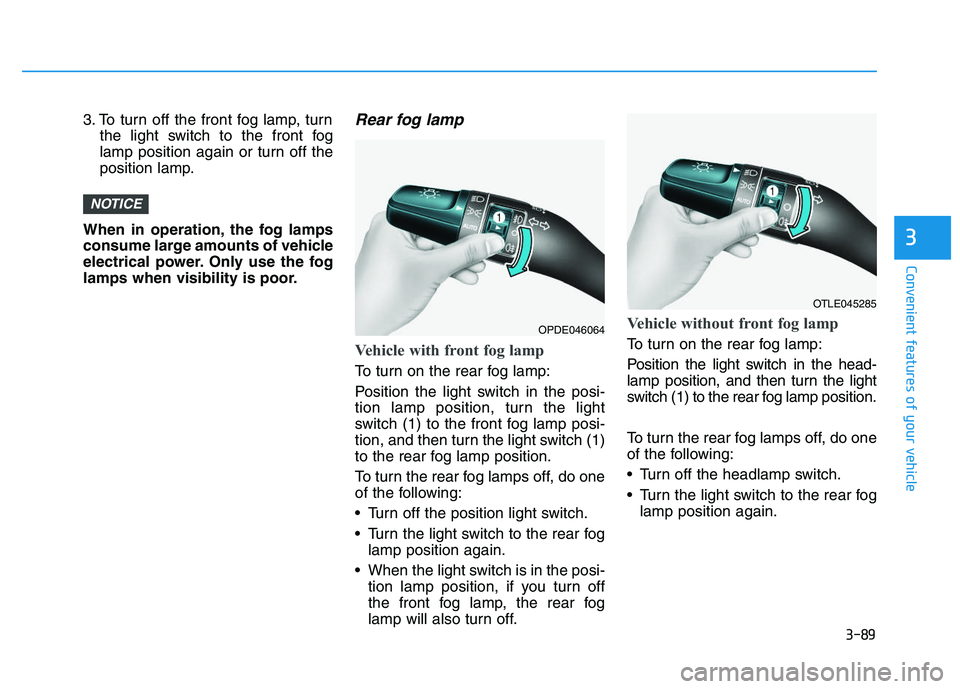
To turn on the rear fog lamp:
Position the light switch in the posi-
tion lamp position, turn the light
switch (1) to the front fog lamp posi-
tion, and then turn the light switch (1)
to the rear fog lamp position.
To turn the rear fog lamps off, do one
of the following:
Turn off the position light switch.
Turn the light switch to the rear fog lamp position again.
When the light switch is in the posi- tion lamp position, if you turn off
the front fog lamp, the rear fog
lamp will also turn off.
Vehicle without front fog lamp
To turn on the rear fog lamp:
Position the light switch in the head-
lamp position, and then turn the light
switch (1) to the rear fog lamp position.
To turn the rear fog lamps off, do one
of the following:
Turn off the headlamp switch.
Turn the light switch to the rear foglamp position again.
NOTICE
OTLE045285
OPDE046064
Page 93 of 659
3-91
Convenient features of your vehicle
3
Daytime running light (DRL) (if equipped)
The Daytime Running Lights (DRL)
can make it easier for others to see
the front of your vehicle during the
day, especially after dawn and before
sunset.
The DRL system will turn the dedi-
cated lamp OFF when:
1. The headlights or front fog lights
are in the ON position.
2. The position light switch is in the ON position.
3. The engine is turned off.
Headlight leveling device (if equipped)
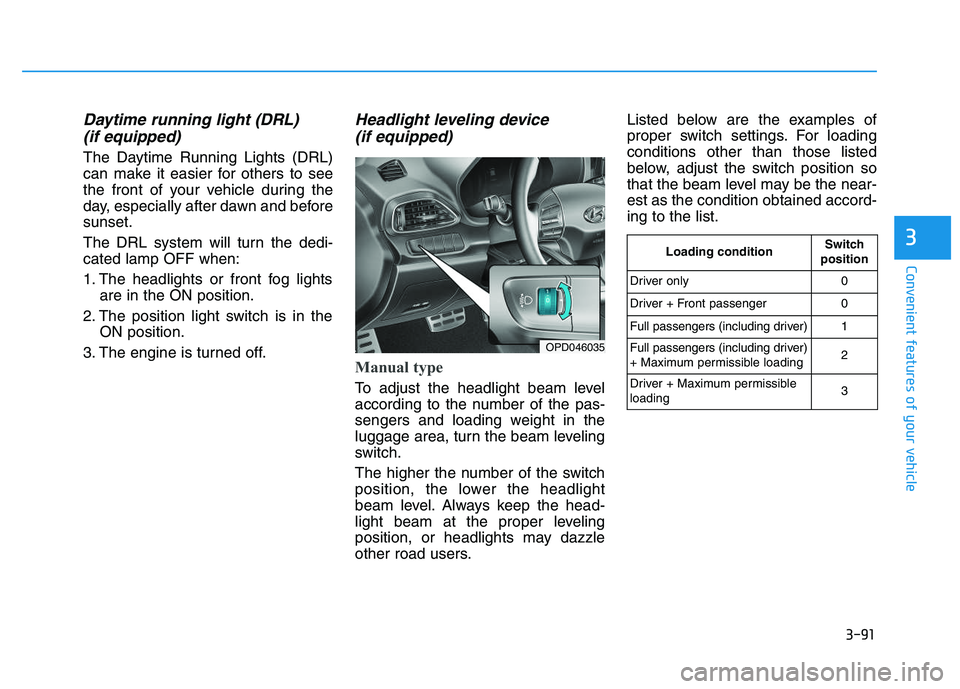
Manual type
To adjust the headlight beam level
according to the number of the pas-
sengers and loading weight in the
luggage area, turn the beam leveling
switch.
The higher the number of the switch
position, the lower the headlight
beam level. Always keep the head-
light beam at the proper leveling
position, or headlights may dazzle
other road users. Listed below are the examples of
proper switch settings. For loading
conditions other than those listed
below, adjust the switch position so
that the beam level may be the near-
est as the condition obtained accord-
ing to the list.
OPD046035
Loading conditionSwitch
position
Driver only0
Driver + Front passenger0
Full passengers (including driver)1
Full passengers (including driver)
+ Maximum permissible loading2
Driver + Maximum permissible
loading 3
Page 96 of 659
3-94
Convenient features of your vehicle
Front lamps
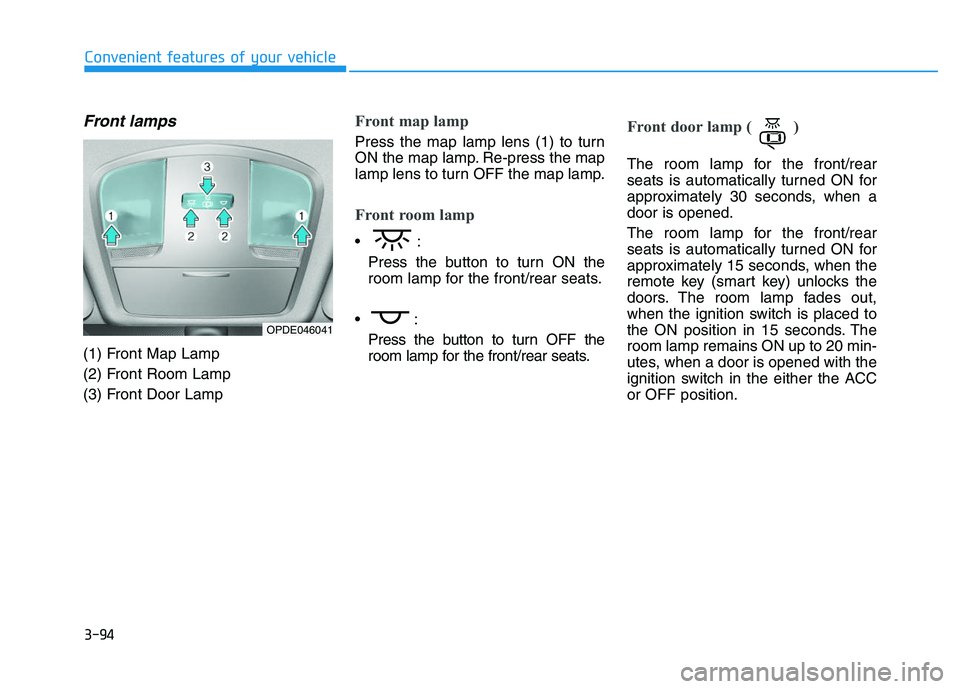
(1) Front Map Lamp
(2) Front Room Lamp
(3) Front Door Lamp
Front map lamp
Press the map lamp lens (1) to turn
ON the map lamp. Re-press the map
lamp lens to turn OFF the map lamp.
Front room lamp
Press the button to turn ON the
room lamp for the front/rear seats.
Press the button to turn OFF the
room lamp for the front/rear seats.
Front door lamp ( )
The room lamp for the front/rear
seats is automatically turned ON for
approximately 30 seconds, when a
door is opened.
The room lamp for the front/rear
seats is automatically turned ON for
approximately 15 seconds, when the
remote key (smart key) unlocks the
doors. The room lamp fades out,
when the ignition switch is placed to
the ON position in 15 seconds. The
room lamp remains ON up to 20 min-
utes, when a door is opened with the
ignition switch in the either the ACC
or OFF position.
OPDE046041
Page 99 of 659
3-97
Convenient features of your vehicle
W
W I
I P
P E
E R
R S
S
A
A N
N D
D
W
W A
A S
S H
H E
E R
R S
S
3
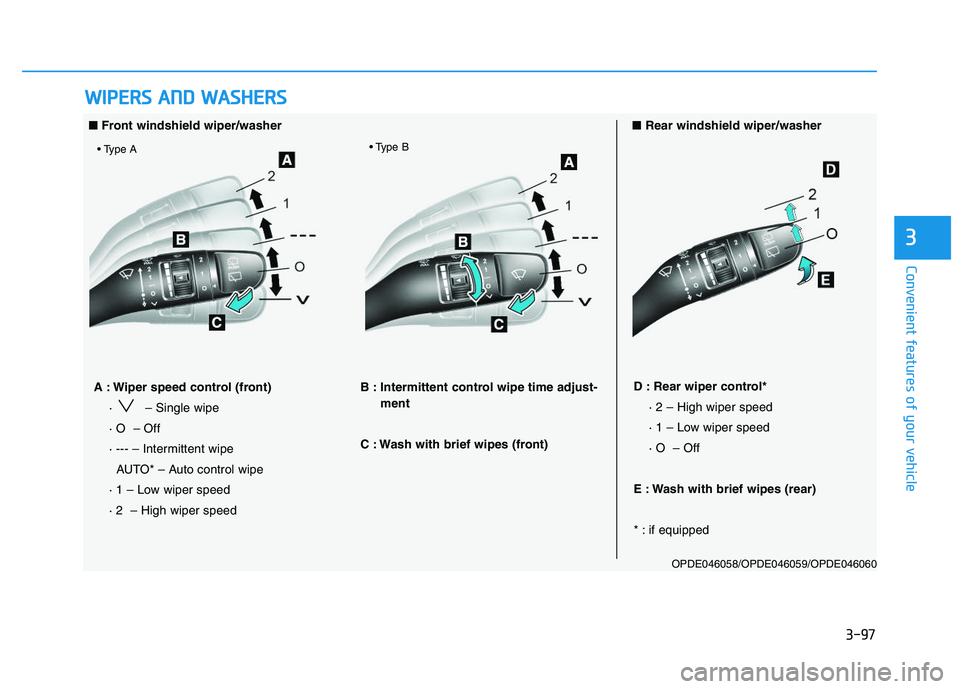
■ Front windshield wiper/washer ■Rear windshield wiper/washer
OPDE046058/OPDE046059/OPDE046060
A : Wiper speed control (front)
· – Single wipe
· O – Off
· --- – Intermittent wipe AUTO* – Auto control wipe
· 1 – Low wiper speed
· 2 – High wiper speed B : Intermittent control wipe time adjust-
ment
C : Wash with brief wipes (front) D : Rear wiper control* · 2 – High wiper speed
· 1 – Low wiper speed
· O – Off
E : Wash with brief wipes (rear)
* : if equipped
Page 102 of 659
3-100
Convenient features of your vehicle
Rear window wiper and wash-
er switch (if equipped)
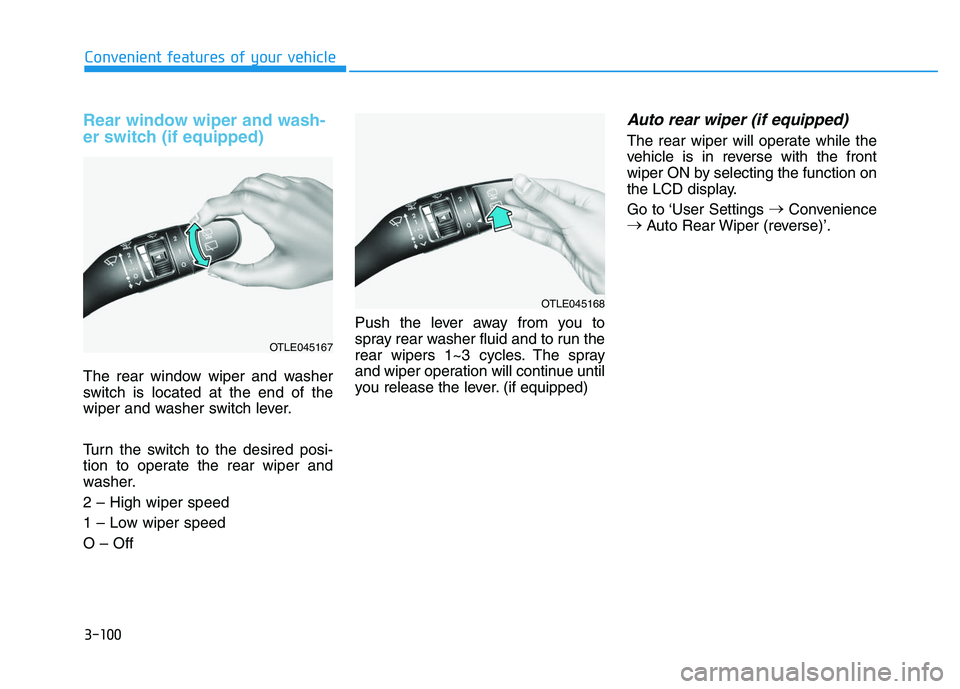
The rear window wiper and washer
switch is located at the end of the
wiper and washer switch lever.
Turn the switch to the desired posi-
tion to operate the rear wiper and
washer.
2 – High wiper speed
1 – Low wiper speed
O – OffPush the lever away from you to
spray rear washer fluid and to run the
rear wipers 1~3 cycles. The spray
and wiper operation will continue until
you release the lever. (if equipped)
Auto rear wiper (if equipped)
The rear wiper will operate while the
vehicle is in reverse with the front
wiper ON by selecting the function on
the LCD display.
Go to ‘User Settings
→
Convenience
→ Auto Rear Wiper (reverse)’.
OTLE045167
OTLE045168
Page 108 of 659
3-106
Convenient features of your vehicle
Parking assist system
(if equipped)
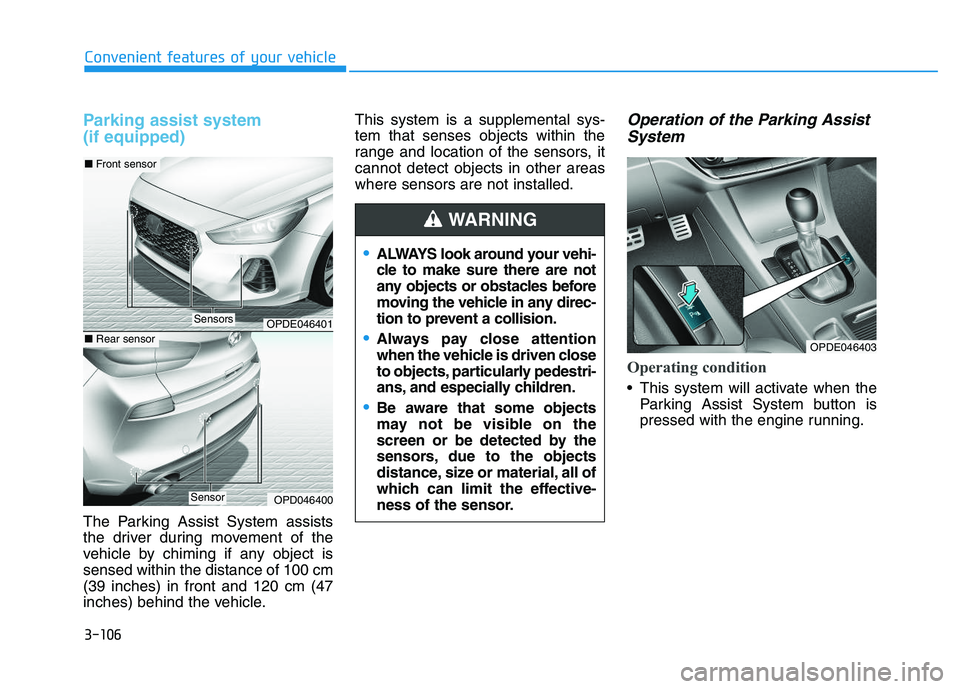
The Parking Assist System assists
the driver during movement of the
vehicle by chiming if any object is
sensed within the distance of 100 cm
(39 inches) in front and 120 cm (47
inches) behind the vehicle.This system is a supplemental sys-
tem that senses objects within the
range and location of the sensors, it
cannot detect objects in other areas
where sensors are not installed.
Operation of the Parking Assist
System
Operating condition
This system will activate when the
Parking Assist System button is
pressed with the engine running.
ALWAYS look around your vehi-
cle to make sure there are not
any objects or obstacles before
moving the vehicle in any direc-
tion to prevent a collision.
Always pay close attention
when the vehicle is driven close
to objects, particularly pedestri-
ans, and especially children.
Be aware that some objects
may not be visible on the
screen or be detected by the
sensors, due to the objects
distance, size or material, all of
which can limit the effective-
ness of the sensor.
WARNING
OPDE046401
OPD046400
■ Front sensor
■Rear sensor
Sensors
Sensor
OPDE046403
Page 109 of 659
3-107
Convenient features of your vehicle
3
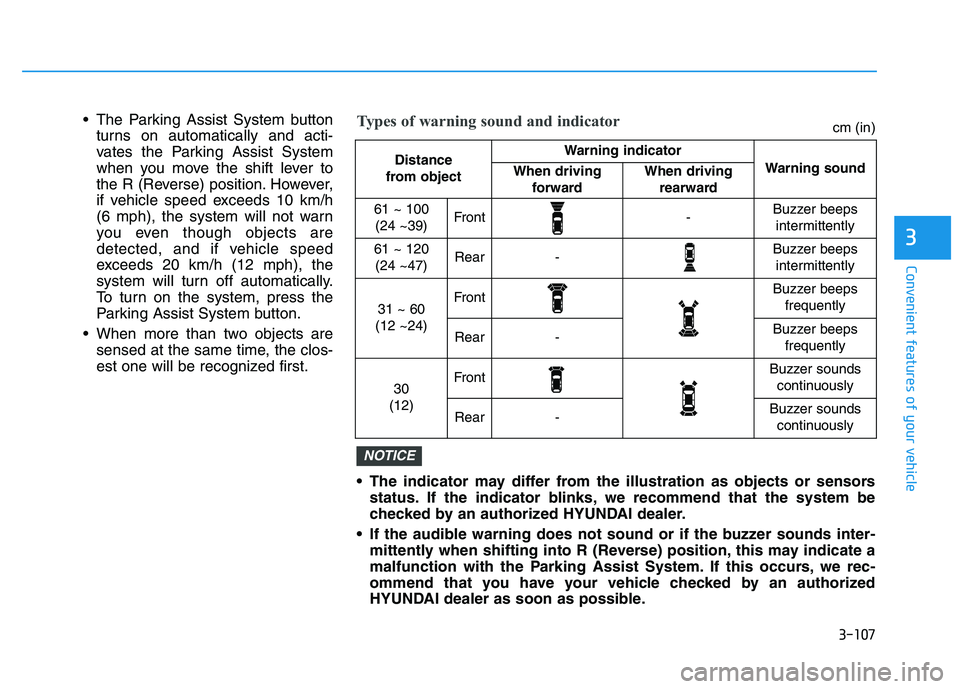
The Parking Assist System buttonturns on automatically and acti-
vates the Parking Assist System
when you move the shift lever to
the R (Reverse) position. However,
if vehicle speed exceeds 10 km/h
(6 mph), the system will not warn
you even though objects are
detected, and if vehicle speed
exceeds 20 km/h (12 mph), the
system will turn off automatically.
To turn on the system, press the
Parking Assist System button.
When more than two objects are sensed at the same time, the clos-
est one will be recognized first.
The indicator may differ from the illustration as objects or sensorsstatus. If the indicator blinks, we recommend that the system be
checked by an authorized HYUNDAI dealer.
If the audible warning does not sound or if the buzzer sounds inter- mittently when shifting into R (Reverse) position, this may indicate a
malfunction with the Parking Assist System. If this occurs, we rec-
ommend that you have your vehicle checked by an authorized
HYUNDAI dealer as soon as possible.
NOTICE
Distance
from object Warning indicator
Warning soundWhen driving forwardWhen driving rearward
61 ~ 100(24 ~39)Front-Buzzer beeps intermittently
61 ~ 120(24 ~47)Rear-Buzzer beeps intermittently
31 ~ 60
(12 ~24)FrontBuzzer beeps frequently
Rear-Buzzer beeps frequently
30
(12)FrontBuzzer sounds continuously
Rear-Buzzer sounds continuously
Types of warning sound and indicatorcm (in)