Front HYUNDAI I30 2018 Manual PDF
[x] Cancel search | Manufacturer: HYUNDAI, Model Year: 2018, Model line: I30, Model: HYUNDAI I30 2018Pages: 659, PDF Size: 17.14 MB
Page 144 of 659
3-142
Convenient features of your vehicle
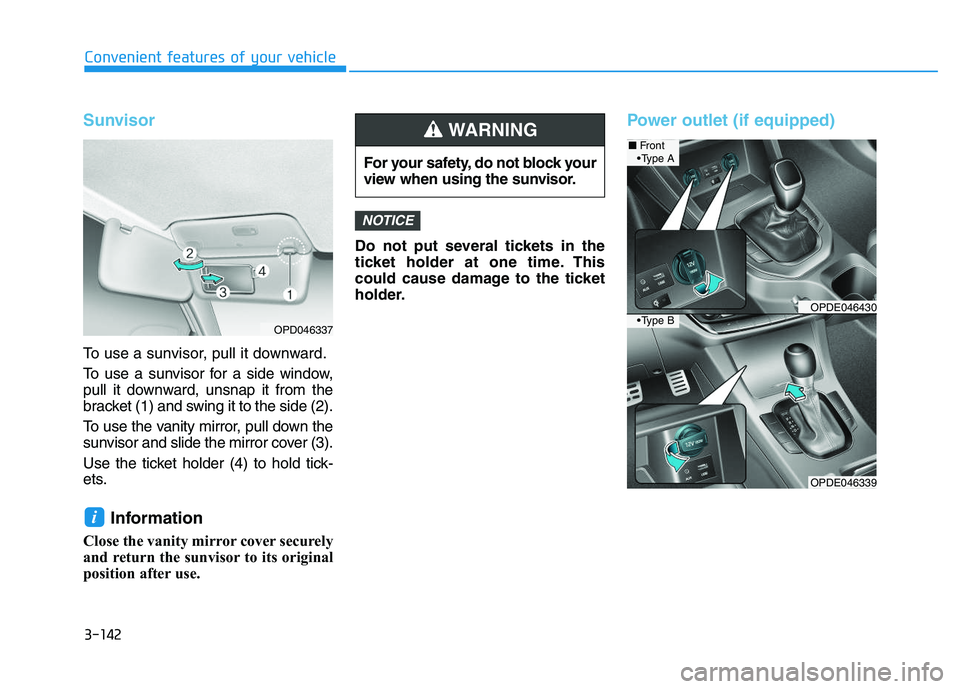
Sunvisor
To use a sunvisor, pull it downward.
To use a sunvisor for a side window,
pull it downward, unsnap it from the
bracket (1) and swing it to the side (2).
To use the vanity mirror, pull down the
sunvisor and slide the mirror cover (3).
Use the ticket holder (4) to hold tick-
ets.
Information
Close the vanity mirror cover securely
and return the sunvisor to its original
position after use.Do not put several tickets in the
ticket holder at one time. This
could cause damage to the ticket
holder.
Power outlet (if equipped)
NOTICE
i
For your safety, do not block your
view when using the sunvisor.
WARNING
OPDE046339
■
Front
OPDE046430
OPD046337
A
B
Page 146 of 659
3-144
Convenient features of your vehicle
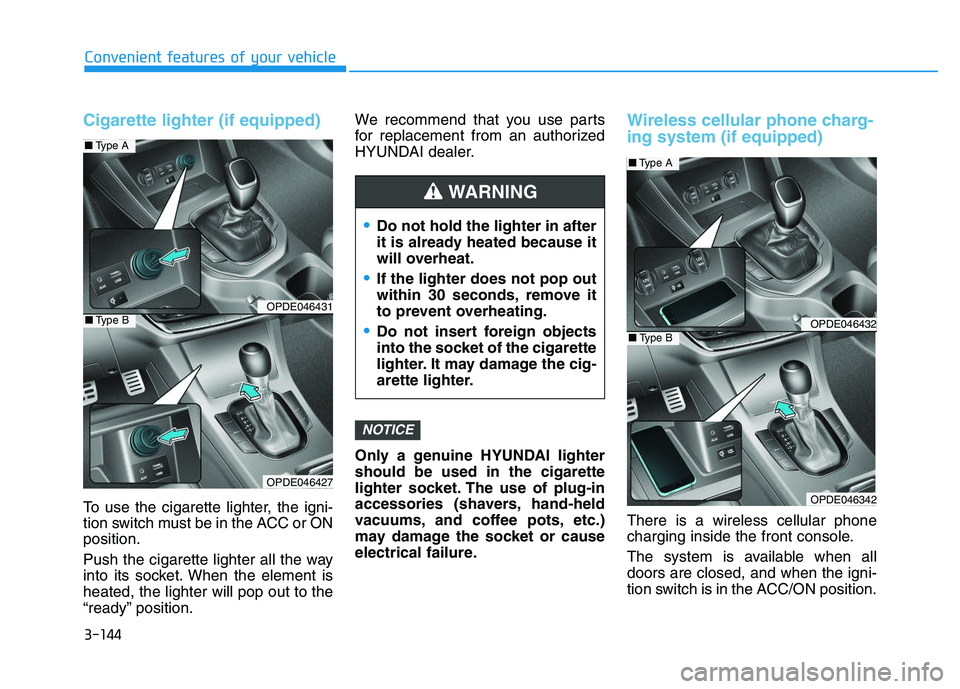
Cigarette lighter (if equipped)
To use the cigarette lighter, the igni-
tion switch must be in the ACC or ON
position.
Push the cigarette lighter all the way
into its socket. When the element is
heated, the lighter will pop out to the
“ready” position.We recommend that you use parts
for replacement from an authorized
HYUNDAI dealer.
Only a genuine HYUNDAI lighter
should be used in the cigarette
lighter socket. The use of plug-in
accessories (shavers, hand-held
vacuums, and coffee pots, etc.)
may damage the socket or cause
electrical failure.
Wireless cellular phone charg-
ing system (if equipped)
There is a wireless cellular phone
charging inside the front console.
The system is available when all
doors are closed, and when the igni-
tion switch is in the ACC/ON position.
NOTICE
Do not hold the lighter in after
it is already heated because it
will overheat.
If the lighter does not pop out
within 30 seconds, remove it
to prevent overheating.
Do not insert foreign objects
into the socket of the cigarette
lighter. It may damage the cig-
arette lighter.
WARNING
OPDE046431
OPDE046427
■
Type A
■Type BOPDE046432
OPDE046342
■Type A
■Type B
Page 147 of 659
3-145
Convenient features of your vehicle
To charge a cellular phone
The wireless cellular phone charging
system charges only the Qi-enabled
cellular phones ( ). Read the label
on the cellular phone accessory
cover or visit your cellular phone
manufacturer’s website to check
whether your cellular phone supports
the Qi technology.
The wireless charging process starts
when you put a Qi-enabled cellular
phone on the wireless charging unit.
1. Remove other items, including thesmart key, from the wireless charg-
ing unit. If not, the wireless charg-
ing process may be interrupted.
2. The indicator illuminates in orange during the charging process. The
indicator color changes to green,
when the charging process is
completed.
3. You can turn ON or OFF the wire- less charging function in the User
Settings mode on the instrument
cluster. (For further information,
refer to the “LCD Modes” in this
chapter.) Slightly change the cellular phone
position, when the cellular phone is
not being charged. Make sure that
the indicator illuminates in orange.
The indicator color may not change
to green in accordance with the cel-
lular phone type, even though the
charging process is completed. The
indicator blinks in orange for 10 sec-
onds when there is a malfunction
with the wireless charging system.
In this case, temporarily stop the
charging process, and re-attempt to
wirelessly charge your cellular phone
again.
The system warns you with a mes-
sage on the LCD display when you do
not take out the cellular phone from
the wireless charging unit with the
front door open and the Engine
Start/Stop button in the OFF position.
The wireless cellular phone
charging system may not sup-
port certain cellular phones,
which are not verified for the Qi
specification ( ).
(Continued)(Continued)
Locate your cell phone well in the
middle of the wireless cellular
phone charging system. Even
when your cell phone locates
slightly to one side, the charging
speed may decrease.
The wireless charging process may temporarily stop, when a
smart key function operates (i.e.
starting the engine, opening the
doors, closing the doors).
For certain cell phones, the indi- cator color may not change to
green, even when the wireless
charging process is properly
completed.
The wireless charging process may temporarily stop, when tempera-
ture abnormally increases inside
the wireless cellular phone charg-
ing system. The wireless charging
process restarts, when tempera-
ture falls to a proper level.
The wireless charging process may temporarily stop when there
is any metallic item, such as a
coin, between the wireless cellu-
lar phone charging system and a
cellular phone.
NOTICE
3
Page 149 of 659

3-147
Convenient features of your vehicle
3
Floor mat anchor(s)
(if equipped)
ALWAYS use the Floor Mat Anchors
to attach the front floor mats to the
vehicle. The anchors on the front
floor carpet keep the floor mats from
sliding forward.
Luggage net (holder)
To keep items from shifting in the
cargo area, you can use the four
holders located in the cargo area to
attach the luggage net.
If necessary, we recommend that you
contact your authorized HYUNDAI
dealer to obtain a luggage net.
OPDE046344
OPD046343
The following must be observed
when installing ANY floor mat
to the vehicle.
Ensure that the floor mats are
securely attached to the vehi-
cle's floor mat anchor(s) before
driving the vehicle.
Do not use ANY floor mat that
cannot be firmly attached to
the vehicle's floor mat anchors.
Do not stack floor mats on top
of one another (e.g. all-weath-
er rubber mat on top of a car-
peted floor mat). Only a single
floor mat should be installed
in each position.
IMPORTANT - Your vehicle was
manufactured with driver's side
floor mat anchors that are
designed to securely hold the
floor mat in place. To avoid any
interference with pedal operation,
HYUNDAI recommends that the
HYUNDAI floor mat designed for
use in your vehicle be installed.
WARNING
Page 161 of 659
3-11
Convenient features of your vehicle
3
Operating door locks from
outside the vehicle
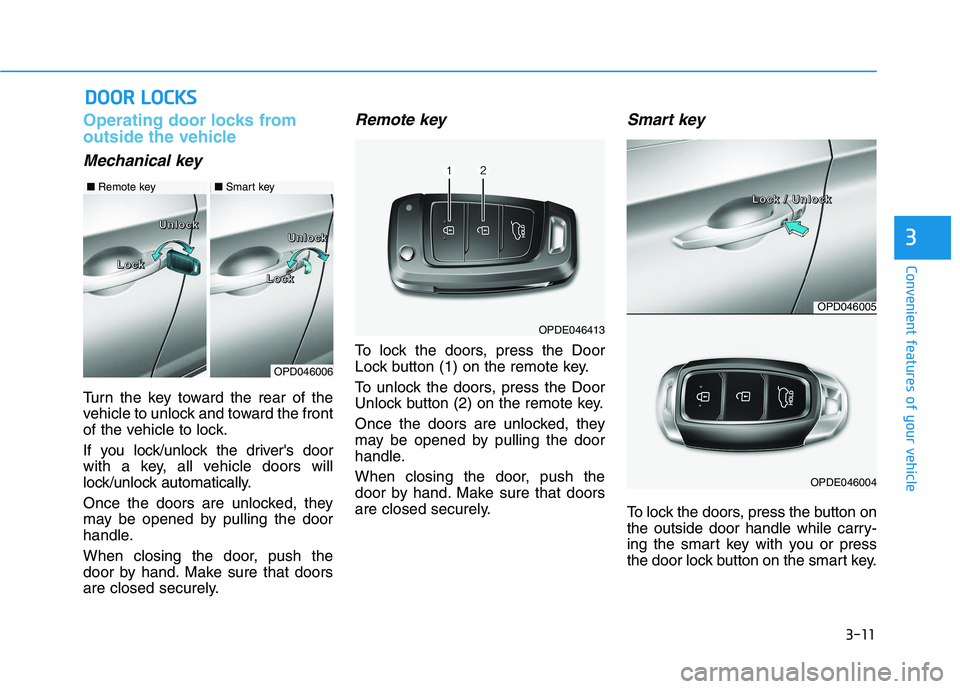
Mechanical key
Turn the key toward the rear of the
vehicle to unlock and toward the front
of the vehicle to lock.
If you lock/unlock the driver's door
with a key, all vehicle doors will
lock/unlock automatically.
Once the doors are unlocked, they
may be opened by pulling the door
handle.
When closing the door, push the
door by hand. Make sure that doors
are closed securely.
Remote key
To lock the doors, press the Door
Lock button (1) on the remote key.
To unlock the doors, press the Door
Unlock button (2) on the remote key.
Once the doors are unlocked, they
may be opened by pulling the door
handle.
When closing the door, push the
door by hand. Make sure that doors
are closed securely.
Smart key
To lock the doors, press the button on
the outside door handle while carry-
ing the smart key with you or press
the door lock button on the smart key.
D
D O
O O
O R
R
L
L O
O C
C K
K S
S
OPDE046413
OPD046006
L
L
L
L
o
o
o
o
c
c
c
c
k
k
k
k
L
L
L
L
o
o
o
o
c
c
c
c
k
k
k
k
U
U
U
U
n
n
n
n
l
l
l
l
o
o
o
o
c
c
c
c
k
k
k
k
U
U
U
U
n
n
n
n
l
l
l
l
o
o
o
o
c
c
c
c
k
k
k
k
■ Remote key■Smart key
OPD046005
OPDE046004
L
L
L
L
o
o
o
o
c
c
c
c
k
k
k
k
/
/
/
/
U
U
U
U
n
n
n
n
l
l
l
l
o
o
o
o
c
c
c
c
k
k
k
k
Page 162 of 659
3-12
Convenient features of your vehicle
To unlock the doors, press the button
on the outside door handle while car-
rying the smart key with you or press
the door unlock button on the smart
key.
Once the doors are unlocked, they
may be opened by pulling the door
handle.
When closing the door, push the
door by hand. Make sure that doors
are closed securely.
Information
• In cold and wet climates, door lock and door mechanisms may not work
properly due to freezing conditions.
• If the door is locked/unlocked multi- ple times in rapid succession with
either the vehicle key or door lock
switch, the system may stop operat-
ing temporarily in order to protect
the circuit and prevent damage to
system components.
In case of an emergency
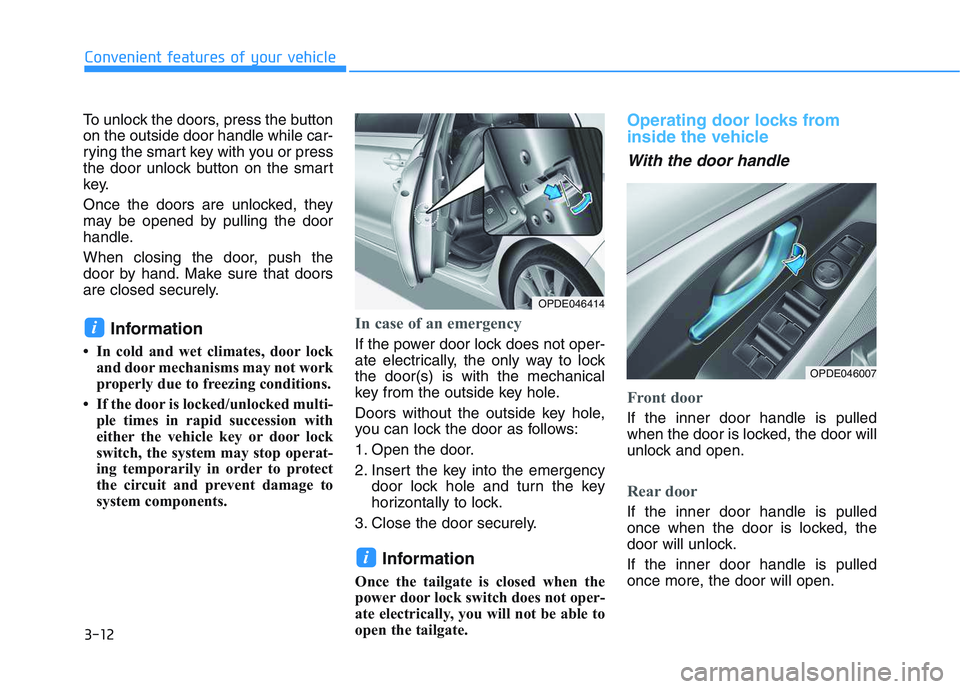
If the power door lock does not oper-
ate electrically, the only way to lock
the door(s) is with the mechanical
key from the outside key hole.
Doors without the outside key hole,
you can lock the door as follows:
1. Open the door.
2. Insert the key into the emergency door lock hole and turn the key
horizontally to lock.
3. Close the door securely.
Information
Once the tailgate is closed when the
power door lock switch does not oper-
ate electrically, you will not be able to
open the tailgate.
Operating door locks from
inside the vehicle
With the door handle
Front door
If the inner door handle is pulled
when the door is locked, the door will
unlock and open.
Rear door
If the inner door handle is pulled
once when the door is locked, the
door will unlock.
If the inner door handle is pulled
once more, the door will open.
i
i
OPDE046007
OPDE046414
Page 163 of 659
3-13
Convenient features of your vehicle
3
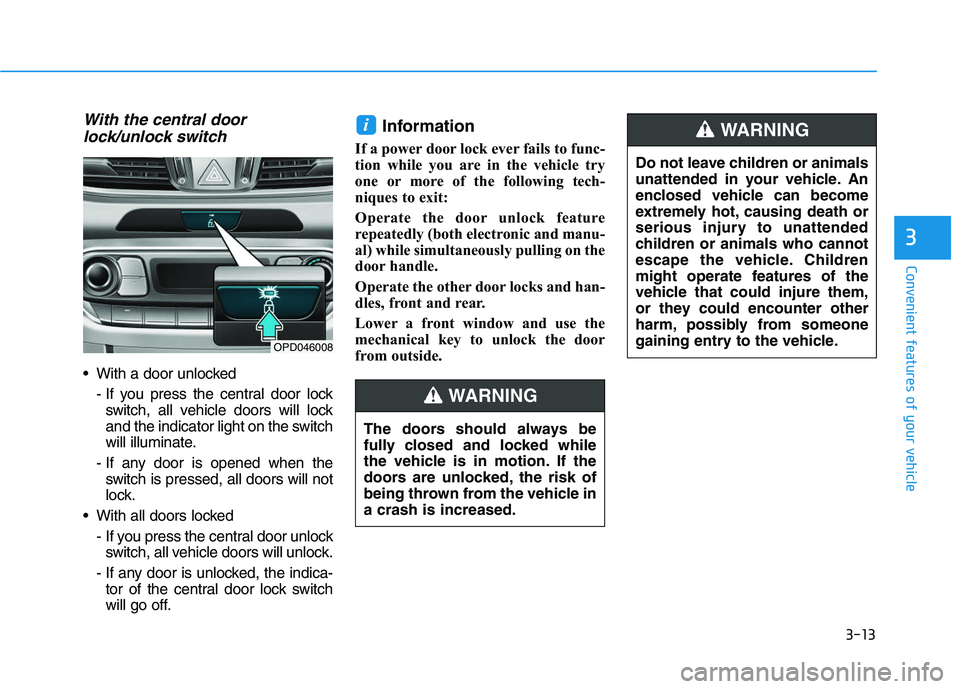
With the central doorlock/unlock switch
With a door unlocked
- If you press the central door lockswitch, all vehicle doors will lock
and the indicator light on the switch
will illuminate.
- If any door is opened when the switch is pressed, all doors will not
lock.
With all doors locked - If you press the central door unlockswitch, all vehicle doors will unlock.
- If any door is unlocked, the indica- tor of the central door lock switch
will go off.
Information
If a power door lock ever fails to func-
tion while you are in the vehicle try
one or more of the following tech-
niques to exit:
Operate the door unlock feature
repeatedly (both electronic and manu-
al) while simultaneously pulling on the
door handle.
Operate the other door locks and han-
dles, front and rear.
Lower a front window and use the
mechanical key to unlock the door
from outside.
i
OPD046008
The doors should always be
fully closed and locked while
the vehicle is in motion. If the
doors are unlocked, the risk of
being thrown from the vehicle in
a crash is increased.
WARNING
Do not leave children or animals
unattended in your vehicle. An
enclosed vehicle can become
extremely hot, causing death or
serious injury to unattended
children or animals who cannot
escape the vehicle. Children
might operate features of the
vehicle that could injure them,
or they could encounter other
harm, possibly from someone
gaining entry to the vehicle.
WARNING
Page 168 of 659
3-18
Convenient features of your vehicle
Information
• While recalling the "1" memoryposition, pressing the SET or 1 but-
ton temporarily stops the adjust-
ment of the recalled memory posi-
tion. Pressing the 2 button recalls
the "2" memory position.
• While recalling the "2" memory position, pressing the SET or 2 but-
ton temporarily stops the adjust-
ment of the recalled memory posi-
tion. Pressing the 1 button recalls
the "1" memory position.
• While recalling the stored positions, pressing one of the control buttons
for the driver's seat, outside
rearview mirror, or instrument
panel illumination will cause the
movement of that component to stop
and move in the direction that the
control button is pressed.
Easy access function
(if equipped)
The system will move the driver's
seat automatically as follows:
The shift lever is in P (Park)
Without smart key system
- It will move the driver’s seat rear-ward when the ignition key is
removed and the driver’s door is
opened.
- It will move the driver’s seat forward when the ignition key is inserted.
With smart key system - It will move the driver’s seat rear-ward when the Engine Start/Stop
button is in the OFF position and
the driver’s door is opened.
- It will move the driver’s seat for- ward when the vehicle is turned
ON or the driver’s door is closed
with the smart key with you.
You can activate or deactivate the
Easy Access Function from the User
Settings mode on the LCD display.
For more details, refer to "LCD
Display" in this chapter.
i
Driver should be cautious when
using this function to assure no
injury to passenger or child on
the back seat. In case of emer-
gency the driver has to stop
movement of front seat (when
easy access feature is activat-
ed) by pressing SET button or
any of the driver seat control
switches.
CAUTION
Page 177 of 659
3-27
Convenient features of your vehicle
3
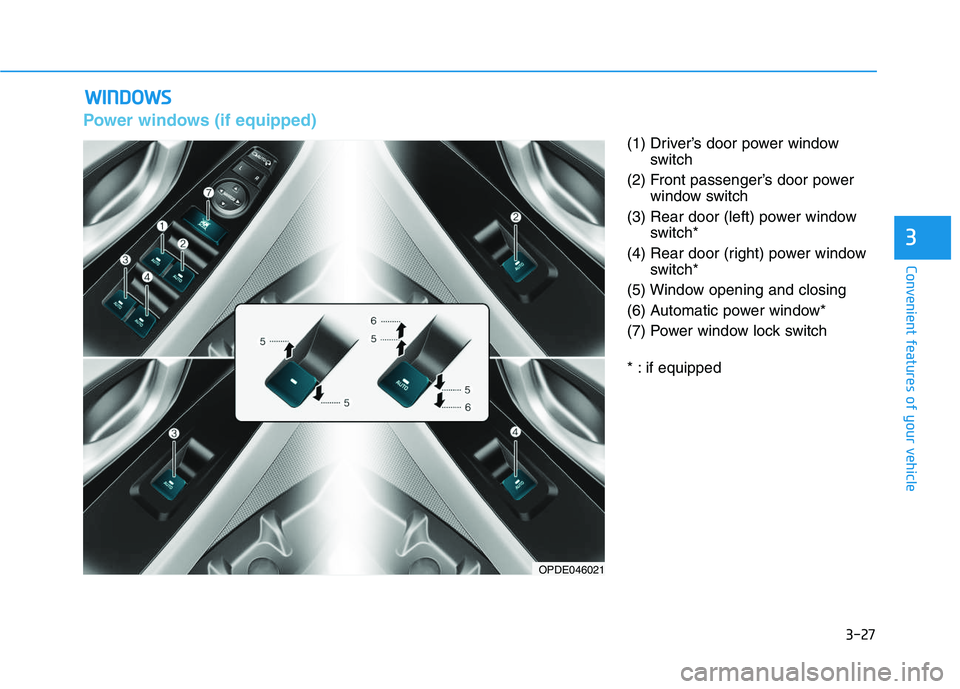
Power windows (if equipped)
(1) Driver’s door power windowswitch
(2) Front passenger’s door power window switch
(3) Rear door (left) power window switch*
(4) Rear door (right) power window switch*
(5) Window opening and closing
(6) Automatic power window*
(7) Power window lock switch
* : if equipped
W
W I
I N
N D
D O
O W
W S
S
OPDE046021
Page 178 of 659
3-28
Convenient features of your vehicle
The ignition switch must be in the ON
position to be able to raise or lower
the windows. Each door has a Power
Window switch to control that door's
window. The driver has a Power
Window Lock switch which can block
the operation of passenger windows.
The power windows will operate for
approximately 30 seconds after the
ignition switch is placed in the ACC
or OFF position. However, if the front
doors are opened, the Power
Windows cannot be operated even
within the 30 second period.
Information
• In cold and wet climates, power win- dows may not work properly due to
freezing conditions.
• While driving with the rear win- dows down or with the sunroof (if
equipped) opened (or partially
opened), your vehicle may demon-
strate a wind buffeting or pulsation
noise. This noise is normal and can
be reduced or eliminated by taking
the following actions. If the noise
occurs with one or both of the rear
windows down, partially lower both
front windows approximately one
inch. If you experience the noise
with the sunroof open, slightly close
the sunroof.
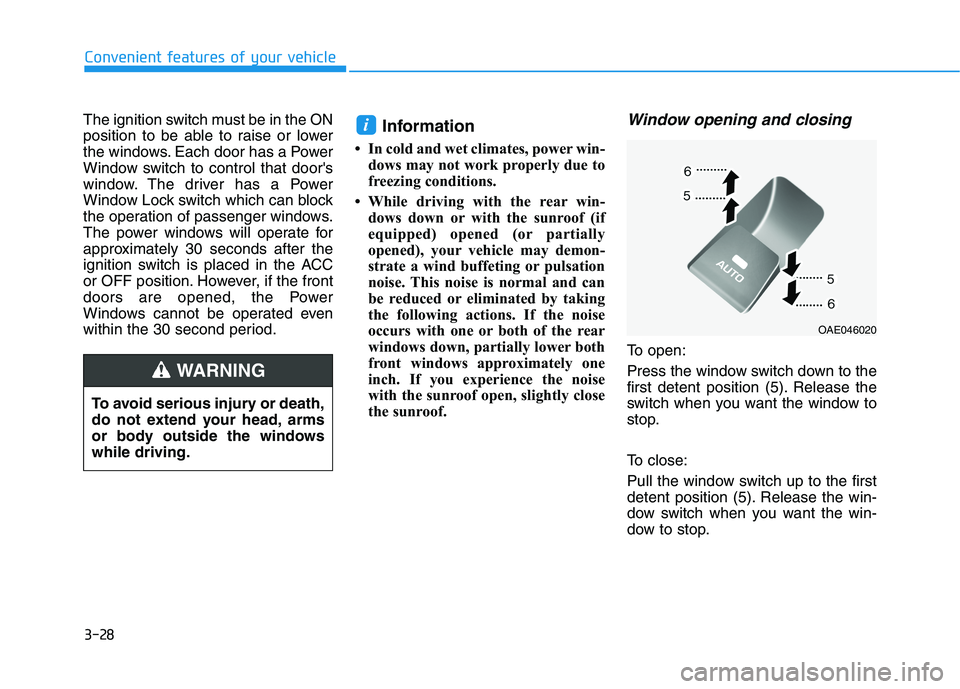
Window opening and closing
To open:
Press the window switch down to the
first detent position (5). Release the
switch when you want the window to
stop.
To close:
Pull the window switch up to the first
detent position (5). Release the win-
dow switch when you want the win-
dow to stop.
i
To avoid serious injury or death,
do not extend your head, arms
or body outside the windows
while driving.
WARNING
OAE046020