type B HYUNDAI I30 2019 User Guide
[x] Cancel search | Manufacturer: HYUNDAI, Model Year: 2019, Model line: I30, Model: HYUNDAI I30 2019Pages: 659, PDF Size: 17.14 MB
Page 77 of 659
2-57
Safety system of your vehicle
2
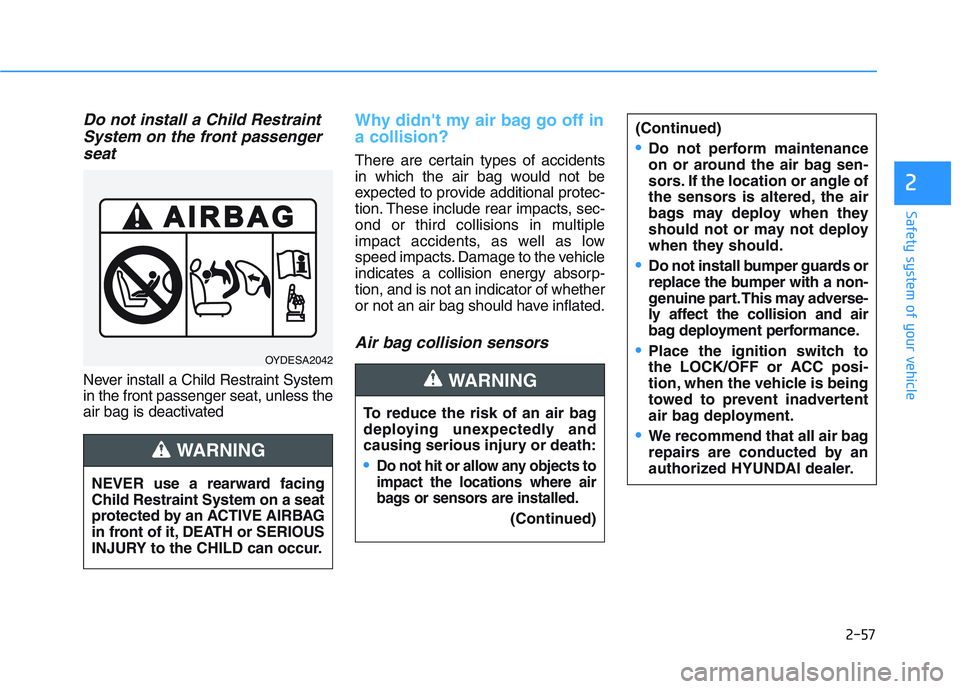
Do not install a Child RestraintSystem on the front passengerseat
Never install a Child Restraint System
in the front passenger seat, unless the
air bag is deactivated
Why didn't my air bag go off in
a collision?
There are certain types of accidents
in which the air bag would not be
expected to provide additional protec-
tion. These include rear impacts, sec-
ond or third collisions in multiple
impact accidents, as well as low
speed impacts. Damage to the vehicle
indicates a collision energy absorp-
tion, and is not an indicator of whether
or not an air bag should have inflated.
Air bag collision sensors
OYDESA2042
NEVER use a rearward facing
Child Restraint System on a seat
protected by an ACTIVE AIRBAG
in front of it, DEATH or SERIOUS
INJURY to the CHILD can occur.
WARNING
To reduce the risk of an air bag
deploying unexpectedly and
causing serious injury or death:
Do not hit or allow any objects to
impact the locations where air
bags or sensors are installed.
(Continued)
WARNING
(Continued)
Do not perform maintenance
on or around the air bag sen-
sors. If the location or angle of
the sensors is altered, the air
bags may deploy when they
should not or may not deploy
when they should.
Do not install bumper guards or
replace the bumper with a non-
genuine part. This may adverse-
ly affect the collision and air
bag deployment performance.
Place the ignition switch to
the LOCK/OFF or ACC posi-
tion, when the vehicle is being
towed to prevent inadvertent
air bag deployment.
We recommend that all air bag
repairs are conducted by an
authorized HYUNDAI dealer.
Page 79 of 659
2-59
Safety system of your vehicle
2
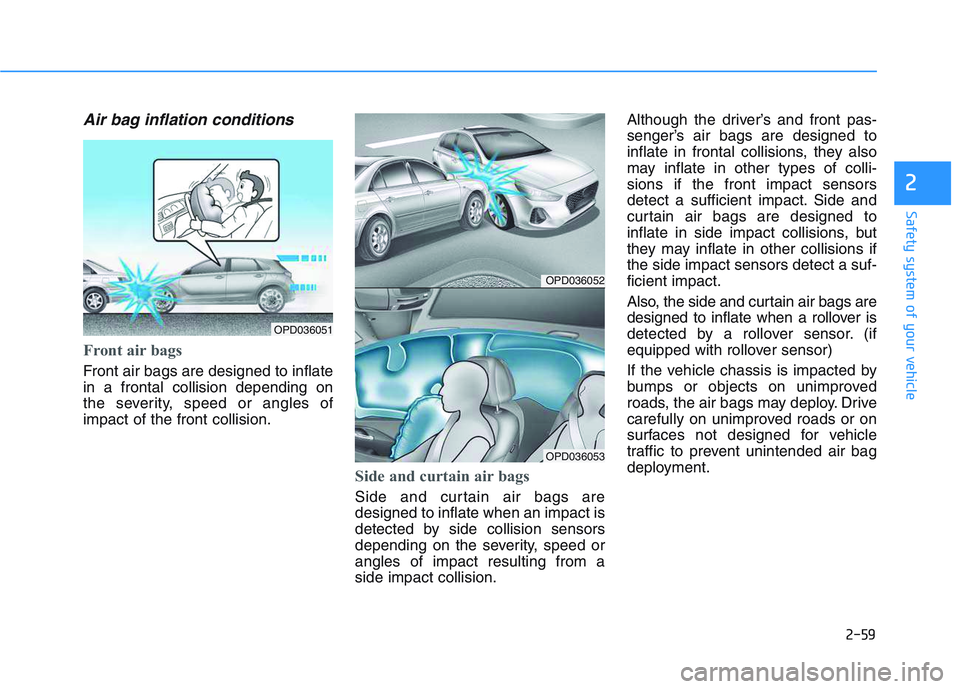
Air bag inflation conditions
Front air bags
Front air bags are designed to inflate
in a frontal collision depending on
the severity, speed or angles of
impact of the front collision.
Side and curtain air bags
Side and curtain air bags are
designed to inflate when an impact is
detected by side collision sensors
depending on the severity, speed or
angles of impact resulting from a
side impact collision.Although the driver’s and front pas-
senger’s air bags are designed to
inflate in frontal collisions, they also
may inflate in other types of colli-
sions if the front impact sensors
detect a sufficient impact. Side and
curtain air bags are designed to
inflate in side impact collisions, but
they may inflate in other collisions if
the side impact sensors detect a suf-
ficient impact.
Also, the side and curtain air bags are
designed to inflate when a rollover is
detected by a rollover sensor. (if
equipped with rollover sensor)
If the vehicle chassis is impacted by
bumps or objects on unimproved
roads, the air bags may deploy. Drive
carefully on unimproved roads or on
surfaces not designed for vehicle
traffic to prevent unintended air bag
deployment.
OPD036052
OPD036053
OPD036051
Page 85 of 659
3-83
Convenient features of your vehicle
3
Exterior lights
Lighting control
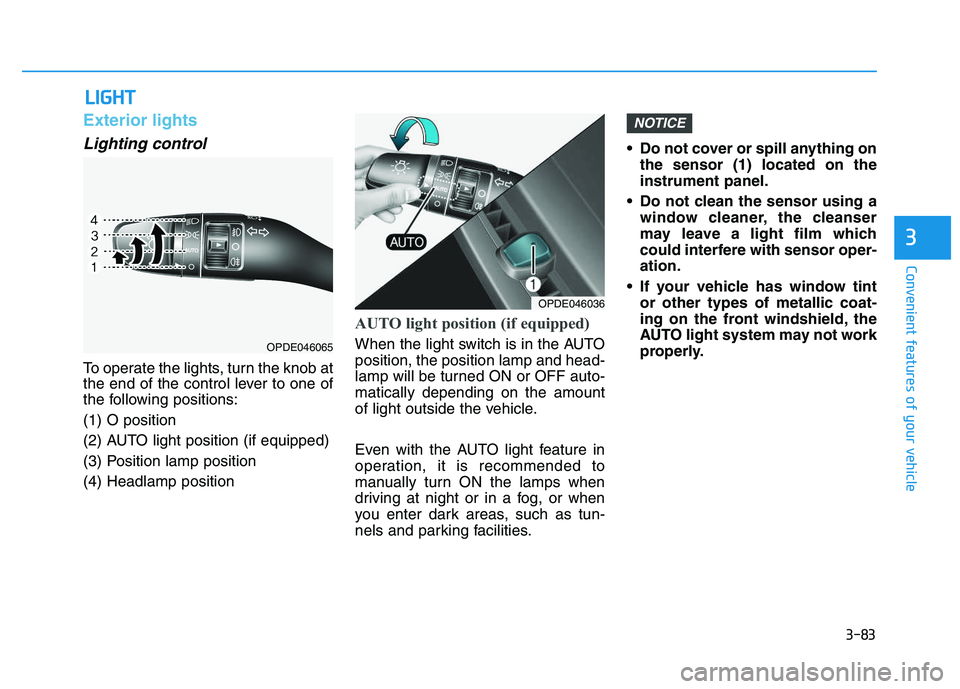
To operate the lights, turn the knob at
the end of the control lever to one of
the following positions:
(1) O position
(2) AUTO light position (if equipped)
(3) Position lamp position
(4) Headlamp position
AUTO light position (if equipped)
When the light switch is in the AUTO
position, the position lamp and head-
lamp will be turned ON or OFF auto-
matically depending on the amount
of light outside the vehicle.
Even with the AUTO light feature in
operation, it is recommended to
manually turn ON the lamps when
driving at night or in a fog, or when
you enter dark areas, such as tun-
nels and parking facilities.• Do not cover or spill anything on
the sensor (1) located on the
instrument panel.
Do not clean the sensor using a window cleaner, the cleanser
may leave a light film which
could interfere with sensor oper-
ation.
If your vehicle has window tint or other types of metallic coat-
ing on the front windshield, the
AUTO light system may not work
properly.
NOTICE
L
L I
I G
G H
H T
T
OPDE046036
OPDE046065
Page 93 of 659
3-91
Convenient features of your vehicle
3
Daytime running light (DRL) (if equipped)
The Daytime Running Lights (DRL)
can make it easier for others to see
the front of your vehicle during the
day, especially after dawn and before
sunset.
The DRL system will turn the dedi-
cated lamp OFF when:
1. The headlights or front fog lights
are in the ON position.
2. The position light switch is in the ON position.
3. The engine is turned off.
Headlight leveling device (if equipped)
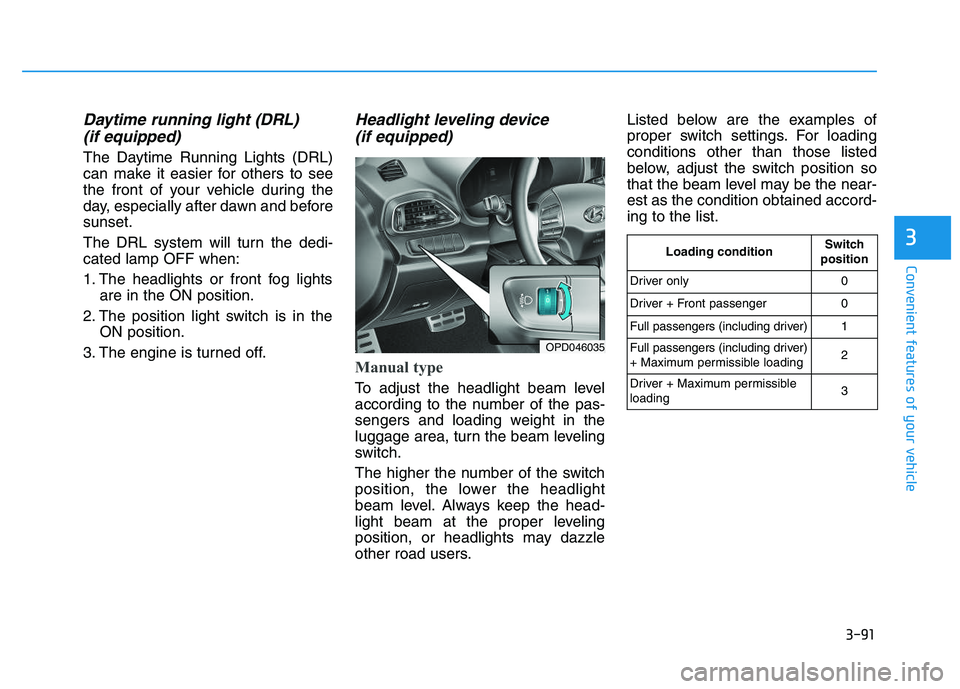
Manual type
To adjust the headlight beam level
according to the number of the pas-
sengers and loading weight in the
luggage area, turn the beam leveling
switch.
The higher the number of the switch
position, the lower the headlight
beam level. Always keep the head-
light beam at the proper leveling
position, or headlights may dazzle
other road users. Listed below are the examples of
proper switch settings. For loading
conditions other than those listed
below, adjust the switch position so
that the beam level may be the near-
est as the condition obtained accord-
ing to the list.
OPD046035
Loading conditionSwitch
position
Driver only0
Driver + Front passenger0
Full passengers (including driver)1
Full passengers (including driver)
+ Maximum permissible loading2
Driver + Maximum permissible
loading 3
Page 94 of 659
3-92
Automatic type
It automatically adjusts the headlight
beam level according to the number
of passengers and loading weight in
the luggage area.
And it offers proper headlight beam
under various conditions.
Static bending light
(if equipped)
While driving a corner, for greater
visibility and safety, either the left or
right side static bending light will turn
on automatically. The static bending
light will turn on when one of the fol-
lowing conditions occur.
Vehicle speed is less than 10 km/h(6 mph) and steering wheel angle
is turned approximately 80 degrees
with the low beam on.
Vehicle speed is between 10 km/h (6 mph) to 90 km/h (56 mph) and
steering wheel angle is turned
approximately 35 degrees with the
low beam on.
When the vehicle is in reverse with one of the conditions above satis-
fied, the light opposite to the direc-
tion the steering wheel is steered
will turn on.
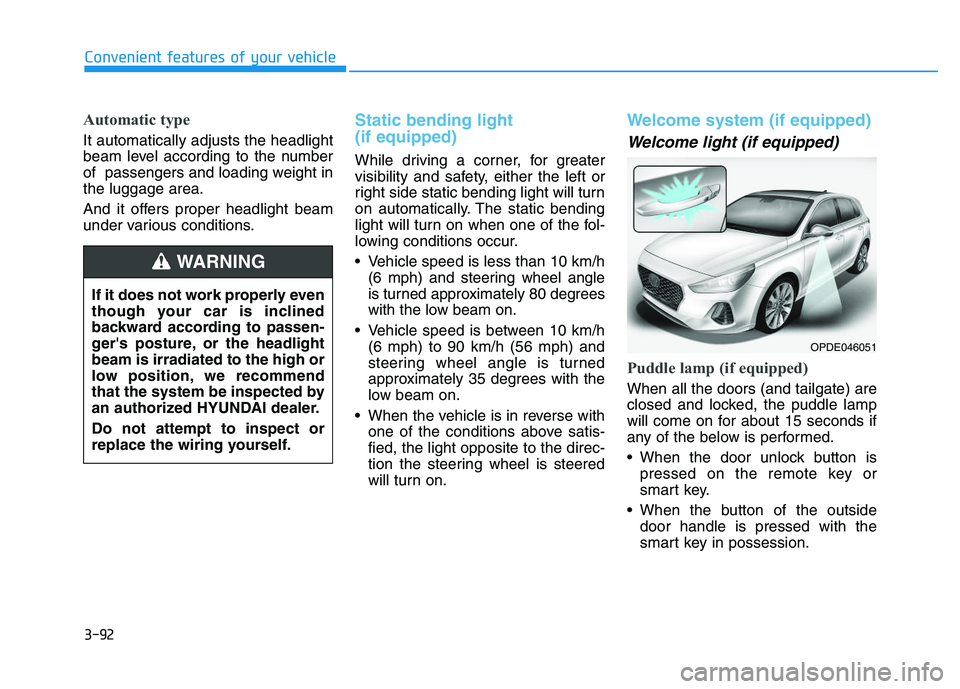
Welcome system (if equipped)
Welcome light (if equipped)
Puddle lamp (if equipped)
When all the doors (and tailgate) are
closed and locked, the puddle lamp
will come on for about 15 seconds if
any of the below is performed.
When the door unlock button ispressed on the remote key or
smart key.
When the button of the outside door handle is pressed with the
smart key in possession.
Convenient features of your vehicle
If it does not work properly even
though your car is inclined
backward according to passen-
ger's posture, or the headlight
beam is irradiated to the high or
low position, we recommend
that the system be inspected by
an authorized HYUNDAI dealer.
Do not attempt to inspect or
replace the wiring yourself.
WARNING
OPDE046051
Page 97 of 659
3-95
Convenient features of your vehicle
3
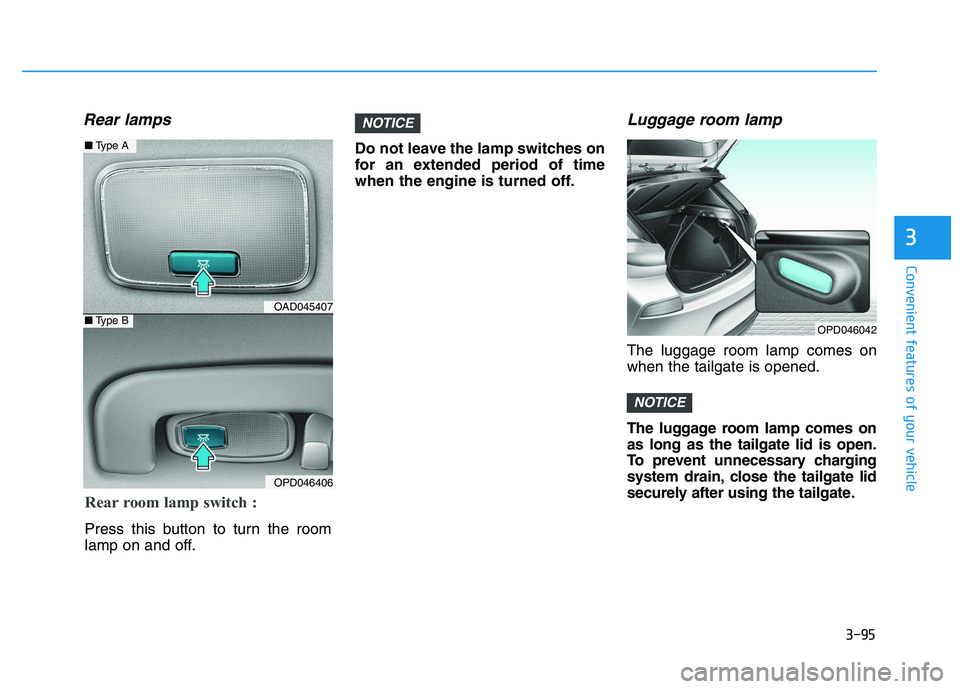
Rear lamps
Do not leave the lamp switches on
for an extended period of time
when the engine is turned off.
Luggage room lamp
The luggage room lamp comes on
when the tailgate is opened.
The luggage room lamp comes on
as long as the tailgate lid is open.
To prevent unnecessary charging
system drain, close the tailgate lid
securely after using the tailgate.
NOTICE
NOTICE
OPD046042
Rear room lamp switch :
Press this button to turn the room
lamp on and off.
OAD045407
OPD046406
■Type A
■Type B
Page 100 of 659
3-98
Convenient features of your vehicle
Windshield wipers
Operates as follows when the igni-
tion switch is turned ON.: For a single wiping cycle, movethe lever down and release it.
The wipers will operate continu-
ously if the lever is held in this
position.
O : Wiper is not in operation
--- : Wiper operates intermittently at the same wiping intervals. Use
this mode in light rain or mist. To
vary the speed setting, turn the
speed control knob.
1 : Normal wiper speed
2 : Fast wiper speed
Information
If there is heavy accumulation of snow
or ice on the windshield, defrost the
windshield for about 10 minutes, or until
the snow and/or ice is removed before
using the windshield wipers to ensure
proper operation.
If you do not remove the snow and/or ice
before using the wiper and washer, it may
damage the wiper and washer system.
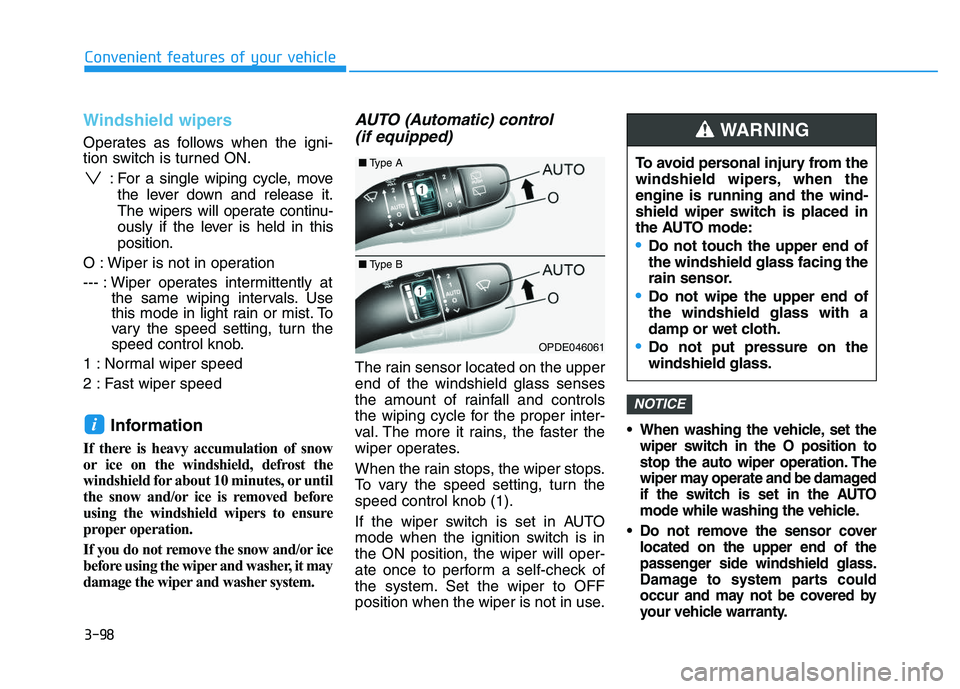
AUTO (Automatic) control (if equipped)
The rain sensor located on the upper
end of the windshield glass senses
the amount of rainfall and controls
the wiping cycle for the proper inter-
val. The more it rains, the faster the
wiper operates.
When the rain stops, the wiper stops.
To vary the speed setting, turn the
speed control knob (1).
If the wiper switch is set in AUTO
mode when the ignition switch is in
the ON position, the wiper will oper-
ate once to perform a self-check of
the system. Set the wiper to OFF
position when the wiper is not in use.
When washing the vehicle, set the
wiper switch in the O position to
stop the auto wiper operation. The
wiper may operate and be damaged
if the switch is set in the AUTO
mode while washing the vehicle.
Do not remove the sensor cover located on the upper end of the
passenger side windshield glass.
Damage to system parts could
occur and may not be covered by
your vehicle warranty.
NOTICE
i
OPDE046061
To avoid personal injury from the
windshield wipers, when the
engine is running and the wind-
shield wiper switch is placed in
the AUTO mode:
Do not touch the upper end of
the windshield glass facing the
rain sensor.
Do not wipe the upper end of
the windshield glass with a
damp or wet cloth.
Do not put pressure on the
windshield glass.
WARNING
■ Type A
■Type B
Page 103 of 659
3-101
Convenient features of your vehicle
3
D
D R
R I
I V
V E
E R
R
A
A S
S S
S I
I S
S T
T
S
S Y
Y S
S T
T E
E M
M
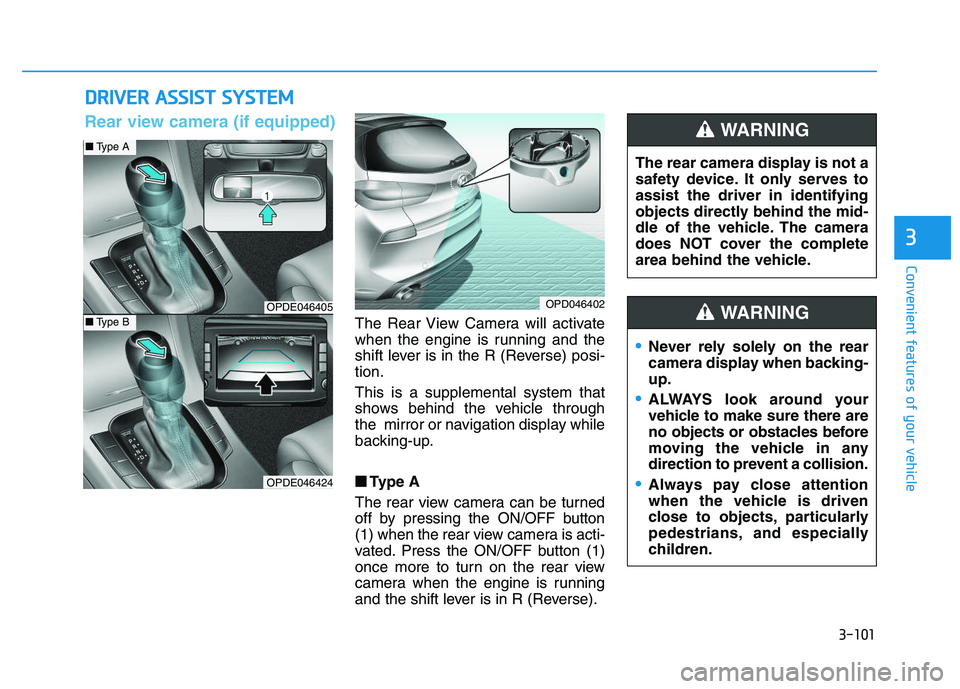
The Rear View Camera will activate
when the engine is running and the
shift lever is in the R (Reverse) posi-
tion.
This is a supplemental system that
shows behind the vehicle through
the mirror or navigation display while
backing-up.
■
■
Type A
The rear view camera can be turned
off by pressing the ON/OFF button
(1) when the rear view camera is acti-
vated. Press the ON/OFF button (1)
once more to turn on the rear view
camera when the engine is running
and the shift lever is in R (Reverse). The rear camera display is not a
safety device. It only serves to
assist the driver in identifying
objects directly behind the mid-
dle of the vehicle. The camera
does NOT cover the complete
area behind the vehicle.
WARNING
OPDE046405
OPDE046424
OPD046402
■
Type A
■Type B
Rear view camera (if equipped)
Never rely solely on the rear
camera display when backing-
up.
ALWAYS look around your
vehicle to make sure there are
no objects or obstacles before
moving the vehicle in any
direction to prevent a collision.
Always pay close attention
when the vehicle is driven
close to objects, particularly
pedestrians, and especially
children.
WARNING
Page 105 of 659
3-103
Convenient features of your vehicle
3
Operation of the Rear ParkingAssist System
Operating condition
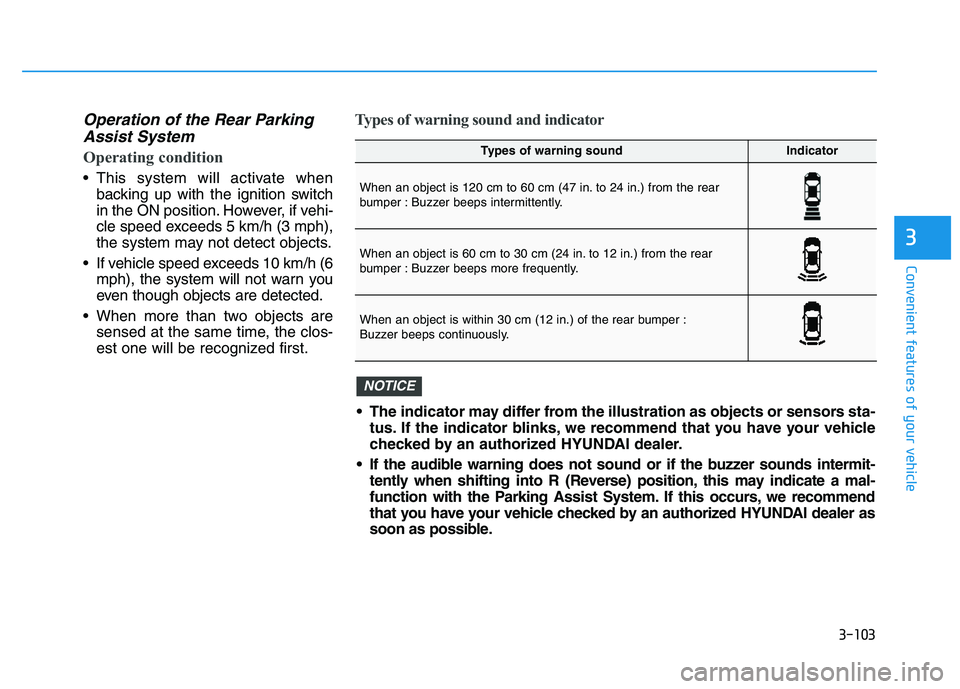
This system will activate when
backing up with the ignition switch
in the ON position. However, if vehi-
cle speed exceeds 5 km/h (3 mph),
the system may not detect objects.
If vehicle speed exceeds 10 km/h (6 mph), the system will not warn you
even though objects are detected.
When more than two objects are sensed at the same time, the clos-
est one will be recognized first.
Types of warning sound and indicator
Types of warning soundIndicator
When an object is 120 cm to 60 cm (47 in. to 24 in.) from the rear
bumper : Buzzer beeps intermittently.
When an object is 60 cm to 30 cm (24 in. to 12 in.) from the rear
bumper : Buzzer beeps more frequently.
When an object is within 30 cm (12 in.) of the rear bumper :
Buzzer beeps continuously.
The indicator may differ from the illustration as objects or sensors sta-tus. If the indicator blinks, we recommend that you have your vehicle
checked by an authorized HYUNDAI dealer.
If the audible warning does not sound or if the buzzer sounds intermit- tently when shifting into R (Reverse) position, this may indicate a mal-
function with the Parking Assist System. If this occurs, we recommend
that you have your vehicle checked by an authorized HYUNDAI dealer as
soon as possible.
NOTICE
Page 109 of 659
3-107
Convenient features of your vehicle
3
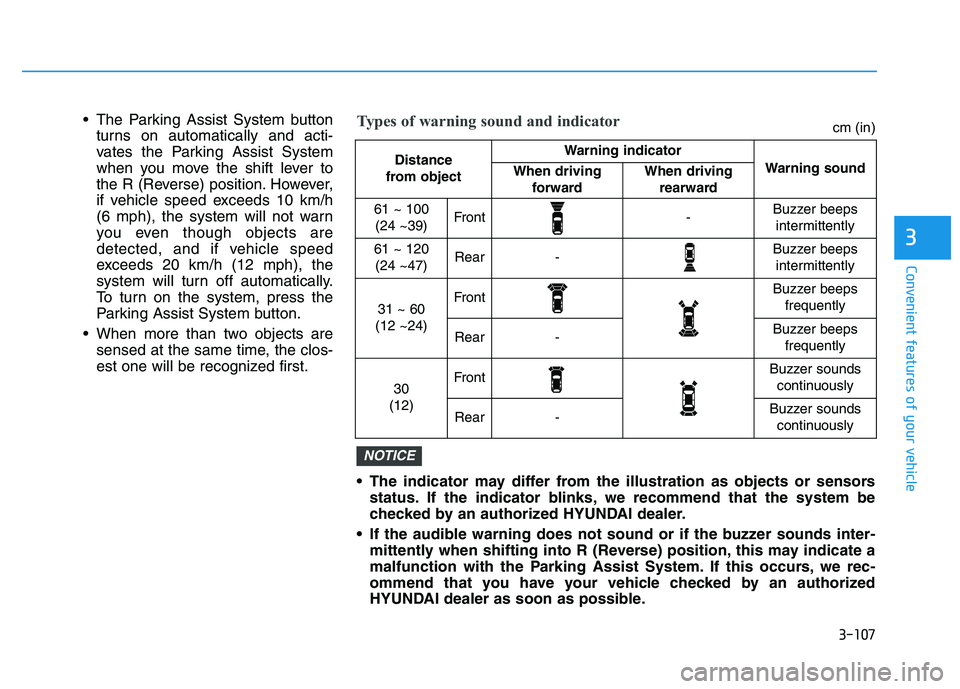
The Parking Assist System buttonturns on automatically and acti-
vates the Parking Assist System
when you move the shift lever to
the R (Reverse) position. However,
if vehicle speed exceeds 10 km/h
(6 mph), the system will not warn
you even though objects are
detected, and if vehicle speed
exceeds 20 km/h (12 mph), the
system will turn off automatically.
To turn on the system, press the
Parking Assist System button.
When more than two objects are sensed at the same time, the clos-
est one will be recognized first.
The indicator may differ from the illustration as objects or sensorsstatus. If the indicator blinks, we recommend that the system be
checked by an authorized HYUNDAI dealer.
If the audible warning does not sound or if the buzzer sounds inter- mittently when shifting into R (Reverse) position, this may indicate a
malfunction with the Parking Assist System. If this occurs, we rec-
ommend that you have your vehicle checked by an authorized
HYUNDAI dealer as soon as possible.
NOTICE
Distance
from object Warning indicator
Warning soundWhen driving forwardWhen driving rearward
61 ~ 100(24 ~39)Front-Buzzer beeps intermittently
61 ~ 120(24 ~47)Rear-Buzzer beeps intermittently
31 ~ 60
(12 ~24)FrontBuzzer beeps frequently
Rear-Buzzer beeps frequently
30
(12)FrontBuzzer sounds continuously
Rear-Buzzer sounds continuously
Types of warning sound and indicatorcm (in)