type B HYUNDAI I30 2019 Repair Manual
[x] Cancel search | Manufacturer: HYUNDAI, Model Year: 2019, Model line: I30, Model: HYUNDAI I30 2019Pages: 659, PDF Size: 17.14 MB
Page 306 of 659
5
Autonomous Emergency Braking (AEB)
- Camera type ......................................................5-90
System setting and activation......................................5-90
AEB warning message and system control ..............5-92
AEB sensor .......................................................................5-94
System malfunction ........................................................5-95
Limitations of the system .............................................5-97
Speed Limit Information Function (SLIF) .......5-101
System setting and activation ...................................5-102
Display .............................................................................5-102
Limitations of the system ...........................................5-104
Lane Keeping Assist System (LKAS) ...............5-106
LKAS operation..............................................................5-107
Warning light and message ........................................5-111
LKAS function change .................................................5-112
Limitations of the System...........................................5-113
Lane Departure Warning System (LDWS) ......5-114
LDWS operation ............................................................5-115
Warning light and message ........................................5-116
Limitations of the system ...........................................5-116
Driver Attention Alert System (DAA)..............5-118
System setting and activation ...................................5-118
Resetting the system ...................................................5-119
System standby .............................................................5-120
System malfunction......................................................5-120
Speed limit control system ...............................5-122
Speed Limit Control operation ...................................5-122
Cruise control .....................................................5-124
Cruise Control operation .............................................5-124
Advanced smart cruise control system ..........5-130
Smart Cruise Control speed........................................5-132
Smart Cruise Control Vehicle-to-Vehicle
Distance ...........................................................................5-136 Sensor to detect distance to the vehicle ahead ...5-139
To adjust the sensitivity of
Smart Cruise Control ....................................................5-141 To convert to Cruise Control mode ..........................5-141
Limitations of the system ...........................................5-142
Page 335 of 659
5-31
Driving your vehicle
5
The dual clutch transmission canbe thought of as an automatically
shifting manual transmission. It
gives the driving feel of a manual
transmission, yet provides the
ease of a fully automatic transmis-
sion.
When D (Drive) is selected, the transmission will automatically shift
through the gears similar to a con-
ventional automatic transmission.
Unlike a traditional automatic
transmission, the gear shifting can
sometimes be felt and heard as the
actuators engage the clutches and
the gears are selected.
The dual clutch transmission incor- porates a dry-type dual clutch
mechanism, which allows for better
acceleration performance and
increased fuel efficiency while driv-
ing. But it differs from a conven-
tional automatic transmission
because it does not incorporate a
torque converter. Instead, the tran-
sition from one gear to the next is
managed by clutch slip, especially
at lower speeds.
D
D U
U A
A L
L
C
C L
L U
U T
T C
C H
H
T
T R
R A
A N
N S
S M
M I
I S
S S
S I
I O
O N
N
(
( I
I F
F
E
E Q
Q U
U I
I P
P P
P E
E D
D )
)
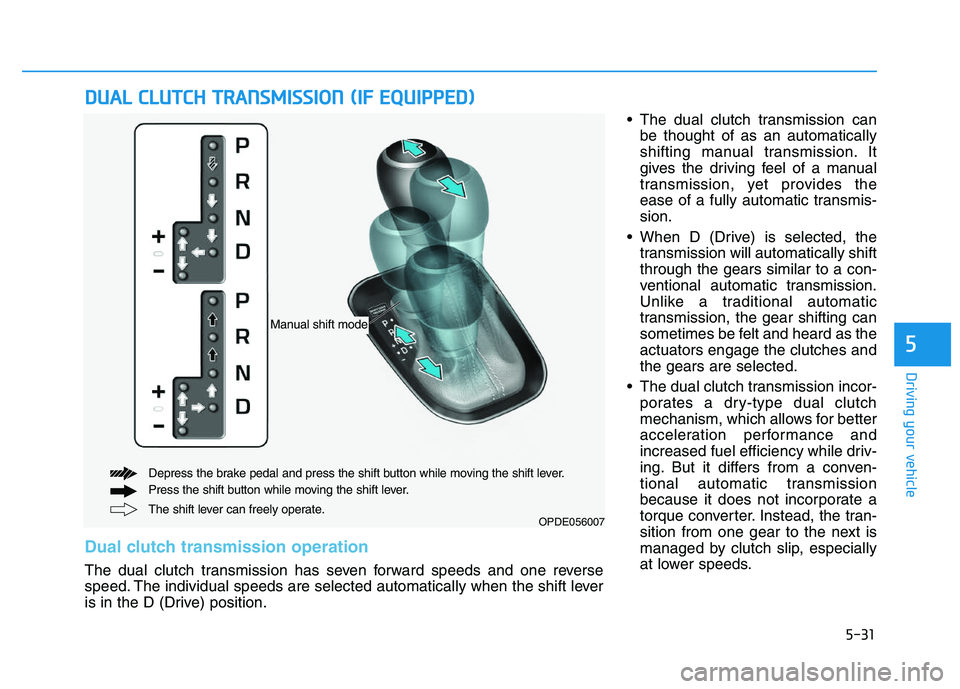
OPDE056007The shift lever can freely operate.
Depress the brake pedal and press the shift button while moving the shift lever.
Press the shift button while moving the shift lever.
Manual shift mode
Dual clutch transmission operation
The dual clutch transmission has seven forward speeds and one reverse
speed. The individual speeds are selected automatically when the shift lever
is in the D (Drive) position.
Page 336 of 659

5-32
Driving your vehicleAs a result, shifts are sometimes
more noticeable, and a light vibra-
tion can be felt as the transmission
shaft speed is matched with the
engine shaft speed. This is a nor-
mal condition of the dual clutch
transmission.
The dry-type clutch transfers torque more directly and provides
a direct-drive feeling which may
feel different from a conventional
automatic transmission. This may
be more noticeable when launch-
ing the vehicle from a stop or when
traveling at low, stop-and-go vehi-
cle speeds.
When rapidly accelerating from a lower vehicle speed, the engine
rpm may increase dramatically as
a result of clutch slip as the dual
clutch transmission selects the cor-
rect gear. This is a normal condi-
tion.
When accelerating from a stop on an incline, press the accelerator
smoothly and gradually to avoid
any shudder feeling or jerkiness. When traveling at a lower vehicle
speed, if you release the accelera-
tor pedal quickly, you may feel
engine braking before the trans-
mission changes gears. This
engine braking feeling is similar to
operating a manual transmission at
low speed.
When driving downhill, you may wish to move the gear shift lever to
Manual Shift mode and downshift
to a lower gear in order to control
your speed without using the brake
pedal excessively.
When you turn the engine on and off, you may hear clicking sounds
as the system goes through a self-
test. This is a normal sound for the
dual clutch transmission.
During the first 1,500 km (1000 miles), you may feel that the vehi-
cle may not be smooth when accel-
erating at low speed. During this
break-in period, the shift quality
and performance of your new vehi-
cle is continuously optimized. To reduce the risk of serious
injury or death:
ALWAYS check the surround-
ing areas near your vehicle for
people, especially children,
before shifting a vehicle into
D (Drive) or R (Reverse).
Before leaving the driver's
seat, always make sure the
shift lever is in the P (Park)
position, then set the parking
brake, and place the ignition
switch in the LOCK/OFF posi-
tion. Unexpected and sudden
vehicle movement can occur
if these precautions are not
followed.
Do not use aggressive engine
braking (shifting from a high-
er gear to a lower gear) on
slippery roads. This could
cause the tires to slip and may
result in an accident.
WARNING
Page 346 of 659
5-42
Driving your vehicle
Disc brakes wear indicator
When your brake pads are worn and
new pads are required, you will hear
a high pitched warning sound from
your front or rear brakes. You may
hear this sound come and go or it
may occur whenever you depress
the brake pedal.
Note that some driving conditions or
climates may cause a brake squeal
when you first apply (or lightly apply)
the brakes. This is normal and does
not indicate a problem with your
brakes.
To avoid costly brake repairs, do
not continue to drive with worn
brake pads.
Information
Always replace brake pads as com-
plete front or rear axle sets.
Parking brake
(hand type, if equipped)
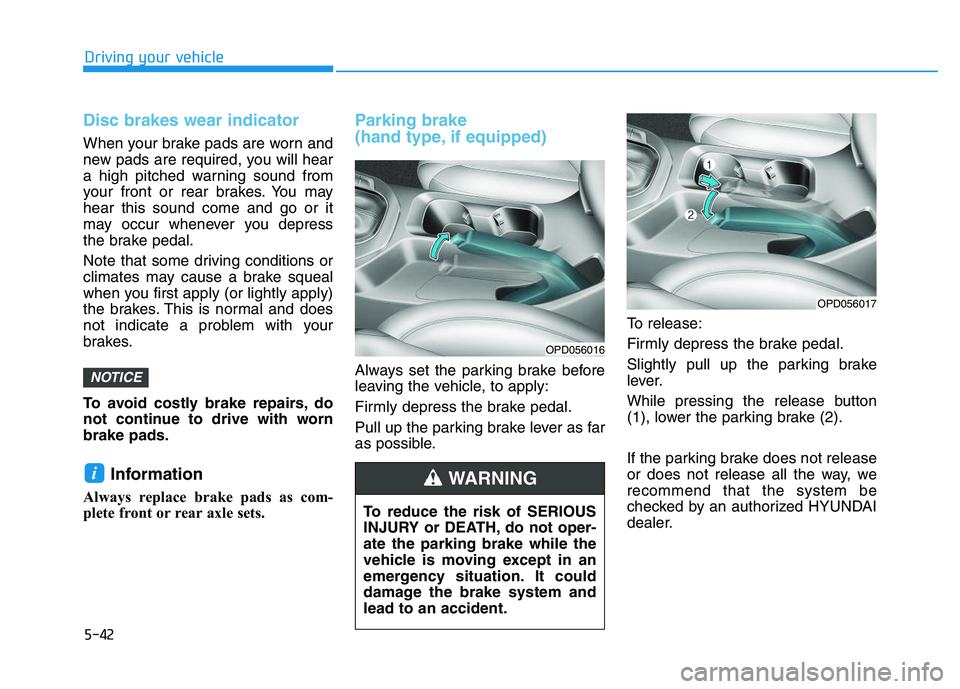
Always set the parking brake before
leaving the vehicle, to apply:
Firmly depress the brake pedal.
Pull up the parking brake lever as far
as possible.To release:
Firmly depress the brake pedal.
Slightly pull up the parking brake
lever.
While pressing the release button
(1), lower the parking brake (2).
If the parking brake does not release
or does not release all the way, we
recommend that the system be
checked by an authorized HYUNDAI
dealer.
i
NOTICE
To reduce the risk of SERIOUS
INJURY or DEATH, do not oper-
ate the parking brake while the
vehicle is moving except in an
emergency situation. It could
damage the brake system and
lead to an accident.
WARNING
OPD056016
OPD056017
Page 351 of 659

5-47
Driving your vehicle
5
Do not apply the acceleratorpedal while the parking brake is
engaged. If you depress the
accelerator pedal with the EPB
engaged, a warning will sound
and a message will appear.
Damage to the parking brake
may occur.
Driving with the parking brake on can overheat the braking sys-
tem and cause premature wear
or damage to brake parts. Make
sure the EPB is released and the
Parking Brake Warning Light is
off before driving.
Information
• A clicking sound may be heardwhile operating or releasing the
EPB. These conditions are normal
and indicate that the EPB is func-
tioning properly.
• When leaving your keys with a parking attendant or assistant,
make sure to inform him/her how to
operate the EPB.
AUTO HOLD deactivating.
Press brake pedal
When the conversion from Auto Hold
to EPB is not working properly a
warning will sound and a message
will appear.
Parking brake automatically locked
If the EPB is applied while Auto Hold
is activated, a warning will sound and
a message will appear.
i
NOTICE■ Type A■Type B
OTLE055028/OLFH044408L
■Type A■Type B
OLF054131N/OLF044411N
Page 352 of 659

5-48
Driving your vehicle
EPB malfunction indicator (if equipped)
This warning light illuminates if the
Engine Start/Stop button is changed
to the ON position and goes off in
approximately 3 seconds if the sys-
tem is operating normally.
If the EPB malfunction indicator
remains on, comes on while driving,
or does not come on when the
Engine Start/Stop button is changed
to the ON position, this indicates that
the EPB may have malfunctioned.
If this occurs, we recommend that
the system be checked by an author-
ized HYUNDAI dealer. The EPB malfunction indicator may
illuminate when the ESC indicator
comes on to indicate that the ESC is
not working properly, but it does not
indicate a malfunction of the EPB.
If the EPB warning light is still
on, we recommend that the sys-
tem be checked by an author-
ized HYUNDAI dealer.
If the parking brake warning light does not illuminate or
blinks even though the EPB
switch was pulled up, the EPB
may not be applied.
If the parking brake warning light blinks when the EPB warning
light is on, press the switch, and
then pull it up. Repeat this one
more time. If the EPB warning
does not go off, we recommend
that the system be checked by
an authorized HYUNDAI dealer.
Emergency braking
If there is a problem with the brake
pedal while driving, emergency brak-
ing is possible by pulling up and
holding the EPB switch. Braking is
possible only while you are holding
the EPB switch. However, braking
distance will be longer than normal.
Information
During emergency braking, the park-
ing brake warning light will illumi-
nate to indicate that the system is
operating.
i
NOTICE
■ Type A■Type B
OPD056021/OPD056074Do not operate the parking
brake while the vehicle is mov-
ing except in an emergency sit-
uation. It could damage the
brake system and lead to a
severe accident.
WARNING
Page 356 of 659

5-52
Driving your vehicle
Warning messages
Parking brake automatically locked
When the EPB is applied from Auto
Hold, a warning will sound and a
message will appear.
AUTO HOLD deactivating.
Press brake pedal
When the conversion from Auto Hold
to EPB is not working properly a
warning will sound and a message
will appear.
When this message is displayed, the
Auto Hold and EPB may not operate.
For your safety, depress the brake
pedal.
Press brake pedal to deactivate
AUTO HOLD
If you did not apply the brake pedal
when you release the Auto Hold by
pressing the [AUTO HOLD] switch, a
warning will sound and a message
will appear.
■Type A■Type B
OLF054131N/OLF044411N
■Type A■Type B
OTLE055028/OLFH044408L
■Type A■Type B
OLF054127N/OLF044407N
Page 378 of 659
5-74
Driving your vehicle
If any of these conditions occur, the
light on the BSD switch and the sys-
tem will turn off automatically.
When the BSD canceled warning
message is displayed in the cluster,
check to make sure that the rear
bumper is free from any dirt or snow
in the areas where the sensor is
located. Remove any dirt, snow, or
foreign material that could interfere
with the radar sensors.
After any dirt or debris is removed,
the BSD system should operate nor-
mally after about 10 minutes of driv-
ing the vehicle.
If the system still does not operate
normally have your vehicle inspected
by an authorized HYUNDAI dealer.
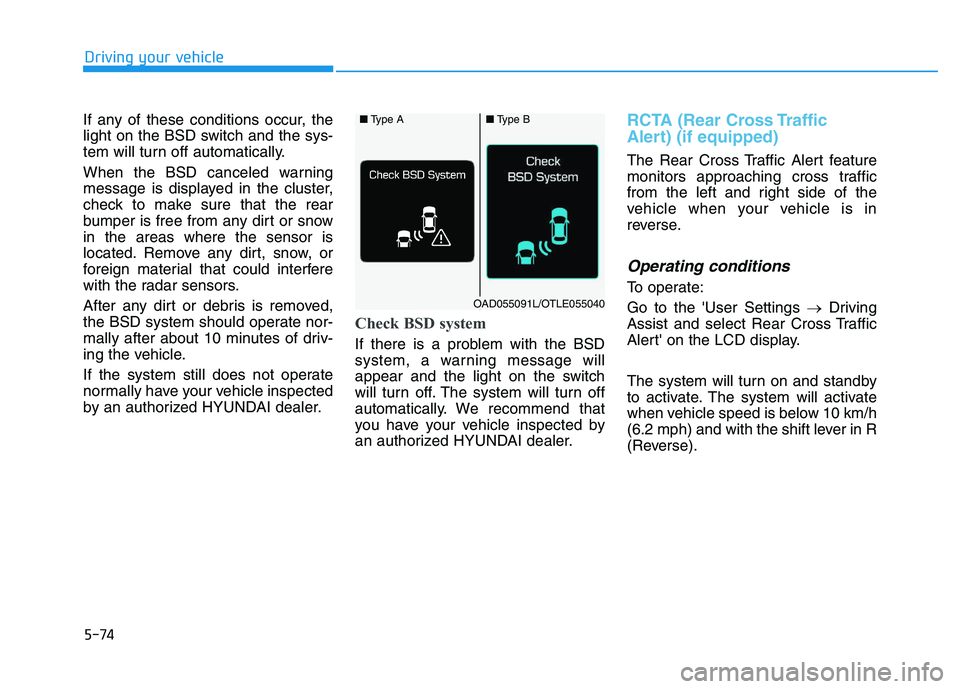
Check BSD system
If there is a problem with the BSD
system, a warning message will
appear and the light on the switch
will turn off. The system will turn off
automatically. We recommend that
you have your vehicle inspected by
an authorized HYUNDAI dealer.
RCTA (Rear Cross Traffic
Alert) (if equipped)
The Rear Cross Traffic Alert feature
monitors approaching cross traffic
from the left and right side of the
vehicle when your vehicle is in
reverse.
Operating conditions
To operate:
Go to the 'User Settings →Driving
Assist and select Rear Cross Traffic
Alert' on the LCD display.
The system will turn on and standby
to activate. The system will activate
when vehicle speed is below 10 km/h
(6.2 mph) and with the shift lever in R
(Reverse).
■ Type A■Type B
OAD055091L/OTLE055040
Page 379 of 659
5-75
Driving your vehicle
5
Information
The Rear Cross Traffic Alert (RCTA)
detecting range is approximately
0.5 m ~ 20 m (1 ft ~ 65 ft). An
approaching vehicle will be detected if
their vehicle speed is within 4 km/h ~
36 km/h (2.5 ~ 22.5 mph ).
Note that the detecting range may
vary under certain conditions. As
always, use caution and pay close
attention to your surroundings when
backing up your vehicle.
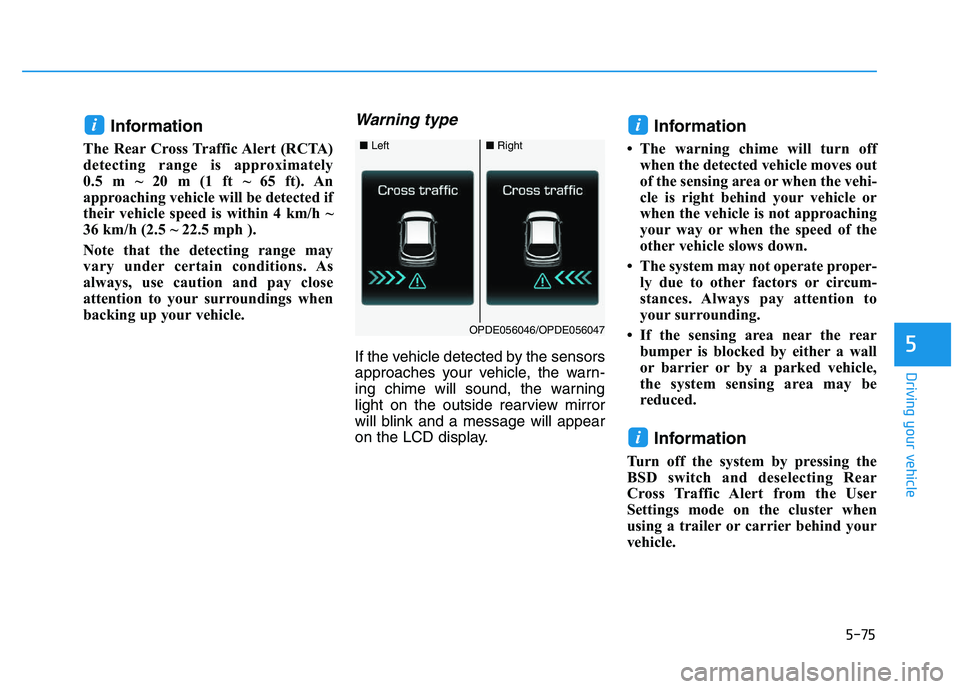
Warning type
If the vehicle detected by the sensors
approaches your vehicle, the warn-
ing chime will sound, the warning
light on the outside rearview mirror
will blink and a message will appear
on the LCD display.
Information
• The warning chime will turn offwhen the detected vehicle moves out
of the sensing area or when the vehi-
cle is right behind your vehicle or
when the vehicle is not approaching
your way or when the speed of the
other vehicle slows down.
• The system may not operate proper- ly due to other factors or circum-
stances. Always pay attention to
your surrounding.
• If the sensing area near the rear bumper is blocked by either a wall
or barrier or by a parked vehicle,
the system sensing area may be
reduced.
Information
Turn off the system by pressing the
BSD switch and deselecting Rear
Cross Traffic Alert from the User
Settings mode on the cluster when
using a trailer or carrier behind your
vehicle.
i
ii
■ Left■Right
OPDE056046/OPDE056047
Page 388 of 659
5-84
Driving your vehicle
System malfunction
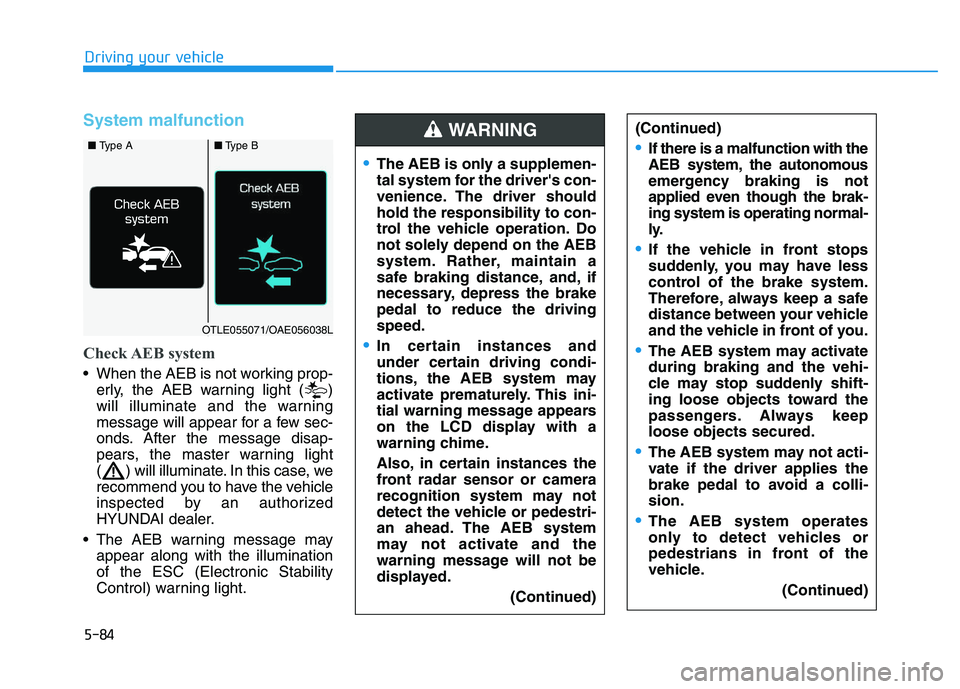
Check AEB system
When the AEB is not working prop-erly, the AEB warning light ( )
will illuminate and the warning
message will appear for a few sec-
onds. After the message disap-
pears, the master warning light
( ) will illuminate. In this case, we
recommend you to have the vehicle
inspected by an authorized
HYUNDAI dealer.
The AEB warning message may appear along with the illumination
of the ESC (Electronic Stability
Control) warning light.
The AEB is only a supplemen-
tal system for the driver's con-
venience. The driver should
hold the responsibility to con-
trol the vehicle operation. Do
not solely depend on the AEB
system. Rather, maintain a
safe braking distance, and, if
necessary, depress the brake
pedal to reduce the driving
speed.
In certain instances and
under certain driving condi-
tions, the AEB system may
activate prematurely. This ini-
tial warning message appears
on the LCD display with a
warning chime.
Also, in certain instances the
front radar sensor or camera
recognition system may not
detect the vehicle or pedestri-
an ahead. The AEB system
may not activate and the
warning message will not be
displayed.
(Continued)
(Continued)
If there is a malfunction with the
AEB system, the autonomous
emergency braking is not
applied even though the brak-
ing system is operating normal-
ly.
If the vehicle in front stops
suddenly, you may have less
control of the brake system.
Therefore, always keep a safe
distance between your vehicle
and the vehicle in front of you.
The AEB system may activate
during braking and the vehi-
cle may stop suddenly shift-
ing loose objects toward the
passengers. Always keep
loose objects secured.
The AEB system may not acti-
vate if the driver applies the
brake pedal to avoid a colli-
sion.
The AEB system operates
only to detect vehicles or
pedestrians in front of the
vehicle.(Continued)
WARNING ■ Type A■Type B
OTLE055071/OAE056038L