Battery change HYUNDAI I30 2021 User Guide
[x] Cancel search | Manufacturer: HYUNDAI, Model Year: 2021, Model line: I30, Model: HYUNDAI I30 2021Pages: 659, PDF Size: 17.14 MB
Page 288 of 659
4-56
Multimedia System
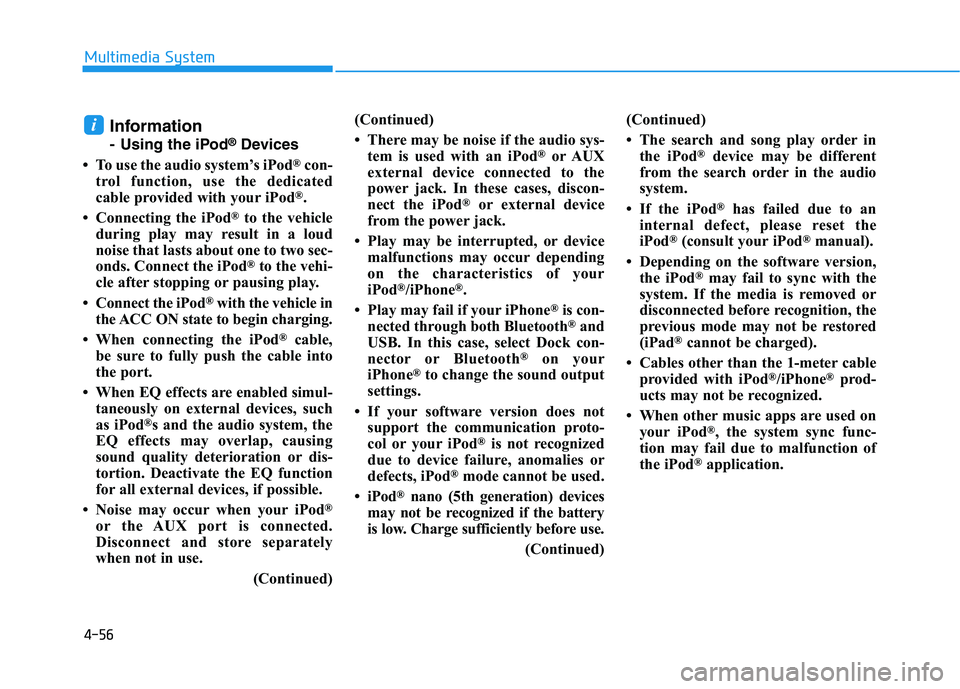
Information
- Using the iPod®Devices
• To use the audio system’s iPod
®con-
trol function, use the dedicated
cable provided with your iPod
®.
• Connecting the iPod
®to the vehicle
during play may result in a loud
noise that lasts about one to two sec-
onds. Connect the iPod
®to the vehi-
cle after stopping or pausing play.
• Connect the iPod
®with the vehicle in
the ACC ON state to begin charging.
• When connecting the iPod
®cable,
be sure to fully push the cable into
the port.
• When EQ effects are enabled simul- taneously on external devices, such
as iPod
®s and the audio system, the
EQ effects may overlap, causing
sound quality deterioration or dis-
tortion. Deactivate the EQ function
for all external devices, if possible.
• Noise may occur when your iPod
®
or the AUX port is connected.
Disconnect and store separately
when not in use. (Continued)(Continued)
• There may be noise if the audio sys-
tem is used with an iPod
®or AUX
external device connected to the
power jack. In these cases, discon-
nect the iPod
®or external device
from the power jack.
• Play may be interrupted, or device malfunctions may occur depending
on the characteristics of your
iPod
®/iPhone®.
• Play may fail if your iPhone
®is con-
nected through both Bluetooth®and
USB. In this case, select Dock con-
nector or Bluetooth
®on your
iPhone®to change the sound output
settings.
• If your software version does not support the communication proto-
col or your iPod
®is not recognized
due to device failure, anomalies or
defects, iPod
®mode cannot be used.
• iPod
®nano (5th generation) devices
may not be recognized if the battery
is low. Charge sufficiently before use.
(Continued)(Continued)
• The search and song play order in
the iPod
®device may be different
from the search order in the audio
system.
• If the iPod
®has failed due to an
internal defect, please reset the
iPod
®(consult your iPod®manual).
• Depending on the software version, the iPod
®may fail to sync with the
system. If the media is removed or
disconnected before recognition, the
previous mode may not be restored
(iPad
®cannot be charged).
• Cables other than the 1-meter cable provided with iPod
®/iPhone®prod-
ucts may not be recognized.
• When other music apps are used on your iPod
®, the system sync func-
tion may fail due to malfunction of
the iPod
®application.
i
Page 305 of 659
Driving your vehicle
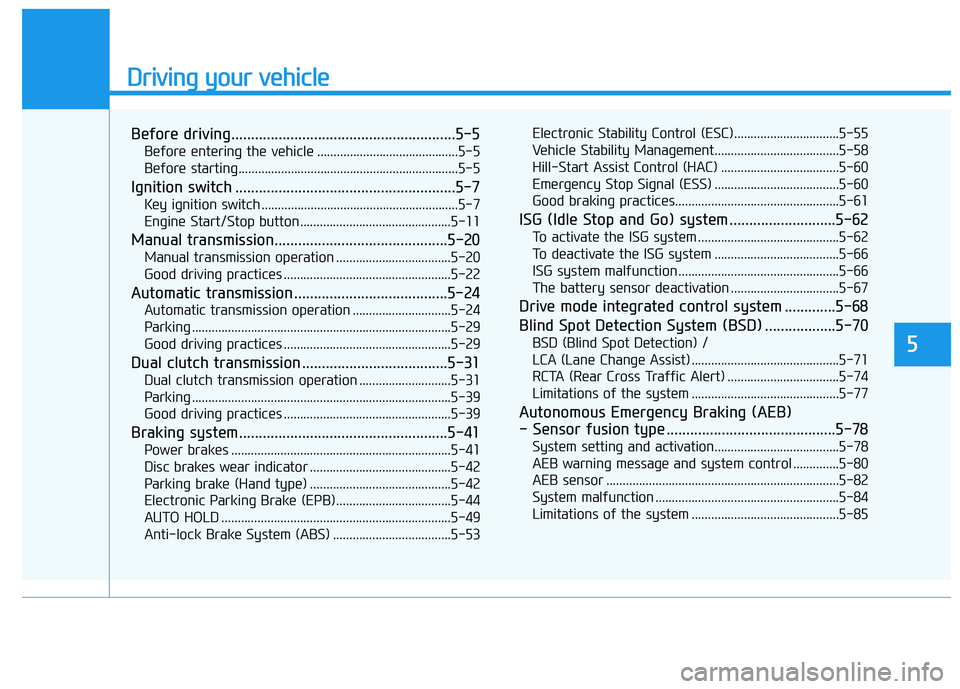
Before driving.........................................................5-5
Before entering the vehicle ...........................................5-5
Before starting...................................................................5-5
Ignition switch ........................................................5-7
Key ignition switch ............................................................5-7
Engine Start/Stop button ..............................................5-11
Manual transmission............................................5-20
Manual transmission operation ...................................5-20
Good driving practices ...................................................5-22
Automatic transmission .......................................5-24
Automatic transmission operation ..............................5-24
Parking ...............................................................................5-29
Good driving practices ...................................................5-29
Dual clutch transmission .....................................5-31
Dual clutch transmission operation ............................5-31
Parking ...............................................................................5-39
Good driving practices ...................................................5-39
Braking system.....................................................5-41
Power brakes ...................................................................5-41
Disc brakes wear indicator ...........................................5-42
Parking brake (Hand type) ...........................................5-42
Electronic Parking Brake (EPB)...................................5-44
AUTO HOLD ......................................................................5-49
Anti-lock Brake System (ABS) ....................................5-53Electronic Stability Control (ESC)................................5-55
Vehicle Stability Management......................................5-58
Hill-Start Assist Control (HAC) ....................................5-60
Emergency Stop Signal (ESS) ......................................5-60
Good braking practices..................................................5-61
ISG (Idle Stop and Go) system ...........................5-62
To activate the ISG system ...........................................5-62
To deactivate the ISG system ......................................5-66
ISG system malfunction .................................................5-66
The battery sensor deactivation .................................5-67
Drive mode integrated control system .............5-68
Blind Spot Detection System (BSD) ..................5-70
BSD (Blind Spot Detection) /
LCA (Lane Change Assist) .............................................5-71
RCTA (Rear Cross Traffic Alert) ..................................5-74
Limitations of the system .............................................5-77
Autonomous Emergency Braking (AEB)
- Sensor fusion type ...........................................5-78
System setting and activation......................................5-78
AEB warning message and system control ..............5-80
AEB sensor .......................................................................5-82
System malfunction ........................................................5-84
Limitations of the system .............................................5-85
5
Page 317 of 659
5-13
Driving your vehicle
5
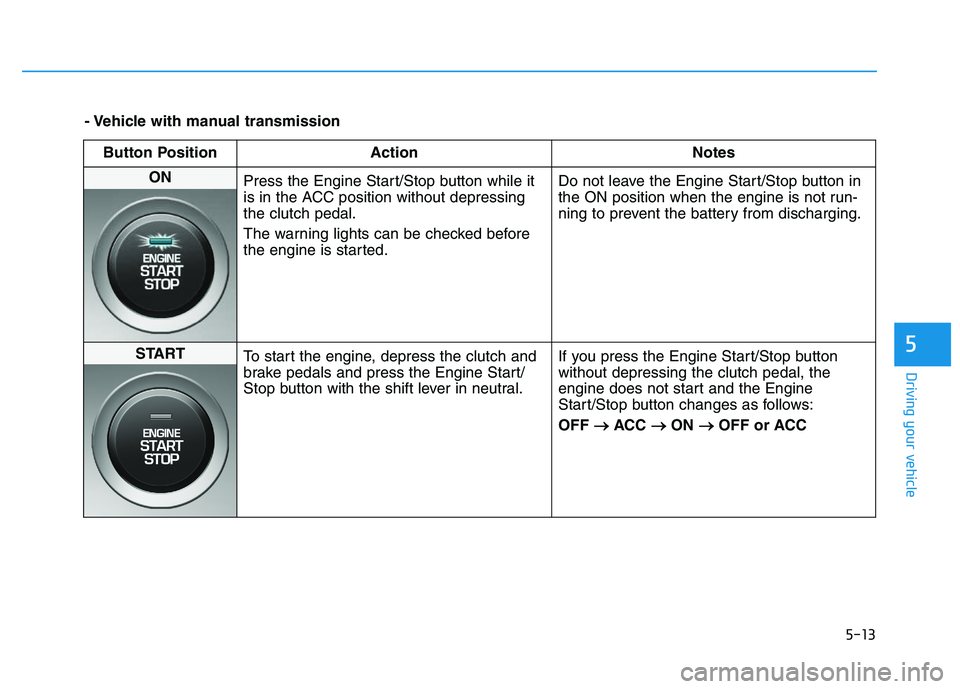
- Vehicle with manual transmissionButton Position Action Notes
ON Press the Engine Start/Stop button while it
is in the ACC position without depressing
the clutch pedal.
The warning lights can be checked before
the engine is started. Do not leave the Engine Start/Stop button in
the ON position when the engine is not run-
ning to prevent the battery from discharging.
START
To start the engine, depress the clutch and
brake pedals and press the Engine Start/
Stop button with the shift lever in neutral. If you press the Engine Start/Stop button
without depressing the clutch pedal, the
engine does not start and the Engine
Start/Stop button changes as follows:
OFF
→
→
ACC →
→
ON →
→
OFF or ACC
Page 319 of 659
5-15
Driving your vehicle
5
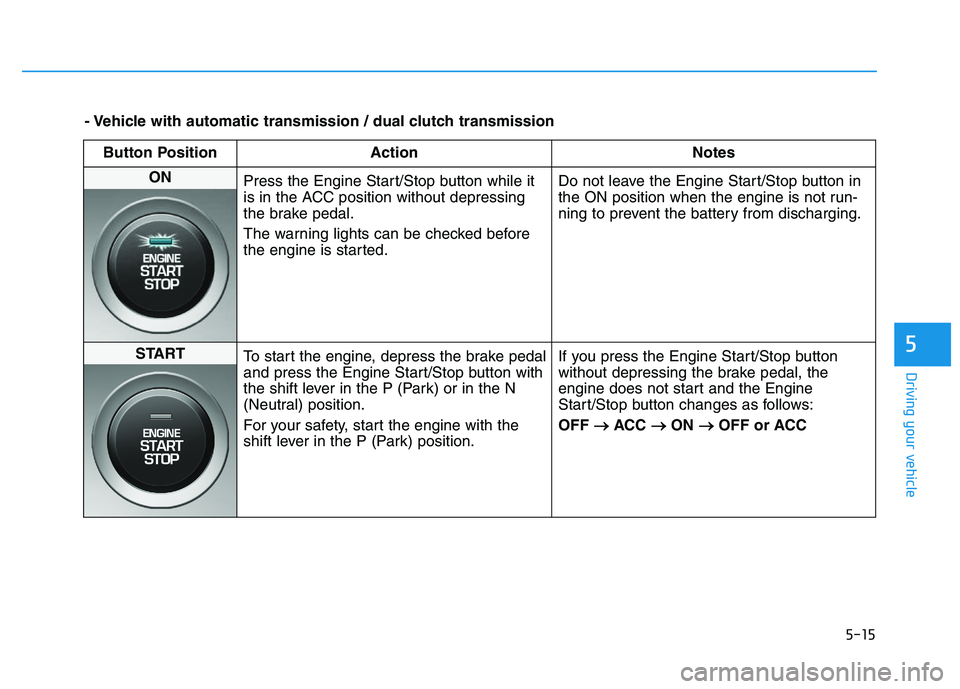
- Vehicle with automatic transmission / dual clutch transmissionButton Position Action Notes
ON Press the Engine Start/Stop button while it
is in the ACC position without depressing
the brake pedal.
The warning lights can be checked before
the engine is started. Do not leave the Engine Start/Stop button in
the ON position when the engine is not run-
ning to prevent the battery from discharging.
START
To start the engine, depress the brake pedal
and press the Engine Start/Stop button with
the shift lever in the P (Park) or in the N
(Neutral) position.
For your safety, start the engine with the
shift lever in the P (Park) position. If you press the Engine Start/Stop button
without depressing the brake pedal, the
engine does not start and the Engine
Start/Stop button changes as follows:
OFF
→
→
ACC →
→
ON →
→
OFF or ACC
Page 458 of 659
5-154
Driving your vehicle
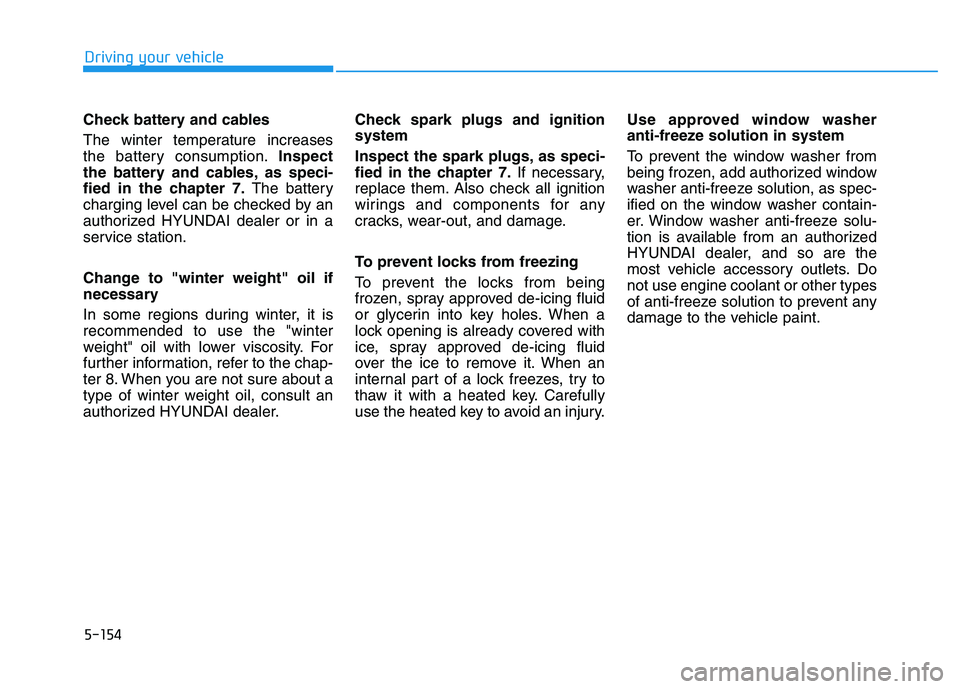
Check battery and cables
The winter temperature increases
the battery consumption. Inspect
the battery and cables, as speci-
fied in the chapter 7. The battery
charging level can be checked by an
authorized HYUNDAI dealer or in a
service station.
Change to "winter weight" oil if
necessary
In some regions during winter, it is
recommended to use the "winter
weight" oil with lower viscosity. For
further information, refer to the chap-
ter 8. When you are not sure about a
type of winter weight oil, consult an
authorized HYUNDAI dealer. Check spark plugs and ignition
system
Inspect the spark plugs, as speci-
fied in the chapter 7.
If necessary,
replace them. Also check all ignition
wirings and components for any
cracks, wear-out, and damage.
To prevent locks from freezing
To prevent the locks from being
frozen, spray approved de-icing fluid
or glycerin into key holes. When a
lock opening is already covered with
ice, spray approved de-icing fluid
over the ice to remove it. When an
internal part of a lock freezes, try to
thaw it with a heated key. Carefully
use the heated key to avoid an injury. Use approved window washer
anti-freeze solution in system
To prevent the window washer from
being frozen, add authorized window
washer anti-freeze solution, as spec-
ified on the window washer contain-
er. Window washer anti-freeze solu-
tion is available from an authorized
HYUNDAI dealer, and so are the
most vehicle accessory outlets. Do
not use engine coolant or other types
of anti-freeze solution to prevent any
damage to the vehicle paint.
Page 525 of 659
Maintenance
7-12
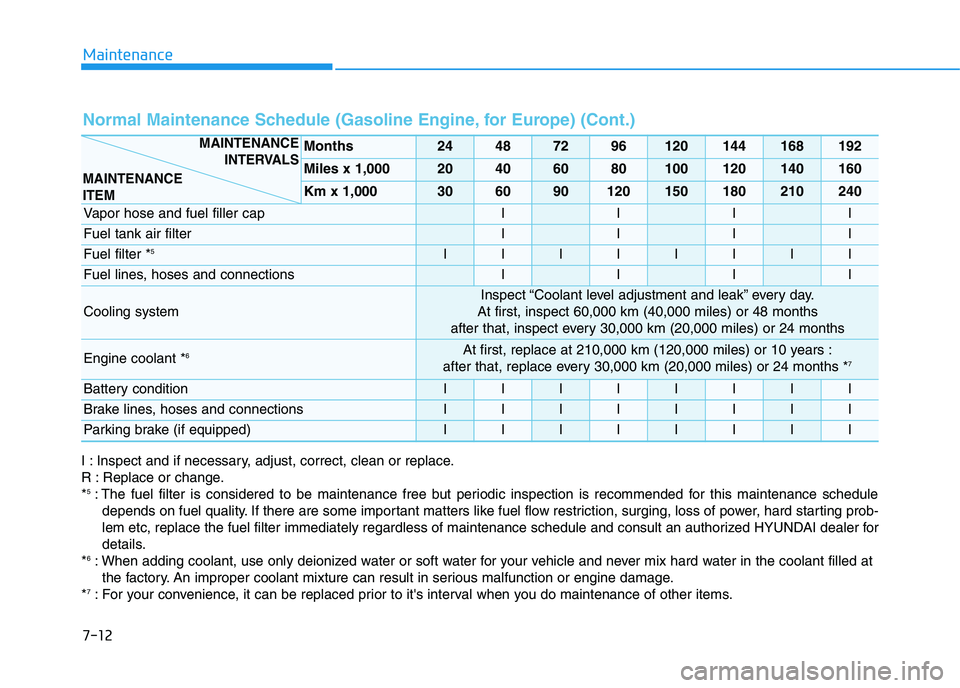
Normal Maintenance Schedule (Gasoline Engine, for Europe) (Cont.)
Months24487296120144168192
Miles x 1,00020406080100120140160
Km x 1,000306090120150180210240
Vapor hose and fuel filler capIIII
Fuel tank air filterIIII
Fuel filter *5IIIIIIII
Fuel lines, hoses and connectionsIIII
Cooling system
Inspect “Coolant level adjustment and leak” every day.
At first, inspect 60,000 km (40,000 miles) or 48 months
after that, inspect every 30,000 km (20,000 miles) or 24 months
Engine coolant *6At first, replace at 210,000 km (120,000 miles) or 10 years :
after that, replace every 30,000 km (20,000 miles) or 24 months *7
Battery conditionIIIIIIII
Brake lines, hoses and connectionsIIIIIIII
Parking brake (if equipped)IIIIIIII
MAINTENANCE INTERVALS
MAINTENANCE
ITEM
I : Inspect and if necessary, adjust, correct, clean or replace.
R : Replace or change.
*
5: The fuel filter is considered to be maintenance free but periodic inspection is recommended for this maintenance schedule depends on fuel quality. If there are some important matters like fuel flow restriction, surging, loss of power, hard starting p rob-
lem etc, replace the fuel filter immediately regardless of maintenance schedule and consult an authorized HYUNDAI dealer for
details.
*
6: When adding coolant, use only deionized water or soft water for your vehicle and never mix hard water in the coolant filled at the factory. An improper coolant mixture can result in serious malfunction or engine damage.
*
7: For your convenience, it can be replaced prior to it's interval when you do maintenance of other items.
Page 531 of 659
Maintenance
7-18
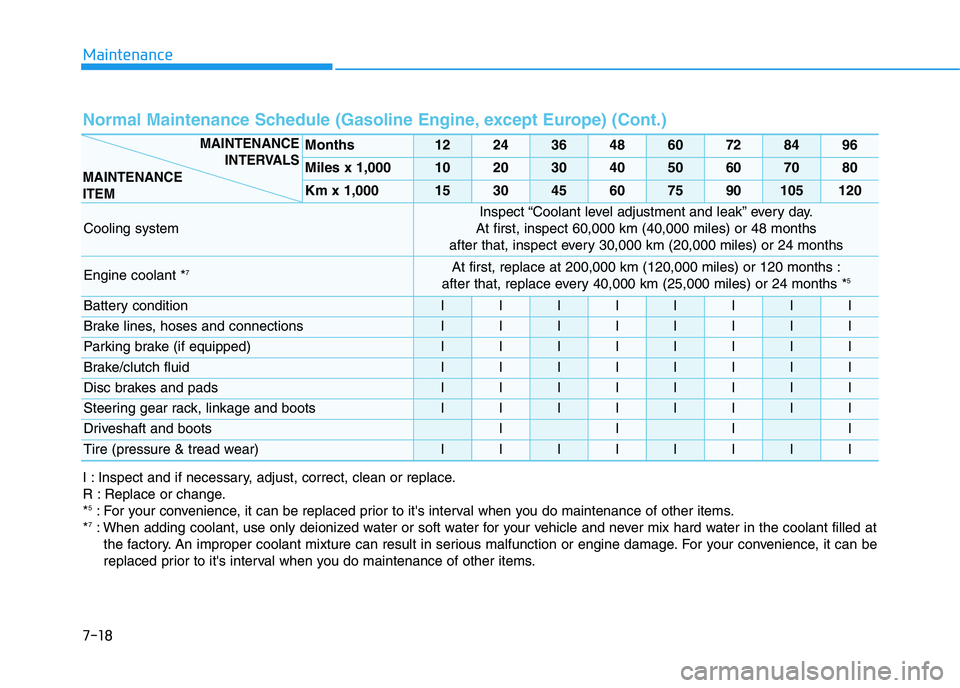
Normal Maintenance Schedule (Gasoline Engine, except Europe) (Cont.)
Months1224364860728496
Miles x 1,0001020304050607080
Km x 1,000153045607590105120
Cooling system
Inspect “Coolant level adjustment and leak” every day.
At first, inspect 60,000 km (40,000 miles) or 48 months
after that, inspect every 30,000 km (20,000 miles) or 24 months
Engine coolant *7At first, replace at 200,000 km (120,000 miles) or 120 months :
after that, replace every 40,000 km (25,000 miles) or 24 months *5
Battery conditionIIIIIIII
Brake lines, hoses and connectionsIIIIIIII
Parking brake (if equipped)IIIIIIII
Brake/clutch fluidIIIIIIII
Disc brakes and padsIIIIIIII
Steering gear rack, linkage and bootsIIIIIIII
Driveshaft and bootsIIII
Tire (pressure & tread wear)IIIIIIII
I : Inspect and if necessary, adjust, correct, clean or replace.
R : Replace or change.
*
5: For your convenience, it can be replaced prior to it's interval when you do maintenance of other items.
*7: When adding coolant, use only deionized water or soft water for your vehicle and never mix hard water in the coolant filled at the factory. An improper coolant mixture can result in serious malfunction or engine damage. For your convenience, it can be
replaced prior to it's interval when you do maintenance of other items.
MAINTENANCE INTERVALS
MAINTENANCE
ITEM
Page 536 of 659
7-23
7
Maintenance
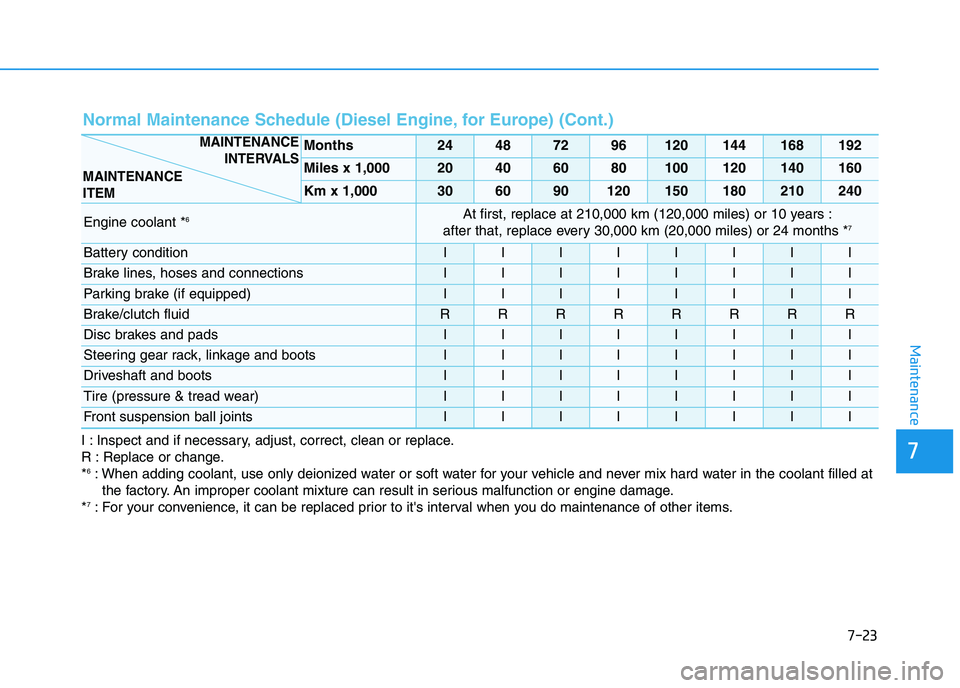
Normal Maintenance Schedule (Diesel Engine, for Europe) (Cont.)
I : Inspect and if necessary, adjust, correct, clean or replace.
R : Replace or change.
*
6: When adding coolant, use only deionized water or soft water for your vehicle and never mix hard water in the coolant filled atthe factory. An improper coolant mixture can result in serious malfunction or engine damage.
*
7: For your convenience, it can be replaced prior to it's interval when you do maintenance of other items.
Months24487296120144168192
Miles x 1,00020406080100120140160
Km x 1,000306090120150180210240
Engine coolant *6At first, replace at 210,000 km (120,000 miles) or 10 years :
after that, replace every 30,000 km (20,000 miles) or 24 months *7
Battery conditionIIIIIIII
Brake lines, hoses and connectionsIIIIIIII
Parking brake (if equipped)IIIIIIII
Brake/clutch fluidRRRRRRRR
Disc brakes and padsIIIIIIII
Steering gear rack, linkage and bootsIIIIIIII
Driveshaft and bootsIIIIIIII
Tire (pressure & tread wear)IIIIIIII
Front suspension ball jointsIIIIIIII
MAINTENANCE INTERVALS
MAINTENANCE
ITEM
Page 541 of 659
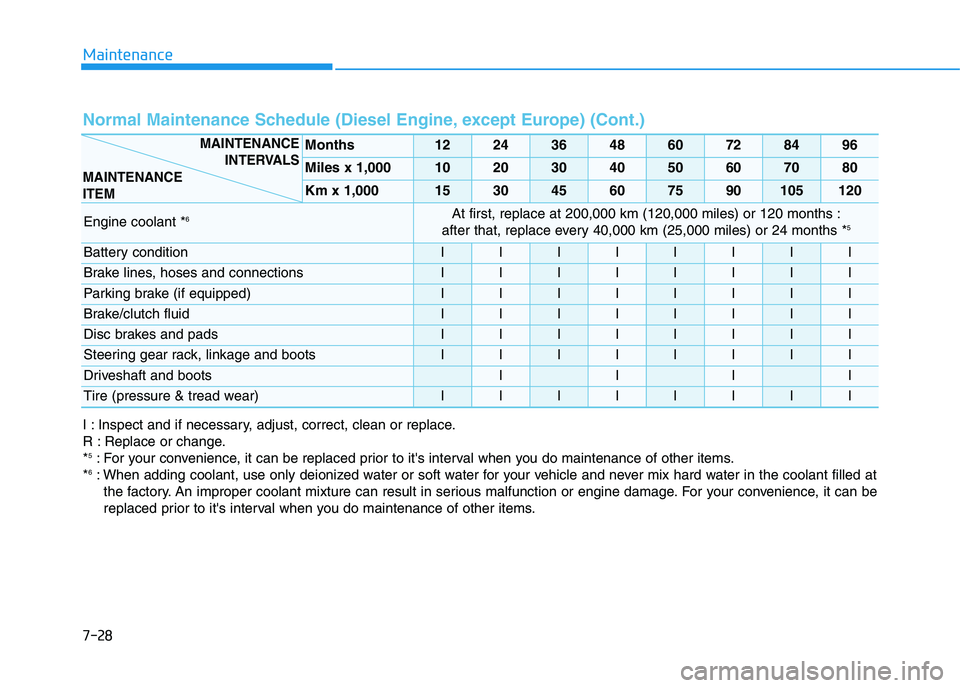
Maintenance
7-28
Normal Maintenance Schedule (Diesel Engine, except Europe) (Cont.)
Months1224364860728496
Miles x 1,0001020304050607080
Km x 1,000153045607590105120
Engine coolant *6At first, replace at 200,000 km (120,000 miles) or 120 months :
after that, replace every 40,000 km (25,000 miles) or 24 months *5
Battery conditionIIIIIIII
Brake lines, hoses and connectionsIIIIIIII
Parking brake (if equipped)IIIIIIII
Brake/clutch fluidIIIIIIII
Disc brakes and padsIIIIIIII
Steering gear rack, linkage and bootsIIIIIIII
Driveshaft and bootsIIII
Tire (pressure & tread wear)IIIIIIII
I : Inspect and if necessary, adjust, correct, clean or replace.
R : Replace or change.
*
5: For your convenience, it can be replaced prior to it's interval when you do maintenance of other items.
*6: When adding coolant, use only deionized water or soft water for your vehicle and never mix hard water in the coolant filled at the factory. An improper coolant mixture can result in serious malfunction or engine damage. For your convenience, it can be
replaced prior to it's interval when you do maintenance of other items.
MAINTENANCE INTERVALS
MAINTENANCE
ITEM