smart HYUNDAI I30 2022 Workshop Manual
[x] Cancel search | Manufacturer: HYUNDAI, Model Year: 2022, Model line: I30, Model: HYUNDAI I30 2022Pages: 659, PDF Size: 17.14 MB
Page 445 of 659
5-141
Driving your vehicle
5
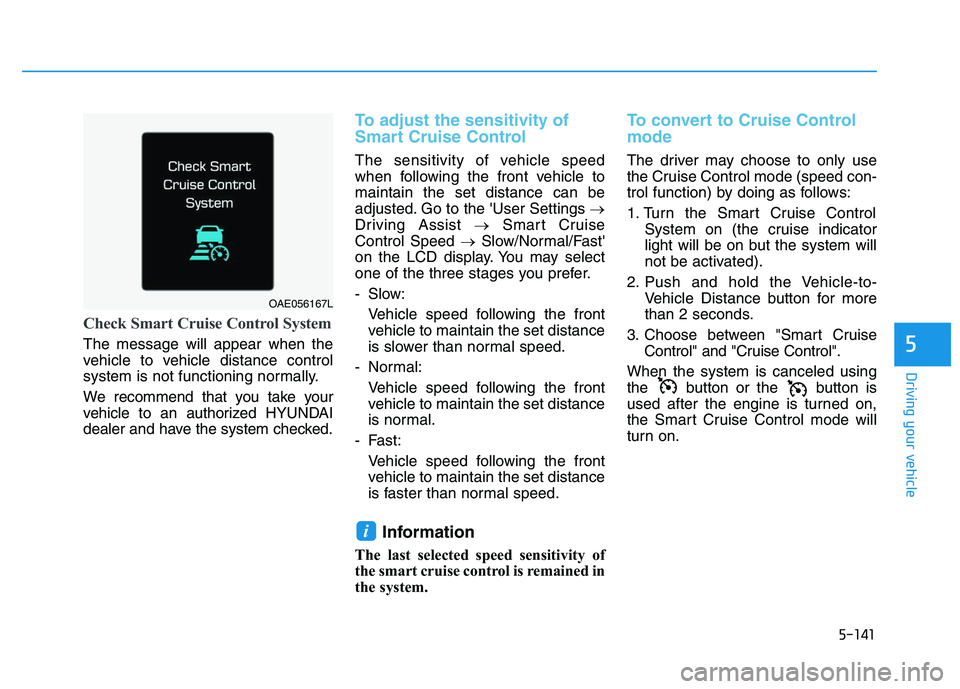
Check Smart Cruise Control System
The message will appear when the
vehicle to vehicle distance control
system is not functioning normally.
We recommend that you take your
vehicle to an authorized HYUNDAI
dealer and have the system checked.
To adjust the sensitivity of
Smart Cruise Control
The sensitivity of vehicle speed
when following the front vehicle to
maintain the set distance can be
adjusted. Go to the 'User Settings →
Driving Assist →Smart Cruise
Control Speed →Slow/Normal/Fast'
on the LCD display. You may select
one of the three stages you prefer.
- Slow:
Vehicle speed following the frontvehicle to maintain the set distance
is slower than normal speed.
- Normal: Vehicle speed following the frontvehicle to maintain the set distance
is normal.
- Fast: Vehicle speed following the frontvehicle to maintain the set distance
is faster than normal speed.
Information
The last selected speed sensitivity of
the smart cruise control is remained in
the system.
To convert to Cruise Control
mode
The driver may choose to only use
the Cruise Control mode (speed con-
trol function) by doing as follows:
1. Turn the Smart Cruise Control System on (the cruise indicator
light will be on but the system will
not be activated).
2. Push and hold the Vehicle-to- Vehicle Distance button for more
than 2 seconds.
3. Choose between "Smart Cruise Control" and "Cruise Control".
When the system is canceled using
the button or the button is
used after the engine is turned on,
the Smart Cruise Control mode will
turn on.
i
OAE056167L
Page 446 of 659
5-142
Driving your vehicle
Limitations of the system
The Smart Cruise Control System
may have limits to its ability to detect
distance to the vehicle ahead due to
road and traffic conditions.
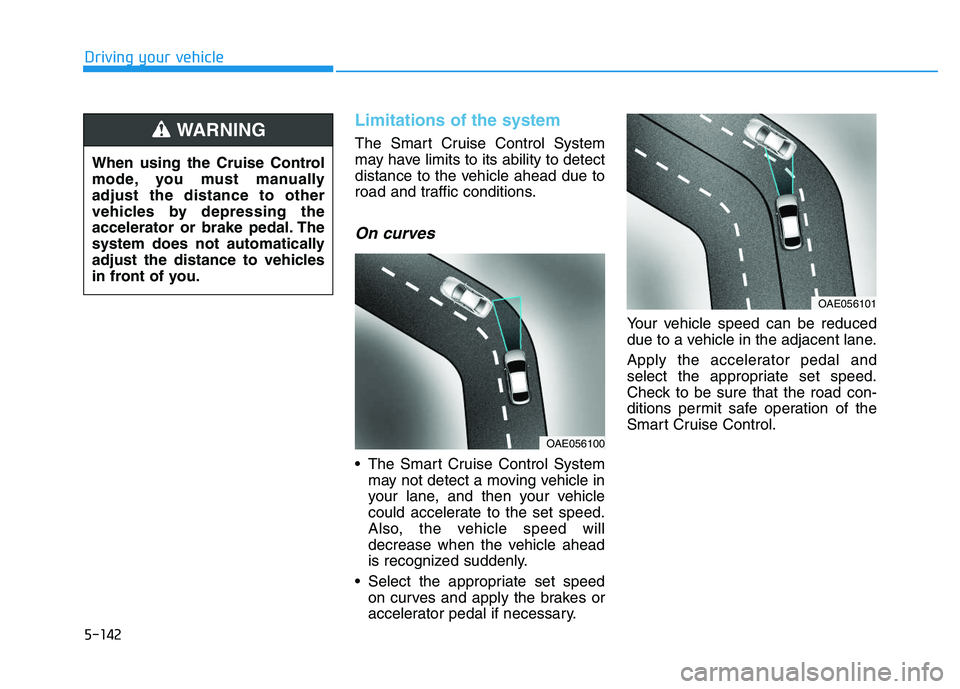
On curves
The Smart Cruise Control Systemmay not detect a moving vehicle in
your lane, and then your vehicle
could accelerate to the set speed.
Also, the vehicle speed will
decrease when the vehicle ahead
is recognized suddenly.
Select the appropriate set speed on curves and apply the brakes or
accelerator pedal if necessary. Your vehicle speed can be reduced
due to a vehicle in the adjacent lane.
Apply the accelerator pedal and
select the appropriate set speed.
Check to be sure that the road con-
ditions permit safe operation of the
Smart Cruise Control.
OAE056101
OAE056100
When using the Cruise Control
mode, you must manually
adjust the distance to other
vehicles by depressing the
accelerator or brake pedal. The
system does not automatically
adjust the distance to vehicles
in front of you.
WARNING
Page 447 of 659
5-143
Driving your vehicle
5
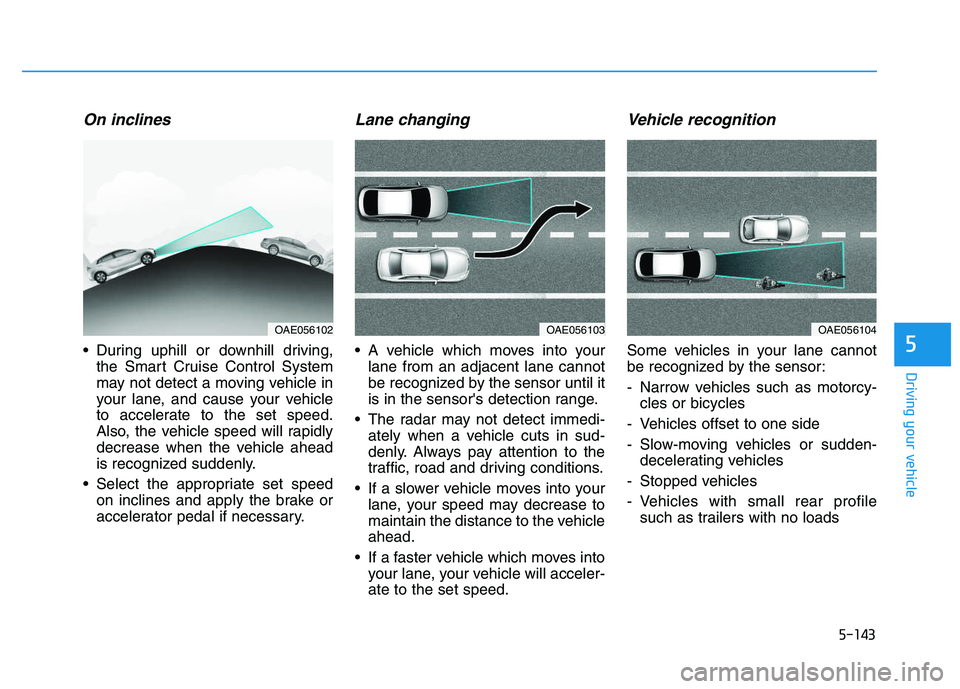
On inclines
During uphill or downhill driving,the Smart Cruise Control System
may not detect a moving vehicle in
your lane, and cause your vehicle
to accelerate to the set speed.
Also, the vehicle speed will rapidly
decrease when the vehicle ahead
is recognized suddenly.
Select the appropriate set speed on inclines and apply the brake or
accelerator pedal if necessary.
Lane changing
A vehicle which moves into yourlane from an adjacent lane cannot
be recognized by the sensor until it
is in the sensor's detection range.
The radar may not detect immedi- ately when a vehicle cuts in sud-
denly. Always pay attention to the
traffic, road and driving conditions.
If a slower vehicle moves into your lane, your speed may decrease to
maintain the distance to the vehicle
ahead.
If a faster vehicle which moves into your lane, your vehicle will acceler-
ate to the set speed.
Vehicle recognition
Some vehicles in your lane cannot
be recognized by the sensor:
- Narrow vehicles such as motorcy-cles or bicycles
- Vehicles offset to one side
- Slow-moving vehicles or sudden- decelerating vehicles
- Stopped vehicles
- Vehicles with small rear profile such as trailers with no loads
OAE056104OAE056103OAE056102
Page 449 of 659
5-145
Driving your vehicle
5
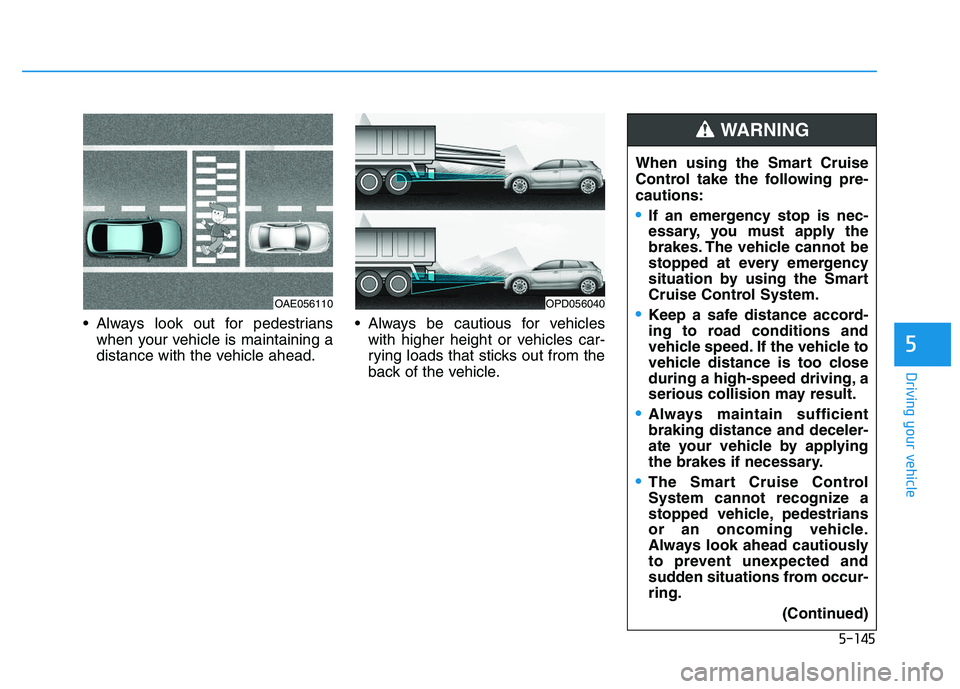
Always look out for pedestrianswhen your vehicle is maintaining a
distance with the vehicle ahead. Always be cautious for vehicles
with higher height or vehicles car-
rying loads that sticks out from the
back of the vehicle. When using the Smart Cruise
Control take the following pre-
cautions:
If an emergency stop is nec-
essary, you must apply the
brakes. The vehicle cannot be
stopped at every emergency
situation by using the Smart
Cruise Control System.
Keep a safe distance accord-
ing to road conditions and
vehicle speed. If the vehicle to
vehicle distance is too close
during a high-speed driving, a
serious collision may result.
Always maintain sufficient
braking distance and deceler-
ate your vehicle by applying
the brakes if necessary.
The Smart Cruise Control
System cannot recognize a
stopped vehicle, pedestrians
or an oncoming vehicle.
Always look ahead cautiously
to prevent unexpected and
sudden situations from occur-
ring.
(Continued)
WARNING
OPD056040OAE056110
Page 450 of 659
5-146
Driving your vehicleThe Smart Cruise Control System
may not operate temporarily due
to:
Electrical interference
Modifying the suspension
Differences of tire abrasion ortire pressure
Installing different type of tires
NOTICE(Continued)
Vehicles moving in front of you
with a frequent lane change
may cause a delay in the sys-
tem's reaction or may cause
the system to react to a vehicle
actually in an adjacent lane.
Always drive cautiously to pre-
vent unexpected and sudden
situations from occurring.
Always be aware of the select-
ed speed and vehicle to vehi-
cle distance. The driver
should not solely rely on the
system but always pay atten-
tion to driving conditions and
control your vehicle speed.
The Smart Cruise Control
System may not recognize
complex driving situations so
always pay attention to driv-
ing conditions and control
your vehicle speed.
Page 577 of 659
7-64
Maintenance
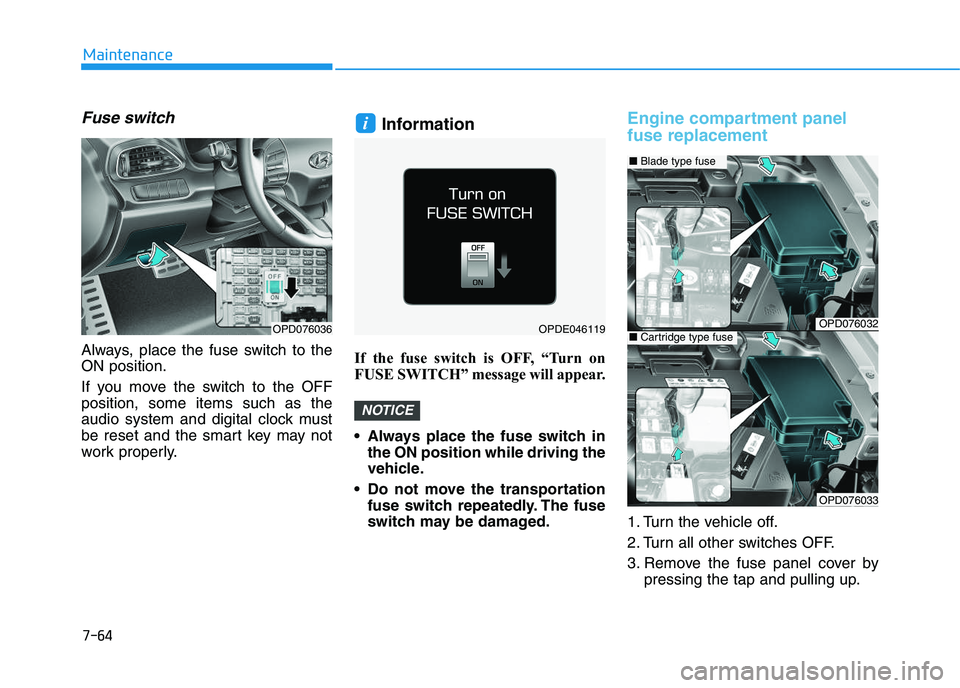
Fuse switch
Always, place the fuse switch to the
ON position.
If you move the switch to the OFF
position, some items such as the
audio system and digital clock must
be reset and the smart key may not
work properly.
Information
If the fuse switch is OFF, “Turn on
FUSE SWITCH” message will appear.
Always place the fuse switch inthe ON position while driving the
vehicle.
Do not move the transportation fuse switch repeatedly. The fuse
switch may be damaged.
Engine compartment panel
fuse replacement
1. Turn the vehicle off.
2. Turn all other switches OFF.
3. Remove the fuse panel cover by pressing the tap and pulling up.
NOTICE
i
OPD076036OPDE046119OPD076032
OPD076033
■Blade type fuse
■Cartridge type fuse
Page 580 of 659
7-67
7
Maintenance
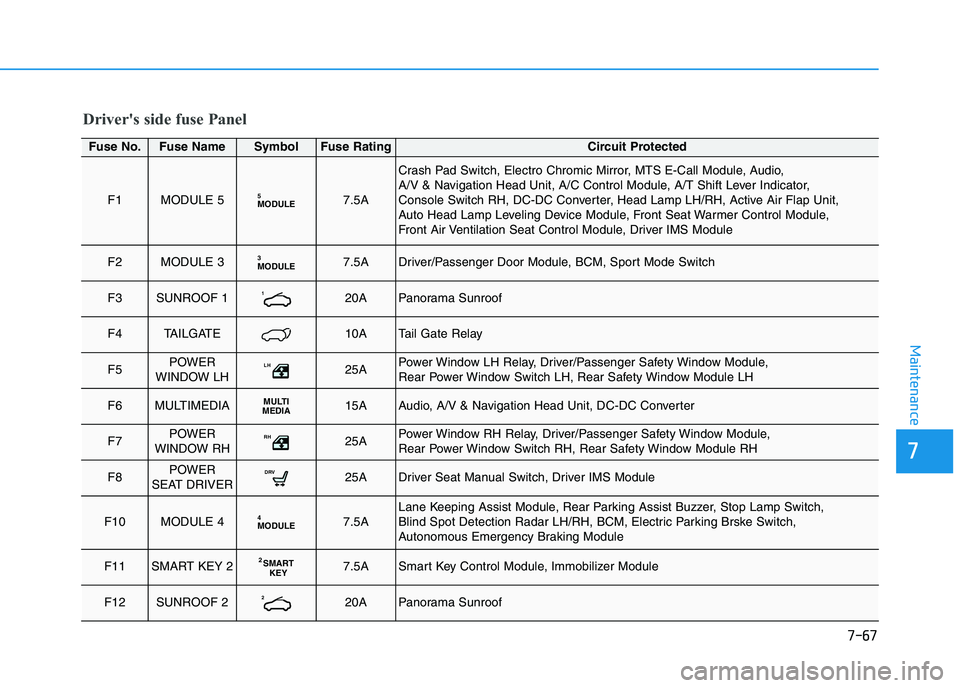
Driver's side fuse Panel
Fuse No.Fuse NameSymbolFuse RatingCircuit Protected
F1MODULE 5MODULE57.5A
Crash Pad Switch, Electro Chromic Mirror, MTS E-Call Module, Audio,
A/V & Navigation Head Unit, A/C Control Module, A/T Shift Lever Indicator,
Console Switch RH, DC-DC Converter, Head Lamp LH/RH, Active Air Flap Unit,
Auto Head Lamp Leveling Device Module, Front Seat Warmer Control Module,
Front Air Ventilation Seat Control Module, Driver IMS Module
F2MODULE 3MODULE37.5ADriver/Passenger Door Module, BCM, Sport Mode Switch
F3SUNROOF 1120APanorama Sunroof
F4TAILGATE10ATail Gate Relay
F5POWER
WINDOW LHLH25APower Window LH Relay, Driver/Passenger Safety Window Module,
Rear Power Window Switch LH, Rear Safety Window Module LH
F6MULTIMEDIAMULTI
MEDIA15AAudio, A/V & Navigation Head Unit, DC-DC Converter
F7POWER
WINDOW RHRH25APower Window RH Relay, Driver/Passenger Safety Window Module,
Rear Power Window Switch RH, Rear Safety Window Module RH
F8POWER
SEAT DRIVERDRV25ADriver Seat Manual Switch, Driver IMS Module
F10MODULE 4MODULE47.5ALane Keeping Assist Module, Rear Parking Assist Buzzer, Stop Lamp Switch,
Blind Spot Detection Radar LH/RH, BCM, Electric Parking Brske Switch,
Autonomous Emergency Braking Module
F11SMART KEY 2S MART
KEY27.5ASmart Key Control Module, Immobilizer Module
F12SUNROOF 2220APanorama Sunroof
Page 581 of 659
7-68
Maintenance
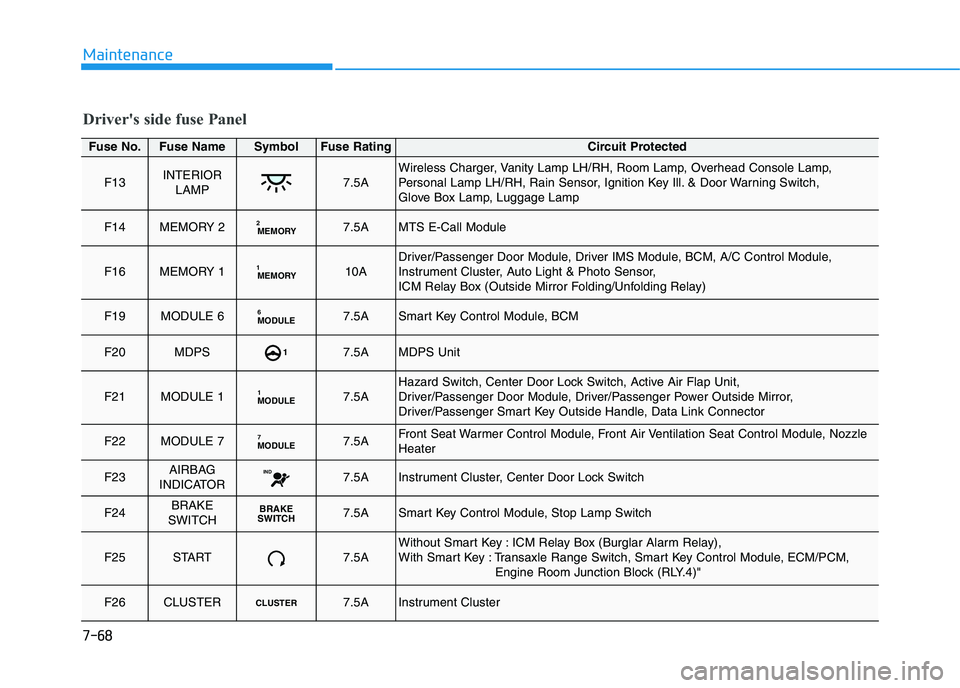
Driver's side fuse Panel
Fuse No.Fuse NameSymbolFuse RatingCircuit Protected
F13INTERIORLAMP7.5AWireless Charger, Vanity Lamp LH/RH, Room Lamp, Overhead Console Lamp,
Personal Lamp LH/RH, Rain Sensor, Ignition Key Ill. & Door Warning Switch,
Glove Box Lamp, Luggage Lamp
F14MEMORY 2MEMORY27.5AMTS E-Call Module
F16MEMORY 1MEMORY110ADriver/Passenger Door Module, Driver IMS Module, BCM, A/C Control Module,
Instrument Cluster, Auto Light & Photo Sensor,
ICM Relay Box (Outside Mirror Folding/Unfolding Relay)
F19MODULE 6 MODULE67.5ASmart Key Control Module, BCM
F20MDPS17.5AMDPS Unit
F21MODULE 1MODULE17.5AHazard Switch, Center Door Lock Switch, Active Air Flap Unit,
Driver/Passenger Door Module, Driver/Passenger Power Outside Mirror,
Driver/Passenger Smart Key Outside Handle, Data Link Connector
F22MODULE 7MODULE77.5AFront Seat Warmer Control Module, Front Air Ventilation Seat Control Module, Nozzle
Heater
F23AIRBAG
INDICATORIND7.5AInstrument Cluster, Center Door Lock Switch
F24BRAKE
SWITCHBRAKE
S WITCH7.5ASmart Key Control Module, Stop Lamp Switch
F25START7.5AWithout Smart Key : ICM Relay Box (Burglar Alarm Relay),
With Smart Key : Transaxle Range Switch, Smart Key Control Module, ECM/PCM,
Engine Room Junction Block (RLY.4)"
F26CLUSTERCLUSTER7.5AInstrument Cluster
Page 582 of 659
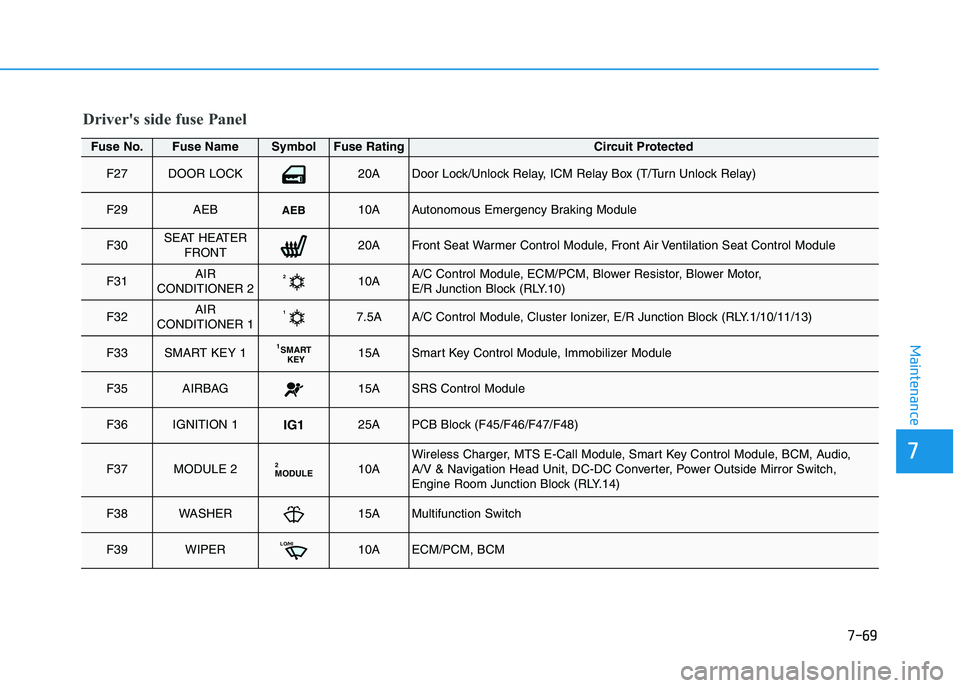
7-69
7
Maintenance
Driver's side fuse Panel
Fuse No.Fuse NameSymbolFuse RatingCircuit Protected
F27DOOR LOCK20ADoor Lock/Unlock Relay, ICM Relay Box (T/Turn Unlock Relay)
F29AEBAEB10AAutonomous Emergency Braking Module
F30SEAT HEATERFRONT20AFront Seat Warmer Control Module, Front Air Ventilation Seat Control Module
F31AIR
CONDITIONER 2210AA/C Control Module, ECM/PCM, Blower Resistor, Blower Motor,
E/R Junction Block (RLY.10)
F32AIR
CONDITIONER 117.5AA/C Control Module, Cluster Ionizer, E/R Junction Block (RLY.1/10/11/13)
F33SMART KEY 1S MART
KEY115ASmart Key Control Module, Immobilizer Module
F35AIRBAG15ASRS Control Module
F36IGNITION 1IG125APCB Block (F45/F46/F47/F48)
F37MODULE 2MODULE210AWireless Charger, MTS E-Call Module, Smart Key Control Module, BCM, Audio,
A/V & Navigation Head Unit, DC-DC Converter, Power Outside Mirror Switch,
Engine Room Junction Block (RLY.14)
F38WASHER15AMultifunction Switch
F39WIPERLO/HI10AECM/PCM, BCM