lock HYUNDAI I30 2023 Owners Manual
[x] Cancel search | Manufacturer: HYUNDAI, Model Year: 2023, Model line: I30, Model: HYUNDAI I30 2023Pages: 533, PDF Size: 59.13 MB
Page 349 of 533
5-84
Driving your vehicle
Limitations of the System
The Forward Collision-Avoidance
Assist (FCA) system is designed to
monitor the vehicle ahead or a pedes-
trian on the roadway through radar
signals and camera recognition to
warn the driver that a collision is immi-
nent, and if necessary, apply emer-
gency braking.
In certain situations, the radar sen-
sor or the camera may not be able to
detect the vehicle or pedestrian
ahead. In these cases, the FCA sys-
tem may not operate normally. The
driver must pay careful attention in
the following situations where the
FCA operation may be limited.
Detecting vehicles
The sensor may be limited when:
The radar sensor or camera is
blocked with a foreign object or
debris
Inclement weather such as heavy
rain or snow obscures the field of
view of the radar sensor or camera
There is interference by electro-
magnetic waves There is severe irregular reflection
from the radar sensor
The radar/camera sensor recogni-
tion is limited
The vehicle in front is too small to
be detected (for example a motor-
cycle or a bicycle, etc.)
The vehicle in front is an oversize
vehicle or trailer that is too big to
be detected by the camera recog-
nition system (for example a tractor
trailer, etc.)
The driver's field of view is not well
illuminated (either too dark or too
much reflection or too much back-
light that obscures the field of view)
The vehicle in front does not have
their rear lights turned ON
The outside brightness changes
suddenly, for example when enter-
ing or exiting a tunnel
Light coming from a street light or
an oncoming vehicle is reflected on
a wet road surface such as a pud-
dle on the road
The field of view in front is
obstructed by sun glare The windscreen glass is fogged
up; a clear view of the road is
obstructed
The vehicle in front is driving errat-
ically
The vehicle is on unpaved or
uneven rough surfaces, or road
with sudden gradient changes.
The vehicle is driven near areas
containing metal substances as a
construction zone, railroad, etc.
The vehicle drives inside a build-
ing, such as a basement parking
lot
The adverse road conditions cause
excessive vehicle vibrations whilst
driving
The sensor recognition changes
suddenly when passing over a
speed bump
The vehicle in front is moving verti-
cally to the driving direction
The vehicle in front is stopped ver-
tically
The vehicle in front is driving
towards your vehicle or reversing
You are on roundabouts and the
vehicle in front circles
Page 352 of 533
5-87
Driving your vehicle
5
Detecting pedestrians
(if equipped)
The sensor may be limited when:
The pedestrian is not fully detected
by the camera recognition system,
for example, if the pedestrian is
leaning over or is not fully walking
upright
The pedestrian is moving very
quickly or appears abruptly in the
camera detection area
The pedestrian is wearing clothing
that easily blends into the back-
ground, making it difficult to be
detected by the camera recogni-
tion system
The outside lighting is too bright
(e.g. when driving in bright sunlight
or in sun glare) or too dark (e.g.
when driving on a dark rural road
at night)
It is difficult to detect and distin-
guish the pedestrian from other
objects in the surroundings, for
example, when there is a group of
pedestrians or a large crowd
There is an item similar to a per-
son's body structure The pedestrian is small
The pedestrian has impaired
mobility
The sensor recognition is limited
The radar sensor or camera is
blocked with a foreign object or
debris
Inclement weather such as heavy
rain or snow obscures the field of
view of the radar sensor or camera
When light coming from a street
light or an oncoming vehicle is
reflected on a wet road surface
such as a puddle in the road
The field of view in front is
obstructed by sun glare
The windscreen glass is fogged
up; a clear view of the road is
obstructed
The adverse road conditions cause
excessive vehicle vibrations whilst
driving
Information
In some instances, the FCA system
may be cancelled when subjected to
electromagnetic interference.
i
Do not use the Forward
Collision-avoidance Assist
(FCA) system when towing a
vehicle. Application of the
FCA system whilst towing
may adversely affect the safe-
ty of your vehicle or the tow-
ing vehicle.
Use extreme caution when the
vehicle in front of you has
cargo that extends rearward
from the cab, or when the
vehicle in front of you has
higher ground clearance.
The FCA system is designed
to detect and monitor the vehi-
cle ahead or detect a pedestri-
an in the roadway through
radar signals and camera
recognition. It is not designed
to detect bicycles, motorcy-
cles, or smaller wheeled
objects such as luggage bags,
shopping carts, or strollers.
Never try to test the operation
of the FCA system. Doing so
may cause severe injury or
death.
WARNING
Page 360 of 533
5-95
Driving your vehicle
5
The lane suddenly disappears
such as at the intersection.
There is not enough distance
between you and the vehicle in
front to be able to detect the lane
line or the vehicle ahead is driving
on the lane line.
Driving on a steep grade, over a
hill, or when driving on a bend.
The adverse road conditions cause
excessive vehicle vibrations whilst
driving.
The surrounding of the inside rear
view mirror temperature is high
due to direct sunlight.
When front visibility is poor
The windscreen or the LKA system
camera lens is blocked with dirt or
debris.
The windscreen glass is fogged
up; a clear view of the road is
obstructed.
Placing objects on the instrument
panel, etc.LKA system Function Change
The driver can change LKA to the
Lane Departure Warning (LDW) sys-
tem or change the LKA system mode
between Standard LKA and Active
LKA from the LCD display. Go to the
"User Settings →Driver Assistance
→Lane Safety →Lane Departure
Warning / Standard LKA / Active
LKA".
Lane Departure Warning
LDW alerts the driver with a visual
warning and a warning alarm when
the system detects the vehicle
departing the lane. The steering
wheel will not be controlled.
Standard LKA
The Standard LKA mode guides the
driver to help keep the vehicle within
the lanes. It rarely controls the steer-
ing wheel, when the vehicle drives
well inside the lanes. However, it
starts to control the steering wheel,
when the vehicle is about to deviate
out of the lanes.
Active LKA
The Active LKA mode provides more
frequent steering wheel control in
comparison with the Standard LKA
mode. Active LKA can reduce the dri-
ver’s fatigue to assist the steering for
maintaining the vehicle in the middle
of the lane.
Page 375 of 533
5-110
Driving your vehicle
Smart Cruise Control set speed
will be temporarily cancelled
when:
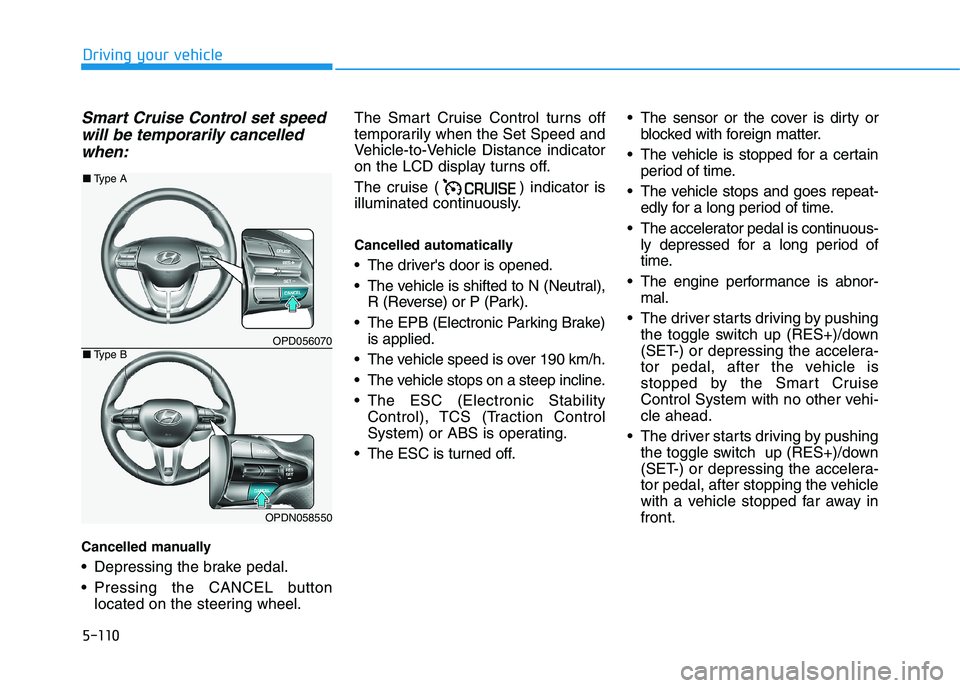
Cancelled manually
Depressing the brake pedal.
Pressing the CANCEL button
located on the steering wheel.The Smart Cruise Control turns off
temporarily when the Set Speed and
Vehicle-to-Vehicle Distance indicator
on the LCD display turns off.
The cruise ( ) indicator is
illuminated continuously.
Cancelled automatically
The driver's door is opened.
The vehicle is shifted to N (Neutral),
R (Reverse) or P (Park).
The EPB (Electronic Parking Brake)
is applied.
The vehicle speed is over 190 km/h.
The vehicle stops on a steep incline.
The ESC (Electronic Stability
Control), TCS (Traction Control
System) or ABS is operating.
The ESC is turned off. The sensor or the cover is dirty or
blocked with foreign matter.
The vehicle is stopped for a certain
period of time.
The vehicle stops and goes repeat-
edly for a long period of time.
The accelerator pedal is continuous-
ly depressed for a long period of
time.
The engine performance is abnor-
mal.
The driver starts driving by pushing
the toggle switch up (RES+)/down
(SET-) or depressing the accelera-
tor pedal, after the vehicle is
stopped by the Smart Cruise
Control System with no other vehi-
cle ahead.
The driver starts driving by pushing
the toggle switch up (RES+)/down
(SET-) or depressing the accelera-
tor pedal, after stopping the vehicle
with a vehicle stopped far away in
front.
OPD056070
OPDN058550
■Type A
■Type B
Page 381 of 533
5-116
Driving your vehicle
Warning message
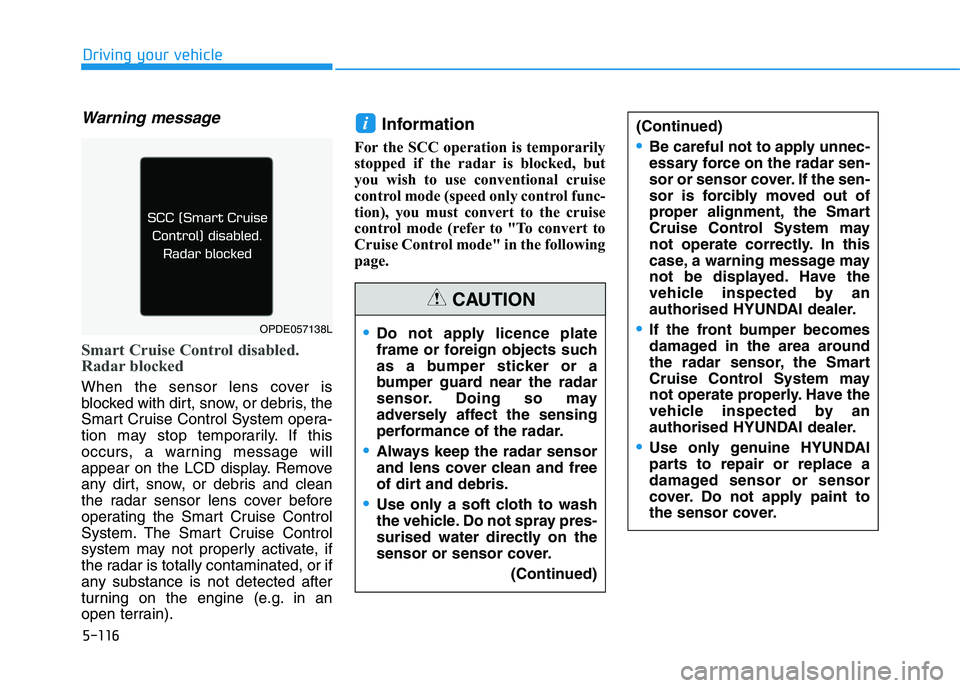
Smart Cruise Control disabled.
Radar blocked
When the sensor lens cover is
blocked with dirt, snow, or debris, the
Smart Cruise Control System opera-
tion may stop temporarily. If this
occurs, a warning message will
appear on the LCD display. Remove
any dirt, snow, or debris and clean
the radar sensor lens cover before
operating the Smart Cruise Control
System. The Smart Cruise Control
system may not properly activate, if
the radar is totally contaminated, or if
any substance is not detected after
turning on the engine (e.g. in an
open terrain).
Information
For the SCC operation is temporarily
stopped if the radar is blocked, but
you wish to use conventional cruise
control mode (speed only control func-
tion), you must convert to the cruise
control mode (refer to "To convert to
Cruise Control mode" in the following
page.
i(Continued)
Be careful not to apply unnec-
essary force on the radar sen-
sor or sensor cover. If the sen-
sor is forcibly moved out of
proper alignment, the Smart
Cruise Control System may
not operate correctly. In this
case, a warning message may
not be displayed. Have the
vehicle inspected by an
authorised HYUNDAI dealer.
If the front bumper becomes
damaged in the area around
the radar sensor, the Smart
Cruise Control System may
not operate properly. Have the
vehicle inspected by an
authorised HYUNDAI dealer.
Use only genuine HYUNDAI
parts to repair or replace a
damaged sensor or sensor
cover. Do not apply paint to
the sensor cover.
Do not apply licence plate
frame or foreign objects such
as a bumper sticker or a
bumper guard near the radar
sensor. Doing so may
adversely affect the sensing
performance of the radar.
Always keep the radar sensor
and lens cover clean and free
of dirt and debris.
Use only a soft cloth to wash
the vehicle. Do not spray pres-
surised water directly on the
sensor or sensor cover.
(Continued)
CAUTION
OPDE057138L
Page 393 of 533
5-128
Driving your vehicle
Information
Do not install studded tyres without
first checking local and municipal regu-
lations for possible restrictions against
their use.
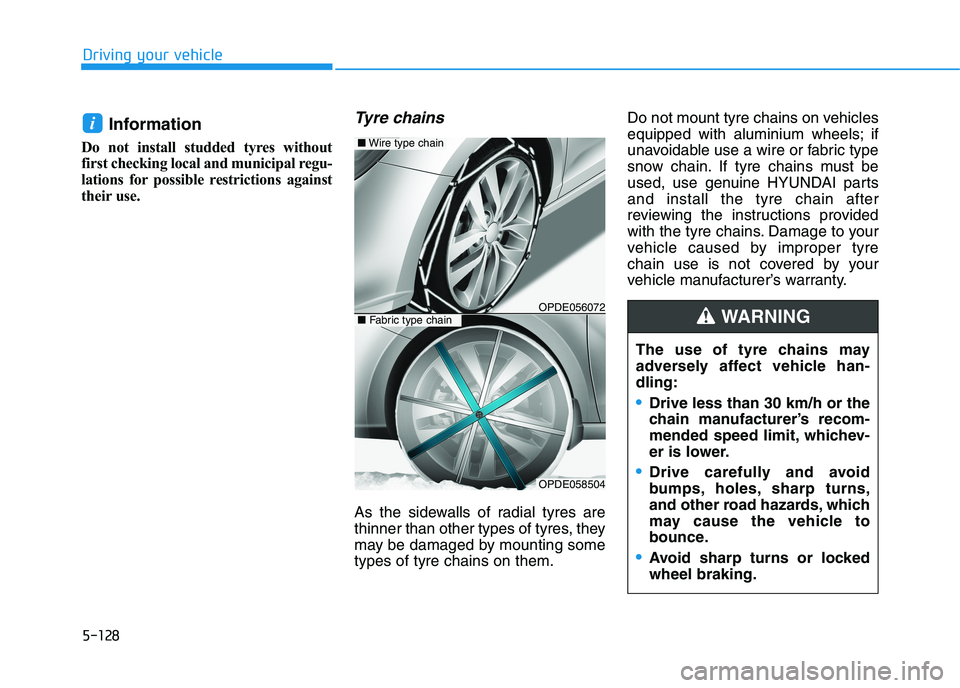
Tyre chains
As the sidewalls of radial tyres are
thinner than other types of tyres, they
may be damaged by mounting some
types of tyre chains on them.Do not mount tyre chains on vehicles
equipped with aluminium wheels; if
unavoidable use a wire or fabric type
snow chain. If tyre chains must be
used, use genuine HYUNDAI parts
and install the tyre chain after
reviewing the instructions provided
with the tyre chains. Damage to your
vehicle caused by improper tyre
chain use is not covered by your
vehicle manufacturer’s warranty.
i
The use of tyre chains may
adversely affect vehicle han-
dling:
Drive less than 30 km/h or the
chain manufacturer’s recom-
mended speed limit, whichev-
er is lower.
Drive carefully and avoid
bumps, holes, sharp turns,
and other road hazards, which
may cause the vehicle to
bounce.
Avoid sharp turns or locked
wheel braking.
WARNING OPDE056072
■Wire type chain
OPDE058504
■Fabric type chain
Page 395 of 533
5-130
Driving your vehicle
Use wire chains less than 12 mm
wide to prevent damage to the
chain’s connection.
Winter Precautions
Use high quality ethylene glycol
coolant
Your vehicle is delivered with high
quality ethylene glycol coolant in the
cooling system. It is the only type of
coolant that should be used because
it helps prevent corrosion in the cool-
ing system, lubricates the water
pump and prevents freezing. Be sure
to replace or replenish your coolant
in accordance with the maintenance
schedule in chapter 7. Before winter,
have your coolant tested to assure
that its freezing point is sufficient for
the temperatures anticipated during
the winter.
Check battery and cables
Winter temperatures affect battery
performance.Inspect the battery
and cables, as specified in the
chapter 7.The battery charging level
can be checked by an authorised
HYUNDAI dealer or in a service sta-
tion.Change to "winter weight" oil if
necessary
In some regions during winter, it is
recommended to use the "winter
weight" oil with lower viscosity. For
further information, refer to chapter
8. When you are not sure about a
type of winter weight oil, consult an
authorised HYUNDAI dealer.
Check spark plugs and ignition
system
Inspect the spark plugs, as speci-
fied in chapter 7.If necessary,
replace them. Also check all ignition
wirings and components for any
cracks, wear-out, and damage.
To prevent locks from freezing
To prevent the locks from being
frozen, spray approved de-icing fluid
or glycerin into key holes. When a
lock opening is already covered with
ice, spray approved de-icing fluid
over the ice to remove it. When an
internal part of a lock freezes, try to
thaw it with a heated key. Carefully
use the heated key to avoid an injury.
Page 396 of 533
5-131
Driving your vehicle
5
Use approved window washer
anti-freeze solution in system
To prevent the window washer from
being frozen, add authorised window
washer anti-freeze solution, as spec-
ified on the window washer contain-
er. Window washer anti-freeze solu-
tion is available from an authorised
HYUNDAI dealer, and most vehicle
accessory outlets. Do not use engine
coolant or other types of anti-freeze
solution, to prevent any damage to
the vehicle paint.Do not let your parking brake
freeze
Under some conditions your parking
brake can freeze in the engaged
position. This is most likely to hap-
pen when there is an accumulation
of snow or ice around or near the
rear brakes or if the brakes are wet.
When there is the risk that your park-
ing brake may freeze, temporarily
apply it with the shift lever in P
(Park). Also, block the rear wheels in
advance, so the vehicle may not roll.
Then, release the parking brake.Do not let ice and snow accumu-
late underneath
Under some conditions, snow and
ice can build up under the wheel
arches and interfere with the steer-
ing. When driving in such conditions
during a severe winter, you should
check underneath the vehicle on a
regular basis, to ensure that the front
wheels and steering components are
unblocked.
Carry emergency equipment
In accordance with weather condi-
tions, you should carry appropriate
emergency equipment, whilst driv-
ing. Some of the items you may want
to carry include tyre chains, tow
straps or chains, flashlight, emer-
gency flares, sand, shovel, jumper
cables, window scraper, gloves,
ground cloth, coveralls, blanket, etc.
Page 409 of 533
6-3
What to do in an emergency
If you have a flat tyre whilst
driving
If a tyre goes flat whilst you are driv-
ing:
Take your foot off the accelerator
pedal and let the vehicle slow
down whilst driving straight ahead.
Do not apply the brakes immedi-
ately or attempt to pull off the road
as this may cause loss of vehicle
control resulting in an accident.
When the vehicle has slowed to
such a speed that it is safe to do
so, brake carefully and pull off the
road. Drive off the road as far as
possible and park on firm, level
ground. If you are on a divided
highway, do not park in the median
area between the two traffic lanes. When the vehicle is stopped, press
the hazard warning flasher button,
move the shift lever into P (Park,
for automatic transmission/dual
clutch transmission vehicle) or neu-
tral (for manual transmission vehi-
cle), apply the parking brake, and
place the ignition switch in the
LOCK/OFF position.
Have all passengers get out of the
vehicle. Be sure they all get out on
the side of the vehicle that is away
from traffic.
When changing a flat tyre, follow
the instructions provided later in
this chapter.If the engine doesn't turn over
or turns over slowly
Be sure the shift lever is in N
(Neutral) or P (Park) if it is an auto-
matic transmission/dual clutch
transmission vehicle. The engine
starts only when the shift lever is in
N (Neutral) or P (Park).
Check the battery connections to
be sure they are clean and tight.
Turn on the interior light. If the light
dims or goes out when you operate
the starter, the battery is drained.
Do not push or pull the vehicle to start
it. This could cause damage to your
vehicle.See instructions for "Jump
Starting" provided in this chapter.
6
I IF
F
T
TH
HE
E
E
EN
NG
GI
IN
NE
E
W
WI
IL
LL
L
N
NO
OT
T
S ST
TA
AR
RT
T
Push or pull starting the vehicle
may cause the catalytic con-
verter to overload which can
lead to damage to the emission
control system.
CAUTION
Page 413 of 533
6-7
What to do in an emergency
6
If your temperature gauge indicates
overheating, you experience a loss
of power, or hear loud pinging or
knocking, the engine may be over-
heating. If this happens, you should:
1. Pull off the road and stop as soon
as it is safe to do so.
2. Place the shift lever in P (Park, for
automatic transmission/dual clutch
transmission vehicle) or neutral (for
manual transmission/dual clutch
transmission vehicle) and set the
parking brake. If the air condition-
ing is ON, turn it OFF.
3. If engine coolant is running out
under the vehicle or steam is com-
ing out from the bonnet, stop the
engine. Do not open the bonnet
until the coolant has stopped run-
ning or the steaming has stopped.
If there is no visible loss of engine
coolant and no steam, leave the
engine running and check to be
sure the engine cooling fan is
operating. If the fan is not running,
turn the engine off.4. Check for coolant leaking from the
radiator, hoses or under the vehi-
cle. (If the air conditioning had been
in use, it is normal for cold water to
be draining from it when you stop.)
5. If engine coolant is leaking out, stop
the engine immediately and we rec-
ommend that you call an authorised
HYUNDAI dealer for assistance.
I IF
F
T
TH
HE
E
E
EN
NG
GI
IN
NE
E
O
OV
VE
ER
RH
HE
EA
AT
TS
S
Whilst the engine is
running, keep hands,
clothing and tools
away from the mov-
ing parts such as the
cooling fan and drive
belt to prevent seri-
ous injury.
WARNING
NEVER remove the
radiator cap or the
drain plug whilst the
engine and radiator
are hot. Hot coolant
and steam may blow out under
pressure, causing serious injury.
Turn the engine off and wait
until the engine cools down.
Use extreme care when remov-
ing the radiator cap. Wrap a
thick towel around it, and turn it
anticlockwise slowly to the first
stop. Step back whilst the pres-
sure is released from the cool-
ing system. When you are sure
all the pressure has been
released, press down on the
cap, using a thick towel, and
continue turning anticlockwise
to remove it.
WARNING