warning light HYUNDAI I30 2023 Owners Manual
[x] Cancel search | Manufacturer: HYUNDAI, Model Year: 2023, Model line: I30, Model: HYUNDAI I30 2023Pages: 533, PDF Size: 59.13 MB
Page 357 of 533
5-92
Driving your vehicle
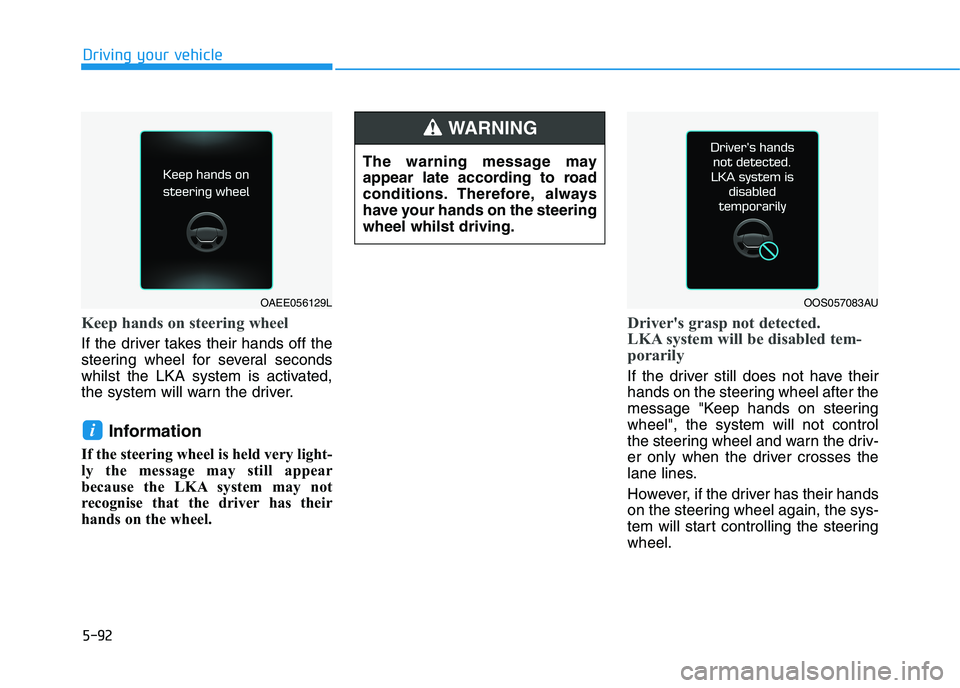
Keep hands on steering wheel
If the driver takes their hands off the
steering wheel for several seconds
whilst the LKA system is activated,
the system will warn the driver.
Information
If the steering wheel is held very light-
ly the message may still appear
because the LKA system may not
recognise that the driver has their
hands on the wheel.
Driver's grasp not detected.
LKA system will be disabled tem-
porarily
If the driver still does not have their
hands on the steering wheel after the
message "Keep hands on steering
wheel", the system will not control
the steering wheel and warn the driv-
er only when the driver crosses the
lane lines.
However, if the driver has their hands
on the steering wheel again, the sys-
tem will start controlling the steering
wheel.
i
OOS057083AU
The warning message may
appear late according to road
conditions. Therefore, always
have your hands on the steering
wheel whilst driving.
WARNING
OAEE056129L
Page 358 of 533
5-93
Driving your vehicle
5Information
• Even though the steering is assisted
by the system, the driver can still
steer to control the steering wheel.
• The steering wheel may feel heavier
when the steering wheel is assisted
by the system than when it is not.
Warning Light and Message
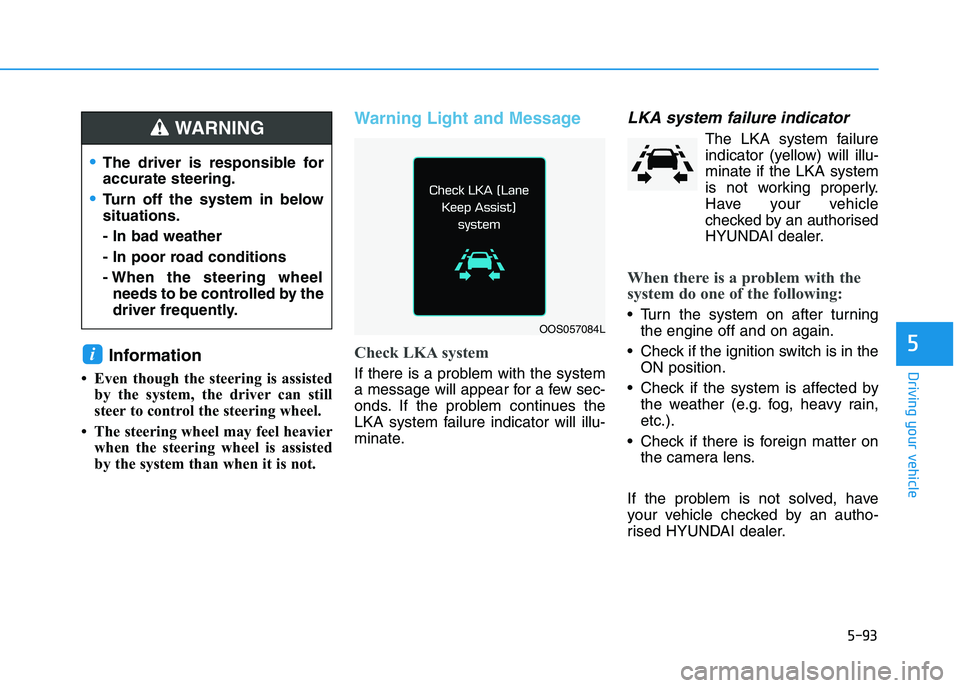
Check LKA system
If there is a problem with the system
a message will appear for a few sec-
onds. If the problem continues the
LKA system failure indicator will illu-
minate.
LKA system failure indicator
The LKA system failure
indicator (yellow) will illu-
minate if the LKA system
is not working properly.
Have your vehicle
checked by an authorised
HYUNDAI dealer.
When there is a problem with the
system do one of the following:
Turn the system on after turning
the engine off and on again.
Check if the ignition switch is in the
ON position.
Check if the system is affected by
the weather (e.g. fog, heavy rain,
etc.).
Check if there is foreign matter on
the camera lens.
If the problem is not solved, have
your vehicle checked by an autho-
rised HYUNDAI dealer.
i
OOS057084L
The driver is responsible for
accurate steering.
Turn off the system in below
situations.
- In bad weather
- In poor road conditions
- When the steering wheel
needs to be controlled by the
driver frequently.
WARNING
Page 360 of 533
5-95
Driving your vehicle
5
The lane suddenly disappears
such as at the intersection.
There is not enough distance
between you and the vehicle in
front to be able to detect the lane
line or the vehicle ahead is driving
on the lane line.
Driving on a steep grade, over a
hill, or when driving on a bend.
The adverse road conditions cause
excessive vehicle vibrations whilst
driving.
The surrounding of the inside rear
view mirror temperature is high
due to direct sunlight.
When front visibility is poor
The windscreen or the LKA system
camera lens is blocked with dirt or
debris.
The windscreen glass is fogged
up; a clear view of the road is
obstructed.
Placing objects on the instrument
panel, etc.LKA system Function Change
The driver can change LKA to the
Lane Departure Warning (LDW) sys-
tem or change the LKA system mode
between Standard LKA and Active
LKA from the LCD display. Go to the
"User Settings →Driver Assistance
→Lane Safety →Lane Departure
Warning / Standard LKA / Active
LKA".
Lane Departure Warning
LDW alerts the driver with a visual
warning and a warning alarm when
the system detects the vehicle
departing the lane. The steering
wheel will not be controlled.
Standard LKA
The Standard LKA mode guides the
driver to help keep the vehicle within
the lanes. It rarely controls the steer-
ing wheel, when the vehicle drives
well inside the lanes. However, it
starts to control the steering wheel,
when the vehicle is about to deviate
out of the lanes.
Active LKA
The Active LKA mode provides more
frequent steering wheel control in
comparison with the Standard LKA
mode. Active LKA can reduce the dri-
ver’s fatigue to assist the steering for
maintaining the vehicle in the middle
of the lane.
Page 364 of 533
5-99
Driving your vehicle
5
The Driver Attention Warning
(DAW) system utilises the camera
sensor on the front windscreen for
its operation. To keep the camera
sensor in the best condition, you
should observe the following:
NEVER install any accessories or
stickers on the front windscreen,
nor tint the front windscreen.
NEVER locate any reflective
objects (i.e. white paper, mirror)
over the instrument panel. Any
light reflection may cause a mal-
function of the Driver Attention
Warning (DAW) system.
Pay extreme caution to keep the
camera sensor out of water.
NEVER disassemble the camera
assembly, nor apply any impact
on the camera assembly.
Do not disassemble the camera
temporarily for tinted window or
attaching any types of coatings
and accessories.
(Continued)(Continued)
If you disassemble a camera and
assemble it again, we recom-
mend that you take your vehicle
to an authorised HYUNDAI deal-
er and have the system checked
for calibration.
NOTICE
The Driver Attention Warning
(DAW) system may not operate
properly or operate with limited
alerts in the following situations:
The lane detection perform-
ance is limited. For more
information, refer to "Lane
Keeping Assist (LKA) system"
in this chapter.
The vehicle is violently driven
or is abruptly turned for
obstacle avoidance (e.g. con-
struction area, other vehicles,
fallen objects, bumpy road).
Forward drivability of the
vehicle is severely under-
mined (possibly due to wide
variation in tyre pressures,
uneven tyre wear-out, toe-
in/toe-out alignment).
(Continued)
(Continued)
The vehicle drives on a wind-
ing road.
The vehicle drives on a
bumpy road.
The vehicle drives through a
windy area.
The vehicle is controlled by
the following driving assist
systems:
- Lane Keeping Assist (LKA)
system
- Forward Collision-
Avoidance Assist (FCA) sys-
tem
- Smart Cruise Control (SCC)
system
CAUTION
Playing the vehicle audio sys-
tem at high volume may offset
the Driver Attention Warning
(DAW) system warning sounds.
CAUTION
Page 365 of 533
5-100
Driving your vehicle
Cruise Control operation
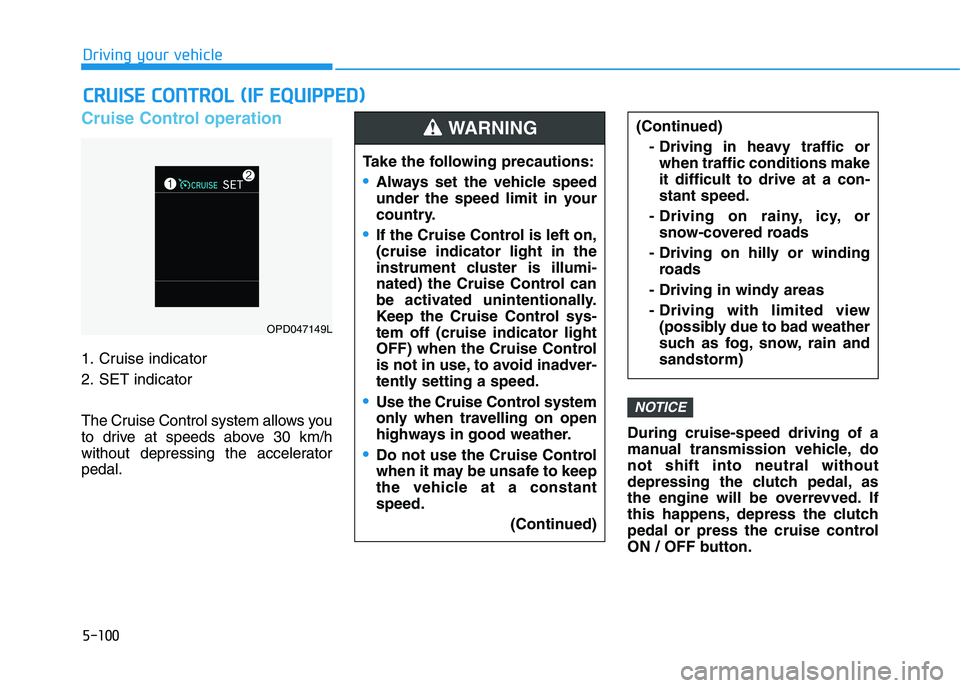
1. Cruise indicator
2. SET indicator
The Cruise Control system allows you
to drive at speeds above 30 km/h
without depressing the accelerator
pedal.During cruise-speed driving of a
manual transmission vehicle, do
not shift into neutral without
depressing the clutch pedal, as
the engine will be overrevved. If
this happens, depress the clutch
pedal or press the cruise control
ON / OFF button.
NOTICE
C CR
RU
UI
IS
SE
E
C
CO
ON
NT
TR
RO
OL
L
(
(I
IF
F
E
EQ
QU
UI
IP
PP
PE
ED
D)
)
Take the following precautions:
Always set the vehicle speed
under the speed limit in your
country.
If the Cruise Control is left on,
(cruise indicator light in the
instrument cluster is illumi-
nated) the Cruise Control can
be activated unintentionally.
Keep the Cruise Control sys-
tem off (cruise indicator light
OFF) when the Cruise Control
is not in use, to avoid inadver-
tently setting a speed.
Use the Cruise Control system
only when travelling on open
highways in good weather.
Do not use the Cruise Control
when it may be unsafe to keep
the vehicle at a constant
speed.
(Continued)
(Continued)
- Driving in heavy traffic or
when traffic conditions make
it difficult to drive at a con-
stant speed.
- Driving on rainy, icy, or
snow-covered roads
- Driving on hilly or winding
roads
- Driving in windy areas
- Driving with limited view
(possibly due to bad weather
such as fog, snow, rain and
sandstorm)WARNING
OPD047149L
Page 371 of 533
5-106
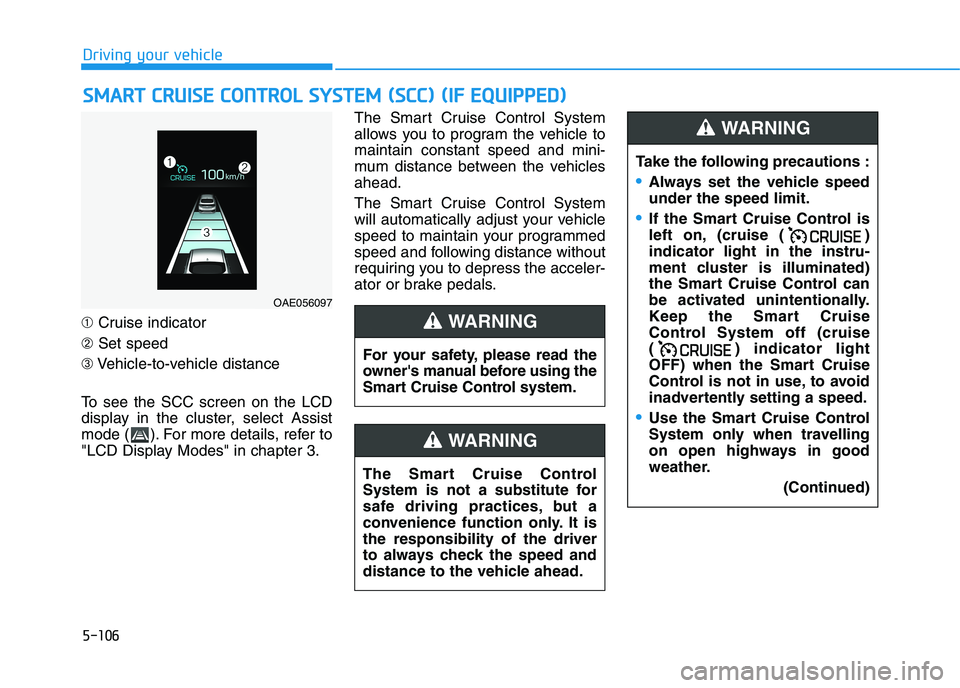
➀Cruise indicator
➁Set speed
➂Vehicle-to-vehicle distance
To see the SCC screen on the LCD
display in the cluster, select Assist
mode ( ). For more details, refer to
"LCD Display Modes" in chapter 3.The Smart Cruise Control System
allows you to program the vehicle to
maintain constant speed and mini-
mum distance between the vehicles
ahead.
The Smart Cruise Control System
will automatically adjust your vehicle
speed to maintain your programmed
speed and following distance without
requiring you to depress the acceler-
ator or brake pedals.
S SM
MA
AR
RT
T
C
CR
RU
UI
IS
SE
E
C
CO
ON
NT
TR
RO
OL
L
S
SY
YS
ST
TE
EM
M
(
(S
SC
CC
C)
)
(
(I
IF
F
E
EQ
QU
UI
IP
PP
PE
ED
D)
)
Driving your vehicle
OAE056097
For your safety, please read the
owner's manual before using the
Smart Cruise Control system.
WARNING
The Smart Cruise Control
System is not a substitute for
safe driving practices, but a
convenience function only. It is
the responsibility of the driver
to always check the speed and
distance to the vehicle ahead.
WARNING
Take the following precautions :
Always set the vehicle speed
under the speed limit.
If the Smart Cruise Control is
left on, (cruise ( )
indicator light in the instru-
ment cluster is illuminated)
the Smart Cruise Control can
be activated unintentionally.
Keep the Smart Cruise
Control System off (cruise
( ) indicator light
OFF) when the Smart Cruise
Control is not in use, to avoid
inadvertently setting a speed.
Use the Smart Cruise Control
System only when travelling
on open highways in good
weather.
(Continued)
WARNING
Page 388 of 533
5-123
Driving your vehicle
5
Hazardous driving conditions
When hazardous driving elements
are encountered such as water,
snow, ice, mud and sand, take the
following precautions:
Drive cautiously and maintain a
longer braking distance.
Avoid abrupt braking or steering.
When your vehicle is stuck in snow,
mud, or sand, use the second
gear. Accelerate slowly to avoid
unnecessary wheel spinning.
Put sand, rock salt, tyre chains or
other non-slip materials under the
wheels to provide additional trac-
tion whilst being stuck in ice, snow,
or mud.
Rocking the vehicle
If it is necessary to rock the vehicle
to free it from snow, sand, or mud,
first turn the steering wheel right and
left to clear the area around your
front wheels. Then, shift back and
forth between R (Reverse) and a for-
ward gear.
Try to avoid spinning the wheels, and
do not race the engine.
To prevent transmission wear, wait
until the wheels stop spinning before
shifting gears. Release the accelera-
tor pedal whilst shifting, and press
lightly on the accelerator pedal whilst
the transmission is in gear. Slowly
spinning the wheels in forward and
reverse directions causes a rocking
motion that may free the vehicle.
S SP
PE
EC
CI
IA
AL
L
D
DR
RI
IV
VI
IN
NG
G
C
CO
ON
ND
DI
IT
TI
IO
ON
NS
S
Downshifting with an automatic
transmission whilst driving on
slippery surfaces can cause an
accident. The sudden change in
tyre speed could cause the
tyres to skid. Be careful when
downshifting on slippery sur-
faces.
WARNING
If the vehicle is stuck and
excessive wheel spin occurs,
the temperature in the tyres can
increase very quickly. If the
tyres become damaged, a tyre
blow out or tyre explosion can
occur. This condition is danger-
ous - you and others may be
injured. Do not attempt this pro-
cedure if people or objects are
anywhere near the vehicle.
If you attempt to free the vehi-
cle, the vehicle can overheat
quickly, possibly causing an
engine compartment fire or
other damage. Try to avoid spin-
ning the wheels as much as
possible to prevent overheating
of either the tyres or the engine.
DO NOT allow the vehicle to
spin the wheels above 56 km/h.
WARNING
Page 392 of 533
5-127
Driving your vehicle
5
The severe weather conditions of
winter quickly wear out tyres and
cause other problems. To minimise
winter driving problems, you should
take the following suggestions:
Information
Summer tyres are equipped to provide
the best driving performance on dry
roads, varying according to specifica-
tion. Since vehicles equipped with
summer tires significantly reduce sur-
face forces when driving on snow or
ice roads, it is recommended to use
snow tyres of the same size as the stan-
dard tyres of the vehicle or the replace
them with all seasons tires or to use
chains.
Snow or icy conditions
You need to keep sufficient distance
between your vehicle and the vehicle
in front of you.
Apply the brakes gently. Speeding,
rapid acceleration, sudden brake
applications, and sharp turns are
potentially very hazardous practices.
During deceleration, use engine
braking to the fullest extent. Sudden
brake applications on snowy or icy
roads may cause skids to occur.
To drive your vehicle in deep snow, it
may be necessary to use snow tyres
or to install tyre chains on your tyres.
Always carry emergency equipment.
Some of the items you may want to
carry include tyre chains, tow straps
or chains, a flashlight, emergency
flares, sand, a shovel, jumper cables,
a window scraper, gloves, ground
cloth, coveralls, a blanket, etc.
Snow tyres
We recommend you use snow tyres
when road temperature is below 7°C
(45°F).
If you mount snow tyres on your vehi-
cle, make sure to use radial tyres of
the same size and load range as the
original tyres. Mount snow tyres on
all four wheels to balance your vehi-
cle’s handling in all weather condi-
tions. The traction provided by snow
tyres on dry roads may not be as
high as your vehicle's original equip-
ment tyres. Check with the tyre deal-
er for maximum speed recommenda-
tions.
i
W WI
IN
NT
TE
ER
R
D
DR
RI
IV
VI
IN
NG
G
Snow tyres should be equivalent
in size and type to the vehicle's
standard tyres. Otherwise, the
safety and handling of your vehi-
cle may be adversely affected.
WARNING
Using summer tyres at very
cold temperature could cause
cracks on them to be formed
and damage them permanently.
WARNING
Page 399 of 533
5-134
Driving your vehicle
Trailer brakes
If your trailer is equipped with a brak-
ing system, make sure it conforms to
your country’s regulations and that it
is properly installed and operating
correctly.
If your trailer weighs more than the
maximum trailer weight without trail-
er brakes loaded, then it needs its
own brakes and they must be ade-
quate. Be sure to read and follow the
instructions for the trailer brakes so
you’ll be able to install, adjust and
maintain them properly. Be sure not
to modify your vehicle's brake sys-
tem.
Driving with a trailer
Towing a trailer requires a certain
amount of experience. Before setting
out for the open road, you must get
to know your trailer. Acquaint your-
self with the feel of handling and
braking with the added weight of the
trailer. And always keep in mind that
the vehicle you are driving is now
longer and not nearly as responsive
as your vehicle is by itself.
Before you start, check the trailer
towbar and platform, safety chains,
electrical connector(s), lights, tyres
and brakes.
During your trip, occasionally check
to be sure that the load is secure,
and that the lights and trailer brakes
are still working.
Distance
Stay at least twice as far behind the
vehicle ahead as you would when
driving your vehicle without a trailer.
This can help you avoid situations
that require heavy braking and sud-
den turns.
Passing
You will need more passing distance
up ahead when you’re towing a trail-
er. And, because of the increased
vehicle length, you’ll need to go
much farther beyond the passed
vehicle before you can return to your
lane.
Do not use a trailer with its own
brakes unless you are absolute-
ly certain that you have proper-
ly set up the brake system. This
is not a task for amateurs. Use
an experienced, competent trail-
er shop for this work.
WARNING
Page 400 of 533
5-135
Driving your vehicle
5
Reversing
Hold the bottom of the steering
wheel with one hand. Then, to move
the trailer to the left, move your hand
to the left. To move the trailer to the
right, move your hand to the right.
Always reverse slowly and, if possi-
ble, have someone guide you.
Making turns
When you’re turning with a trailer,
make wider turns than normal. Do this
so your trailer won’t strike soft shoul-
ders, kerbs, road signs, trees, or other
objects. Avoid jerky or sudden
manoeuvres. Signal well in advance.
Turn signals
When you tow a trailer, your vehicle
has to have a different turn signal
flasher and extra wiring. The green
arrows on your instrument panel will
flash whenever you signal a turn or
lane change. Properly connected,
the trailer lights will also flash to alert
other drivers you’re about to turn,
change lanes, or stop.
When towing a trailer, the green
arrows on your instrument panel will
flash for turns even if the bulbs on
the trailer are burned out. Thus, you
may think drivers behind you are
seeing your signals when, in fact,
they are not. It’s important to check
occasionally to be sure the trailer
bulbs are still working. You must also
check the lights every time you dis-
connect and then reconnect the
wires.Do not connect a trailer lighting
system directly to your vehi-
cle’s lighting system. Use an
approved trailer wiring harness.
Failure to do so could result in
damage to the vehicle electrical
system and/or personal injury.
Consult an authorised HYUNDAI
dealer for assistance.WARNING