wheel HYUNDAI I30 2023 User Guide
[x] Cancel search | Manufacturer: HYUNDAI, Model Year: 2023, Model line: I30, Model: HYUNDAI I30 2023Pages: 533, PDF Size: 59.13 MB
Page 73 of 533
2-52
Safety system of your vehicle
During a moderate to severe frontal
collision, sensors will detect the vehi-
cle’s rapid deceleration. If the rate of
deceleration is high enough, the con-
trol unit will inflate the front air bags,
at the time and with the force needed.
The front air bags help protect the driv-
er and front passenger by responding
to frontal impacts in which seat belts
alone cannot provide adequate
restraint. When needed, the side air
bags help provide protection in the
event of a side impact or rollover by
supporting the side upper body area.
Air bags are activated (able to inflate
if necessary) only when the ignition
switch is in the ON position.
Air bags inflate in the event of certain
frontal or side collisions to help pro-
tect the occupants from serious
physical injury.
There is no single speed at which the
air bags will inflate. Generally, air bags
are designed to inflate based upon
the severity of a collision and its direc-
tion. These two factors determine
whether the sensors produce an elec-
tronic deployment/inflation signal. Air bag deployment depends on a
number of factors including vehicle
speed, angles of impact and the
density and stiffness of the vehicles
or objects which your vehicle
impacts during a collision. The
determining factors are not limited
to those mentioned above.
The front air bags will completely
inflate and deflate in an instant. It is
virtually impossible for you to see
the air bags inflate during an acci-
dent. It is much more likely that you
will simply see the deflated air bags
hanging out of their storage com-
partments after the collision.
To help provide protection, the air
bags must inflate rapidly. The speed
of air bag inflation is a consequence
of an extremely short time in which
to inflate the air bag between the
occupant and the vehicle structures
before the occupant impacts those
structures. This speed of inflation
reduces the risk of serious or life-
threatening injuries and is thus a
necessary part of air bag design.However, the rapid air bag inflation
can also cause injuries which can
include facial abrasions, bruises
and broken bones because the
inflation speed also causes the air
bags to expand with a great deal of
force.
There are even circumstances
under which contact with the air
bag can cause fatal injuries, espe-
cially if the occupant is positioned
excessively close to the air bag.
You can take steps to reduce the risk
of being injured by an inflating air
bag. The greatest risk is sitting too
close to the air bag. An air bag needs
space to inflate. It is recommended
that drivers sit as far back as possi-
ble leaving space between the centre
of the steering wheel and the chest
whilst still maintaining control of the
vehicle.
Page 82 of 533
2-61
Safety system of your vehicle
2
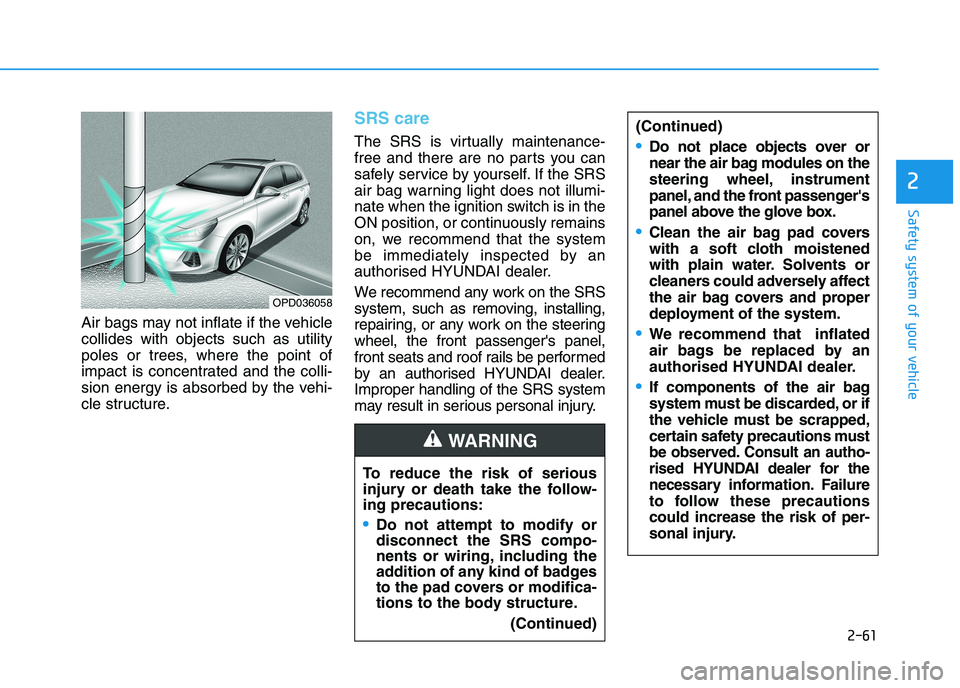
Air bags may not inflate if the vehicle
collides with objects such as utility
poles or trees, where the point of
impact is concentrated and the colli-
sion energy is absorbed by the vehi-
cle structure.
SRS care
The SRS is virtually maintenance-
free and there are no parts you can
safely service by yourself. If the SRS
air bag warning light does not illumi-
nate when the ignition switch is in the
ON position, or continuously remains
on, we recommend that the system
be immediately inspected by an
authorised HYUNDAI dealer.
We recommend any work on the SRS
system, such as removing, installing,
repairing, or any work on the steering
wheel, the front passenger's panel,
front seats and roof rails be performed
by an authorised HYUNDAI dealer.
Improper handling of the SRS system
may result in serious personal injury.
OPD036058
To reduce the risk of serious
injury or death take the follow-
ing precautions:
Do not attempt to modify or
disconnect the SRS compo-
nents or wiring, including the
addition of any kind of badges
to the pad covers or modifica-
tions to the body structure.
(Continued)
WARNING
(Continued)
Do not place objects over or
near the air bag modules on the
steering wheel, instrument
panel, and the front passenger's
panel above the glove box.
Clean the air bag pad covers
with a soft cloth moistened
with plain water. Solvents or
cleaners could adversely affect
the air bag covers and proper
deployment of the system.
We recommend that inflated
air bags be replaced by an
authorised HYUNDAI dealer.
If components of the air bag
system must be discarded, or if
the vehicle must be scrapped,
certain safety precautions must
be observed. Consult an autho-
rised HYUNDAI dealer for the
necess
ary information. Failure
to follow these precautions
could increase the risk of per-
sonal injury.
Page 84 of 533
Convenient features of your vehicle
Accessing your vehicle .........................................3-3
Remote key .........................................................................3-3
Smart key ............................................................................3-6
Immobiliser system .........................................................3-10
Door locks .............................................................3-11
Operating door locks from outside the vehicle ......3-11
Operating door locks from inside the vehicle .........3-12
Auto door lock/unlock features..................................3-15
Child-protector rear door locks ..................................3-15
Theft-alarm system.............................................3-16
Steering wheel......................................................3-17
Electric power steering (EPS) ......................................3-17
Tilt steering / Telescopic steering ..............................3-18
Horn ....................................................................................3-19
Mirrors ...................................................................3-20
Inside rearview mirror....................................................3-20
Outside rearview mirror ................................................3-21
Reverse parking aid function.......................................3-24
Windows ................................................................3-25
Power windows ................................................................3-25
Remote window closing function ................................3-29
Panorama sunroof ...............................................3-30
Sunshade ...........................................................................3-31
Sliding the sunroof .........................................................3-31
Tilting the sunroof ..........................................................3-32
Closing the sunroof ........................................................3-32
Resetting the sunroof ....................................................3-33
Sunroof open warning ...................................................3-34
Exterior features .................................................3-35
Bonnet................................................................................3-35
Tailgate...............................................................................3-36
Fuel filler door .................................................................3-38
Instrument cluster................................................3-41
Instrument cluster control ............................................3-42
Gauges ...............................................................................3-43
Transmission shift indicator .........................................3-46
Warning and indicator lights ........................................3-48
LCD display messages ....................................................3-62
LCD Display ...........................................................3-68
LCD display control.........................................................3-68
LCD display modes ..........................................................3-69
Trip computer .......................................................3-77
Trip modes ........................................................................3-77
Lighting..................................................................3-81
Exterior lights ..................................................................3-81
Welcome system..............................................................3-87
Interior lights ....................................................................3-88
3
Page 100 of 533
3-17
Convenient features of your vehicle
3
Electric power steering (EPS)
The system assists you with steering
the vehicle. If the engine is off or if
the power steering system becomes
inoperative, the vehicle may still be
steered, but it will require increased
steering effort.
Also, the steering effort becomes
heavier as the vehicle’s speed
increases and becomes lighter as
the vehicle’s speed decreases for
better control of the steering wheel.
Should you notice any change in the
effort required to steer during normal
vehicle operation, we recommend
that the system be checked by an
authorised HYUNDAI dealer. If the Electric Power Steering
System does not operate nor-
mally, the warning light ( ) will
illuminate or blink on the instru-
ment cluster. The steering wheel
may become difficult to control
or operate. We recommend that
you take your vehicle to an
authorised HYUNDAI dealer and
have the system checked as
soon as possible.
When abnormality is detected in
the electric power steering sys-
tem, to prevent a deadly acci-
dent, the steering assist function
will stop. At this time, the warn-
ing light turns on or blinks on
the cluster. The steering wheel
may become difficult to control
or operate. Have your vehicle
checked immediately, after mov-
ing the vehicle to a safe zone.
Information
The following symptoms may occur
during normal vehicle operation:
• The steering effort may be high
immediately after placing the igni-
tion switch button in the ON posi-
tion.
This happens as the system per-
forms the EPS system diagnostics.
When the diagnostics are complet-
ed, the steering wheel will return to
its normal condition.
• A click noise may be heard from the
EPS relay after the ignition switch is
placed in the ON or LOCK/OFF
position.
• Motor noise may be heard when the
vehicle is at a stop or at a low driv-
ing speed.
• When you operate the steering
wheel in low temperatures, abnor-
mal noise may occur. If the temper-
ature rises, the noise will disappear.
This is a normal condition.
(Continued)
iNOTICE
S ST
TE
EE
ER
RI
IN
NG
G
W
WH
HE
EE
EL
L
Page 101 of 533
3-18
Convenient features of your vehicle
(Continued)
• When the vehicle is stationary, if
you turn the steering wheel all the
way to the left or right continuously,
the steering wheel effort increases.
This is not a system malfunction. As
time passes, the steering wheel
effort will return to its normal con-
dition.
Tilt steering / Telescopic steer-
ing
Information
After adjustment, sometimes the lock-
release lever may not lock the steering
wheel.
It is not a malfunction. This occurs
when two gears are not engaged cor-
rectly. In this case, adjust the steering
wheel again and then lock the steering
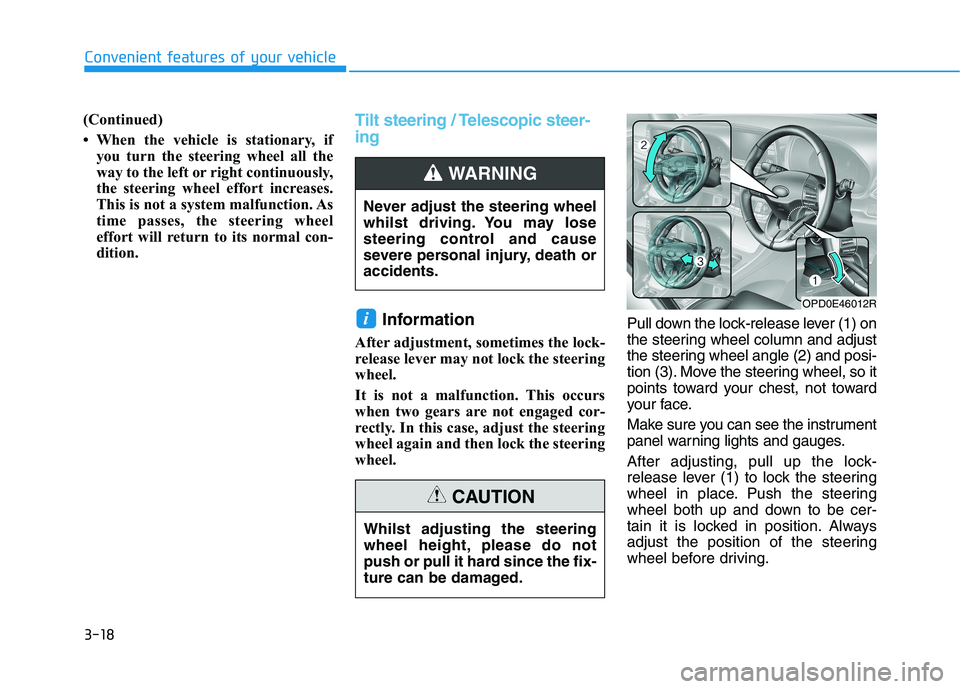
wheel.Pull down the lock-release lever (1) on
the steering wheel column and adjust
the steering wheel angle (2) and posi-
tion (3). Move the steering wheel, so it
points toward your chest, not toward
your face.
Make sure you can see the instrument
panel warning lights and gauges.
After adjusting, pull up the lock-
release lever (1) to lock the steering
wheel in place. Push the steering
wheel both up and down to be cer-
tain it is locked in position. Always
adjust the position of the steering
wheel before driving.
i
Never adjust the steering wheel
whilst driving. You may lose
steering control and cause
severe personal injury, death or
accidents.
WARNING
OPD0E46012R
Whilst adjusting the steering
wheel height, please do not
push or pull it hard since the fix-
ture can be damaged.
CAUTION
Page 102 of 533
3-19
Convenient features of your vehicle
3
Horn
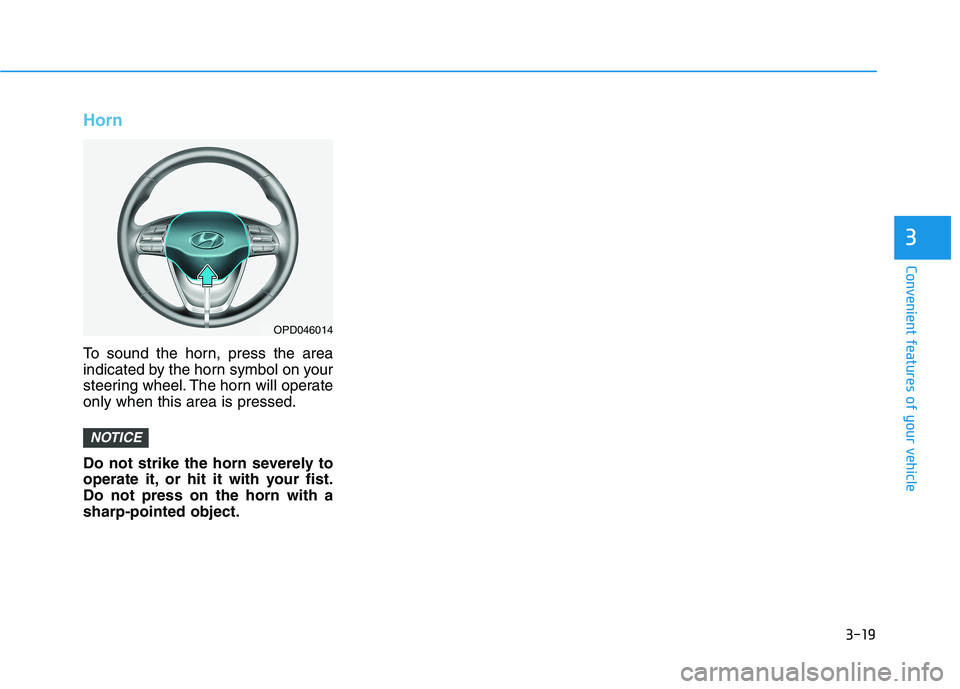
To sound the horn, press the area
indicated by the horn symbol on your
steering wheel. The horn will operate
only when this area is pressed.
Do not strike the horn severely to
operate it, or hit it with your fist.
Do not press on the horn with a
sharp-pointed object.
NOTICE
OPD046014
Page 132 of 533
3-49
Convenient features of your vehicle
3
Parking Brake & Brake
Fluid Warning Light
This warning light illuminates:
When you set the ignition switch or
the Engine Start/Stop button to the
ON position.
- It illuminates for approximately 3
seconds
- It remains on if the parking brake
is applied.
When the parking brake is applied.
When the brake fluid level in the
reservoir is low.
- If the warning light illuminates
with the parking brake released, it
indicates the brake fluid level in
the reservoir is low.
If the brake fluid level in the reser-
voir is low:
1. Drive carefully to the nearest safe
location and stop your vehicle.
2. With the engine stopped, check the
brake fluid level immediately and
add fluid as required (For more
details, refer to “Brake Fluid” in
chapter 7). After adding brake
fluid, check all brake components
for fluid leaks. If a brake fluid leak is
found, or if the warning light
remains on, or if the brakes do not
operate properly, do not drive the
vehicle. We recommend that you
have the vehicle inspected by an
authorised HYUNDAI dealer.
Dual-diagonal braking system
Your vehicle is equipped with dual-
diagonal braking systems. This
means you still have braking on two
wheels even if one of the dual sys-
tems should fail.
With only one of the dual systems
working, more than normal pedal
travel and greater pedal pressure are
required to stop the vehicle.Also, the vehicle will not stop in as
short a distance with only a portion
of the brake system working.
If the brakes fail whilst you are driv-
ing, shift to a lower gear for addition-
al engine braking and stop the vehi-
cle as soon as it is safe to do so.
Parking Brake & Brake Fluid
Warning Light
Driving the vehicle with a warn-
ing light ON is dangerous. If the
Parking Brake & Brake Fluid
Warning Light illuminates with
the parking brake released, it
indicates that the brake fluid
level is low.
In this case, we recommend
that you have the vehicle
inspected by an authorised
HYUNDAI dealer.
WARNING
Page 146 of 533
3-63
Convenient features of your vehicle
3
Press START button whilst turn-
ing wheel
(for smart key system)
This warning message is displayed if
the steering wheel does not unlock
normally when the Engine Start/Stop
button is pressed.
You should press the Engine Start/Stop
button whilst turning the steering wheel
right and left.
Steering wheel not locked
(for smart key system)
This warning message is displayed if
the steering wheel is not locked
whilst the Engine Start/Stop button
changes to the OFF position.
Check Steering Wheel Lock
System (for smart key system)
This warning message is displayed if
the steering wheel does not lock nor-
mally whilst the Engine Start/Stop but-
ton changes to the OFF position.
Press brake pedal to start engine
(for smart key system and auto-
matic transmission/dual clutch
transmission)
This warning message is displayed if
the Engine Start/Stop button changes
to the ACC position by pressing the
button repeatedly without depressing
the brake pedal.
You can start the vehicle by depressing
the brake pedal.
Press clutch pedal to start
engine (for smart key system
and manual transmission)
This warning message is displayed if
the Engine Start/Stop button is in the
ACC position by pressing the button
repeatedly without depressing the
clutch pedal.
Depress the clutch pedal to start the
engine.
Key not in vehicle
(for smart key system)
This warning message is displayed if
the smart key is not in the vehicle
when you press the Engine Start/Stop
button.
When attempting to start the vehicle
always have the smart key with you.
Key not detected
(for smart key system)
This warning message is displayed if
the smart key is not detected when you
press the Engine Start/Stop button.
Press START button with key
(for smart key system)
This warning message is displayed if
you press the Engine Start/Stop but-
ton whilst the warning message “Key
not detected” is displayed.
At this time, the immobiliser indicator
light blinks.
Page 149 of 533
3-66
Convenient features of your vehicle
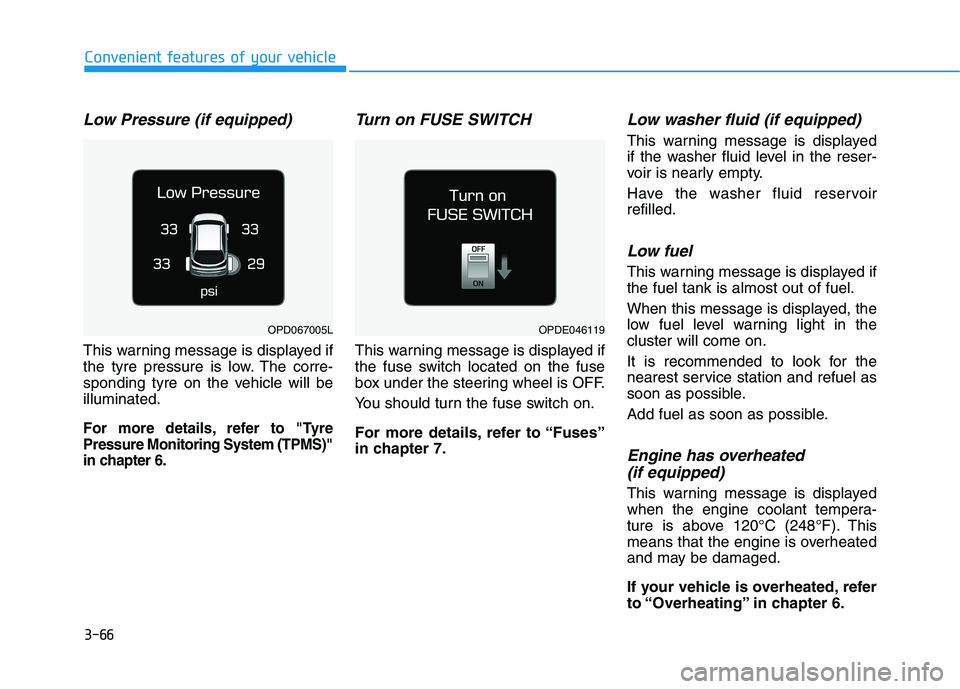
Low Pressure (if equipped)
This warning message is displayed if
the tyre pressure is low. The corre-
sponding tyre on the vehicle will be
illuminated.
For more details, refer to "Tyre
Pressure Monitoring System (TPMS)"
in chapter 6.
Turn on FUSE SWITCH
This warning message is displayed if
the fuse switch located on the fuse
box under the steering wheel is OFF.
You should turn the fuse switch on.
For more details, refer to “Fuses”
in chapter 7.
Low washer fluid (if equipped)
This warning message is displayed
if the washer fluid level in the reser-
voir is nearly empty.
Have the washer fluid reservoir
refilled.
Low fuel
This warning message is displayed if
the fuel tank is almost out of fuel.
When this message is displayed, the
low fuel level warning light in the
cluster will come on.
It is recommended to look for the
nearest service station and refuel as
soon as possible.
Add fuel as soon as possible.
Engine has overheated
(if equipped)
This warning message is displayed
when the engine coolant tempera-
ture is above 120°C (248°F). This
means that the engine is overheated
and may be damaged.
If your vehicle is overheated, refer
to “Overheating” in chapter 6.
OPDE046119OPD067005L
Page 160 of 533
3-77
Convenient features of your vehicle
3
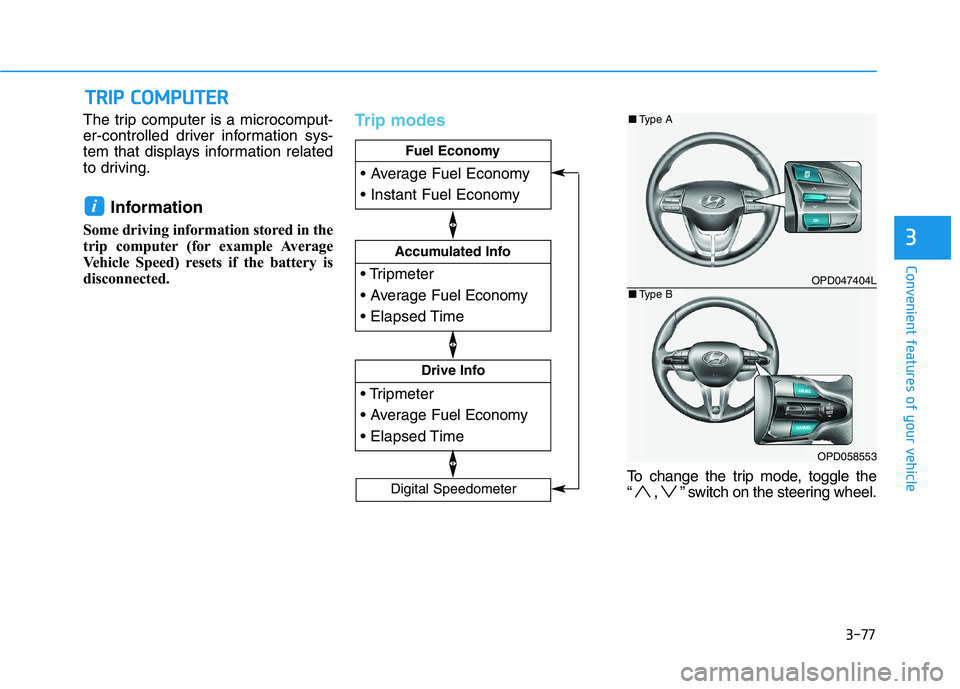
The trip computer is a microcomput-
er-controlled driver information sys-
tem that displays information related
to driving.
Information
Some driving information stored in the
trip computer (for example Average
Vehicle Speed) resets if the battery is
disconnected.
Trip modes
To change the trip mode, toggle the
“ , ” switch on the steering wheel.
i
T TR
RI
IP
P
C
CO
OM
MP
PU
UT
TE
ER
R
Drive Info
Accumulated Info
Fuel Economy
Digital Speedometer
OPD047404L
OPD058553
■Type A
■Type B