change time HYUNDAI I30 2023 Owner's Manual
[x] Cancel search | Manufacturer: HYUNDAI, Model Year: 2023, Model line: I30, Model: HYUNDAI I30 2023Pages: 533, PDF Size: 59.13 MB
Page 251 of 533
4-26
Multimedia System
iPod®
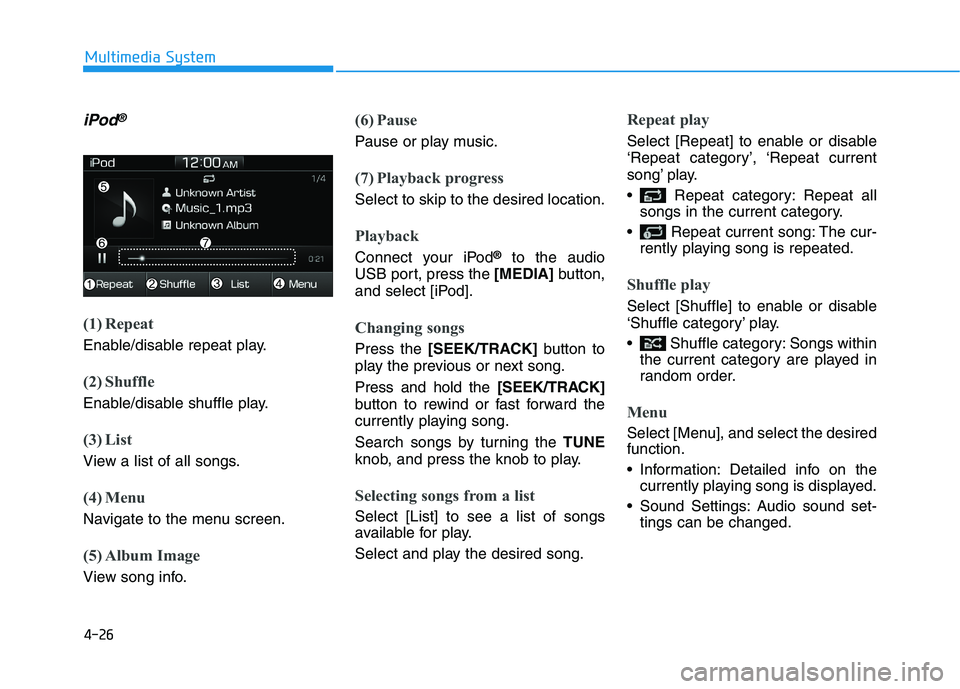
(1) Repeat
Enable/disable repeat play.
(2) Shuffle
Enable/disable shuffle play.
(3) List
View a list of all songs.
(4) Menu
Navigate to the menu screen.
(5) Album Image
View song info.
(6) Pause
Pause or play music.
(7) Playback progress
Select to skip to the desired location.
Playback
Connect your iPod®to the audio
USB port, press the [MEDIA]button,
and select [iPod].
Changing songs
Press the [SEEK/TRACK]button to
play the previous or next song.
Press and hold the [SEEK/TRACK]
button to rewind or fast forward the
currently playing song.
Search songs by turning the TUNE
knob, and press the knob to play.
Selecting songs from a list
Select [List] to see a list of songs
available for play.
Select and play the desired song.
Repeat play
Select [Repeat] to enable or disable
‘Repeat category’, ‘Repeat current
song’ play.
Repeat category: Repeat all
songs in the current category.
Repeat current song: The cur-
rently playing song is repeated.
Shuffle play
Select [Shuffle] to enable or disable
‘Shuffle category’ play.
Shuffle category: Songs within
the current category are played in
random order.
Menu
Select [Menu], and select the desired
function.
Information: Detailed info on the
currently playing song is displayed.
Sound Settings: Audio sound set-
tings can be changed.
Page 252 of 533
4-27
Multimedia System
4
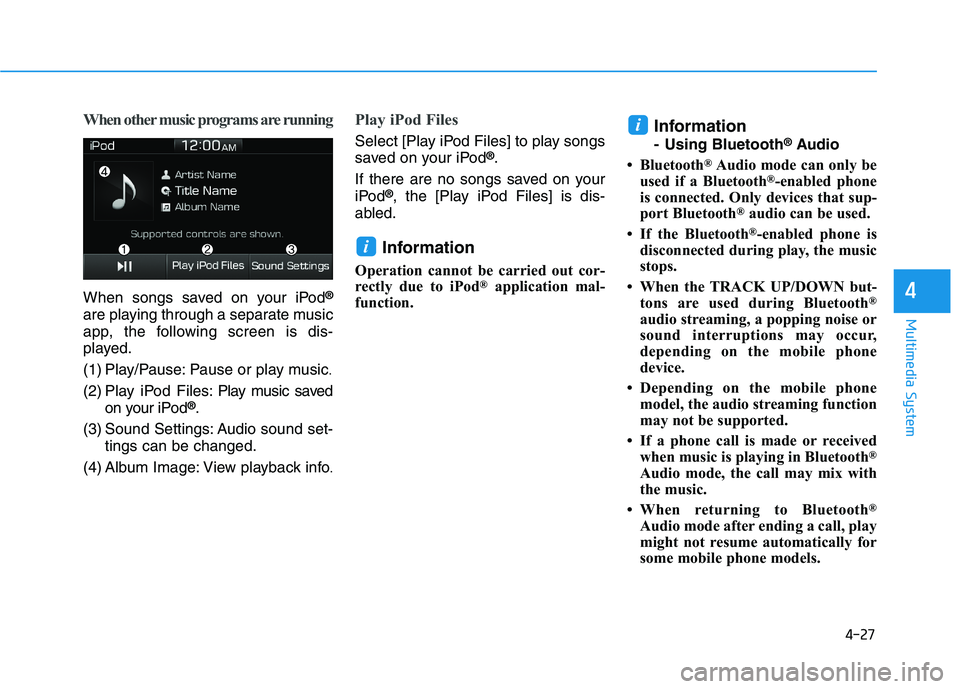
When other music programs are running
When songs saved on your iPod®
are playing through a separate music
app, the following screen is dis-
played.
(1) Play/Pause: Pause or play music
.
(2) Play iPod Files: Play music saved
on your iPod®.
(3) Sound Settings: Audio sound set-
tings can be changed.
(4) Album Image: View playback info
.
Play iPod Files
Select [Play iPod Files] to play songs
saved on your iPod®.
If there are no songs saved on your
iPod
®, the [Play iPod Files] is dis-
abled.
Information
Operation cannot be carried out cor-
rectly due to iPod®application mal-
function.
Information
- Using Bluetooth®Audio
• Bluetooth
®Audio mode can only be
used if a Bluetooth®-enabled phone
is connected. Only devices that sup-
port Bluetooth
®audio can be used.
• If the Bluetooth
®-enabled phone is
disconnected during play, the music
stops.
• When the TRACK UP/DOWN but-
tons are used during Bluetooth
®
audio streaming, a popping noise or
sound interruptions may occur,
depending on the mobile phone
device.
• Depending on the mobile phone
model, the audio streaming function
may not be supported.
• If a phone call is made or received
when music is playing in Bluetooth
®
Audio mode, the call may mix with
the music.
• When returning to Bluetooth
®
Audio mode after ending a call, play
might not resume automatically for
some mobile phone models.
i
i
Page 254 of 533
![HYUNDAI I30 2023 Owners Manual 4-29
Multimedia System
4
Repeat play
Select [Repeat] to enable or disable
‘Repeat all’, ‘Repeat current song’ or
‘Repeat category’ play.
Repeat all: All songs in the
playlist are repeated](/img/35/56144/w960_56144-253.png "HYUNDAI I30 2023 Owners Manual 4-29
Multimedia System
4
Repeat play
Select [Repeat] to enable or disable
‘Repeat all’, ‘Repeat current song’ or
‘Repeat category’ play.
Repeat all: All songs in the
playlist are repeated")
4-29
Multimedia System
4
Repeat play
Select [Repeat] to enable or disable
‘Repeat all’, ‘Repeat current song’ or
‘Repeat category’ play.
Repeat all: All songs in the
playlist are repeated.
Repeat current song: The cur-
rently playing song is repeated.
Repeat category: Repeat all
songs in the current category.
Information
The repeat play function is engaged,
depending on the operation of the con-
nected Bluetooth
®device.
Shuffle play
Select [Shuffle] to enable or disable
‘Shuffle’, ‘Shuffle category’ play.
Shuffle: Songs are played in
random order.
Shuffle category: Songs within
the current category are played in
random order.
Information
The shuffle function is engaged,
depending on the operation of the con-
nected Bluetooth
®device.
Menu
Select [Menu], and select the desired
function.
Connections: The currently connected
Bluetooth
®device can be changed.
Information: Detailed information on
the currently playing song is displayed.
Sound Settings: Audio sound set-
tings can be changed.
AUX
Running AUX
Press the [MEDIA]button, and
select [AUX].
Connect the external device connec-
tion jack to the AUX terminal to run
AUX.
(1) Sound Settings: Audio sound set-
tings can be changed.
i
i
Page 256 of 533
![HYUNDAI I30 2023 Owners Manual 4-31
Multimedia System
4
Shuffle play
Select [Shuffle] to enable or disable
‘Shuffle’, ‘Shuffle category’ play.
Shuffle: Songs are played in
random order.
Shuffle category: Songs within
the](/img/35/56144/w960_56144-255.png "HYUNDAI I30 2023 Owners Manual 4-31
Multimedia System
4
Shuffle play
Select [Shuffle] to enable or disable
‘Shuffle’, ‘Shuffle category’ play.
Shuffle: Songs are played in
random order.
Shuffle category: Songs within
the")
4-31
Multimedia System
4
Shuffle play
Select [Shuffle] to enable or disable
‘Shuffle’, ‘Shuffle category’ play.
Shuffle: Songs are played in
random order.
Shuffle category: Songs within
the current category are played in
random order.
Menu
Select [Menu], and select the desired
function.
Delete Files: You can delete files
from My Music.
(1) File: Select saved file
.
(2) Mark All: Select all files.
(3) Unmark All: Deselect all files.(4) Delete: Delete the selected file(s)
.
- Select the file to delete, then
select [Delete] to delete it.
Add to Playlist: Frequently played
songs can be paired in a [Playlist].
- Songs can be played from the
[Playlist].
Information: Detailed info on the
currently playing song is displayed.
Sound Settings: Audio sound set-
tings can be changed.
Delete from Playlist
When a song in the playlist is play-
ing, select [Menu] and select [Delete
from Playlist].
Select the song to delete, then select
[Delete].
Phone (if equipped)
Information
- Using Bluetooth®(BT) Phone
• Bluetooth
®is a near-field wireless
networking technology that uses the
2.4 GHz frequency to connect vari-
ous devices within a certain distance
wirelessly.
• The technology is used in PCs,
peripherals, Bluetooth
®phones,
tablet PCs, household appliances
and automobiles. Devices support-
ing Bluetooth
®can exchange data at
high speeds without physical cable
connections.
• Bluetooth
®Handsfree devices enable
convenient access to phone functions
through cell phones equipped with
Bluetooth
®.
• Some Bluetooth
®devices may not be
supported by the Bluetooth®
Handsfree function.
(Continued)
i
Page 262 of 533
![HYUNDAI I30 2023 Owners Manual 4-37
Multimedia System
4
Operation during calls
Incoming call with Bluetooth®con-
nected ➟Select [Accept].
(1) Call duration: Call duration dis-
play.
(2) Caller name: If the caller number is
in y](/img/35/56144/w960_56144-261.png "HYUNDAI I30 2023 Owners Manual 4-37
Multimedia System
4
Operation during calls
Incoming call with Bluetooth®con-
nected ➟Select [Accept].
(1) Call duration: Call duration dis-
play.
(2) Caller name: If the caller number is
in y")
4-37
Multimedia System
4
Operation during calls
Incoming call with Bluetooth®con-
nected ➟Select [Accept].
(1) Call duration: Call duration dis-
play.
(2) Caller name: If the caller number is
in your contacts, the corresponding
name is displayed.
(3) Incoming phone number: Incoming
phone number is displayed.
(4) Keypad: Number keypad for
Automatic Response Service input
is displayed.
(5) Private: Call is transferred to a
cell phone.
(6) Outgoing Volume: Adjust outgo-
ing voice volume.
(7) End: End call.Information
• Some Bluetooth®devices may not
support the Private function.
• The outgoing voice volume may
vary depending on the type of
Bluetooth
®device. If the outgoing
voice volume is too high or low,
adjust the Outgoing Volume.
Favorites
Press the [PHONE]button on the
audio system ➟Select [Favorites] ➟
Favorites list displayed.
(1) Favorites list: A list of paired
favorites is displayed.
Connect a call when selected.
(2) Add to Favorites: Add a down-
loaded phone number to favorites.
(3) Delete: Delete a saved favorite.
Information
• Up to 20 favorites can be saved for
each connected Bluetooth®device.
• Favorites can be accessed when the
Bluetooth
®device they were paired
from is connected.
• The audio system does not down-
load favorites from Bluetooth
®
devices. Favorites must be newly
saved before use.
• To add to favorites, contacts must be
downloaded first.
• Saved favorites are not updated
even if the contacts of the connected
Bluetooth
®device are changed. In
this case, favorites need to be delet-
ed and added again.
ii
Page 264 of 533
4-39
Multimedia System
4
(2) Clear
- Shortly press to delete individual
digits.
- Press and hold to delete the
entire phone number.
(3) Keypad: Enter phone number.
(4) Bluetooth
®Phone name
- The name of the connected
Bluetooth
®device is displayed.
- Contacts matching the keypad
number/letter input are dis-
played.
(5) Call
- Enter and select a phone num-
ber to call.
- Select without entering a phone
number to see the most recent
dialed call.
Settings
Press the [PHONE]button on the
audio ➟Select [Settings].
- For phone Setup, refer to Setup
page ➟Select [Bluetooth].
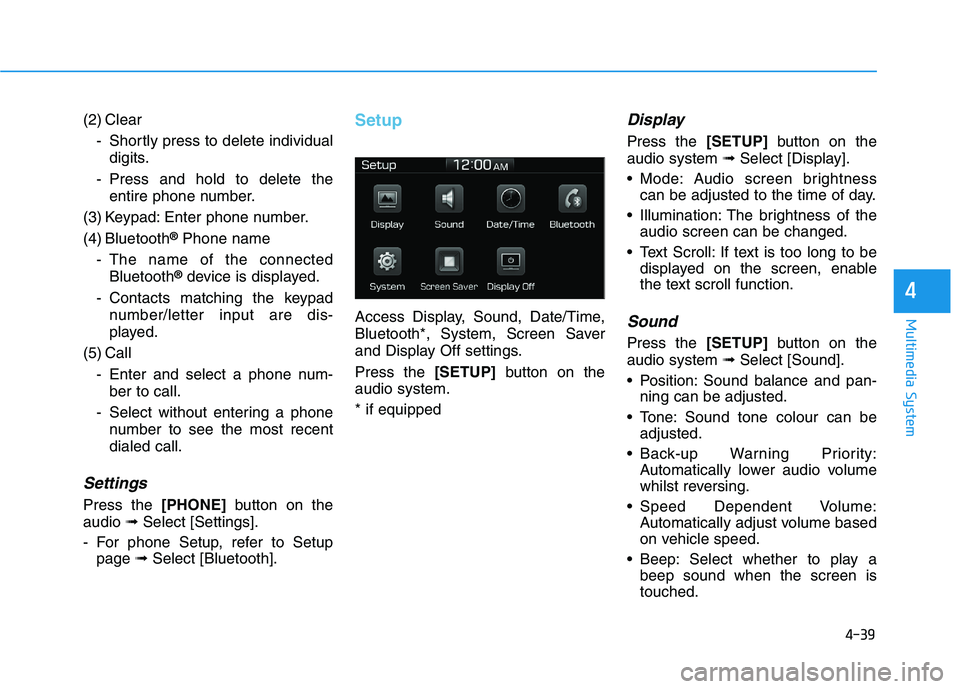
Setup
Access Display, Sound, Date/Time,
Bluetooth*, System, Screen Saver
and Display Off settings.
Press the [SETUP]button on the
audio system.
* if equipped
Display
Press the [SETUP]button on the
audio system ➟Select [Display].
Mode: Audio screen brightness
can be adjusted to the time of day.
Illumination: The brightness of the
audio screen can be changed.
Text Scroll: If text is too long to be
displayed on the screen, enable
the text scroll function.
Sound
Press the [SETUP]button on the
audio system ➟Select [Sound].
Position: Sound balance and pan-
ning can be adjusted.
Tone: Sound tone colour can be
adjusted.
Back-up Warning Priority:
Automatically lower audio volume
whilst reversing.
Speed Dependent Volume:
Automatically adjust volume based
on vehicle speed.
Beep: Select whether to play a
beep sound when the screen is
touched.
Page 265 of 533
![HYUNDAI I30 2023 Owners Manual 4-40
Multimedia System
Date/Time
Press the [SETUP]button on the
audio system ➟Select [Date/Time].
Set Time: Set the time displayed on
the audio screen.
Time Format: Choose between 12-
hour and 24-](/img/35/56144/w960_56144-264.png "HYUNDAI I30 2023 Owners Manual 4-40
Multimedia System
Date/Time
Press the [SETUP]button on the
audio system ➟Select [Date/Time].
Set Time: Set the time displayed on
the audio screen.
Time Format: Choose between 12-
hour and 24-")
4-40
Multimedia System
Date/Time
Press the [SETUP]button on the
audio system ➟Select [Date/Time].
Set Time: Set the time displayed on
the audio screen.
Time Format: Choose between 12-
hour and 24-hour time formats.
Set Date: Set the date displayed on
the audio screen.
Bluetooth (if equipped)
Press the [SETUP]button on the
audio system ➟Select [Bluetooth].
Connections: Control pairing, dele-
tion, connection and disconnection
of Bluetooth
®devices.
Auto Connection Priority: Set the
connection priority of Bluetooth
®
devices when the vehicle is start-
ed.
Download Contacts: Contacts can
be downloaded from connected
Bluetooth
®devices.
Information
• When paired devices are deleted,
the call history and contacts of the
device saved to the audio system are
deleted.
• For Bluetooth
®connections with
low connection priority, some time
may be required for the connection
to be established.
• Contacts can be downloaded only
from the currently connected
Bluetooth
®device.
• If no Bluetooth
®device is connected,
the Download Contacts button is
disabled.
System
Press the [SETUP]button on the
audio system ➟Select [System].
Memory Information: View My
Music memory usage.
Language: Change the user language.
Default: Reset the audio system.
Information
The system resets to the default val-
ues, and all saved data and settings
are lost.
Screen Saver
Set the information displayed when
the audio system is switched off or
the screen is turned off.
Press the [SETUP]button on the
audio system ➟Select [Screen
Saver].
Analog: An analog clock is dis-
played.
Digital: A digital clock is displayed.
None: No information is displayed.
Display Off
To prevent glare, the screen can be
turned off with the audio system in
operation.
Press the [SETUP]button on the
audio system ➟Select [Display Off].
Information
Use ‘Screen Saver’ to set the informa-
tion to be displayed when the screen is
turned off.
i
i
i
Page 269 of 533
5-4
Driving your vehicle
Carbon monoxide (CO) gas is toxic. Breathing CO can cause unconsciousness and death.
Engine exhaust contains carbon monoxide which cannot be seen or smelled.
Do not inhale engine exhaust fumes.
If at any time you smell engine exhaust fumes inside the vehicle, open the windows immediately. Exposure to CO can
cause unconsciousness and death by asphyxiation.
Be sure the exhaust system does not leak.
The exhaust system should be checked whenever the vehicle is raised to change the oil or for any other purpose. If
you hear a change in the sound of the exhaust or if you drive over something that strikes the underneath side of the
vehicle, we recommend that the exhaust system be checked as soon as possible by an authorised HYUNDAI dealer.
Do not run the engine in an enclosed area.
Letting the engine idle in your garage, even with the garage door open, is a hazardous practice. Run the engine only
long enough to start the engine and to move the vehicle out of the garage.
Avoid idling the engine for prolonged periods with people inside the vehicle.
If it is necessary to idle the engine for a prolonged period with people inside the vehicle, be sure to do so only in an
open area with the air intake set at "Fresh" and blower speed control set to high so fresh air is drawn into the interior.
Keep the air intakes clear.
To ensure proper operation of the ventilation system, keep the ventilation air intakes located in front of the windscreen
clear of snow, ice, leaves, or other obstructions.
If you must drive with the tailgate open:
Close all windows.
Open instrument panel air vents.
Set the air intake control at "Fresh", the air flow control at "Floor" or "Face", and the blower speed control set to high.
WARNING
Page 287 of 533
5-22
Driving your vehicle
To prevent damage to the engine,
clutch and transmission:
When downshifting from 5th
gear to 4th gear, be careful not
to inadvertently push the shift
lever sideways engaging the 2nd
gears. A drastic downshift may
cause the engine speed to
increase to the point the
tachometer will enter the red-
zone.
Do not downshift more than two
gears at a time or downshift the
gear when the engine is running
at high speed (5,000 RPM or
higher). Such a downshifting
may damage the engine, clutch
and the transmission.
Good driving practices
Never take the vehicle out of gear
and coast down a hill. This is
extremely dangerous.
Don't "ride" the brakes. This can
cause the brakes and related parts
to overheat and malfunction.
When you are driving down a long
hill, slow down and shift to a lower
gear. Engine braking will help slow
down the vehicle.
Slow down before shifting to a
lower gear. This will help avoid
over-revving the engine, which can
cause damage.
Slow down when you encounter
cross winds. This gives you much
better control of your vehicle.
Be sure the vehicle is completely
stopped before you shift into R
(Reverse) to prevent damage to
the transmission. Exercise extreme caution when
driving on a slippery surface. Be
especially careful when braking,
accelerating or shifting gears. On a
slippery surface, an abrupt change
in vehicle speed can cause the
drive wheels to lose traction and
may cause loss of vehicle control
resulting in an accident.
NOTICE
Do not use aggressive engine
braking (shifting from a higher
gear to a lower gear) on slip-
pery roads. This could cause
the tyres to skid and may result
in an accident.
WARNING
Page 294 of 533
5-29
Driving your vehicle
5
Parking
Always come to a complete stop and
continue to depress the brake pedal.
Move the shift lever into the P (Park)
position, apply the parking brake,
and place the ignition switch in the
LOCK/OFF position. Take the key
with you when exiting the vehicle.
Good driving practices
Never move the shift lever from P
(Park) or N (Neutral) to any other
position with the accelerator pedal
depressed.
Never move the shift lever into P
(Park) when the vehicle is in
motion.
Be sure the vehicle is completely
stopped before you attempt to shift
into R (Reverse) or D (Drive).
Do not move the shift lever to N
(Neutral) when driving. Doing so
may result in an accident because
of a loss of engine braking and the
transmission could be damaged.
Do not drive with your foot resting
on the brake pedal. Even light, but
consistent pedal pressure can
result in the brakes overheating,
brake wear and possibly even
brake failure.
When driving in manual shift mode,
slow down before shifting to a
lower gear. Otherwise, the lower
gear may not be engaged if the
engine rpms are outside of the
allowable range. Always apply the parking brake
when leaving the vehicle. Do not
depend on placing the transmis-
sion in P (Park) to keep the vehicle
from moving.
Exercise extreme caution when
driving on a slippery surface. Be
especially careful when braking,
accelerating or shifting gears. On a
slippery surface, an abrupt change
in vehicle speed can cause the
drive wheels to lose traction and
may cause loss of vehicle control
resulting in an accident.
Optimum vehicle performance and
economy is obtained by smoothly
depressing and releasing the
accelerator. When you stay in the vehicle
with the engine running, be
careful not to depress the accel-
erator pedal for a long period of
time. The engine or exhaust
system may overheat and start
a fire.
The exhaust gas and the
exhaust system are very hot.
Keep away from the exhaust
system components.
Do not stop or park over flam-
mable materials, such as dry
grass, paper or leaves. They
may ignite and cause a fire.
WARNING