instrument panel HYUNDAI I30 2023 Owner's Manual
[x] Cancel search | Manufacturer: HYUNDAI, Model Year: 2023, Model line: I30, Model: HYUNDAI I30 2023Pages: 533, PDF Size: 59.13 MB
Page 354 of 533
5-89
Driving your vehicle
5
(Continued)
The operation of the LKA sys-
tem can be cancelled or not
work properly according to
road condition and surround-
ings. Always be cautious
when driving.
Do not disassemble the LKA
system camera temporarily to
tint the window or attach any
types of coatings and acces-
sories. If you disassemble the
camera and assemble it again,
we recommend that you take
your vehicle to an authorised
HYUNDAI dealer and have the
system checked for calibra-
tion.
When you replace the wind-
screen glass, LKA system
camera or related parts of the
steering wheel, take your
vehicle to an authorised
HYUNDAI dealer and have the
system checked for calibra-
tion.
(Continued)
(Continued)
Always have your hands on
the steering wheel whilst the
LKA system is activated. If
you continue to drive with
your hands off the steering
wheel after the "Keep hands
on steering wheel" warning
message appears, the system
will turn off automatically.
The steering wheel is not con-
tinuously controlled so if the
vehicle speed is at a higher
speed when leaving a lane the
vehicle may not be able to be
controlled by the system. The
driver must always follow the
speed limit when using the
system.
If you attach objects to the
steering wheel, the system
may not assist steering or the
hands off alarm may not work
properly.
(Continued)
The system detects lane lines
and controls the steering
wheel by a camera, therefore,
if the lane lines are hard to
detect, the system may not
work properly.
Please refer to "Limitations of
the system".
Do not remove or damage the
related parts of LKA system.
You may not hear a warning
sound of the LKA system
because of excessive audio
sound.
Do not place objects on the
instrument panel that reflects
light such as mirrors, white
paper, etc. The system may
malfunction if the sunlight is
reflected.
(Continued)
Page 355 of 533
5-90
Driving your vehicle
LKA system Operation
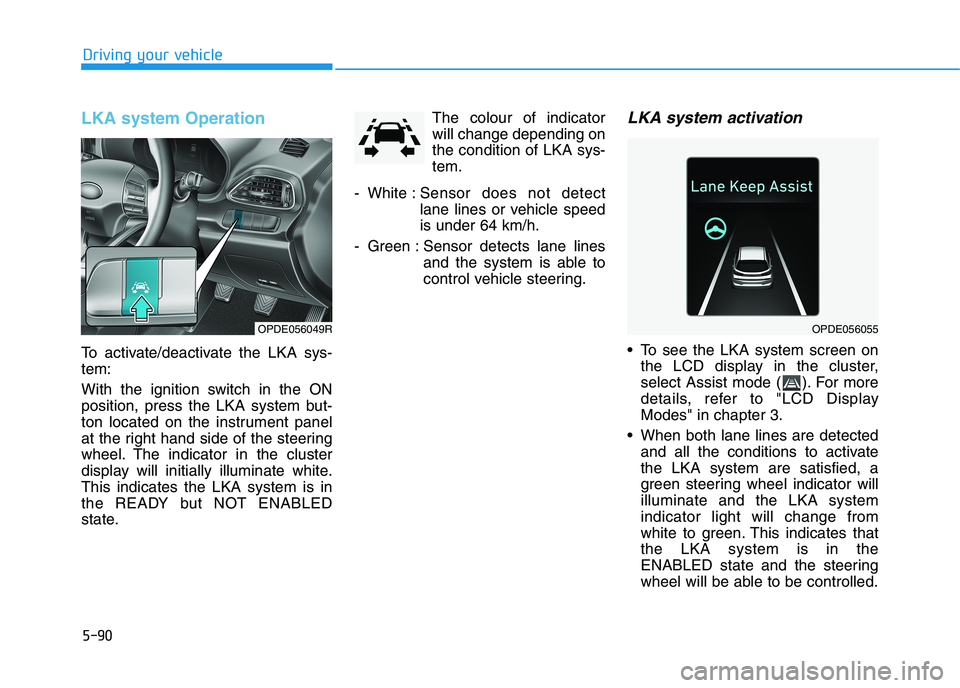
To activate/deactivate the LKA sys-
tem:
With the ignition switch in the ON
position, press the LKA system but-
ton located on the instrument panel
at the right hand side of the steering
wheel. The indicator in the cluster
display will initially illuminate white.
This indicates the LKA system is in
the READY but NOT ENABLED
state.The colour of indicator
will change depending on
the condition of LKA sys-
tem.
- White :Sensor does not detect
lane lines or vehicle speed
is under 64 km/h.
- Green : Sensor detects lane lines
and the system is able to
control vehicle steering.
LKA system activation
To see the LKA system screen on
the LCD display in the cluster,
select Assist mode ( ). For more
details, refer to "LCD Display
Modes" in chapter 3.
When both lane lines are detected
and all the conditions to activate
the LKA system are satisfied, a
green steering wheel indicator will
illuminate and the LKA system
indicator light will change from
white to green. This indicates that
the LKA system is in the
ENABLED state and the steering
wheel will be able to be controlled.
OPDE056055OPDE056049R
Page 360 of 533
5-95
Driving your vehicle
5
The lane suddenly disappears
such as at the intersection.
There is not enough distance
between you and the vehicle in
front to be able to detect the lane
line or the vehicle ahead is driving
on the lane line.
Driving on a steep grade, over a
hill, or when driving on a bend.
The adverse road conditions cause
excessive vehicle vibrations whilst
driving.
The surrounding of the inside rear
view mirror temperature is high
due to direct sunlight.
When front visibility is poor
The windscreen or the LKA system
camera lens is blocked with dirt or
debris.
The windscreen glass is fogged
up; a clear view of the road is
obstructed.
Placing objects on the instrument
panel, etc.LKA system Function Change
The driver can change LKA to the
Lane Departure Warning (LDW) sys-
tem or change the LKA system mode
between Standard LKA and Active
LKA from the LCD display. Go to the
"User Settings →Driver Assistance
→Lane Safety →Lane Departure
Warning / Standard LKA / Active
LKA".
Lane Departure Warning
LDW alerts the driver with a visual
warning and a warning alarm when
the system detects the vehicle
departing the lane. The steering
wheel will not be controlled.
Standard LKA
The Standard LKA mode guides the
driver to help keep the vehicle within
the lanes. It rarely controls the steer-
ing wheel, when the vehicle drives
well inside the lanes. However, it
starts to control the steering wheel,
when the vehicle is about to deviate
out of the lanes.
Active LKA
The Active LKA mode provides more
frequent steering wheel control in
comparison with the Standard LKA
mode. Active LKA can reduce the dri-
ver’s fatigue to assist the steering for
maintaining the vehicle in the middle
of the lane.
Page 364 of 533
5-99
Driving your vehicle
5
The Driver Attention Warning
(DAW) system utilises the camera
sensor on the front windscreen for
its operation. To keep the camera
sensor in the best condition, you
should observe the following:
NEVER install any accessories or
stickers on the front windscreen,
nor tint the front windscreen.
NEVER locate any reflective
objects (i.e. white paper, mirror)
over the instrument panel. Any
light reflection may cause a mal-
function of the Driver Attention
Warning (DAW) system.
Pay extreme caution to keep the
camera sensor out of water.
NEVER disassemble the camera
assembly, nor apply any impact
on the camera assembly.
Do not disassemble the camera
temporarily for tinted window or
attaching any types of coatings
and accessories.
(Continued)(Continued)
If you disassemble a camera and
assemble it again, we recom-
mend that you take your vehicle
to an authorised HYUNDAI deal-
er and have the system checked
for calibration.
NOTICE
The Driver Attention Warning
(DAW) system may not operate
properly or operate with limited
alerts in the following situations:
The lane detection perform-
ance is limited. For more
information, refer to "Lane
Keeping Assist (LKA) system"
in this chapter.
The vehicle is violently driven
or is abruptly turned for
obstacle avoidance (e.g. con-
struction area, other vehicles,
fallen objects, bumpy road).
Forward drivability of the
vehicle is severely under-
mined (possibly due to wide
variation in tyre pressures,
uneven tyre wear-out, toe-
in/toe-out alignment).
(Continued)
(Continued)
The vehicle drives on a wind-
ing road.
The vehicle drives on a
bumpy road.
The vehicle drives through a
windy area.
The vehicle is controlled by
the following driving assist
systems:
- Lane Keeping Assist (LKA)
system
- Forward Collision-
Avoidance Assist (FCA) sys-
tem
- Smart Cruise Control (SCC)
system
CAUTION
Playing the vehicle audio sys-
tem at high volume may offset
the Driver Attention Warning
(DAW) system warning sounds.
CAUTION
Page 400 of 533
5-135
Driving your vehicle
5
Reversing
Hold the bottom of the steering
wheel with one hand. Then, to move
the trailer to the left, move your hand
to the left. To move the trailer to the
right, move your hand to the right.
Always reverse slowly and, if possi-
ble, have someone guide you.
Making turns
When you’re turning with a trailer,
make wider turns than normal. Do this
so your trailer won’t strike soft shoul-
ders, kerbs, road signs, trees, or other
objects. Avoid jerky or sudden
manoeuvres. Signal well in advance.
Turn signals
When you tow a trailer, your vehicle
has to have a different turn signal
flasher and extra wiring. The green
arrows on your instrument panel will
flash whenever you signal a turn or
lane change. Properly connected,
the trailer lights will also flash to alert
other drivers you’re about to turn,
change lanes, or stop.
When towing a trailer, the green
arrows on your instrument panel will
flash for turns even if the bulbs on
the trailer are burned out. Thus, you
may think drivers behind you are
seeing your signals when, in fact,
they are not. It’s important to check
occasionally to be sure the trailer
bulbs are still working. You must also
check the lights every time you dis-
connect and then reconnect the
wires.Do not connect a trailer lighting
system directly to your vehi-
cle’s lighting system. Use an
approved trailer wiring harness.
Failure to do so could result in
damage to the vehicle electrical
system and/or personal injury.
Consult an authorised HYUNDAI
dealer for assistance.WARNING
Page 433 of 533
7
Tyres and wheels .................................................7-47
Tyre care ...........................................................................7-47
Recommended cold tyre inflation pressures ...........7-48
Check tyre inflation pressure ......................................7-49
Tyre rotation ....................................................................7-49
Wheel alignment and tyre balance.............................7-50
Tyre replacement ............................................................7-53
Wheel replacement .........................................................7-53
Tyre traction .....................................................................7-53
Tyre maintenance ...........................................................7-54
Tyre sidewall labelling ....................................................7-54
Low aspect ratio tyres...................................................7-57
Fuses ......................................................................7-59
Instrument panel fuse replacement ...........................7-60
Engine compartment panel fuse replacement.........7-61
Fuse/Relay panel description ......................................7-63
Light bulbs.............................................................7-66
Headlamp, position lamp, turn signal lamp and
daytime running light bulb replacement ...................7-67
Side repeater lamp replacement .................................7-70
Rear combination lamp bulb replacement ................7-71
Rear fog lamp ..................................................................7-74
High mounted stop lamp replacement .......................7-75
Licence plate light bulb replacement .........................7-75
Interior light bulb replacement ....................................7-75
Appearance care ..................................................7-77
Exterior care ....................................................................7-77
Interior care......................................................................7-83
Emission control system .....................................7-86
Crankcase emission control system ...........................7-86
Evaporative emission control system.........................7-86
Exhaust emission control system ...............................7-87
Page 491 of 533
7-60
Maintenance
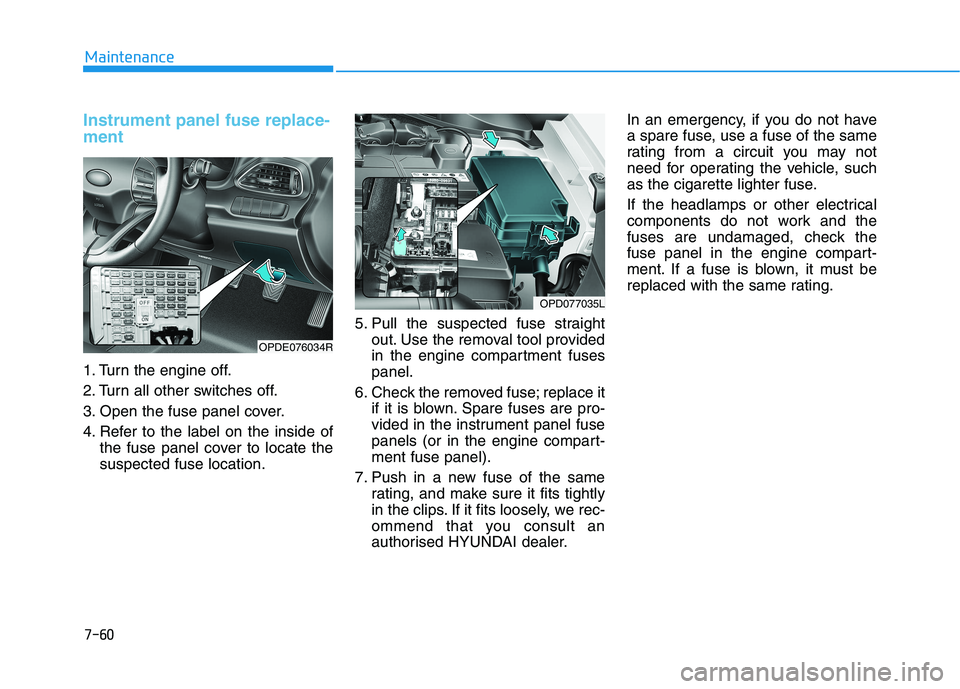
Instrument panel fuse replace-
ment
1. Turn the engine off.
2. Turn all other switches off.
3. Open the fuse panel cover.
4. Refer to the label on the inside of
the fuse panel cover to locate the
suspected fuse location.5. Pull the suspected fuse straight
out. Use the removal tool provided
in the engine compartment fuses
panel.
6. Check the removed fuse; replace it
if it is blown. Spare fuses are pro-
vided in the instrument panel fuse
panels (or in the engine compart-
ment fuse panel).
7. Push in a new fuse of the same
rating, and make sure it fits tightly
in the clips. If it fits loosely, we rec-
ommend that you consult an
authorised HYUNDAI dealer.In an emergency, if you do not have
a spare fuse, use a fuse of the same
rating from a circuit you may not
need for operating the vehicle, such
as the cigarette lighter fuse.
If the headlamps or other electrical
components do not work and the
fuses are undamaged, check the
fuse panel in the engine compart-
ment. If a fuse is blown, it must be
replaced with the same rating.
OPDE076034R
OPD077035L
Page 531 of 533
8-10
Specifications & Consumer information
V VE
EH
HI
IC
CL
LE
E
C
CE
ER
RT
TI
IF
FI
IC
CA
AT
TI
IO
ON
N
L LA
AB
BE
EL
L
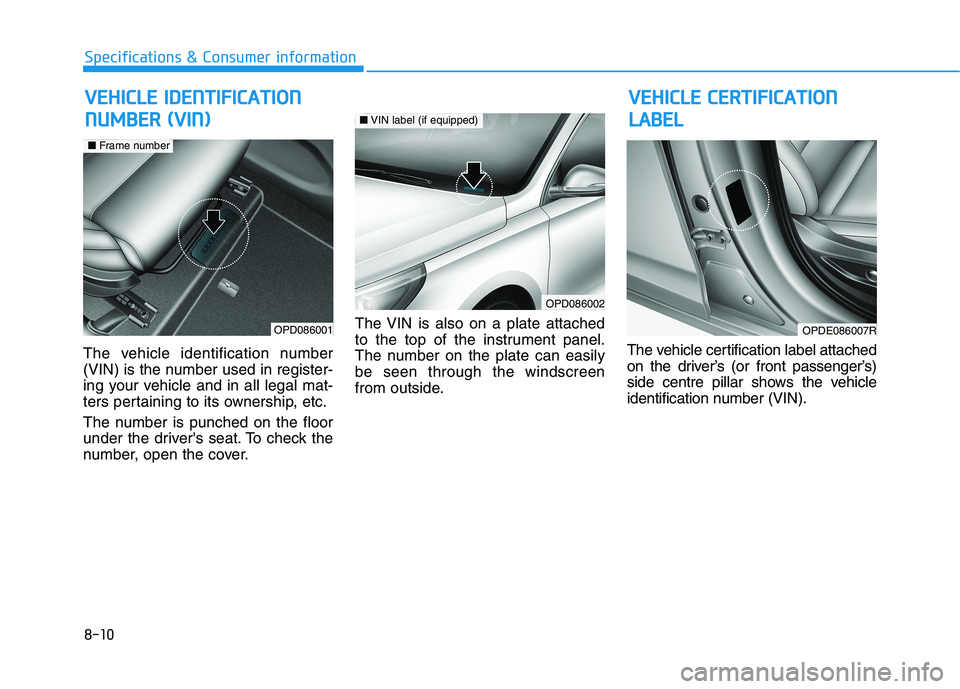
The vehicle identification number
(VIN) is the number used in register-
ing your vehicle and in all legal mat-
ters pertaining to its ownership, etc.
The number is punched on the floor
under the driver's seat. To check the
number, open the cover.The VIN is also on a plate attached
to the top of the instrument panel.
The number on the plate can easily
be seen through the windscreen
from outside.The vehicle certification label attached
on the driver’s (or front passenger’s)
side centre pillar shows the vehicle
identification number (VIN).
OPDE086007ROPD086001
■Frame number
V
VE
EH
HI
IC
CL
LE
E
I
ID
DE
EN
NT
TI
IF
FI
IC
CA
AT
TI
IO
ON
N
N NU
UM
MB
BE
ER
R
(
(V
VI
IN
N)
)
OPD086002
■VIN label (if equipped)