5-100 HYUNDAI I30 2023 Owners Manual
[x] Cancel search | Manufacturer: HYUNDAI, Model Year: 2023, Model line: I30, Model: HYUNDAI I30 2023Pages: 533, PDF Size: 59.13 MB
Page 18 of 533
1-5
Your vehicle at a glance
1
I IN
NS
ST
TR
RU
UM
ME
EN
NT
T
P
PA
AN
NE
EL
L
O
OV
VE
ER
RV
VI
IE
EW
W
(
(I
I)
)
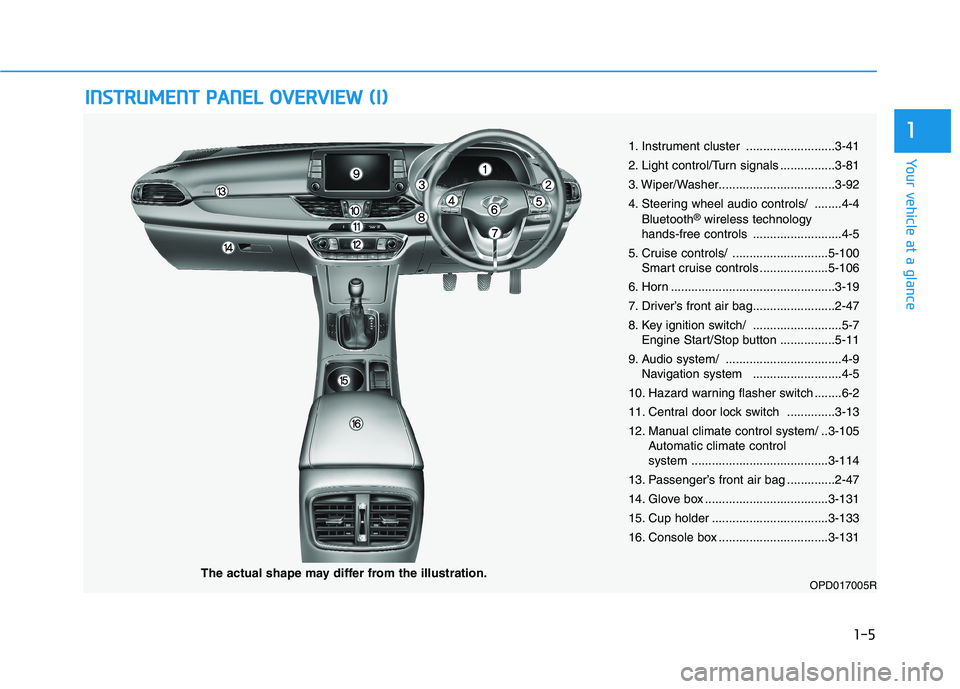
1. Instrument cluster ..........................3-41
2. Light control/Turn signals ................3-81
3. Wiper/Washer..................................3-92
4. Steering wheel audio controls/ ........4-4
Bluetooth
®wireless technology
hands-free controls ..........................4-5
5. Cruise controls/ ............................5-100
Smart cruise controls ....................5-106
6. Horn ................................................3-19
7. Driver’s front air bag........................2-47
8. Key ignition switch/ ..........................5-7
Engine Start/Stop button ................5-11
9. Audio system/ ..................................4-9
Navigation system ..........................4-5
10. Hazard warning flasher switch ........6-2
11. Central door lock switch ..............3-13
12. Manual climate control system/ ..3-105
Automatic climate control
system ........................................3-114
13. Passenger’s front air bag ..............2-47
14. Glove box ....................................3-131
15. Cup holder ..................................3-133
16. Console box ................................3-131
OPD017005RThe actual shape may differ from the illustration.
Page 267 of 533
5
Forward collision assist (FCA) system
(Front radar + Front camera) ............................5-76
System Setting and Activation.....................................5-76
FCA Warning Message and System Control ............5-78
FCA Sensor .......................................................................5-80
System Malfunction .......................................................5-82
Limitations of the System .............................................5-84
Lane keeping assist (LKA) system ....................5-88
LKA Operation..................................................................5-90
Warning Light and Message.........................................5-93
Limitations of the System .............................................5-94
LKA Function Change ...................................................5-95
Driver attention warning (DAW) system ..........5-96
System Setting and Activation.....................................5-96
Resetting the System .....................................................5-97
System Standby ...............................................................5-98
System Malfunction .......................................................5-98
Cruise control .....................................................5-100
Cruise Control operation .............................................5-100
Smart cruise control system (SCC) .................5-106
Smart Cruise Control Speed .......................................5-107
Smart Cruise Control Vehicle-to-Vehicle
Distance ...........................................................................5-112
Sensor to Detect Distance to the Vehicle
Ahead ...............................................................................5-115
To Adjust the Sensitivity of Smart Cruise
Control .............................................................................5-117
To Convert to Cruise Control Mode .........................5-117
Limitations of the System...........................................5-118
Special driving conditions .................................5-123
Hazardous driving conditions ....................................5-123
Rocking the vehicle ......................................................5-123
Smooth cornering .........................................................5-124
Driving at night ..............................................................5-124
Driving in the rain .........................................................5-124
Driving in flooded areas..............................................5-125
Highway driving .............................................................5-125
Reducing the risk of a rollover .................................5-126
Page 365 of 533
5-100
Driving your vehicle
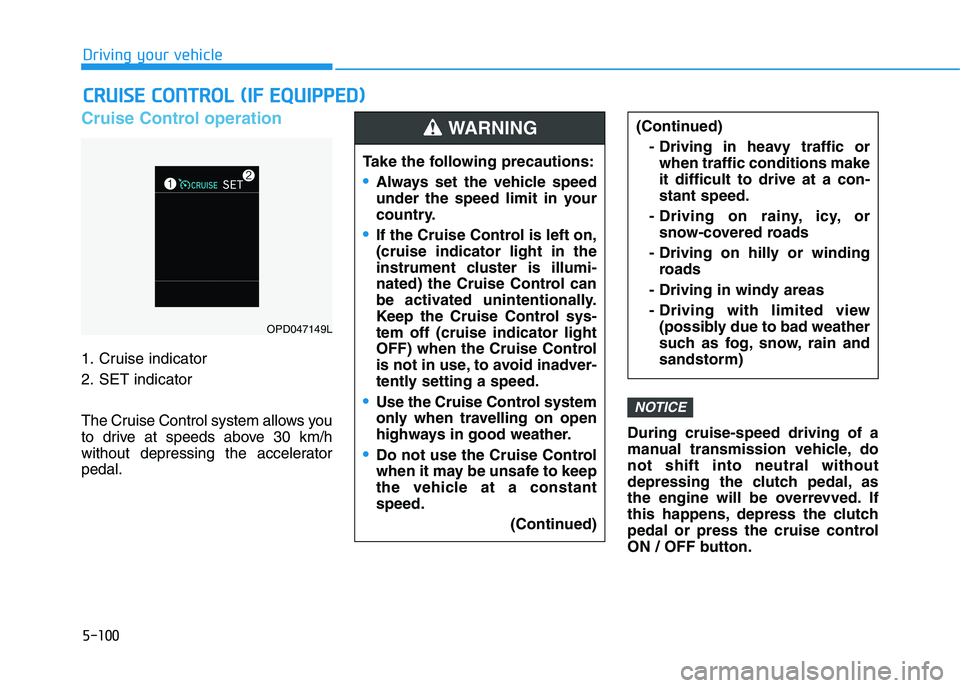
Cruise Control operation
1. Cruise indicator
2. SET indicator
The Cruise Control system allows you
to drive at speeds above 30 km/h
without depressing the accelerator
pedal.During cruise-speed driving of a
manual transmission vehicle, do
not shift into neutral without
depressing the clutch pedal, as
the engine will be overrevved. If
this happens, depress the clutch
pedal or press the cruise control
ON / OFF button.
NOTICE
C CR
RU
UI
IS
SE
E
C
CO
ON
NT
TR
RO
OL
L
(
(I
IF
F
E
EQ
QU
UI
IP
PP
PE
ED
D)
)
Take the following precautions:
Always set the vehicle speed
under the speed limit in your
country.
If the Cruise Control is left on,
(cruise indicator light in the
instrument cluster is illumi-
nated) the Cruise Control can
be activated unintentionally.
Keep the Cruise Control sys-
tem off (cruise indicator light
OFF) when the Cruise Control
is not in use, to avoid inadver-
tently setting a speed.
Use the Cruise Control system
only when travelling on open
highways in good weather.
Do not use the Cruise Control
when it may be unsafe to keep
the vehicle at a constant
speed.
(Continued)
(Continued)
- Driving in heavy traffic or
when traffic conditions make
it difficult to drive at a con-
stant speed.
- Driving on rainy, icy, or
snow-covered roads
- Driving on hilly or winding
roads
- Driving in windy areas
- Driving with limited view
(possibly due to bad weather
such as fog, snow, rain and
sandstorm)WARNING
OPD047149L