ECO mode HYUNDAI I800 2015 Owners Manual
[x] Cancel search | Manufacturer: HYUNDAI, Model Year: 2015, Model line: I800, Model: HYUNDAI I800 2015Pages: 339, PDF Size: 7.25 MB
Page 108 of 339
437
Features of your vehicle
✽NOTICE
• If the vehicle is not on level ground or
the battery power has been interrupt-
ed, the “Distance to empty” function
may not operate correctly.
The trip computer may not register
additional fuel if less than 6 litres (1.6
gallons) of fuel are added to the vehi-
cle.
• The fuel consumption and distance to
empty values may vary significantly
based on driving conditions, driving
habits, and condition of the vehicle.
• The distance to empty value is an esti-
mate of the available driving distance.
This value may differ from the actual
driving distance available.
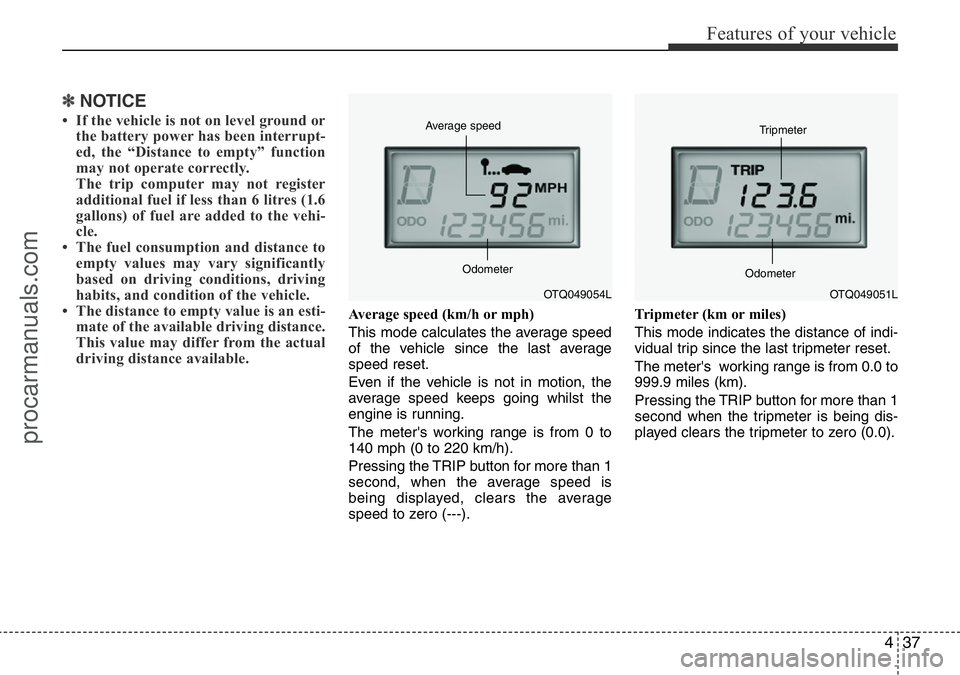
Average speed (km/h or mph)
This mode calculates the average speed
of the vehicle since the last average
speed reset.
Even if the vehicle is not in motion, the
average speed keeps going whilst the
engine is running.
The meter's working range is from 0 to
140 mph (0 to 220 km/h).
Pressing the TRIP button for more than 1
second, when the average speed is
being displayed, clears the average
speed to zero (---).Tripmeter (km or miles)
This mode indicates the distance of indi-
vidual trip since the last tripmeter reset.
The meter's working range is from 0.0 to
999.9 miles (km).
Pressing the TRIP button for more than 1
second when the tripmeter is being dis-
played clears the tripmeter to zero (0.0).
OTQ049054L Average speed
OdometerOTQ049051L Tripmeter
Odometer
procarmanuals.com
Page 113 of 339
Features of your vehicle
42 4
Low brake vacuum pressure warning
(diesel engine only, if equipped)
If the warning light remains on, it may
indicate that the brake vacuum pump has
any problem. Therefore you should avoid
high speed driving or sudden stop, and
you should depress the brake pedal
deeper and harder than usual in braking.
We recommend that the system be serv-
iced by a HYUNDAI authorised repairer.D150312AUN
Shift pattern indicator
(if equipped)
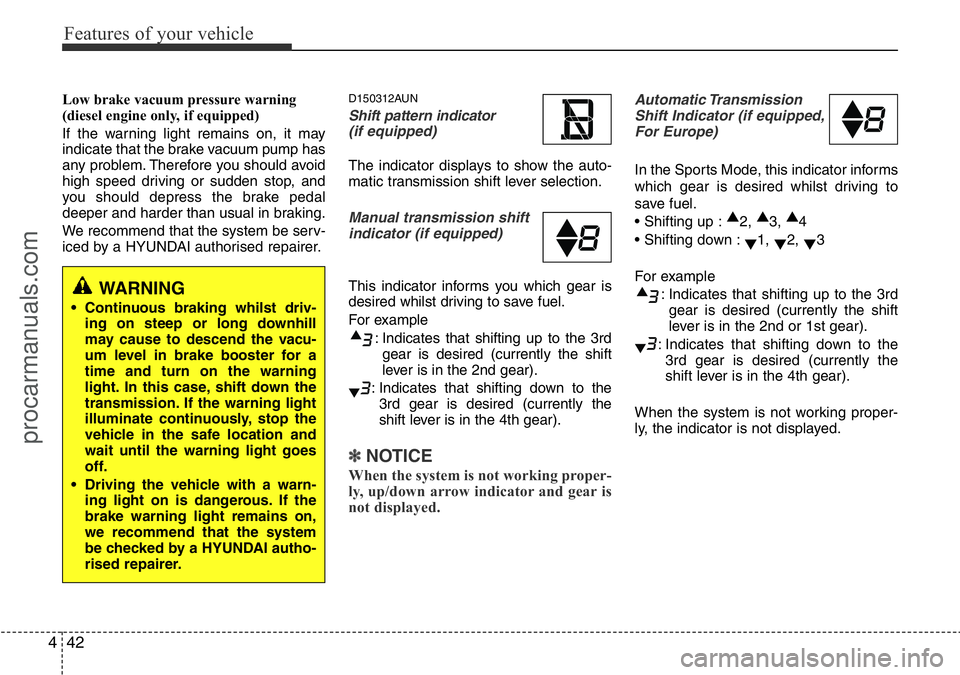
The indicator displays to show the auto-
matic transmission shift lever selection.
Manual transmission shift
indicator (if equipped)
This indicator informs you which gear is
desired whilst driving to save fuel.
For example
: Indicates that shifting up to the 3rd
gear is desired (currently the shift
lever is in the 2nd gear).
: Indicates that shifting down to the
3rd gear is desired (currently the
shift lever is in the 4th gear).
✽ NOTICE
When the system is not working proper-
ly, up/down arrow indicator and gear is
not displayed.
Automatic Transmission
Shift Indicator (if equipped,
For Europe)
In the Sports Mode, this indicator informs
which gear is desired whilst driving to
save fuel.
• Shifting up :▲
2, ▲
3, ▲
4
• Shifting down :
▼1,
▼2,
▼3
For example
: Indicates that shifting up to the 3rd
gear is desired (currently the shift
lever is in the 2nd or 1st gear).
: Indicates that shifting down to the
3rd gear is desired (currently the
shift lever is in the 4th gear).
When the system is not working proper-
ly, the indicator is not displayed.
WARNING
• Continuous braking whilst driv-
ing on steep or long downhill
may cause to descend the vacu-
um level in brake booster for a
time and turn on the warning
light. In this case, shift down the
transmission. If the warning light
illuminate continuously, stop the
vehicle in the safe location and
wait until the warning light goes
off.
• Driving the vehicle with a warn-
ing light on is dangerous. If the
brake warning light remains on,
we recommend that the system
be checked by a HYUNDAI autho-
rised repairer.
procarmanuals.com
Page 117 of 339
Features of your vehicle
46 4
✽NOTICE
After reconnecting or recharging a dis-
charged battery, the ESP (ESC) indica-
tor may illuminate. In this case, turn the
steering wheel half way to the left and
right whilst the ignition switch is in the
ON position. Then, restart the engine
after the ignition is off. If the ESP (ESC)
indicator does not turn off, we recom-
mend that the system be checked by a
HYUNDAI authorised repairer.
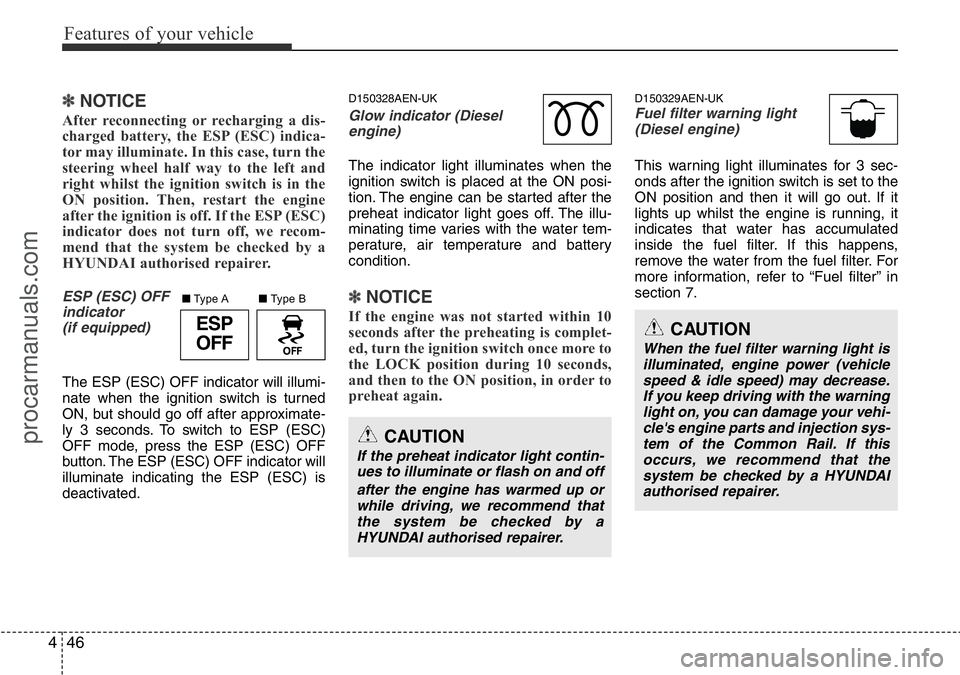
ESP (ESC) OFF
indicator
(if equipped)
The ESP (ESC) OFF indicator will illumi-
nate when the ignition switch is turned
ON, but should go off after approximate-
ly 3 seconds. To switch to ESP (ESC)
OFF mode, press the ESP (ESC) OFF
button. The ESP (ESC) OFF indicator will
illuminate indicating the ESP (ESC) is
deactivated.
D150328AEN-UK
Glow indicator (Diesel
engine)
The indicator light illuminates when the
ignition switch is placed at the ON posi-
tion. The engine can be started after the
preheat indicator light goes off. The illu-
minating time varies with the water tem-
perature, air temperature and battery
condition.
✽NOTICE
If the engine was not started within 10
seconds after the preheating is complet-
ed, turn the ignition switch once more to
the LOCK position during 10 seconds,
and then to the ON position, in order to
preheat again.
D150329AEN-UKFuel filter warning light
(Diesel engine)
This warning light illuminates for 3 sec-
onds after the ignition switch is set to the
ON position and then it will go out. If it
lights up whilst the engine is running, it
indicates that water has accumulated
inside the fuel filter. If this happens,
remove the water from the fuel filter. For
more information, refer to “Fuel filter” in
section 7.
CAUTION
If the preheat indicator light contin-
ues to illuminate or flash on and off
after the engine has warmed up or
while driving, we recommend that
the system be checked by a
HYUNDAI authorised repairer.
CAUTION
When the fuel filter warning light is
illuminated, engine power (vehicle
speed & idle speed) may decrease.
If you keep driving with the warning
light on, you can damage your vehi-
cle's engine parts and injection sys-
tem of the Common Rail. If this
occurs, we recommend that the
system be checked by a HYUNDAI
authorised repairer.
ESP
OFF
■Type B ■Type A
procarmanuals.com
Page 126 of 339
455
Features of your vehicle
D200100CTQ-UK
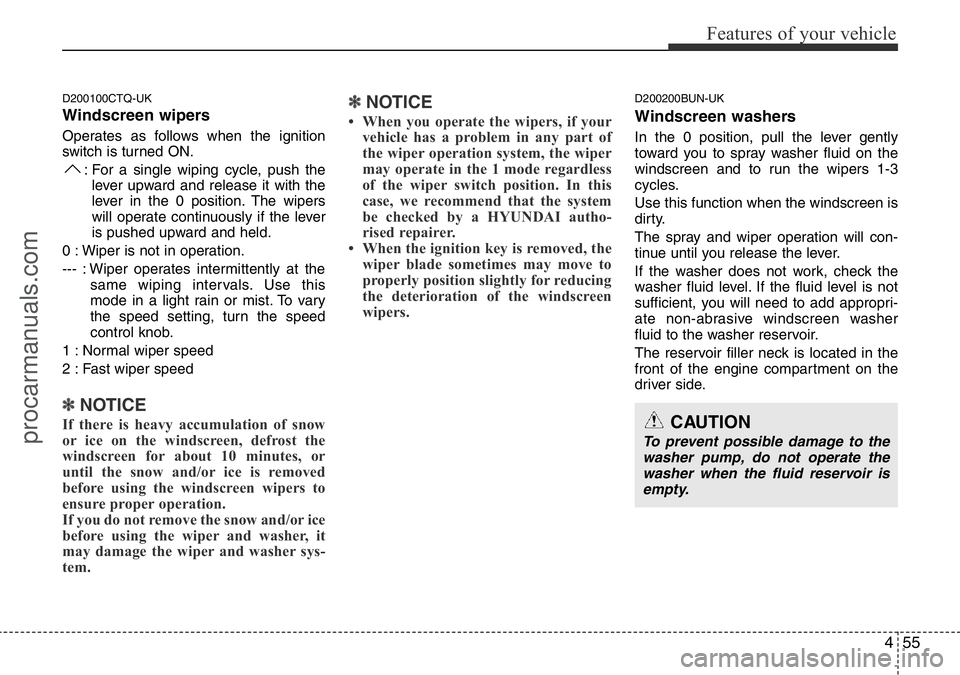
Windscreen wipers
Operates as follows when the ignition
switch is turned ON.
: For a single wiping cycle, push the
lever upward and release it with the
lever in the 0 position. The wipers
will operate continuously if the lever
is pushed upward and held.
0 : Wiper is not in operation.
--- : Wiper operates intermittently at the
same wiping intervals. Use this
mode in a light rain or mist. To vary
the speed setting, turn the speed
control knob.
1 : Normal wiper speed
2 : Fast wiper speed
✽NOTICE
If there is heavy accumulation of snow
or ice on the windscreen, defrost the
windscreen for about 10 minutes, or
until the snow and/or ice is removed
before using the windscreen wipers to
ensure proper operation.
If you do not remove the snow and/or ice
before using the wiper and washer, it
may damage the wiper and washer sys-
tem.
✽NOTICE
• When you operate the wipers, if your
vehicle has a problem in any part of
the wiper operation system, the wiper
may operate in the 1 mode regardless
of the wiper switch position. In this
case, we recommend that the system
be checked by a HYUNDAI autho-
rised repairer.
• When the ignition key is removed, the
wiper blade sometimes may move to
properly position slightly for reducing
the deterioration of the windscreen
wipers.
D200200BUN-UK
Windscreen washers
In the 0 position, pull the lever gently
toward you to spray washer fluid on the
windscreen and to run the wipers 1-3
cycles.
Use this function when the windscreen is
dirty.
The spray and wiper operation will con-
tinue until you release the lever.
If the washer does not work, check the
washer fluid level. If the fluid level is not
sufficient, you will need to add appropri-
ate non-abrasive windscreen washer
fluid to the washer reservoir.
The reservoir filler neck is located in the
front of the engine compartment on the
driver side.
CAUTION
To prevent possible damage to the
washer pump, do not operate the
washer when the fluid reservoir is
empty.
procarmanuals.com
Page 140 of 339
469
Features of your vehicle
Air conditioning system operation tips
• If the vehicle has been parked in direct
sunlight during hot weather, open the
windows for a short time to let the hot
air inside the vehicle escape.
• To help reduce moisture inside of win-
dows on rainy or humid days, decrease
the humidity inside the vehicle by oper-
ating the air conditioning system.
• During air conditioning system opera-
tion, you may occasionally notice a
slight change in engine speed as the
air conditioning compressor cycles.
This is a normal system operation
characteristic.
• Use the air conditioning system every
month if only for a few minutes to
ensure maximum system performance.
• When using the air conditioning sys-
tem, you may notice clear water drip-
ping (or even puddling) on the ground
under the passenger side of the vehi-
cle. This is a normal system operation
characteristic.
• Operating the air conditioning system
in the recirculated air position provides
maximum cooling, however, continual
operation in this mode may cause the
air inside the vehicle to become stale.
• During cooling operation, you may
occasionally notice a misty air flow
because of rapid cooling and humid air
intake. This is a normal system opera-
tion characteristics.D230504ATQ-UK
Fuel-fired Heater (if equipped)
This fuel-fired heater supplies additional
heat to the interior compartment with a
low fuel consumption to compensate the
heat provided by engine alone.
The following 3 conditions should be
meet at the same time for automatic
operation of the fuel-fired heater.
• Engine runs.
• Ambient temperature is lower than 5°C.
• Coolant temperature is lower than
68°C.
A cleaning process of the fuel-fired
heater will be performed automatically
when the heater is not operated due to
increase of coolant temperature and igni-
tion off.
During cleaning process, supplied fuel in
the heater will be burnt completely and
any smoke will be expelled. It is a neces-
sary process for next operation and dura-
bility of the heater and takes about 1~3
minutes.
✽NOTICE
• The following symptoms will occur
and it is normal.
- A white smoke may come out from
the fuel-fired heater exhaust pipe
during operation of the heater.
However, when an excessive black
smoke is discharged, the fuel-fired
heater should be inspected.
- A “buk-buk” noise from the heater is
a noise to form flame for combus-
tion.
- When the heater is operated at full
load, a “Wooing” noise occurs.
- When shutting off the engine during
heater operation, a “Wing” noise
occurs to perform the cleaning
process.
• When refuelling, stop operation of the
fuel-fired heater by shutting off the
engine.
procarmanuals.com
Page 143 of 339
Features of your vehicle
72 4
D250102AFD-UK
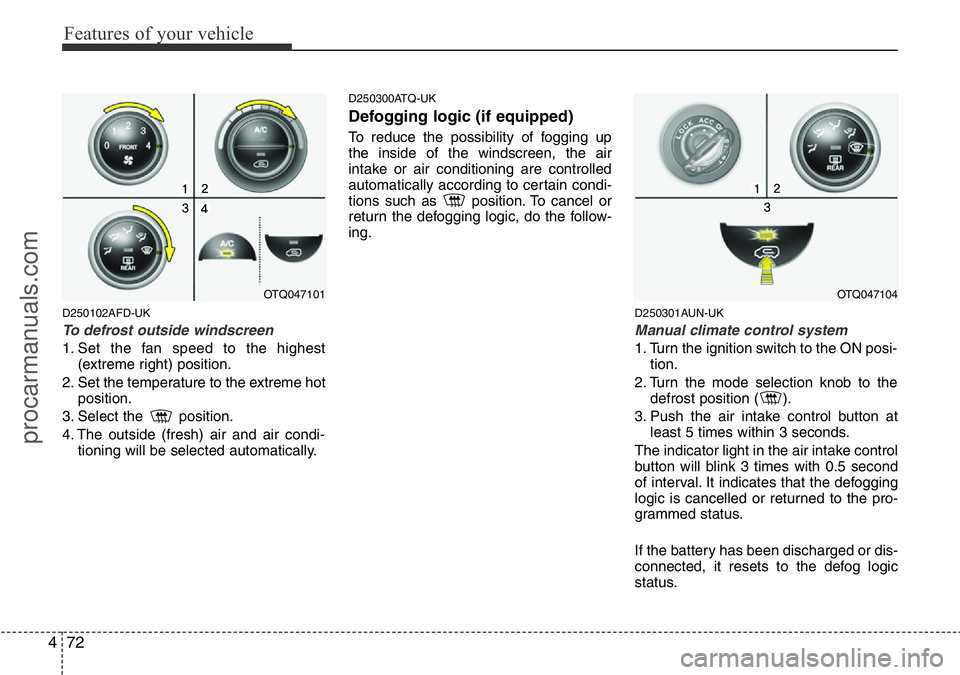
To defrost outside windscreen
1. Set the fan speed to the highest
(extreme right) position.
2. Set the temperature to the extreme hot
position.
3. Select the position.
4. The outside (fresh) air and air condi-
tioning will be selected automatically.
D250300ATQ-UK
Defogging logic (if equipped)
To reduce the possibility of fogging up
the inside of the windscreen, the air
intake or air conditioning are controlled
automatically according to certain condi-
tions such as position. To cancel or
return the defogging logic, do the follow-
ing.
D250301AUN-UK
Manual climate control system
1. Turn the ignition switch to the ON posi-
tion.
2. Turn the mode selection knob to the
defrost position ( ).
3. Push the air intake control button at
least 5 times within 3 seconds.
The indicator light in the air intake control
button will blink 3 times with 0.5 second
of interval. It indicates that the defogging
logic is cancelled or returned to the pro-
grammed status.
If the battery has been discharged or dis-
connected, it resets to the defog logic
status.
OTQ047101OTQ047104
procarmanuals.com
Page 152 of 339
481
Features of your vehicle
D300200ATQ
Steering wheel audio control
(if equipped)
The steering wheel audio remote control
button is installed to promote safe driv-
ing.
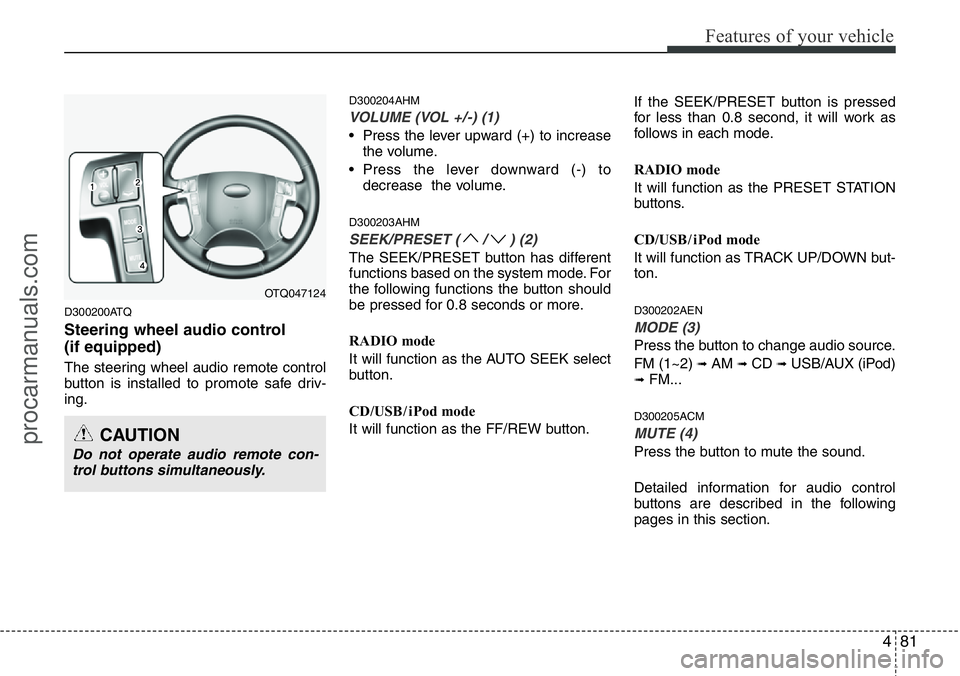
D300204AHM
VOLUME (VOL +/-) (1)
• Press the lever upward (+) to increase
the volume.
• Press the lever downward (-) to
decrease the volume.
D300203AHM
SEEK/PRESET ( / ) (2)
The SEEK/PRESET button has different
functions based on the system mode. For
the following functions the button should
be pressed for 0.8 seconds or more.
RADIO mode
It will function as the AUTO SEEK select
button.
CD/USB / i Pod mode
It will function as the FF/REW button.If the SEEK/PRESET button is pressed
for less than 0.8 second, it will work as
follows in each mode.
RADIO mode
It will function as the PRESET STATION
buttons.
CD/USB / i Pod mode
It will function as TRACK UP/DOWN but-
ton.
D300202AEN
MODE (3)
Press the button to change audio source.
FM (1~2)
➟ AM ➟ CD ➟ USB/AUX (iPod)➟ FM...
D300205ACM
MUTE (4)
Press the button to mute the sound.
Detailed information for audio control
buttons are described in the following
pages in this section.
OTQ047124
CAUTION
Do not operate audio remote con-
trol buttons simultaneously.
procarmanuals.com
Page 157 of 339
Features of your vehicle
86 4
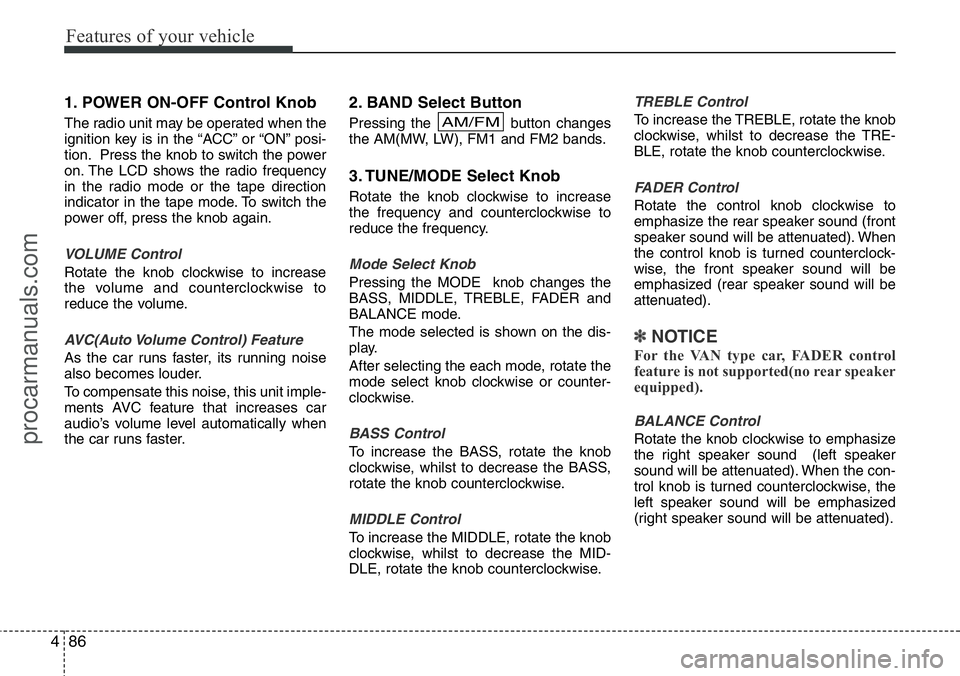
1. POWER ON-OFF Control Knob
The radio unit may be operated when the
ignition key is in the “ACC” or “ON” posi-
tion. Press the knob to switch the power
on. The LCD shows the radio frequency
in the radio mode or the tape direction
indicator in the tape mode. To switch the
power off, press the knob again.
VOLUME Control
Rotate the knob clockwise to increase
the volume and counterclockwise to
reduce the volume.
AVC(Auto Volume Control) Feature
As the car runs faster, its running noise
also becomes louder.
To compensate this noise, this unit imple-
ments AVC feature that increases car
audio’s volume level automatically when
the car runs faster.
2. BAND Select Button
Pressing the button changes
the AM(MW, LW), FM1 and FM2 bands.
3. TUNE/MODE Select Knob
Rotate the knob clockwise to increase
the frequency and counterclockwise to
reduce the frequency.
Mode Select Knob
Pressing the MODE knob changes the
BASS, MIDDLE, TREBLE, FADER and
BALANCE mode.
The mode selected is shown on the dis-
play.
After selecting the each mode, rotate the
mode select knob clockwise or counter-
clockwise.
BASS Control
To increase the BASS, rotate the knob
clockwise, whilst to decrease the BASS,
rotate the knob counterclockwise.
MIDDLE Control
To increase the MIDDLE, rotate the knob
clockwise, whilst to decrease the MID-
DLE, rotate the knob counterclockwise.
TREBLE Control
To increase the TREBLE, rotate the knob
clockwise, whilst to decrease the TRE-
BLE, rotate the knob counterclockwise.
FADER Control
Rotate the control knob clockwise to
emphasize the rear speaker sound (front
speaker sound will be attenuated). When
the control knob is turned counterclock-
wise, the front speaker sound will be
emphasized (rear speaker sound will be
attenuated).
✽NOTICE
For the VAN type car, FADER control
feature is not supported(no rear speaker
equipped).
BALANCE Control
Rotate the knob clockwise to emphasize
the right speaker sound (left speaker
sound will be attenuated). When the con-
trol knob is turned counterclockwise, the
left speaker sound will be emphasized
(right speaker sound will be attenuated).
AM/FM
procarmanuals.com
Page 160 of 339
489
Features of your vehicle
1. TAPE PROGRAM/AUX Button
This allows you to play the reverse side
of the tape by merely pressing the pro-
gram button. The PLAY and an arrow will
appear in the display to show the tape
direction.
• If you press this button more than 0.8
second. you can change to AUX mode.
• AUX mode is available only when AUX
jack is plugged in and will change back
to the last mode if you pull it out.
2. TAPE EJECT Button
• When the button is pressed with a
cassette loaded, the cassette will eject.
• When the button is pressed during
FF/REW mode, the cassette will eject.
3. DOLBY Button
If you get background noise during tape
PLAY, you can reduce this considerably
by merely pressing the DOLBY button. If
you want to cancel the DOLBY feature,
press the button again.
4. REPEAT (RPT) Button
• To repeat the track you are currently
listening to, press the RPT button. To
cancel , press again.• If you do not release RPT operation
when the track ends, it will automati-
cally be replayed.
This process will continue until you
push the button again.
5. AUTO MUSIC Search (AMS)
Button
Press the button to find the starting point
of each song in a prerecorded music
tape. The quiet space between songs
(must have at least a 4 sec. gap) can be
identified by the AUTO MUSIC Search
button.
• Pressing the will play the begin-
ning of the next music segment.
• Pressing the will start replay at the
beginning of the music just listened to.
• To stop FF or REW action, press the
button again.
6. FF/REW Button
• Fast forward tape winding starts when
the FF button is pressed during PLAY
or REW mode.
• PLAY starts when the FF button is
pressed again during FF mode.
• Tape rewinding starts when the
REW button is pressed during PLAY or
FF mode.• PLAY starts when the REW button
pressed again during REW mode.✽NOTICE
When using a portable audio device
connected to the power outlet, noise may
occur during playback. If this happens,
use the orignal power source of the
portable audio device(e.g., batteries).
CAUTION
• Do not insert anything like coins
into the player slot as damage to
the unit may occur.
• Do not place beverages close to
the audio system. The playback
mechanism may be damaged if
you spill them.
• Do not strike or allow anything to
impact the audio system, damage
to the system mechanisms could
occur.
• When no device is connected to
the AUX cable, please pull out the
cable from the JACK on the car.
(AUX MODE is operational and
noise may heard in the AUX
MODE.)
procarmanuals.com
Page 162 of 339
491
Features of your vehicle
1. POWER ON-OFF Control Knob
The radio unit may be operated when the
ignition key is in the "ACC" or “ON” posi-
tion. Press the knob to switch the power
on. The LCD shows the radio frequency
in the radio mode, the tape direction indi-
cator in the tape mode or CD track in
either the CD mode or CD AUTO
CHANGER mode. To switch the power
off, press the knob again.
VOLUME Control
Rotate the knob clockwise to increase
the volume and counterclockwise to
reduce the volume.
AVC(Auto Volume Control) Feature
As the car runs faster, its running noise
also becomes louder.
To compensate this noise, this unit imple-
ments AVC feature that increases car
audio’s volume level automatically when
the car runs faster.
2. BAND Select Button
Pressing the FM/AM button changes the
AM(MW, LW), FM1 and FM2 bands. The
mode selected is shown on the display.
3. TUNE/AUDIO Control Knob
Rotate the knob clockwise to increase
the frequency and counterclockwise to
reduce the frequency.
AUDIO Control Knob
Pressing the AUDIO Mode select button
changes the BASS, MIDDLE, TREBLE,
FADER and BALANCE mode. The mode
selected is shown on the display.
BASS Control
To increase the BASS, rotate the knob
clockwise, whilst to decrease the BASS,
rotate the knob counterclockwise.
MIDDLE Control
To increase the MIDDLE, rotate the knob
clockwise, whilst to decrease the MID-
DLE, rotate the knob counterclockwise.
TREBLE Control
To increase the TREBLE, rotate the knob
clockwise, whilst to decrease the TRE-
BLE, rotate the knob counterclockwise.
FADER Control
Rotate the control knob clockwise to
emphasize the rear speaker sound (front
speaker sound will be attenuated). When
the control knob is turned counterclock-
wise, the front speaker sound will be
emphasized (rear speaker sound will be
attenuated).
✽NOTICE
For the VAN type car, FADER Control
feature is not supported(no rear speaker
equipped).
BALANCE Control
Rotate the knob clockwise to emphasize
the right speaker sound (left speaker
sound will be attenuated). When the con-
trol knob is turned counterclockwise, the
left speaker sound will be emphasized
(right speaker sound will be attenuated).
4. AUTO SEEK Select Button
(Automatic Channel Selection)
Press the AUTO SEEK select button.
When the side is pressed, the unit will
automatically tune to the next higher fre-
quency and when the side is pressed,
it will automatically tune to the next lower
frequency.
procarmanuals.com