lock HYUNDAI I800 2016 Workshop Manual
[x] Cancel search | Manufacturer: HYUNDAI, Model Year: 2016, Model line: I800, Model: HYUNDAI I800 2016Pages: 419, PDF Size: 9.23 MB
Page 187 of 419
4113
Features of your vehicle
✽NOTICE
• If you install an aftermarket HID
head lamp, your vehicle’s audio and
electronic device may malfunction.
• Prevent chemicals such as perfume,
cosmetic oil, sun cream, hand cleaner
and air freshener from contacting the
interior parts because they may cause
damage or discoloration.
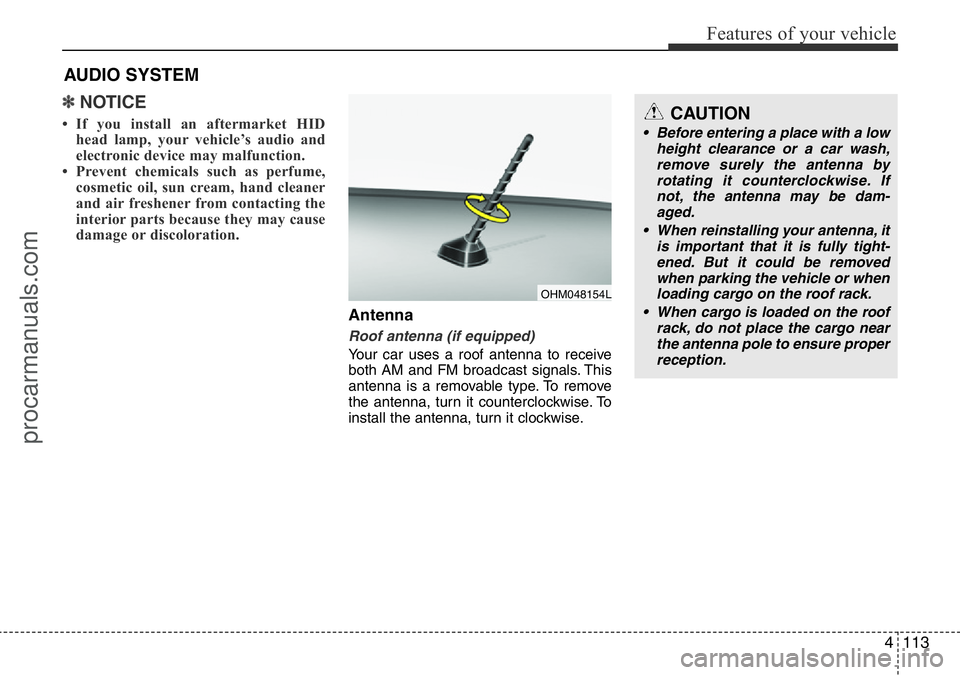
Antenna
Roof antenna (if equipped)
Your car uses a roof antenna to receive
both AM and FM broadcast signals. This
antenna is a removable type. To remove
the antenna, turn it counterclockwise. To
install the antenna, turn it clockwise.
AUDIO SYSTEM
CAUTION
• Before entering a place with a low
height clearance or a car wash,
remove surely the antenna by
rotating it counterclockwise. If
not, the antenna may be dam-
aged.
• When reinstalling your antenna, it
is important that it is fully tight-
ened. But it could be removed
when parking the vehicle or when
loading cargo on the roof rack.
• When cargo is loaded on the roof
rack, do not place the cargo near
the antenna pole to ensure proper
reception.
OHM048154L
procarmanuals.com
Page 191 of 419
4117
Features of your vehicle
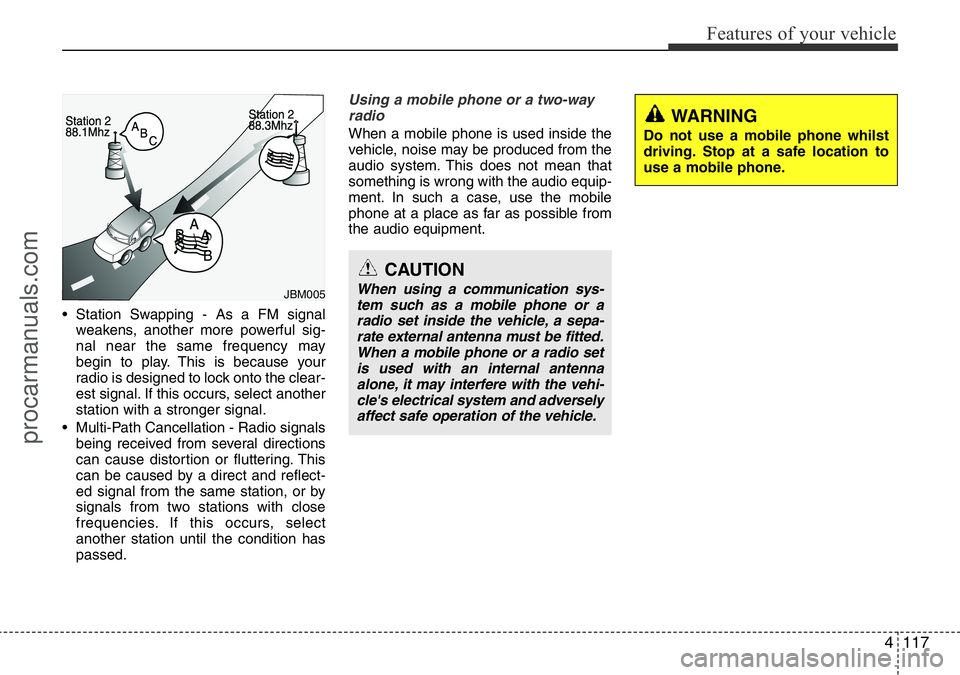
• Station Swapping - As a FM signal
weakens, another more powerful sig-
nal near the same frequency may
begin to play. This is because your
radio is designed to lock onto the clear-
est signal. If this occurs, select another
station with a stronger signal.
• Multi-Path Cancellation - Radio signals
being received from several directions
can cause distortion or fluttering. This
can be caused by a direct and reflect-
ed signal from the same station, or by
signals from two stations with close
frequencies. If this occurs, select
another station until the condition has
passed.
Using a mobile phone or a two-way
radio
When a mobile phone is used inside the
vehicle, noise may be produced from the
audio system. This does not mean that
something is wrong with the audio equip-
ment. In such a case, use the mobile
phone at a place as far as possible from
the audio equipment.
CAUTION
When using a communication sys-
tem such as a mobile phone or a
radio set inside the vehicle, a sepa-
rate external antenna must be fitted.
When a mobile phone or a radio set
is used with an internal antenna
alone, it may interfere with the vehi-
cle's electrical system and adversely
affect safe operation of the vehicle.
WARNING
Do not use a mobile phone whilst
driving. Stop at a safe location to
use a mobile phone.
JBM005
procarmanuals.com
Page 202 of 419
Features of your vehicle
128 4
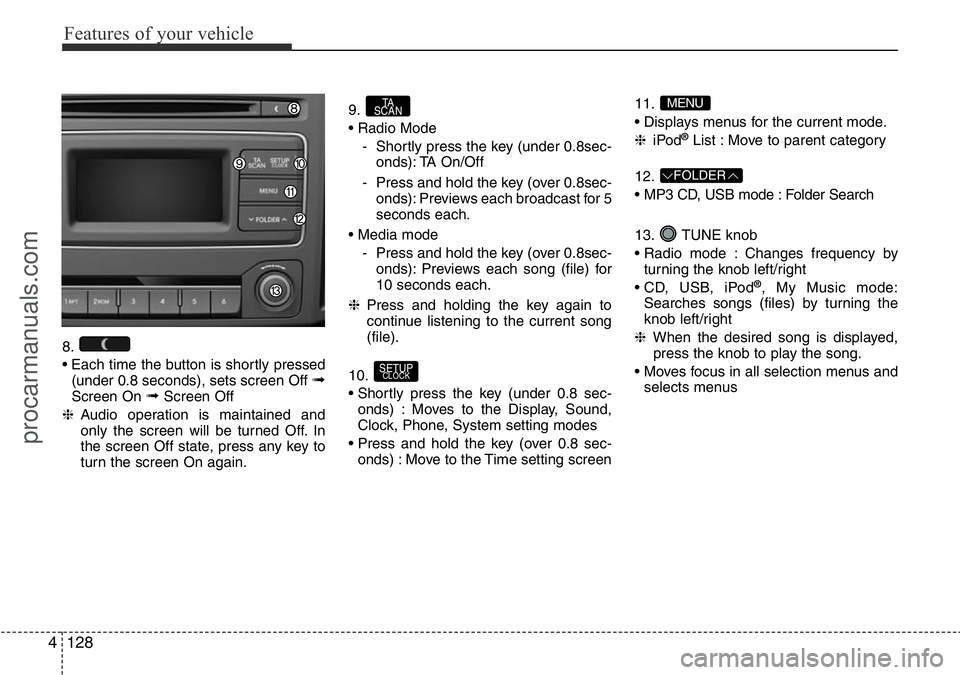
8.
• Each time the button is shortly pressed
(under 0.8 seconds), sets screen Off
➟Screen On ➟Screen Off
❈Audio operation is maintained and
only the screen will be turned Off. In
the screen Off state, press any key to
turn the screen On again.9.
• Radio Mode
- Shortly press the key (under 0.8sec-
onds): TA On/Off
- Press and hold the key (over 0.8sec-
onds): Previews each broadcast for 5
seconds each.
• Media mode
- Press and hold the key (over 0.8sec-
onds): Previews each song (file) for
10 seconds each.
❈Press and holding the key again to
continue listening to the current song
(file).
10.
• Shortly press the key (under 0.8 sec-
onds) : Moves to the Display, Sound,
Clock, Phone, System setting modes
• Press and hold the key (over 0.8 sec-
onds) : Move to the Time setting screen11.
• Displays menus for the current mode.
❈iPod
®List : Move to parent category
12.
• MP3 CD, USB mode : Folder Search
13. TUNE knob
• Radio mode : Changes frequency by
turning the knob left/right
• CD, USB, iPod
®, My Music mode:
Searches songs (files) by turning the
knob left/right
❈When the desired song is displayed,
press the knob to play the song.
• Moves focus in all selection menus and
selects menus
FOLDER
MENU
SETUPCLOCK
TA
SCAN
procarmanuals.com
Page 205 of 419
4131
Features of your vehicle
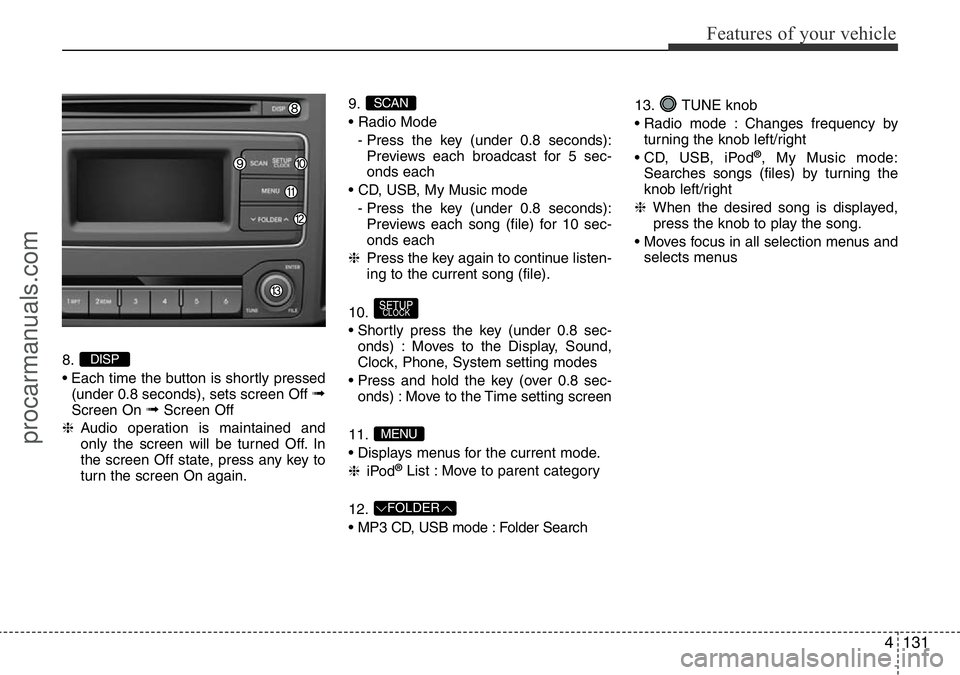
8.
• Each time the button is shortly pressed
(under 0.8 seconds), sets screen Off
➟Screen On ➟Screen Off
❈Audio operation is maintained and
only the screen will be turned Off. In
the screen Off state, press any key to
turn the screen On again.9.
• Radio Mode
- Press the key (under 0.8 seconds):
Previews each broadcast for 5 sec-
onds each
• CD, USB, My Music mode
- Press the key (under 0.8 seconds):
Previews each song (file) for 10 sec-
onds each
❈Press the key again to continue listen-
ing to the current song (file).
10.
• Shortly press the key (under 0.8 sec-
onds) : Moves to the Display, Sound,
Clock, Phone, System setting modes
• Press and hold the key (over 0.8 sec-
onds) : Move to the Time setting screen
11.
• Displays menus for the current mode.
❈iPod
®List : Move to parent category
12.
• MP3 CD, USB mode : Folder Search13. TUNE knob
• Radio mode : Changes frequency by
turning the knob left/right
• CD, USB, iPod
®, My Music mode:
Searches songs (files) by turning the
knob left/right
❈When the desired song is displayed,
press the knob to play the song.
• Moves focus in all selection menus and
selects menus
FOLDER
MENU
SETUPCLOCK
SCAN
DISP
procarmanuals.com
Page 206 of 419
![HYUNDAI I800 2016 Workshop Manual Features of your vehicle
132 4
SETUP (For EUROPE)
Display Settings
Press the key Select [Display]
through TUNE knob or key
Select menu through TUNE knob
Mode Pop up
[Mode Pop up] Changes . selec-](/img/35/57914/w960_57914-205.png "HYUNDAI I800 2016 Workshop Manual Features of your vehicle
132 4
SETUP (For EUROPE)
Display Settings
Press the key Select [Display]
through TUNE knob or key
Select menu through TUNE knob
Mode Pop up
[Mode Pop up] Changes . selec-")
Features of your vehicle
132 4
SETUP (For EUROPE)
Display Settings
Press the key Select [Display]
through TUNE knob or key
Select menu through TUNE knob
Mode Pop up
[Mode Pop up] Changes . selec-
tion mode
• During On state, press the or
key to display the mode
change pop up screen.
• When the pop up screen is displayed,
use the TUNE knob or keys ~
to select the desired mode.
Scroll text
[Scroll text] Set /
• : Maintains scroll
• : Scrolls only one (1) time.
Song Info
When playing an MP3 file, select the
desired display info from ‘Folder/File’ or
‘Album/Artist/Song’.
Off
On
OffOn
6
1
MEDIARADIO
On
1 RPT
SETUPCLOCK
procarmanuals.com
Page 207 of 419
![HYUNDAI I800 2016 Workshop Manual 4133
Features of your vehicle
Sound Settings
Press the key Select [Sound]
through TUNE knob or key
Select menu through TUNE knob
Audio Settings (For Van)
This menu allows you to set the â€](/img/35/57914/w960_57914-206.png "HYUNDAI I800 2016 Workshop Manual 4133
Features of your vehicle
Sound Settings
Press the key Select [Sound]
through TUNE knob or key
Select menu through TUNE knob
Audio Settings (For Van)
This menu allows you to set the â€")
4133
Features of your vehicle
Sound Settings
Press the key Select [Sound]
through TUNE knob or key
Select menu through TUNE knob
Audio Settings (For Van)
This menu allows you to set the ‘Bass,
Middle, Treble’ and the Sound Balance.
Select [Audio Settings] Select menu
through TUNE knob Turn TUNE
knob left/right to set
• Bass, Middle, Treble : Selects the sound
tone.
• Balance : Moves the sound balance.
• Default : Restores default settings.
❈Return : Whilst adjusting values, re-
pressing the TUNE knob will
restore the parent menu.Audio Settings (For Wagon)
This menu allows you to set the ‘Bass,
Middle, Treble’ and the Sound Fader and
Balance.
Select [Audio Settings] Select menu
through TUNE knob Turn TUNE
knob left/right to set
• Bass, Middle, Treble : Selects the sound
tone.
• Fader, Balance : Moves the sound fader
and balance.
• Default : Restores default settings.
❈Return : Whilst adjusting values, re-
pressing the TUNE knob will
restore the parent menu.
Speed Dependent Volume Control
This feature is used to automatically con-
trol the volume level according to the
speed of the vehicle.
Select [Speed Dependent Vol.] Set in
[On/Off] of
TUNEknob
2 RDM
SETUPCLOCK
procarmanuals.com
Page 208 of 419
![HYUNDAI I800 2016 Workshop Manual Features of your vehicle
134 4
Clock Settings
Press the key Select [Clock]
through TUNE knob or key
Select menu through TUNE knob
Clock Settings
This menu is used to set the time.
Select [Clock Se](/img/35/57914/w960_57914-207.png "HYUNDAI I800 2016 Workshop Manual Features of your vehicle
134 4
Clock Settings
Press the key Select [Clock]
through TUNE knob or key
Select menu through TUNE knob
Clock Settings
This menu is used to set the time.
Select [Clock Se")
Features of your vehicle
134 4
Clock Settings
Press the key Select [Clock]
through TUNE knob or key
Select menu through TUNE knob
Clock Settings
This menu is used to set the time.
Select [Clock Settings] Set through
TUNE knob Press TUNE knob
❈Adjust the number currently in focus to
set the [hour] and press the tune knob
to set the [minute].
Day Settings
This menu is used to set the date
(DD.MM.YYYY).
Select [Day Settings] Set through
TUNE knob Press TUNE knob
❈Adjust the number currently in focus to
make the settings and press the tune
knob to move to the next setting. (Set
in order of Day/Month/Year)
Time Format
This function is used to set the 12/24
hour time format of the audio system.
Select [Time Format] Set 12Hr / 24Hr
through TUNE knob
Clock Display when Power is OFF
Select [Clock Disp.(Pwr Off) Set /
through TUNE knob
• : Displays time/date on screen
• : Turn off.
Automatic RDS Time
This option is used to automatically set
the time by synchronizing with RDS.
Select [Automatic RDS Time] Set
/ through TUNE knob
• : Turn on Automatic Time
• : Turn off.
Off
On
OffOn
Off
On
OffOn
3
SETUPCLOCK
procarmanuals.com
Page 209 of 419
![HYUNDAI I800 2016 Workshop Manual 4135
Features of your vehicle
System Settings
Press the key Select [System]
through tune knob or key Select
menu through TUNE knob
Memory Information
(If equipped)
Displays currently used memory a](/img/35/57914/w960_57914-208.png "HYUNDAI I800 2016 Workshop Manual 4135
Features of your vehicle
System Settings
Press the key Select [System]
through tune knob or key Select
menu through TUNE knob
Memory Information
(If equipped)
Displays currently used memory a")
4135
Features of your vehicle
System Settings
Press the key Select [System]
through tune knob or key Select
menu through TUNE knob
Memory Information
(If equipped)
Displays currently used memory and
total system memory.
Select [Memory Information] OK
The currently used memory is displayed
on the left side whilst the total system
memory is displayed on the right side.
Language
This menu is used to set the display and
voice recognition language.
Select [Language] Set through
TUNE knob
❈The system will reboot after the lan-
guage is changed.
❈Language support by region
-
5
SETUPCLOCK
procarmanuals.com
Page 210 of 419
![HYUNDAI I800 2016 Workshop Manual Features of your vehicle
136 4
SETUP (Except EUROPE)
Display Settings
Press the key Select [Display]
through TUNE knob or key
Select menu through TUNE knob
Mode Pop up
[Mode Pop up] Changes . s](/img/35/57914/w960_57914-209.png "HYUNDAI I800 2016 Workshop Manual Features of your vehicle
136 4
SETUP (Except EUROPE)
Display Settings
Press the key Select [Display]
through TUNE knob or key
Select menu through TUNE knob
Mode Pop up
[Mode Pop up] Changes . s")
Features of your vehicle
136 4
SETUP (Except EUROPE)
Display Settings
Press the key Select [Display]
through TUNE knob or key
Select menu through TUNE knob
Mode Pop up
[Mode Pop up] Changes . selec-
tion mode
• During On state, press the or
key to display the mode
change pop up screen.
• When the pop up screen is displayed,
use the TUNE knob or keys ~
to select the desired mode.
Text Scroll
[Text Scroll] Set /
• : Maintains scroll
• : Scrolls only one (1) time.
Media Display
When playing an MP3 file, select the
desired display info from ‘Folder/File’ or
‘Album/Artist/Song’.
Sound Settings
Press the key Select [Sound]
through TUNE knob or key
Select menu through TUNE knob.2 RDM
SETUPCLOCK
Off
On
OffOn
6
1
MEDIARADIO
On
1 RPT
SETUPCLOCK
procarmanuals.com
Page 212 of 419
![HYUNDAI I800 2016 Workshop Manual Features of your vehicle
138 4
Clock Settings
Press the key Select [Clock]
through TUNE knob or key
Select menu through TUNE knob
Clock Settings
This menu is used to set the time.
Select [Clock Se](/img/35/57914/w960_57914-211.png "HYUNDAI I800 2016 Workshop Manual Features of your vehicle
138 4
Clock Settings
Press the key Select [Clock]
through TUNE knob or key
Select menu through TUNE knob
Clock Settings
This menu is used to set the time.
Select [Clock Se")
Features of your vehicle
138 4
Clock Settings
Press the key Select [Clock]
through TUNE knob or key
Select menu through TUNE knob
Clock Settings
This menu is used to set the time.
Select [Clock Settings] Set through
TUNE knob Press TUNE knob
❈Adjust the number currently in focus to
set the [hour] and press the tune knob
to set the [minute].
Calendar Settings
This menu is used to set the date
(YYYY.MM.DD).
Select [Calendar Settings] Set through
TUNE knob Press TUNE knob
❈Adjust the number currently in focus to
make the settings and press the tune
knob to move to the next setting. (Set
in order of Year/Month/Day)
Time Format
This function is used to set the 12/24 hour
time format of the audio system.
Select [Time Format] Set 12Hr / 24Hr
through
TUNEknob
Clock Display when Power is OFF
Select [Clock Disp.(Pwr Off)Set /
through TUNE knob
• : Displays time/date on screen
• : Turn off.Off
On
Off
On
3
SETUPCLOCK
procarmanuals.com