power steering HYUNDAI I800 2016 Owners Manual
[x] Cancel search | Manufacturer: HYUNDAI, Model Year: 2016, Model line: I800, Model: HYUNDAI I800 2016Pages: 419, PDF Size: 9.23 MB
Page 13 of 419
Your vehicle at a glance
2 2
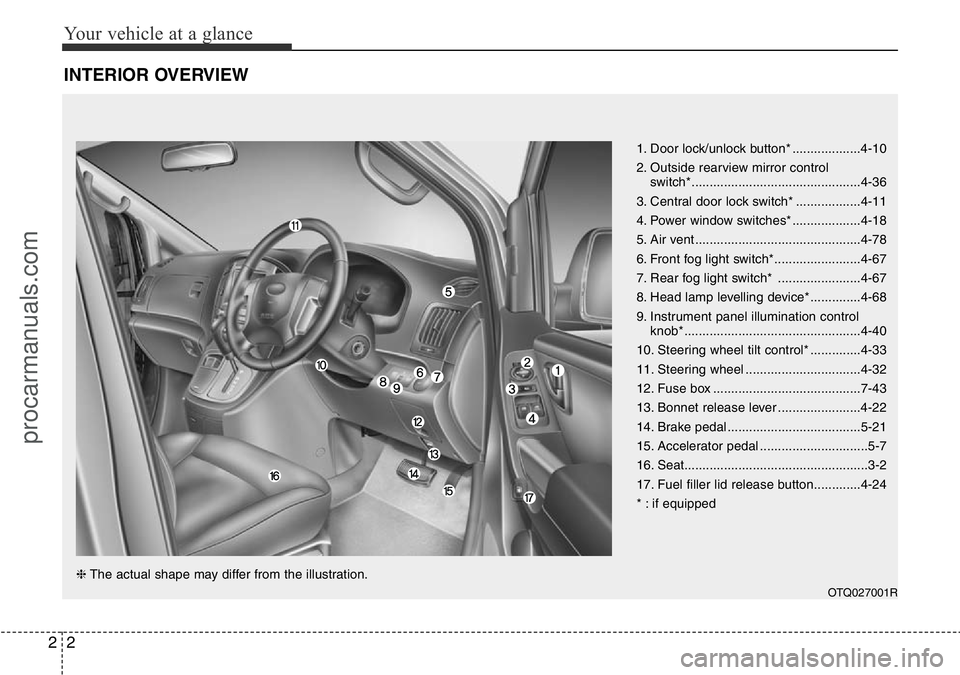
INTERIOR OVERVIEW
1. Door lock/unlock button* ...................4-10
2. Outside rearview mirror control
switch*...............................................4-36
3. Central door lock switch* ..................4-11
4. Power window switches* ...................4-18
5. Air vent ..............................................4-78
6. Front fog light switch*........................4-67
7. Rear fog light switch* .......................4-67
8. Head lamp levelling device* ..............4-68
9. Instrument panel illumination control
knob* .................................................4-40
10. Steering wheel tilt control* ..............4-33
11. Steering wheel ................................4-32
12. Fuse box .........................................7-43
13. Bonnet release lever .......................4-22
14. Brake pedal .....................................5-21
15. Accelerator pedal ..............................5-7
16. Seat...................................................3-2
17. Fuel filler lid release button.............4-24
* : if equipped
OTQ027001R
❈The actual shape may differ from the illustration.
procarmanuals.com
Page 15 of 419
Your vehicle at a glance
4 2
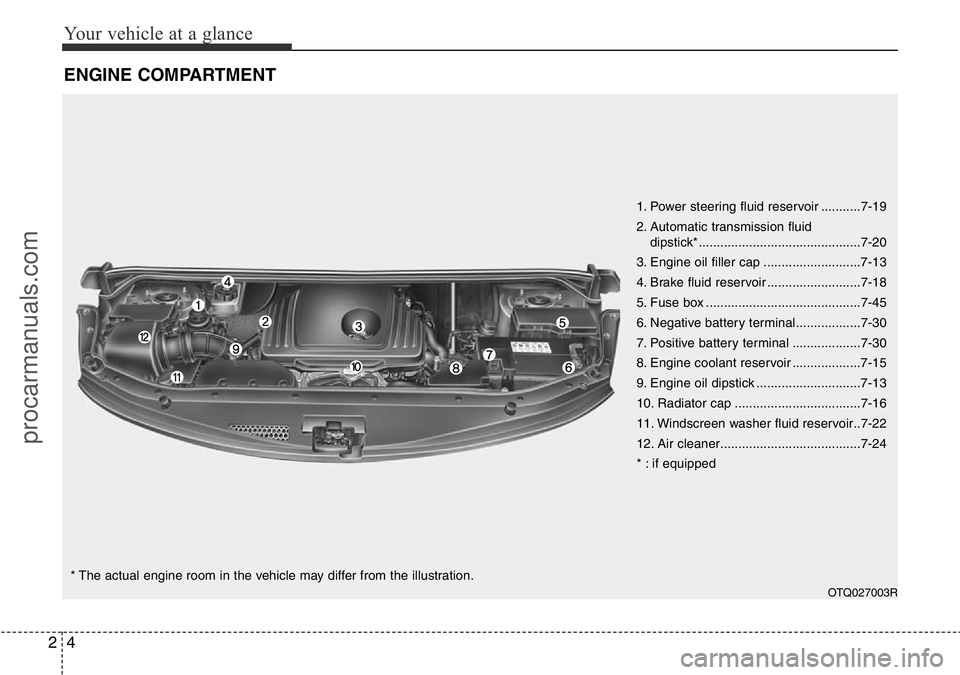
ENGINE COMPARTMENT
1. Power steering fluid reservoir ...........7-19
2. Automatic transmission fluid
dipstick*.............................................7-20
3. Engine oil filler cap ...........................7-13
4. Brake fluid reservoir ..........................7-18
5. Fuse box ...........................................7-45
6. Negative battery terminal..................7-30
7. Positive battery terminal ...................7-30
8. Engine coolant reservoir ...................7-15
9. Engine oil dipstick .............................7-13
10. Radiator cap ...................................7-16
11. Windscreen washer fluid reservoir..7-22
12. Air cleaner.......................................7-24
* : if equipped
OTQ027003R
* The actual engine room in the vehicle may differ from the illustration.
procarmanuals.com
Page 106 of 419
Features of your vehicle
32 4
WARNING
• Never adjust the angle of the
steering wheel whilst driving. You
may lose steering control and
cause severe personal injury,
death or accidents.
• After adjusting, push the steering
wheel both up and down to be
certain it is locked in position.
Power steering
Power steering uses energy from the
engine to assist you in steering the vehi-
cle. If the engine is off or if the power
steering system becomes inoperative,
the vehicle may still be steered, but it will
require increased steering effort.
Should you notice any change in the
effort required to steer during normal
vehicle operation, we recommend that
the system be checked by a HYUNDAI
authorised repairer.
✽NOTICE
If the power steering drive belt breaks
or if the power steering pump malfunc-
tions, the steering effort will greatly
increase.
✽NOTICE
If the vehicle is parked for extended
periods outside in cold weather (below
-10°C/14°F), the power steering may
require increased effort when the engine
is first started. This is caused by
increased fluid viscosity due to the cold
weather and does not indicate a mal-
function.
When this happens, increase the engine
RPM by depressing accelerator until the
RPM reaches 1,500 rpm then release or
let the engine idle for two or three min-
utes to warm up the fluid.
Adjustable steering column
The adjustable steering column permits
adjustment of the rake of the steering
wheel for the convenience of the driver.
The position of the steering wheel should
be adjusted for maximum comfort and
control whilst permitting a clear view of
the instrument panel.
STEERING WHEEL
CAUTION
Never hold the steering wheel
against a stop (extreme right or left
turn) for more than 5 seconds with
the engine running. Holding the
steering wheel for more than 5 sec-
onds in either position may cause
damage to the power steering
pump.
procarmanuals.com
Page 184 of 419
Features of your vehicle
110 4
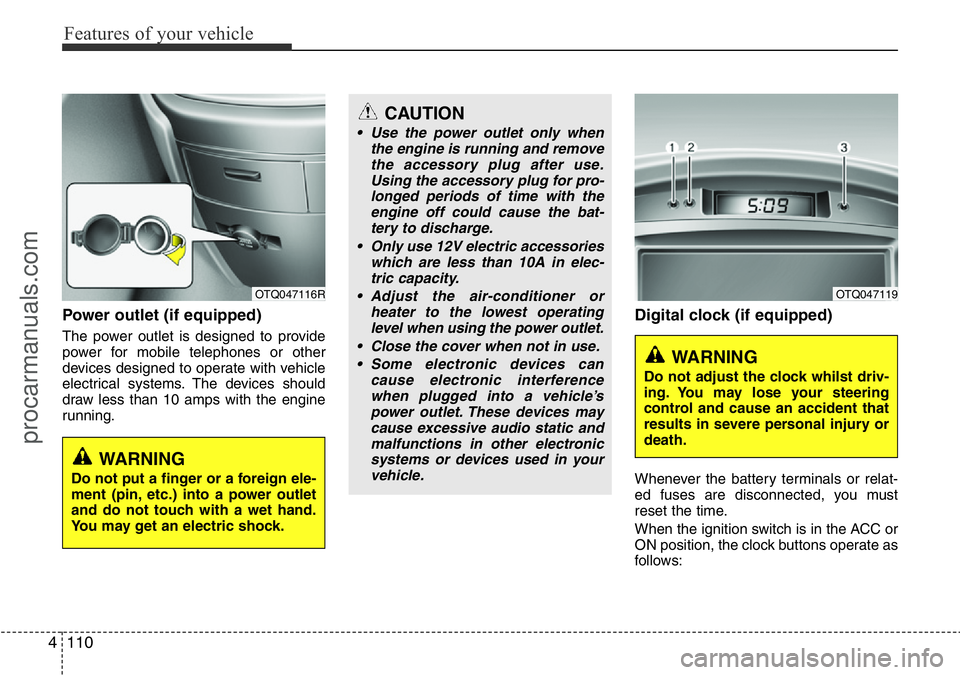
Power outlet (if equipped)
The power outlet is designed to provide
power for mobile telephones or other
devices designed to operate with vehicle
electrical systems. The devices should
draw less than 10 amps with the engine
running.
Digital clock (if equipped)
Whenever the battery terminals or relat-
ed fuses are disconnected, you must
reset the time.
When the ignition switch is in the ACC or
ON position, the clock buttons operate as
follows:
OTQ047116R
WARNING
Do not put a finger or a foreign ele-
ment (pin, etc.) into a power outlet
and do not touch with a wet hand.
You may get an electric shock.
OTQ047119
WARNING
Do not adjust the clock whilst driv-
ing. You may lose your steering
control and cause an accident that
results in severe personal injury or
death.
CAUTION
• Use the power outlet only when
the engine is running and remove
the accessory plug after use.
Using the accessory plug for pro-
longed periods of time with the
engine off could cause the bat-
tery to discharge.
• Only use 12V electric accessories
which are less than 10A in elec-
tric capacity.
• Adjust the air-conditioner or
heater to the lowest operating
level when using the power outlet.
• Close the cover when not in use.
• Some electronic devices can
cause electronic interference
when plugged into a vehicle’s
power outlet. These devices may
cause excessive audio static and
malfunctions in other electronic
systems or devices used in your
vehicle.
procarmanuals.com
Page 234 of 419
Features of your vehicle
160 4
PHONE (If equipped)
Before using the Bluetooth®Wireless
Technology phone features
• In order to use
Bluetooth®Wireless
Technology phone, you must first pair
and connect the
Bluetooth®Wireless
Technology mobile phone.
• If the mobile phone is not paired or con-
nected, it is not possible to enter Phone
mode. Once a phone is paired or con-
nected, the guidance screen will be dis-
played.
• If Priority is set upon vehicle ignition
(IGN/ACC ON), the
Bluetooth®Wireless
Technology phone will be automatically
connected. Even if you are outside, the
Bluetooth®Wireless Technology phone
will be automatically connected once
you are in the vicinity of the vehicle. If
you do not want automatic
Bluetooth®
Wireless Technology phone connec-
tion, set the Bluetooth®Wireless
Technology power to OFF.
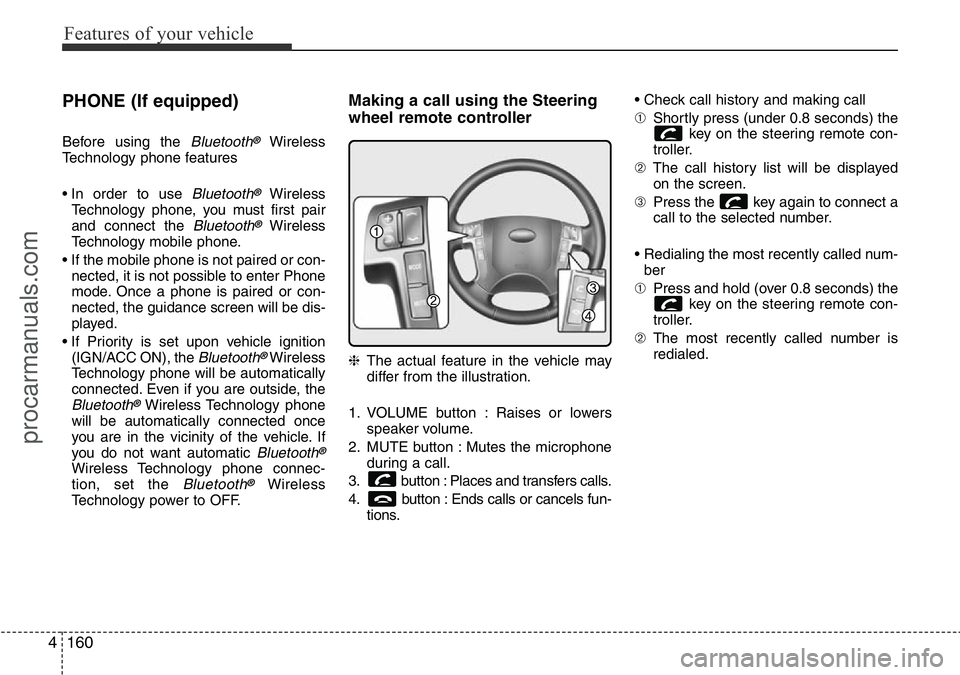
Making a call using the Steering
wheel remote controller
❈The actual feature in the vehicle may
differ from the illustration.
1. VOLUME button : Raises or lowers
speaker volume.
2. MUTE button : Mutes the microphone
during a call.
3. button : Places and transfers calls.
4. button : Ends calls or cancels fun-
tions.• Check call history and making call
➀Shortly press (under 0.8 seconds) the
key on the steering remote con-
troller.
➁The call history list will be displayed
on the screen.
➂Press the key again to connect a
call to the selected number.
• Redialing the most recently called num-
ber
➀Press and hold (over 0.8 seconds) the
key on the steering remote con-
troller.
➁The most recently called number is
redialed.
procarmanuals.com
Page 266 of 419
Driving your vehicle
20 5
Power brakes
Your vehicle has power-assisted brakes
that adjust automatically through normal
usage.
In the event that the power-assisted
brakes lose power because of a stalled
engine or some other reason, you can
still stop your vehicle by applying greater
force to the brake pedal than you nor-
mally would. The stopping distance, how-
ever, will be longer.
When the engine is not running, the
reserve brake power is partially depleted
each time the brake pedal is applied. Do
not pump the brake pedal when the
power assist has been interrupted.
Pump the brake pedal only when neces-
sary to maintain steering control on slip-
pery surfaces.
BRAKE SYSTEM
WARNING - Brakes
• Do not drive with your foot rest-
ing on the brake pedal. This will
create abnormal high brake tem-
peratures, excessive brake lining
and pad wear, and increased
stopping distances.
• When descending a long or steep
hill, shift to a lower gear and
avoid continuous application of
the brakes. Continuous brake
application will cause the brakes
to overheat and could result in a
temporary loss of braking per-
formance.
• Wet brakes may impair the vehi-
cle’s ability to sefely slow down;
the vehicle may also pull to one
side when the brakes are applied.
Applying the brakes lightly will
indicate whether they have been
affected in this way. Always test
your brakes in this fashion after
driving through deep water. To
dry the brakes, apply them lightly
whilst maintaining a safe forward
speed until brake performance
returns to normal.
(Continued)
(Continued)
• Always, confirm the position of
the brake and accelerator pedal
before driving. If you do not
check the position of the acceler-
ator and brake pedal before driv-
ing, you may depress the acceler-
ator instead of the brake pedal. It
may cause a serious accident.
procarmanuals.com
Page 285 of 419
539
Driving your vehicle
• Use your air conditioning sparingly.
The air conditioning system is operat-
ed by engine power so your fuel econ-
omy is reduced when you use it.
• Open windows at high speeds can
reduce fuel economy.
• Fuel economy is less in crosswinds
and headwinds. To help offset some of
this loss, slow down when driving in
these conditions.
Keeping a vehicle in good operating con-
dition is important both for economy and
safety. Therefore, we recommend that the
system be serviced by a HYUNDAI
authorised repairer.
WARNING - Engine off dur-
ing motion
Never turn the engine off to coast
down hills or anytime the vehicle is
in motion. The power steering and
power brakes will not function
properly without the engine run-
ning. Instead, keep the engine on
and downshift to an appropriate
gear for engine braking effect. In
addition, turning off the ignition
whilst driving could engage the
steering wheel lock resulting in
loss of vehicle steering which
could cause serious injury or
death.
procarmanuals.com
Page 328 of 419
What to do in an emergency
24 6
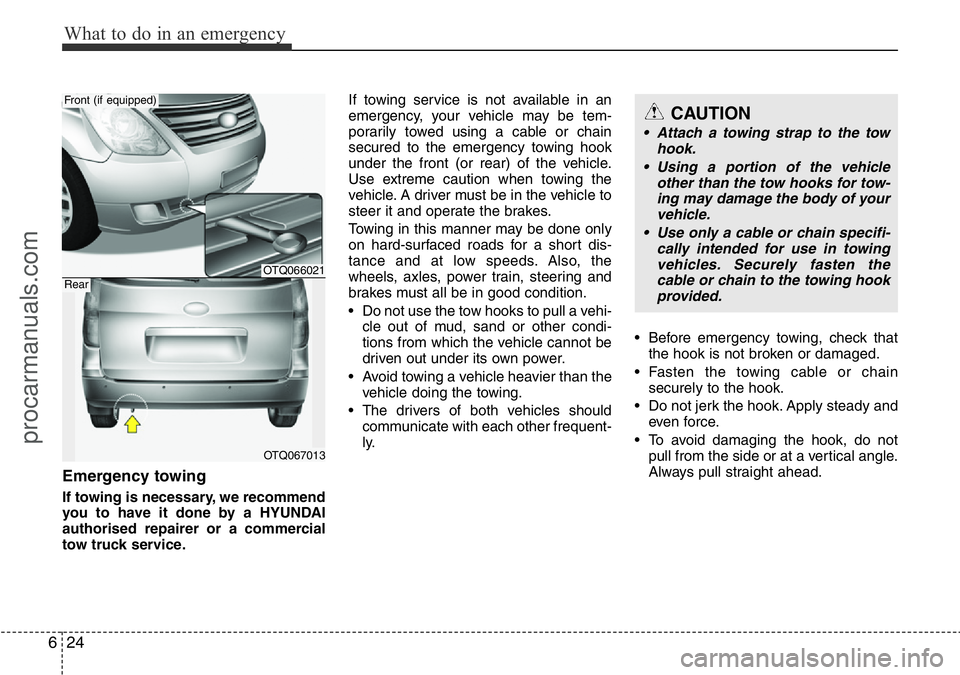
Emergency towing
If towing is necessary, we recommend
you to have it done by a HYUNDAI
authorised repairer or a commercial
tow truck service.If towing service is not available in an
emergency, your vehicle may be tem-
porarily towed using a cable or chain
secured to the emergency towing hook
under the front (or rear) of the vehicle.
Use extreme caution when towing the
vehicle. A driver must be in the vehicle to
steer it and operate the brakes.
Towing in this manner may be done only
on hard-surfaced roads for a short dis-
tance and at low speeds. Also, the
wheels, axles, power train, steering and
brakes must all be in good condition.
• Do not use the tow hooks to pull a vehi-
cle out of mud, sand or other condi-
tions from which the vehicle cannot be
driven out under its own power.
• Avoid towing a vehicle heavier than the
vehicle doing the towing.
• The drivers of both vehicles should
communicate with each other frequent-
ly.• Before emergency towing, check that
the hook is not broken or damaged.
• Fasten the towing cable or chain
securely to the hook.
• Do not jerk the hook. Apply steady and
even force.
• To avoid damaging the hook, do not
pull from the side or at a vertical angle.
Always pull straight ahead.
CAUTION
• Attach a towing strap to the tow
hook.
• Using a portion of the vehicle
other than the tow hooks for tow-
ing may damage the body of your
vehicle.
• Use only a cable or chain specifi-
cally intended for use in towing
vehicles. Securely fasten the
cable or chain to the towing hook
provided.
OTQ066021
OTQ067013
Front (if equipped)
Rear
procarmanuals.com
Page 329 of 419
625
What to do in an emergency
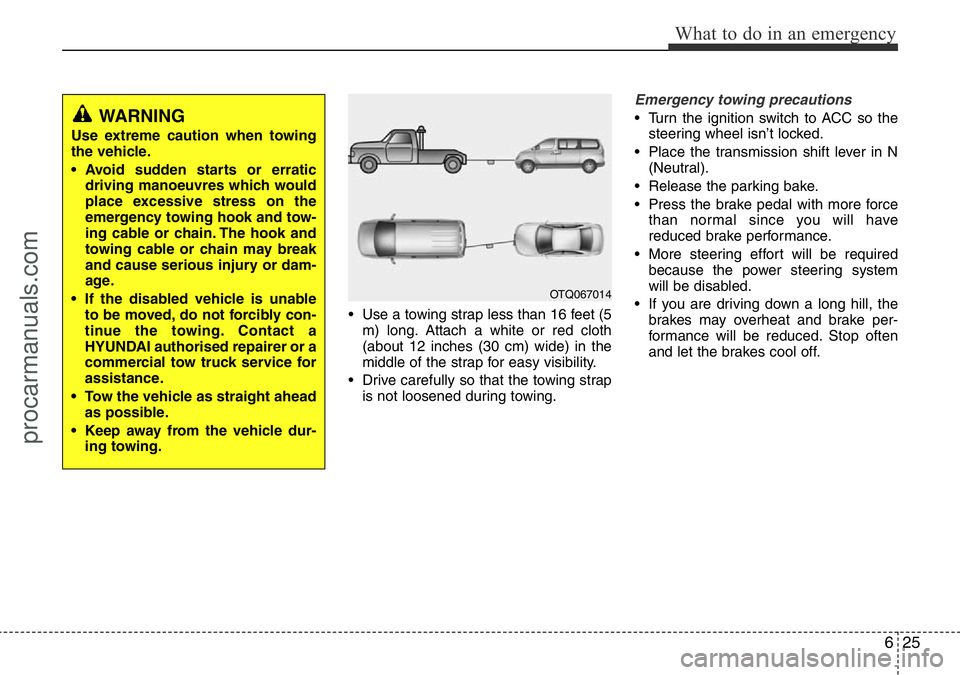
• Use a towing strap less than 16 feet (5
m) long. Attach a white or red cloth
(about 12 inches (30 cm) wide) in the
middle of the strap for easy visibility.
• Drive carefully so that the towing strap
is not loosened during towing.
Emergency towing precautions
• Turn the ignition switch to ACC so the
steering wheel isn’t locked.
• Place the transmission shift lever in N
(Neutral).
• Release the parking bake.
• Press the brake pedal with more force
than normal since you will have
reduced brake performance.
• More steering effort will be required
because the power steering system
will be disabled.
• If you are driving down a long hill, the
brakes may overheat and brake per-
formance will be reduced. Stop often
and let the brakes cool off.WARNING
Use extreme caution when towing
the vehicle.
• Avoid sudden starts or erratic
driving manoeuvres which would
place excessive stress on the
emergency towing hook and tow-
ing cable or chain. The hook and
towing cable or chain may break
and cause serious injury or dam-
age.
• If the disabled vehicle is unable
to be moved, do not forcibly con-
tinue the towing. Contact a
HYUNDAI authorised repairer or a
commercial tow truck service for
assistance.
• Tow the vehicle as straight ahead
as possible.
• Keep away from the vehicle dur-
ing towing.
OTQ067014
procarmanuals.com
Page 331 of 419
7
Engine compartment / 7-2
Maintenance services / 7-4
Owner maintenance / 7-6
Scheduled maintenance service / 7-8
Explanation of scheduled maintenance items / 7-9
Engine oil / 7-13
Engine coolant / 7-15
Brake and clutch fluid / 7-18
Power steering fluid / 7-19
Automatic transmission fluid / 7-20
Washer fluid / 7-22
Parking brake / 7-22
Fuel filter (for diesel) / 7-23
Air cleaner / 7-24
Climate control air filter / 7-25
Wiper blades / 7-27
Battery / 7-30
Tyres and wheels / 7-33
Fuses / 7-45
Light bulbs / 7-54
Appearance care / 7-62
Emission control system / 7-69
• Selective catalytic reduction / 7-72
• Urea gauge / 7-72
• Low urea warning message / 7-73
• Malfunction with the scr system / 7-74
• Clearing the vehicle-restarting restriction / 7-75
• Adding the urea solution / 7-76
• Storing the urea solution / 7-78
• Urea solution purity / 7-79
Maintenance
procarmanuals.com