audio HYUNDAI IONIQ 2020 User Guide
[x] Cancel search | Manufacturer: HYUNDAI, Model Year: 2020, Model line: IONIQ, Model: HYUNDAI IONIQ 2020Pages: 561, PDF Size: 24.5 MB
Page 286 of 561
5-50
Driving your vehicle
If FCA detects a vehicle in front,
the system operates when your
vehicle speed is above 5 mph (8
km/h) and less than or equal to 110
mph (180 km/h). Maximum vehicle
speed may decrease depending
on the condition of the vehicle
ahead and surroundings.
If FCA detects a pedestrian or
cyclist in front, the system operates
when your vehicle speed is
between 5 mph (8 km/h) or above
and under 45 mph (70 km/h).
Maximum vehicle speed may
decrease depending on the condi-
tion of the pedestrian or cyclist
ahead and surroundings.
If you select 'Warning Only' for the
system setting, FCA system acti-
vates and produces only warning
alarms in accordance with the col-
lision risk levels. You should control
the brake directly because FCA
system will not control the brake.
Brake operation
In an urgent situation, the braking
system enters into the ready status
for prompt reaction against the dri-
ver's depressing the brake pedal.
FCA provides additional braking
power for optimum braking per-
formance, when the driver
depresses the brake pedal.
The braking control is automatical-
ly deactivated, when the driver
sharply depresses the accelerator
pedal, or when the driver abruptly
operates the steering wheel.
The FCA brake control is automat-
ically canceled, when risk factors
disappear.The driver should always use
extreme caution while operat-
ing the vehicle, whether or not
there is a warning message or
alarm from FCA system.
After the brake control is acti-
vated, the driver must immedi-
ately depress the brake pedal
and check the surroundings.
The brake activation by the
system lasts for about 2 sec-
onds.
If any other warning sound
such as seat belt warning
chime is already generated,
Forward Collision-Avoidance
Assist system warning may
not sound.
Playing the vehicle audio sys-
tem at high volume may pre-
vent occupants from hearing
the system warning sounds.CAUTION
Page 299 of 561
5-63
Driving your vehicle
5
(Continued)
The system detects lane
markers and controls the
steering wheel by a front view
camera, therefore, if the lane
markers are hard to detect,
the system may not work
properly.
Please refer to "Limitations of
the System".
Do not remove or damage the
related parts of LKA system.
You may not hear a warning
sound of LKA system if the
audio volume is high.
Do not place objects on the
dashboard that reflects light
such as mirrors, white paper,
etc. This may prevent LKA
system from functioning
properly.
When the lane markers are
hard to detect, please refer to
"Driver's Attention".
(Continued)(Continued)
Always have your hands on
the steering wheel while LKA
system is activated. If you
continue to drive with your
hands off the steering wheel
after the "Keep hands on
steering wheel" warning mes-
sage appears, the system will
stop controlling the steering
wheel.
The steering wheel is not con-
tinuously controlled so if the
vehicle speed is at a higher
rate when leaving a lane the
vehicle may not be controlled
by the system. The driver
must always follow the speed
limit when using the system.
If you attach objects to the
steering wheel, the system
may not assist steering or the
hands off alarm may not work
properly.
When you tow a trailer, make
sure that you turn off LKA
system.(Continued)
Do not disassemble LKA sys-
tem camera temporarily to
tint the window or attach any
types of coatings and acces-
sories. If you disassemble the
camera and assemble it again,
we recommend that you take
your vehicle to an authorized
HYUNDAI dealer and have the
system checked for calibra-
tion.
When you replace the wind-
shield glass, LKA system
camera or related parts of the
steering wheel, we recom-
mend that you take your vehi-
cle to an authorized HYUNDAI
dealer and have the system
checked for calibration.
(Continued)
Page 311 of 561
5-75
Driving your vehicle
5
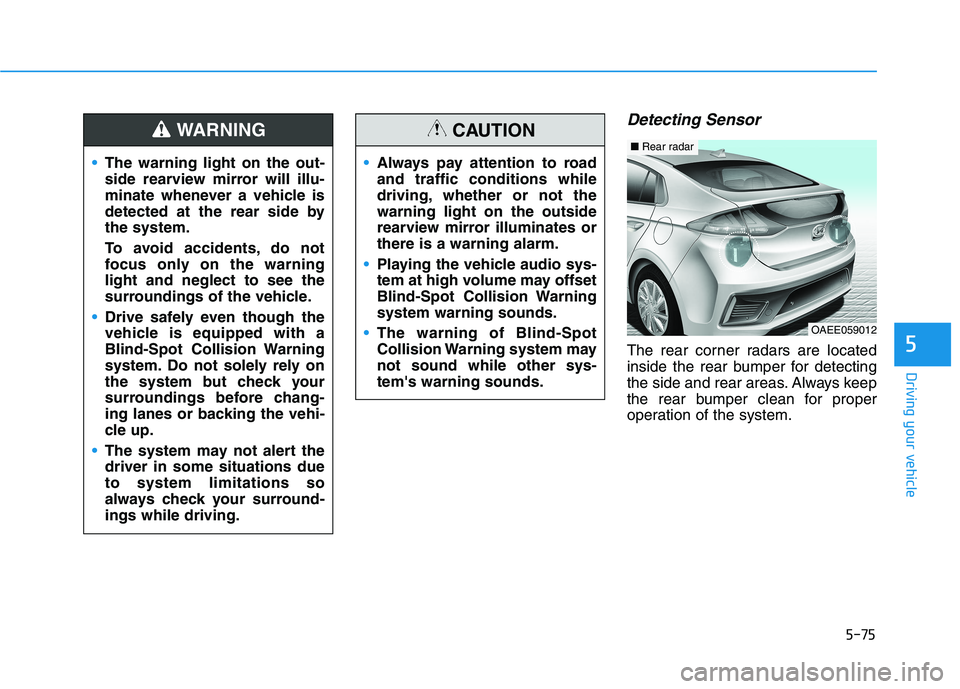
Detecting Sensor
The rear corner radars are located
inside the rear bumper for detecting
the side and rear areas. Always keep
the rear bumper clean for proper
operation of the system. The warning light on the out-
side rearview mirror will illu-
minate whenever a vehicle is
detected at the rear side by
the system.
To avoid accidents, do not
focus only on the warning
light and neglect to see the
surroundings of the vehicle.
Drive safely even though the
vehicle is equipped with a
Blind-Spot Collision Warning
system. Do not solely rely on
the system but check your
surroundings before chang-
ing lanes or backing the vehi-
cle up.
The system may not alert the
driver in some situations due
to system limitations so
always check your surround-
ings while driving.
WARNING
Always pay attention to road
and traffic conditions while
driving, whether or not the
warning light on the outside
rearview mirror illuminates or
there is a warning alarm.
Playing the vehicle audio sys-
tem at high volume may offset
Blind-Spot Collision Warning
system warning sounds.
The warning of Blind-Spot
Collision Warning system may
not sound while other sys-
tem's warning sounds.
CAUTION
OAEE059012
■Rear radar
Page 325 of 561
5-89
Driving your vehicle
5
Driver Attention Warning sys-
tem may not provide alerts in
the following situations:
The system may not work
around 15 seconds after start-
ing the vehicle or the initial-
ization or rebooting of the
front view camera.
The lane detection perform-
ance is limited. (For more
information, refer to "Lane
Keeping Assist (LKA)" in this
chapter.)
The vehicle is erratically driv-
en or is abruptly turned for
obstacle avoidance (e.g. con-
struction area, other vehicles,
fallen objects, bumpy road).
(Continued)
CAUTION(Continued)
Forward drivability of the
vehicle is severely under-
mined (possibly due to wide
variation in tire pressures,
uneven tire wear-out, toe-
in/toe-out alignment).
The vehicle is driven on a
curvy road.
The vehicle is driven through
a windy area.
The vehicle is driven on a
bumpy road.
The vehicle is controlled by
the following driving assist
systems:
- Forward Collision-
Avoidance Assist system
- Lane Keeping Assist system
- Smart Cruise Control system
- Lane Following Assist sys-
tem
Playing the vehicle audio sys-
tem at high volume may prevent
occupants from hearing Driver
Attention Warning system warn-
ing sounds.
CAUTION
Page 338 of 561
5-102
Driving your vehicle
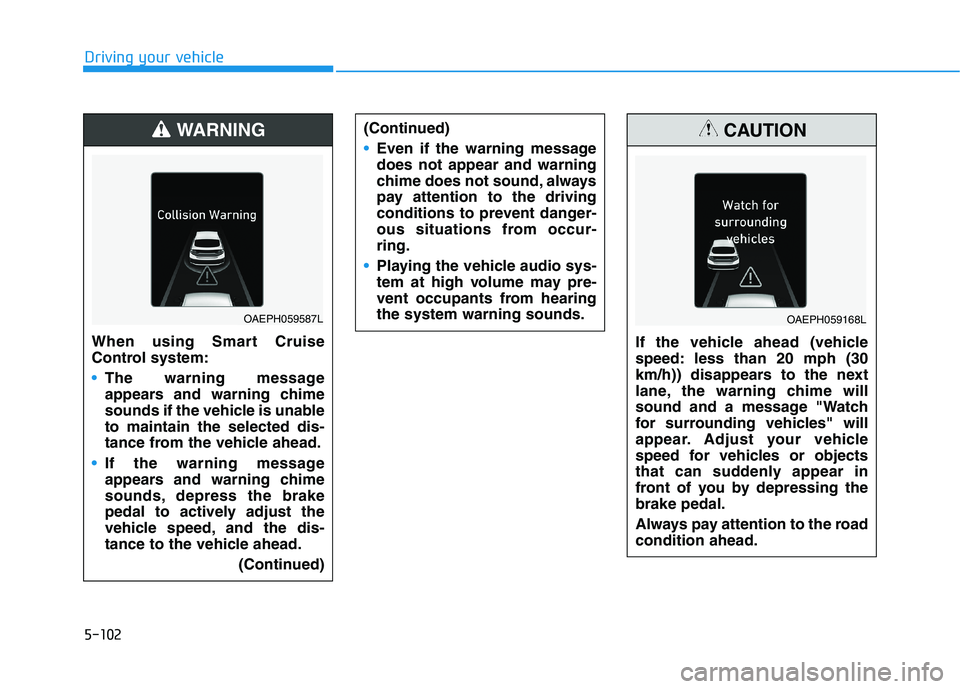
When using Smart Cruise
Control system:
The warning message
appears and warning chime
sounds if the vehicle is unable
to maintain the selected dis-
tance from the vehicle ahead.
If the warning message
appears and warning chime
sounds, depress the brake
pedal to actively adjust the
vehicle speed, and the dis-
tance to the vehicle ahead.
(Continued)
WARNING
OAEPH059587L
(Continued)
Even if the warning message
does not appear and warning
chime does not sound, always
pay attention to the driving
conditions to prevent danger-
ous situations from occur-
ring.
Playing the vehicle audio sys-
tem at high volume may pre-
vent occupants from hearing
the system warning sounds.
If the vehicle ahead (vehicle
speed: less than 20 mph (30
km/h)) disappears to the next
lane, the warning chime will
sound and a message "Watch
for surrounding vehicles" will
appear. Adjust your vehicle
speed for vehicles or objects
that can suddenly appear in
front of you by depressing the
brake pedal.
Always pay attention to the road
condition ahead.
CAUTION
OAEPH059168L
Page 348 of 561
5-112
Driving your vehicle
(Continued)
Do not disassemble the front
view camera temporarily to
tint the window or attach any
types of coatings and acces-
sories. If you disassemble the
camera and assemble it again,
we recommend that you take
your vehicle to an authorized
HYUNDAI dealer and have the
system checked for calibra-
tion.
When you replace the wind-
shield glass, front view cam-
era or related parts of the
steering wheel, we recom-
mend that you take your vehi-
cle to an authorized HYUNDAI
dealer and have the system
checked for calibration.
The system helps detect lane
markers and controls the
steering wheel by a camera,
therefore, if the lane markers
are hard to detect, the system
may not work properly.
(Continued)
(Continued)
Please refer to "Limitations of
the System".
Do not remove or damage the
related parts of LFA system.
You may not hear a warning
sound of LFA system if the
audio volume is high.
Do not place objects on the
dashboard that reflects light
such as mirrors, white paper,
etc. This may prevent LFA sys-
tem from functioning proper-
ly.
Always have your hands on
the steering wheel while LFA
system is activated. If you
continue to drive with your
hands off the steering wheel
after the "Keep hands on
steering wheel" warning mes-
sage appears, the system will
turn off automatically.
However, if the driver has their
hands on the steering wheel
again, the system will start
controlling the steering wheel.
(Continued)(Continued)
The steering wheel is not con-
tinuously controlled so if the
vehicle speed is at a higher
rate when leaving a lane the
vehicle may not be controlled
by the system. The driver
must always follow the speed
limit when using the system.
If you attach objects to the
steering wheel, the system
may not assist steering or the
hands off alarm may not work
properly.
When you tow a trailer, make
sure that you turn off LFA sys-
tem.
Page 363 of 561
5-127
Driving your vehicle
5
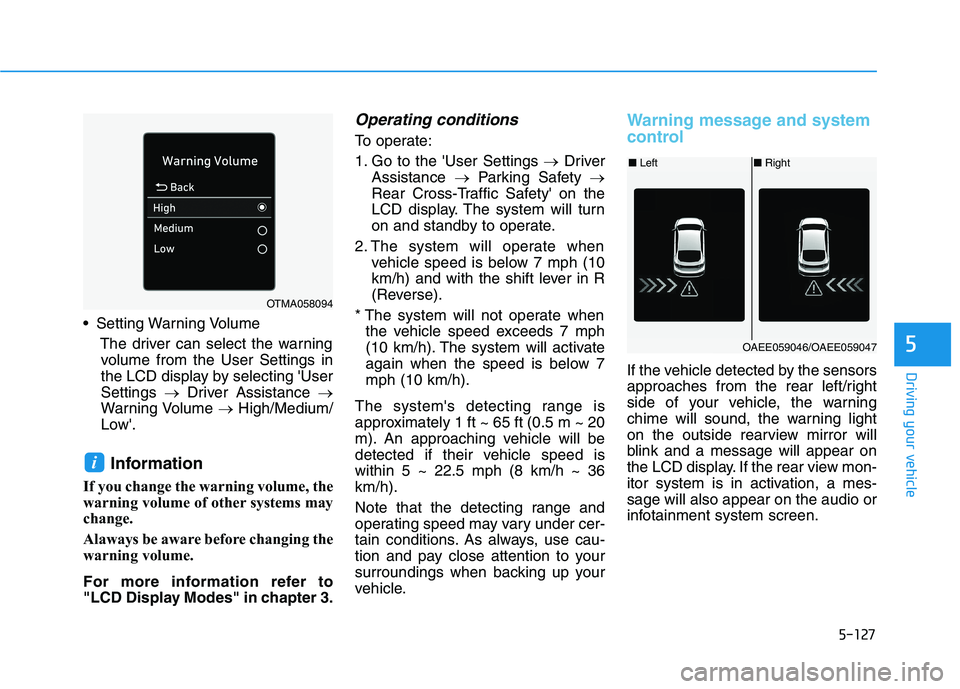
Setting Warning Volume
The driver can select the warning
volume from the User Settings in
the LCD display by selecting 'User
Settings →Driver Assistance →
Warning Volume →High/Medium/
Low'.
Information
If you change the warning volume, the
warning volume of other systems may
change.
Alaways be aware before changing the
warning volume.
For more information refer to
"LCD Display Modes" in chapter 3.
Operating conditions
To operate:
1. Go to the 'User Settings →Driver
Assistance →Parking Safety →
Rear Cross-Traffic Safety' on the
LCD display. The system will turn
on and standby to operate.
2. The system will operate when
vehicle speed is below 7 mph (10
km/h) and with the shift lever in R
(Reverse).
* The system will not operate when
the vehicle speed exceeds 7 mph
(10 km/h). The system will activate
again when the speed is below 7
mph (10 km/h).
The system's detecting range is
approximately 1 ft ~ 65 ft (0.5 m ~ 20
m). An approaching vehicle will be
detected if their vehicle speed is
within 5 ~ 22.5 mph (8 km/h ~ 36
km/h).
Note that the detecting range and
operating speed may vary under cer-
tain conditions. As always, use cau-
tion and pay close attention to your
surroundings when backing up your
vehicle.
Warning message and system
control
If the vehicle detected by the sensors
approaches from the rear left/right
side of your vehicle, the warning
chime will sound, the warning light
on the outside rearview mirror will
blink and a message will appear on
the LCD display. If the rear view mon-
itor system is in activation, a mes-
sage will also appear on the audio or
infotainment system screen.
i
OTMA058094
■Left■Right
OAEE059046/OAEE059047
Page 364 of 561
5-128
Driving your vehicle
The warning will stop when:
- The detected vehicle moves out of
the sensing area or
- When the vehicle is right behind
your vehicle or
- When the vehicle is not approach-
ing your vehicle or
- When the other vehicle slows
down.
- The vehicle's approaching speed is
decreased.(Continued)
The warning of Rear Cross-
Traffic Collision Warning sys-
tem may not sound while
other system's warning
sounds.
When the operating condition
of Rear Cross-Traffic Collision
Warning system is satisfied
the warning will occur when a
vehicle approaches the
side/rear of your stopped (0
km/h vehicle speed) vehicle.
The system's warning may
not operate properly if the
left/right of your vehicle's rear
bumper is blocked by a vehi-
cle or obstacle.
Always pay attention to road
and traffic conditions while
driving, whether or not the
warning light on the outside
rearview mirror illuminates or
there is a warning alarm.
Playing the vehicle audio sys-
tem at high volume may pre-
vent occupants from hearing
the system's warning sounds.
(Continued)
CAUTION
If any other warning sound
such as seat belt warning
chime is already generated,
Rear Cross-Traffic Collision
Warning system warning may
not sound.
Drive safely even though the
vehicle is equipped with a
Rear Cross-Traffic Collision
Warning system. Do not sole-
ly rely on the system but
check your surrounding when
backing the vehicle up.
The driver is responsible for
accurate brake control.
(Continued)
WARNING
Page 428 of 561
7-22
Maintenance
By jump starting
After a jump start from a good bat-
tery, drive the vehicle for 20-30 min-
utes before it is shutoff. The vehicle
may not restart if you shut it off
before the battery had a chance to
adequately recharge. See "Jump
Starting" in chapter 6 for more infor-
mation on jump starting procedures.
Information
An inappropriately disposed
battery can be harmful to
the environment and human
health.
Dispose the battery according to your
local law(s) or regulation.
Reset Features
Some items need to be reset after
the battery has been discharged or
the battery has been disconnected.
See chapter 3 for:
Power Windows
Trip Computer
Climate Control System
Clock
Audio System
Sunroof
Driver Position Memory System
i
(Continued)
Watch the battery during
charging, and stop or reduce
the charging rate if the battery
cells begin boiling violently.
The negative battery cable
must be removed first and
installed last when the battery
is disconnected. Disconnect
the battery charger in the fol-
lowing order:
(1) Turn off the battery charg-
er main switch.
(2) Unhook the negative
clamp from the negative
battery terminal.
(3) Unhook the positive clamp
from the positive battery
terminal.
Always use a genuine
HYUNDAI approved battery
when you replace the battery.
Page 447 of 561
7-41
7
Maintenance
In an emergency, if you do not have
a spare fuse, use a fuse of the same
rating from a circuit you may not
need for operating the vehicle.
If the headlamps or other electrical
components do not work and the
fuses are OK, check the fuse panel
in the motor compartment. If a fuse is
blown, it must be replaced with the
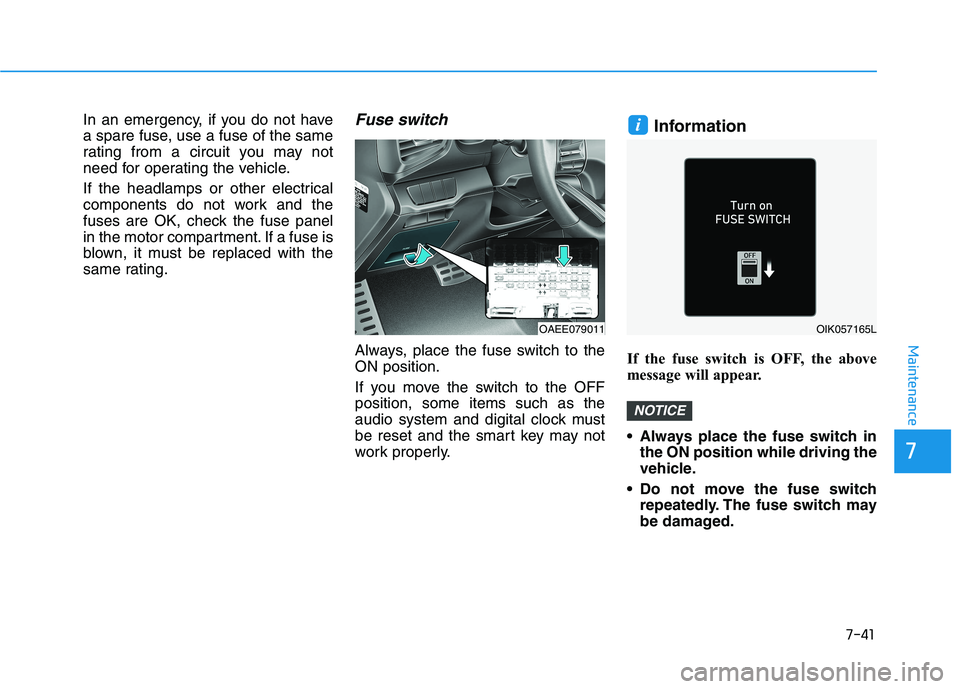
same rating.Fuse switch
Always, place the fuse switch to the
ON position.
If you move the switch to the OFF
position, some items such as the
audio system and digital clock must
be reset and the smart key may not
work properly.
Information
If the fuse switch is OFF, the above
message will appear.
Always place the fuse switch in
the ON position while driving the
vehicle.
Do not move the fuse switch
repeatedly. The fuse switch may
be damaged.
NOTICE
i
OAEE079011OIK057165L