battery HYUNDAI IONIQ 2020 Owner's Manual
[x] Cancel search | Manufacturer: HYUNDAI, Model Year: 2020, Model line: IONIQ, Model: HYUNDAI IONIQ 2020Pages: 561, PDF Size: 24.5 MB
Page 177 of 561
3-92
Convenient features of your vehicle
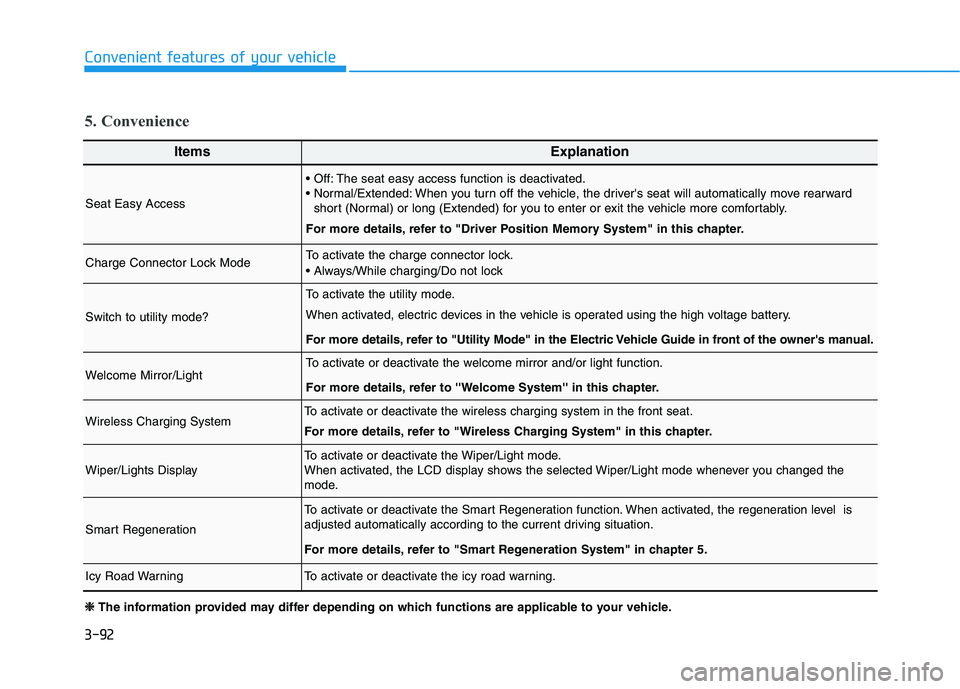
ItemsExplanation
Seat Easy Access
The seat easy access function is deactivated.
When you turn off the vehicle, the driver's seat will automatically move rearward
short (Normal) or long (Extended) for you to enter or exit the vehicle more comfortably.
For more details, refer to "Driver Position Memory System" in this chapter.
Charge Connector Lock ModeTo activate the charge connector lock.
Switch to utility mode?
To activate the utility mode.
When activated, electric devices in the vehicle is operated using the high voltage battery.
For more details, refer to "Utility Mode" in the Electric Vehicle Guide in front of the owner's manual.
Welcome Mirror/LightTo activate or deactivate the welcome mirror and/or light function.
For more details, refer to ''Welcome System'' in this chapter.
Wireless Charging SystemTo activate or deactivate the wireless charging system in the front seat.
For more details, refer to "Wireless Charging System" in this chapter.
Wiper/Lights DisplayTo activate or deactivate the Wiper/Light mode.
When activated, the LCD display shows the selected Wiper/Light mode whenever you changed the
mode.
Smart Regeneration
To activate or deactivate the Smart Regeneration function. When activated, the regeneration level is
adjusted automatically according to the current driving situation.
For more details, refer to "Smart Regeneration System" in chapter 5.
Icy Road WarningTo activate or deactivate the icy road warning.
5. Convenience
❈ ❈
The information provided may differ depending on which functions are applicable to your vehicle.
Page 178 of 561
3-93
Convenient features of your vehicle
3
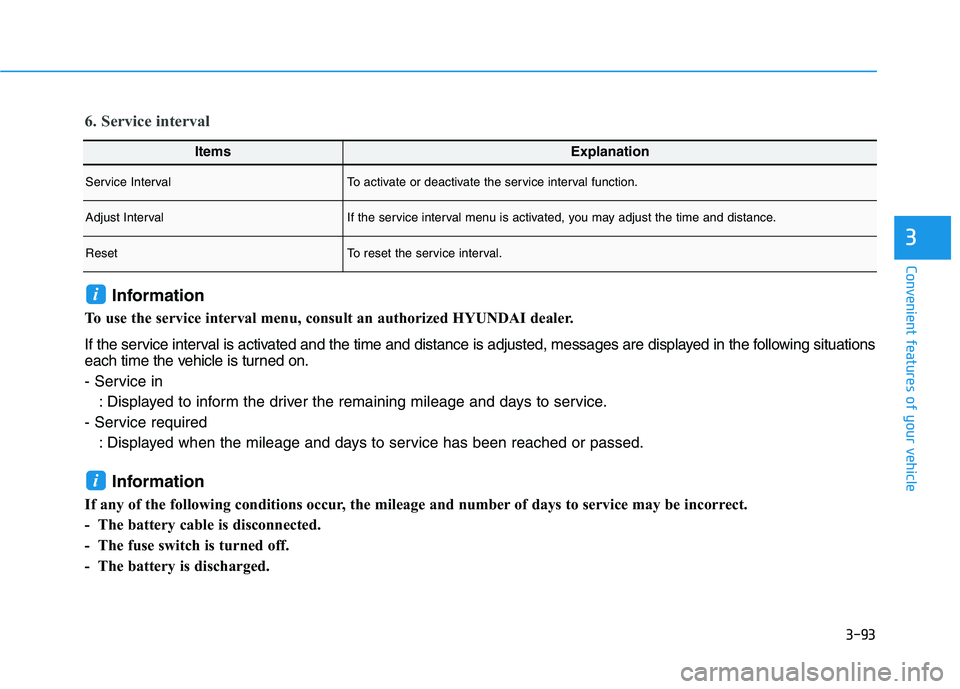
ItemsExplanation
Service IntervalTo activate or deactivate the service interval function.
Adjust IntervalIf the service interval menu is activated, you may adjust the time and distance.
ResetTo reset the service interval.
6. Service interval
Information
To use the service interval menu, consult an authorized HYUNDAI dealer.
If the service interval is activated and the time and distance is adjusted, messages are displayed in the following situations
each time the vehicle is turned on.
- Service in
: Displayed to inform the driver the remaining mileage and days to service.
- Service required
: Displayed when the mileage and days to service has been reached or passed.
Information
If any of the following conditions occur, the mileage and number of days to service may be incorrect.
- The battery cable is disconnected.
- The fuse switch is turned off.
- The battery is discharged.
i
i
Page 179 of 561
3-94
Convenient features of your vehicle
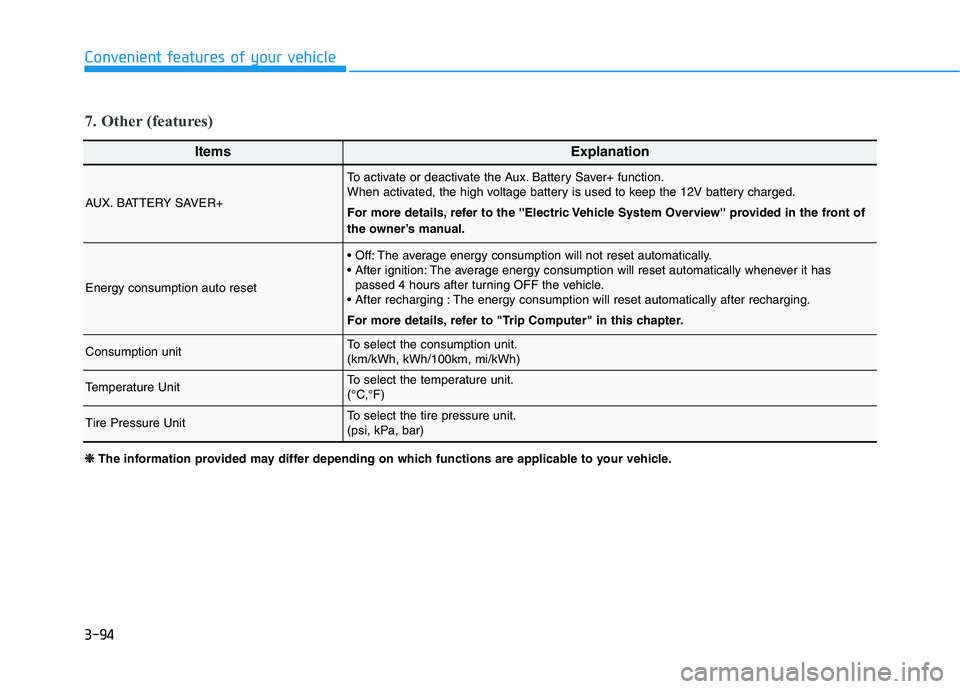
ItemsExplanation
AUX. BATTERY SAVER+
To activate or deactivate the Aux. Battery Saver+ function.
When activated, the high voltage battery is used to keep the 12V battery charged.
For more details, refer to the ''Electric Vehicle System Overview'' provided in the front of
the owner’s manual.
Energy consumption auto reset
The average energy consumption will not reset automatically.
The average energy consumption will reset automatically whenever it has
passed 4 hours after turning OFF the vehicle.
The energy consumption will reset automatically after recharging.
For more details, refer to "Trip Computer" in this chapter.
Consumption unitTo select the consumption unit.
(km/kWh, kWh/100km, mi/kWh)
Temperature UnitTo select the temperature unit.
(°C,°F)
Tire Pressure UnitTo select the tire pressure unit.
(psi, kPa, bar)
7. Other (features)
❈ ❈
The information provided may differ depending on which functions are applicable to your vehicle.
Page 181 of 561
3-96
The trip computer is a microcomput-
er-controlled driver information sys-
tem that displays information related
to driving.
Information
Some driving information stored in the
trip computer (for example Average
Vehicle Speed) resets if the battery is
disconnected.
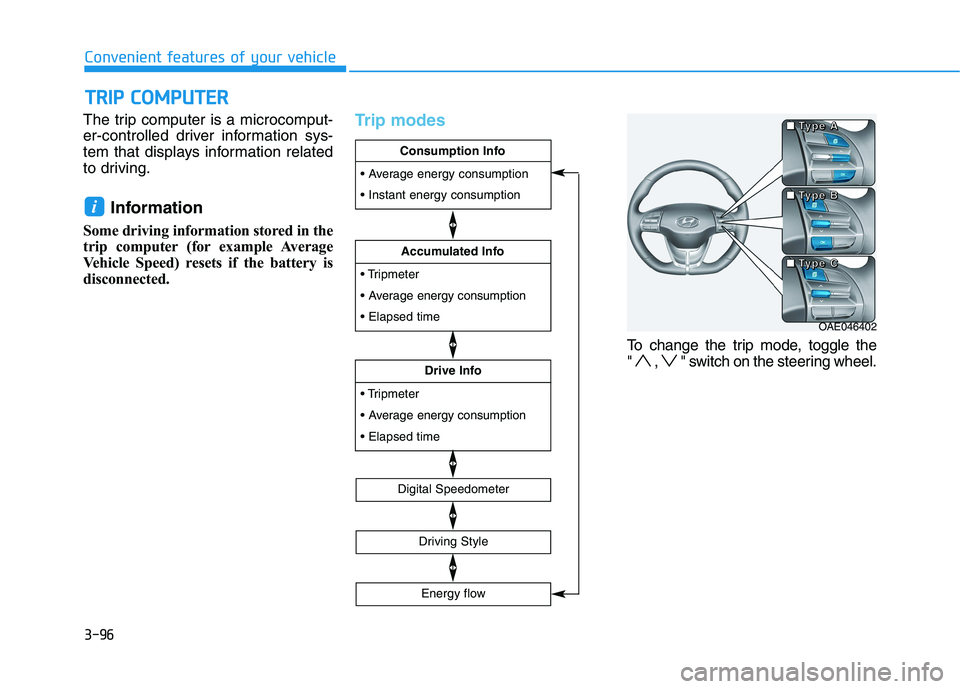
Trip modes
To change the trip mode, toggle the
" , " switch on the steering wheel.
i
T TR
RI
IP
P
C
CO
OM
MP
PU
UT
TE
ER
R
Convenient features of your vehicle
OAE046402 ■ ■ ■ ■
T T T T
y y y y
p p p p
e e e e
B B B B ■ ■ ■ ■
T T T T
y y y y
p p p p
e e e e
A A A A
■ ■ ■ ■
T T T T
y y y y
p p p p
e e e e
C C C C
energy consumption
Drive Info
energy consumption
Accumulated Info
Consumption Info
Digital Speedometer
Driving Style
Energy flow
Page 182 of 561
3-97
Convenient features of your vehicle
Consumption info display
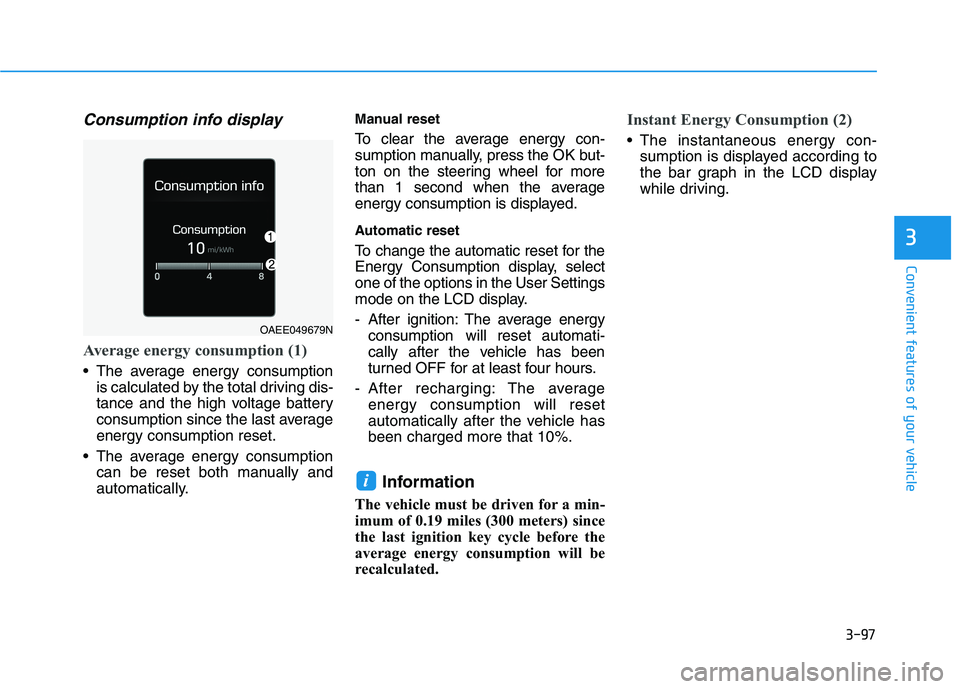
Average energy consumption (1)
The average energy consumption
is calculated by the total driving dis-
tance and the high voltage battery
consumption since the last average
energy consumption reset.
The average energy consumption
can be reset both manually and
automatically.
Manual reset
To clear the average energy con-
sumption manually, press the OK but-
ton on the steering wheel for more
than 1 second when the average
energy consumption is displayed.
Automatic reset
To change the automatic reset for the
Energy Consumption display, select
one of the options in the User Settings
mode on the LCD display.
- After ignition: The average energy
consumption will reset automati-
cally after the vehicle has been
turned OFF for at least four hours.
- After recharging: The average
energy consumption will reset
automatically after the vehicle has
been charged more that 10%.
Information
The vehicle must be driven for a min-
imum of 0.19 miles (300 meters) since
the last ignition key cycle before the
average energy consumption will be
recalculated.
Instant Energy Consumption (2)
The instantaneous energy con-
sumption is displayed according to
the bar graph in the LCD display
while driving.
i
3
OAEE049679N
Page 192 of 561
3-107
Convenient features of your vehicle
Turn signals and lane change
signals
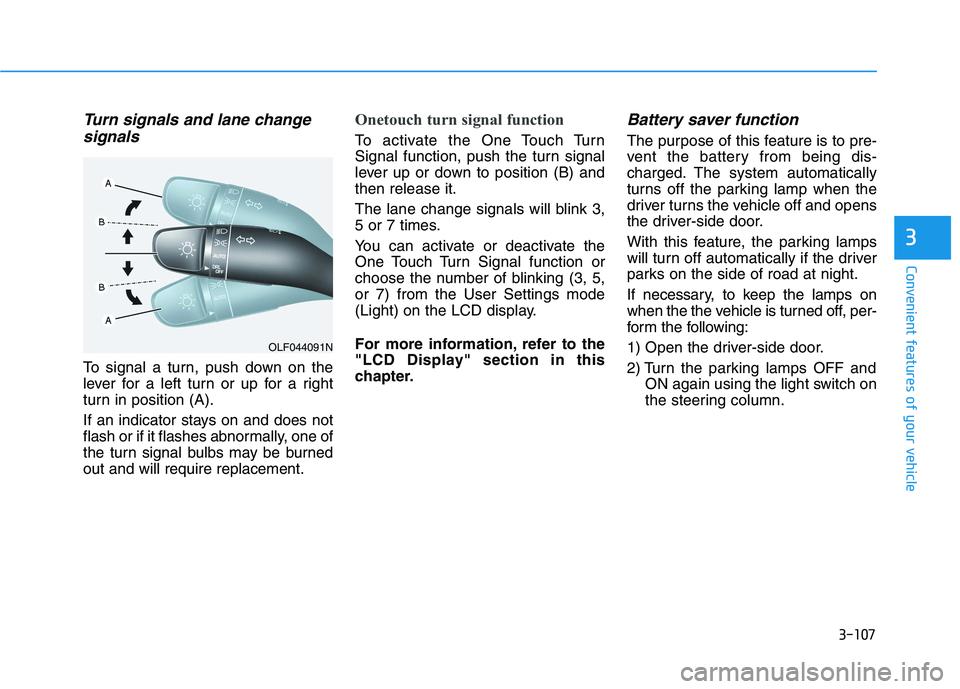
To signal a turn, push down on the
lever for a left turn or up for a right
turn in position (A).
If an indicator stays on and does not
flash or if it flashes abnormally, one of
the turn signal bulbs may be burned
out and will require replacement.
Onetouch turn signal function
To activate the One Touch Turn
Signal function, push the turn signal
lever up or down to position (B) and
then release it.
The lane change signals will blink 3,
5 or 7 times.
You can activate or deactivate the
One Touch Turn Signal function or
choose the number of blinking (3, 5,
or 7) from the User Settings mode
(Light) on the LCD display.
For more information, refer to the
"LCD Display" section in this
chapter.
Battery saver function
The purpose of this feature is to pre-
vent the battery from being dis-
charged. The system automatically
turns off the parking lamp when the
driver turns the vehicle off and opens
the driver-side door.
With this feature, the parking lamps
will turn off automatically if the driver
parks on the side of road at night.
If necessary, to keep the lamps on
when the the vehicle is turned off, per-
form the following:
1) Open the driver-side door.
2) Turn the parking lamps OFF and
ON again using the light switch on
the steering column.
3
OLF044091N
Page 193 of 561
3-108
Convenient features of your vehicle
Headlamp delay function
(if equipped)
If the POWER button is placed in the
ACC position or the OFF position
with the headlamps ON, the head-
lamps (and/or parking lamps) remain
on for about 5 minutes. However, if
the driver’s door is opened and
closed, the headlights are turned off
after 15 seconds. Also, with the vehi-
cle off if the driver's door is opened
and closed, the headlamps (and/or
parking lamps) are turned off after 15
seconds.
The headlamps (and/or parking
lamps) can be turned off by pressing
the lock button on the smart key
twice or turning the light switch to the
OFF or AUTO position.
You can activate or deactivate the
Headlamp Delay function from the
User Settings mode (Light) on the
LCD display.
For more information, refer to the
"LCD Display" section in this
chapter.If the driver gets out of the vehicle
through other doors (except dri-
ver’s door), the battery saver func-
tion does not operate and the
headlamp delay function does not
turn off automatically. Therefore, It
causes the battery to be dis-
charged. In this case, make sure
to turn off the lamp before getting
out of the vehicle.
AFL (Adaptive Front Lighting)
System a.k.a. DBL (Dynamic
Bending Light) (if equipped)
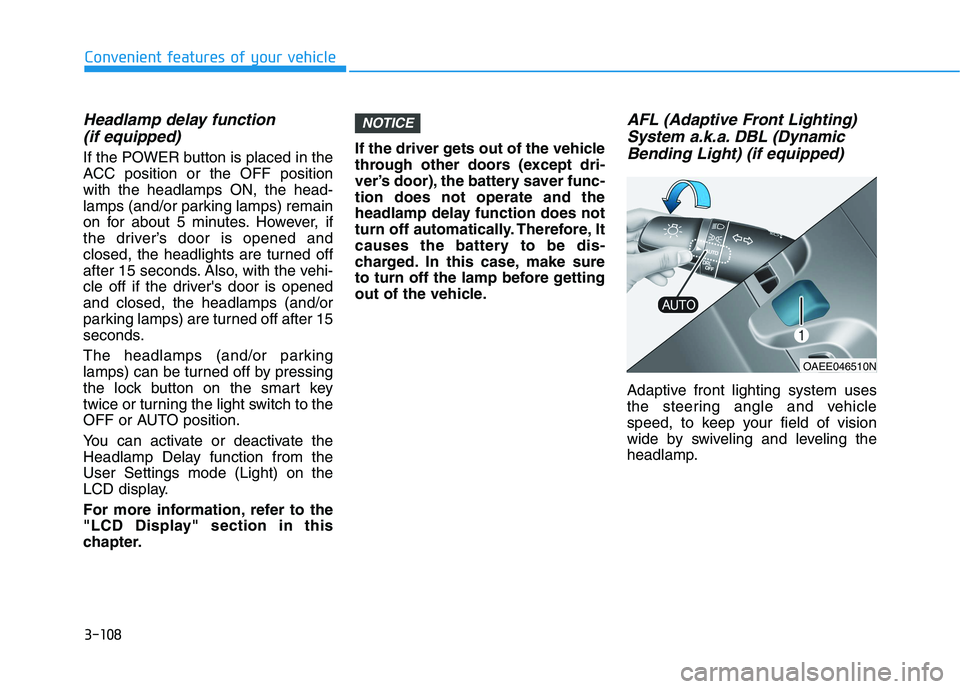
Adaptive front lighting system uses
the steering angle and vehicle
speed, to keep your field of vision
wide by swiveling and leveling the
headlamp.
NOTICE
OAEE046510N
Page 194 of 561
3-109
Convenient features of your vehicle
3
Change the switch to the AUTO posi-
tion when the vehicle is in the ready
( ) mode. The adaptive front light-
ing system will operate when the
headlamp is ON. To turn off the AFL
system, change the switch to other
positions. After turning the AFL sys-
tem off, headlamp swiveling no
longer occurs, but leveling operates
continuously.
If the AFL system malfunction indica-
tor comes on, the AFL system is not
working properly. Drive to the near-
est safe location and restart the vehi-
cle ( indicator ON). If the indica-
tor continuously remains on, have
the system be checked by an author-
ized HYUNDAI dealer.Interior Lights
Do not use the interior lights for
extended periods when the vehi-
cle is turned off or the battery will
discharge.
Interior lamp AUTO cut
The interior lamps will automatically
go off approximately 20 minutes after
the vehicle is turned off and the
doors closed. If a door is opened, the
lamp will go off 40 minutes after the
vehicle is turned off. If the doors are
locked by the smart key and the vehi-
cle enters the armed stage of the
theft alarm system, the lamps will go
off five seconds later.
Front lamps
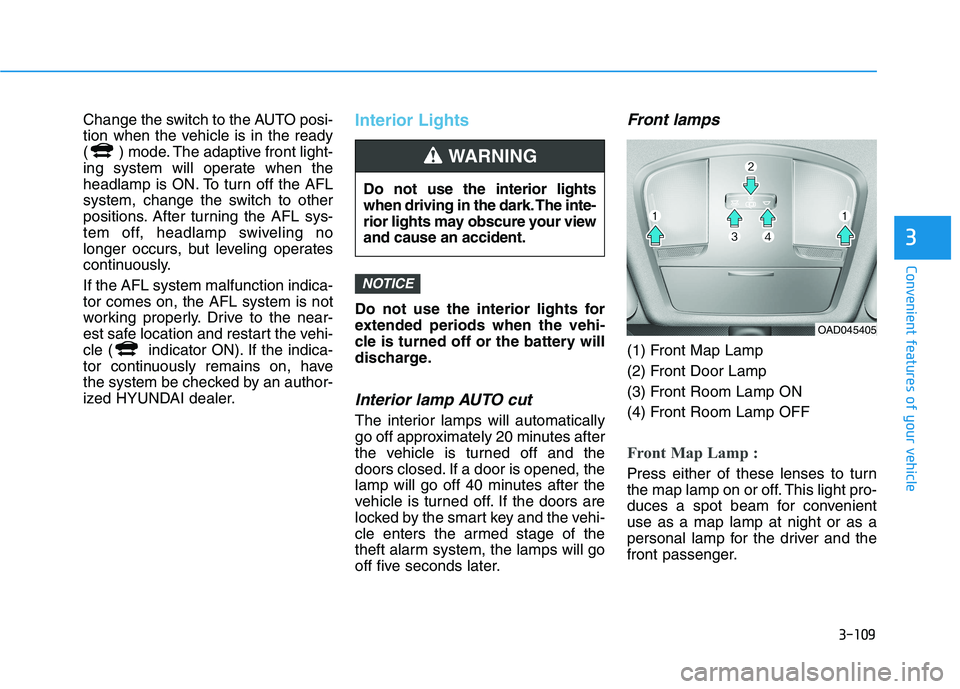
(1) Front Map Lamp
(2) Front Door Lamp
(3) Front Room Lamp ON
(4) Front Room Lamp OFF
Front Map Lamp :
Press either of these lenses to turn
the map lamp on or off. This light pro-
duces a spot beam for convenient
use as a map lamp at night or as a
personal lamp for the driver and the
front passenger.
NOTICE
Do not use the interior lights
when driving in the dark. The inte-
rior lights may obscure your view
and cause an accident.
WARNING
OAD045405
Page 196 of 561
3-111
Convenient features of your vehicle
3
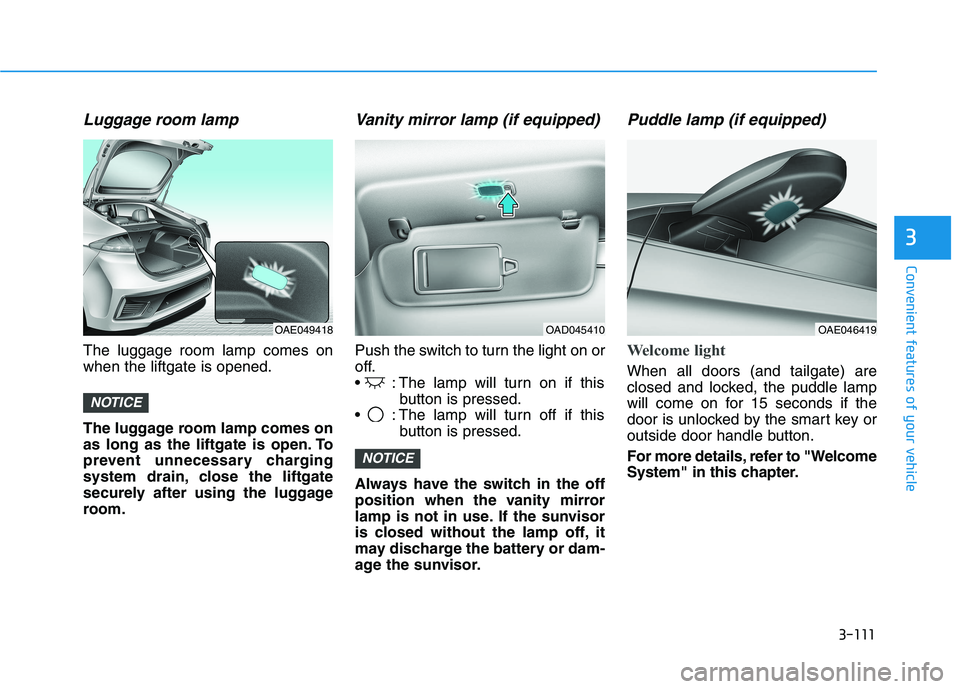
Luggage room lamp
The luggage room lamp comes on
when the liftgate is opened.
The luggage room lamp comes on
as long as the liftgate is open. To
prevent unnecessary charging
system drain, close the liftgate
securely after using the luggage
room.
Vanity mirror lamp (if equipped)
Push the switch to turn the light on or
off.
: The lamp will turn on if this
button is pressed.
: The lamp will turn off if this
button is pressed.
Always have the switch in the off
position when the vanity mirror
lamp is not in use. If the sunvisor
is closed without the lamp off, it
may discharge the battery or dam-
age the sunvisor.
Puddle lamp (if equipped)
Welcome light
When all doors (and tailgate) are
closed and locked, the puddle lamp
will come on for 15 seconds if the
door is unlocked by the smart key or
outside door handle button.
For more details, refer to "Welcome
System" in this chapter.
NOTICE
NOTICE
OAD045410OAE049418OAE046419
Page 209 of 561
3-124
Convenient features of your vehicle
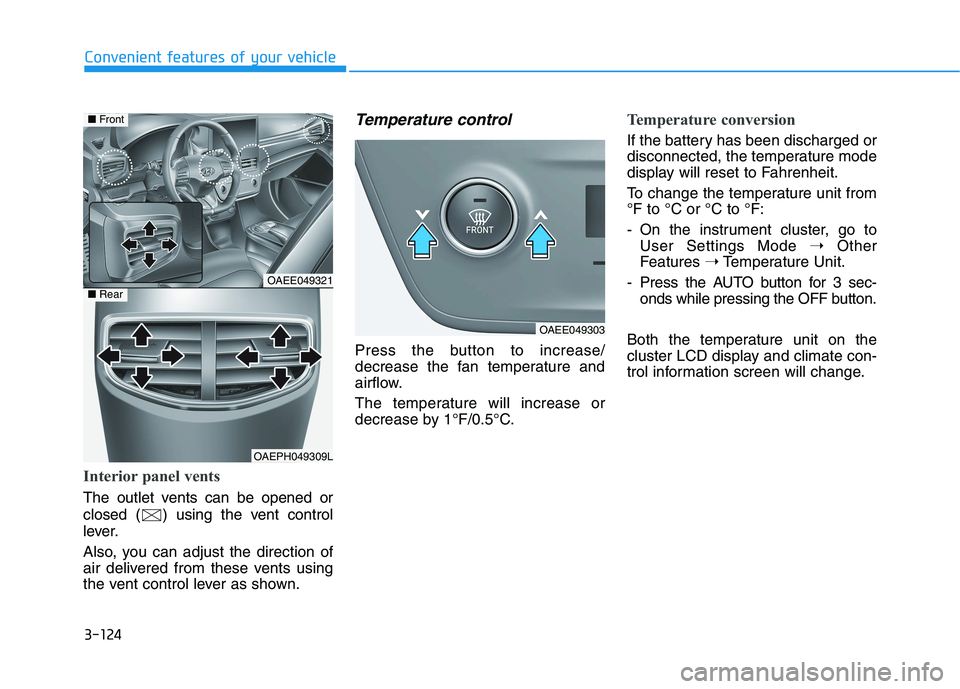
Interior panel vents
The outlet vents can be opened or
closed ( ) using the vent control
lever.
Also, you can adjust the direction of
air delivered from these vents using
the vent control lever as shown.
Temperature control
Press the button to increase/
decrease the fan temperature and
airflow.
The temperature will increase or
decrease by 1°F/0.5°C.
Temperature conversion
If the battery has been discharged or
disconnected, the temperature mode
display will reset to Fahrenheit.
To change the temperature unit from
°F to °C or °C to °F:
- On the instrument cluster, go to
User Settings Mode ➝Other
Features ➝Temperature Unit.
- Press the AUTO button for 3 sec-
onds while pressing the OFF button.
Both the temperature unit on the
cluster LCD display and climate con-
trol information screen will change.
OAEE049321
OAEPH049309L
■Front
■Rear
OAEE049303