start stop HYUNDAI IONIQ 5 2023 Owners Manual
[x] Cancel search | Manufacturer: HYUNDAI, Model Year: 2023, Model line: IONIQ 5, Model: HYUNDAI IONIQ 5 2023Pages: 680, PDF Size: 48.22 MB
Page 622 of 680
09
9-21
WARNING
Always follow these instructions when
recharging your vehicle’s battery to
avoid the risk of SERIOUS INJURY or
DEATH from explosions or acid burns: • Before performing maintenance or
recharging the battery, turn off all
accessories and stop the vehicle.
• Keep all flames, sparks, or smoking
materials away from the battery.
• Always work outdoors or in an area
with plenty of ventilation.
• Wear eye protection when checking
the battery during charging.
• The battery must be removed from
the vehicle and placed in a well
ventilated area.
• Watch the battery during charging,
and stop or reduce the charging
rate if the battery cells begin boiling
violently.
• The negative battery cable must
be removed first and installed last
when the battery is disconnected.
Disconnect the battery charger in the
following order:
1. Turn off the battery charger main
switch.
2. Unhook the negative clamp from the negative battery terminal.
3. Unhook the positive clamp from the positive battery terminal.
• Use batteries for replacement from
an authorized HYUNDAI dealer. By jump starting
After a jump start from a good battery,
drive the vehicle for 20-30 minutes
before it is shutoff. The vehicle may
not restart if you shut it off before the
battery had a chance to adequately
recharge. See “Jump Starting” in chapter
8 for more information on jump starting
procedures.
Information
An inappropriately disposed battery can be harmful to the
environment and human health. Dispose of the battery according
to your local law(s) or regulation.
Reset Items
The following items may need to be reset
after the battery has been discharged or
the battery has been disconnected. •
Driving info/After recharging/
Accumulated info (items in Utility
view) (see chapter 4)
• Integrated memory system (see
chapter 5)
• Power window (see chapter 5)
• Vision roof (see chapter 5)
• Power liftgate (see chapter 5)
• Climate control system (see chapter 5)
• Clock (see Infotainment system manual)
• Infotainment system (see
Infotainment system manual)
Page 649 of 680
Maintenance
9-48
Consult an authorized HYUNDAI dealer
to replace most vehicle light bulbs. It is
difficult to replace vehicle light bulbs
because other parts of the vehicle must
be removed before you can get to the
bulb. This is especially true for removing
the headlamp assembly to get to the
bulb(s).
Removing/installing the headlamp
assembly can result in damage to the
vehicle.
WARNING
• Prior to working on a light, depress
the foot brake, shift to P (Park), apply
the parking brake, press the Start/
Stop button to the OFF position
and take the key with you when
leaving the vehicle to avoid sudden
movement of the vehicle and to
prevent possible electric shock.
• Be aware the bulbs may be hot and
may burn your fingers.
NOTICE
Be sure to replace the burned-out bulb
with one of the same wattage rating.
Otherwise, it may cause damage to the
fuse or electrical wiring system.
NOTICE
To prevent damage, do not clean the
headlamp lens with chemical solvents
or strong detergents.
Information - Headlamp
desiccant (if equipped)
This vehicle is equipped with desiccant to
reduce fogging inside the headlamp due
to moisture. The desiccant is consumable and its performance may change based on
the used period or environment. If fogging
inside the headlamp due to moisture
continues for a long time, consult an
authorized HYUNDAI dealer.
Information
The headlamp and tail lamp lenses could
appear frosty if the vehicle is washed after
driving or the vehicle is driven at night in
wet weather. This condition is caused by
temperature difference between the lamp inside and outside and, it does not indicate
a problem with your vehicle. When
moisture condenses in the lamp, it will be
removed after driving with the headlamp
on. The removable level may differ depending on lamp size, lamp position
and environmental condition. However, if
moisture is not removed, have your vehicle inspected by an authorized HYUNDAI
dealer.
light BulBs
Page 656 of 680
09
9-55
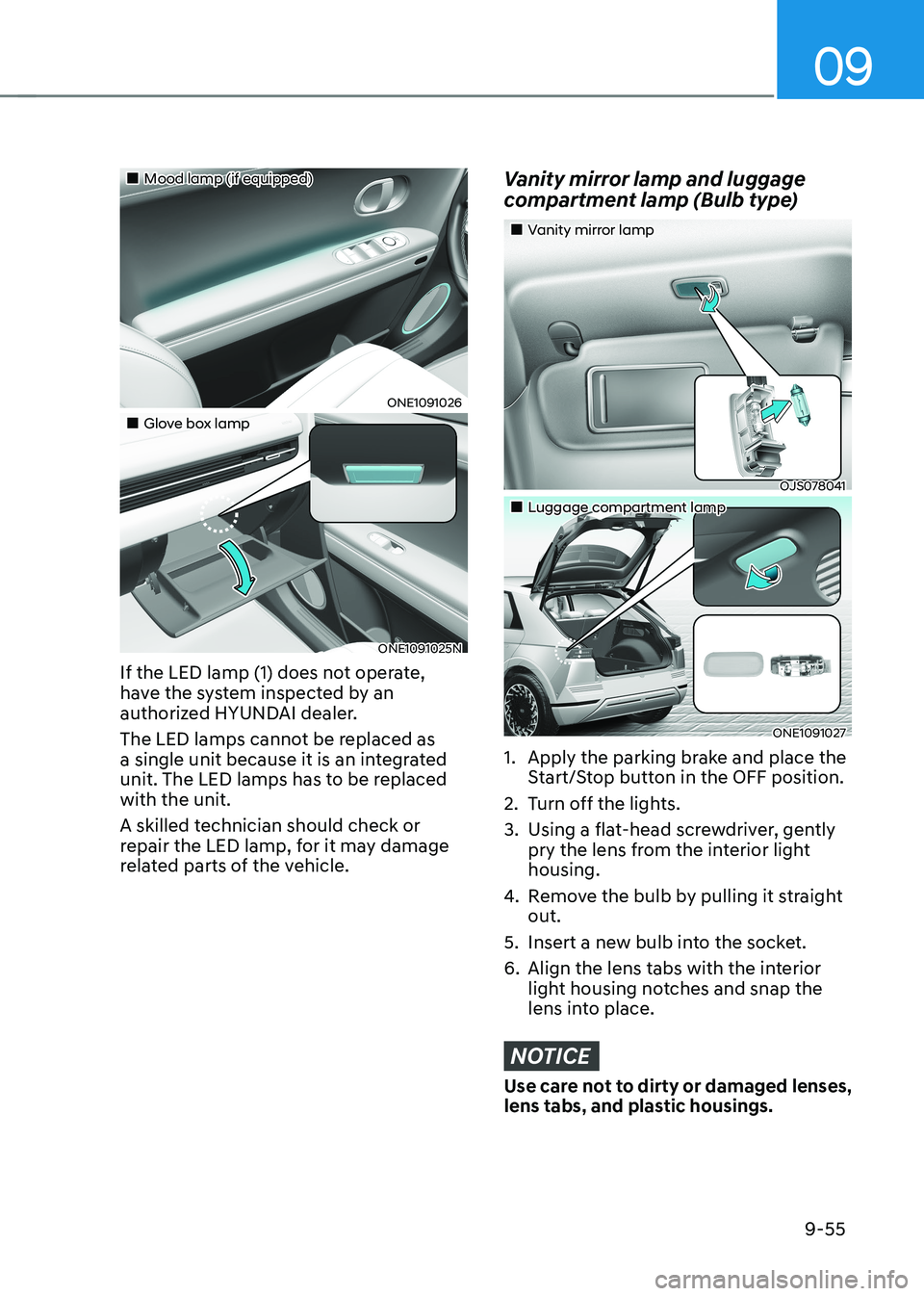
„„Mood lamp (if equipped)
ONE1091026
„„Glove box lamp
ONE1091025N
If the LED lamp (1) does not operate,
have the system inspected by an
authorized HYUNDAI dealer.
The LED lamps cannot be replaced as
a single unit because it is an integrated
unit. The LED lamps has to be replaced with the unit.
A skilled technician should check or
repair the LED lamp, for it may damage
related parts of the vehicle.
Vanity mirror lamp and luggage
compartment lamp (Bulb type)
„„Vanity mirror lamp
OJS078041
„„Luggage compartment lamp
ONE1091027
1. Apply the parking brake and place the Start/Stop button in the OFF position.
2. Turn off the lights.
3. Using a flat-head screwdriver, gently pry the lens from the interior light housing.
4. Remove the bulb by pulling it straight out.
5. Insert a new bulb into the socket.
6. Align the lens tabs with the interior light housing notches and snap the
lens into place.
NOTICE
Use care not to dirty or damaged lenses,
lens tabs, and plastic housings.
Page 670 of 680
I
I-5
D
Declaration of conformity.................................................................................. 7-175
Front Radar ..................................................................................................... 7-175
Rear Corner Radar .......................................................................................... 7-176
Dimensions ............................................................................................................ 2-8
Door Locks .......................................................................................................... 5-30
Automatic Door Lock and Unlock Features ....................................................5-36
Electronic Child Safety Lock ........................................................................... 5-37
Operating Door Lock/Unlock from Inside the Vehicle ....................................5-34
Operating Door Locks from Outside the Vehicle (Electric type) .....................5-32
Operating Door Locks from Outside the Vehicle (Manual type) .....................5-32
Operating Door Unlocks from Outside the Vehicle (Electric type) ................5-30
Operating Door Unlocks from Outside the Vehicle (Manual type).................. 5-30
Vehicle Auto-Shut Off Function ....................................................................... 5-38
Drive Mode Integrated Control System (2WD) .................................................6-47
Drive Mode ...................................................................................................... 6-47
Drive Mode Integrated Control System (AWD) ..................................................6-49
Drive Mode ...................................................................................................... 6-49
Drive Modes Characteristic .............................................................................. 6-51
Driver Attention Warning (DAW) ...................................................................... 7-62
Driver Attention Warning Malfunction and Limitations ..................................7-65
Driver Attention Warning Operation ................................................................ 7-63
Driver Attention Warning Settings .................................................................. 7-62
Driving Electric Vehicle ...................................................................................... 1-50
Aux. Battery Saver+ ......................................................................................... 1-55
Distance to Empty ............................................................................................ 1-51
ECO Driving .................................................................................................... 1-53
Electricity Use .................................................................................................. 1-53
How to Start the Vehicle ................................................................................... 1-50
How to Stop the Vehicle ................................................................................... 1-50
LCD Display Messages .................................................................................... 1-58
Power/Charge Gauge ........................................................................................ 1-54
State Of Charge (SOC) Gauge for High Voltage Battery .................................1-54
Tips for Improving Distance to Empty .............................................................1-52
Virtual Engine Sound System .......................................................................... 1-51
Warning and Indicator Lights (related to electric vehicle) ...............................1-56
Page 678 of 680
I
I-13
Start/Stop Button ................................................................................................... 6-4
Remote Start ....................................................................................................... 6-8
Start/Stop Button Positions ................................................................................ 6-5
Starting the Vehicle ............................................................................................ 6-6
Turning Off the Vehicle ...................................................................................... 6-7
Steering Wheel ..................................................................................................... 5-44
Electric Power Steering (EPS) ......................................................................... 5-44
Heated Steering Wheel ..................................................................................... 5-46
Horn .................................................................................................................. 5-46
Tilt/Telescopic Steering .................................................................................... 5-45
Storage Compartment ........................................................................................ 5-119
Center Console Storage .................................................................................. 5-119
Glove Box ...................................................................................................... 5-120
Surround View Monitor (SVM) ......................................................................... 7-116
Surround View Monitor Malfunction and Limitations................................... 7-121
Surround View Monitor Operation................................................................. 7-119
Surround View Monitor Settings .................................................................... 7-117
T Theft-alarm System ............................................................................................. 5-39
Tire Pressure Monitoring System (TPMS) ............................................................8-7
Changing a Tire with TPMS ............................................................................. 8-10
Check Tire Pressure ............................................................................................ 8-7
Low Tire Pressure Position and Tire Pressure Telltale .......................................8-9
Low Tire Pressure Warning Light ...................................................................... 8-9
Tire Pressure Monitoring System ....................................................................... 8-8
TPMS (Tire Pressure Monitoring System) Malfunction Indicator ..................8-10
Tire Specification and Pressure Label ................................................................. 2-14