heating HYUNDAI IONIQ 5 2023 User Guide
[x] Cancel search | Manufacturer: HYUNDAI, Model Year: 2023, Model line: IONIQ 5, Model: HYUNDAI IONIQ 5 2023Pages: 680, PDF Size: 48.22 MB
Page 268 of 680
Convenience Features
5 -76
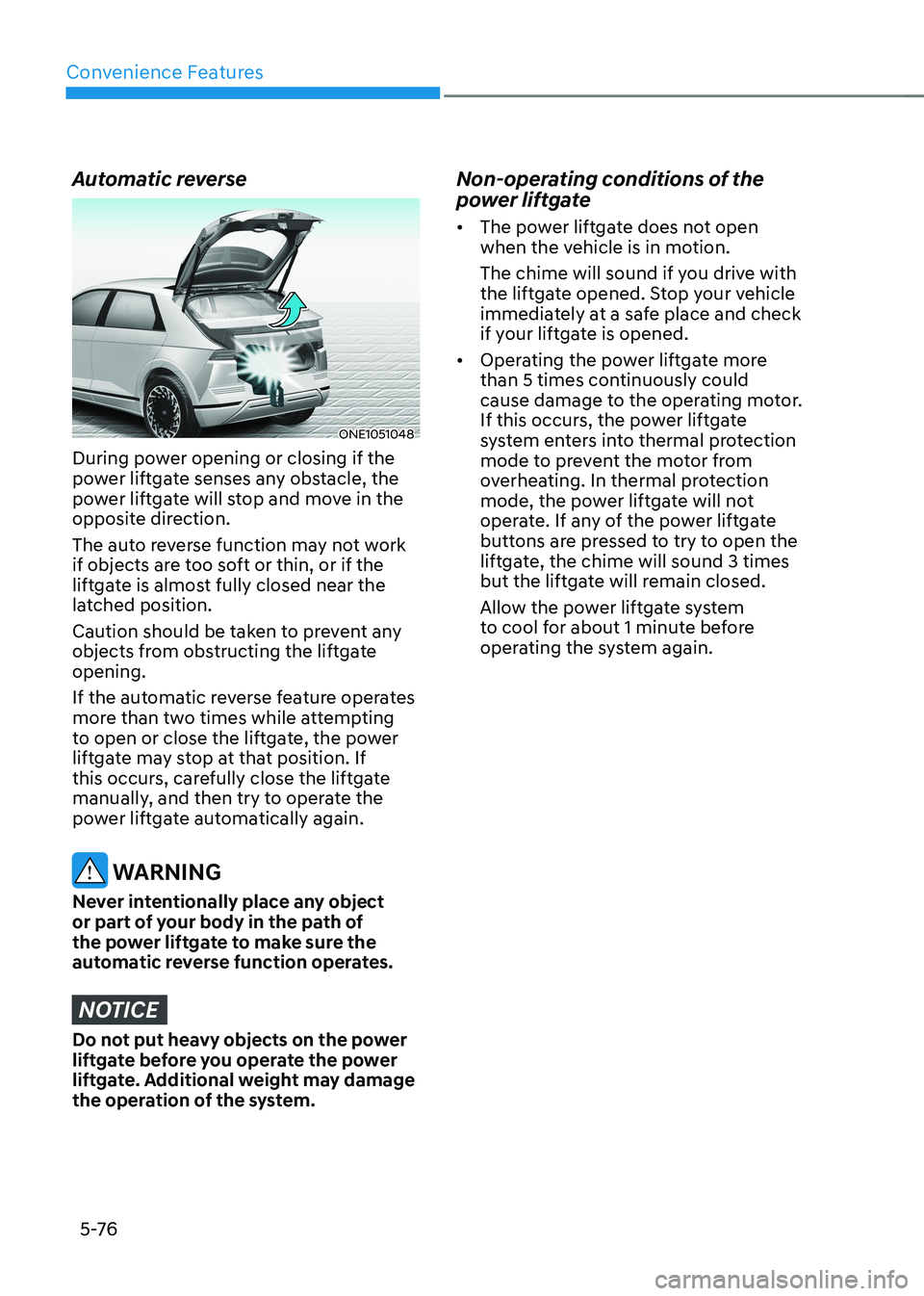
Automatic reverse
ONE1051048
During power opening or closing if the
power liftgate senses any obstacle, the
power liftgate will stop and move in the
opposite direction.
The auto reverse function may not work
if objects are too soft or thin, or if the
liftgate is almost fully closed near the
latched position.
Caution should be taken to prevent any
objects from obstructing the liftgate opening.
If the automatic reverse feature operates
more than two times while attempting
to open or close the liftgate, the power
liftgate may stop at that position. If
this occurs, carefully close the liftgate
manually, and then try to operate the
power liftgate automatically again.
WARNING
Never intentionally place any object
or part of your body in the path of
the power liftgate to make sure the
automatic reverse function operates.
NOTICE
Do not put heavy objects on the power
liftgate before you operate the power
liftgate. Additional weight may damage
the operation of the system. Non-operating conditions of the
power liftgate •
The power liftgate does not open
when the vehicle is in motion.
The chime will sound if you drive with
the liftgate opened. Stop your vehicle
immediately at a safe place and check
if your liftgate is opened.
• Operating the power liftgate more
than 5 times continuously could
cause damage to the operating motor.
If this occurs, the power liftgate
system enters into thermal protection
mode to prevent the motor from
overheating. In thermal protection
mode, the power liftgate will not
operate. If any of the power liftgate
buttons are pressed to try to open the
liftgate, the chime will sound 3 times
but the liftgate will remain closed.
Allow the power liftgate system
to cool for about 1 minute before
operating the system again.
Page 291 of 680
05
5-99
Information
Use a clean soft microfiber cloth to gently wipe any finger prints off the touch screen.
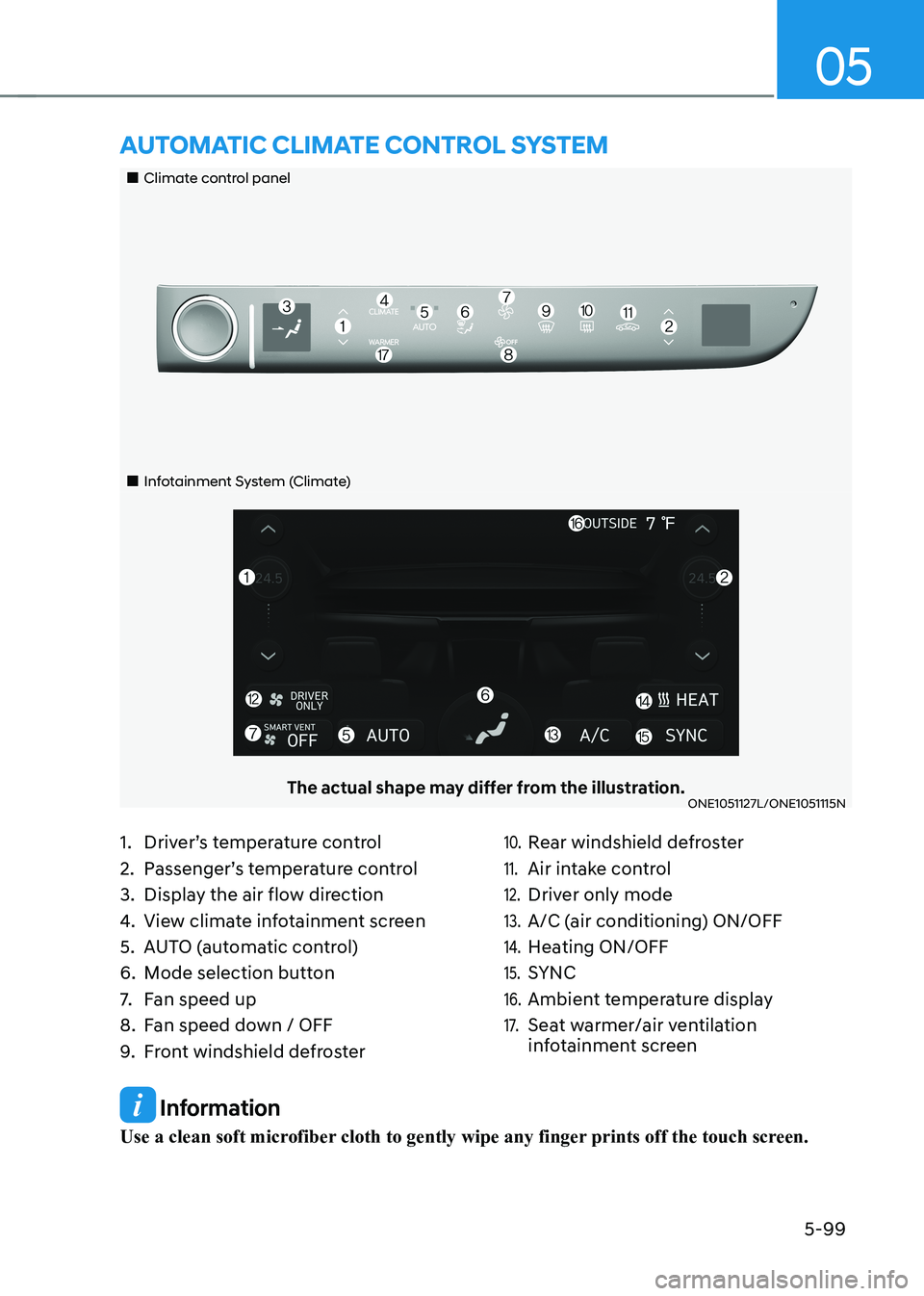
„„Climate control panel
„„Infotainment System (Climate)
The actual shape may differ from the illustration.ONE1051127L/ONE1051115N
aUTomaTIc clImaTe conTrol sysTem
1. Driver’s temperature control
2. Passenger’s temperature control
3. Display the air flow direction
4. View climate infotainment screen
5. AUTO (automatic control)
6. Mode selection button
7. Fan speed up
8. Fan speed down / OFF
9. Front windshield defroster10. Rear windshield defroster
11. Air intake control
12. Driver only mode
13. A/C (air conditioning) ON/OFF
14. Heating ON/OFF
15. SYNC
16. Ambient temperature display
17. Seat warmer/air ventilation
infotainment screen
Page 293 of 680
05
5-101
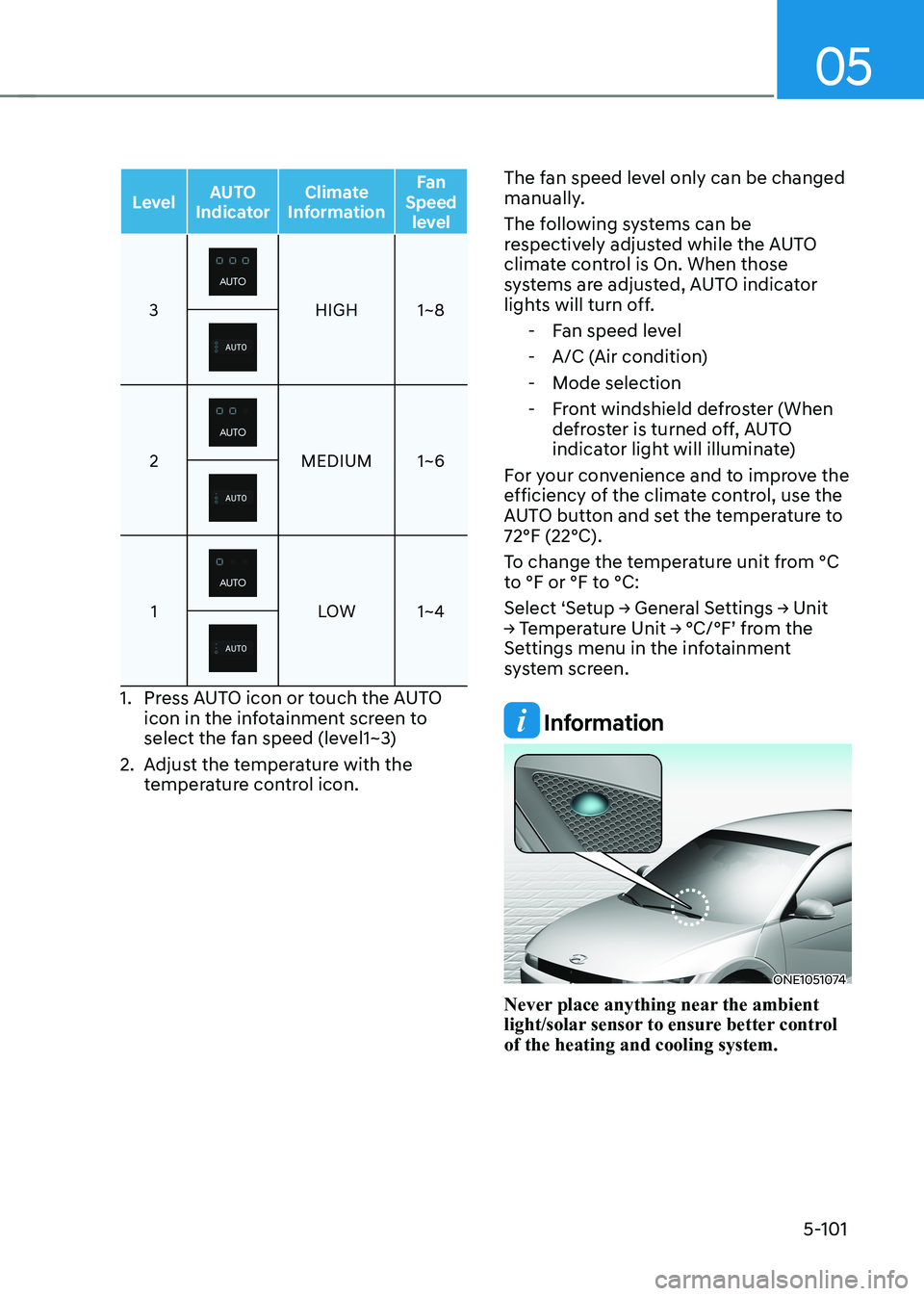
LevelAUTO
Indicator Climate
Information Fan
Speed level
3HIGH 1~8
2MEDIUM 1~6
1LOW 1~4
1. Press AUTO icon or touch the AUTO
icon in the infotainment screen to
select the fan speed (level1~3)
2. Adjust the temperature with the temperature control icon. The fan speed level only can be changed
manually.
The following systems can be
respectively adjusted while the AUTO
climate control is On. When those
systems are adjusted, AUTO indicator
lights will turn off.
- Fan speed level
- A/C (Air condition)
- Mode selection
- Front windshield defroster (When defroster is turned off, AUTO
indicator light will illuminate)
For your convenience and to improve the
efficiency of the climate control, use the
AUTO button and set the temperature to 72°F (22°C).
To change the temperature unit from °C
to °F or °F to °C:
Select ‘Setup → General Settings → Unit
→ Temperature Unit → °C/°F’ from the
Settings menu in the infotainment
system screen.
Information
ONE1051074
Never place anything near the ambient
light/solar sensor to ensure better control of the heating and cooling system.
Page 294 of 680
Convenience Features
5-102
Manual Temperature Control
Mode
The heating and cooling system can
be controlled manually by selecting
functions other than AUTO. In this case,
the system works sequentially according
to the order of the functions selected.
When selecting any other functions
except AUTO while using automatic
operation, the functions not selected will
be controlled automatically.
1. Start the vehicle.
2. Set the mode to the desired position.To improve the effectiveness of
heating and cooling, select the mode
according to the following: - Heating:
- Cooling:
3. Set the temperature control to the desired value.
4. Set the air intake control to Fresh or
Recirculation mode.
5. Set the fan speed control to the desired speed.
6. If air conditioning is desired, turn the air conditioning system on.
7. Select AUTO to revert back to full
automatic control of the system. Mode selection
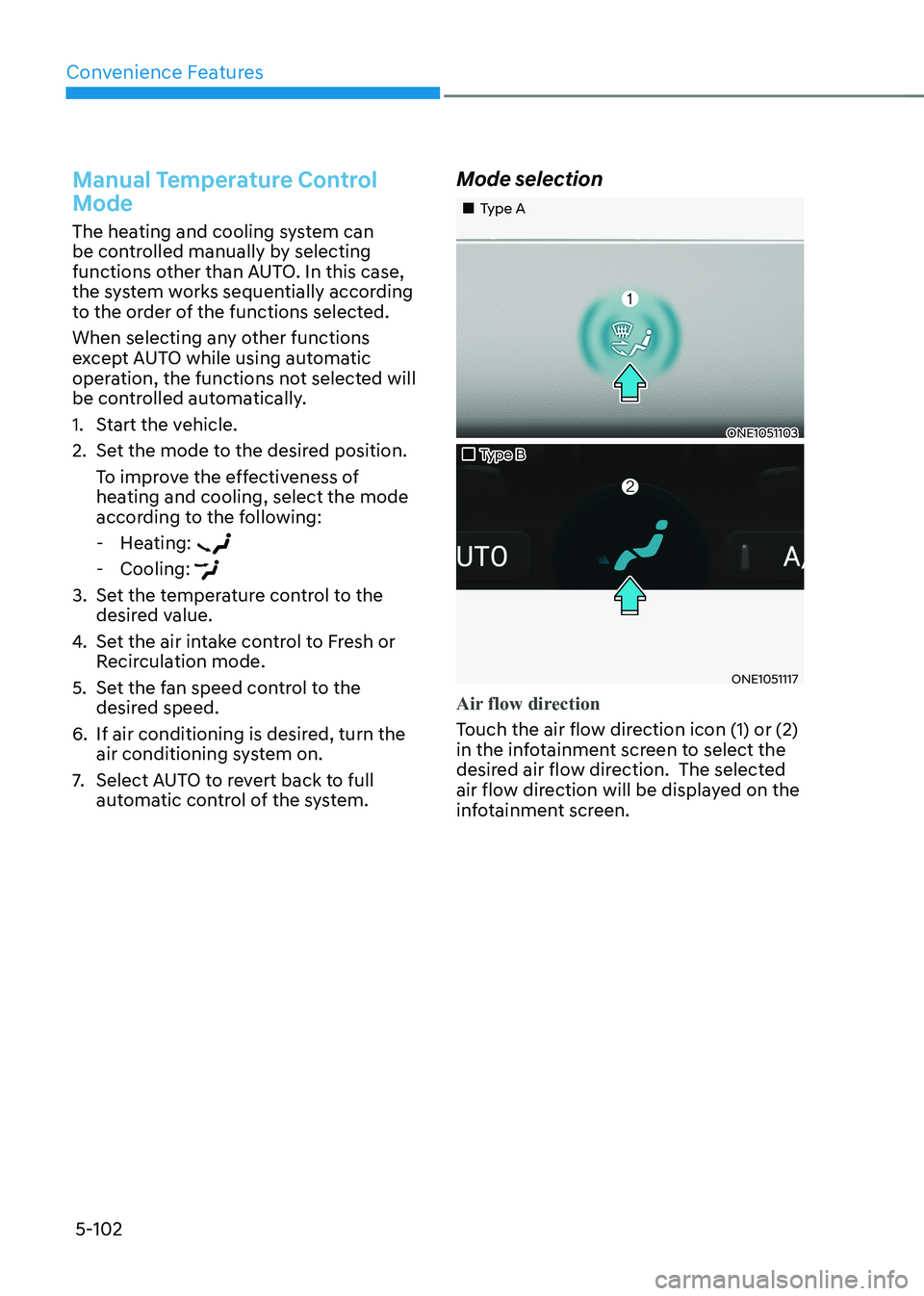
„„Type A
ONE1051103
„„Type B
ONE1051117
Air flow direction
Touch the air flow direction icon (1) or (2)
in the infotainment screen to select the
desired air flow direction. The selected
air flow direction will be displayed on the
infotainment screen.
Page 302 of 680
Convenience Features
5-110
System Operation
Cooling / Ventilation
1. Select the Face Level (
) mode in the
infotainment screen.
2. Set the air intake control to fresh or recirculation mode.
3. Set the temperature to the desired position.
4. Set the fan speed to the desired speed.
Heating
1. Select the Floor Level (
) mode in
the infotainment screen.
2. Set the air intake control to fresh or recirculation mode.
3. Set the temperature to the desired position.
4. Set the fan speed to the desired speed.
5. If desired, turn the air conditioning ON
with the temperature set high in order
to dehumidify the air before it enters
into the cabin.
If the windshield fogs up, select the Front
Defrost (
) mode.
Operation Tips
• To keep dust or unpleasant fumes
from entering the vehicle through the
ventilation system, temporarily set the
air intake control to the recirculation
mode. Return the control to the
Recirculation mode to the Fresh mode
when the unpleasant air outside has
diminished. This will help keep the
driver alert and comfortable.
• To help prevent the inside of the
windshield from fogging, set the air
intake control to fresh mode and the
fan speed to the desired position, turn
on the air conditioning system, and
adjust the temperature control to the
desired temperature. Air conditioning
Your HYUNDAI Vehicle air conditioning
system is filled with R-1234yf refrigerant.
1. Touch the [CLIMATE] icon to display
climate information the infotainment
screen.
2. Select A/C icon (indicator light ON) in the climate information screen to
activate the air-condition.
3. Set the temperature low.
4. Set the direction of air flow by
touching the mode selection icon.
5. Touch the HEAT icon (indicator light OFF) to turn on the air-condition.
When maximum cooling is desired, set
the temperature to the lowest position,
then set the fan speed control to the
highest setting.
Air conditioning system operation tips
• If the vehicle has been parked in
direct sunlight during hot weather,
open the windows for a short time
to let the hot air inside the vehicle escape.
• After sufficient cooling has been
achieved, switch back from
recirculation mode to fresh mode.
• To help reduce moisture inside of
the windows on rainy or humid
days, decrease the humidity inside
the vehicle by operating the air
conditioning system with the windows
and sunroof closed.
• Use the air conditioning system
every month only for a few minutes
to ensure maximum system
performance.
• If you operate air conditioner
excessively, the difference between
the temperature of the outside air and
that of the windshield could cause
the outer surface of the windshield to
fog up, causing loss of visibility. In this
case, set the mode selection to the
position and fan speed control to the
lowest speed.
Page 303 of 680
![HYUNDAI IONIQ 5 2023 User Guide 05
5-111
System Maintenance
Climate control air filter
OHI048581L
[A] : Outside air, [B] : Recirculated air
[C] : Climate control air filter, [D] : Blower
[E] : Evaporator core, [F] : PTC & Inner con](/img/35/56168/w960_56168-302.png "HYUNDAI IONIQ 5 2023 User Guide 05
5-111
System Maintenance
Climate control air filter
OHI048581L
[A] : Outside air, [B] : Recirculated air
[C] : Climate control air filter, [D] : Blower
[E] : Evaporator core, [F] : PTC & Inner con")
05
5-111
System Maintenance
Climate control air filter
OHI048581L
[A] : Outside air, [B] : Recirculated air
[C] : Climate control air filter, [D] : Blower
[E] : Evaporator core, [F] : PTC & Inner condenser
The cabin air filter is installed behind the
front trunk. It filters the dust or other
pollutants that enter the vehicle through
the heating and air conditioning system.
Have the cabin air filter replaced by an
authorized HYUNDAI dealer according to
the maintenance schedule. If the vehicle
is being driven in severe conditions such
as dusty or rough roads, more frequent
cabin air filter inspections and changes
are required.
If the air flow rate suddenly decreases,
have the system inspected at an
authorized HYUNDAI dealer.
Checking the amount of air
conditioner refrigerant and
compressor lubricant
When the amount of refrigerant is low,
the performance of the air conditioning
is reduced. Overfilling also reduces the
performance of the air conditixoning
system.
Therefore, if abnormal operation is
found, have the system inspected by an
authorized HYUNDAI dealer.
NOTICE
It is important that the correct type and
amount of oil and refrigerant is used.
Otherwise, damage to the compressor
and abnormal system operation may
occur. To prevent damage, the air
conditioning system in your vehicle
should only be serviced by trained and
certified technicians.
NOTICE
The refrigerant system should only
be serviced by trained and certified
technicians to insure proper and safe
operation.
The refrigerant system should be
serviced in a well-ventilated place.
The air conditioning evaporator (cooling
coil) shall never be repaired or replaced
with one removed from a used or
salvaged vehicle and new replacement
MAC evaporators shall be certified
(and labeled) as meeting SAE Standard J2842.
Page 305 of 680
05
5-113
winDshielD Defrosting AnD Defogging
WARNING
Windshield heating
Do not use the
position during
cooling operation in extremely humid
weather. The difference between the
temperature of the outside air and that
of the windshield could cause the outer
surface of the windshield to fog up,
causing loss of visibility could cause
an accident resulting in serious injury
or death. In this case, set the mode
selection to the
position and fan
speed control to a lower speed. • For maximum defrost performance,
set the temperature control to the
highest temperature setting and
the fan speed control to the highest
setting.
• If warm air to the floor is desired while
defrosting or defogging, set the mode
to the floor-defrost position.
• Before driving, clear all snow and ice
from the windshield, rear window,
outside rearview mirrors, and all side
windows.
• Clear all snow and ice from the
hood and air inlet in the cowl grill
to improve heater and defroster
efficiency and to reduce the
probability of fogging up the inside of the windshield.
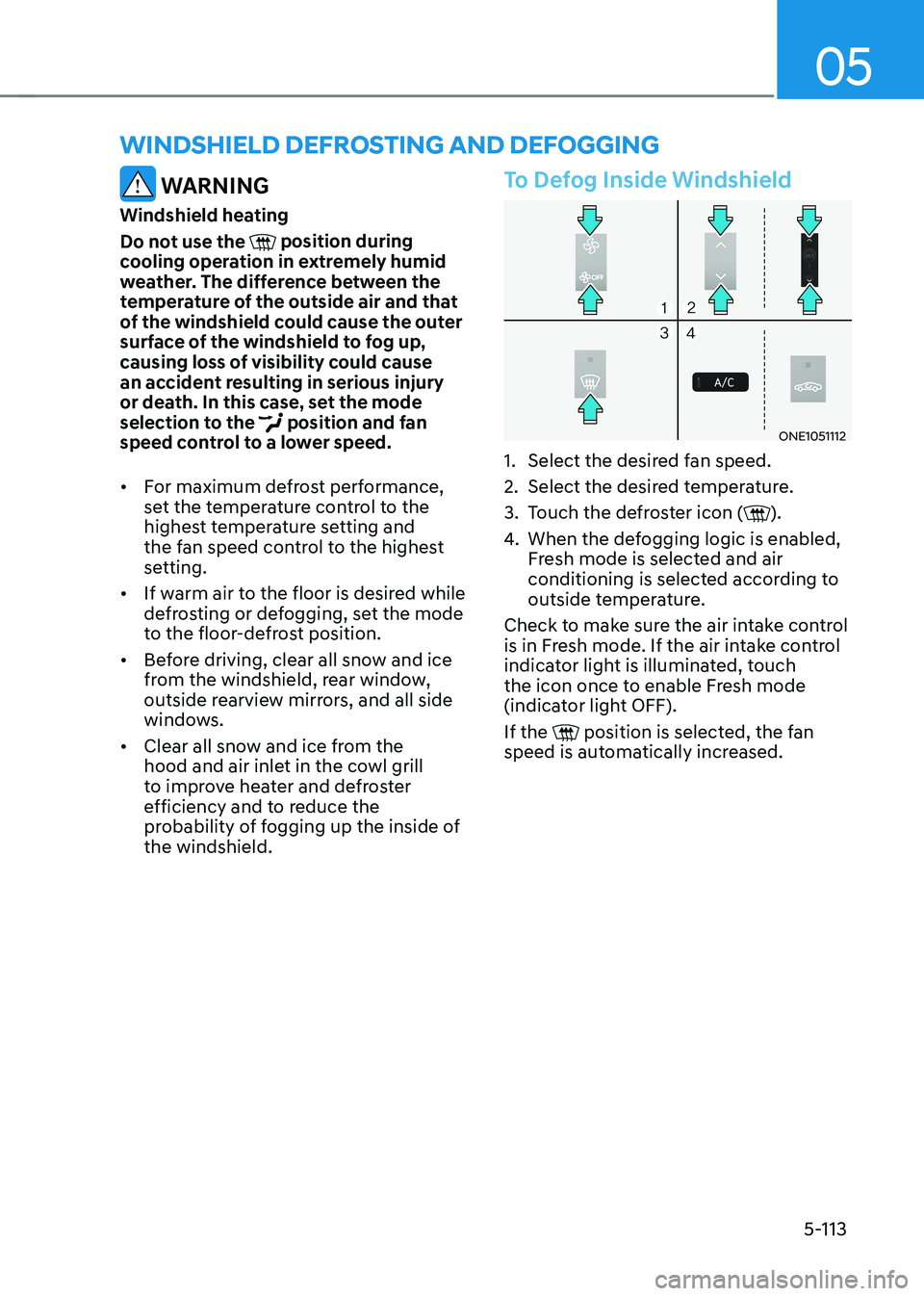
To Defog Inside Windshield
ONE1051112
1. Select the desired fan speed.
2. Select the desired temperature.
3. Touch the defroster icon (
).
4. When the defogging logic is enabled,
Fresh mode is selected and air
conditioning is selected according to
outside temperature.
Check to make sure the air intake control
is in Fresh mode. If the air intake control
indicator light is illuminated, touch
the icon once to enable Fresh mode
(indicator light OFF). If the
position is selected, the fan
speed is automatically increased.
Page 341 of 680
06
6-15
Good Driving Practices
• Never shift the gear from P (Park) or
N (Neutral) to any other position with
the accelerator pedal depressed.
• Never shift the gear into P (Park) when
the vehicle is in motion.
Be sure the vehicle is completely
stopped before you attempt to shift
into R (Reverse) or D (Drive).
• Do not shift the gear to N (Neutral)
when driving. If the gear is shifted to
N (Neutral) while driving. Doing so
may increase the risk of an accident.
Also, shift the gear back to D (Drive)
while the vehicle is moving may
severely damage the reduction gear.
• When driving uphill or downhill,
always shift to D (Drive) for driving
forward or shift to R (Reverse) for
driving backwards, and check the
gear position indicated on the cluster
or the rotary gear shift dial before
driving. Driving in the opposite
direction of the selected gear, can
lead to a dangerous situation by
shutting off the vehicle and affecting
the braking performance.
• Do not drive with your foot resting
on the brake pedal. Even light, but
consistent pedal pressure can result
in the brakes overheating, brake wear
and possibly even brake failure.
• Always apply the parking brake when
leaving the vehicle. Do not depend
on placing the shift gear in P (Park) to
keep the vehicle from moving.
• Exercise extreme caution when
driving on a slippery surface. Be
especially careful when braking,
accelerating or shifting gears. On a
slippery surface, an abrupt change
in vehicle speed can cause the drive
wheels to lose traction and may cause
loss of vehicle control resulting in an
accident. •
Optimum vehicle performance and
economy is obtained by smoothly
depressing and releasing the
accelerator.
WARNING
To reduce the risk of SERIOUS INJURY
or DEATH: • ALWAYS wear your seat belt. In a
collision, an unbelted occupant
is significantly more likely to be
seriously injured or killed than a
properly belted occupant.
• Avoid high speeds when cornering or turning.
• Do not make quick steering wheel
movements, such as sharp lane
changes or fast, sharp turns.
• The risk of rollover is greatly
increased if you lose control of your
vehicle at highway speeds.
• Loss of control often occurs if two or
more wheels drop off the roadway
and the driver over steers to reenter
the roadway.
• In the event your vehicle leaves
the roadway, do not steer sharply.
Instead, slow down before pulling
back into the travel lanes.
• HYUNDAI Vehicle recommends you
to follow all posted speed limits.
Page 368 of 680
Driving Your Vehicle
6-42
Good Braking Practices
WARNING
Whenever leaving the vehicle or
parking, always come to a complete
stop and continue to depress the brake
pedal. Shift the gear to the P (Park)
position, then apply the parking brake,
and press the Start/Stop button to the OFF position.
Vehicles parked with the parking brake
not applied or not fully engaged may
roll inadvertently and may cause injury
to the driver and others. ALWAYS apply
the parking brake before exiting the
vehicle. Be aware of wet brakes. The brakes may
get wet if the vehicle is driven through
standing water or if it is washed. Your
vehicle will not stop as quickly if the
brakes are wet. Wet brakes may cause
the vehicle to pull to one side.
To dry the brakes, apply the brakes
lightly until the braking action returns to
normal. If the braking action does not
return to normal, stop as soon as it is safe
to do so and call an authorized HYUNDAI
dealer for assistance.
DO NOT drive with your foot resting on
the brake pedal. Even light, but constant
pedal pressure can result in the brakes
overheating, brake wear, and possibly
even brake failure.
If a tire goes flat while you are driving,
apply the brakes gently and keep the
vehicle pointed straight ahead while you
slow down. When you are moving slowly
enough for it to be safe to do so, pull off
the road and stop in a safe location.
Keep your foot firmly on the brake pedal
when the vehicle is stopped to prevent
the vehicle from rolling forward.
Page 379 of 680
06
6-53
Rocking the Vehicle
If it is necessary to rock the vehicle to
free it from snow, sand, or mud, first turn
the steering wheel right and left to clear
the area around your front wheels. Then,
shift back and forth between R (Reverse)
and a forward gear.
Try to avoid spinning the wheels, and do
not race the vehicle.
To prevent reduction gear wear, wait
until the wheels stop spinning before
shifting gears. Release the accelerator
pedal while shifting, and press lightly on
the accelerator pedal while the reduction
gear is in gear. Slowly spinning the
wheels in forward and reverse directions
causes a rocking motion that may free
the vehicle.
WARNING
If the vehicle is stuck and excessive
wheel spin occurs, the temperature
in the tires can increase very quickly.
If the tires become damaged, a tire
blow out or tire explosion can occur.
This condition is dangerous - you and
others may be injured. Do not attempt
this procedure if people or objects are
anywhere near the vehicle.
If you attempt to free the vehicle, the
vehicle can overheat quickly, possibly
causing an motor compartment fire or
other damage. Try to avoid spinning the
wheels as much as possible to prevent
overheating of either the tires or the
motor. DO NOT allow the vehicle to spin
the wheels above 35 mph (56 km/h).
Hazardous Driving Conditions
When hazardous driving elements
are encountered such as water, snow,
ice, mud and sand, take the following
precautions: • Drive cautiously and maintain a longer
braking distance.
• Avoid abrupt braking or steering.
• When your vehicle is stuck in
snow, mud, or sand, use second
gear. Accelerate slowly to avoid unnecessary wheel spin.
• Put sand, rock salt, tire chains or other
non-slip materials under the wheels to
provide additional traction while the
vehicle becomes stuck in ice, snow, or mud.
WARNING
Changing the tire speed suddenly could
cause the tires to skid while driving
on slippery surface. Be careful when
driving on slippery surfaces.
Special driving conditionS