display HYUNDAI IONIQ 5 2023 Service Manual
[x] Cancel search | Manufacturer: HYUNDAI, Model Year: 2023, Model line: IONIQ 5, Model: HYUNDAI IONIQ 5 2023Pages: 680, PDF Size: 48.22 MB
Page 186 of 680
Instrument Cluster
4-28
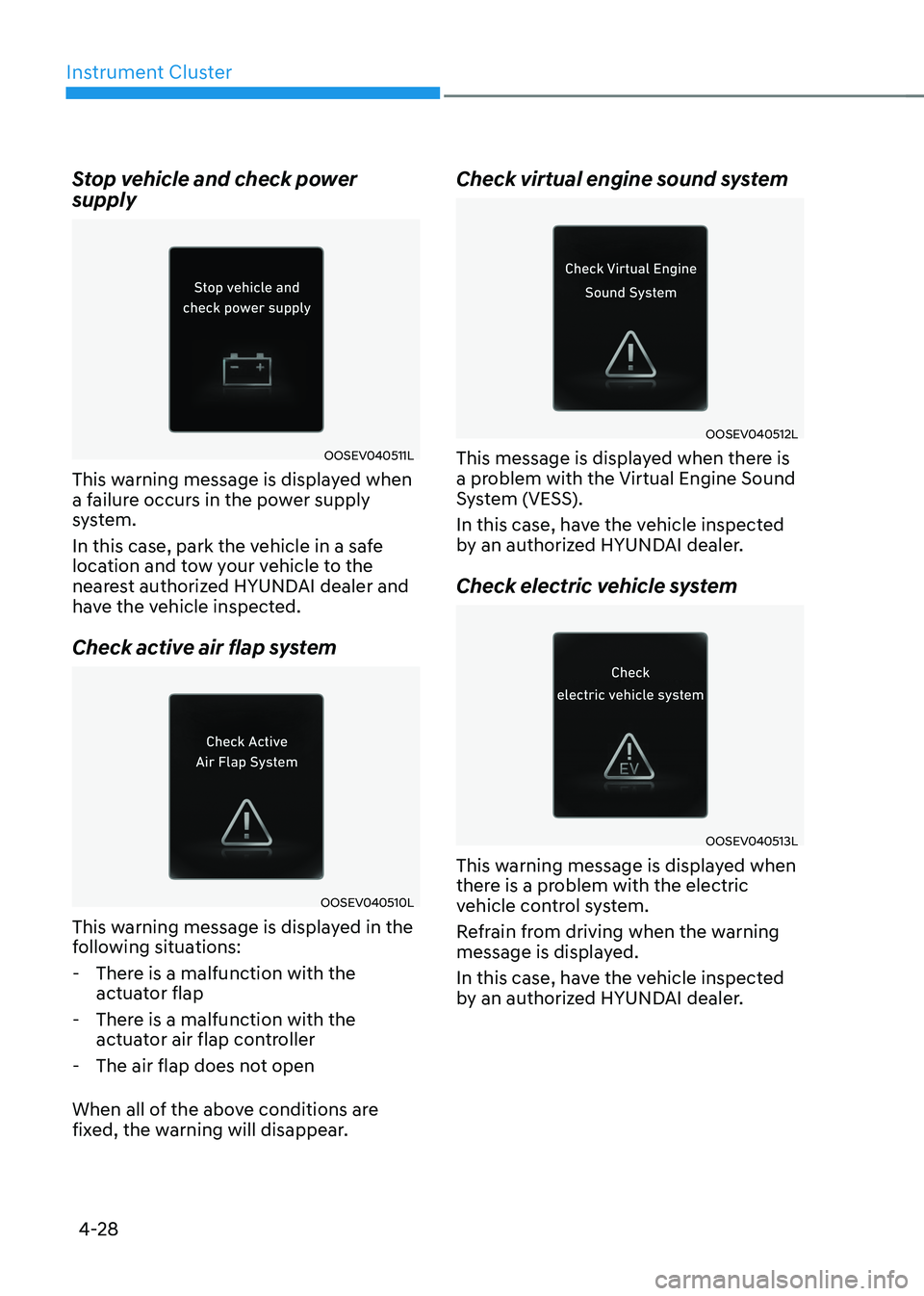
Stop vehicle and check power supply
OOSEV040511L
This warning message is displayed when
a failure occurs in the power supply
system.
In this case, park the vehicle in a safe
location and tow your vehicle to the
nearest authorized HYUNDAI dealer and
have the vehicle inspected.
Check active air flap system
OOSEV040510L
This warning message is displayed in the
following situations:
- There is a malfunction with the actuator flap
- There is a malfunction with the actuator air flap controller
- The air flap does not open
When all of the above conditions are
fixed, the warning will disappear. Check virtual engine sound system
OOSEV040512L
This message is displayed when there is
a problem with the Virtual Engine Sound
System (VESS).
In this case, have the vehicle inspected
by an authorized HYUNDAI dealer.
Check electric vehicle system
OOSEV040513L
This warning message is displayed when
there is a problem with the electric
vehicle control system.
Refrain from driving when the warning
message is displayed.
In this case, have the vehicle inspected
by an authorized HYUNDAI dealer.
Page 187 of 680
04
4-29
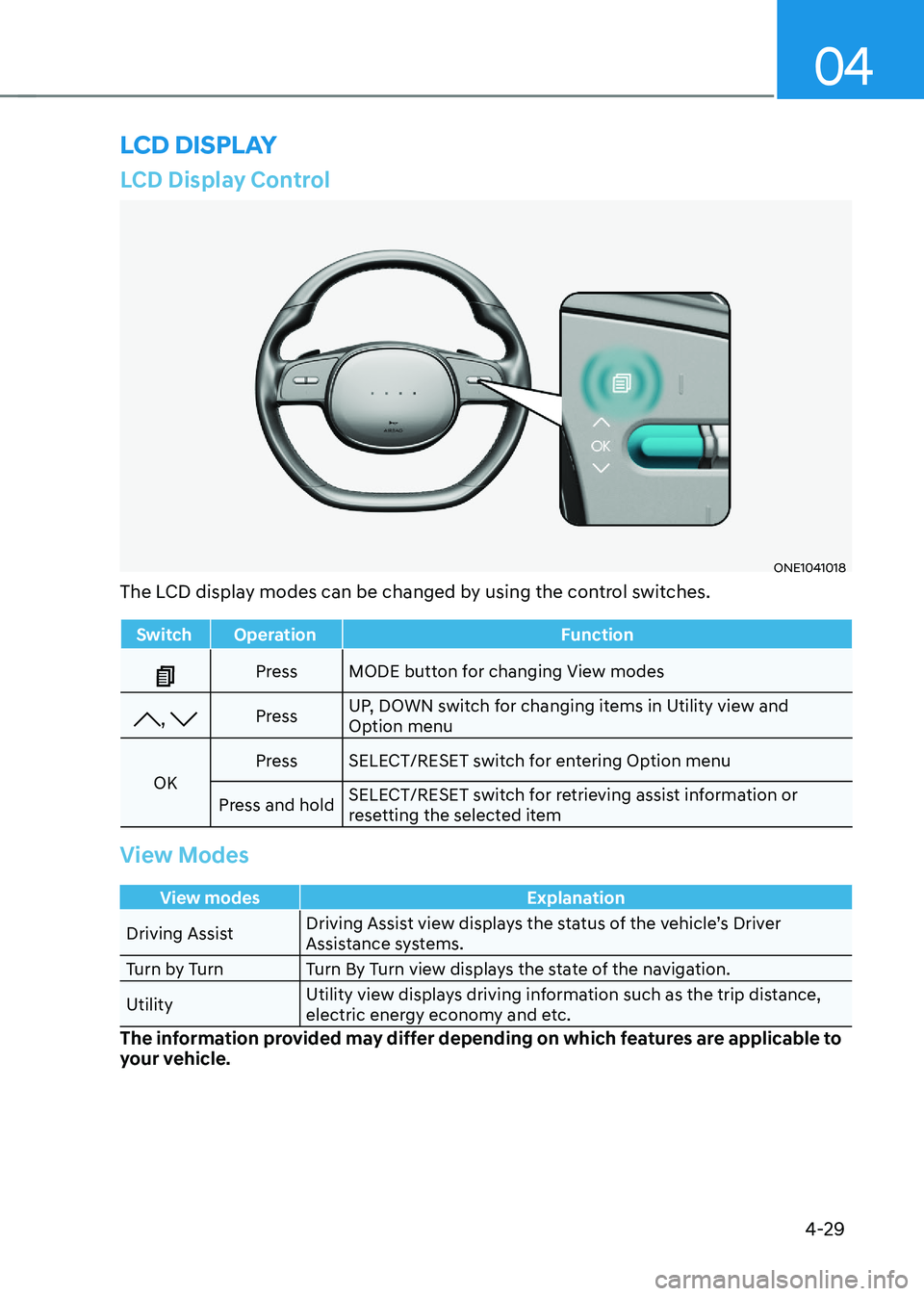
LCD Display Control
ONE1041018
The LCD display modes can be changed by using the control switches.
Switch Operation Function
Press MODE button for changing View modes
, Press UP, DOWN switch for changing items in Utility view and
Option menu
OK Press SELECT/RESET switch for entering Option menu
Press and hold SELECT/RESET switch for retrieving assist information or
resetting the selected item
View Modes
View modes Explanation
Driving Assist Driving Assist view displays the status of the vehicle’s Driver
Assistance systems.
Turn by Turn Turn By Turn view displays the state of the navigation. Utility Utility view displays driving information such as the trip distance,
electric energy economy and etc.
The information provided may differ depending on which features are applicable to
your vehicle.
lcD DIsplay
Page 188 of 680
Instrument Cluster
4-30
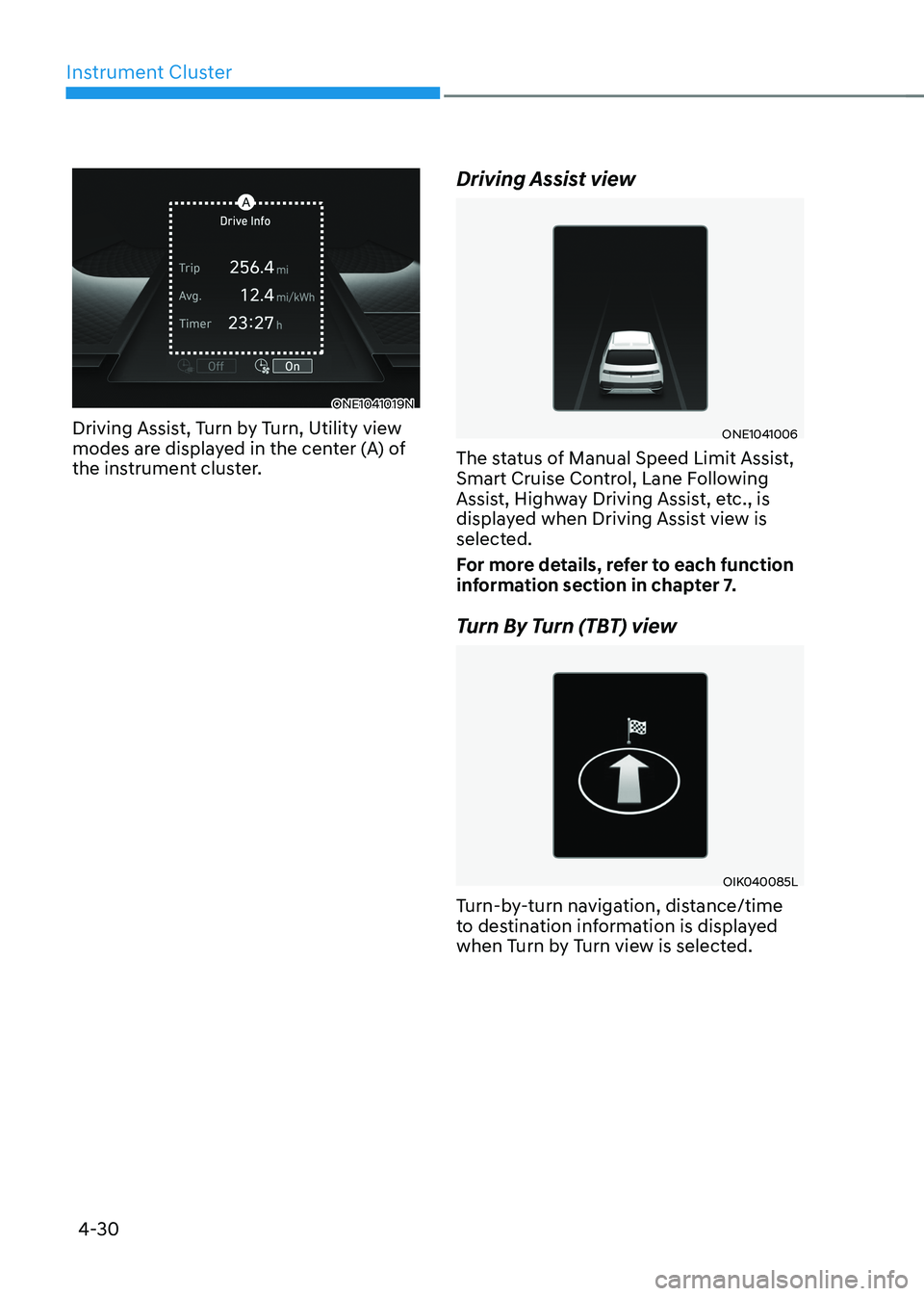
ONE1041019N
Driving Assist, Turn by Turn, Utility view
modes are displayed in the center (A) of
the instrument cluster. Driving Assist view
ONE1041006
The status of Manual Speed Limit Assist,
Smart Cruise Control, Lane Following
Assist, Highway Driving Assist, etc., is
displayed when Driving Assist view is
selected.
For more details, refer to each function
information section in chapter 7.
Turn By Turn (TBT) view
OIK040085L
Turn-by-turn navigation, distance/time
to destination information is displayed
when Turn by Turn view is selected.
Page 189 of 680
04
4-31
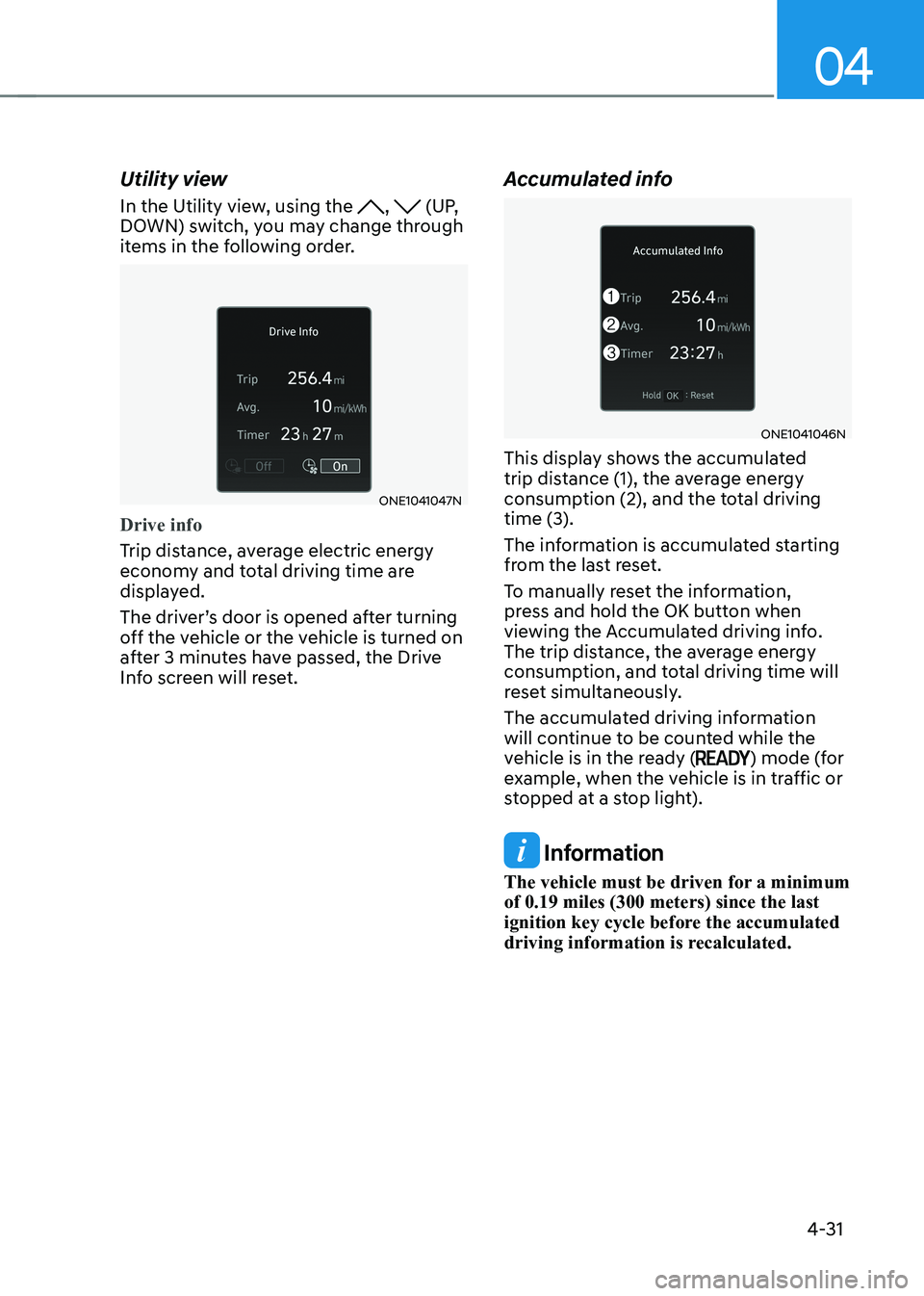
Utility view
In the Utility view, using the
, (UP,
DOWN) switch, you may change through
items in the following order.
ONE1041047N
Drive info
Trip distance, average electric energy
economy and total driving time are
displayed.
The driver’s door is opened after turning
off the vehicle or the vehicle is turned on
after 3 minutes have passed, the Drive
Info screen will reset. Accumulated info
ONE1041046N
This display shows the accumulated
trip distance (1), the average energy
consumption (2), and the total driving
time (3).
The information is accumulated starting
from the last reset.
To manually reset the information,
press and hold the OK button when
viewing the Accumulated driving info.
The trip distance, the average energy
consumption, and total driving time will
reset simultaneously.
The accumulated driving information
will continue to be counted while the
vehicle is in the ready (
) mode (for
example, when the vehicle is in traffic or
stopped at a stop light).
Information
The vehicle must be driven for a minimum of 0.19 miles (300 meters) since the last
ignition key cycle before the accumulated
driving information is recalculated.
Page 190 of 680
Instrument Cluster
4-32
ONE1041052L
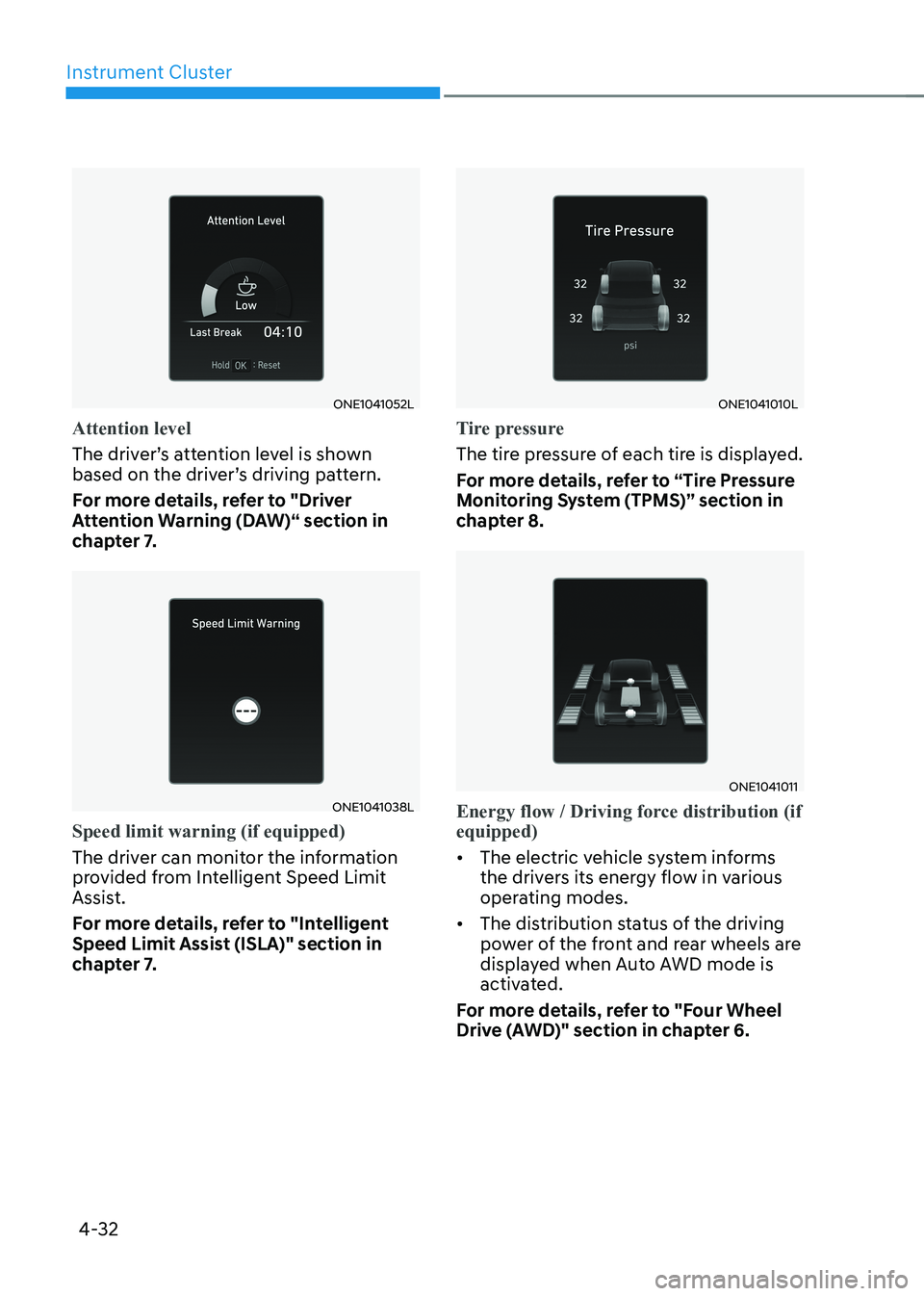
Attention level
The driver’s attention level is shown
based on the driver’s driving pattern.
For more details, refer to "Driver
Attention Warning (DAW)“ section in
chapter 7.
ONE1041038L
Speed limit warning (if equipped)
The driver can monitor the information
provided from Intelligent Speed Limit
Assist.
For more details, refer to "Intelligent
Speed Limit Assist (ISLA)" section in
chapter 7.
ONE1041010L
Tire pressure
The tire pressure of each tire is displayed.
For more details, refer to “Tire Pressure
Monitoring System (TPMS)” section in
chapter 8.
ONE1041011
Energy flow / Driving force distribution (if equipped)
• The electric vehicle system informs
the drivers its energy flow in various
operating modes.
• The distribution status of the driving
power of the front and rear wheels are
displayed when Auto AWD mode is
activated.
For more details, refer to "Four Wheel
Drive (AWD)" section in chapter 6.
Page 191 of 680
04
4-33
Additional information display
„„Type A
ONE1041047N
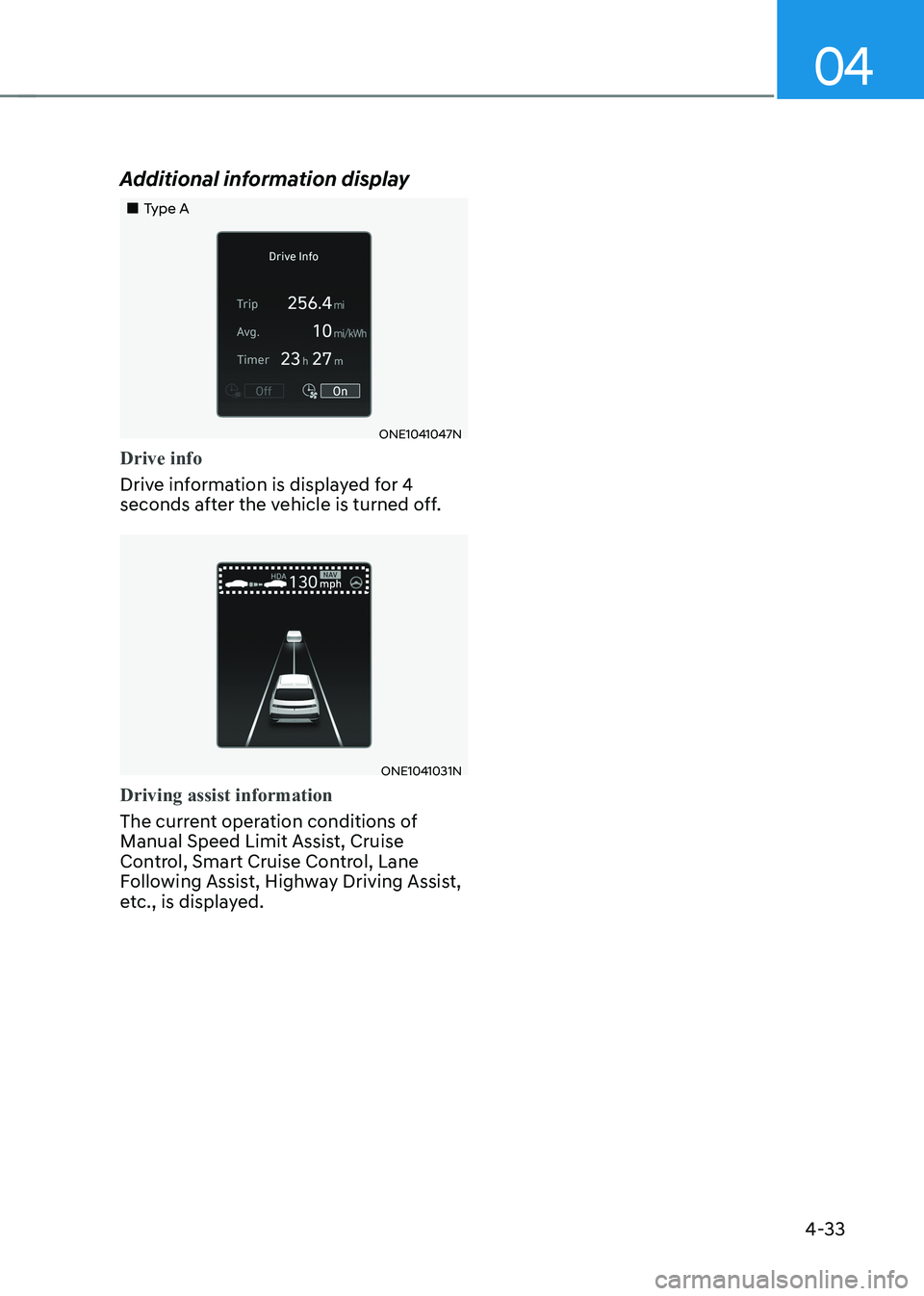
Drive info
Drive information is displayed for 4
seconds after the vehicle is turned off.
ONE1041031N
Driving assist information
The current operation conditions of
Manual Speed Limit Assist, Cruise
Control, Smart Cruise Control, Lane
Following Assist, Highway Driving Assist,
etc., is displayed.
Page 192 of 680
Instrument Cluster
4-34
Vehicle settings (infotainment system)
Vehicle Settings in the infotainment
system provides user options for a
variety of settings including door lock/
unlock features, convenience features,
driver assistance settings, etc.
Vehicle Settings menu - Driver Assistance
- Drive Mode
- EV
- Head-Up Display
- Cluster
- Climate
- Seat
- Lights
- Door
- Convenience
The information provided may differ
depending on which features are
applicable to your vehicle.
WARNING
Do not operate the Vehicle Settings
while driving. This may cause
distraction resulting in an accident.
Setting Your Vehicle
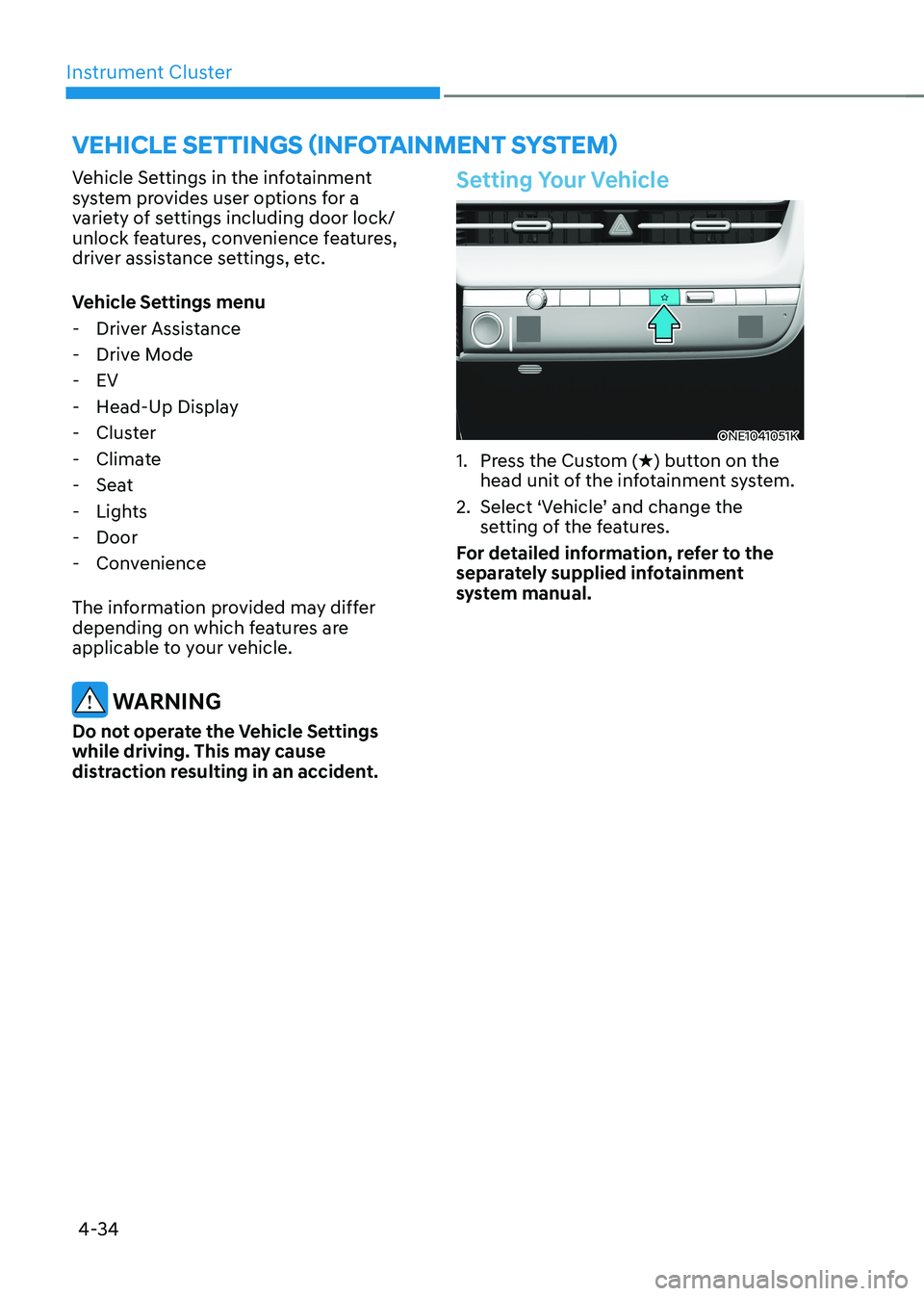
ONE1041051K
1. Press the Custom ( H) button on the
head unit of the infotainment system.
2. Select ‘Vehicle’ and change the setting of the features.
For detailed information, refer to the
separately supplied infotainment
system manual.
Page 194 of 680
5
Exterior Features ............................................................................................. 5-70
Hood ............................................................................................................................ 5-70
Front trunk ................................................................................................................... 5-71
Power Liftgate ............................................................................................................ 5-72
Smart Liftgate ............................................................................................................. 5-78
Electric Charging Door .................................................................................... 5-81
Augmented Reality HUD ................................................................................ 5-82
Head-up display Settings .......................................................................................... 5-82
Head-up display Information .................................................................................... 5-83
Precautions while Using the Head-up display ........................................................5-84
Lighting ............................................................................................................ 5-85
Exterior Lights ............................................................................................................ 5-85
Interior Lights ............................................................................................................ 5-89
High Beam Assist (HBA) ................................................................................ 5-93
High Beam Assist Settings ......................................................................................... 5-93
High Beam Assist Operation ..................................................................................... 5-94
High Beam Assist Malfunction and Limitations .......................................................5-95
Wipers and Washers ....................................................................................... 5-96
Front Windshield Wipers .......................................................................................... 5-96
Front Windshield Washers ........................................................................................ 5-98
Automatic Climate Control System ............................................................... 5-99
Climate ...................................................................................................................... 5-100
Automatic Temperature Control Mode ................................................................... 5-100
Manual Temperature Control Mode ........................................................................ 5-102
System Operation ...................................................................................................... 5-110
System Maintenance ................................................................................................. 5-111
Windshield Defrosting and Defogging ..........................................................5-113
To Defog Inside Windshield ...................................................................................... 5-113
To Defrost Outside Windshield ................................................................................. 5-114
Defogging Logic ........................................................................................................ 5-114
Rear Window Defroster............................................................................................. 5-115
Climate Control Additional Features ............................................................. 5-116
Auto Defogging System ............................................................................................ 5-116
Auto Dehumidify ....................................................................................................... 5-117
Recirculating Air When Washer Fluid Is Used .........................................................5-118
Auto. Controls That Use Climate Control Settings (for driver’s seat) ....................5-118
Smart ventilation ....................................................................................................... 5-118
Page 200 of 680
Convenience Features
5-8
When you set the Two Press Unlock function
1. Make sure you have the smart key in your possession.
2. Touch the touch sensor on the door handle(engraved part) or press the
Door Unlock button (2) on the smart
key. The driver’s door handle will
pop out and the driver’s door will be
unlocked.
3. Touch the touch sensor on the door handle(engraved part) or press the
Door Unlock button (2) on the smart
key within 4 seconds again. All door
handles will pop out and the doors will
be unlocked and the hazard warning
lights will blink twice and the chime will sound.
4. After unlocking the doors, the doors
will automatically re-lock after 30 seconds unless a door is opened. Two Press Unlock Feature
The priority for unlocking the driver door
only, or unlocking all the doors with
one press may be adjusted in the User
Settings menu in the LCD cluster display.
The Two Press Unlock feature, when
enabled, will require the user to press
the door unlock button once for driver
door only and twice for unlocking all the
doors.
Select or Deselect the Two Press Unlock
Feature in the User Settings menu in the
LCD cluster display. The option can be
found under the following menu:
USER SETTINGS → DOOR →TWO PRESS
UNLOCK
The Two Press Unlock Feature can also
be enabled or disabled by pressing
the door lock and unlock buttons
simultaneously on the Key FOB:
Press and hold both the DOOR LOCK
button and the DOOR UNLOCK button
simultaneously until the hazard warning
lights blink.
This will enable or disable the Two Press
Unlock feature. Repeat this procedure to enable/disable the mode again.
Page 213 of 680
05
5-21
Remote Start with Digital Key •
When the shift button of your vehicle
is in P (Park) and all of the doors
including trunk and hood is locked
and the vehicle is off, press the Door
Lock button in the Hyundai Digital
Key app then press the Remote Start
button within 4 seconds.
You can confirm the engine is on if the
hazard warning lights blinks two times and the chime sounds.
• If you want to turn off the engine,
press Remote Engine Stop. Air
Conditioner / Heating system
maintains the same status as when
you last used the vehicle.
• Unless you put the registered digital
key(smartphone) on the interior
authentication pad (wireless charger)
when the remote start function is on,
the engine will turn off.
• If you do not get on the vehicle within
10 minutes after the engine turns on,
the vehicle will turn off.
For more information, refer to the Engine
Start/Stop button in chapter 6.
Vehicle information Display
The digital key application displays
the vehicle information such as
driving or door conditions through the
communication with the vehicle. • How to check : Select the vehicle
what you want to check and touch
the vehicle image, then vehicle
information display page will be
shown.
• Contents : accumulated odometer,
latest fuel economy, driving range,
fuel remaining, tire pressure, doors
lock/unlock status and last data
updated time.
à Displayed vehicle date could be
differed from the current vehicle condition.
à For more information, please refer to
the ‘Tutorial’ on your Digital key app.
Smartphone change/App deletion
If you change your smartphone or delete
the Hyundai Digital Key App, please refer
to the following to set up your Digital
Key:
Smartphone Change/ Reset
If you change or reset the smartphone,
the registered digital key in your previous
smartphone may not be used. Please
refer to following procedure to use the
digital key.
1. Install the digital key application and
log in.
2. If you are the owner, retry the Digital key save process.
3. If you are the sharer, need to re-share the key from owner.
App delete & reinstall/ Delete App data
You can re-download the digital key
from server in these cases as follow
procedure.
1. Reinstall the application and log in.
2. Input the PIN number for user verification.
3. If PIN is correct, digital key data will be re-downloaded to your
smartphone and you can use it
without any further registration or sharing.
Smartphone operability with Digital Key
The digital key application may not
be available to old type smartphones.
Please check the available smartphone
models with your dealer. NFC antenna position on the smartphone can be
confirmed on each smartphone’s manual
or contact to customer service center of
the smartphone manufacture.