warning light HYUNDAI IONIQ 5 2023 Workshop Manual
[x] Cancel search | Manufacturer: HYUNDAI, Model Year: 2023, Model line: IONIQ 5, Model: HYUNDAI IONIQ 5 2023Pages: 680, PDF Size: 48.22 MB
Page 222 of 680
Convenience Features
5-30
Door locKs
Operating Door Unlocks from
Outside the Vehicle (Manual
type)
Smart key
ONE1051004L
ONE1051010L
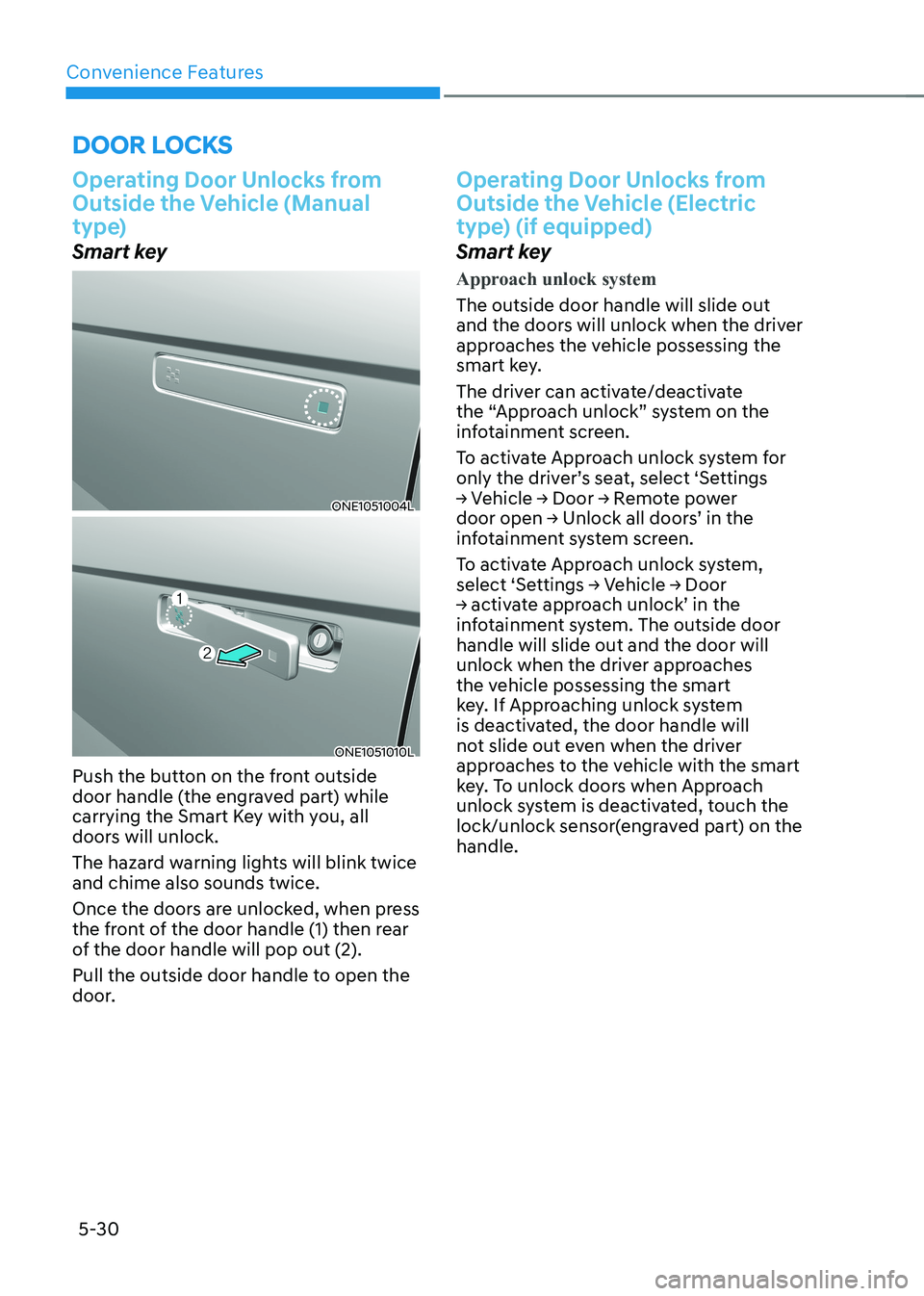
Push the button on the front outside
door handle (the engraved part) while
carrying the Smart Key with you, all
doors will unlock.
The hazard warning lights will blink twice and chime also sounds twice.
Once the doors are unlocked, when press
the front of the door handle (1) then rear
of the door handle will pop out (2).
Pull the outside door handle to open the
door.
Operating Door Unlocks from
Outside the Vehicle (Electric
type) (if equipped)
Smart key
Approach unlock system
The outside door handle will slide out
and the doors will unlock when the driver
approaches the vehicle possessing the
smart key.
The driver can activate/deactivate
the “Approach unlock” system on the
infotainment screen.
To activate Approach unlock system for
only the driver’s seat, select ‘Settings
→ Vehicle → Door → Remote power
door open → Unlock all doors’ in the
infotainment system screen.
To activate Approach unlock system,
select ‘Settings → Vehicle → Door
→ activate approach unlock’ in the
infotainment system. The outside door handle will slide out and the door will
unlock when the driver approaches
the vehicle possessing the smart
key. If Approaching unlock system
is deactivated, the door handle will
not slide out even when the driver
approaches to the vehicle with the smart
key. To unlock doors when Approach
unlock system is deactivated, touch the
lock/unlock sensor(engraved part) on the handle.
Page 224 of 680
Convenience Features
5-32
Operating Door Locks from
Outside the Vehicle (Manual
type)
Smart key
ONE1051004L
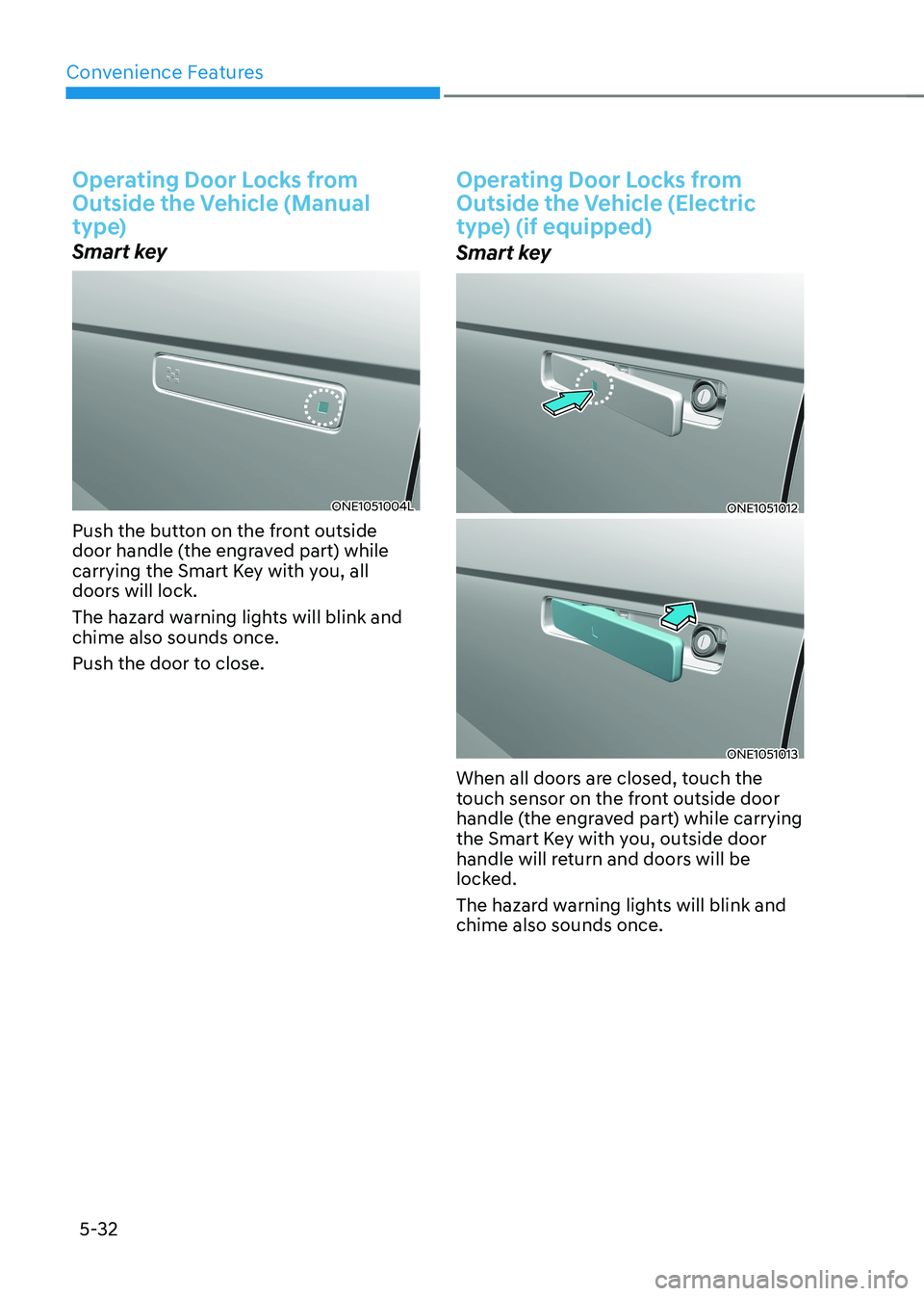
Push the button on the front outside
door handle (the engraved part) while
carrying the Smart Key with you, all
doors will lock.
The hazard warning lights will blink and chime also sounds once.
Push the door to close.
Operating Door Locks from
Outside the Vehicle (Electric
type) (if equipped)
Smart key
ONE1051012
ONE1051013
When all doors are closed, touch the
touch sensor on the front outside door
handle (the engraved part) while carrying
the Smart Key with you, outside door
handle will return and doors will be
locked.
The hazard warning lights will blink and chime also sounds once.
Page 229 of 680
05
5-37
Electronic Child Safety Lock
ONE1051020
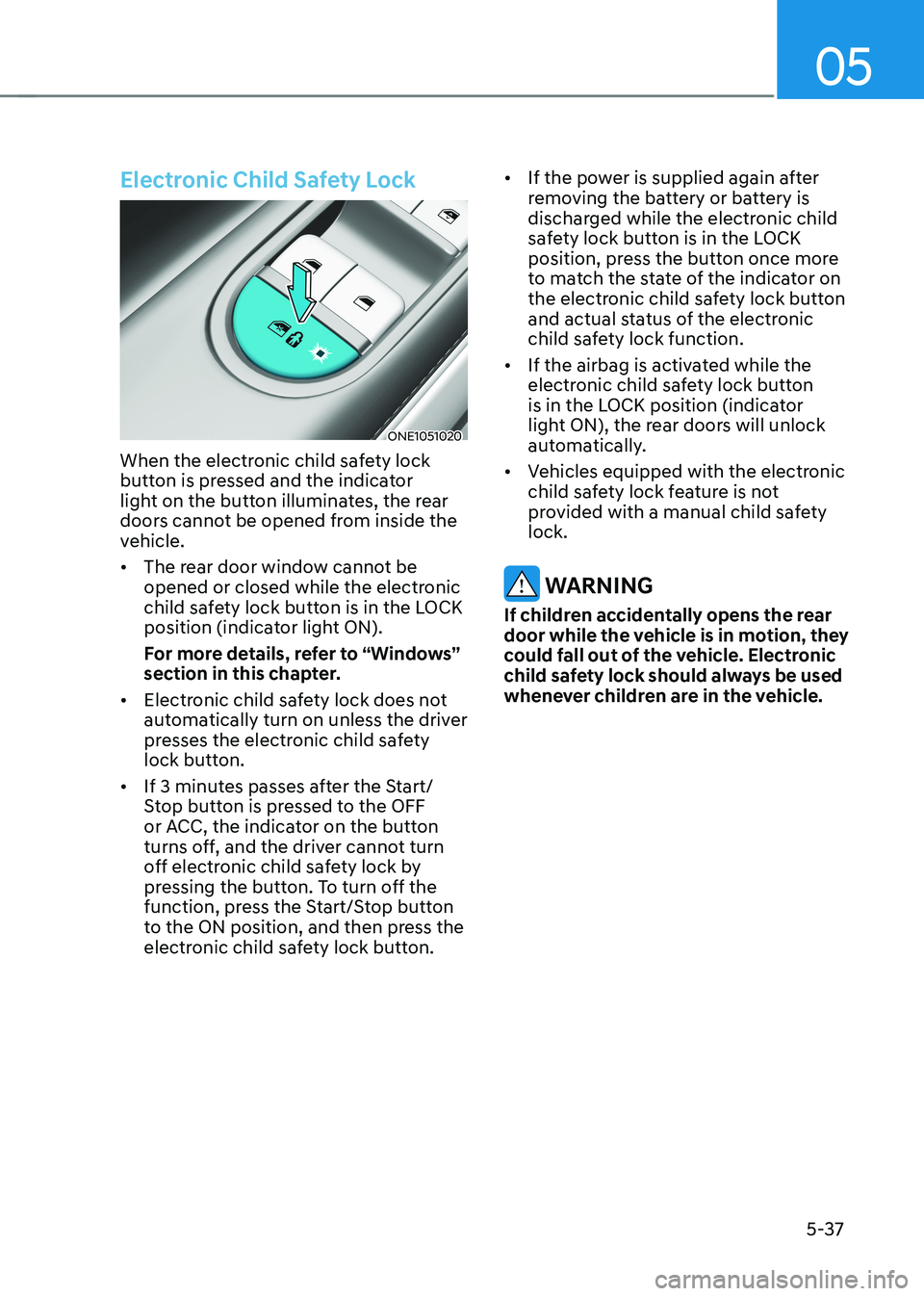
When the electronic child safety lock
button is pressed and the indicator
light on the button illuminates, the rear
doors cannot be opened from inside the
vehicle. • The rear door window cannot be
opened or closed while the electronic
child safety lock button is in the LOCK
position (indicator light ON).
For more details, refer to “Windows”
section in this chapter.
• Electronic child safety lock does not
automatically turn on unless the driver
presses the electronic child safety
lock button.
• If 3 minutes passes after the Start/
Stop button is pressed to the OFF
or ACC, the indicator on the button
turns off, and the driver cannot turn
off electronic child safety lock by
pressing the button. To turn off the
function, press the Start/Stop button
to the ON position, and then press the
electronic child safety lock button. •
If the power is supplied again after
removing the battery or battery is
discharged while the electronic child
safety lock button is in the LOCK
position, press the button once more
to match the state of the indicator on
the electronic child safety lock button
and actual status of the electronic
child safety lock function.
• If the airbag is activated while the
electronic child safety lock button
is in the LOCK position (indicator
light ON), the rear doors will unlock
automatically.
• Vehicles equipped with the electronic
child safety lock feature is not
provided with a manual child safety lock.
WARNING
If children accidentally opens the rear
door while the vehicle is in motion, they
could fall out of the vehicle. Electronic
child safety lock should always be used
whenever children are in the vehicle.
Page 231 of 680
05
5-39
This system helps to protect your vehicle
and valuables. The horn will sound and
the hazard warning lights will blink
continuously if any of the following occur:
- A door is opened without using the smart key.
- The liftgate is opened without using the smart key.
- The vehicle hood is opened.
The alarm continues for 30 seconds, then
the system resets. To turn off the alarm,
unlock the doors with the smart key.
The Theft Alarm System automatically
sets 30 seconds after you lock the
doors and the liftgate. For the system to
activate, you must lock the doors and
the liftgate from outside the vehicle with
the smart key or by touching the touch
sensor or pressing the button on the
outside door handle with the smart key
in your possession.
The hazard warning lights will blink and
the chime will sound once to indicate the
system is armed.
Once the security system is set, opening
any door, the liftgate, or the hood
without using the smart key will cause
the alarm to activate.
The Theft Alarm System will not set if the
hood, the liftgate, or any door is not fully
closed. If the system will not set, check
the hood, the liftgate, or the doors are fully closed.
Do not attempt to alter this system or
add other devices to it.
Information
• Do not lock the doors until all passengers have left the vehicle. If the
remaining passenger leaves the vehicle when the system is armed, the alarm will be activated.
• If the vehicle is not disarmed with the
smart key, open the doors by using the mechanical key and start the vehicle by
directly pressing the Start/Stop button
with the smart key.
• If the system is disarmed by unlocking
the vehicle, but neither a door or the liftgate is opened within 30 seconds, the
doors will relock and the system will
rearm automatically.
ThefT-alarm sysTem
Page 236 of 680
Convenience Features
5-44
steering wheel
Electric Power Steering (EPS)
The system assists you with steering the
vehicle. If the vehicle is turned off or
if the power steering system becomes
inoperative, you may still steer the
vehicle, but it will require increased
steering effort.
Should you notice any change in the
effort required to steer during normal
vehicle operation, have the system
checked by an authorized HYUNDAI
dealer.
CAUTION
If Electric Power Steering does not
operate normally, the
warning light
and the message ‘Check motor driven
power steering’ will illuminate on the
instrument cluster. You may steer the
vehicle, but it will require increased
steering efforts. Take the vehicle to an
authorized HYUNDAI dealer and have
the system checked as soon as possible.
Information
The following symptoms may occur during normal vehicle operation: • The steering effort may be high
immediately after pressing the Start/Stop button to the ON position. This happens as the system performs
the EPS system diagnostics. When the
diagnostics are completed, the steering
wheel effort will return to its normal condition.
• When the battery voltage is low, you
might have to put more steering effort.
However, it is a temporary condition so
that it will return to normal condition
after charging the battery.
• A click noise may be heard from the
EPS relay after the Start/Stop button is
in the ON or OFF position.
• Motor noise may be heard when the
vehicle is at a stop or at a low driving speed.
• When you operate the steering wheel
in low temperatures, abnormal noise
may occur. If the temperature rises, the
noise will disappear. This is a normal condition.
• When an error is detected from EPS, the steering effort assist function will
not be activated in order to prevent
fatal accidents. Instrument cluster
warning lights may be on or the steering effort may be high. If these
symptoms occur, drive the vehicle to
a safe area as soon as it is safe to do so. Have the system checked by an
authorized HYUNDAI dealer as soon as possible.
Page 237 of 680
05
5-45
Tilt/Telescopic Steering
When adjusting the steering wheel to a
comfortable position, adjust the steering
wheel so that it points toward your chest,
not toward your face. Make sure you can
see the instrument cluster warning lights
and gauges. After adjusting, push the
steering wheel both up and down to be
certain it is locked in position.
Always adjust the position of the steering
wheel before driving.
WARNING
NEVER adjust the steering wheel while
driving. This may cause loss of vehicle
control resulting in an accident.
NOTICE
While adjusting the steering wheel
height, please do not push or pull it
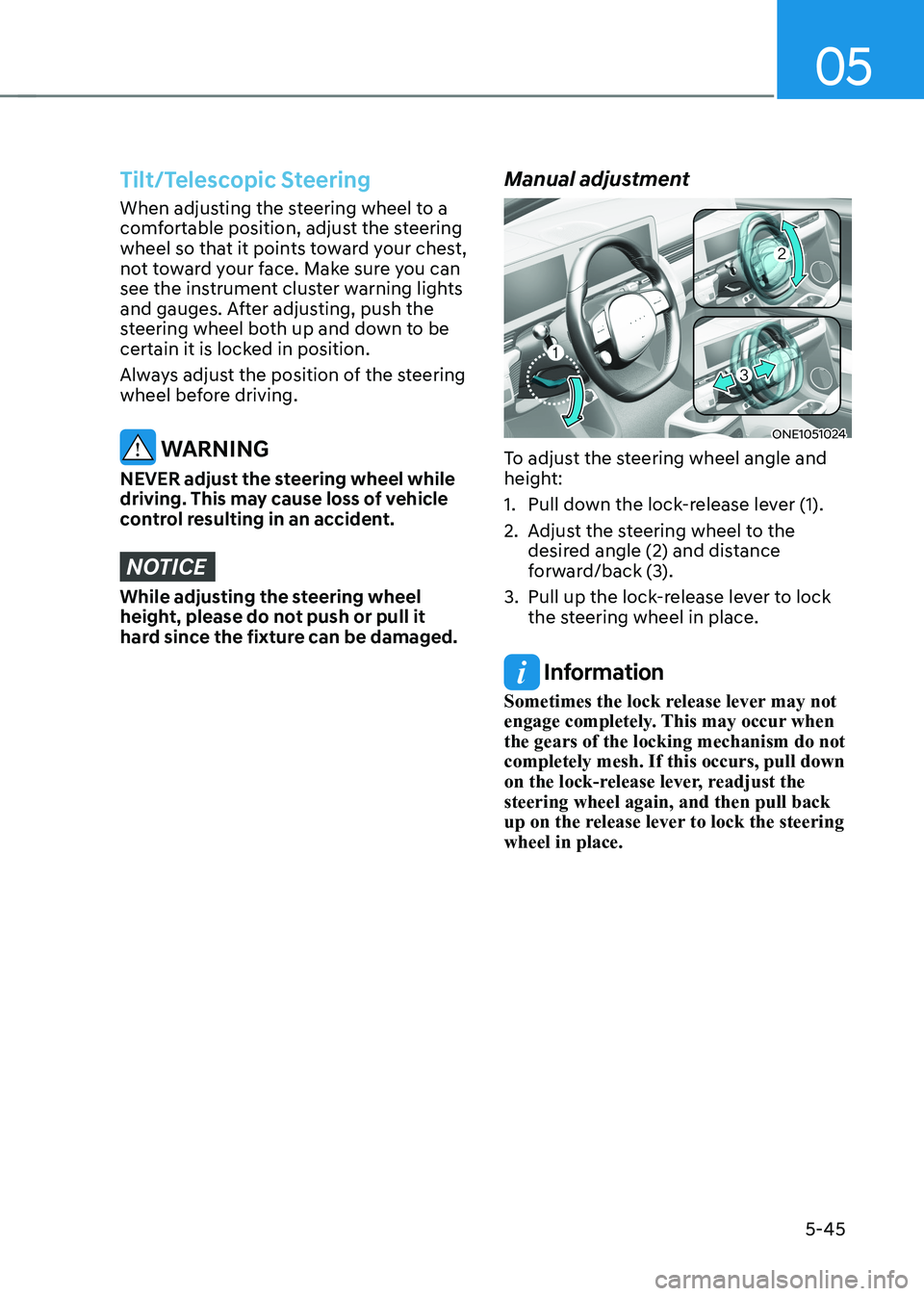
hard since the fixture can be damaged. Manual adjustment
ONE1051024
To adjust the steering wheel angle and
height:
1. Pull down the lock-release lever (1).
2. Adjust the steering wheel to the desired angle (2) and distance
forward/back (3).
3. Pull up the lock-release lever to lock the steering wheel in place.
Information
Sometimes the lock release lever may not
engage completely. This may occur when the gears of the locking mechanism do not completely mesh. If this occurs, pull down
on the lock-release lever, readjust the steering wheel again, and then pull back
up on the release lever to lock the steering wheel in place.
Page 242 of 680
Convenience Features
5-50
Automatic-Dimming Night Vision Safety™ (NVS®
) Mirror (if equipped)
The NVS® Mirror automatically reduces
glare by monitoring light levels in the
front and the rear of the vehicle. Any
object that obstructs either light sensor
will degrade the automatic dimming
control feature.
For more information regarding NVS®
mirrors and other applications, please
refer to the Gentex website:
www.gentex.com
Your mirror will automatically dim
upon detecting glare from the vehicles
traveling behind you.
The mirror defaults to the ON position
each time the vehicle is started.
Integrated HomeLink ®
Wireless Control
System
The HomeLink® Wireless Control System
provides a convenient way to replace
up to three hand held radio-frequency
transmitters used to activate compatible
devices such as gate operators, garage
door openers, entry door locks, security
systems, and home lighting.
NOTICE
HomeLink® operates while the ignition
switch is in the ACC or ON position
for safety reasons. It is to prevent
unintentional security problems from
happening when the vehicle is parked
outside the garage.
WARNING
Before programming HomeLink® to a
garage door opener or gate operator,
make sure people and objects are out
of the way of the device to prevent
potential harm or damage. Do not
use the HomeLink® with any garage
door opener that lacks the safety
stop and reverse features required
by U.S. federal safety standards (this
includes any garage door opener model
manufactured before April 1, 1982).
A garage door that cannot detect an
object - signaling the door to stop and
reverse - does not meet current U.S.
federal safety standards. Using a garage
door opener without these features
increases the risk of serious injury or
death.
For more information, contact
HomeLink® at www.homelink.com, or
call Home-Link customer support at
1-800-355-3515.
It is also recommended that a new
battery be replaced in the handheld
transmitter of the device being trained
to HomeLink® for quicker training and
accurate transmission of the radio
frequency.
Page 259 of 680
05
5-67
ONE1051036
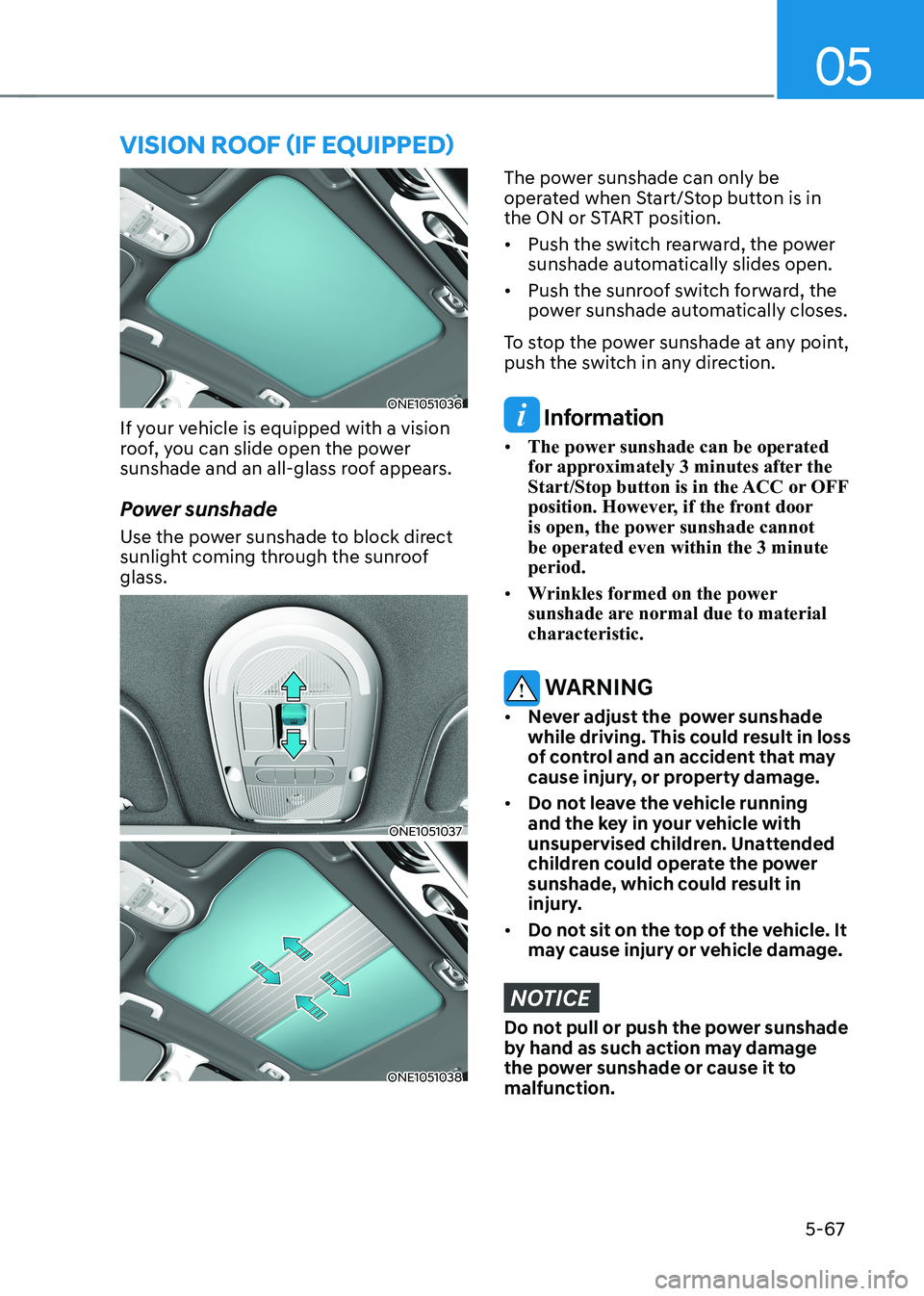
If your vehicle is equipped with a vision
roof, you can slide open the power
sunshade and an all-glass roof appears.
Power sunshade
Use the power sunshade to block direct
sunlight coming through the sunroof glass.
ONE1051037
ONE1051038
The power sunshade can only be
operated when Start/Stop button is in
the ON or START position. • Push the switch rearward, the power
sunshade automatically slides open.
• Push the sunroof switch forward, the
power sunshade automatically closes.
To stop the power sunshade at any point,
push the switch in any direction.
Information
• The power sunshade can be operated
for approximately 3 minutes after the
Start/Stop button is in the ACC or OFF
position. However, if the front door
is open, the power sunshade cannot be operated even within the 3 minute period.
• Wrinkles formed on the power
sunshade are normal due to material characteristic.
WARNING
• Never adjust the power sunshade
while driving. This could result in loss
of control and an accident that may
cause injury, or property damage.
• Do not leave the vehicle running
and the key in your vehicle with
unsupervised children. Unattended
children could operate the power
sunshade, which could result in
injury.
• Do not sit on the top of the vehicle. It
may cause injury or vehicle damage.
NOTICE
Do not pull or push the power sunshade
by hand as such action may damage
the power sunshade or cause it to malfunction.
VIsIon roof (If eQUIPPed)
Page 262 of 680
Convenience Features
5-70
exterior feAtures
Hood
Opening the hood
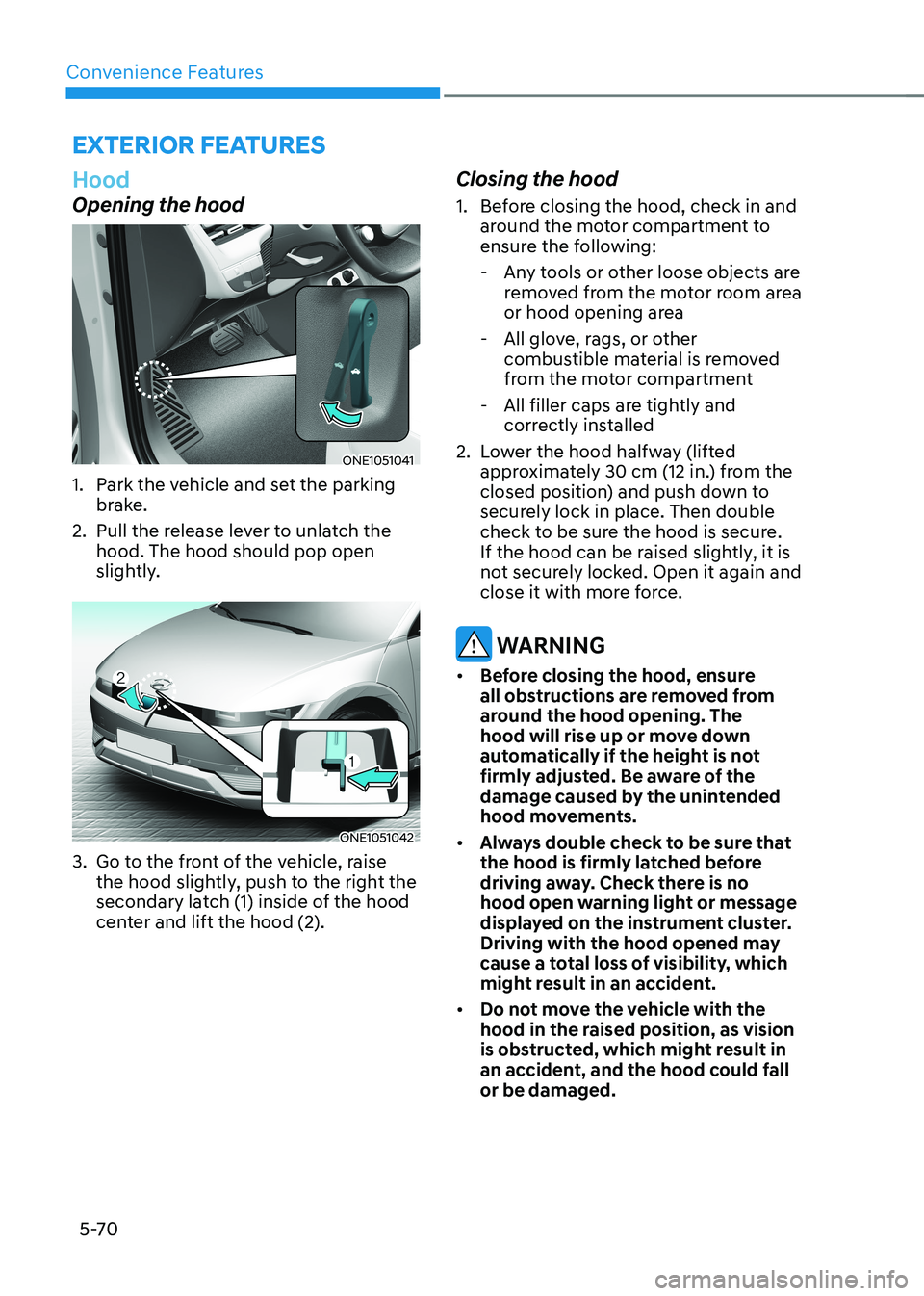
ONE1051041
1. Park the vehicle and set the parking brake.
2. Pull the release lever to unlatch the hood. The hood should pop open
slightly.
ONE1051042
3. Go to the front of the vehicle, raise the hood slightly, push to the right the
secondary latch (1) inside of the hood
center and lift the hood (2). Closing the hood
1. Before closing the hood, check in and
around the motor compartment to
ensure the following:
- Any tools or other loose objects are removed from the motor room area
or hood opening area
- All glove, rags, or other combustible material is removed
from the motor compartment
- All filler caps are tightly and correctly installed
2. Lower the hood halfway (lifted approximately 30 cm (12 in.) from the
closed position) and push down to
securely lock in place. Then double
check to be sure the hood is secure.
If the hood can be raised slightly, it is
not securely locked. Open it again and
close it with more force.
WARNING
• Before closing the hood, ensure
all obstructions are removed from
around the hood opening. The
hood will rise up or move down
automatically if the height is not
firmly adjusted. Be aware of the
damage caused by the unintended
hood movements.
• Always double check to be sure that
the hood is firmly latched before
driving away. Check there is no
hood open warning light or message
displayed on the instrument cluster.
Driving with the hood opened may
cause a total loss of visibility, which
might result in an accident.
• Do not move the vehicle with the
hood in the raised position, as vision
is obstructed, which might result in
an accident, and the hood could fall or be damaged.
Page 263 of 680
05
5-71
Front trunk
Opening the Front Trunk
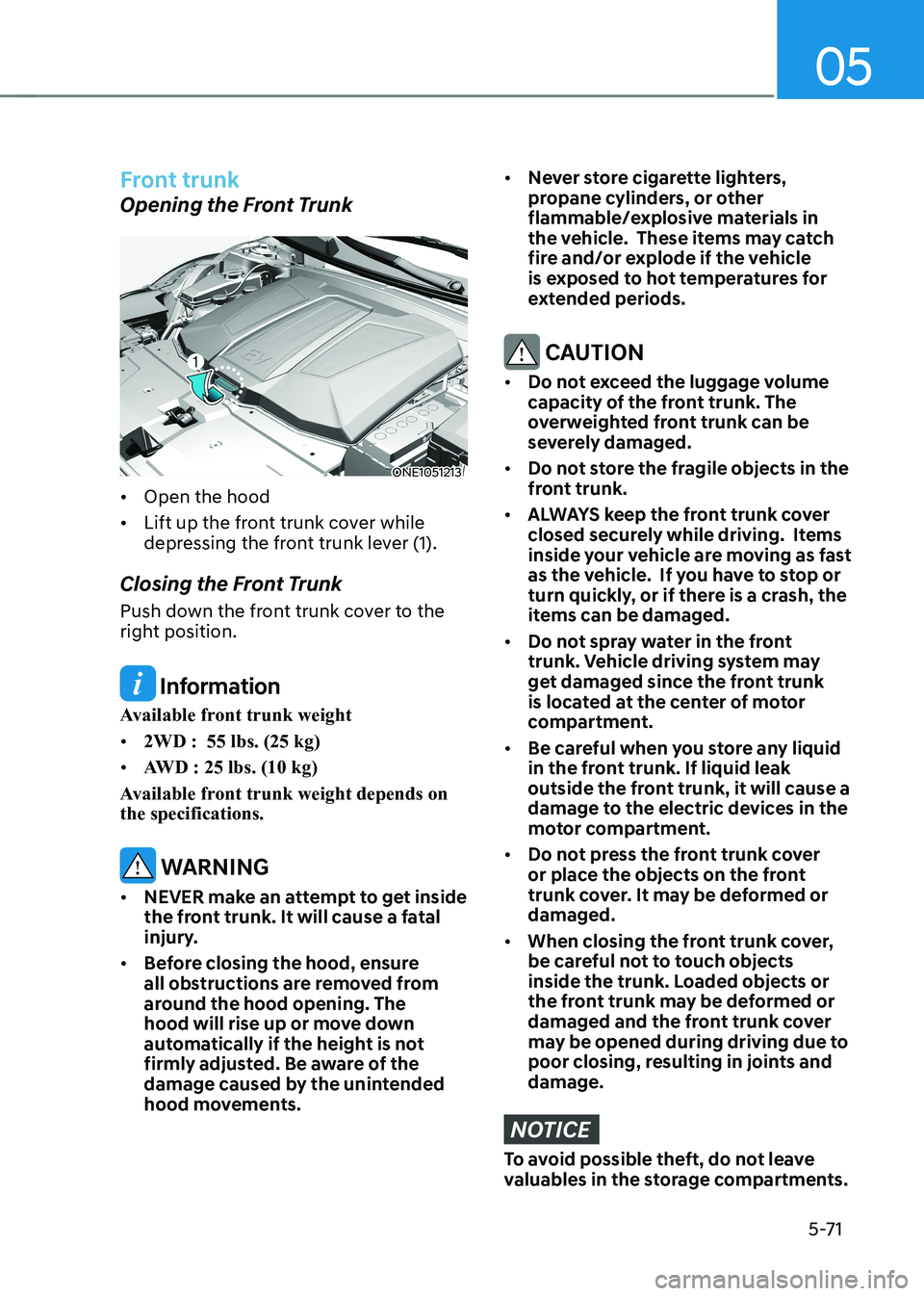
ONE1051213
• Open the hood
• Lift up the front trunk cover while
depressing the front trunk lever (1).
Closing the Front Trunk
Push down the front trunk cover to the
right position.
Information
Available front trunk weight • 2WD : 55 lbs. (25 kg)
• AWD : 25 lbs. (10 kg)
Available front trunk weight depends on the specifications.
WARNING
• NEVER make an attempt to get inside
the front trunk. It will cause a fatal
injury.
• Before closing the hood, ensure
all obstructions are removed from
around the hood opening. The
hood will rise up or move down
automatically if the height is not
firmly adjusted. Be aware of the
damage caused by the unintended
hood movements.
• Never store cigarette lighters,
propane cylinders, or other
flammable/explosive materials in
the vehicle. These items may catch
fire and/or explode if the vehicle
is exposed to hot temperatures for
extended periods.
CAUTION
• Do not exceed the luggage volume
capacity of the front trunk. The
overweighted front trunk can be
severely damaged.
• Do not store the fragile objects in the
front trunk.
• ALWAYS keep the front trunk cover
closed securely while driving. Items
inside your vehicle are moving as fast
as the vehicle. If you have to stop or
turn quickly, or if there is a crash, the
items can be damaged.
• Do not spray water in the front
trunk. Vehicle driving system may
get damaged since the front trunk
is located at the center of motor
compartment.
• Be careful when you store any liquid
in the front trunk. If liquid leak
outside the front trunk, it will cause a
damage to the electric devices in the
motor compartment.
• Do not press the front trunk cover
or place the objects on the front
trunk cover. It may be deformed or damaged.
• When closing the front trunk cover,
be careful not to touch objects
inside the trunk. Loaded objects or
the front trunk may be deformed or
damaged and the front trunk cover
may be opened during driving due to
poor closing, resulting in joints and damage.
NOTICE
To avoid possible theft, do not leave
valuables in the storage compartments.