warning light HYUNDAI IONIQ 5 2023 Service Manual
[x] Cancel search | Manufacturer: HYUNDAI, Model Year: 2023, Model line: IONIQ 5, Model: HYUNDAI IONIQ 5 2023Pages: 680, PDF Size: 48.22 MB
Page 185 of 680
04
4-27
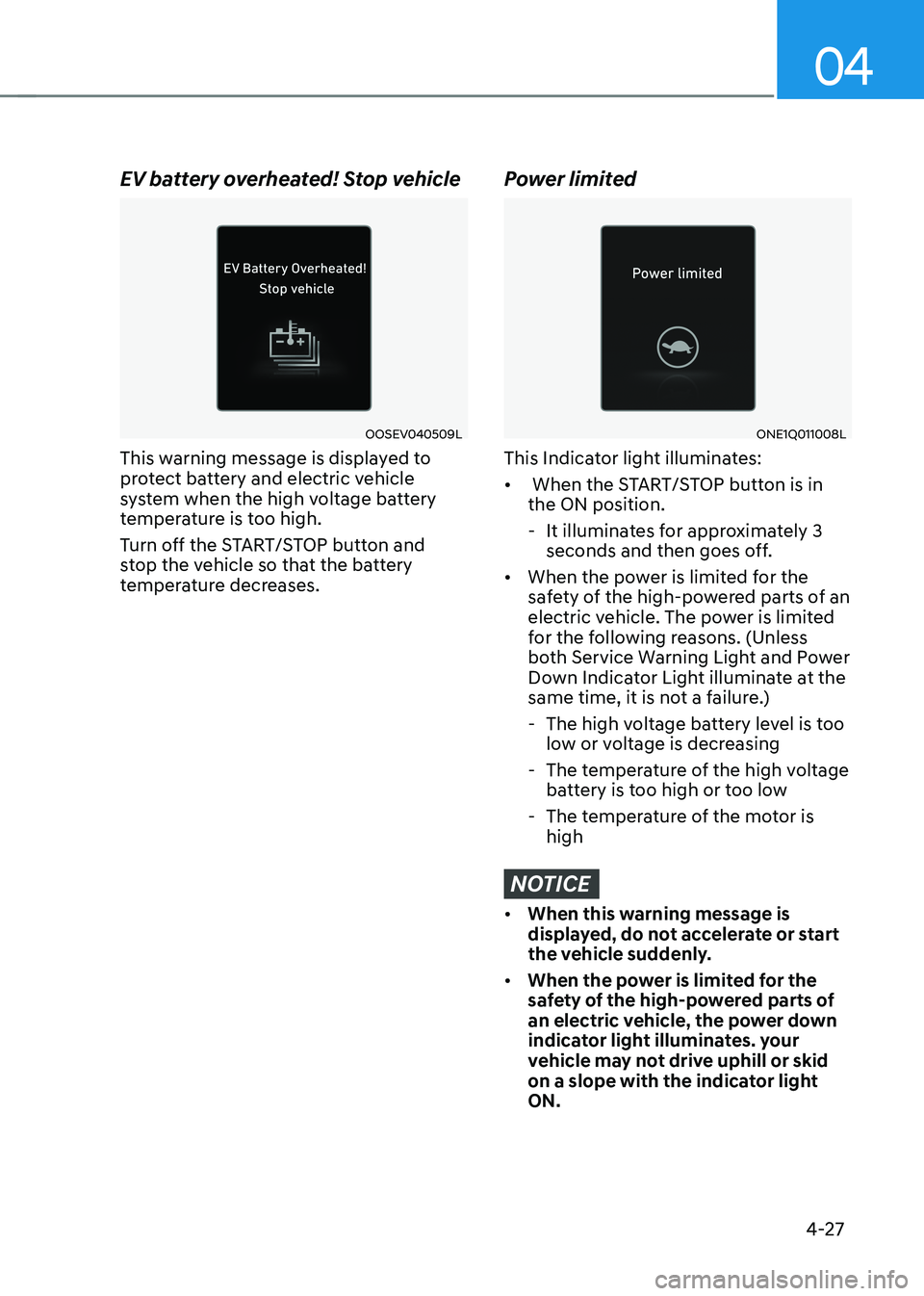
EV battery overheated! Stop vehicle
OOSEV040509L
This warning message is displayed to
protect battery and electric vehicle
system when the high voltage battery
temperature is too high.
Turn off the START/STOP button and
stop the vehicle so that the battery
temperature decreases.
Power limited
ONE1Q011008L
This Indicator light illuminates: • When the START/STOP button is in the ON position.
- It illuminates for approximately 3 seconds and then goes off.
• When the power is limited for the
safety of the high-powered parts of an
electric vehicle. The power is limited
for the following reasons. (Unless
both Service Warning Light and Power
Down Indicator Light illuminate at the
same time, it is not a failure.)
- The high voltage battery level is too low or voltage is decreasing
- The temperature of the high voltage battery is too high or too low
- The temperature of the motor is high
NOTICE
• When this warning message is
displayed, do not accelerate or start
the vehicle suddenly.
• When the power is limited for the
safety of the high-powered parts of
an electric vehicle, the power down
indicator light illuminates. your
vehicle may not drive uphill or skid
on a slope with the indicator light ON.
Page 192 of 680
Instrument Cluster
4-34
Vehicle settings (infotainment system)
Vehicle Settings in the infotainment
system provides user options for a
variety of settings including door lock/
unlock features, convenience features,
driver assistance settings, etc.
Vehicle Settings menu - Driver Assistance
- Drive Mode
- EV
- Head-Up Display
- Cluster
- Climate
- Seat
- Lights
- Door
- Convenience
The information provided may differ
depending on which features are
applicable to your vehicle.
WARNING
Do not operate the Vehicle Settings
while driving. This may cause
distraction resulting in an accident.
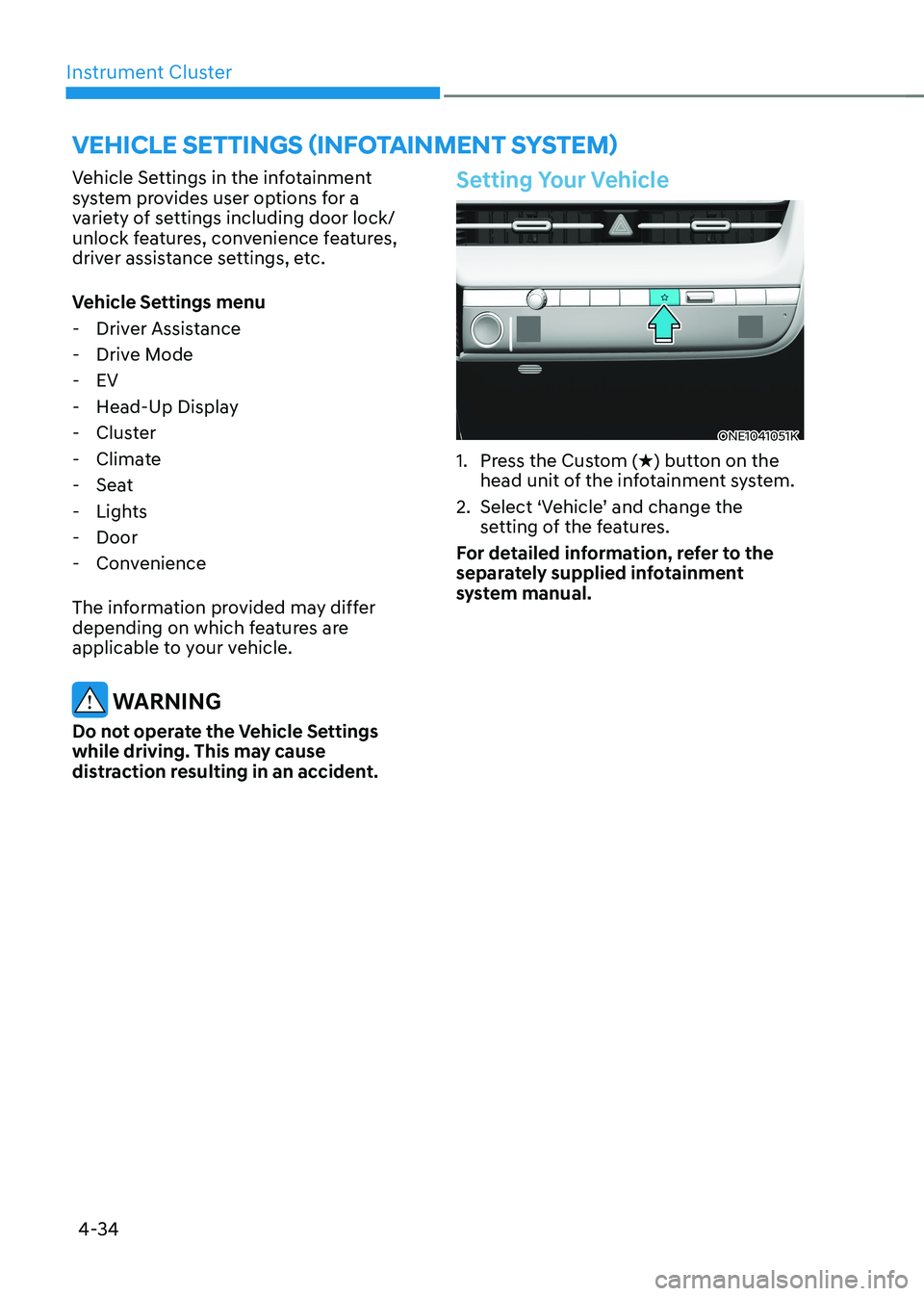
Setting Your Vehicle
ONE1041051K
1. Press the Custom ( H) button on the
head unit of the infotainment system.
2. Select ‘Vehicle’ and change the setting of the features.
For detailed information, refer to the
separately supplied infotainment
system manual.
Page 197 of 680
05
5-5
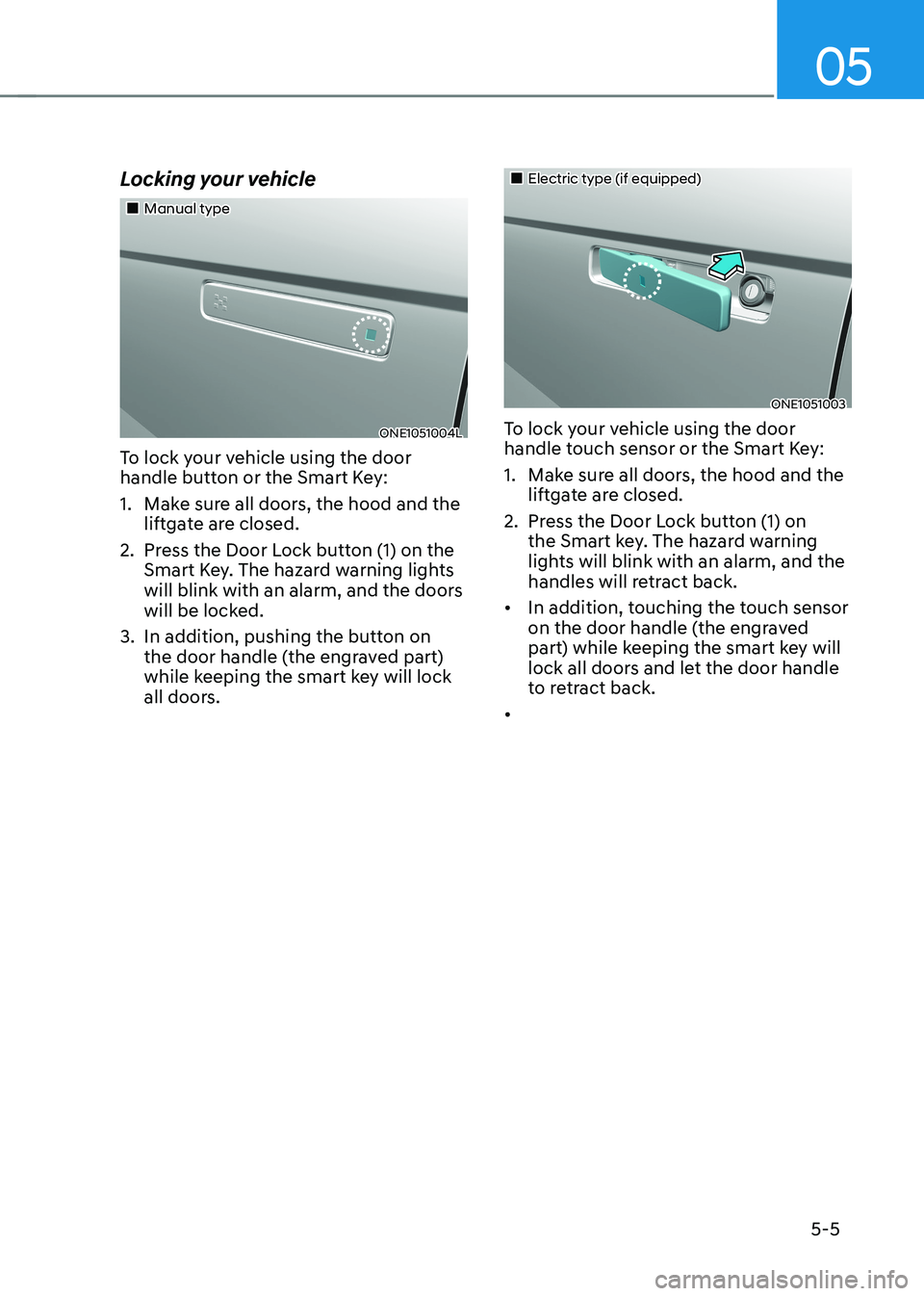
Locking your vehicle
„„Manual type
ONE1051004L
To lock your vehicle using the door
handle button or the Smart Key:
1. Make sure all doors, the hood and the liftgate are closed.
2. Press the Door Lock button (1) on the Smart Key. The hazard warning lights
will blink with an alarm, and the doors
will be locked.
3. In addition, pushing the button on the door handle (the engraved part)
while keeping the smart key will lock
all doors.
„„Electric type (if equipped)
ONE1051003
To lock your vehicle using the door
handle touch sensor or the Smart Key:
1. Make sure all doors, the hood and the liftgate are closed.
2. Press the Door Lock button (1) on the Smart key. The hazard warning
lights will blink with an alarm, and the
handles will retract back.
• In addition, touching the touch sensor
on the door handle (the engraved
part) while keeping the smart key will
lock all doors and let the door handle
to retract back.
•
Page 199 of 680
05
5 -7
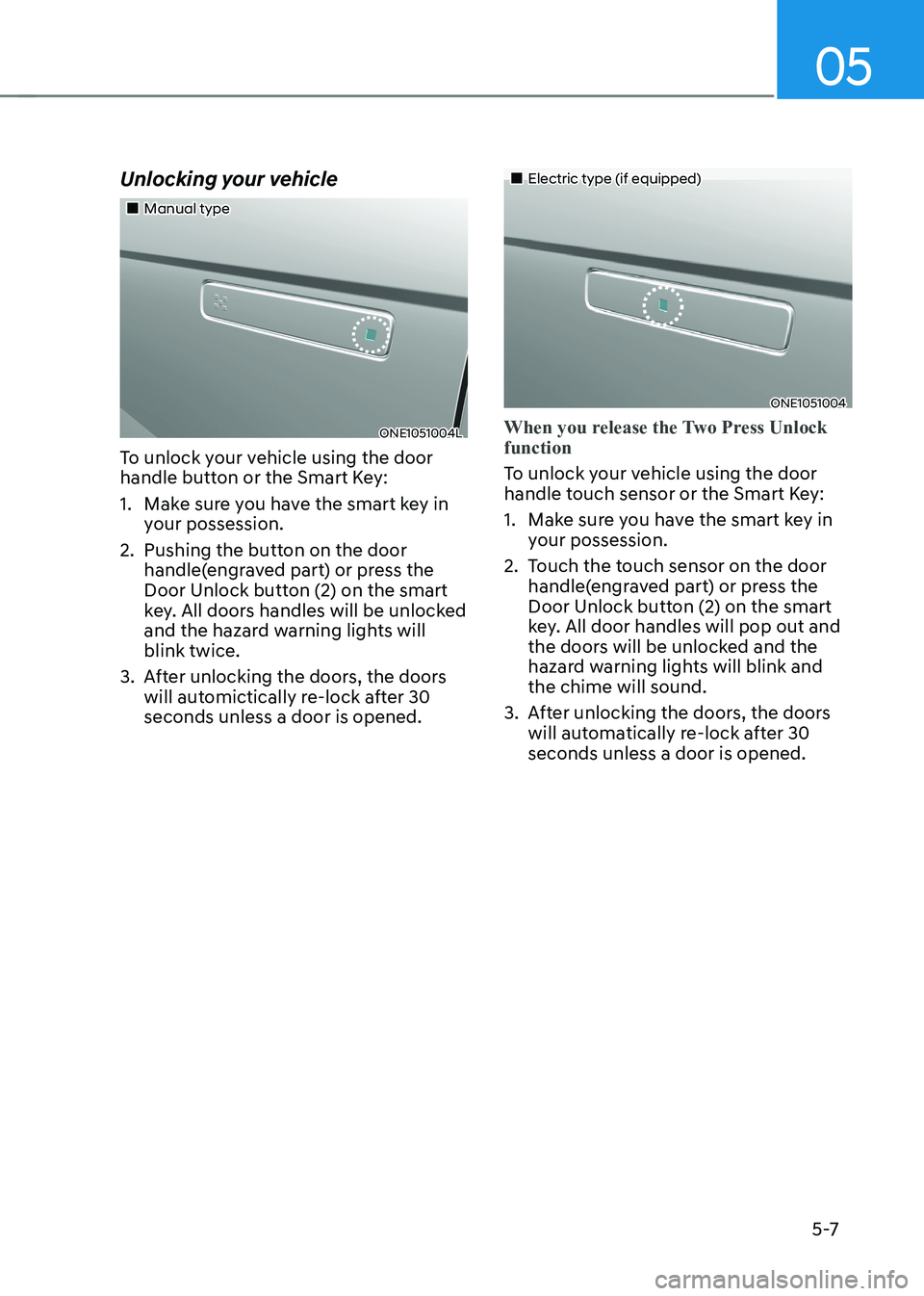
Unlocking your vehicle
„„Manual type
ONE1051004L
To unlock your vehicle using the door
handle button or the Smart Key:
1. Make sure you have the smart key in your possession.
2. Pushing the button on the door handle(engraved part) or press the
Door Unlock button (2) on the smart
key. All doors handles will be unlocked
and the hazard warning lights will blink twice.
3. After unlocking the doors, the doors will automictically re-lock after 30 seconds unless a door is opened.
„„Electric type (if equipped)
ONE1051004
When you release the Two Press Unlock function
To unlock your vehicle using the door
handle touch sensor or the Smart Key:
1. Make sure you have the smart key in your possession.
2. Touch the touch sensor on the door handle(engraved part) or press the
Door Unlock button (2) on the smart
key. All door handles will pop out and
the doors will be unlocked and the
hazard warning lights will blink and the chime will sound.
3. After unlocking the doors, the doors will automatically re-lock after 30 seconds unless a door is opened.
Page 200 of 680
Convenience Features
5-8
When you set the Two Press Unlock function
1. Make sure you have the smart key in your possession.
2. Touch the touch sensor on the door handle(engraved part) or press the
Door Unlock button (2) on the smart
key. The driver’s door handle will
pop out and the driver’s door will be
unlocked.
3. Touch the touch sensor on the door handle(engraved part) or press the
Door Unlock button (2) on the smart
key within 4 seconds again. All door
handles will pop out and the doors will
be unlocked and the hazard warning
lights will blink twice and the chime will sound.
4. After unlocking the doors, the doors
will automatically re-lock after 30 seconds unless a door is opened. Two Press Unlock Feature
The priority for unlocking the driver door
only, or unlocking all the doors with
one press may be adjusted in the User
Settings menu in the LCD cluster display.
The Two Press Unlock feature, when
enabled, will require the user to press
the door unlock button once for driver
door only and twice for unlocking all the
doors.
Select or Deselect the Two Press Unlock
Feature in the User Settings menu in the
LCD cluster display. The option can be
found under the following menu:
USER SETTINGS → DOOR →TWO PRESS
UNLOCK
The Two Press Unlock Feature can also
be enabled or disabled by pressing
the door lock and unlock buttons
simultaneously on the Key FOB:
Press and hold both the DOOR LOCK
button and the DOOR UNLOCK button
simultaneously until the hazard warning
lights blink.
This will enable or disable the Two Press
Unlock feature. Repeat this procedure to enable/disable the mode again.
Page 201 of 680
05
5-9
Information
• The outside rearview mirror will
unfold if ‘Enable on Door Unlock’ is
selected from the Settings menu in the
infotainment system screen. Select:
- Setup → Vehicle Settings →
Convenience → Welcome Mirror →
Enable on Door Unlock
• The door handle touch sensor will only operate when the smart key is within
0.7~1 m (28~40 in.) from the outside
door handle.
• The doors may lock or unlock if the
touch sensor of the outer door handle is
recognized while washing your car or due to heavy rain.
• To prevent unintentional door lock or unlock:
Press the lock button on the smart
key and immediately press the unlock button along with the lock button
for more than 4 seconds. The hazard
warning lights will blink four times.
At this time, the doors will not lock or
unlock even though the touch sensor is
touched on the outside door handle.
To deactivate the function, press the
door lock or unlock button on the
smart key.
• The doors may not lock or unlock in the following situations.
- If the touch sensor is touched with gloves on
- If the door is suddenly approached Opening the liftgate
To open the liftgate:
1. Make sure you have the smart key in
your possession.
2. Press the liftgate open/close button (3) on the vehicle or press and hold
the Liftgate handle switch on the
smart key for more than one second.
The hazard warning lights will blink
two times and the liftgate will open.
Information
The liftgate open/close button will only operate when the smart key is within 0.7
m (28 in.) from the liftgate.
Page 202 of 680
Convenience Features
5-10
Remotely opening and closing the
charging door
To open charging door remotely:
Press the Charging Door Open/Close
button (4) for more than one second,
or press the charging door open/close
button in the vehicle while carrying the
smart key.
To close the charging door:
Press the Charging Door Open/Close
button (4) for more than a second while
the door is open, or press the charging
door open/close button in the vehicle
while carrying the smart key when the
charging door is opened.
Remotely initiating electricity
charging
To remotely start charging the vehicle:
Press the charging door open/close
button in the smart key while the
charging connector is connected to the
vehicle.
For more details, refer to “Charging
Electric Vehicle” section in chapter 1.
Remotely starting vehicle
You can start the vehicle using the
Remote Start button (5) on the smart key.
To start the vehicle remotely:
1. Press the door lock button on the
smart key within 10 m (32 feet) from
the vehicle.
2. Press the Remote Start button (5) for more than 2 seconds within 4 seconds
after pressing the door lock button.
3. The hazard warning lights will blink and the vehicle will start.
4. To turn off the remote start function,
press the Remote Start button (5) once.
Information
• The vehicle must be in P (Park) for the
remote start function to start.
• The vehicle turns off if you get on the
vehicle without a registered smart key.
• The vehicle turns off if you do not get
on the vehicle within 10 minutes after
remotely starting the vehicle.
• The Remote Start button (5) may not operate if the smart key is not within 10 m (32 feet).
• The vehicle will not remotely start if the
vehicle hood or liftgate is opened.
Page 212 of 680
Convenience Features
5-20
Remote Control with Digital Key
To use the remote control function with
your android smartphone, Bluetooth
must be turned on.
Remote Control Connection with Digital
Key
1. Open Hyundai digital key application on the smartphone. Select the
vehicle to activate the remote control
function as a main vehicle.
2. Approach with the activated smartphone app to your vehicle
and you can check whether the
connection is available. If it enables
your smartphone to connect, connect
with your vehicle by pressing the
connect button. The remote control
function is activated after completing
the process.
Remote Control Operation with Digital
Key
You can execute the remote control
operation including door lock/unlock,
panic on/off, remote start / remote
stop and trunk opening. The icon for
each function will be highlighted and
alarm/vibration also provided when the
operation is performed.
Note that you cannot lock your vehicle
using the Hyundai digital key app if any
of the following occurs: • The Engine Start/Stop button is in
ACC or ON position.
• Any doors are open.
When the smartphone and the vehicle
are connected by the Bluetooth function
but the remote control command
cannot be received over 5 minutes, the
remote control connection is cancelled
automatically. CAUTION
• If metallic window tint was applied
to your vehicle, it may cause
bad Bluetooth connection or
performance degradation of the
digital key.
• If multiple users operate the remote
control function simultaneously, the
connection between the digital key
and the vehicle might result in failed
commands. Please connect and
operate the remote control function
only the necessary user.
• When using the remote control
operation, the driver (the remote
control user) should leave the vehicle
after confirming the door lock (the
chime sounds once and the hazard
warning lights blink).
• The remote functions of the Digital
Key app enables the vehicle to be
controlled from a set distance. If
the digital key or the vehicle goes
beyond the operable distance, the
remote control function might be
disconnected or cancelled.
• If the digital key (smartphone) is
connected with the vehicle for the
remote control, the driver with the
key goes far away from the vehicle,
the function might not work.
• If the remote control operation
is executed where the mobile
connection is weak, Bluetooth
connection is poor due to several
Bluetooth devices or there is an
object such as metal or concrete, it
might be delayed or the operable
distance might decrease. You should
not cover the smartphone with your
hand or place other devices which
can cause frequency interference. It
may result in poor performance.
• If the remote control function is not
available, please use NFC function to
lock or unlock the doors.
Page 213 of 680
05
5-21
Remote Start with Digital Key •
When the shift button of your vehicle
is in P (Park) and all of the doors
including trunk and hood is locked
and the vehicle is off, press the Door
Lock button in the Hyundai Digital
Key app then press the Remote Start
button within 4 seconds.
You can confirm the engine is on if the
hazard warning lights blinks two times and the chime sounds.
• If you want to turn off the engine,
press Remote Engine Stop. Air
Conditioner / Heating system
maintains the same status as when
you last used the vehicle.
• Unless you put the registered digital
key(smartphone) on the interior
authentication pad (wireless charger)
when the remote start function is on,
the engine will turn off.
• If you do not get on the vehicle within
10 minutes after the engine turns on,
the vehicle will turn off.
For more information, refer to the Engine
Start/Stop button in chapter 6.
Vehicle information Display
The digital key application displays
the vehicle information such as
driving or door conditions through the
communication with the vehicle. • How to check : Select the vehicle
what you want to check and touch
the vehicle image, then vehicle
information display page will be
shown.
• Contents : accumulated odometer,
latest fuel economy, driving range,
fuel remaining, tire pressure, doors
lock/unlock status and last data
updated time.
à Displayed vehicle date could be
differed from the current vehicle condition.
à For more information, please refer to
the ‘Tutorial’ on your Digital key app.
Smartphone change/App deletion
If you change your smartphone or delete
the Hyundai Digital Key App, please refer
to the following to set up your Digital
Key:
Smartphone Change/ Reset
If you change or reset the smartphone,
the registered digital key in your previous
smartphone may not be used. Please
refer to following procedure to use the
digital key.
1. Install the digital key application and
log in.
2. If you are the owner, retry the Digital key save process.
3. If you are the sharer, need to re-share the key from owner.
App delete & reinstall/ Delete App data
You can re-download the digital key
from server in these cases as follow
procedure.
1. Reinstall the application and log in.
2. Input the PIN number for user verification.
3. If PIN is correct, digital key data will be re-downloaded to your
smartphone and you can use it
without any further registration or sharing.
Smartphone operability with Digital Key
The digital key application may not
be available to old type smartphones.
Please check the available smartphone
models with your dealer. NFC antenna position on the smartphone can be
confirmed on each smartphone’s manual
or contact to customer service center of
the smartphone manufacture.
Page 218 of 680
Convenience Features
5-26
Inoperable condition
If you do not contact the digital key (card
key) to the center of the door handle
authentication pad accurately., it may
not work. In addition, if you overlap and
use the key with NFC-enabled cards such
as transportation card or credit card, it
does not work.
Note that if you try to lock your vehicle
with digital key (card key) in following
cases, the doors will not be locked and
chime will sound for 3 seconds. •
The Smart Key is in the vehicle.
• The Engine Start/Stop button is in
ACC or ON position.
• Any of the doors, hood and trunk are open
If the digital key (card key) does not
work, please detach the key around
4 inches (0.1 m) from the handle
authentication pad and retry to contact.
The card key may be damaged by the
impact. It would not work properly if
the key is damaged. You should buy a
new card and register again. Long-time
exposure to high temperature may cause
the card key to malfunction. Please be
careful not to expose the key to direct
sunlight or high temperature.
After unlock the door or start up the
vehicle with digital key, even though
the driver tries to lock the doors by the
central door lock switch, the door lock
will be once locked and immediately
released at the moment of door closed.
Start-up with Card key
After placing your registered card key
onto the interior authentication pad
(wireless charger), step on the brake and
press the Engine Start/Stop button.
WARNING
• If you do not place the digital key
(card key) onto the center of the
interior authentication pad (wireless
charger) exactly, the card key may
not be recognized. If the engine is
not turned on, adjust and place the
key again.
• If you overlap and use the key
with NFC-enabled cards such as
transportation card or credit card,
the card key may not be recognized.
• If the digital key (card key) does not
work, please detach the key around
4 inches (0.1 m) from the handle
authentication pad and retry to
contact.
• The card key may be damaged due to
impact. It would not work properly if
the key is damaged. You should buy a
new card and register again.
For more information, refer to the
Engine Start/Stop button in chapter 6.