camera HYUNDAI IONIQ 5 2023 Owners Manual
[x] Cancel search | Manufacturer: HYUNDAI, Model Year: 2023, Model line: IONIQ 5, Model: HYUNDAI IONIQ 5 2023Pages: 680, PDF Size: 48.22 MB
Page 72 of 680
2-2
Vehicle Information, Consumer Information and Reporting Safety DefectsExtErior ovErviEw (i)
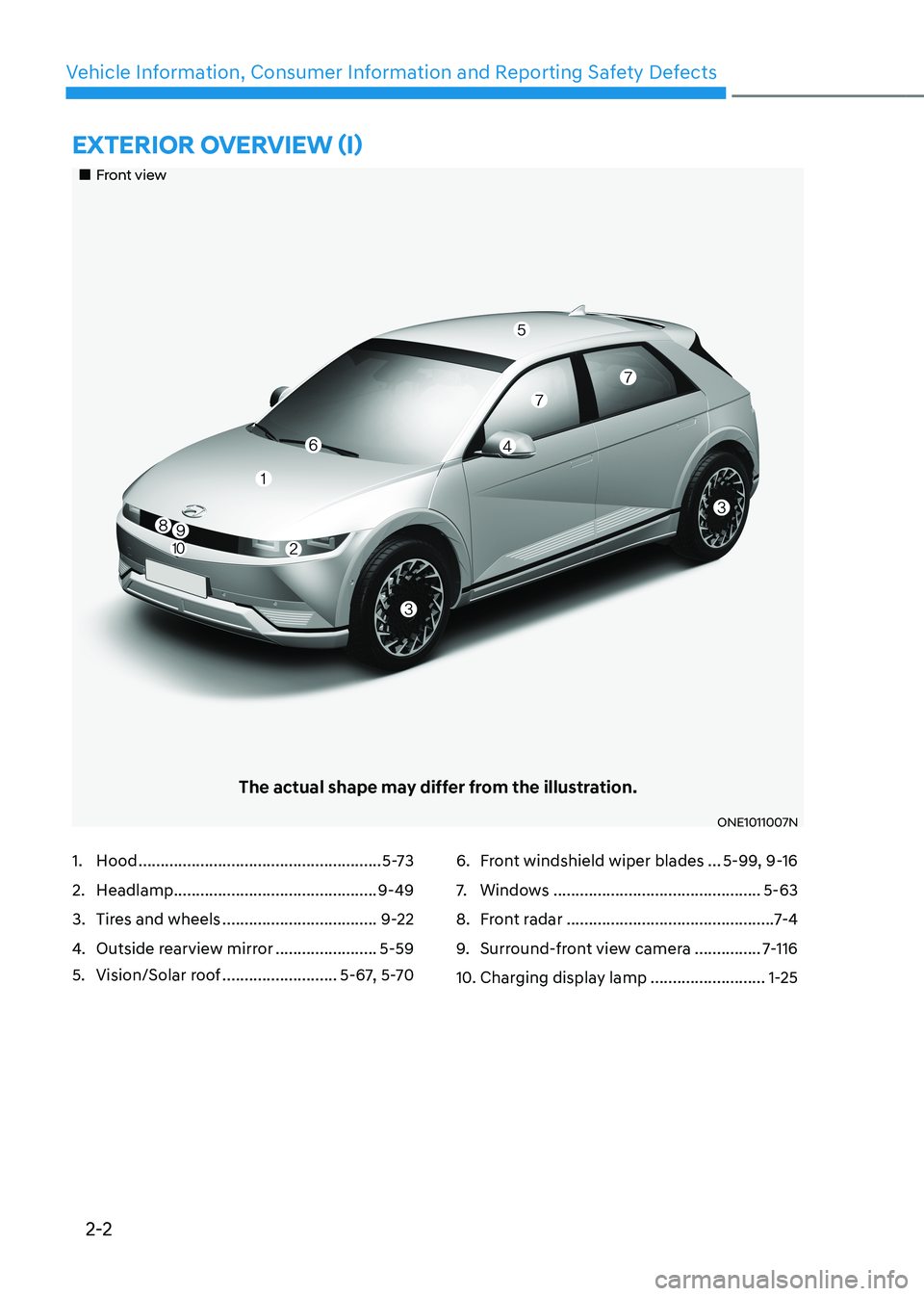
„„Front view
The actual shape may differ from the illustration.
ONE1011007N
1. Hood ....................................................... 5-73
2. Headlamp .............................................. 9-49
3. Tires and wheels ................................... 9-22
4. Outside rearview mirror .......................5-59
5. Vision/Solar roof ..........................5-67, 5-706. Front windshield wiper blades
...5-99, 9-16
7. Windows ............................................... 5-63
8. Front radar ............................................... 7-4
9. Surround-front view camera ...............7-116
10. Charging display lamp ..........................1-25
Page 73 of 680
2-3
02
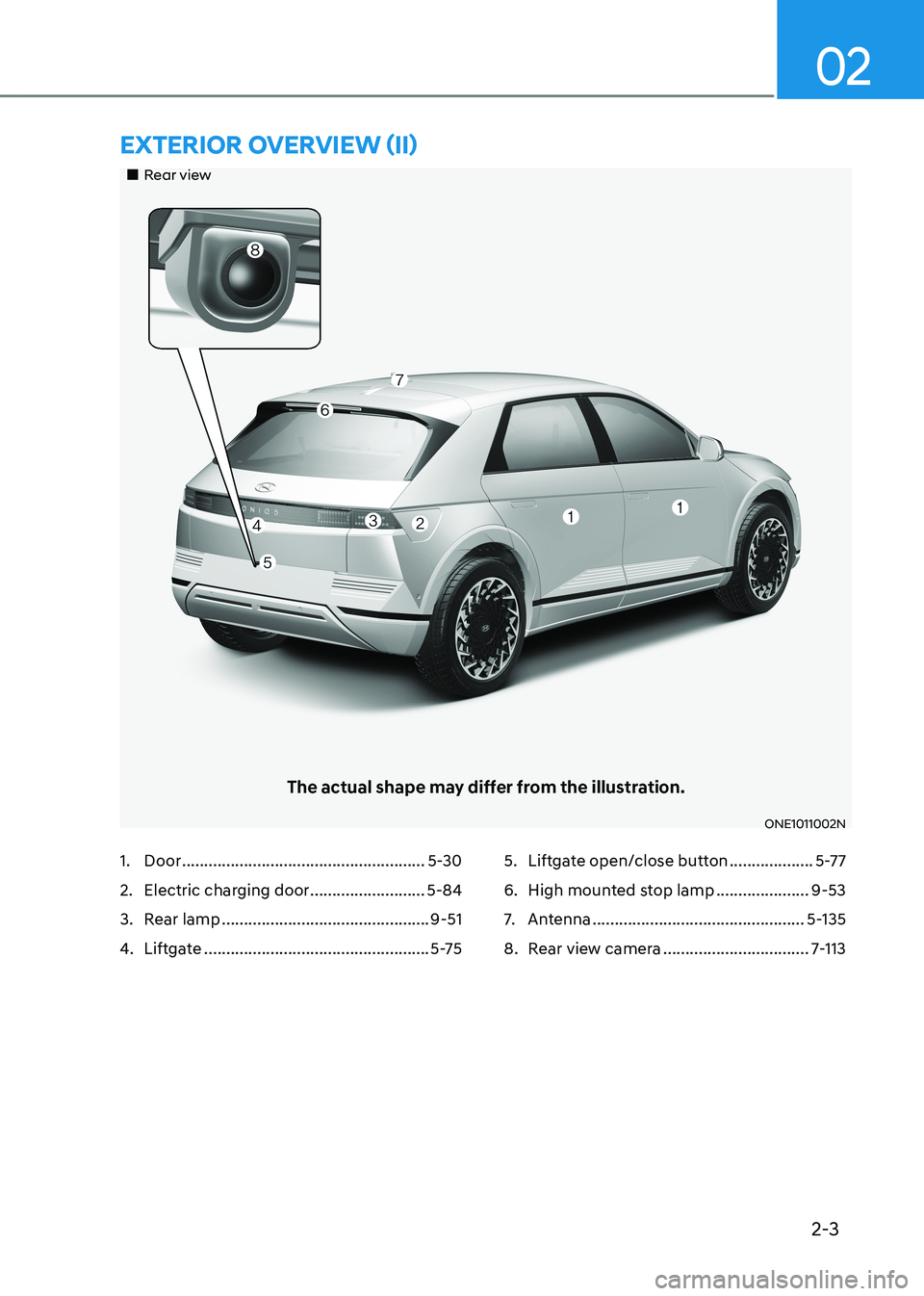
„„Rear view
The actual shape may differ from the illustration.
ONE1011002N
ExtErior ovErviEw (ii)
1. Door ....................................................... 5-30
2. Electric charging door ..........................5-84
3. Rear lamp ............................................... 9-51
4. Liftgate ................................................... 5-755. Liftgate open/close button
...................5-77
6. High mounted stop lamp .....................9-53
7. Antenna ................................................ 5-135
8. Rear view camera .................................7-113
Page 285 of 680
05
5-93
ONE1051064
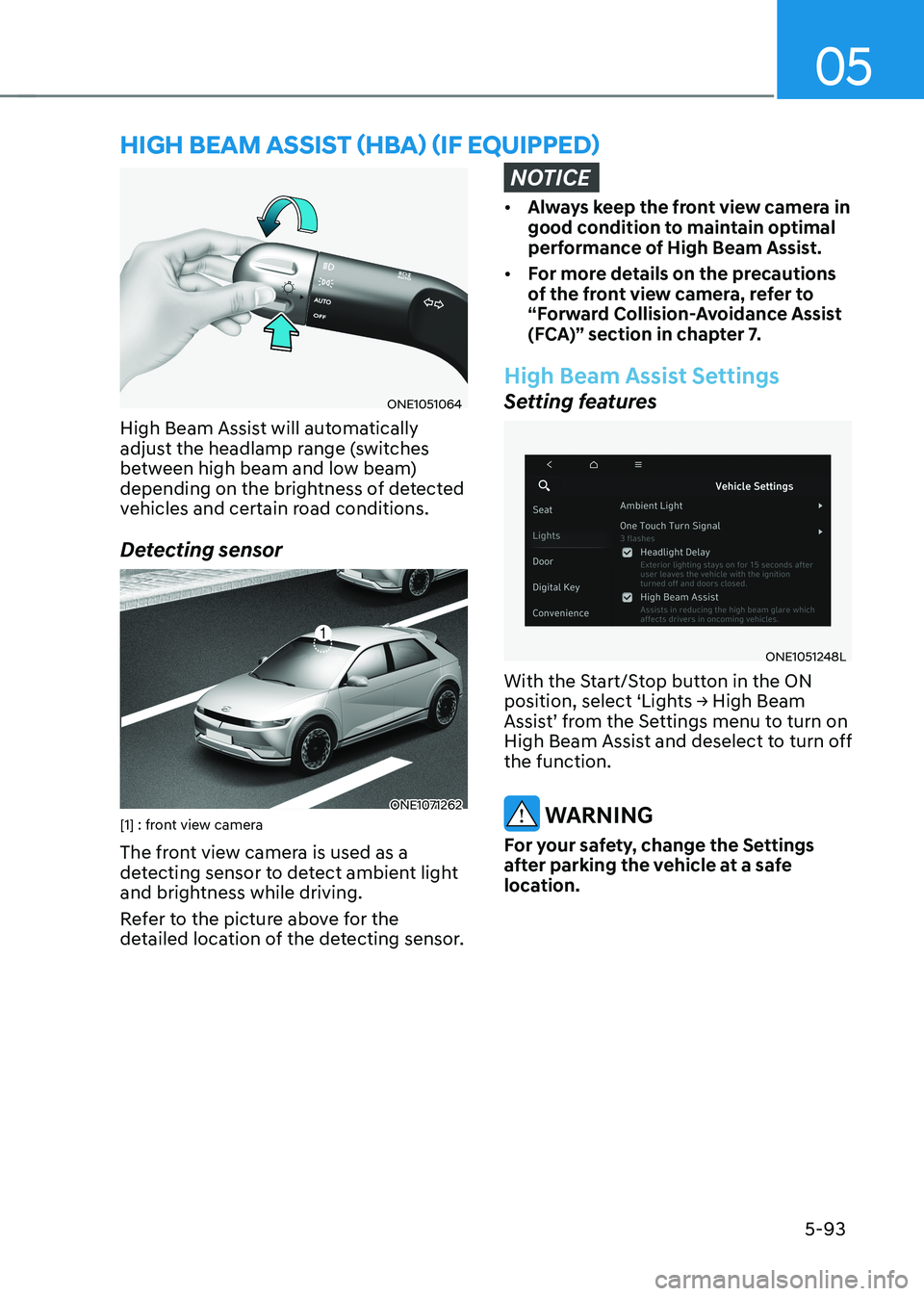
High Beam Assist will automatically
adjust the headlamp range (switches
between high beam and low beam)
depending on the brightness of detected
vehicles and certain road conditions.
Detecting sensor
ONE1071262
[1] : front view camera
The front view camera is used as a
detecting sensor to detect ambient light
and brightness while driving.
Refer to the picture above for the
detailed location of the detecting sensor.
NOTICE
• Always keep the front view camera in
good condition to maintain optimal
performance of High Beam Assist.
• For more details on the precautions
of the front view camera, refer to
“Forward Collision-Avoidance Assist
(FCA)” section in chapter 7.
High Beam Assist Settings
Setting features
ONE1051248L
With the Start/Stop button in the ON
position, select ‘Lights → High Beam
Assist’ from the Settings menu to turn on
High Beam Assist and deselect to turn off the function.
WARNING
For your safety, change the Settings
after parking the vehicle at a safe
location.
hIgh Beam assIsT (hBa) (If eQUIPPed)
Page 287 of 680
05
5-95
High Beam Assist Malfunction
and Limitations
High Beam Assist malfunction
OJK050059L
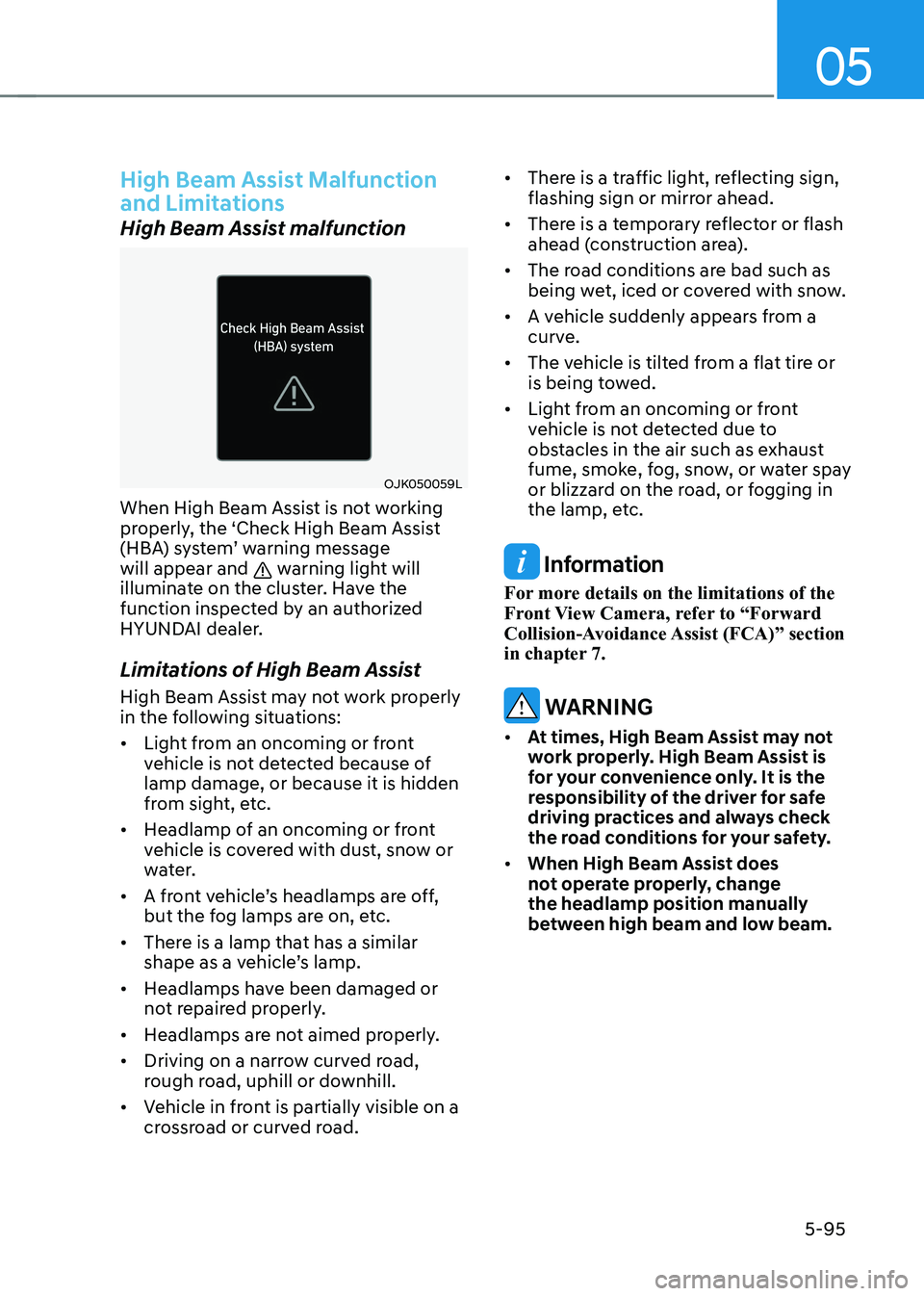
When High Beam Assist is not working
properly, the ‘Check High Beam Assist
(HBA) system’ warning message will appear and
warning light will
illuminate on the cluster. Have the
function inspected by an authorized
HYUNDAI dealer.
Limitations of High Beam Assist
High Beam Assist may not work properly
in the following situations: • Light from an oncoming or front
vehicle is not detected because of lamp damage, or because it is hidden
from sight, etc.
• Headlamp of an oncoming or front
vehicle is covered with dust, snow or
water.
• A front vehicle’s headlamps are off,
but the fog lamps are on, etc.
• There is a lamp that has a similar
shape as a vehicle’s lamp.
• Headlamps have been damaged or
not repaired properly.
• Headlamps are not aimed properly.
• Driving on a narrow curved road,
rough road, uphill or downhill.
• Vehicle in front is partially visible on a
crossroad or curved road. •
There is a traffic light, reflecting sign,
flashing sign or mirror ahead.
• There is a temporary reflector or flash
ahead (construction area).
• The road conditions are bad such as
being wet, iced or covered with snow.
• A vehicle suddenly appears from a
curve.
• The vehicle is tilted from a flat tire or
is being towed.
• Light from an oncoming or front
vehicle is not detected due to
obstacles in the air such as exhaust
fume, smoke, fog, snow, or water spay
or blizzard on the road, or fogging in
the lamp, etc. Information
For more details on the limitations of the
Front View Camera, refer to “Forward
Collision-Avoidance Assist (FCA)” section
in chapter 7.
WARNING
• At times, High Beam Assist may not
work properly. High Beam Assist is
for your convenience only. It is the
responsibility of the driver for safe
driving practices and always check
the road conditions for your safety.
• When High Beam Assist does
not operate properly, change the headlamp position manually
between high beam and low beam.
Page 346 of 680
Driving Your Vehicle
6-20
Information
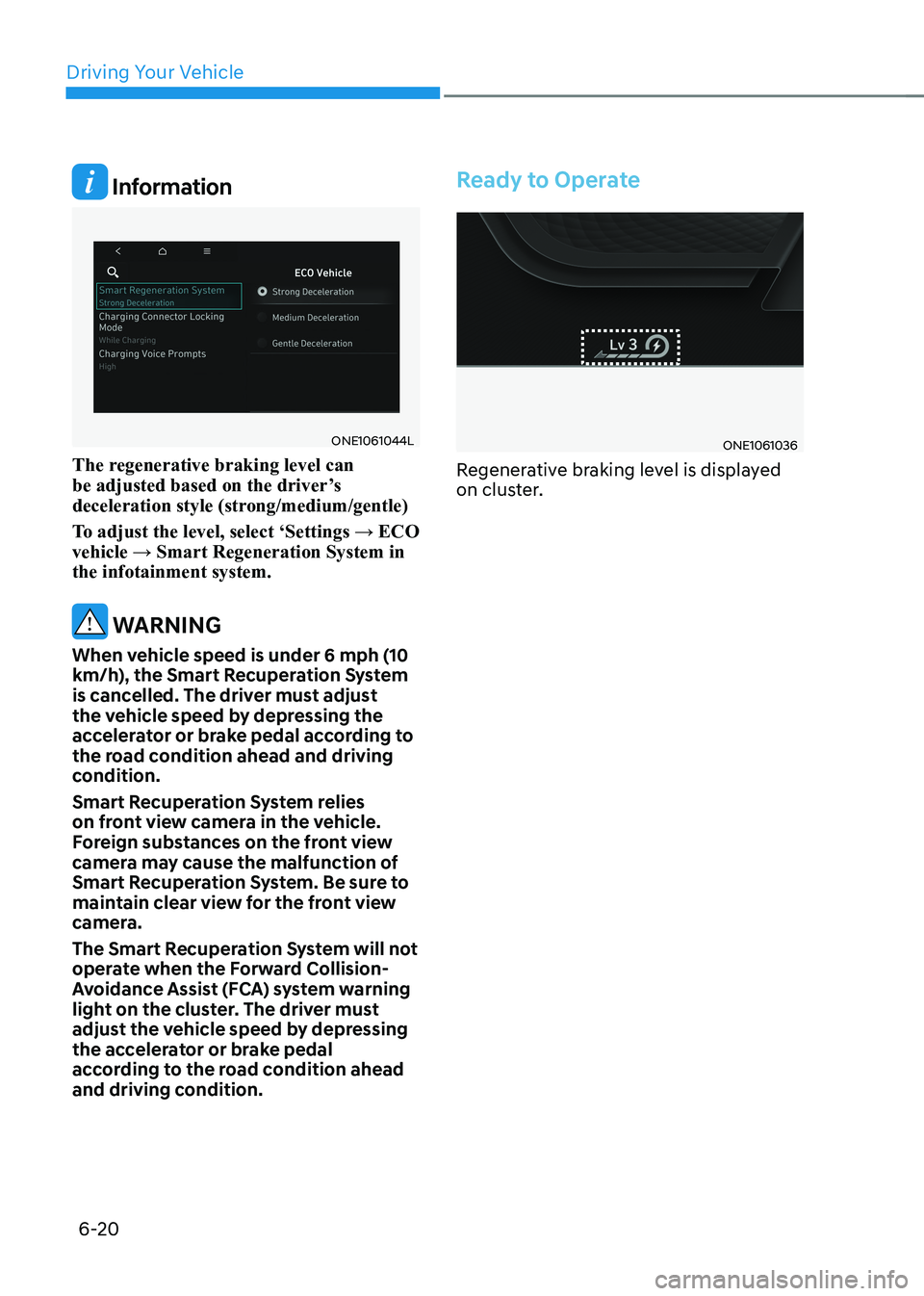
ONE1061044L
The regenerative braking level can
be adjusted based on the driver’s
deceleration style (strong/medium/gentle)
To adjust the level, select ‘Settings → ECO vehicle → Smart Regeneration System in the infotainment system.
WARNING
When vehicle speed is under 6 mph (10
km/h), the Smart Recuperation System
is cancelled. The driver must adjust
the vehicle speed by depressing the
accelerator or brake pedal according to
the road condition ahead and driving
condition.
Smart Recuperation System relies
on front view camera in the vehicle.
Foreign substances on the front view
camera may cause the malfunction of
Smart Recuperation System. Be sure to
maintain clear view for the front view
camera.
The Smart Recuperation System will not
operate when the Forward Collision-
Avoidance Assist (FCA) system warning
light on the cluster. The driver must
adjust the vehicle speed by depressing
the accelerator or brake pedal
according to the road condition ahead
and driving condition.
Ready to Operate
ONE1061036
Regenerative braking level is displayed
on cluster.
Page 406 of 680
![HYUNDAI IONIQ 5 2023 Owners Manual Driver Assistance System
7-4
Detecting sensor
ONE1071002K
ONE1071003
ONE1071004N
[1]: Front view camera, [2]: Front radar,
[3]: Front corner radar (if equipped),
[4]: Rear corner radar (if equipped](/img/35/56168/w960_56168-405.png "HYUNDAI IONIQ 5 2023 Owners Manual Driver Assistance System
7-4
Detecting sensor
ONE1071002K
ONE1071003
ONE1071004N
[1]: Front view camera, [2]: Front radar,
[3]: Front corner radar (if equipped),
[4]: Rear corner radar (if equipped")
Driver Assistance System
7-4
Detecting sensor
ONE1071002K
ONE1071003
ONE1071004N
[1]: Front view camera, [2]: Front radar,
[3]: Front corner radar (if equipped),
[4]: Rear corner radar (if equipped)
Refer to the picture above for the
detailed location of the detecting
sensors.
CAUTION
Take the following precautions to
maintain optimal performance of the
detecting sensor: • Never disassemble the detecting
sensor or sensor assembly, or cause
any damage to it.
• If the detecting sensors have
been replaced or repaired, have
the vehicle be inspected by an
authorized HYUNDAI dealer.
• Never install any accessories or
stickers on the front windshield, or
tint the front windshield.
• Pay extreme caution to keep the
front view camera dry.
• Never place any reflective objects
(for example, white paper, mirror)
over the dashboard.
• Do not place any objects near the
front windshield or install any
accessories on the front windshield.
It can affect the performance of the
defogging and defrosting function
of the climate control system, which
may prevent the Driver Assistance
systems from operating
• Do not place objects or mount
structures near the windshield.
When operating the air conditioner,
moisture and defrost performance
may be poor, and driver assistance
functions may not work.
• Do not apply license plate frame or
objects, such as a bumper sticker,
film or a bumper guard, near the
front radar cover.
• Always keep the front radar and
cover clean and free of dirt and debris.
Use only a soft cloth to wash the
vehicle. Do not spray pressurized
water directly on the sensor or
sensor cover.
Page 420 of 680
Driver Assistance System
7-18
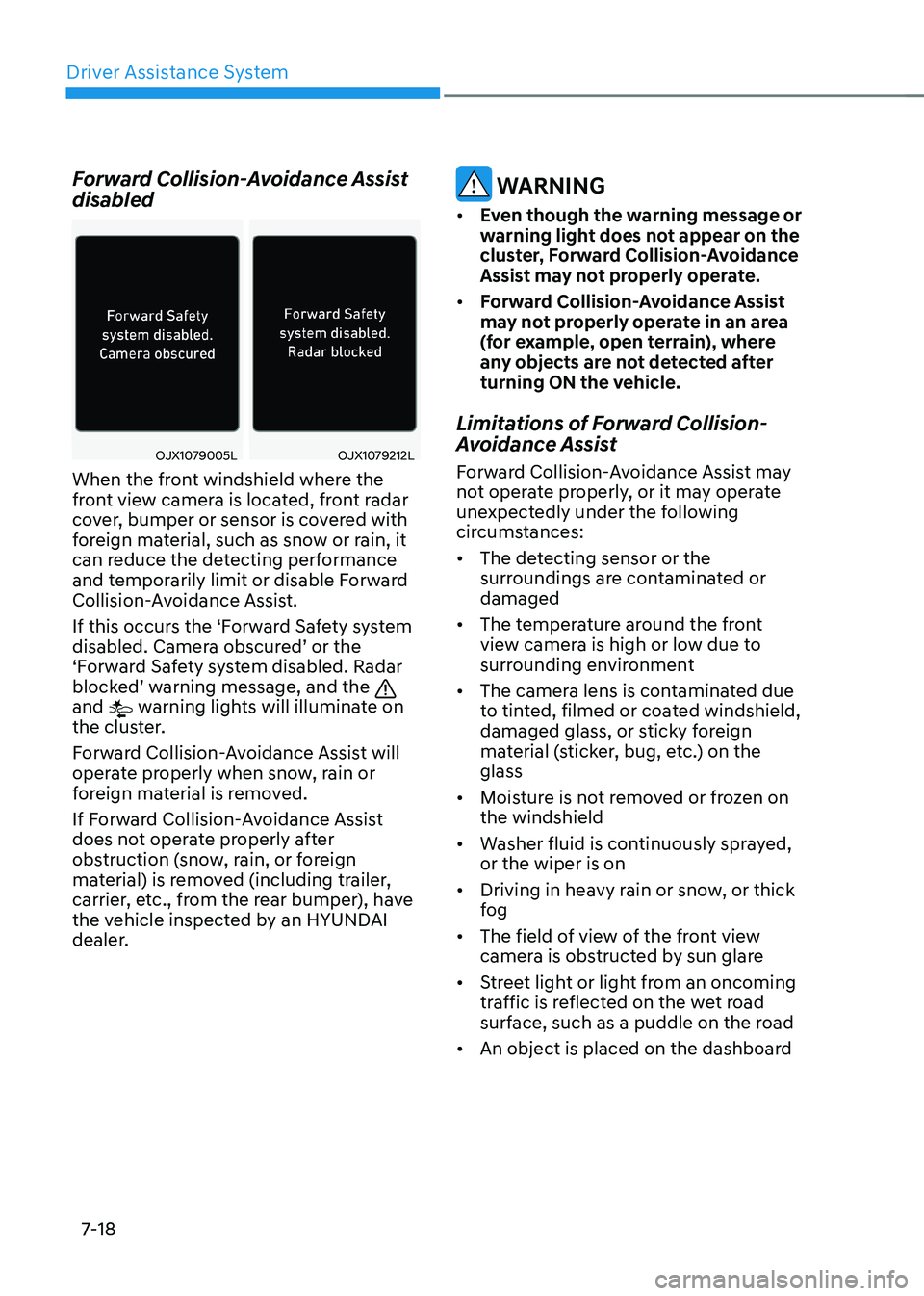
Forward Collision-Avoidance Assist disabled
OJX1079005LOJX1079212L
When the front windshield where the
front view camera is located, front radar
cover, bumper or sensor is covered with
foreign material, such as snow or rain, it
can reduce the detecting performance
and temporarily limit or disable Forward
Collision-Avoidance Assist.
If this occurs the ‘Forward Safety system
disabled. Camera obscured’ or the
‘Forward Safety system disabled. Radar
blocked’ warning message, and the
and warning lights will illuminate on
the cluster.
Forward Collision-Avoidance Assist will
operate properly when snow, rain or
foreign material is removed.
If Forward Collision-Avoidance Assist
does not operate properly after
obstruction (snow, rain, or foreign
material) is removed (including trailer,
carrier, etc., from the rear bumper), have
the vehicle inspected by an HYUNDAI
dealer.
WARNING
• Even though the warning message or
warning light does not appear on the
cluster, Forward Collision-Avoidance
Assist may not properly operate.
• Forward Collision-Avoidance Assist
may not properly operate in an area
(for example, open terrain), where
any objects are not detected after
turning ON the vehicle.
Limitations of Forward Collision-
Avoidance Assist
Forward Collision-Avoidance Assist may
not operate properly, or it may operate
unexpectedly under the following
circumstances: • The detecting sensor or the
surroundings are contaminated or damaged
• The temperature around the front
view camera is high or low due to
surrounding environment
• The camera lens is contaminated due
to tinted, filmed or coated windshield,
damaged glass, or sticky foreign
material (sticker, bug, etc.) on the glass
• Moisture is not removed or frozen on the windshield
• Washer fluid is continuously sprayed, or the wiper is on
• Driving in heavy rain or snow, or thick
fog
• The field of view of the front view
camera is obstructed by sun glare
• Street light or light from an oncoming
traffic is reflected on the wet road
surface, such as a puddle on the road
• An object is placed on the dashboard
Page 422 of 680
Driver Assistance System
7-20
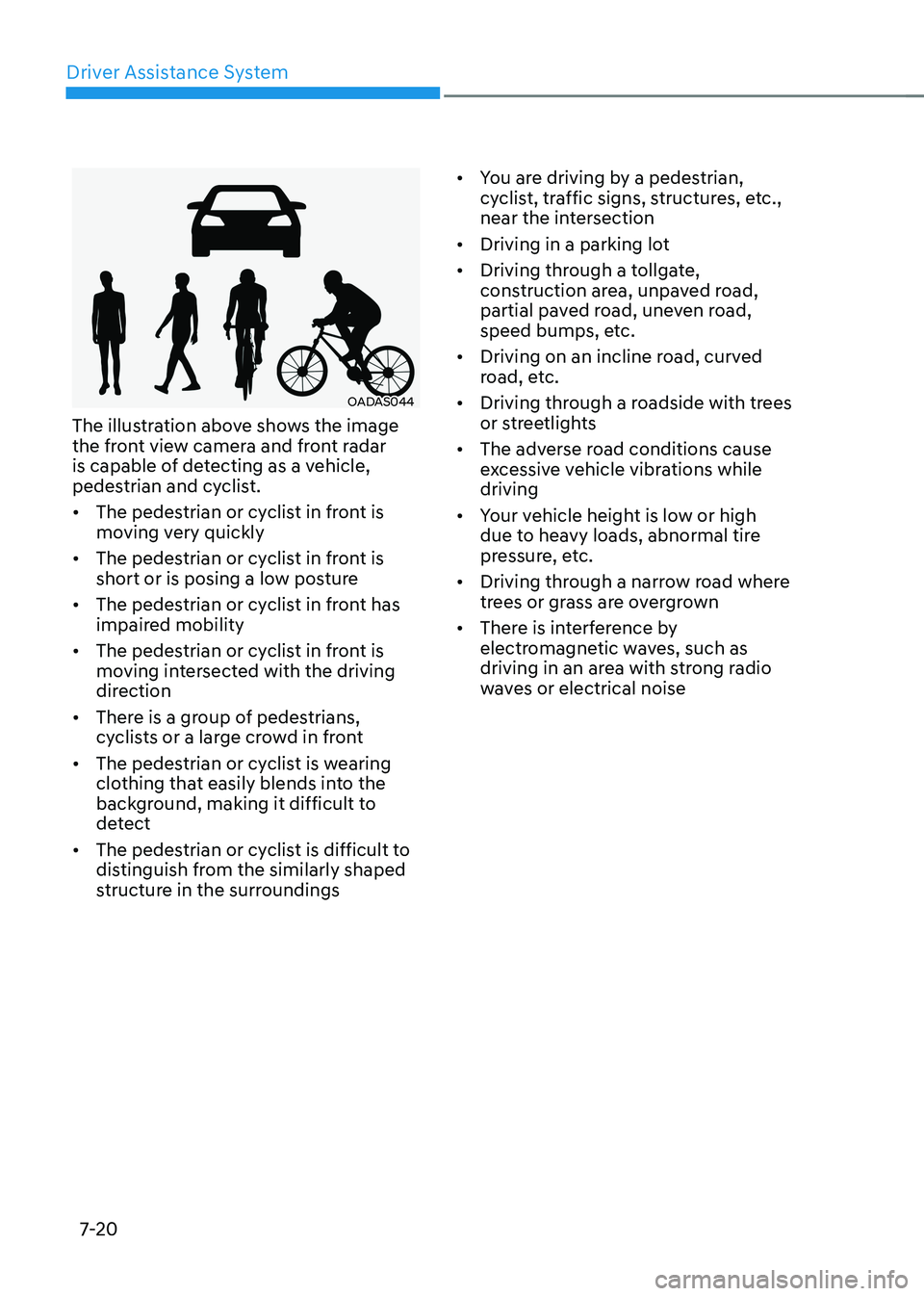
OADAS044
The illustration above shows the image
the front view camera and front radar
is capable of detecting as a vehicle,
pedestrian and cyclist. • The pedestrian or cyclist in front is
moving very quickly
• The pedestrian or cyclist in front is
short or is posing a low posture
• The pedestrian or cyclist in front has
impaired mobility
• The pedestrian or cyclist in front is
moving intersected with the driving
direction
• There is a group of pedestrians,
cyclists or a large crowd in front
• The pedestrian or cyclist is wearing
clothing that easily blends into the
background, making it difficult to
detect
• The pedestrian or cyclist is difficult to
distinguish from the similarly shaped
structure in the surroundings •
You are driving by a pedestrian,
cyclist, traffic signs, structures, etc.,
near the intersection
• Driving in a parking lot
• Driving through a tollgate,
construction area, unpaved road,
partial paved road, uneven road,
speed bumps, etc.
• Driving on an incline road, curved
road, etc.
• Driving through a roadside with trees
or streetlights
• The adverse road conditions cause
excessive vehicle vibrations while driving
• Your vehicle height is low or high
due to heavy loads, abnormal tire
pressure, etc.
• Driving through a narrow road where
trees or grass are overgrown
• There is interference by
electromagnetic waves, such as
driving in an area with strong radio
waves or electrical noise
Page 427 of 680
07
7-25
•
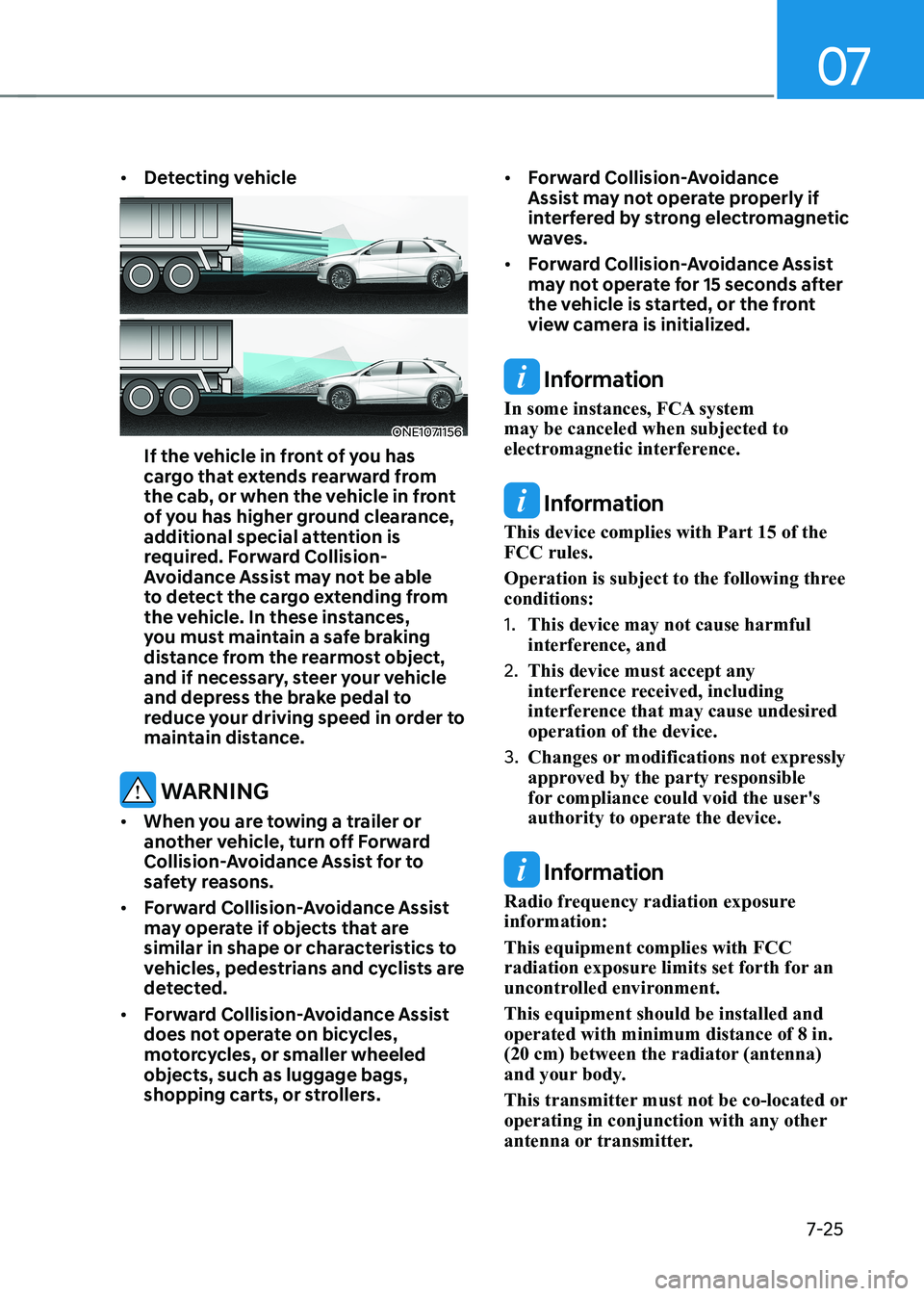
Detecting vehicle
ONE1071156
If the vehicle in front of you has
cargo that extends rearward from
the cab, or when the vehicle in front
of you has higher ground clearance,
additional special attention is
required. Forward Collision-
Avoidance Assist may not be able
to detect the cargo extending from
the vehicle. In these instances,
you must maintain a safe braking
distance from the rearmost object,
and if necessary, steer your vehicle
and depress the brake pedal to
reduce your driving speed in order to
maintain distance.
WARNING
• When you are towing a trailer or
another vehicle, turn off Forward
Collision-Avoidance Assist for to
safety reasons.
• Forward Collision-Avoidance Assist
may operate if objects that are
similar in shape or characteristics to
vehicles, pedestrians and cyclists are
detected.
• Forward Collision-Avoidance Assist
does not operate on bicycles,
motorcycles, or smaller wheeled objects, such as luggage bags,
shopping carts, or strollers. •
Forward Collision-Avoidance
Assist may not operate properly if
interfered by strong electromagnetic
waves.
• Forward Collision-Avoidance Assist
may not operate for 15 seconds after
the vehicle is started, or the front
view camera is initialized.
Information
In some instances, FCA system may be canceled when subjected to
electromagnetic interference.
Information
This device complies with Part 15 of the FCC rules.
Operation is subject to the following three conditions: 1. This device may not cause harmful
interference, and
2. This device must accept any
interference received, including
interference that may cause undesired operation of the device.
3. Changes or modifications not expressly
approved by the party responsible
for compliance could void the user's authority to operate the device.
Information
Radio frequency radiation exposure information: This equipment complies with FCC
radiation exposure limits set forth for an
uncontrolled environment. This equipment should be installed and operated with minimum distance of 8 in.
(20 cm) between the radiator (antenna)
and your body.
This transmitter must not be co-located or
operating in conjunction with any other
antenna or transmitter.
Page 428 of 680
Driver Assistance System
7-26
Lane Keeping Assist is designed to help
detect lane markings (or road edges)
while driving over a certain speed. Lane
Keeping Assist will warn the driver if the
vehicle leaves the lane without using the
turn signal, or will automatically assist
the driver’s steering to help prevent the
vehicle from departing the lane.
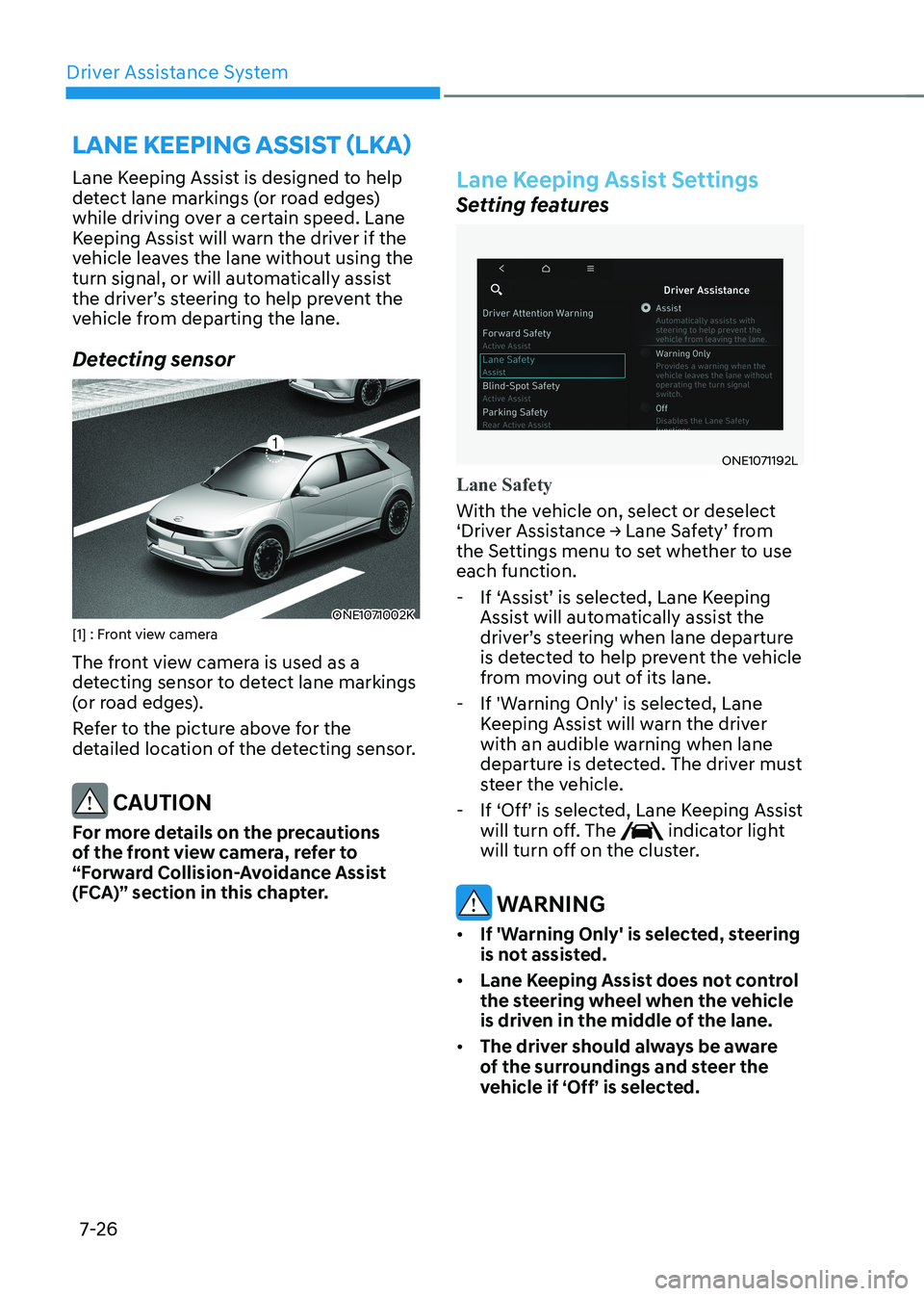
Detecting sensor
ONE1071002K
[1] : Front view camera
The front view camera is used as a
detecting sensor to detect lane markings
(or road edges).
Refer to the picture above for the
detailed location of the detecting sensor.
CAUTION
For more details on the precautions
of the front view camera, refer to
“Forward Collision-Avoidance Assist
(FCA)” section in this chapter.
Lane Keeping Assist Settings
Setting features
ONE1071192L
Lane Safety
With the vehicle on, select or deselect
‘Driver Assistance → Lane Safety’ from
the Settings menu to set whether to use each function. - If ‘Assist’ is selected, Lane Keeping Assist will automatically assist the
driver’s steering when lane departure
is detected to help prevent the vehicle
from moving out of its lane.
- If 'Warning Only' is selected, Lane Keeping Assist will warn the driver
with an audible warning when lane
departure is detected. The driver must
steer the vehicle.
- If ‘Off’ is selected, Lane Keeping Assist will turn off. The
indicator light
will turn off on the cluster.
WARNING
• If 'Warning Only' is selected, steering
is not assisted.
• Lane Keeping Assist does not control
the steering wheel when the vehicle
is driven in the middle of the lane.
• The driver should always be aware
of the surroundings and steer the
vehicle if ‘Off’ is selected.
LANE KEEPING ASSIST (LKA)